check HYUNDAI SONATA 2021 Owner's Guide
[x] Cancel search | Manufacturer: HYUNDAI, Model Year: 2021, Model line: SONATA, Model: HYUNDAI SONATA 2021Pages: 546, PDF Size: 51.21 MB
Page 176 of 546
Convenient Features5-46
mirrorS
Inside Rearview Mirror
Before driving your vehicle, check to
see that your inside rearview mirror is
properly positioned. Adjust the rearview
mirror so that the view through the rear
window is properly centered.
WARNING
Make sure your line of sight is not
obstructed. Do not place objects in the
rear seat, cargo area, or behind the rear
head restraints which could interfere
with your vision through the rear
window.
WARNING
To prevent serious injury during an
accident or deployment of the air bag,
do not modify the rearview mirror and
do not install a wide mirror.
WARNING
NEVER adjust the mirror while driving.
This may cause loss of vehicle control
resulting in an accident.
NOTICE
When cleaning the mirror, use a paper
towel or similar material dampened
with glass cleaner. Do not spray glass
cleaner directly on the mirror as this
may cause the liquid cleaner to enter
the mirror housing.
Day/night rearview mirror
(if equipped)
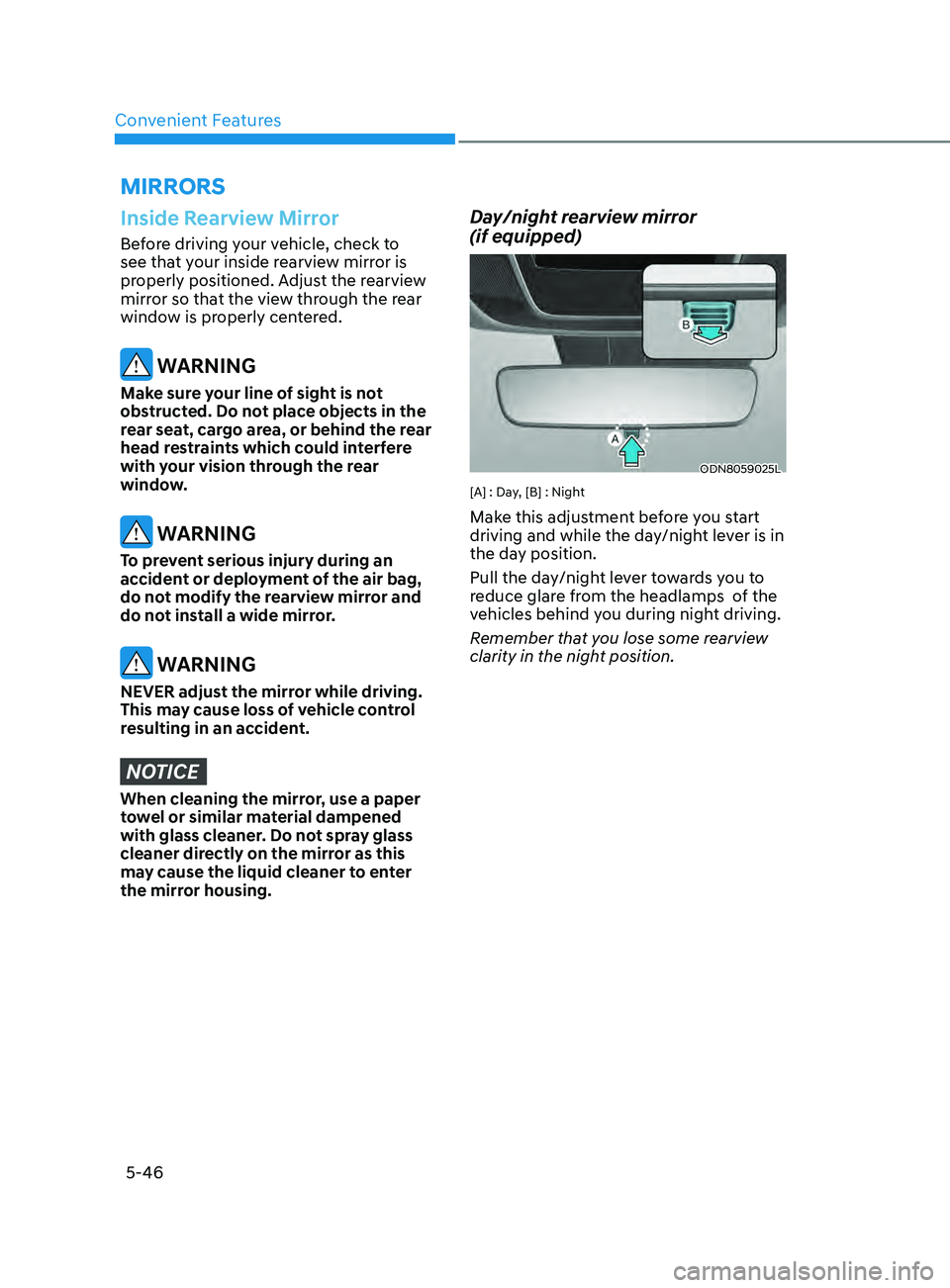
ODN8059025L
[A] : Day, [B] : Night
Make this adjustment before you start
driving and while the day/night lever is in
the day position.
Pull the day/night lever towards you to
reduce glare from the headlamps of the
vehicles behind you during night driving.
Remember that you lose some rearview
clarity in the night position.
Page 188 of 546
Convenient Features
5-58
To reset the power windows
If the power windows do not operate
normally, the automatic power window
system must be reset as follows:
1.
Place the ignition s
witch to the ON
position.
2.
Close the windo
w and continue
pulling up on the power window
switch for at least one second.
If the power windows do not operate
properly after resetting, have the system
checked by an authorized HYUNDAI
dealer.
WARNING
The automatic reverse feature doesn’t
activate while resetting the power
window system. Make sure body parts
or other objects are safely out of the
way before closing the windows to
avoid injuries or vehicle damage.
Automatic reverse (if equipped)
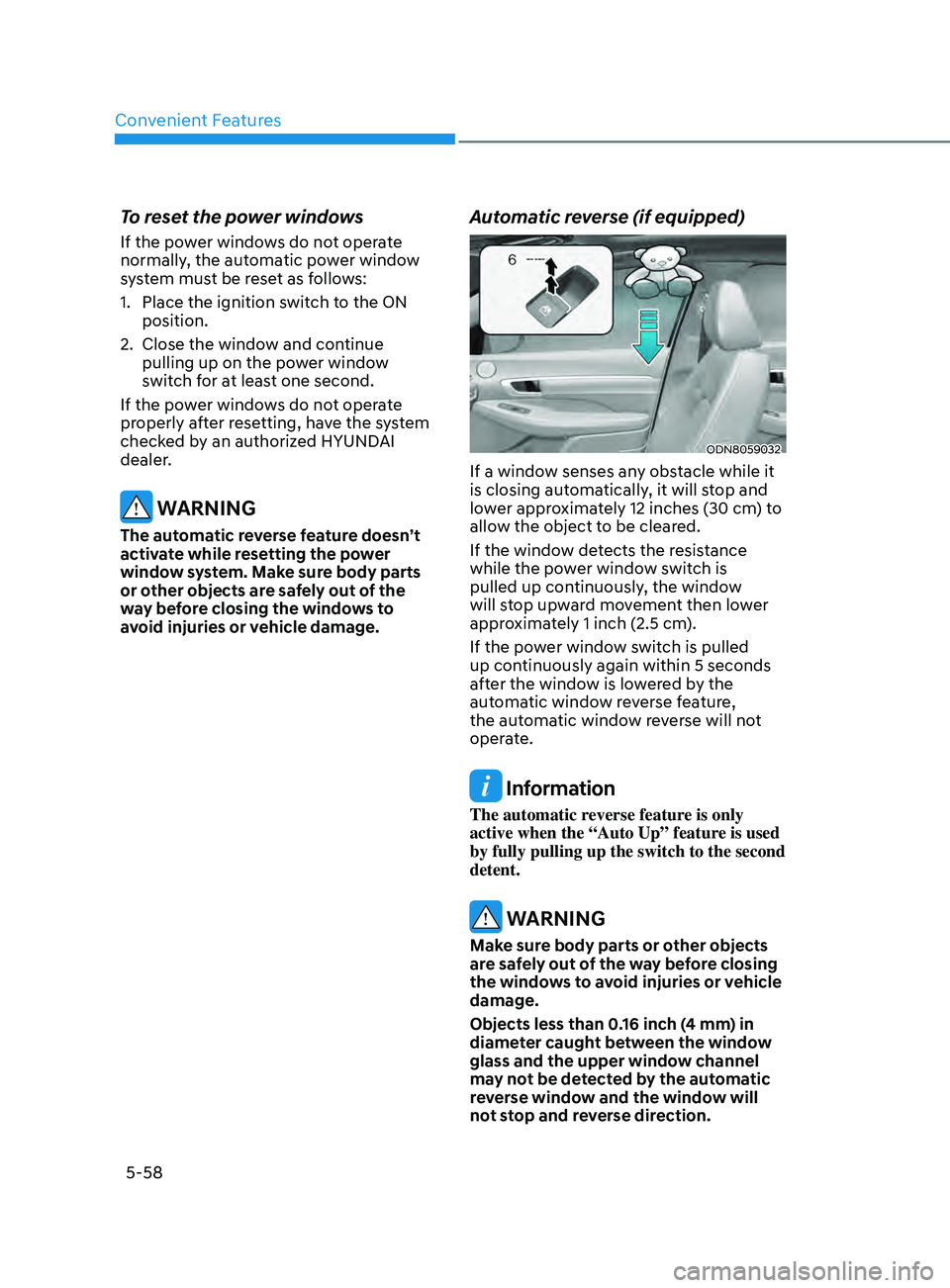
ODN8059032
If a window senses any obstacle while it
is closing automatically, it will stop and
lower approximately 12 inches (30 cm) to
allow the object to be cleared.
If the window detects the resistance
while the power window switch is
pulled up continuously, the window
will stop upward movement then lower
approximately 1 inch (2.5 cm).
If the power window switch is pulled
up continuously again within 5 seconds
after the window is lowered by the
automatic window reverse feature,
the automatic window reverse will not
operate.
Information
The automatic reverse feature is only
active when the “Auto Up” feature is used
by fully pulling up the switch to the second
detent.
WARNING
Make sure body parts or other objects
are safely out of the way before closing
the windows to avoid injuries or vehicle
damage.
Objects less than 0.16 inch (4 mm) in
diameter caught between the window
glass and the upper window channel
may not be detected by the automatic
reverse window and the window will
not stop and reverse direction.
Page 194 of 546
Convenient Features5-64
exterior FeAtures
Hood
Opening the hood
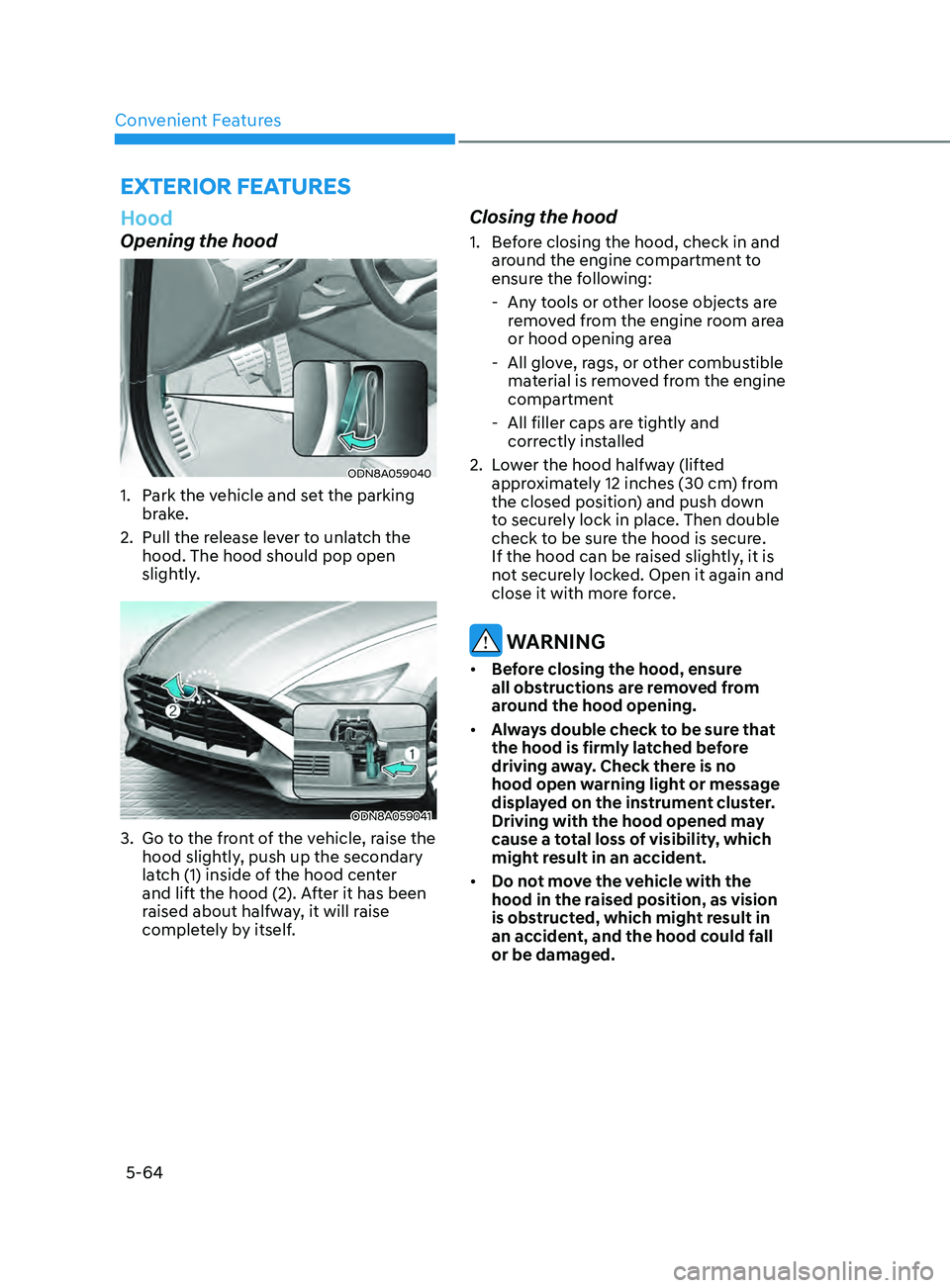
ODN8A059040
1. Park the vehicle and set the parking brake.
2.
Pull the r
elease lever to unlatch the
hood. The hood should pop open
slightly.
ODN8A059041
3. Go to the front of the vehicle, raise the hood slightly, push up the secondary
latch (1) inside of the hood center
and lift the hood (2). After it has been
raised about halfway, it will raise
completely by itself.
Closing the hood
1. Before closing the hood, check in and around the engine compartment to
ensure the following:
- An
y tools or other loose objects are
removed from the engine room area
or hood opening area
- All glo
ve, rags, or other combustible
material is removed from the engine
compartment
- All filler caps ar
e tightly and
correctly installed
2.
L
ower the hood halfway (lifted
approximately 12 inches (30 cm) from
the closed position) and push down
to securely lock in place. Then double
check to be sure the hood is secure.
If the hood can be raised slightly, it is
not securely locked. Open it again and
close it with more force.
WARNING
• Before closing the hood, ensure
all obstructions are removed from
around the hood opening.
• Always double check to be sure that
the hood is firmly latched before
driving away. Check there is no
hood open warning light or message
displayed on the instrument cluster.
Driving with the hood opened may
cause a total loss of visibility, which
might result in an accident.
• Do not move the vehicle with the
hood in the raised position, as vision
is obstructed, which might result in
an accident, and the hood could fall
or be damaged.
Page 195 of 546
05
5-65
Trunk
Opening the trunk
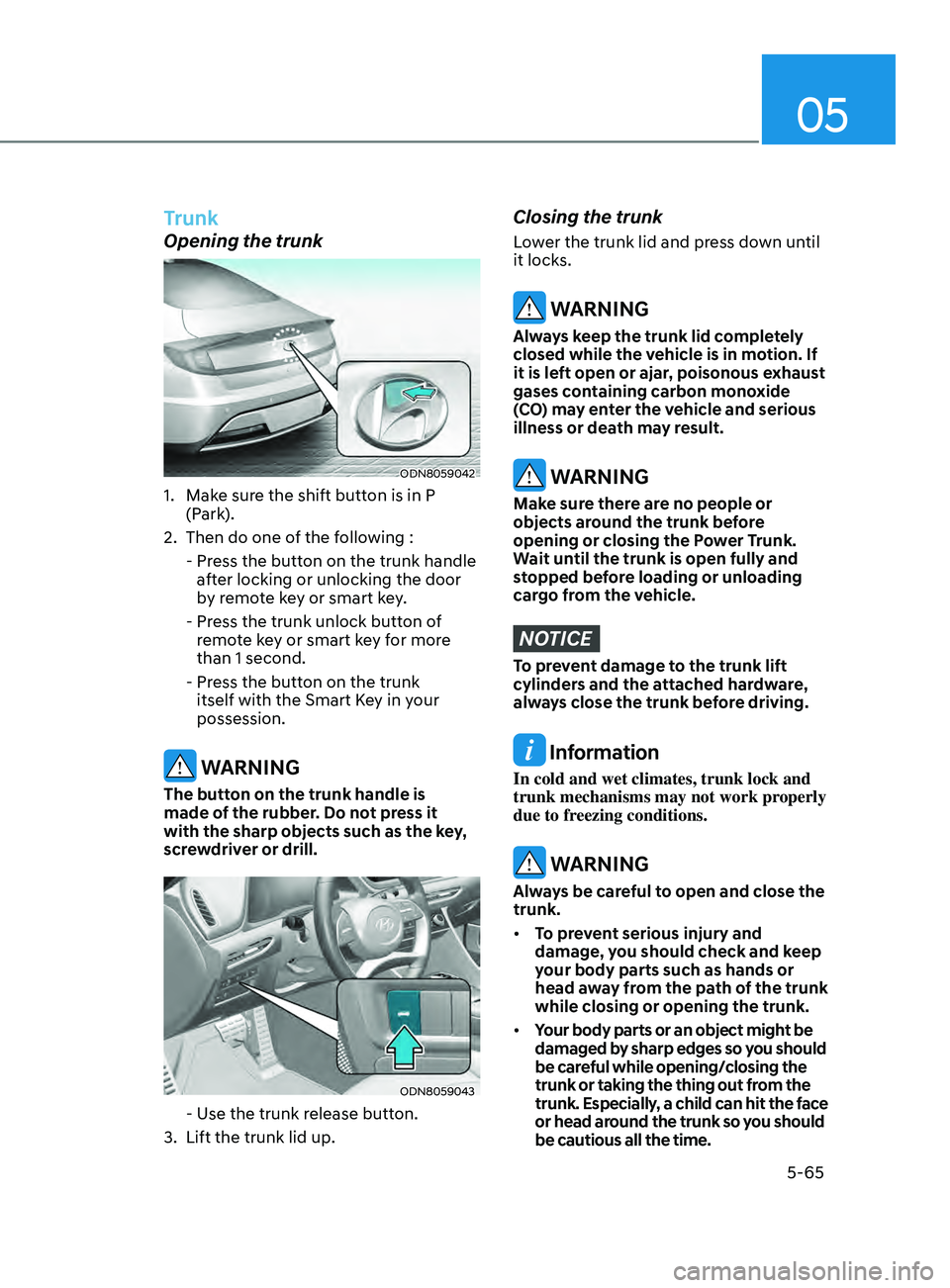
ODN8059042
1. Make sure the shift button is in P (Park).
2.
Then do one o
f the following :
-
Pr
ess the button on the trunk handle
after locking or unlocking the door
by remote key or smart key.
-
Pr
ess the trunk unlock button of
remote key or smart key for more
than 1 second.
-
Pr
ess the button on the trunk
itself with the Smart Key in your
possession.
WARNING
The button on the trunk handle is
made of the rubber. Do not press it
with the sharp objects such as the key,
screwdriver or drill.
ODN8059043
- Use the trunk release button.
3.
Lift the trunk lid up.
Closing the trunk
Lower the trunk lid and press down until
it locks.
WARNING
Always keep the trunk lid completely
closed while the vehicle is in motion. If
it is left open or ajar, poisonous exhaust
gases containing carbon monoxide
(CO) may enter the vehicle and serious
illness or death may result.
WARNING
Make sure there are no people or
objects around the trunk before
opening or closing the Power Trunk.
Wait until the trunk is open fully and
stopped before loading or unloading
cargo from the vehicle.
NOTICE
To prevent damage to the trunk lift
cylinders and the attached hardware,
always close the trunk before driving.
Information
In cold and wet climates, trunk lock and
trunk mechanisms may not work properly
due to freezing conditions.
WARNING
Always be careful to open and close the
trunk.
• To prevent serious injury and
damage, you should check and keep
your body parts such as hands or
head away from the path of the trunk
while closing or opening the trunk.
• Your body parts or an object might be
damaged by sharp edges so you should
be careful while opening/closing the
trunk or taking the thing out from the
trunk. Especially, a child can hit the face
or head around the trunk so you should
be cautious all the time.
Page 201 of 546
05
5-71
• Do not get back into a vehicle
once you have begun refueling.
You can generate a buildup of
static electricity by touching,
rubbing or sliding against any item
or fabric capable of producing
static electricity. Static electricity
discharge can ignite fuel vapors
causing a fire. If you must re-enter
the vehicle, you should once again
eliminate potentially dangerous
static electricity discharge by
touching a metal part of the vehicle,
away from the fuel filler neck, nozzle
or other gasoline source, with your
bare hand.
• When using an approved portable
fuel container, be sure to place the
container on the ground prior to
refueling. Static electricity discharge
from the container can ignite fuel
vapors causing a fire.
Once refueling has begun, contact
between your bare hand and the
vehicle should be maintained until
the filling is complete.
• Use only approved portable plastic
fuel containers designed to carry and
store gasoline.
• When refueling, always move the
shift button to the P (Park) position,
set the parking brake, and place
the ignition switch to the LOCK/
OFF position. Sparks produced by
electrical components related to the
engine can ignite fuel vapors causing
a fire.
• Do not use matches or a lighter and
do not smoke or leave a lit cigarette
in your vehicle while at a gas station,
especially during refueling.
• Do not over-fill or top-off your
vehicle tank, which can cause
gasoline spillage.• If a fire breaks out during refueling,
leave the vicinity of the vehicle, and
immediately contact the manager
of the gas station and then contact
the local fire department. Follow any
safety instructions they provide.
• If pressurized fuel sprays out, it can
cover your clothes or skin and thus
subject you to the risk of fire and
burns. Always remove the fuel cap
carefully and slowly. If the cap is
venting fuel or if you hear a hissing
sound, wait until the condition stops
before completely removing the cap.
• Always check that the fuel cap is
installed securely to prevent fuel
spillage in the event of an accident.
Information
Make sure to refuel your vehicle according
to the “Fuel Requirements” suggested in
the Introduction chapter.
NOTICE
• Do not spill fuel on the exterior
surfaces of the vehicle. Any type of
fuel spilled on painted surfaces may
damage the paint.
• If the fuel filler cap requires
replacement, use only a genuine
HYUNDAI cap or the equivalent
specified for your vehicle. An
incorrect fuel filler cap can result
in a serious malfunction of the fuel
system or emission control system.
Page 207 of 546
05
5-77
When High Beam Assist system is
operating, the high beam switches to low
beam if any of the following conditions
occur: - When the headlamp of an on-coming vehicle is detected.
- When the tail lamp of a vehicle in front
is detected.
- When the headlamp or tail lamp of a motorcycle or a bicycle is detected.
- When the surrounding ambient light is bright enough that high beams are not
required.
- When streetlights or other lights are detected.
- When the headlamp switch is not in the AUTO position.
- When High Beam Assist system is off.
- When vehicle speed is below 15 mph (24 km/h).
OIK047132N
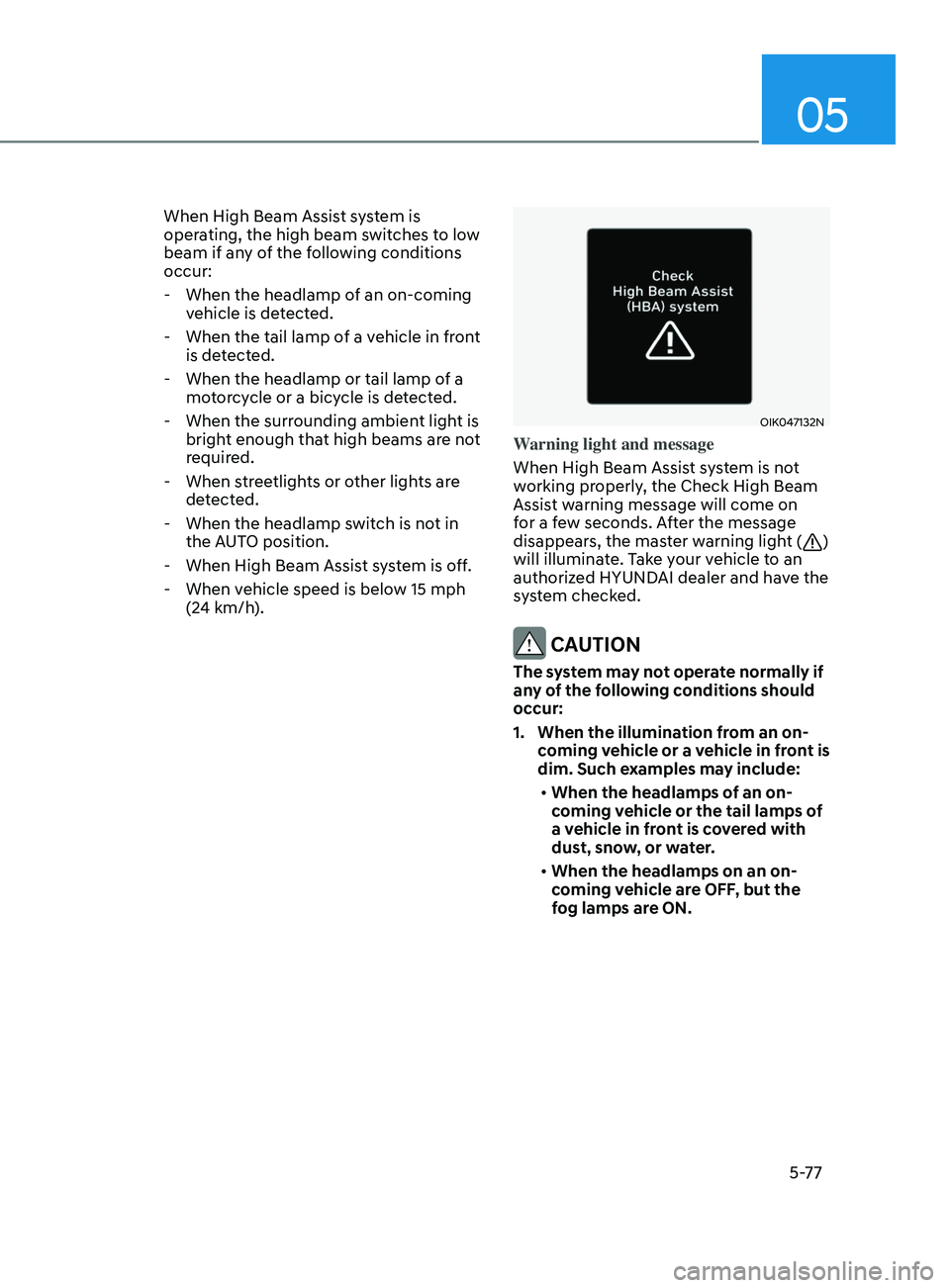
Warning light and message
When High Beam Assist system is not
working properly, the Check High Beam
Assist warning message will come on
for a few seconds. After the message
disappears, the master warning light (
)
will illuminate. Take your vehicle to an
authorized HYUNDAI dealer and have the
system checked.
CAUTION
The system may not operate normally if
any of the following conditions should
occur:
1. When the illumination from an on- coming vehicle or a vehicle in front is
dim. Such examples may include:
• When the headlamps of an on-
coming vehicle or the tail lamps of
a vehicle in front is covered with
dust, snow, or water.
• When the headlamps on an on-
coming vehicle are OFF, but the
fog lamps are ON.
Page 208 of 546
Convenient Features5-78
2. When the High Beam Assis t camera
is adversely affected by an external
condition. Such examples may
include:
• When the vehicle’s headlamps
have been damaged or not
repaired properly.
• When the vehicle headlamps are
not aimed properly.
• When the vehicle is driven on a
narrow curved road or rough road
• When the vehicle is driven on an
uphill road or downhill road
• When only part of the vehicle in
front is visible on a crossroad or
curved road.
• When there is a traffic light,
reflecting sign, flashing sign or
mirror.
• When the road conditions are bad
such as being wet or covered with
snow.
• When a vehicle suddenly appears
from a curve.
• When the vehicle is tilted from a
flat tire or being towed.
• When Lane Keeping Assist system
warning light illuminates.
• When the light from the on-coming
or front vehicle is not detected
because of exhaust fume, smoke,
fog, snow, etc.
• When the front window is covered
with foreign matters such as ice,
dust, fog, or is damaged.
3.
When the f
orward visibility is poor.
Such examples may include:
• When the headlamps of an on-
coming vehicle or a vehicle in front
is not detected due to poor outside
visibility (smog, smoke, dust, fog,
heavy rain, snow, etc.).
• When the windshield visibility is
poor. WARNING
• Do not attempt to disassemble
the front view camera without the
assistance of an authorized HYUNDAI
dealer technician. If the front camera
is removed for any reason, the
system may need to be re-calibrated.
Have the system inspected by an
authorized HYUNDAI dealer.
• If the windshield of your vehicle is
replaced, most likely the front view
camera will need to be re-calibrated.
If this occurs, have your vehicle
inspected and have the system re-
calibrated by an authorized HYUNDAI
dealer.
• Be careful that water doesn’t get into
High Beam Assist unit and do not
remove or damage related parts of
High Beam Assist system.
• Do not place objects on the crash
pad that reflect light such as mirrors,
white paper, etc. The system may
malfunction if sunlight is reflected.
• At times, High Beam Assist system
may not work properly. The system
is for your convenience only. It is the
responsibility of the driver for safe
driving practices and always check
the road conditions for your safety.
• When the system does not operate
normally, change the headlamp
position manually between the high
beam and low beam.
Page 215 of 546
05
5-85
Information
If the wiper switch is set in AUTO mode
when Engine Start/Stop button is in the
ON position, the wiper will operate once to
perform a self-check of the system. Set the
wiper to the OFF position when the wiper
is not in use.
WARNING
To avoid personal injury from the
windshield wipers, when the engine
is running and the windshield wiper
switch is placed in the AUTO mode:
•
Do no
t touch the upper end of the
windshield glass facing the rain
sensor.
•
Do no
t wipe the upper end of the
windshield glass with a damp or wet
cloth.
•
Do no
t put pressure on the
windshield glass.
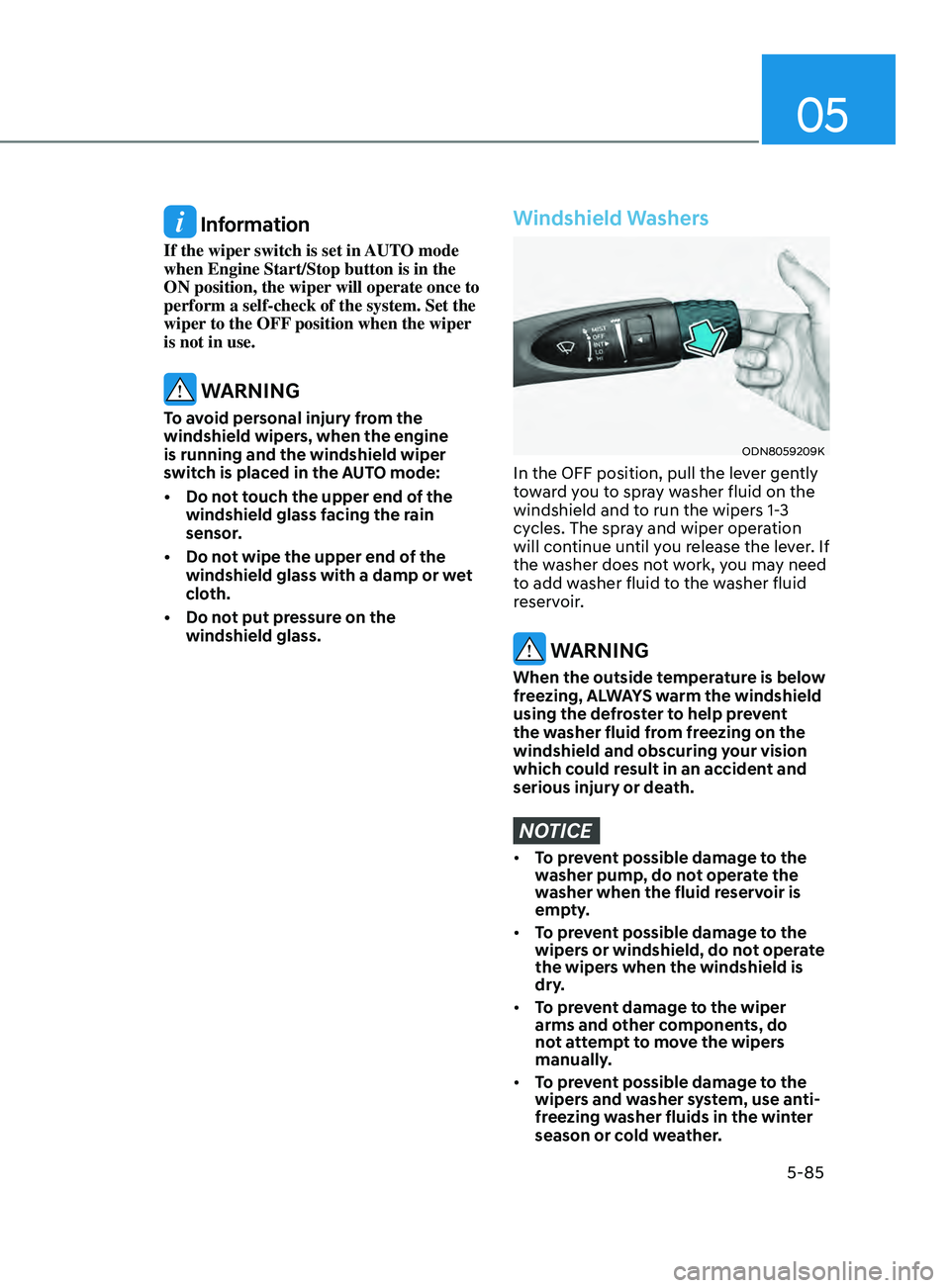
Windshield Washers
ODN8059209K
In the OFF position, pull the lever gently
toward you to spray washer fluid on the
windshield and to run the wipers 1-3
cycles. The spray and wiper operation
will continue until you release the lever. If
the washer does not work, you may need
to add washer fluid to the washer fluid
reservoir.
WARNING
When the outside temperature is below
freezing, ALWAYS warm the windshield
using the defroster to help prevent
the washer fluid from freezing on the
windshield and obscuring your vision
which could result in an accident and
serious injury or death.
NOTICE
• To prevent possible damage to the
washer pump, do not operate the
washer when the fluid reservoir is
empty.
• To prevent possible damage to the
wipers or windshield, do not operate
the wipers when the windshield is
dry.
• To prevent damage to the wiper
arms and other components, do
not attempt to move the wipers
manually.
• To prevent possible damage to the
wipers and washer system, use anti-
freezing washer fluids in the winter
season or cold weather.
Page 218 of 546
Convenient Features5-88
SUrroUnD view moniTor (Svm ) (if eQU ippe D )
ODN8059265
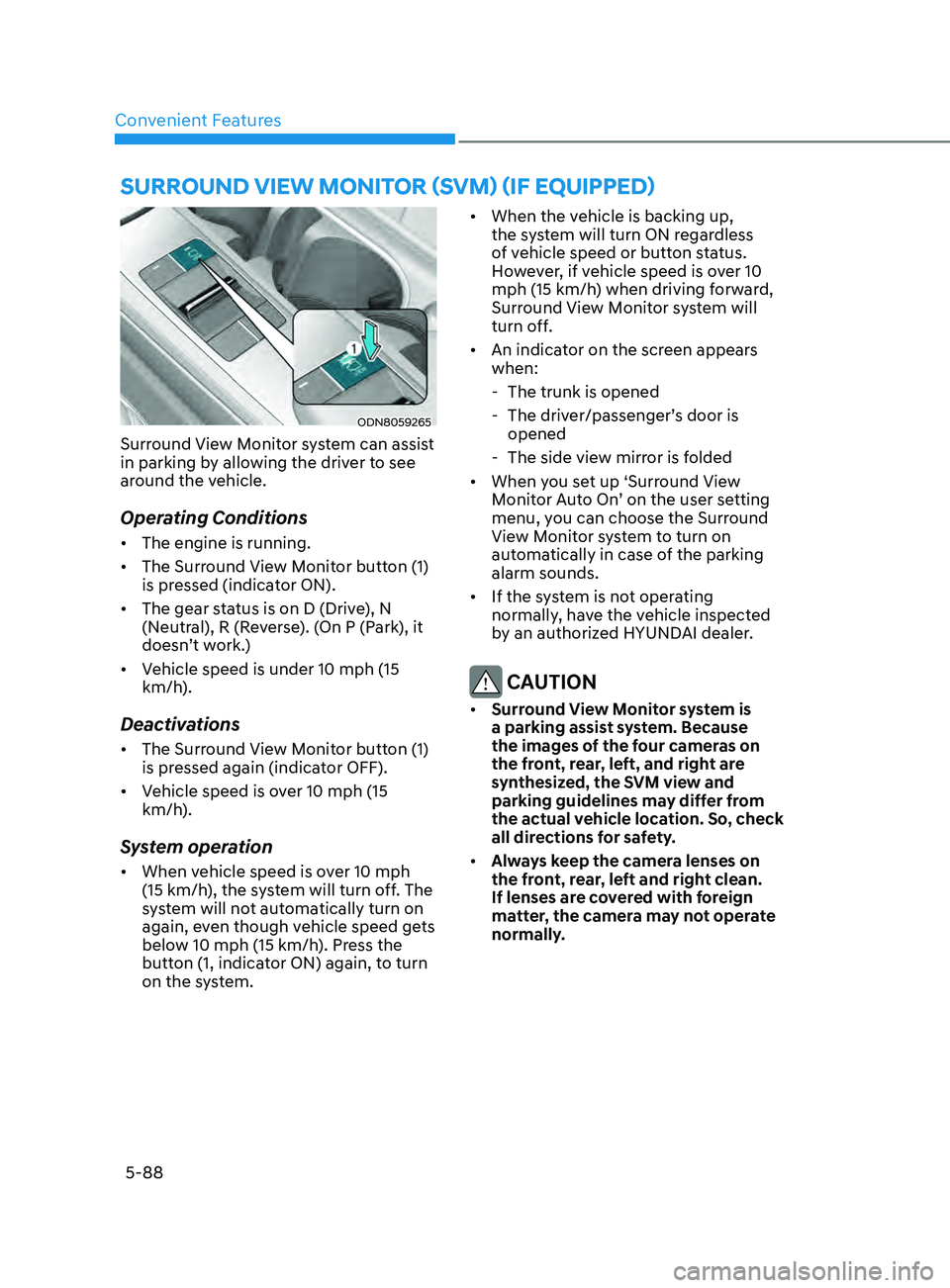
Surround View Monitor system can assist
in parking by allowing the driver to see
around the vehicle.
Operating Conditions
• The engine is running.
• The Surround View Monitor button (1)
is pressed (indicator ON).
• The gear status is on D (Drive), N
(Neutral), R (Reverse). (On P (Park), it
doesn’t work.)
• Vehicle speed is under 10 mph (15
km/h).
Deactivations
• The Surround View Monitor button (1)
is pressed again (indicator OFF).
• Vehicle speed is over 10 mph (15
km/h).
System operation
• When vehicle speed is over 10 mph
(15 km/h), the system will turn off. The
system will not automatically turn on
again, even though vehicle speed gets
below 10 mph (15 km/h). Press the
button (1, indicator ON) again, to turn
on the system. •
When the vehicle is backing up,
the system will turn ON regardless
of vehicle speed or button status.
However, if vehicle speed is over 10
mph (15 km/h) when driving forward,
Surround View Monitor system will
turn off.
• An indicator on the screen appears
when:
- The trunk is opened
- The driv
er/passenger’s door is
opened
- The side vie
w mirror is folded
• When you set up ‘Surround View
Monitor Auto On’ on the user setting
menu, you can choose the Surround
View Monitor system to turn on
automatically in case of the parking
alarm sounds.
• If the system is not operating
normally, have the vehicle inspected
by an authorized HYUNDAI dealer.
CAUTION
• Surround View Monitor system is
a parking assist system. Because
the images of the four cameras on
the front, rear, left, and right are
synthesized, the SVM view and
parking guidelines may differ from
the actual vehicle location. So, check
all directions for safety.
• Always keep the camera lenses on
the front, rear, left and right clean.
If lenses are covered with foreign
matter, the camera may not operate
normally.
Page 220 of 546
Convenient Features
5-90
Operating conditions
Reverse Parking Collision-Avoidance
Assist system enters the ready status,
when ‘Active Assist’ or ‘Warning Only’ is
selected in the AVN system screen and
the following conditions are satisfied:
• The trunk is closed
• The shift lever is in R (Reverse)
• Vehicle speed is below 6 mph (10
km/h)
• System components such as the rear
view camera and the rear ultrasonic
sensors are in normal conditions
The driver needs to select ‘Active Assist’
on the LCD display or infotainment
system display for collision-avoidance
assist.
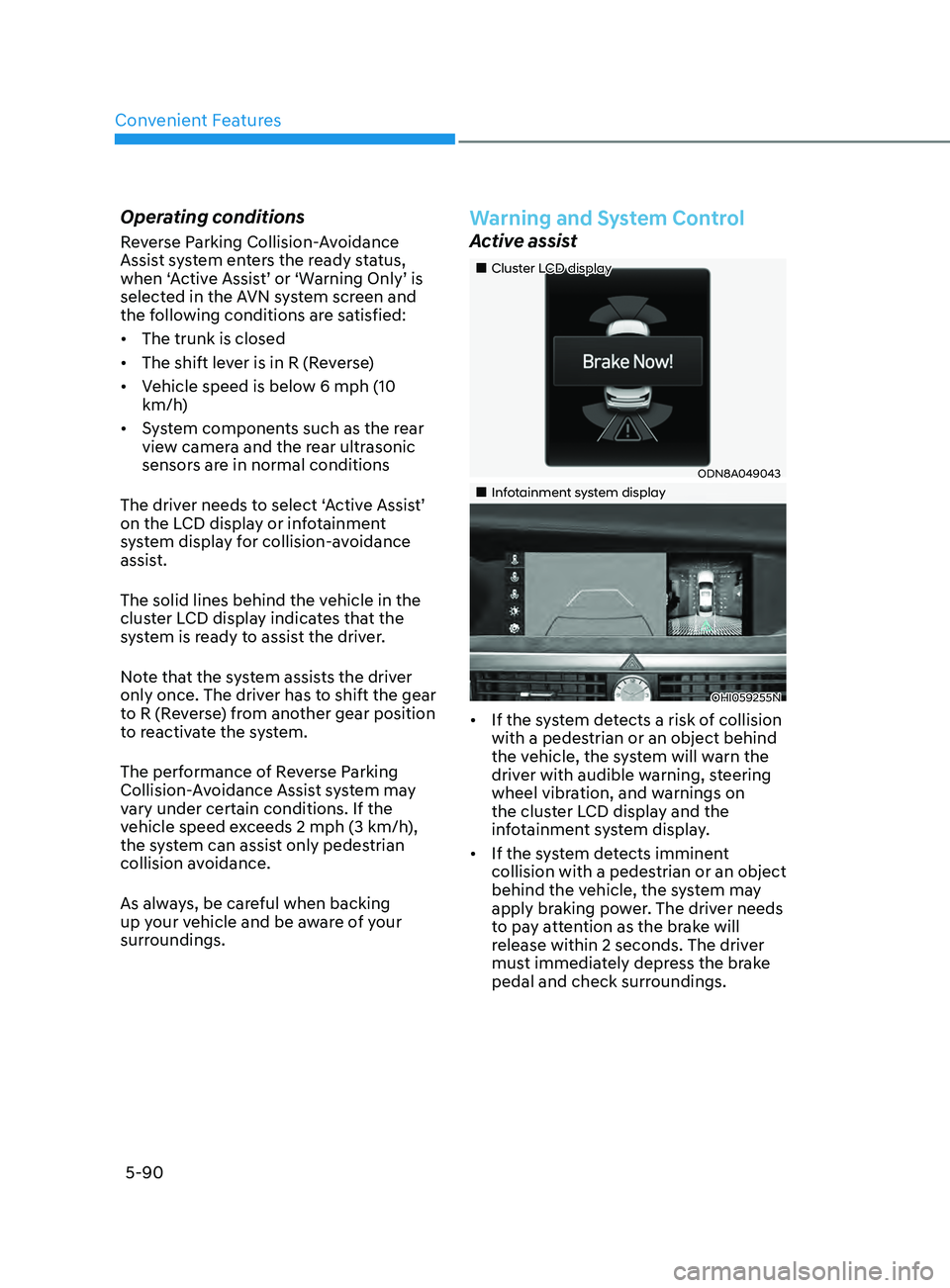
The solid lines behind the vehicle in the
cluster LCD display indicates that the
system is ready to assist the driver.
Note that the system assists the driver
only once. The driver has to shift the gear
to R (Reverse) from another gear position
to reactivate the system.
The performance of Reverse Parking
Collision-Avoidance Assist system may
vary under certain conditions. If the
vehicle speed exceeds 2 mph (3 km/h),
the system can assist only pedestrian
collision avoidance.
As always, be careful when backing
up your vehicle and be aware of your
surroundings.
Warning and System Control
Active assist
„„Cluster LCD display
ODN8A049043
„„Infotainment system display
OHI059255N
• If the system detects a risk of collision
with a pedestrian or an object behind
the vehicle, the system will warn the
driver with audible warning, steering
wheel vibration, and warnings on
the cluster LCD display and the
infotainment system display.
• If the system detects imminent
collision with a pedestrian or an object
behind the vehicle, the system may
apply braking power. The driver needs
to pay attention as the brake will
release within 2 seconds. The driver
must immediately depress the brake
pedal and check surroundings.