headlamp HYUNDAI SONATA 2023 Owner's Manual
[x] Cancel search | Manufacturer: HYUNDAI, Model Year: 2023, Model line: SONATA, Model: HYUNDAI SONATA 2023Pages: 555, PDF Size: 42.72 MB
Page 346 of 555
06
6-59
Detecting vehicle, pedestrian and
cyclist
The sensor may be limited when: •
The system may not operate for 15
seconds after the vehicle is started or
the camera is initialized
• The radar sensor or camera is covered
with a foreign object or debris
• The camera lens is contaminated due
to tinted, filmed or coated windshield,
damaged glass, or stuck of foreign
matter (sticker, bug, etc.) on the glass
• Inclement weather such as heavy rain
or snow obscures the field of view of
the radar sensor or camera
• There is interference by
electromagnetic waves
• There is severe irregular reflection
from the radar sensor
• The radar/camera sensor recognition
is limited
• The vehicle in front is too small to be
detected (for example a motorcycle
etc.)
• The vehicle in front is an oversize
vehicle or trailer that is too big to be
detected by the camera recognition
system (for example a tractor trailer,
etc.)
• The camera’s field of view is not well
illuminated (either too dark or too
much reflection or too much backlight
that obscures the field of view)
• The vehicle in front does not have
their rear lights or their rear lights
does not turned ON or their rear lights
are located unusually
• The outside brightness changes
suddenly, for example when entering
or exiting a tunnel
• Light coming from a street light or an
oncoming vehicle is reflected on a wet
road surface such as a puddle in the
road •
The field of view in front is obstructed
by sun glare or head light of oncoming
vehicle
• The windshield glass is fogged up; a
clear view of the road is obstructed
• The vehicle in front is driving
erratically
• The vehicle is on unpaved or uneven
rough surfaces, or road with sudden
gradient changes
• The vehicle is driven near areas
containing metal substances as a
construction zone, railroad, etc.
• The vehicle drives inside a building,
such as a basement parking lot
• The camera does not recognize the
entire vehicle in front
• The camera is damaged
• The brightness outside is too low such
as when the headlamps are not on at
night or the vehicle is going through a tunnel
• The shadow is on the road by a
median strip, trees, etc.
• The vehicle drives through a tollgate
• The windshield glass is fogged up; a
clear view of the road is obstructed
• The rear part of the vehicle in front is
not normally visible (the vehicle turns
in other direction or the vehicle is
overturned.)
• The adverse road conditions cause
excessive vehicle vibrations while driving
• The sensor recognition changes
suddenly when passing over a speed bump
• The vehicle in front is moving
vertically to the driving direction
• The vehicle in front is stopped
vertically
• The vehicle in front is driving towards
your vehicle or reversing
• You are on a roundabout and the
vehicle in front circles
Page 363 of 555
While Driving
6 -76
When external condition is intervened •
The brightness outside changes
suddenly such as when entering or
exiting a tunnel, or when passing under a bridge.
• The brightness outside is too low such
as when the headlamps are not on at
night or the vehicle is going through a tunnel.
• There is a boundary structure in the
roadway such as a concrete barrier,
guardrail and reflector post that is
inadvertently being detected by the
camera.
• When light coming from a street light
or an oncoming vehicle is reflected on
a wet road surface such as a puddle in
the road.
• The field of view in front is obstructed
by sun glare.
• There is not enough distance between
you and the vehicle in front to be
able to detect the lane marker or the
vehicle ahead is driving on the lane
maker.
• Driving on a steep grade, over a hill, or
when driving on a curved road.
• The adverse road conditions cause
excessive vehicle vibrations while driving.
• The surrounding of the inside rear
view mirror temperature is high due to
direct sunlight, etc.
• Road surface is not even. When front visibility is poor •
The windshield or the camera lens is
blocked with dirt or debris.
• The windshield glass is fogged up; a
clear view of the road is obstructed.
• Placing objects on the dashboard, etc.
• The sensor cannot detect the lane
marker because of fog, heavy rain or
snow.
Page 417 of 555
While Driving
6-130
Limitations of the System
LFA system may operate prematurely
even if the vehicle does not depart from
the intended lane, OR, LFA system may
not assist your steering or warn you if the
vehicle leaves the intended lane under
the following circumstances:
When the lane and road conditions are poor • It is difficult to distinguish the lane
marking from the road surface or the
lane marking is faded or not clearly
marked.
• It is difficult to distinguish the color of
the lane marker from the road.
• There are markings on the road
surface that look like a lane marker
that is inadvertently being detected
by the camera.
• The lane marker is indistinct or damaged.
• The lane marker is merged or divided
(e.g. tollgate).
• The lane number increases or
decreases or the lane marker are
crossing complicatedly.
• There are more than two lane markers
on the road in front of you.
• The lane marker is very thick or thin.
• The lane is very wide or narrow.
• The lane marker ahead is not visible
due to rain, snow, water on the road,
damaged or stained road surface, or
other factors. •
The shadow is on the lane marker by
a median strip, trees, guardrail, noise
barriers, etc.
• The lane markers are complicated or a
structure substitutes for the lines such
as a construction area.
• There are crosswalk signs or other
symbols on the road.
• The lane marker in a tunnel is stained
with oil, etc.
• The lane suddenly disappears such as
at the intersection.
• Driving the shared lane usage (bicycle
lane, pedestrians lane, etc.)
When external condition is intervened • The brightness outside changes
suddenly such as when entering or
exiting a tunnel, or when passing under a bridge.
• The brightness outside is too low such
as when the headlamps are not on at
night or the vehicle is going through a tunnel.
• There is a boundary structure in the
roadway such as a concrete barrier,
guardrail and reflector post that is
inadvertently being detected by the
camera.
• When light coming from a street light
or an oncoming vehicle is reflected on
a wet road surface such as a puddle in
the road.
• The field of view in front is obstructed
by sun glare.
Page 438 of 555
06
6-151
Smooth Cornering
Avoid braking or gear changing in
corners, especially when roads are wet.
Ideally, corners should always be taken
under gentle acceleration.
Driving at Night
Night driving presents more hazards than
driving in the daylight. Here are some
important tips to remember: • Slow down and keep more distance
between you and other vehicles, as it
may be more difficult to see at night,
especially in areas where there may
not be any street lights.
• Adjust your mirrors to reduce the glare
from other driver's headlamps.
• Keep your headlamps clean and
properly aimed. Dirty or improperly
aimed headlamps will make it much
more difficult to see at night.
• Avoid staring directly at the
headlamps of oncoming vehicles. You
could be temporarily blinded, and it
will take several seconds for your eyes
to readjust to the darkness.
Driving in the Rain
Rain and wet roads can make driving
dangerous. Here are a few things to
consider when driving in the rain or on
slick pavement: • Slow down and allow extra following
distance. A heavy rainfall makes
it harder to see and increases the
distance needed to stop your vehicle.
• Turn OFF your Cruise Control.
• Replace your windshield wiper blades
when they show signs of streaking or
missing areas on the windshield.
• Tires should be properly maintained
with at least 1.6mm (2/32nds of an
inch) of tread depth. If your tires
do not have enough tread, making
a quick stop on wet pavement can
cause a skid and possibly lead to an
accident. See "Tire replacement" in
chapter 8.
• Turn on your headlamps to make it
easier for others to see you.
• Driving too fast through large puddles
can affect your brakes. If you must go
through puddles, try to drive through
them slowly.
• If you believe your brakes may be wet,
apply them lightly while driving until
normal braking operation returns.
Hydroplaning
If the road is wet enough and you are
going fast enough, your vehicle may
have little or no contact with the road
surface and actually ride on the water.
The best advice is SLOW DOWN when
the road is wet.
The risk of hydroplaning increases as
the depth of tire tread decreases, refer
to “Tire replacement” in chapter 8.
Page 472 of 555
Tires and Wheels .......................................................................................... 8-38
Tire Care .................................................................................................................. 8-38
Recommended Cold Tire Inflation Pressures .......................................................8-38
Check Tire Inflation Pressure ................................................................................. 8-39
Tire Rotation .......................................................................................................... 8-40
Wheel Alignment and Tire Balance ...................................................................... 8-40
Tire Replacement ................................................................................................... 8-41
Wheel Replacement ............................................................................................... 8-42
Tire Traction ............................................................................................................ 8-42
Tire Maintenance.................................................................................................... 8-42
Tire Sidewall Labeling ............................................................................................ 8-42
Tire Terminology and Definitions .......................................................................... 8-45
All Season Tires ....................................................................................................... 8-48
Summer Tires ......................................................................................................... 8-48
Snow Tires...............................................................................................................8-48
Radial-Ply Tires ....................................................................................................... 8-48
Fuses ............................................................................................................ 8-50
Instrument Panel Fuse Replacement ..................................................................... 8-51
Engine Compartment Panel Fuse Replacement ..................................................8-52
Fuse/Relay Panel Description................................................................................ 8-53
Light Bulbs .................................................................................................... 8-58
Headlamp, Parking Lamp, Daytime Running Light, Turn Signal Lamp,
Cornering Lamp and Side Marker ......................................................................... 8-58
Side Repeater Lamp Replacement ....................................................................... 8-59
Rear Combination Light Bulb Replacement .........................................................8-59
High Mounted Stop Lamp Replacement ..............................................................8-61
License Plate Light Bulb Replacement ................................................................. 8-61
Interior Light Bulb Replacement ........................................................................... 8-62
Appearance Care ........................................................................................ 8-64
Exterior Care ........................................................................................................... 8-64
Interior Care ............................................................................................................ 8-68
Emission Control System ............................................................................. 8-70
8
Page 477 of 555
08
8 -7
While operating your vehicle: •
Note any changes in the sound of the
exhaust or any smell of exhaust fumes
in the vehicle.
• Check for vibrations in the steering
wheel. Notice if there is any increased
steering effort or looseness in the
steering wheel, or change in its
straight-ahead position.
• Notice if your vehicle constantly turns
slightly or “pulls” to one side when
traveling on smooth, level road.
• When stopping, listen and check for
unusual sounds, pulling to one side,
increased brake pedal travel or “hard-
to-push” brake pedal.
• If any slipping or changes in the
operation of your transmission occurs,
check the transmission fluid level.
• Check the automatic transmission P
(Park) function.
• Check the parking brake.
• Check for fluid leaks under your
vehicle (water dripping from the air
conditioning system during or after use is normal).
At least monthly: • Check coolant level in the engine
coolant reservoir.
• Check the operation of all exterior
lights, including the brake lights, turn
signals and hazard warning flashers.
• Check the inflation pressures of all
tires including the spare for tires that
are worn, show uneven wear, or are damaged.
• Check for loose wheel lug nuts. At least twice a year:
(i.e., every Spring and Autumn) •
Check radiator, heater and air
conditioning hoses for leaks or damage.
• Check windshield washer spray and
wiper operation. Clean wiper blades
with a clean cloth dampened with
washer a fluid.
• Check headlamp alignment.
• Check muffler, exhaust pipes, shields and clamps.
• Check the seat belts for wear and function.
At least once a year: • Clean body and door drain holes.
• Lubricate door hinges and hood hinges.
• Lubricate door and hood locks and
latches.
• Lubricate door rubber weather strips.
• Lubricate door checker.
• Check the air conditioning system.
• Inspect and lubricate automatic
transmission linkage and controls.
• Clean the battery and terminals.
• Check the brake fluid level.
Page 521 of 555
08
8-51
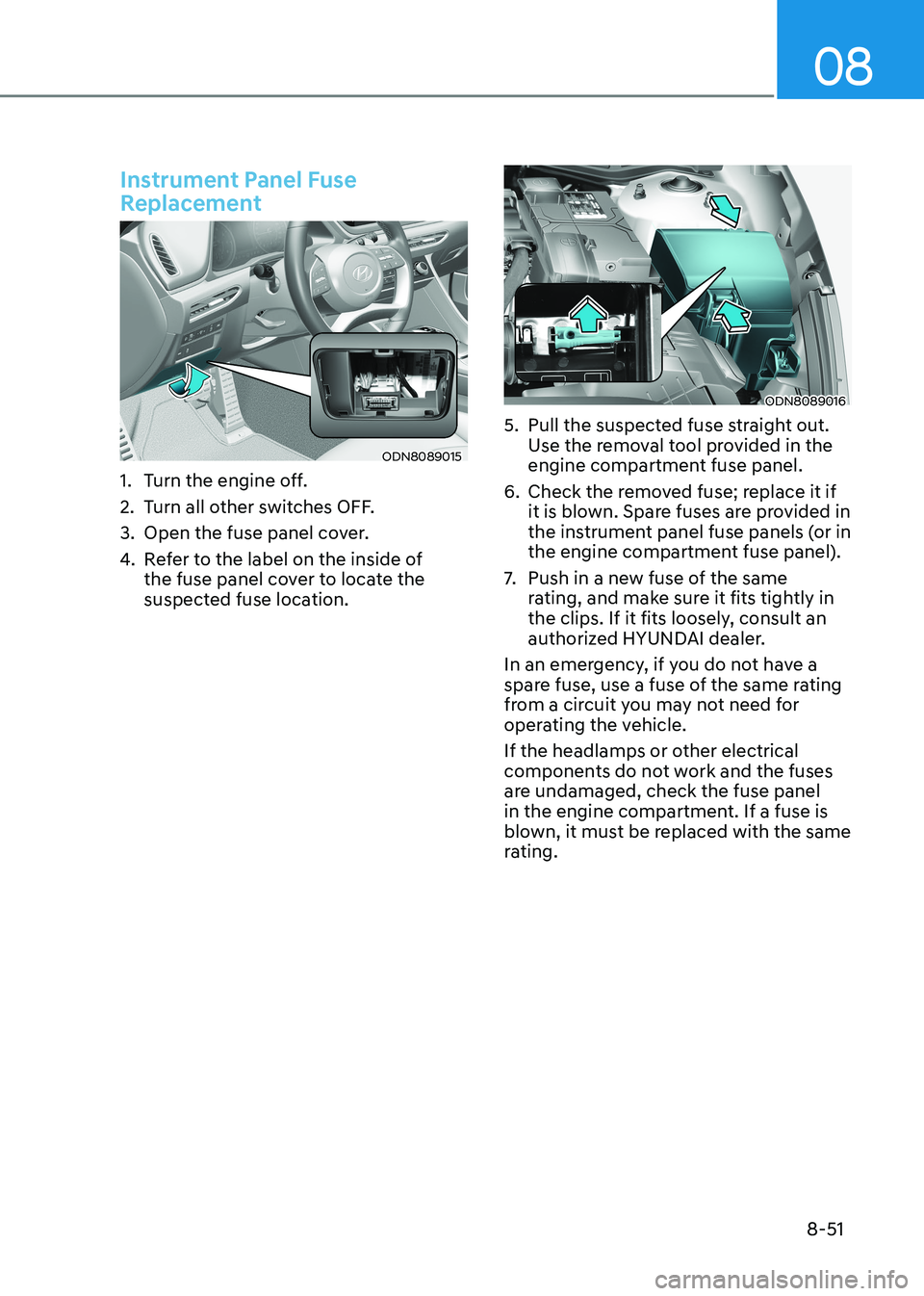
Instrument Panel Fuse
Replacement
ODN8089015
1. Turn the engine off.
2. Turn all other switches OFF.
3. Open the fuse panel cover.
4. Refer to the label on the inside of
the fuse panel cover to locate the
suspected fuse location.
ODN8089016
5. Pull the suspected fuse straight out. Use the removal tool provided in the
engine compartment fuse panel.
6. Check the removed fuse; replace it if it is blown. Spare fuses are provided in
the instrument panel fuse panels (or in
the engine compartment fuse panel).
7. Push in a new fuse of the same
rating, and make sure it fits tightly in
the clips. If it fits loosely, consult an
authorized HYUNDAI dealer.
In an emergency, if you do not have a
spare fuse, use a fuse of the same rating
from a circuit you may not need for
operating the vehicle.
If the headlamps or other electrical
components do not work and the fuses
are undamaged, check the fuse panel
in the engine compartment. If a fuse is
blown, it must be replaced with the same
rating.
Page 528 of 555
Maintenance
8-58
Consult an authorized HYUNDAI dealer
to replace most vehicle light bulbs. It is
difficult to replace vehicle light bulbs
because other parts of the vehicle must
be removed before you can get to the
bulb. This is especially true for removing
the headlamp assembly to get to the
bulb(s).
Removing/installing the headlamp
assembly can result in damage to the
vehicle.
Information
The headlamp and tail lamp lenses could
appear frosty if the vehicle is washed after
driving or the vehicle is driven at night
in wet weather. This condition is caused
by temperature difference between the lamp inside and outside and, it does not
indicate a problem with your vehicle.
When moisture condenses in the lamp,
it will be removed after driving with the
headlamp on. The removable level may
differ depending on lamp size, lamp
position and environmental condition.
However, if moisture is not removed, we
recommend that your vehicle is inspected
by an authorized HYUNDAI dealer.
WARNING
• Prior to replacing a lamp, depress
the foot brake, move the shift button
into P (Park) apply the parking brake,
place the ignition switch to the
LOCK/OFF position, and take the key
with you when leaving the vehicle
to avoid sudden movement of the
vehicle and to prevent possible electric shock.
• Be aware the bulbs may be hot and
may burn your fingers.
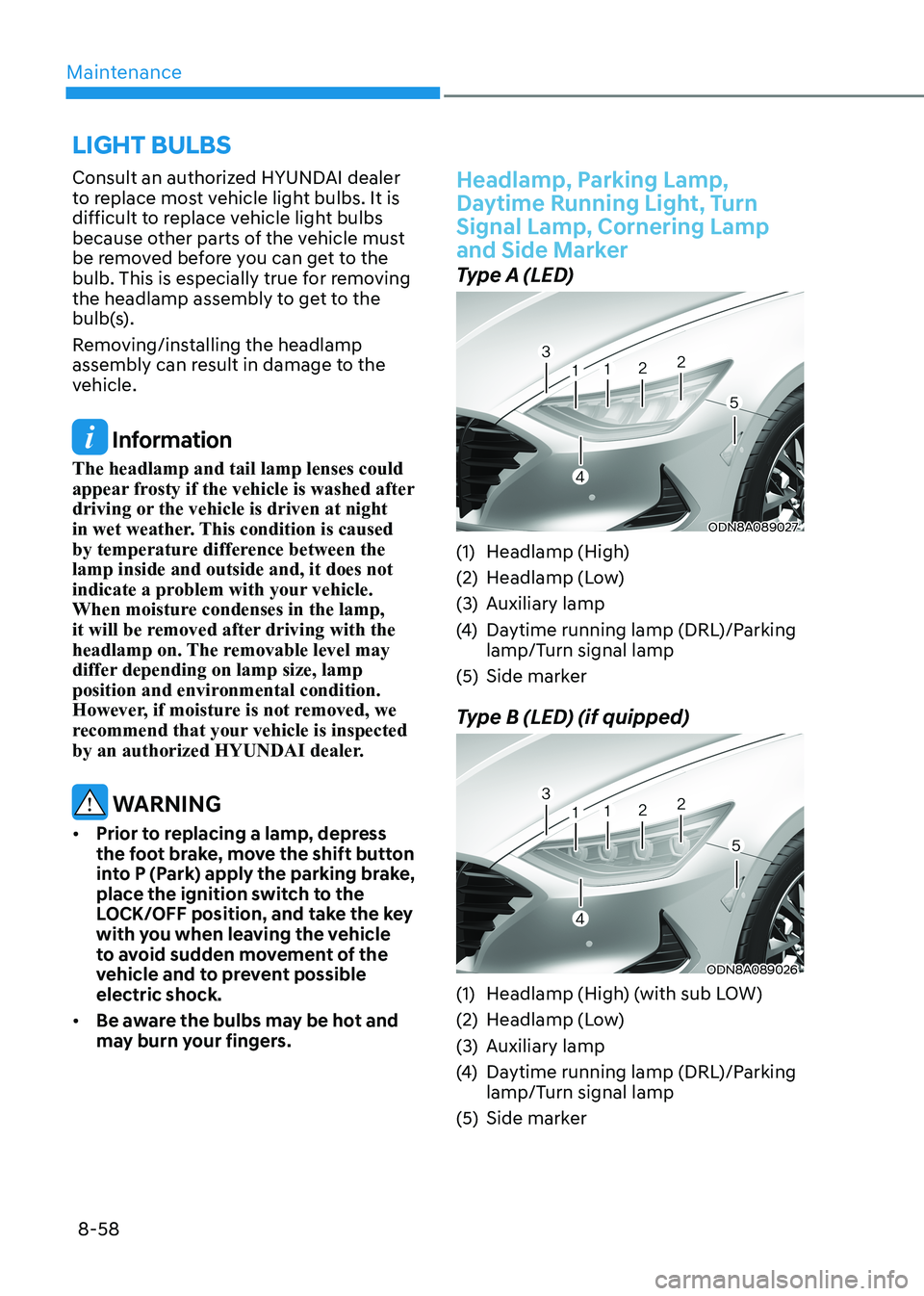
Headlamp, Parking Lamp,
Daytime Running Light, Turn Signal Lamp, Cornering Lamp
and Side Marker
Type A (LED)
ODN8A089027
(1) Headlamp (High)
(2) Headlamp (Low)
(3) Auxiliary lamp
(4) Daytime running lamp (DRL)/Parking
lamp/Turn signal lamp
(5) Side marker
Type B (LED) (if quipped)
ODN8A089026
(1) Headlamp (High) (with sub LOW)
(2) Headlamp (Low)
(3) Auxiliary lamp
(4) Daytime running lamp (DRL)/Parking
lamp/Turn signal lamp
(5) Side marker
LigHt BULBS
Page 550 of 555
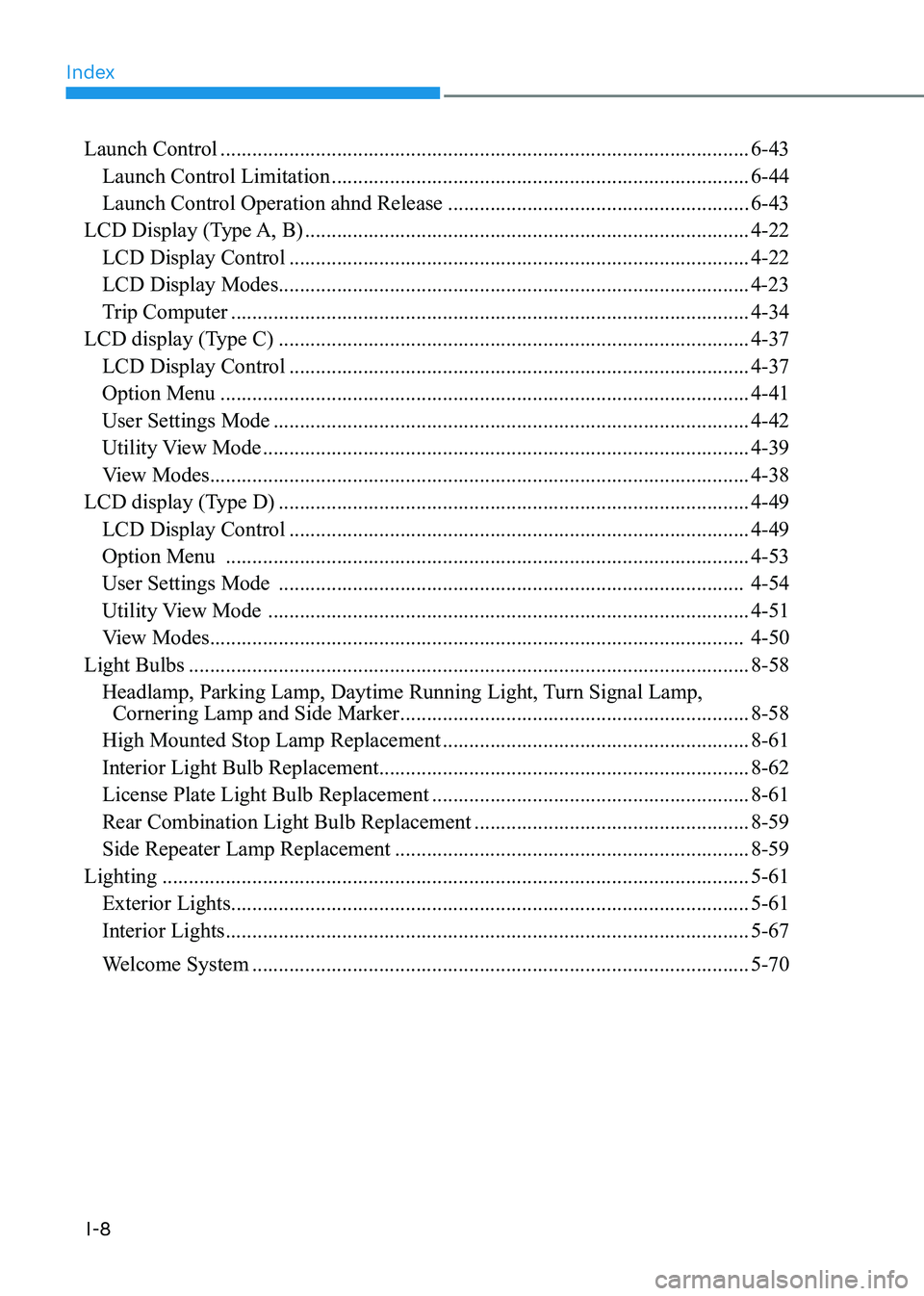
Index
I-8
Launch Control
.................................................................................................... 6-43
Launch Control Limitation ............................................................................... 6-44
Launch Control Operation ahnd Release .........................................................6-43
LCD Display (Type A, B) .................................................................................... 4-22
LCD Display Control ....................................................................................... 4-22
LCD Display Modes......................................................................................... 4-23
Trip Computer .................................................................................................. 4-34
LCD display (Type C) ......................................................................................... 4-37
LCD Display Control ....................................................................................... 4-37
Option Menu .................................................................................................... 4-41
User Settings Mode .......................................................................................... 4-42
Utility View Mode ............................................................................................ 4-39
View Modes ...................................................................................................... 4-38
LCD display (Type D) ......................................................................................... 4-49
LCD Display Control ....................................................................................... 4-49
Option Menu ................................................................................................... 4-53
User Settings Mode ........................................................................................ 4-54
Utility View Mode ........................................................................................... 4-51
View Modes ..................................................................................................... 4-50
Light Bulbs .......................................................................................................... 8-58
Headlamp, Parking Lamp, Daytime Running Light, Turn Signal Lamp,
Cornering Lamp and Side Marker .................................................................. 8-58
High Mounted Stop Lamp Replacement ..........................................................8-61
Interior Light Bulb Replacement ...................................................................... 8-62
License Plate Light Bulb Replacement ............................................................8-61
Rear Combination Light Bulb Replacement ....................................................8-59
Side Repeater Lamp Replacement ................................................................... 8-59
Lighting ............................................................................................................... 5-61
Exterior Lights .................................................................................................. 5-61
Interior Lights ................................................................................................... 5-67
Welcome System .............................................................................................. 5-70