Oli HYUNDAI SONATA 2023 Owners Manual
[x] Cancel search | Manufacturer: HYUNDAI, Model Year: 2023, Model line: SONATA, Model: HYUNDAI SONATA 2023Pages: 555, PDF Size: 42.72 MB
Page 1 of 555
OWNER’S MANUAL
Operation
MaintenanceSpecifications
All information in this Owner’s Manual is current at the time of
publication.
However, HYUNDAI Auto Canada Corp. reserves the right
to make changes at any time so that our policy of continual
product improvement may be carried out.
This manual applies to all HYUNDAI models and includes
descriptions and explanations of optional as well as standard
equipment. As a result, you may find material in this manual
that does not apply to your specific vehicle.
* Trademarks and tradenames owned or licensed in Canada by HYUNDAI Auto Canada Corp. which carries on business as
‘’HYUNDAI Auto Canada’’.
Page 9 of 555
Foreword
1-6
Gasoline containing alcohol or
methanol
Gasohol, a mixture of gasoline and
ethanol (also known as grain alcohol) are
being marketed along with or instead
of leaded or unleaded gasoline. For
example, “E15” is a gasohol comprised of
15% ethanol and 85% gasoline.
Do not use gasohol containing more than
15% ethanol, and do not use gasoline or
gasohol containing any methanol. Either
of these fuels may cause drivability
problems and damage to the fuel
system, engine control system and
emission control system.
Discontinue using gasohol of any kind if
drivability problems occur.
“E85” fuel is an alternative fuel
comprised of 85 percent ethanol and 15
percent gasoline, and is manufactured
exclusively for use in Flexible Fuel
Vehicles. “E85” is not compatible with
your vehicle. Use of “E85” may result in
poor engine performance and damage
to your vehicle’s engine and fuel system.
HYUNDAI recommends that customers
do not use fuel with an ethanol content
exceeding 15 percent.
NOTICE
To prevent damage to your vehicle’s
engine and fuel system:
Page 10 of 555
01
1-7
Detergent Fuel Additives
HYUNDAI recommends that you use
good quality gasolines treated with
detergent additives such as TOP TIER
Detergent Gasoline, which help prevent
deposit formation in the engine. These gasolines will help the engine run
cleaner and enhance performance of
the Emission Control System. For more
information on TOP TIER Detergent
Gasoline, please go to the website (www.
toptiergas.com).
For customers who do not use TOP Tier
Detergent Gasoline regularly, and have
problems starting or the engine does
not run smoothly, detergent-based
fuel additives that you can purchase
separately may be added to the gasoline.
If TOP TIER Detergent Gasoline is
not available, one bottle of additive
added to the fuel tank according to the
maintenance schedule is recommended
(refer to the Maintenance Schedule in
chapter 8).
Additives are available from your
authorized HYUNDAI dealer along with
information on how to use them. Do not
mix other additives.
Operation in foreign countries
If you are going to drive your vehicle in
another country, be sure to:
Page 44 of 555
03
3-15
Seat Warmers and Air Ventilation
Seats
Seat warmers (if equipped)
Seat warmers are provided to warm the
seats during cold weather.
WARNING
The seat warmers can cause a SERIOUS
BURN, even at low temperatures and
especially if used for long periods of time.
Passengers must be able to feel if the
seat is becoming too warm so they can
turn it off, if needed.
People who cannot detect temperature
change or pain to the skin should
use extreme caution, especially the
following types of passengers: • Infants, children, elderly or disabled
persons, or hospital outpatients.
• People with sensitive skin or who
burn easily.
• Fatigued individuals.
• Intoxicated individuals.
• People taking medication that can
cause drowsiness or sleepiness.
WARNING
NEVER place anything on the seat
that insulates against heat when the
seat warmer is in operation, such as a
blanket or seat cushion. This may cause
the seat warmer to overheat, causing a
burn or damage to the seat.
NOTICE
To prevent damage to the seat warmers
and seats:
Never use a solvent such as paint
thinner, benzene, alcohol or gasoline to
clean the seats.
Do not place heavy or sharp objects on
seats equipped with seat warmers.
Do not change the seat cover. It
may damage the seat warmer or air
ventilation system.
Page 47 of 555
Seats & Safety System
3-18
NOTICE
To prevent damage to the air ventilation
seat: • Use the air ventilation seat ONLY
when the climate control system
is on. Using the air ventilation seat
for prolonged periods of time with
the climate control system off could
cause the air ventilation seat to malfunction.
• NEVER use a solvent such as paint
thinner, benzene, alcohol or gasoline
to clean the seats.
• Avoid spilling liquids on the surface
of the front seats and seatbacks;
this may cause the air vent holes
to become blocked and not work
properly.
• Do not place materials such as
plastic bags or newspapers under
the seats. They may block the air
intake causing the air vents to not
work properly.
• Do not change the seat covers. It may
damage the air ventilation seat.
• If the air vents do not operate, restart
the vehicle. If there is no change,
have the vehicle inspected by an
authorized HYUNDAI dealer.
Page 101 of 555
04
4-15
Information
When engine oil pressure decreases due to insufficient engine oil, etc., the Engine Oil
Pressure warning light will illuminate. In
addition, the enhanced engine protection
system which limits engine power will
be activated. If the engine oil pressure is
restored, the Engine Oil Pressure warning
light and the enhanced engine protection
system will turn off. However, for gasoline 2.5 turbo engine, when the engine oil
pressure is restored, the warning light and
the enhanced engine protection system will
turn off after the engine is restarted.
NOTICE
• If the engine is not turned OFF
immediately after the Engine
Oil Pressure Warning Light is
illuminated, severe damage could
occur.
• If the warning light stays on while the
engine is running, it indicates that
there may be serious engine damage or malfunction. In this case:
1. Stop the vehicle as soon as it is safe to do so.
2. Turn off the engine and check the oil level. If the oil level is low, fill
the engine oil to the proper level.
3. Start the engine again. If the warning light stays on after the
engine has started, turn the
engine off immediately. In this
case, have the vehicle inspected
by an authorized HYUNDAI dealer.
Low Fuel Level Warning Light
This warning light illuminates:
When the fuel tank is nearly empty. Add fuel as soon as possible.
NOTICE
Driving with the Low Fuel Level warning
light on or with the fuel level below "E"
can cause the engine to misfire and
damage the catalytic converter.
Master Warning Light
This indicator light illuminates:
When there is a malfunction in operation
in any of the following systems:
- Forward Collision-Avoidance Assist system malfunction (if equipped)
- Forward Collision-Avoidance Assist radar blocked (if equipped)
- Blind-Spot Collision Warning system malfunction (if equipped)
- Blind-Spot Collision Warning radar blocked (if equipped)
- High Beam Assist malfunction (if equipped)
- Lamp malfunction (if equipped)
- Smart Cruise Control malfunction (if equipped)
- Tire Pressure Monitoring System (TPMS) malfunction (if equipped)
To identify the details of the warning,
look at the LCD display.
Page 203 of 555
05
5-57
Information
If the fuel filler door does not open
because ice has formed around it, tap
lightly or push on the door to break the
ice and release the door. Do not pry on the
door. If necessary, spray around the door
with an approved deicer fluid (do not use
radiator antifreeze) or move the vehicle to a warm place and allow the ice to melt. Closing the fuel filler door
1. To install the fuel tank cap, turn it clockwise until it “clicks” one time.
2. Close the fuel filler door until it is latched securely.
WARNING
Gasoline is highly flammable and
explosive. Failure to follow these
guidelines may result in SERIOUS
INJURY or DEATH: • Read and follow all warnings posted
at the gas station.
• Before refueling, note the location of
the Emergency Gasoline Shut-Off, if
available, at the gas station.
• Before touching the fuel nozzle, you
should eliminate the potential build-
up of static electricity by touching
a metal part of the vehicle, a safe
distance away from the fuel filler
neck, nozzle, or other gas source,
with your bare hand.
• Do not use cellular phones while
refueling. Electric current and/or
electronic interference from cellular
phones can potentially ignite fuel
vapors and cause a fire. •
Do not get back into a vehicle
once you have begun refueling.
You can generate a buildup of
static electricity by touching,
rubbing or sliding against any item
or fabric capable of producing
static electricity. Static electricity
discharge can ignite fuel vapors
causing a fire. If you must re-enter
the vehicle, you should once again
eliminate potentially dangerous
static electricity discharge by
touching a metal part of the vehicle,
away from the fuel filler neck, nozzle
or other gasoline source, with your
bare hand.
• When using an approved portable
fuel container, be sure to place the
container on the ground prior to
refueling. Static electricity discharge
from the container can ignite fuel
vapors causing a fire.
Once refueling has begun, contact
between your bare hand and the
vehicle should be maintained until
the filling is complete.
• Use only approved portable plastic
fuel containers designed to carry and
store gasoline.
• When refueling, always move the
shift button to the P (Park) position
set the parking brake, and place
the ignition switch to the LOCK/
OFF position. Sparks produced by
electrical components related to the
engine can ignite fuel vapors causing
a fire.
• Do not use matches or a lighter and
do not smoke or leave a lit cigarette
in your vehicle while at a gas station,
especially during refueling.
• Do not over-fill or top-off your
vehicle tank, which can cause gasoline spillage.
Page 220 of 555
Convenience Features
5 -74
WARNING
• Never rely solely on the rear camera
display when backing-up.
• ALWAYS look around your vehicle
to make sure there are no objects or
obstacles before moving the vehicle
in any direction to prevent a collision.
• Always pay close attention when the
vehicle is driven close to objects,
particularly pedestrians, and
especially children.
NOTICE
• Do not spray the camera or its
surrounding area directly with a high
pressure washer. Shock applied from
high pressure water may cause the
device to not operate normally.
• Do not use any cleanser containing
acid or alkaline detergents when
cleaning the lens. Use only a mild
soap or neutral detergent, and rinse
thoroughly with water.
• Always keep the rear view camera
lens clean. If the lens is covered with
foreign material, it may adversely
affect camera performance and
Rear View Monitor may not operate
normally. However, do not use
chemical solvents such as strong
detergents containing high alkaline
or volatile organic solvents (gasoline,
acetone etc.). This may damage the
camera lens.
Page 221 of 555
05
5-75
SUrroUnD view moniTor (Svm) (if eQUippeD)
ODN8059265
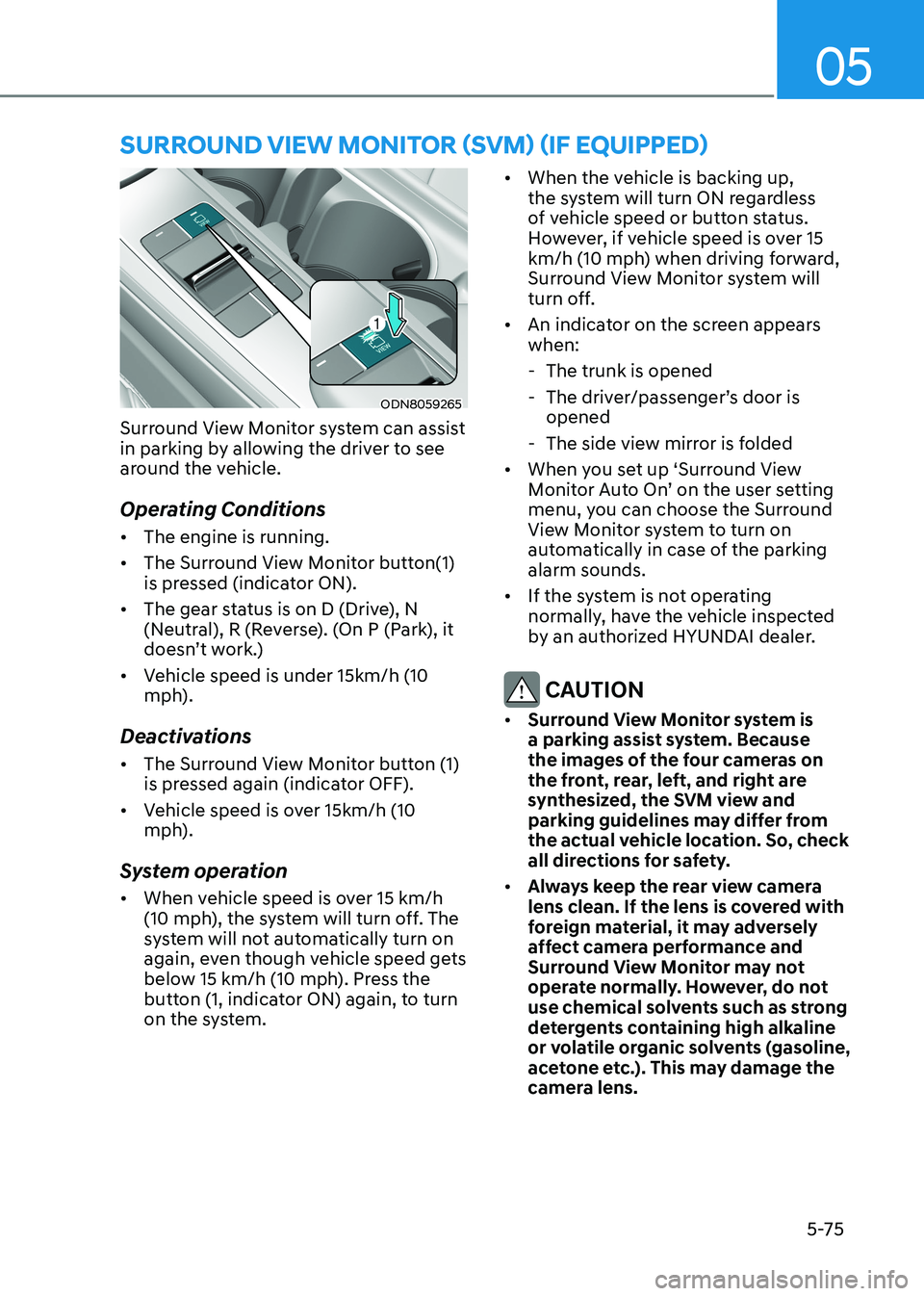
Surround View Monitor system can assist
in parking by allowing the driver to see
around the vehicle.
Operating Conditions • The engine is running.
• The Surround View Monitor button(1)
is pressed (indicator ON).
• The gear status is on D (Drive), N
(Neutral), R (Reverse). (On P (Park), it
doesn’t work.)
• Vehicle speed is under 15km/h (10
mph).
Deactivations • The Surround View Monitor button (1)
is pressed again (indicator OFF).
• Vehicle speed is over 15km/h (10
mph).
System operation • When vehicle speed is over 15 km/h
(10 mph), the system will turn off. The
system will not automatically turn on
again, even though vehicle speed gets
below 15 km/h (10 mph). Press the
button (1, indicator ON) again, to turn
on the system. •
When the vehicle is backing up,
the system will turn ON regardless
of vehicle speed or button status.
However, if vehicle speed is over 15
km/h (10 mph) when driving forward,
Surround View Monitor system will
turn off.
• An indicator on the screen appears when:
- The trunk is opened
- The driver/passenger’s door is opened
- The side view mirror is folded
• When you set up ‘Surround View
Monitor Auto On’ on the user setting
menu, you can choose the Surround
View Monitor system to turn on
automatically in case of the parking alarm sounds.
• If the system is not operating
normally, have the vehicle inspected
by an authorized HYUNDAI dealer.
CAUTION
• Surround View Monitor system is
a parking assist system. Because
the images of the four cameras on
the front, rear, left, and right are
synthesized, the SVM view and
parking guidelines may differ from
the actual vehicle location. So, check
all directions for safety.
• Always keep the rear view camera
lens clean. If the lens is covered with
foreign material, it may adversely
affect camera performance and
Surround View Monitor may not
operate normally. However, do not
use chemical solvents such as strong
detergents containing high alkaline
or volatile organic solvents (gasoline,
acetone etc.). This may damage the
camera lens.
Page 223 of 555
05
5-77
Operating conditions
Reverse Parking Collision-Avoidance
Assist system enters the ready status,
when 'Active Assist' or 'Warning Only' is
selected in the AVN system screen and
the following conditions are satisfied:
• The trunk is closed
• The shift lever is in R (Reverse)
• Vehicle speed is below 10 km/h (6 mph)
• System components such as the rear
view camera and the rear ultrasonic
sensors are in normal conditions
The driver needs to select 'Active Assist'
on the LCD display or infotainment
system display for collision-avoidance
assist.
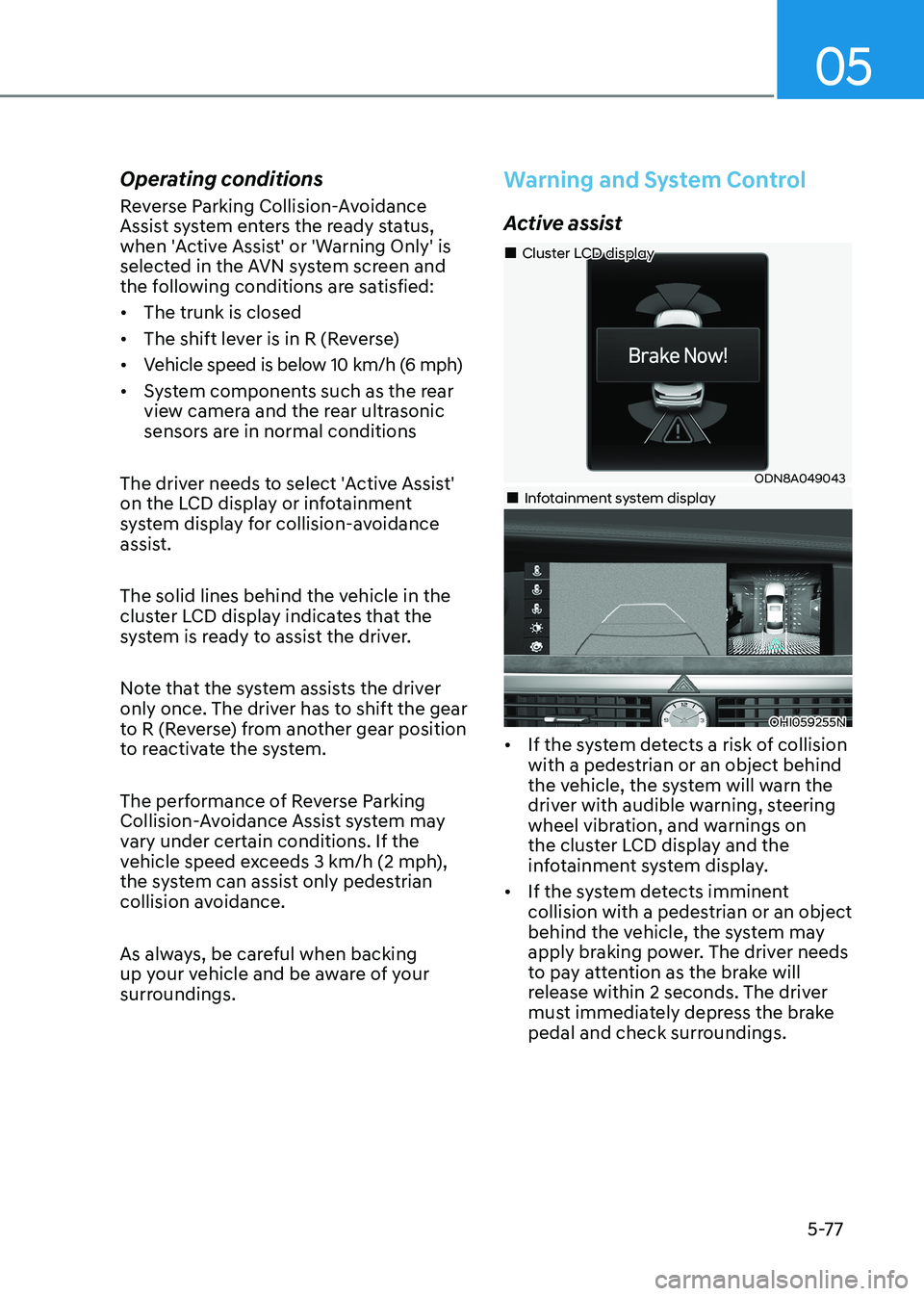
The solid lines behind the vehicle in the
cluster LCD display indicates that the
system is ready to assist the driver.
Note that the system assists the driver
only once. The driver has to shift the gear
to R (Reverse) from another gear position
to reactivate the system.
The performance of Reverse Parking
Collision-Avoidance Assist system may
vary under certain conditions. If the
vehicle speed exceeds 3 km/h (2 mph),
the system can assist only pedestrian
collision avoidance.
As always, be careful when backing
up your vehicle and be aware of your
surroundings.
Warning and System Control
Active assist
ODN8A049043
„
„Cluster LCD display
„„Infotainment system display
OHI059255N
• If the system detects a risk of collision with a pedestrian or an object behind
the vehicle, the system will warn the
driver with audible warning, steering
wheel vibration, and warnings on
the cluster LCD display and the
infotainment system display.
• If the system detects imminent collision with a pedestrian or an object
behind the vehicle, the system may
apply braking power. The driver needs
to pay attention as the brake will
release within 2 seconds. The driver
must immediately depress the brake
pedal and check surroundings.