radio Hyundai Sonata
[x] Cancel search | Manufacturer: HYUNDAI, Model Year: , Model line: , Model:Pages: 380, PDF Size: 7.97 MB
Page 189 of 380
4 109
Features of your vehicle
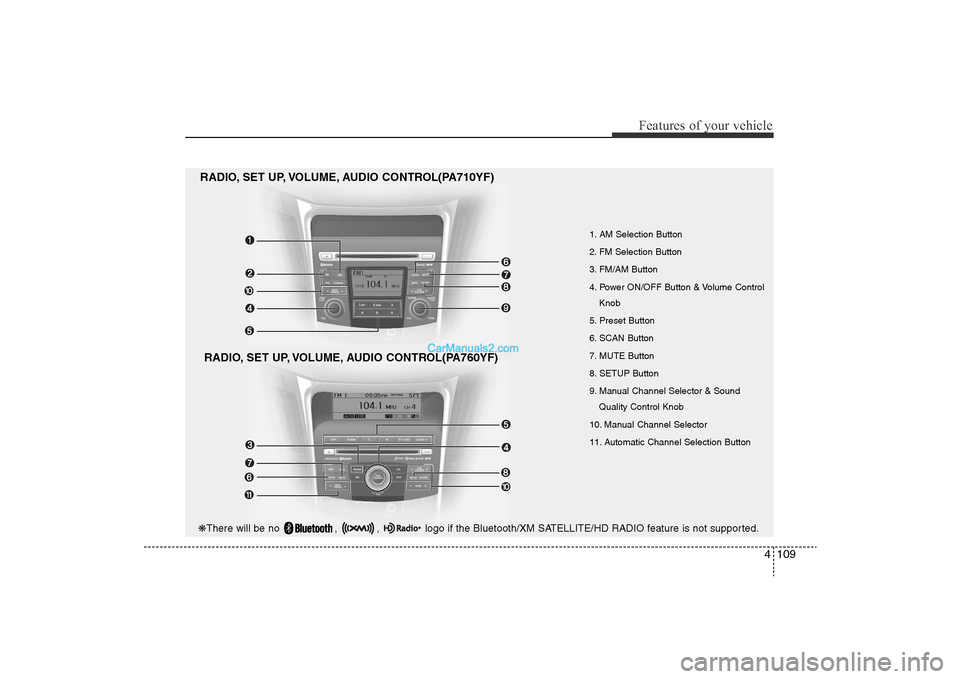
1. AM Selection Button
2. FM Selection Button
3. FM/AM Button
4. Power ON/OFF Button & Volume ControlKnob
5. Preset Button
6. SCAN Button
7. MUTE Button
8. SETUP Button
9. Manual Channel Selector & Sound Quality Control Knob
10. Manual Channel Selector
11. Automatic Channel Selection Button
RADIO, SET UP, VOLUME, AUDIO CONTROL(PA710YF)
RADIO, SET UP, VOLUME, AUDIO CONTROL(PA760YF)
❋ There will be no , , logo if the Bluetooth/XM SATELLITE/HD RADIO feature is not supported.
YF HMA 4-104~(AUDIO).QXP 12/24/2009 5:21 PM Page 109
Page 190 of 380
![Hyundai Sonata
Features of your vehicle110
41. AM Selection ButtonPressing the [AM] button selects the AM
band. AM Mode is displayed on the LCD.2. FM Selection ButtonTurns to FM mode and toggles FM1and
FM2 when the](/img/35/16817/w960_16817-189.png "Hyundai Sonata
Features of your vehicle110
41. AM Selection ButtonPressing the [AM] button selects the AM
band. AM Mode is displayed on the LCD.2. FM Selection ButtonTurns to FM mode and toggles FM1and
FM2 when the")
Features of your vehicle110
41. AM Selection ButtonPressing the [AM] button selects the AM
band. AM Mode is displayed on the LCD.2. FM Selection ButtonTurns to FM mode and toggles FM1and
FM2 when the button is pressed each
time.3. FM/AM ButtonTurns to FM or AM mode, and toggles in
the order of FM1
➟FM2
➟AM
➟FM1...
when the button is pressed each time.
4.
Power ON/OFF Button & VolumeControl Knob
Turns on/off the set when the IGNITION
SWITCH is on ACC or ON. If the button
is turned to the right, it increases the vol-
ume and left,decreases the volume.
• Adjusts the volume of the car audio system. Rotate clockwise to increase
the volume or counterclockwise to
decrease.
5. Preset ButtonPush [1]~[6] buttons less than 0.8 sec-
ond to play the channel saved in each
button.Push Preset button for 0.8 second
or longer to save current channel to the
respective button with a beep.6. SCAN Button• When the button is pressed, it automat-ically scans the radio stations upwards.
• The SCAN feature steps through each station, starting from the initial station,
for ten seconds.
• press the [SCAN] button again to stop the scan feature and to listen to the cur-
rently selected channel.7. MUTE ButtonPress the button to mute the sound.
8. SETUP Button
Press this button to turn to the XM option
and the other adjustment mode.
If no action is taken for 5 seconds after
pressing the button, it will return to the
play mode.(After entering SEPUP mode,
move between items using the left, right
and PUSH functions of the [TUNE]
knob.)
The setup changes in the order of TEXT
SCROLL
➟AV C
➟BT
➟XM
In case of PA760YF, Using the
[ FOLDER ] and [ENTER] button.
The setup Change in the order of
SOUND
➟XM
➟HD RADIO
➟ AVC
➟ CLOCK
➟SCROLL
➟PHONE
➟RETURN
• SCROLL
ters longer than the LCD text display
and can be turned ON/OFF through the
sound quality control knob.
(For PA760YF, Press the [ FOLDER ]
button.)
YF HMA 4-104~(AUDIO).QXP 12/24/2009 5:21 PM Page 110
Page 191 of 380
4 111
Features of your vehicle
• AVCThis funtion automatically adjusts the
volume level according to the speed of
the vehicle and can be turned ON/OFF
through the sound quality control knob.
(For PA760YF, Press the [ FOLDER ]
button.)
• SOUND
Pressing the [ FOLDER ] button
to select the sound the following order
: Sound Setup, Variable EQ Select the
Sound Setup and press [ENTER] the
button to set.
Pressing the [ENTER] button to adjust
the Sound Setup the following order :
BASS, MIDDLE, TREBLE, FADER,
BALANCE. Select the BASS and press
the [ FOLDER ] button to set.
Use the same method to adjust MID-
DLE, TREBLE, FADER, BALANCE
and press the button to [ENTER] com-
plete and exit from Sound Setup adjust-
ment mode.
• Variable EQ
to Select the sound the following order
: Sound Setup, Variable EQ Select the
Variable EQ and press the [ENTER]
button to set. Pressing the [ FOLDER ] button
to select the Variable EQ the following
order : Normal, Powerful, Concert
Select and press the [ENTER] button to
complete and exit from Variable EQ set
up mode.
• XM It will be able to change the XM display.
ex) Display by category/channel or
artist/song title.
Select the XM Display through the
[ FOLDER ] button(for PA710YF,
Turn the control knob), and press the
[ENTER] button(for PA710YF, press
[TUNE] knob) to complete and exit
XM setup mode.
• HD RADIO This funtion is used to enable FM/AM
HD RADIO receptions, and detail dis-
play. Press the [ FOLDER ] button
to select the HD RADIO setup the fol-
lowing order : HD RADIO FM, HD
RADIO AM, Details. Press the [ENTER]
button to the HD RADIO setup and can
be turned ON/OFF through the [
FOLDER ] button.
Press the [ENTER] button to complete
and exit HD RADIO setup mode. • CLOCK
Pressing the [ FOLDER ] button
to adjust the clock in the following
order: CLOCK SET, TIME FORMAT,
RETURN. Adjust the CLOCK SET and
press [ENTER] button to set.
Use the same method to adjust TIME
FORMAT and press the [ENTER] but-
ton to complete and exit and from clock
adjustment mode.
9. Manual Channel Selector & Sound Quality Control Knob Turn this control while listening to a radio
channel to manually adjust frequency.
Turn clockwise to increase frequency and
counterclockwise to reduce frequency.
Pressing the button changes the BASS,
MIDDLE, TREBLE, FADER and BAL-
ANCE TUNE mode.
The mode selected is shown on the dis-
play. After selecting each mode, rotate
the Audio control knob clockwise or
counterclockwise.
BASS Control
To increase the BASS, rotate the knob
clockwise, while to decrease the BASS,
rotate the knob counterclockwise.
YF HMA 4-104~(AUDIO).QXP 12/24/2009 5:21 PM Page 111
Page 192 of 380
Features of your vehicle112
4MIDDLE Control
To increase the MIDDLE, rotate the knob
clockwise, while to decrease the MID-
DLE, rotate the knob counterclockwise.
TREBLE Control
To increase the TREBLE, rotate the knob
clockwise, while to decrease the TRE-
BLE, rotate the knob counterclockwise.
FADER Control
Turn the control knob clockwise to
emphasize rear speaker sound(front
speaker sound will be attenuated).
When the control knob is turned counter-
clockwise, front speaker sound will be
emphasized(rear speaker sound will be
attenuated).
BALANCE Control
Rotate the knob clockwise to emphasize
right speaker sound(left speaker sound
will be attenuated).
When the control knob is turned counter
clockwise, left speaker sound will be
emphasized(right speaker sound will be
attenuated).
10. Manual Channel Selector Press the [ FOLDER ] button while
listening to a radio channel to manually
adjust frequency.11. Automatic Channel Selection
Button• When the [SEEK ] button is pressed,
it increases the band frequency to auto-
matically select channel. Stops at the
previous frequency if no channel is
found.
• When the [TRACK ] button is press- ed, it reduces the band frequency to
automatically select channel. Stops at
the previous frequency if no channel is
found.
YF HMA 4-104~(AUDIO).QXP 12/24/2009 5:21 PM Page 112
Page 193 of 380
4 113
Features of your vehicle
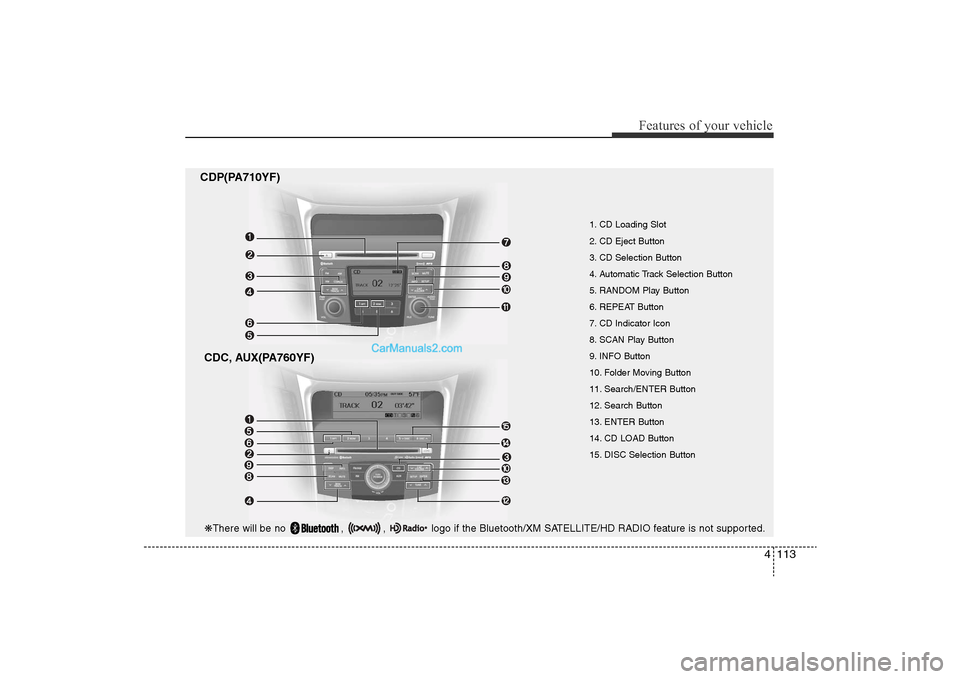
CDP(PA710YF)CDC, AUX(PA760YF)
1. CD Loading Slot
2. CD Eject Button
3. CD Selection Button
4. Automatic Track Selection Button
5. RANDOM Play Button
6. REPEAT Button
7. CD Indicator Icon
8. SCAN Play Button
9. INFO Button
10. Folder Moving Button
11. Search/ENTER Button
12. Search Button
13. ENTER Button
14. CD LOAD Button
15. DISC Selection Button
❋ There will be no , , logo if the Bluetooth/XM SATELLITE/HD RADIO feature is not supported.
YF HMA 4-104~(AUDIO).QXP 12/24/2009 5:21 PM Page 113
Page 196 of 380
Features of your vehicle116
4
CAUTION IN USING
USB DEVICE
• To use an external USB device,
make sure the device is not con-nected when starting up the vehi- cle. Connect the device afterstarting up.
• If you start the engine when the USB device is connected, it maydamage the USB device. (USBflashdrives are very sensitive to electric shock.)
• If the engine is started up or turned off while the external USBdevice is connected, the externalUSB device may not work.
• It may not play inauthentic MP3 or WMA files.
1) It can only play MP3 files with the compression rate between8Kbps~320Kbps.
2) It can only play WMA music files with the compression ratebetween 8Kbps~320Kbps.
• Take precautions for static electrici- ty when connecting or disconnect-ing the external USB device.
(Continued)
(Continued)• An encoded MP3 PLAYER is not recognizable.
• Depending on the condition of the external USB device, the con-nected external USB device can be unrecognizable.
• When the formatted byte/sector setting of External USB devices isnot either 512BYTE or 2048BYTE,then the device will not be recog-nized.
• Use only a USB device formatted to FAT 12/16/32.
• USB devices without USB I/F authentication may not be recog-nizable.
• Make sure the USB connection terminal does not come in contactthe human body or other objects.
• If you repeatedly mounting and unmounting the USB device in ashort period of time, it may break-the device.
• You may hear a strange noise when connecting or disconnect-ing a USB device.
(Continued)
(Continued)• If you disconnect the external USB device during playback in USBmode, the external USB device canbe damaged or may malfunction. Therefore, connect the externalUSB device when the audio is turned off or in another mode (e.g,Radio, XM or CD).
• Depending on the type and capac- ity of the external USB device orthe type of the files stored in the device, there is a difference in thetime taken for recognition of the device.
• Do not use the USB device for pur- pose other than playing music files.
• Use of USB accessories such as rechargers or heaters using USBI/F may lower performance orcause trouble.
• If you use devices such as a USB hub purchased separately, thevehicle’s audio system may notrecognize the USB device. In that case, connect the USB devicedirectly to the multimedia termi- nal of the vehicle.
(Continued)
YF HMA 4-104~(AUDIO).QXP 12/24/2009 5:21 PM Page 116
Page 198 of 380
Features of your vehicle118
4
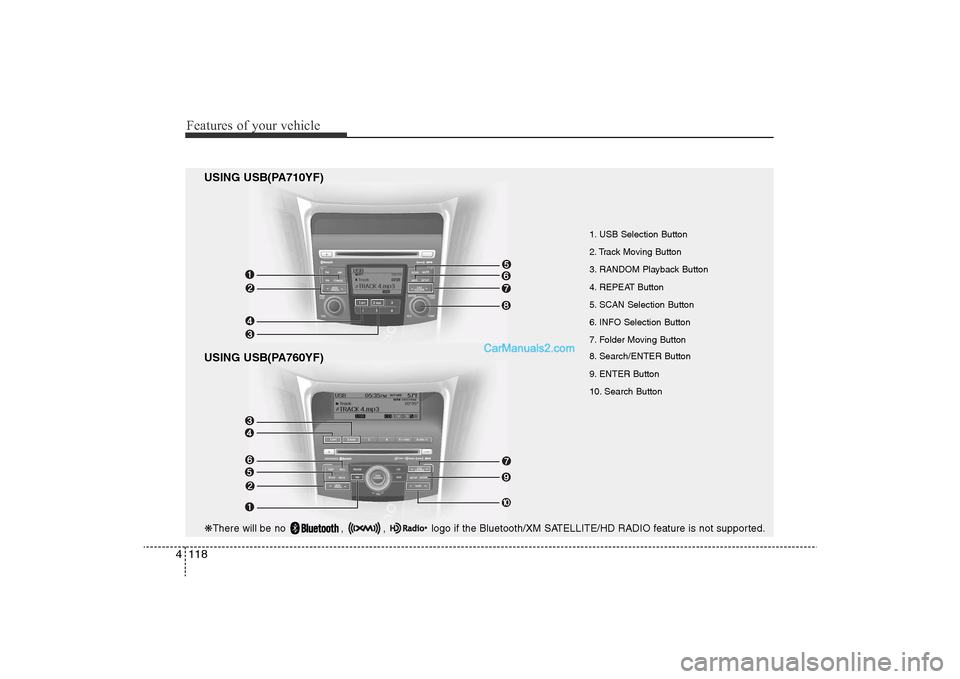
USING USB(PA710YF)
USING USB(PA760YF)
1. USB Selection Button
2. Track Moving Button
3. RANDOM Playback Button
4. REPEAT Button
5. SCAN Selection Button
6. INFO Selection Button
7. Folder Moving Button
8. Search/ENTER Button
9. ENTER Button
10. Search Button
❋ There will be no , , logo if the Bluetooth/XM SATELLITE/HD RADIO feature is not supported.
YF HMA 4-104~(AUDIO).QXP 12/24/2009 5:21 PM Page 118
Page 202 of 380
Features of your vehicle122
4
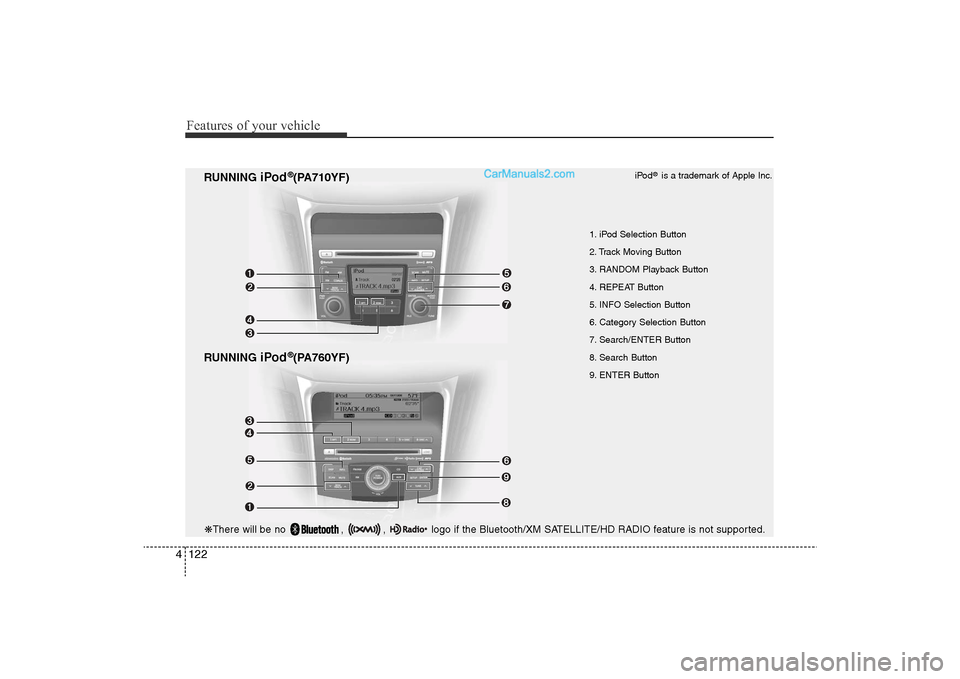
RUNNING
iPod
®(PA760YF)
RUNNING
iPod
®(PA710YF)
1. iPod Selection Button
2. Track Moving Button
3. RANDOM Playback Button
4. REPEAT Button
5. INFO Selection Button
6. Category Selection Button
7. Search/ENTER Button
8. Search Button
9. ENTER Button iPod
®is a trademark of Apple Inc.
❋
There will be no , , logo if the Bluetooth/XM SATELLITE/HD RADIO feature is not supported.
YF HMA 4-104~(AUDIO).QXP 12/24/2009 5:22 PM Page 122
Page 204 of 380
Features of your vehicle124
4
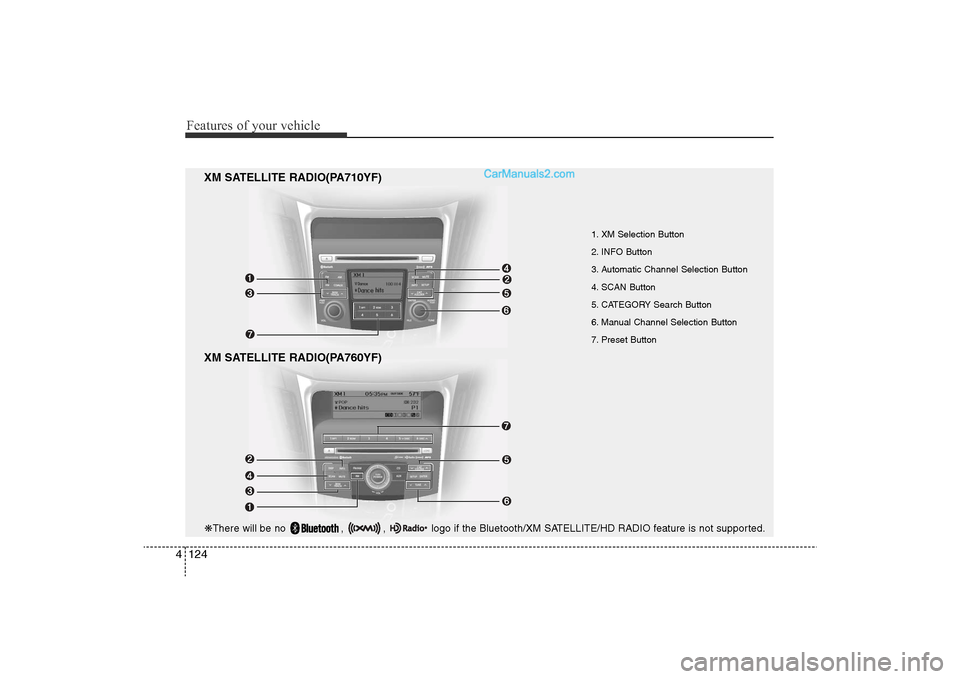
XM SATELLITE RADIO(PA760YF)
1. XM Selection Button
2. INFO Button
3. Automatic Channel Selection Button
4. SCAN Button
5. CATEGORY Search Button
6. Manual Channel Selection Button
7. Preset Button
XM SATELLITE RADIO(PA710YF)
❋ There will be no , , logo if the Bluetooth/XM SATELLITE/HD RADIO feature is not supported.
YF HMA 4-104~(AUDIO).QXP 12/24/2009 5:22 PM Page 124
Page 205 of 380
4 125
Features of your vehicle
Using XM satellite RadioYour vehicle is equipped with 3 months
complimentary period of XM Satellite
Radio. XM provides access to over 130
channels of music, information, and
entertainment programming.1. XM Selection ButtonTurns to XM Satellite Radio Mode. XM
mode toggles in order to XM1
➟XM2
➟
XM3
➟XM1... when the button is pressed
each time.
2. INFO ButtonDisplays the information of the current
channel in the order of Artist/Song title
➟
Category/Channel name
➟Current Play
Channel
➟Artist/Song title
➟Category/
Channel name... when the button is
pressed each time. The complete text
information is not displayed, rotate the
tune button to see the next page.
3. Automatic Channel Selection Button• Push [TRACK ] button for less than
0.8 second to select previous channel.
• Push [TRACK ] button for 0.8 sec- ond or longer to continuously move to
previous channel. • Push [SEEK ] button for less than
0.8 second to select next channel.
• Push [SEEK ] button for 0.8 second or longer to continuously move to next channel.
• Radio ID : Seek or Tune to XM channel 0 to display the Radio ID.
4. SCAN ButtonPress to hear a brief sampling of all
channel. To cancel the scan mode, press
the button once again.5. CATEGORY Search Button• Push [FOLDER ] button to searchprevious category.
• Push [CAT ] button to search next category. To listen to the displayed cat-
egory, press the TUNE/SETUP but-
ton(for PA760YF, press [ENTER] but-
ton). To scan channel in displayed cat-
egory, press the scan button.
To search channel in displayed catego-
ry, press seek buttons or turn the tune
button clockwise/counterclockwise(for
PA760YF, press [ TUNE ]).
(CATEGORY icon is will be turned on
in Category mode)
6. Manual Channel Selection Button
While listening to XM broadcast, rotate
this control to the right or left to search
other channels while listening to current
channel. (Turn to the right to searchhigh-
er channels and left, lower channels)
In case of PA760YF, press the
[TUNE ] button to search higher chan-
nels and the [ TUNE] button, lower
channels.7. Preset ButtonPush [1]~[6] buttons less than 0.8 sec-
ond to play the channel saved in each
button. Push Preset button for 0.8 sec-
ond or longer to save current channel to
the respective button with a beep.
YF HMA 4-104~(AUDIO).QXP 12/24/2009 5:22 PM Page 125