Econ HYUNDAI SONATA HYBRID 2014 Repair Manual
[x] Cancel search | Manufacturer: HYUNDAI, Model Year: 2014, Model line: SONATA HYBRID, Model: HYUNDAI SONATA HYBRID 2014Pages: 410, PDF Size: 17.26 MB
Page 227 of 410
Features of your vehicle
146
4
Phone
Before using the
Bluetooth
®
Wireless
Technology enabled phone features
In order to use
Bluetooth
®
Wireless
Technology phone, you must first pair
and connect the
Bluetooth
®
Wireless
Technology mobile phone.
If the mobile phone is not paired or
connected, it is not possible to enter
Phone mode. Once a phone is paired
or connected, the guidance screen will
be displayed.
If Priority is set upon vehicle ignition
(IGN/ACC ON), the
Bluetooth
®
Wireless Technology enabled phone
will be automatically connected. Even if
you are outside, the
Bluetooth
®
Wireless Technology enabled phone
will be automatically connected once
you are in the vicinity of the vehicle. If
you do not want automatic
Bluetooth
®
Wireless Technology enabled phone
connection, set the
Bluetooth
®
Wireless Technology power to OFF.
Making a call using the steering
wheel remote controller
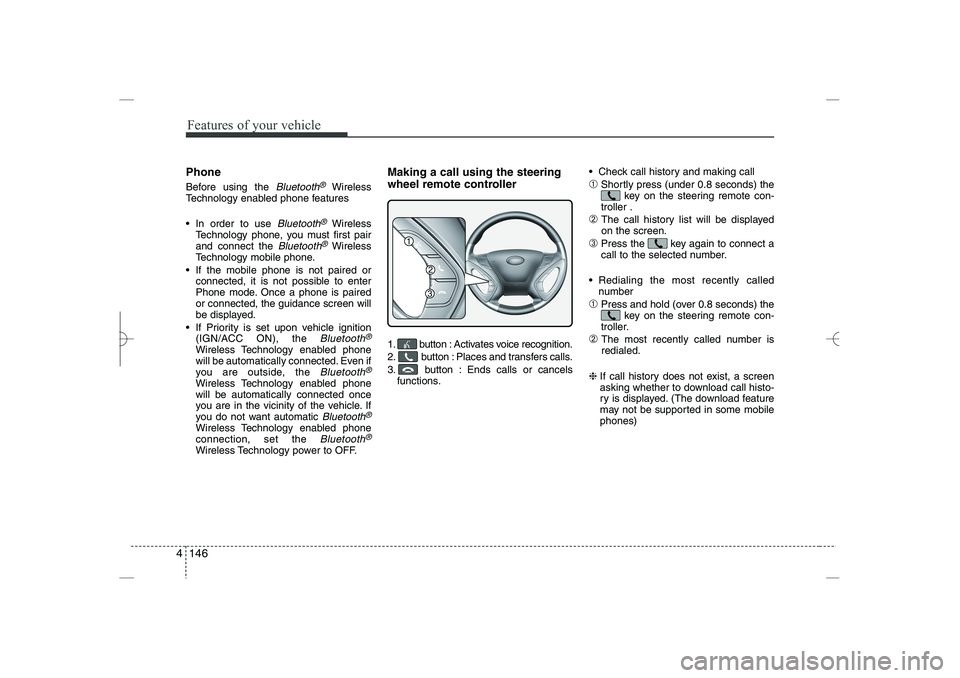
1. button : Activates voice recognition.
2. button : Places and transfers calls.
3. button : Ends calls or cancels
functions.
Check call history and making call
➀
Shortly press (under 0.8 seconds) the
key on the steering remote con-
troller .
➁
The call history list will be displayed
on the screen.
➂
Press the key again to connect a
call to the selected number.
Redialing the most recently called
number
➀
Press and hold (over 0.8 seconds) the
key on the steering remote con-
troller.
➁
The most recently called number is
redialed.
❈
If call history does not exist, a screen
asking whether to download call histo-
ry is displayed. (The download feature
may not be supported in some mobile
phones)
YF HMA 4b-112~(Audio).qxp 3/5/2012 4:24 PM Page 146
Page 231 of 410
![HYUNDAI SONATA HYBRID 2014 Repair Manual
Features of your vehicle
150
4
VOICE COMMAND
Starting Voice Command
To start voice command, shortly press
the key on the steering wheel
remote controller.
If voice command is in [Normal Mode],](/img/35/58887/w960_58887-230.png "HYUNDAI SONATA HYBRID 2014 Repair Manual
Features of your vehicle
150
4
VOICE COMMAND
Starting Voice Command
To start voice command, shortly press
the key on the steering wheel
remote controller.
If voice command is in [Normal Mode],")
Features of your vehicle
150
4
VOICE COMMAND
Starting Voice Command
To start voice command, shortly press
the key on the steering wheel
remote controller.
If voice command is in [Normal Mode],
then the system will say “Please say a
command. Beep”
❈
If voice command is in [Expert Mode],
then the system will only say a “Beep-”
❈
Setting Voice command [Normal
Mode]/[Expert Mode]:
Press the key Select [System]
through the TUNE knob or
key Select [Voice Command Mode]
through the TUNE knob Set [Normal
Mode]/[Expert Mode]
Say the voice command.
Skipping the Guidance Message
While the guidance message is being
stated, shortly press the key (under
0.8 seconds) to discontinue the guidance
message and sound the “beep”.
After the “beep”, say the voice command.
Ending Voice Command
While using voice command, press and
hold the key (over 0.8 seconds) to
end voice command.
While using voice command, pressing
the steering wheel remote controller or
a different key will end voice command.
In a state where the system is waiting
for your voice command, say “cancel”
or “end” to end voice command.
In a state where the system is waiting
for your voice command, shortly press
the key (under 0.8 seconds) to
end voice command.
5
SETUP
CAUTION
For proper voice recognition, say the
voice command after the guidance
message and the “Beep” sound.
YF HMA 4b-112~(Audio).qxp 3/5/2012 4:24 PM Page 150
Page 233 of 410
Features of your vehicle
152
4
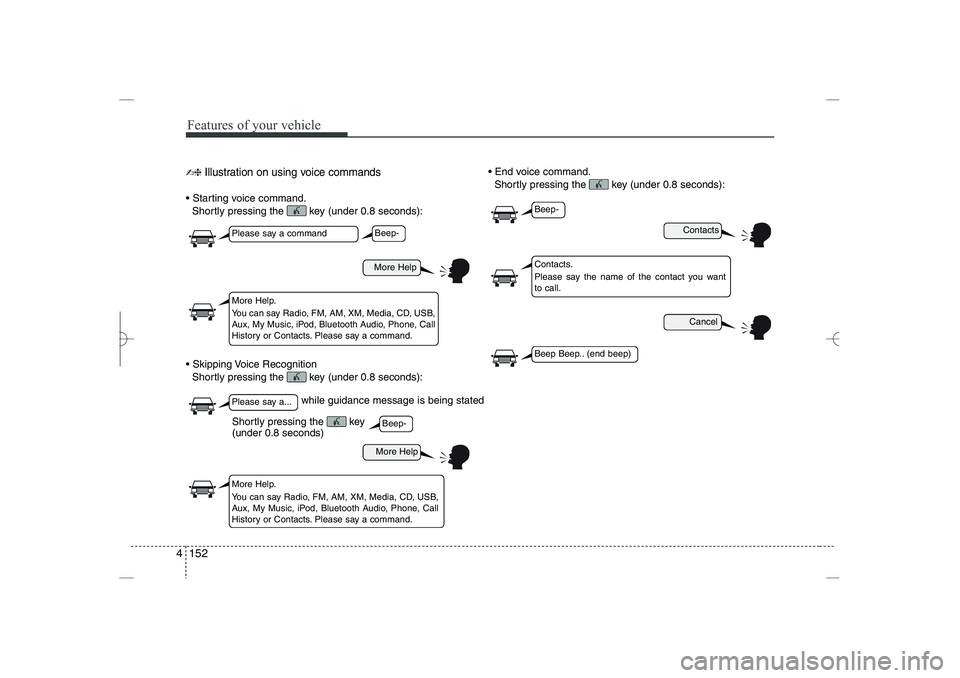
✍❈
Illustration on using voice commands
Starting voice command.
Shortly pressing the key (under 0.8 seconds):
Skipping Voice Recognition
Shortly pressing the key (under 0.8 seconds):
End voice command.
Shortly pressing the key (under 0.8 seconds):
while guidance message is being stated
More Help
Contacts
Cancel
More Help
Please say a command
Please say a...
More Help.
You can say Radio, FM, AM, XM, Media, CD, USB,
Aux, My Music, iPod, Bluetooth Audio, Phone, Call
History or Contacts. Please say a command.
Contacts.
Please say the name of the contact you want
to call.
More Help.
You can say Radio, FM, AM, XM, Media, CD, USB,
Aux, My Music, iPod, Bluetooth Audio, Phone, Call
History or Contacts. Please say a command.
Beep-
Beep-
Beep-
Beep Beep.. (end beep)
Shortly pressing the key
(under 0.8 seconds)
YF HMA 4b-112~(Audio).qxp 3/5/2012 4:24 PM Page 152
Page 236 of 410
4 155
Features of your vehicle
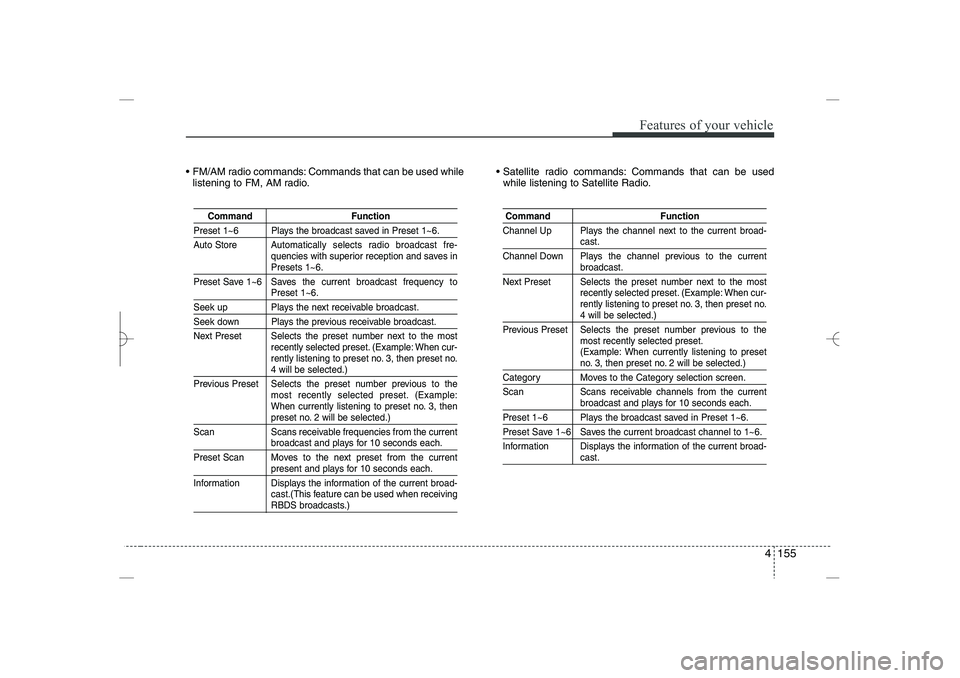
FM/AM radio commands: Commands that can be used while
listening to FM, AM radio.
Satellite radio commands: Commands that can be used
while listening to Satellite Radio.
Command
Function
Preset 1~6 Plays the broadcast saved in Preset 1~6.
Auto Store A
utomatically selects radio broadcast fre-
quencies with superior reception and saves in
Presets 1~6.
Preset Save 1~6 Saves the current broadcast frequency to
Preset 1~6.
Seek up Plays the next receivable broadcast.
Seek down Plays the previous receivable broadcast.
Next Preset Selects the preset number next to the most
recently selected preset. (Example: When cur-
rently listening to preset no. 3, then preset no.
4 will be selected.)
Previous Preset Selects the preset number previous to the
most recently selected preset. (Example:
When currently listening to preset no. 3, then
preset no. 2 will be selected.)
Scan Scans receivable frequencies from the current
broadcast and plays for 10 seconds each.
Preset Scan Moves to the next preset from the current
present and plays for 10 seconds each.
Information Displays the information of the current broad-
cast.(This feature can be used when receiving
RBDS broadcasts.)
Command
Function
Channel Up Plays the channel next to the current broad-
cast.
Channel Down Plays the channel previous to the current
broadcast.
Next Preset Selects the preset number next to the most
recently selected preset. (Example: When cur-
rently listening to preset no. 3, then preset no.
4 will be selected.)
Previous Preset Selects the preset number previous to the
most recently selected preset.
(Example: When currently listening to preset
no. 3, then preset no. 2 will be selected.)
Category Moves to the Category selection screen.
Scan Scans receivable channels from the current
broadcast and plays for 10 seconds each.
Preset 1~6 Plays the broadcast saved in Preset 1~6.
Preset Save 1~6 Saves the current broadcast channel to 1~6.
Information Displays the information of the current broad-
cast.
YF HMA 4b-112~(Audio).qxp 3/5/2012 4:24 PM Page 155
Page 237 of 410
Features of your vehicle
156
4
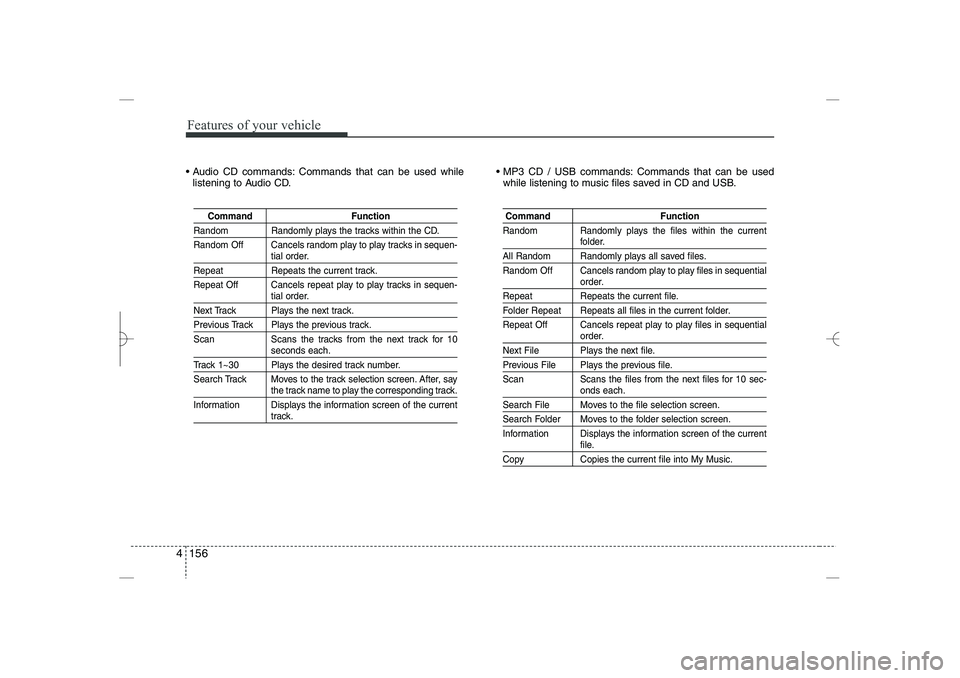
Audio CD commands: Commands that can be used while
listening to Audio CD.
MP3 CD / USB commands: Commands that can be used
while listening to music files saved in CD and USB.
Command
Function
Random Randomly plays the tracks within the CD.
Random Off Cancels random play to play tracks in sequen-
tial order.
Repeat
Repeats the current track.
Repeat Off Cancels repeat play to play tracks in sequen-
tial order.
Next Track Plays the next track.
Previous Track Plays the previous track.
Scan Scans the tracks from the next track for 10
seconds each.
Track 1~30 Plays the desired track number.
Search Track Moves
to the track selection screen. After, say
the track name to play the corresponding track.
Information Displays the information screen of the current
track.
Command
Function
Random Randomly plays the files within the current
folder.
All Random Randomly plays all saved files.
Random Off Cancels random play to play files in sequential
order.
Repeat
Repeats the current file.
Folder Repeat Repeats all files in the current folder.
Repeat Off Cancels repeat play to play files in sequential
order.
Next File Plays the next file.
Previous File Plays the previous file.
Scan Scans the files from the next files for 10 sec-
onds each.
Search File Moves to the file selection screen.
Search Folder Moves to the folder selection screen.
Information Displays the information screen of the current
file.
Copy
Copies the current file into My Music.
YF HMA 4b-112~(Audio).qxp 3/5/2012 4:24 PM Page 156
Page 242 of 410
4 161
Features of your vehicle
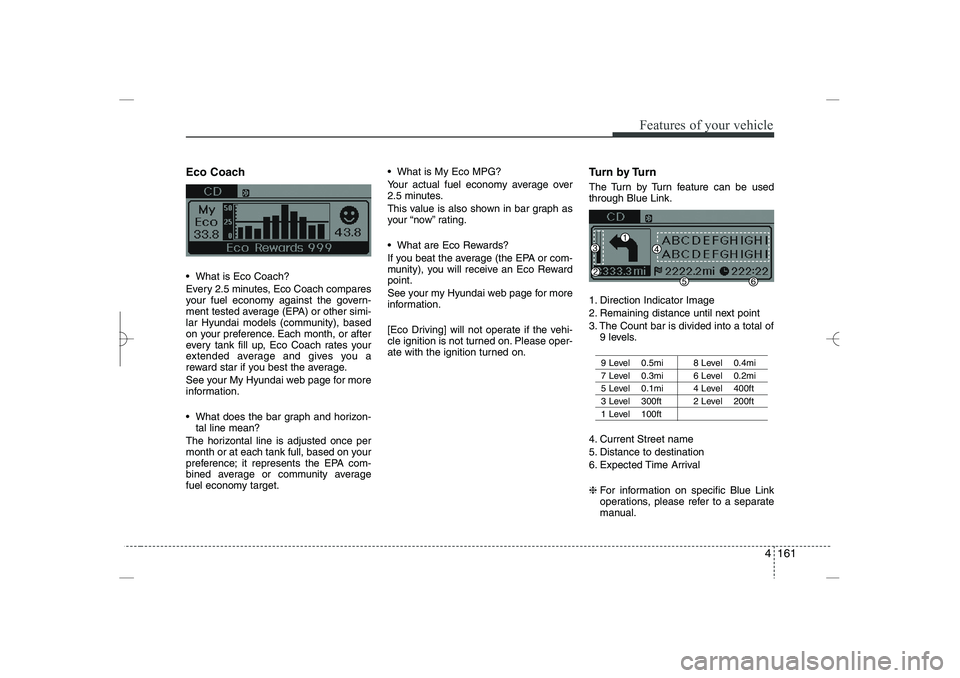
Eco Coach
What is Eco Coach?
Every 2.5 minutes, Eco Coach compares
your fuel economy against the govern-
ment tested average (EPA) or other simi-
lar Hyundai models (community), based
on your preference. Each month, or after
every tank fill up, Eco Coach rates your
extended average and gives you a
reward star if you best the average.
See your My Hyundai web page for more
information.
What does the bar graph and horizon-
tal line mean?
The horizontal line is adjusted once per
month or at each tank full, based on your
preference; it represents the EPA com-
bined average or community average
fuel economy target.
What is My Eco MPG?
Your actual fuel economy average over
2.5 minutes.
This value is also shown in bar graph as
your “now” rating.
What are Eco Rewards?
If you beat the average (the EPA or com-
munity), you will receive an Eco Reward
point.
See your my Hyundai web page for more
information.
[Eco Driving] will not operate if the vehi-
cle ignition is not turned on. Please oper-
ate with the ignition turned on.
Turn by Turn
The Turn by Turn feature can be used
through Blue Link.
1. Direction Indicator Image
2. Remaining distance until next point
3. The Count bar is divided into a total of
9 levels.
9 Level 0.5mi 8 Level 0.4mi
7 Level 0.3mi 6 Level 0.2mi
5 Level 0.1mi 4 Level 400ft
3 Level 300ft 2 Level 200ft
1 Level 100ft
4. Current Street name
5. Distance to destination
6. Expected Time Arrival
❈
For information on specific Blue Link
operations, please refer to a separate
manual.
YF HMA 4b-112~(Audio).qxp 3/5/2012 4:24 PM Page 161
Page 243 of 410
5
Before driving / 5-3
Key / 5-4
Engine start/stop button / 5-7
Manual transaxle /5-11
Automatic transaxle / 5-14
Brake system / 5-21
Cruise control system / 5-31
Active ECO system / 5-35
Economical operation / 5-36
Special driving conditions / 5-38
Winter driving / 5-42
Vehicle load limit / 5-46
Vehicle weight / 5-51
Trailer towing / 5-52
Driving your vehicle
YF HMA 5.qxp 1/16/2012 6:22 PM Page 1
Page 248 of 410
Driving your vehicle
65
Starting the engine
1. Make sure the parking brake is
applied.
2.
Manual Transaxle
- Depress the
clutch pedal fully and shift the
transaxle into Neutral. Keep the clutch
pedal and brake pedal depressed
while turning the ignition switch to the
start position.
Automatic Transaxle
- Place the
transaxle shift lever in P (Park).
Depress the brake pedal fully.
You can also start the engine when
the shift lever is in the N (Neutral)
position.
3. Turn the ignition switch to START and
hold it there until the engine starts (a
maximum of 10 seconds), then
release the key.
4. In extremely cold weather (below
0°F / -18°C) or after the vehicle has
not been operated for several days, let
the engine warm up without depress-
ing the accelerator.
Whether the engine is cold or warm, it
should be started
without depressing
the accelerator.
(Continued)
Never reach for the ignition switch,
or any other controls through the
steering wheel while the vehicle is
in motion. The presence of your
hand or arm in this area could
cause a loss of vehicle control, an
accident and serious bodily injury
or death.
Do not place any movable objects
around the driver’s seat as they
may move while driving, interfere
with the driver and lead to an acci-
dent.
WARNING
Always wear appropriate shoes
when operating your vehicle.
Unsuitable shoes (high heels, ski
boots,etc.) may interfere with your
ability to use the brake, accelerator
pedal, and clutch (if equipped).
CAUTION
If the engine stalls while the vehicle
is in motion, do not attempt to move
the shift lever to the P (Park) posi-
tion. If traffic and road conditions
permit, you may put the shift lever
in the N (Neutral) position while the
vehicle is still moving and turn the
ignition switch to the START posi-
tion in an attempt to restart the
engine.
CAUTION
Do not engage the starter for more
than 10 seconds. If the engine stalls
or fails to start, wait 5 to 10 seconds
before re-engaging the starter.
Improper use of the starter may
damage it.
YF HMA 5.qxp 1/16/2012 6:23 PM Page 6
Page 249 of 410
57
Driving your vehicle
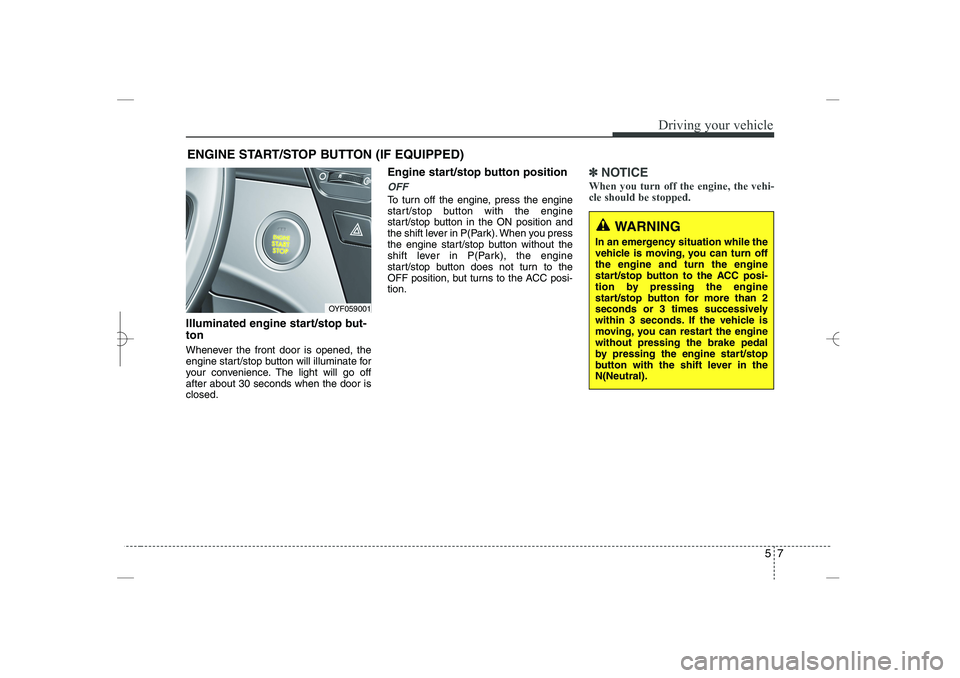
Illuminated engine start/stop but-
ton
Whenever the front door is opened, the
engine start/stop button will illuminate for
your convenience. The light will go off
after about 30 seconds when the door is
closed.
Engine start/stop button position
OFF
To turn off the engine, press the engine
start/stop button with the engine
start/stop button in the ON position and
the shift lever in P(Park). When you press
the engine start/stop button without the
shift lever in P(Park), the engine
start/stop button does not turn to the
OFF position, but turns to the ACC posi-
tion.
✽
✽
NOTICE
When you turn off the engine, the vehi-
cle should be stopped.
ENGINE START/STOP BUTTON (IF EQUIPPED)
OYF059001
WARNING
In an emergency situation while the
vehicle is moving, you can turn off
the engine and turn the engine
start/stop button to the ACC posi-
tion by pressing the engine
start/stop button for more than 2
seconds or 3 times successively
within 3 seconds. If the vehicle is
moving, you can restart the engine
without pressing the brake pedal
by pressing the engine start/stop
button with the shift lever in the
N(Neutral).
YF HMA 5.qxp 1/16/2012 6:23 PM Page 7
Page 251 of 410
59
Driving your vehicle
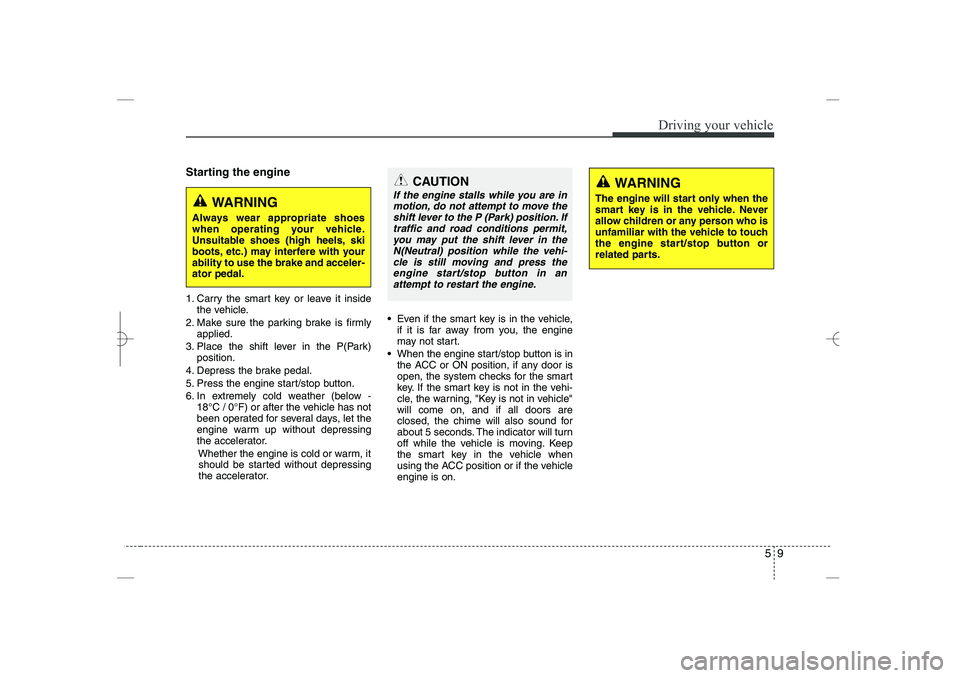
Starting the engine
1. Carry the smart key or leave it inside
the vehicle.
2. Make sure the parking brake is firmly
applied.
3. Place the shift lever in the P(Park)
position.
4. Depress the brake pedal.
5. Press the engine start/stop button.
6. In extremely cold weather (below -
18°C / 0°F) or after the vehicle has not
been operated for several days, let the
engine warm up without depressing
the accelerator.
Whether the engine is cold or warm, it
should be started without depressing
the accelerator.
Even if the smart key is in the vehicle,
if it is far away from you, the engine
may not start.
When the engine start/stop button is in
the ACC or ON position, if any door is
open, the system checks for the smart
key. If the smart key is not in the vehi-
cle, the warning, "Key is not in vehicle"
will come on, and if all doors are
closed, the chime will also sound for
about 5 seconds. The indicator will turn
off while the vehicle is moving. Keep
the smart key in the vehicle when
using the ACC position or if the vehicle
engine is on.
WARNING
Always wear appropriate shoes
when operating your vehicle.
Unsuitable shoes (high heels, ski
boots, etc.) may interfere with your
ability to use the brake and acceler-
ator pedal.
WARNING
The engine will start only when the
smart key is in the vehicle. Never
allow children or any person who is
unfamiliar with the vehicle to touch
the engine start/stop button or
related parts.
CAUTION
If the engine stalls while you are in
motion, do not attempt to move the
shift lever to the P (Park) position. If
traffic and road conditions permit,
you may put the shift lever in the
N(Neutral) position while the vehi-
cle is still moving and press the
engine start/stop button in an
attempt to restart the engine.
YF HMA 5.qxp 1/16/2012 6:23 PM Page 9