display Hyundai Sonata Hybrid 2015 Owner's Guide
[x] Cancel search | Manufacturer: HYUNDAI, Model Year: 2015, Model line: Sonata Hybrid, Model: Hyundai Sonata Hybrid 2015Pages: 543, PDF Size: 25.53 MB
Page 211 of 543
Features of your vehicle
130
4
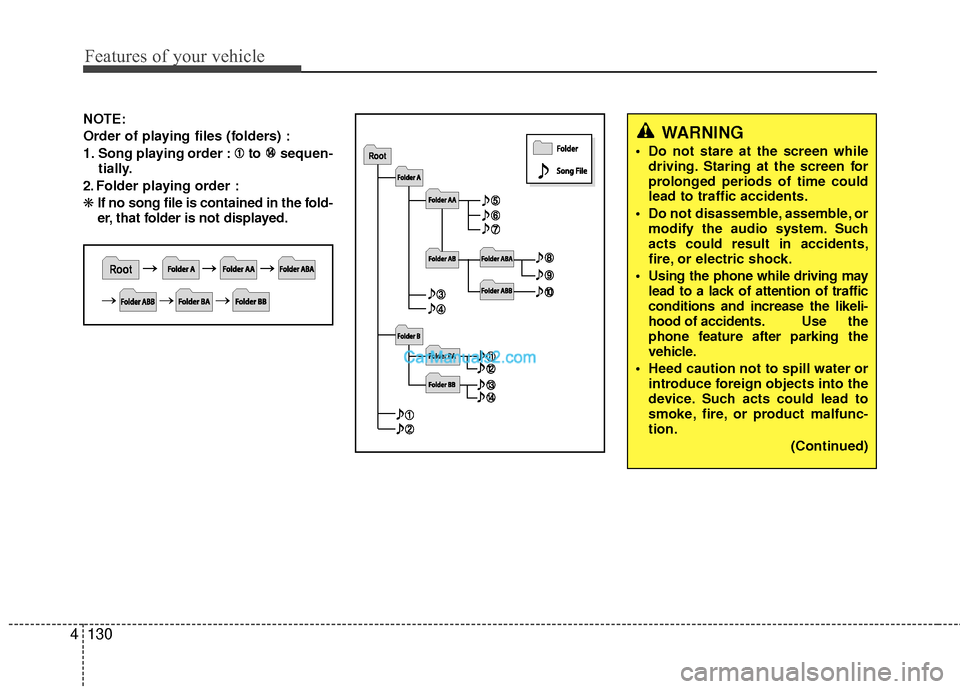
NOTE:
Order of playing files (folders) :
1. Song playing order : to sequen-
tially.
2. Folder playing order :
❋ If no song file is contained in the fold-
er, that folder is not displayed.WARNING
Do not stare at the screen while
driving. Staring at the screen for
prolonged periods of time could
lead to traffic accidents.
Do not disassemble, assemble, or modify the audio system. Such
acts could result in accidents,
fire, or electric shock.
Using the phone while driving may lead to a lack of attention of traffic
conditions and increase the likeli-
hood of accidents. Use the
phone feature after parking the
vehicle.
Heed caution not to spill water or introduce foreign objects into the
device. Such acts could lead to
smoke, fire, or product malfunc-
tion.
(Continued)
Page 221 of 543
Features of your vehicle
140
4
SYSTEM CONTROLLERS AND
FUNCTIONS
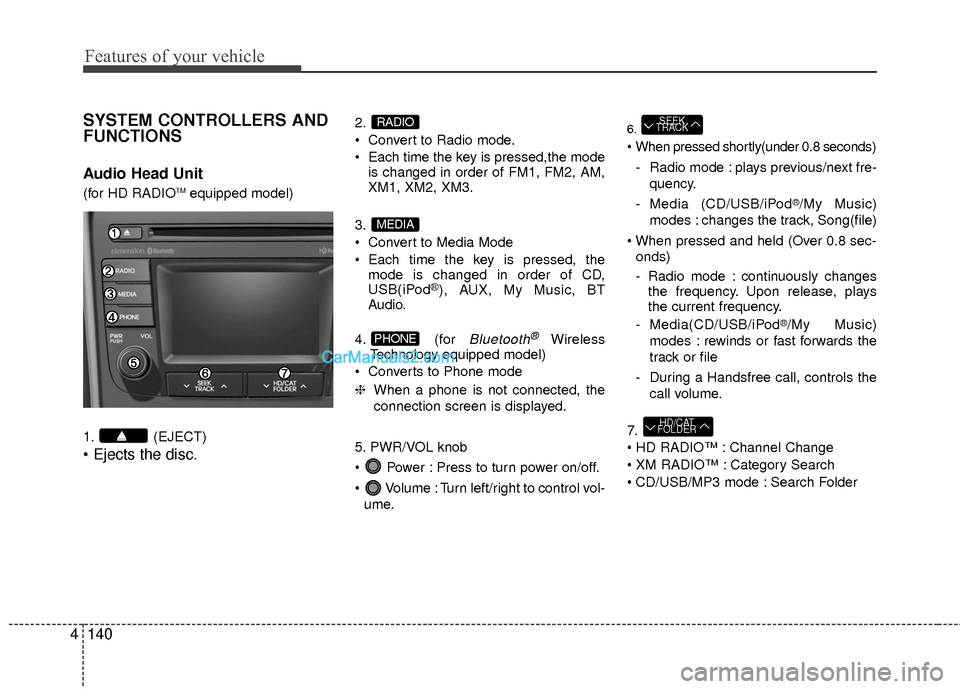
Audio Head Unit
(for HD RADIOTMequipped model)
1. (EJECT)
2.
Convert to Radio mode.
Each time the key is pressed,the mode is changed in order of FM1, FM2, AM,
XM1, XM2, XM3.
3.
Convert to Media Mode
Each time the key is pressed, the mode is changed in order of CD,
USB(iPod
®), AUX, My Music, BT
Audio.
4. (for
Bluetooth®Wireless
Technology equipped model)
Converts to Phone mode
❈ When a phone is not connected, the
connection screen is displayed.
5. PWR/VOL knob
Power : Press to turn power on/off.
Volume : Turn left/right to control vol- ume.
6.
- Radio mode : plays previous/next fre- quency.
- Media (CD/USB/iPod
®/My Music)
modes : changes the track, Song(file)
onds)
- Radio mode : continuously changes the frequency. Upon release, plays
the current frequency.
- Media(CD/USB/iPod
®/My Music)
modes : rewinds or fast forwards the
track or file
- During a Handsfree call, controls the call volume.
7.
Channel Change
Category Search
CD/USB/MP3 mode : Search Folder
HD/CAT
FOLDER
SEEK
TRACK
PHONE
MEDIA
RADIO
Page 222 of 543
4141
Features of your vehicle
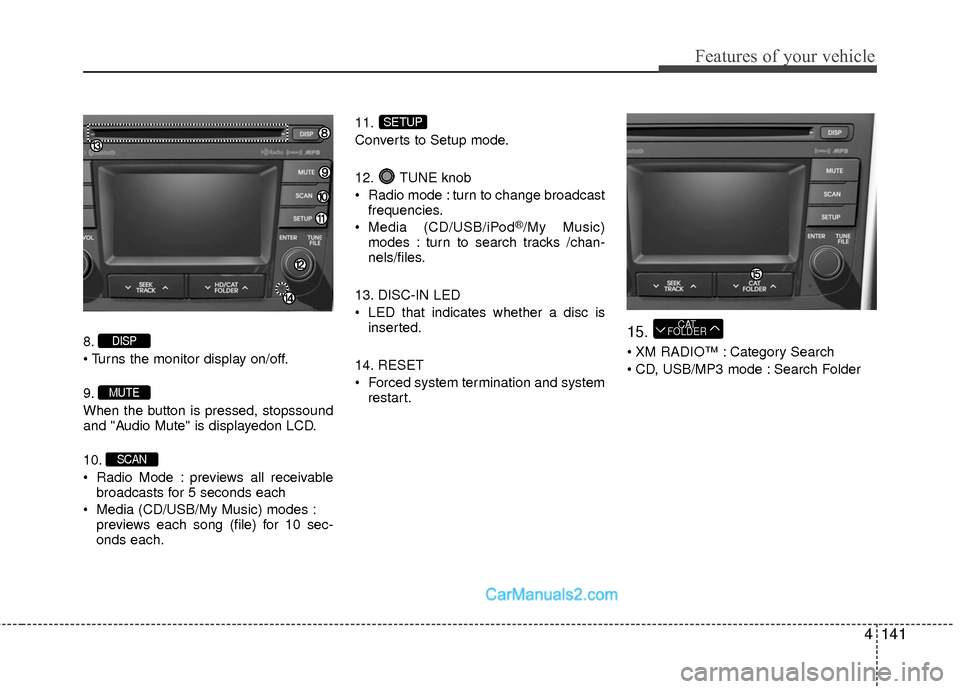
8.
9.
When the button is pressed, stopssound
and "Audio Mute" is displayedon LCD.
10.
Radio Mode : previews all receivablebroadcasts for 5 seconds each
Media (CD/USB/My Music) modes : previews each song (file) for 10 sec-
onds each. 11.
Converts to Setup mode.
12. TUNE knob
Radio mode : turn to change broadcast
frequencies.
Media (CD/USB/iPod
®/My Music)
modes : turn to search tracks /chan-
nels/files.
13. DISC-IN LED
LED that indicates whether a disc is inserted.
14. RESET
Forced system termination and system restart.
15.
XM RADIO™ : Category Search
CD, USB/MP3 mode : Search Folder
CAT
FOLDER
SETUP
SCAN
MUTE
DISP
Page 224 of 543
4143
Features of your vehicle
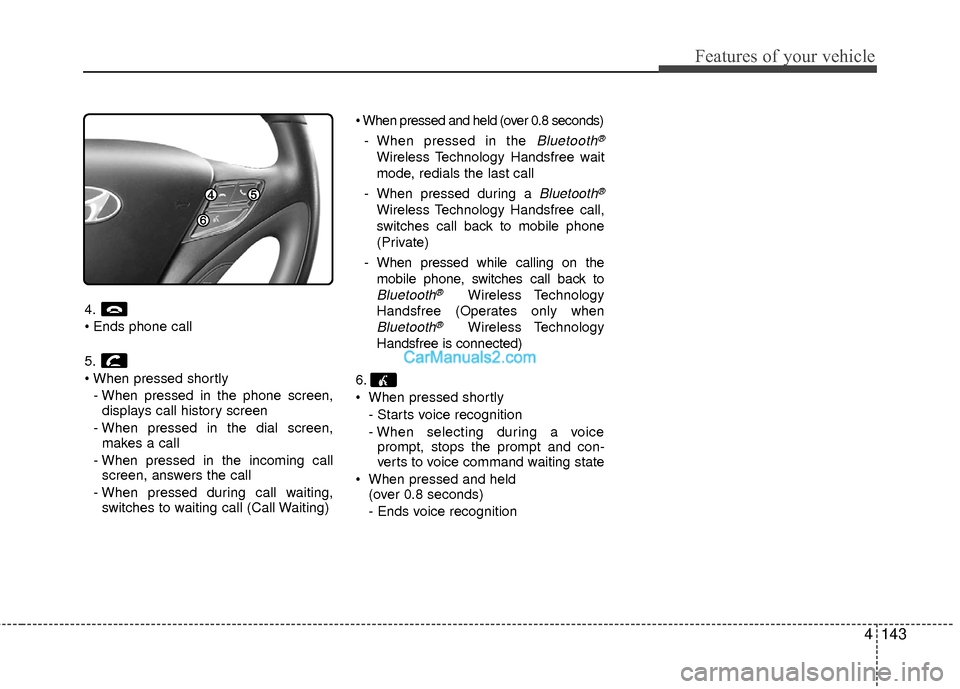
4.
5.
- When pressed in the phone screen,displays call history screen
- When pressed in the dial screen, makes a call
- When pressed in the incoming call screen, answers the call
- When pressed during call waiting, switches to waiting call (Call Waiting)
- When pressed in the
Bluetooth®
Wireless Technology Handsfree wait
mode, redials the last call
- When pressed during a
Bluetooth®
Wireless Technology Handsfree call,
switches call back to mobile phone
(Private)
- When pressed while calling on the mobile phone, switches call back to
Bluetooth®Wireless Technology
Handsfree (Operates only when
Bluetooth®Wireless Technology
Handsfree is connected)
6.
When pressed shortly - Starts voice recognition
- When selecting during a voiceprompt, stops the prompt and con-
verts to voice command waiting state
When pressed and held (over 0.8 seconds)
- Ends voice recognition
Page 226 of 543
![Hyundai Sonata Hybrid 2015 Owners Guide 4145
Features of your vehicle
RADIO MODE
Basic Mode Screen
1. Mode Display
Displays currently operating mode.
2. Frequency
Displays the current frequency.
3. Preset
Displays current preset number [1]](/img/35/19645/w960_19645-225.png "Hyundai Sonata Hybrid 2015 Owners Guide 4145
Features of your vehicle
RADIO MODE
Basic Mode Screen
1. Mode Display
Displays currently operating mode.
2. Frequency
Displays the current frequency.
3. Preset
Displays current preset number [1]")
4145
Features of your vehicle
RADIO MODE
Basic Mode Screen
1. Mode Display
Displays currently operating mode.
2. Frequency
Displays the current frequency.
3. Preset
Displays current preset number [1] ~ [6].
4. Preset Display
Displays preset buttons.
5. Info
Displays broadcast information.
6. HD
Changes HD Radio channels.
7. A.store
Automatically saves frequencies with
superior reception to Preset buttons.
Page 227 of 543
Features of your vehicle
146
4
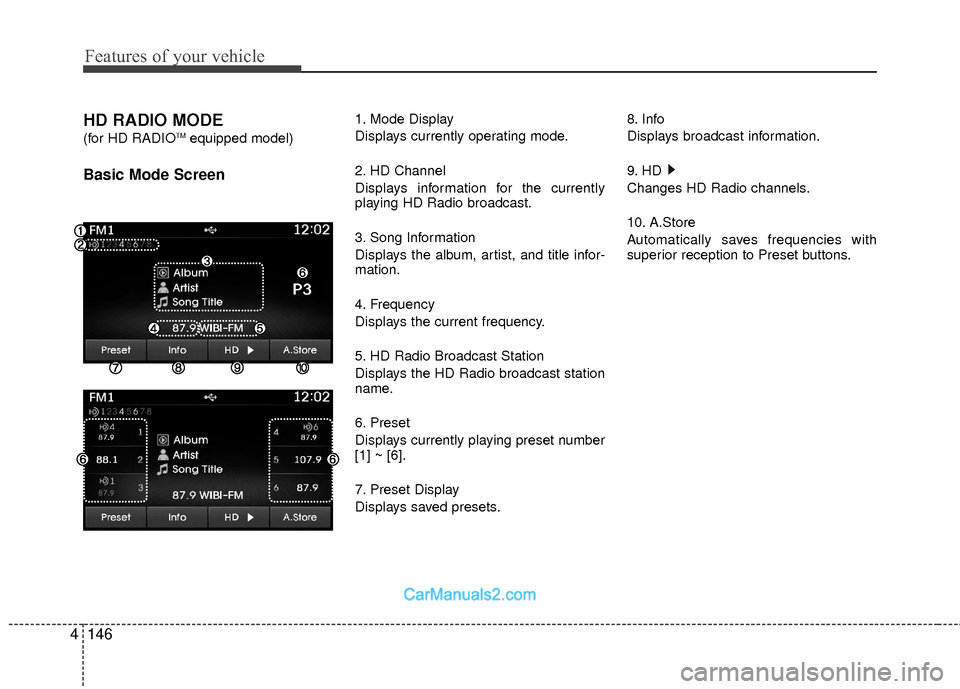
HD RADIO MODE
(for HD RADIOTMequipped model)
Basic Mode Screen
1. Mode Display
Displays currently operating mode.
2. HD Channel
Displays information for the currently
playing HD Radio broadcast.
3. Song Information
Displays the album, artist, and title infor-
mation.
4. Frequency
Displays the current frequency.
5. HD Radio Broadcast Station
Displays the HD Radio broadcast station
name.
6. Preset
Displays currently playing preset number
[1] ~ [6].
7. Preset Display
Displays saved presets. 8. Info
Displays broadcast information.
9. HD
Changes HD Radio channels.
10. A.Store
Automatically saves frequencies with
superior reception to Preset buttons.
Page 228 of 543
![Hyundai Sonata Hybrid 2015 Owners Guide 4147
Features of your vehicle
Switching to Radio Mode
Pressing the key will change the
operating mode in order of FM1
➟FM2➟AM➟XM1➟XM2➟XM3
If [Mode Pop up] is turned on within [Display], the](/img/35/19645/w960_19645-227.png "Hyundai Sonata Hybrid 2015 Owners Guide 4147
Features of your vehicle
Switching to Radio Mode
Pressing the key will change the
operating mode in order of FM1
➟FM2➟AM➟XM1➟XM2➟XM3
If [Mode Pop up] is turned on within [Display], the")
4147
Features of your vehicle
Switching to Radio Mode
Pressing the key will change the
operating mode in order of FM1
➟FM2➟AM➟XM1➟XM2➟XM3
If [Mode Pop up] is turned on within [Display], then pressing the
key will display the Radio Pop-
up Mode screen.
Turn the TUNE knob to move the
focus. Press the knob to select.
Searching Radio Frequencies
Using Seek
Press the key to play the pre-
vious/next frequency.
Using TUNE
Turn the TUNE knob to select the
desired frequency.
FM : Increases/decreased by 200kHz
AM : Increases/decreased by 10kHz
Using Radio Mode
Selecting Presets/Saving Presets
Press the button to display the
broadcast information for the frequency
saved to each button.
Press the ~ buttons to play the
desired preset.
✽ ✽ NOTICE
While listening to a frequency you want
to save as a preset, press and hold one of
the ~ preset buttons (over 0.8
seconds) to save the current frequency
to the selected preset.
61
61
PresetSEEK
TRACK
RADIO
SETUP
RADIO
Page 229 of 543
![Hyundai Sonata Hybrid 2015 Owners Guide Features of your vehicle
148
4
Auto Store
Press the button to automatical-
ly save receivable frequencies to Preset
buttons.
✽ ✽
NOTICE
While Auto Store is operating, pressing
the [Cancel] butto](/img/35/19645/w960_19645-228.png "Hyundai Sonata Hybrid 2015 Owners Guide Features of your vehicle
148
4
Auto Store
Press the button to automatical-
ly save receivable frequencies to Preset
buttons.
✽ ✽
NOTICE
While Auto Store is operating, pressing
the [Cancel] butto")
Features of your vehicle
148
4
Auto Store
Press the button to automatical-
ly save receivable frequencies to Preset
buttons.
✽ ✽
NOTICE
While Auto Store is operating, pressing
the [Cancel] button again will cancel
Auto Store and restore the previous fre-
quency.
Scan
Press the key to preview fre-
quencies with superior reception for 5
seconds each.
Press and hold the key (over
0.8 seconds) to preview presets for 5
seconds each.
Once scan is complete, the previous fre-
quency will be restored.
While Scan is operating, pressing the
key will cancel the scan opera-
tion.
Listening to HD Radio Stations
HD Radio Technology is a digital radio
technology used by AM and FM radio
station to transmit audio and data via a
digital signal in conjunction with their
analog signals.
While listening to the radio, the HD Radio
icon will become displayed if receiving an
HD Radio broadcast.
Changing HD Radio stations
Press the button to change HD
Radio station.
Viewing Station Information
Press the button to view station
information.Info
SCAN
SCAN
SCAN
A.Store
Page 231 of 543
Features of your vehicle
150
4
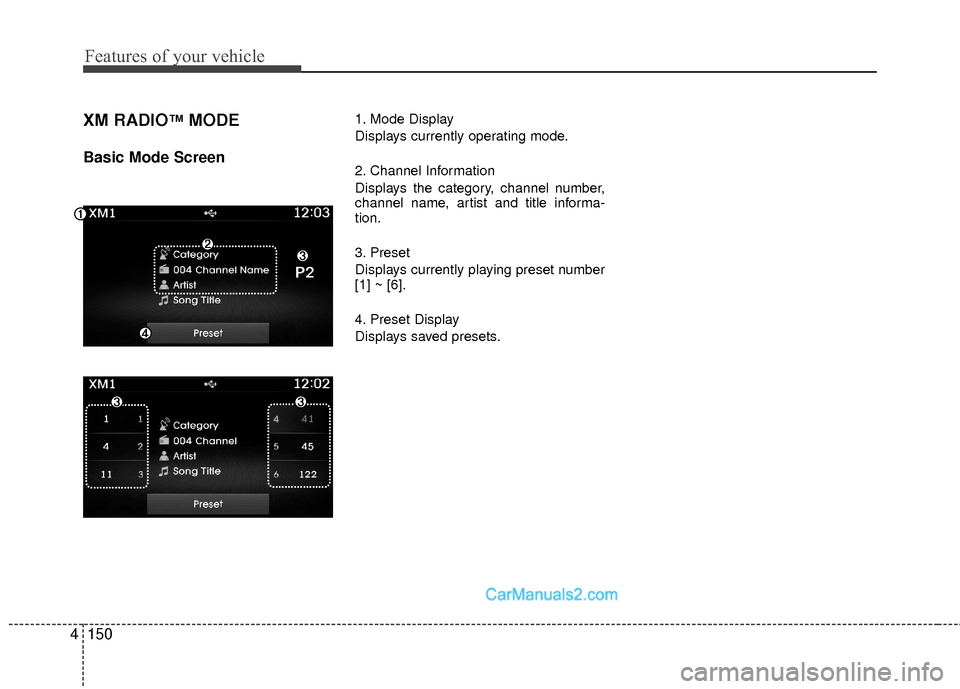
XM RADIO™MODE
Basic Mode Screen
1. Mode Display
Displays currently operating mode.
2. Channel Information
Displays the category, channel number,
channel name, artist and title informa-
tion.
3. Preset
Displays currently playing preset number
[1] ~ [6].
4. Preset Display
Displays saved presets.
Page 232 of 543
4151
Features of your vehicle
Using SEEK
Press the key to play the pre-
vious/next channel.
❈ If the “Category” icon is displayed,
channels are changed within the cur-
rent category.
Using Tune
Turn the TUNE knob to select the
desired channel.
SCAN
Press the key to scan all chan-
nels with superior reception for 5 sec-
onds each.
Once scan is complete, the previously
played channel will be restored.
During Scan, pressing the key
again will cancel the scan operation and
restore the previously played channel.
If the “Category” icon is displayed, chan-
nels are changed within the current cate-
gory.
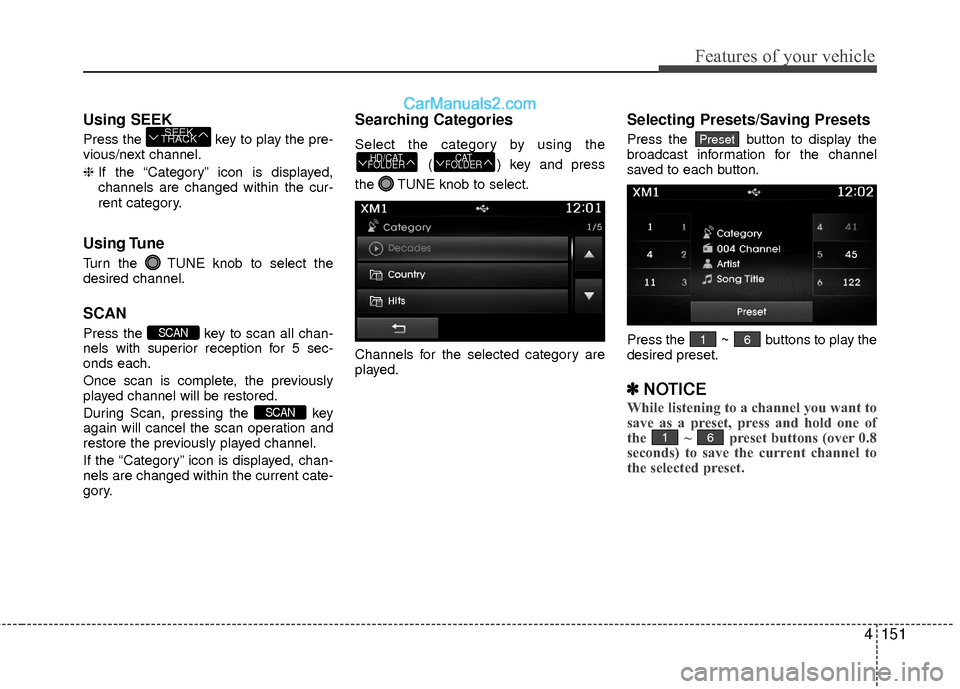
Searching Categories
Select the category by using the
( ) key and press
the TUNE knob to select.
Channels for the selected category are
played.
Selecting Presets/Saving Presets
Press the button to display the
broadcast information for the channel
saved to each button.
Press the ~ buttons to play the
desired preset.
✽ ✽ NOTICE
While listening to a channel you want to
save as a preset, press and hold one of
the ~ preset buttons (over 0.8
seconds) to save the current channel to
the selected preset.
61
61
Preset
CAT
FOLDERHD/CAT
FOLDER
SCAN
SCAN
SEEK
TRACK