warning HYUNDAI SONATA HYBRID 2019 Owners Manual
[x] Cancel search | Manufacturer: HYUNDAI, Model Year: 2019, Model line: SONATA HYBRID, Model: HYUNDAI SONATA HYBRID 2019Pages: 546, PDF Size: 78.75 MB
Page 213 of 546
3-77
Convenient features of your vehicle
3
Low Tire Pressure
This warning message is displayed if
the tire pressure is low. The corre-
sponding tire on the vehicle will beilluminated.
For more information, refer to "Tire Pressure Monitoring System
(TPMS)" in chapter 6.
Turn on FUSE SWITCH
This warning message is displayed if
the fuse switch in the instrument
panel fuse, under the steering wheel
is OFF.
If this message is displayed, turn the
fuse switch on.
For more information, refer to
"Fuses" in chapter 7.
Align steering wheel (if equipped)
This warning message is displayed
when the steering wheel is turned by
90 degrees or wider, either to the left
or to the right, while running the
engine.
In order to align the steering wheel,
turn the wheel in the direction shown
while the engine is running to
straighten the steering wheel.
Steering wheel aligning is com-pleted (if equipped)
If the steering wheel aligning is com-
pleted after "Align steering wheel"
warning message is displayed, this
message is displayed for 2 seconds.
Low Washer Fluid
This warning message is displayed
in the service reminder mode, when
the washer fluid in the reservoir is
nearly empty.
If this warning message is displayed,
have the washer fluid reservoirrefilled.
Low Fuel
This warning message is displayed ifthe fuel tank is almost out of fuel.
When this message is displayed, the
vehicle range is approximately 48 km(30 miles).
When this message is displayed, the
low fuel level warning light in the
instrument cluster will come on.
It is recommended to look for the nearest fueling station and refuel as
soon as possible.
Page 214 of 546
3-78
Convenient features of your vehicle
Engine overheated
This warning message is displayed
when the engine coolant tempera-
ture is above 120°C (248°F). This
means that the engine is overheated
and may be damaged.
If your vehicle is overheated, refer
to "Overheating" in chapter 6.
Check headlight (if equipped)
This warning message is displayed,
if the headlamps are not operating
properly. The headlamp bulb may
need to be replaced. If the vehicle is
equipped with LED headlamps, have
the vehicle inspected by an author-
ized HYUNDAI dealer.Information
Make sure to replace the burned out
bulb with a new one of the same
wattage rating.
Check headlamp LED (if equipped)
This warning message is displayed if
there is a problem with the LED
headlamp. Have the vehicle inspect-
ed by an authorized HYUNDAI deal-
er.
Check headlamp cooling fan(if equipped)
This warning message is displayed if
there is a problem with headlamp
fan. Have the vehicle inspected by an
authorized HYUNDAI dealer.
Check smart high beam system
(if equipped)
This warning message is displayed if
there is a problem with the Smart
High Beam System. Have the vehicle
inspected by an authorized
HYUNDAI dealer.
For more information, refer to
"Smart High Beam System" in
chapter 3.
i
Page 215 of 546
3-79
Convenient features of your vehicle
3
Check Auton. EmergencyBraking system (if equipped)
This warning message is displayed if there is a malfunction with the
Autonomous Emergency Braking
(AEB) system. Have the vehicle
inspected by an authorized
HYUNDAI dealer.
For more details, refer to
"Autonomous Emergency Braking
(AEB) system" in chapter 5.
Check Driver Attention AlertSystem (if equipped)
This warning message is displayed if
there is a problem with the Driver
Attention Alert System. Have the
vehicle inspected by an authorized
HYUNDAI dealer.
For more information, refer to
"Driver Attention Alert (DAA)" in
chapter 5.
Check BSD System (if equipped)
This warning message is displayed if
there is a problem with the Blind Spot
Detection (BSD) system. Have the
vehicle inspected by an authorized
HYUNDAI dealer.
For more information, refer to "Blind Spot Detection (BSD)
System" in chapter 5.
Check Lane Keep AssistSystem (if equipped)
This warning message is displayed if
there is a problem with the Lane
Keeping Assist System (LKAS).
Have the vehicle inspected by an
authorized HYUNDAI dealer.
For more information, refer to
"Lane Keeping Assist System
(LKAS)" in chapter 5.
Check Active Air Flap System
This warning message is displayed
in the following situations:
- There is a malfunction with the actuator flap
- There is a malfunction with the actuator air flap controller
- The air flap does not open
When all of the above conditions are
fixed, the warning will disappear.
Page 216 of 546
3-80
Convenient features of your vehicle
Check Hybrid system
This warning message is displayed
when there is a problem with the
hybrid control system.
Refrain from driving when the warn-
ing message is displayed.
In this case, have your vehicle
inspected by an authorized HYUNDAI
dealer.
Check Hybrid system.Turn engine off.
This warning message is displayed
when there is a problem with the
hybrid system. The " " indicator
will blink and a warning chime will
sound until the problem is solved.
In this case, have your vehicle
inspected by an authorized HYUNDAI
dealer.
Check Hybrid system. Do notstart engine.
This warning message is displayed
when the hybrid battery power
(SOC) level is low. A warning chime
will sound until the problem is solved.
In this case, have your vehicle
inspected by an authorized HYUNDAI
dealer.
Stop vehicle and check powersupply
This warning message is displayed
when a failure occurs in the powersupply system.
In this case, park the vehicle in a
safe location and tow your vehicle to
the nearest authorized HYUNDAI
dealer and have the vehicle inspect-ed.
Park with engine On to charge battery
This warning message is displayed
when the hybrid battery power
(SOC) level is low.
In this case, park the vehicle in a
safe location and wait until the hybrid
battery is charged.
You can increase the hybrid battery
charging rate by holding the acceler-
ator pedal to the floor with transmis-
sion in P. The engine will rev high but
it will be limited for charging purpose
when you hold the pedal to the floor.
Page 217 of 546
3-81
Convenient features of your vehicle
3
Refuel to prevent Hybrid batterydamage
This warning message is displayed
when the fuel tank is nearly empty.
You should refill the fuel tank to pre-
vent hybrid battery damage.
Refill inverter coolant
This warning message is displayed
when the inverter coolant is nearly
empty.
You should refill the inverter coolant.
Stop vehicle and check regen.
brakes
This warning message is displayed
when a failure occurs in the brakesystem.
In this case, park the vehicle in a safe
location and tow your vehicle to the
nearest authorized HYUNDAI dealer
and have the vehicle inspected.
Check regenerative brakes
This warning message is displayed
when the brake performance is low
or the regenerative brake does not
work properly due to a failure in the
brake system.
In this case, it may take longer for the
brake pedal to operate and the brak-
ing distance may become longer.
Check Virtual Engine SoundSystem
This message is displayed when
there is a problem with the VirtualEngine Sound System (VESS).
In this case, have your vehicle
inspected by an authorized HYUNDAI
dealer.
Coasting guide (if equipped)
A chime will sound and the coasting
guide indicator will blink four times to
inform the driver when to take the
foot off from the accelerator by antic-
ipating a decelerating event* based
on the analysis of driving routes and
road conditions of the navigation. It
encourages the driver to remove foot
from the pedal and allow coasting
down the road with EV motor only.
This helps prevent unnecessary fuelconsumption and increases fuel effi-
ciency.
Page 220 of 546
3-84
Convenient features of your vehicle
EV/HEV/CHG modes (Plug-in hybrid)
A corresponding message is dis-
played when a mode is selected by
pressing the HEV button
Battery charged. Maintainingcurrent mode/Low battery.
Maintaining hybrid mode (Plug-in hybrid)
A corresponding message is dis-
played when the high-voltage
(hybrid) battery is fully charged or
nearly discharged.
Charging complete.Switching to Hybrid mode
(Plug-in hybrid)
The message is displayed when the
high-voltage (hybrid) battery is fullycharged, and when the mode is
changed to the HEV mode.
Low/High System Temp. Maintaining Hybrid mode
(Plug-in hybrid)
A corresponding message is dis-
played when the temperature of the
high-voltage (hybrid) battery is too
low or too high. This warning mes-
sage is to protect the battery and the
hybrid system.
Low/High System Temp. Switching to Hybrid mode
(Plug-in hybrid)
A corresponding message is dis-
played when the temperature of the
high-voltage (hybrid) battery is too
low or high. This warning message is
to protect the battery and the hybridsystem.
Switching to Hybrid mode tolubricate engine (Plug-in hybrid)
To prevent damage of the hybrid
lubrication system when the hybrid
system has not been started for a
long time.
- When the hybrid system is ON after 5 weeks of being turned off, the
hybrid system maintenance mode
will operate.
- When the hybrid system mainte- nance mode is operated, HEV
mode will be kept on after the
hybrid system is ON and the above
message will be displayed on the
cluster.
If you press the HEV switch to shift
EV mode during engine mainte-
nance mode, the above message will
appear due to priority of the hybrid
system maintenance mode.
Maintaining Hybrid mode to pro- tect engine (Plug-in hybrid)
The hybrid system will automatically
stop after sufficient heating. (If the
hybrid system is turned OFF without
sufficient heating, the hybrid system
maintenance mode will be operated
once more.
Page 221 of 546
3-85
Convenient features of your vehicle
LCD display control
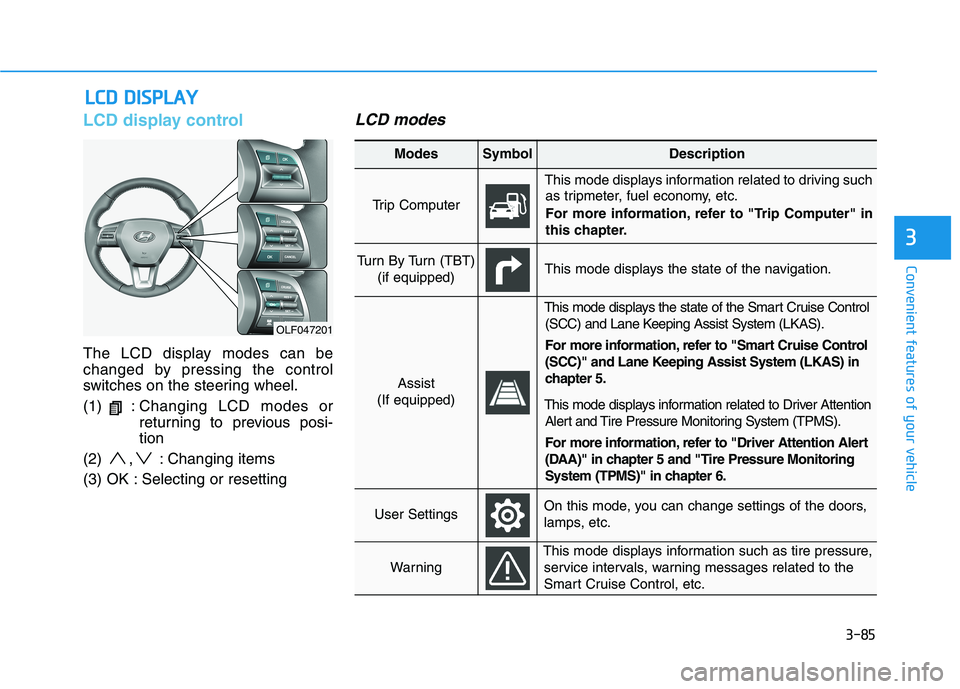
The LCD display modes can be
changed by pressing the control
switches on the steering wheel. (1) :Changing LCD modes or
returning to previous posi-tion
(2) , : Changing items
(3) OK : Selecting or resetting
LCD modes
LL CC DD DD IISS PP LLAA YY
3
OLF047201
Modes SymbolDescription
Trip Computer
This mode displays information related to driving such
as tripmeter, fuel economy, etc.
For more information, refer to "Trip Computer" in
this chapter.
Turn By Turn (TBT)
(if equipped)This mode displays the state of the navigation.
Assist
(If equipped)
This mode displays the state of the Smart Cruise Control (SCC) and Lane Keeping Assist System (LKAS).
For more information, refer to "Smart Cruise Control
(SCC)" and Lane Keeping Assist System (LKAS) in
chapter 5.
This mode displays information related to Driver Attention Alert and Tire Pressure Monitoring System (TPMS).
For more information, refer to "Driver Attention Alert
(DAA)" in chapter 5 and "Tire Pressure Monitoring
System (TPMS)" in chapter 6.
User SettingsOn this mode, you can change settings of the doors,
lamps, etc.
Warning
This mode displays information such as tire pressure,service intervals, warning messages related to the
Smart Cruise Control, etc.
Page 222 of 546
3-86
Convenient features of your vehicle
Shift to P to edit settings
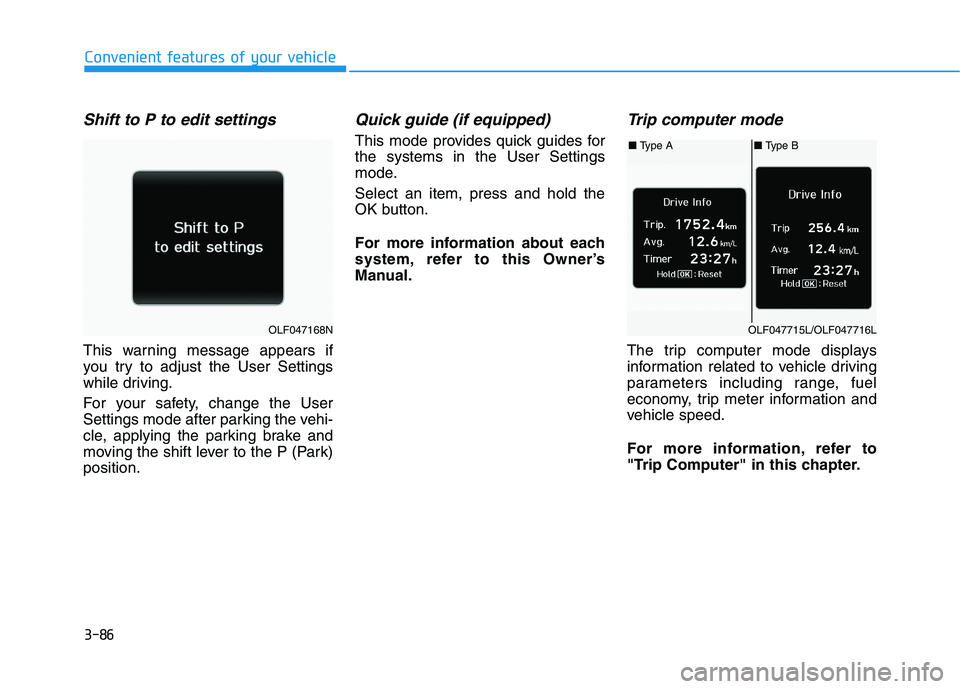
This warning message appears if
you try to adjust the User Settings
while driving.
For your safety, change the User
Settings mode after parking the vehi-
cle, applying the parking brake and
moving the shift lever to the P (Park)position.
Quick guide (if equipped)
This mode provides quick guides forthe systems in the User Settings
mode. Select an item, press and hold the
OK button.
For more information about each
system, refer to this Owner’s
Manual.
Trip computer mode
The trip computer mode displays
information related to vehicle driving
parameters including range, fuel
economy, trip meter information and
vehicle speed.
For more information, refer to
"Trip Computer" in this chapter.
OLF047168N
■ Type A■ Type B
OLF047715L/OLF047716L
Page 224 of 546
3-88
Convenient features of your vehicle
Warning Message Mode
If one of followings occurs, warning
messages will be displayed on the
information mode for several sec-
onds.
- Malfunction of below systems
- Low washer fluid (if equipped)
(TPMS)
system (AEB)
User settings mode
In this mode, you can change the
setting of the instrument cluster,
doors, lamps, etc.
1. Driving Assist
2. Door
3. Lights
4. Sound
5. Convenience
6. Service interval
7. Other features
8. Reset
The information provided differs
according to the items applied to
your vehicle. 1. Driving Assist
LKAS (Lane Keeping Assist
System)
- Lane Departure Warning/Standard LKA/Active LKA
To adjust the sensitivity of the Lane
Keeping Assist System.
For more information, refer to the
"Lane Keeping Assist System" in
chapter 5.
DAA (Driver Attention Alert)
To adjust the sensitivity of the Driver
Attention Alert (DAA).
- Off/Normal/Early
For more information, refer to the
"Driver Attention Alert (DAA)" in
chapter 5.
Page 225 of 546
3-89
Convenient features of your vehicle
3
SCC Response (Smart CruiseControl)
- Slow/Normal/Fast To adjust the sensitivity of the
Smart Cruise Control system.
For more information, refer to the
"Smart Cruise Control" in chapter5.
AEB (Auton. Emergency Braking)
To activate or deactivate the
Autonomous Emergency Braking(AEB).
For more information, refer to
"Autonomous Emergency Braking
(AEB)" in chapter 5.
FCW (Fwd. Collision Warning)
- Late/Normal/Early To adjust the initial warning alert
time for Autonomous Emergency
Braking system.
For more information, refer to
"Autonomous Emergency Braking
(AEB)" in chapter 5. BSD Sound (Blind Spot Detection)
To activate or deactivate the Blind Spot Detection sound.
For more information, refer to
"Blind Spot Detection" in chapter5.
RCTA (Rear Cross Traffic Alert)
To activate or deactivate the Rear
Cross Traffic Alert system.
For more information, refer to
"Blind Spot Detection" in chapter5.
- Coasting Guide: To activate or
deactivate the Coasting Guide sys- tem.
- Sound: To activate or deactivate the Coasting Guide system sound.
For more information, refer to
"Coasting Guide" in chapter 5. 2. Door
Automatic Lock
- Disable: The auto door lock opera-
tion will be canceled.
- Enable on Speed: All doors will be automatically locked when the
vehicle speed exceeds 15 km/h(9.3 mph).
- Enable on Shift: All doors will be automatically locked if the auto-
matic transmission shift lever is
shifted from the P (Park) position to
the R (Reverse), N (Neutral), or D
(Drive) position.