check engine HYUNDAI SONATA HYBRID 2019 User Guide
[x] Cancel search | Manufacturer: HYUNDAI, Model Year: 2019, Model line: SONATA HYBRID, Model: HYUNDAI SONATA HYBRID 2019Pages: 546, PDF Size: 78.75 MB
Page 60 of 546
H49
When the hybrid vehicle shuts off
When the high voltage battery is dis-
charged, when the 12-volt battery isdischarged, or when the fuel tank is
empty, the hybrid system may not
operate while driving. When the
Hybrid system does not operate, do
the followings:
1.Gradually reduce the vehiclespeed. Pull over your vehicle off
the road in a safe area.
2.Locate the shift lever in P (Park).
3. Turn ON the hazard warning flashers.
4.Turn OFF the Engine Start/Stop button, and try to start the hybrid system, while depressing the
brake pedal and pressing the
Engine Start/Stop button. 5.When the hybrid system still does
not operate, refer to "EMERGENCY
STARTING" in the chapter 6.
Before jump-starting the vehicle,
check the fuel level and the exact
procedure to jump start. For further
details, refer to "EMERGENCY
STARTING" in the chapter 6. When
the fuel level is low, do not attempt
to drive the vehicle only with the
battery power. The high voltage bat-
tery may be discharged, and the
hybrid system will turn OFF.
Page 119 of 546
2-53
Safety system of your vehicle
2
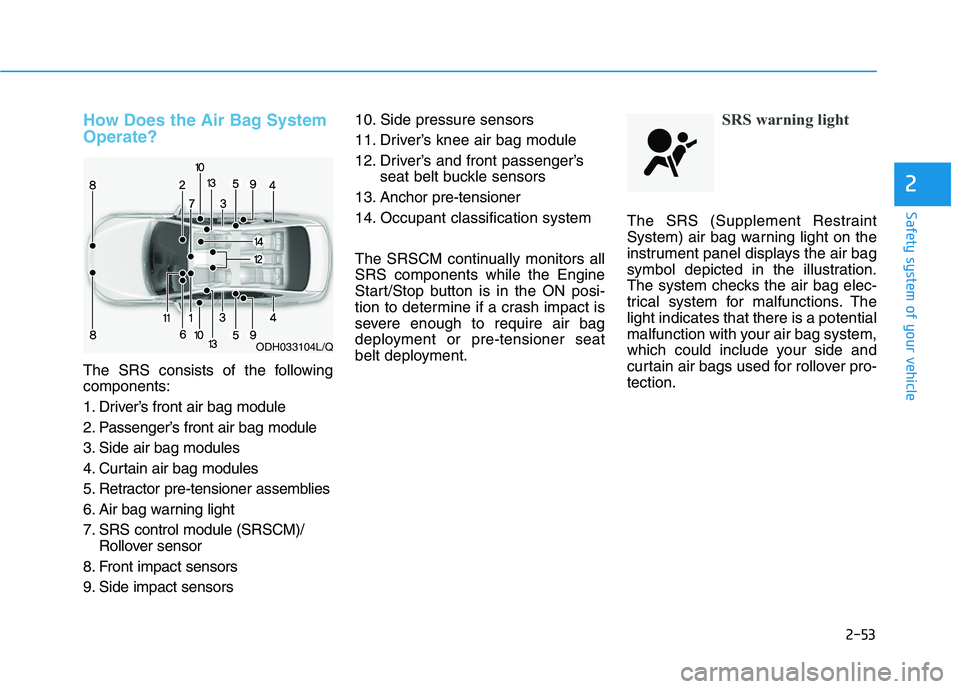
How Does the Air Bag System Operate?
The SRS consists of the following components:
1. Driver’s front air bag module
2. Passenger’s front air bag module
3. Side air bag modules
4. Curtain air bag modules
5. Retractor pre-tensioner assemblies
6. Air bag warning light
7. SRS control module (SRSCM)/Rollover sensor
8. Front impact sensors
9. Side impact sensors 10. Side pressure sensors
11. Driver’s knee air bag module
12. Driver’s and front passenger’s
seat belt buckle sensors
13. Anchor pre-tensioner
14. Occupant classification system
The SRSCM continually monitors all SRS components while the Engine
Start/Stop button is in the ON posi-
tion to determine if a crash impact is
severe enough to require air bag
deployment or pre-tensioner seat
belt deployment.
SRS warning light
The SRS (Supplement Restraint
System) air bag warning light on the
instrument panel displays the air bag
symbol depicted in the illustration.
The system checks the air bag elec-
trical system for malfunctions. Thelight indicates that there is a potential
malfunction with your air bag system,
which could include your side and
curtain air bags used for rollover pro-tection.
ODH033104L/Q
Page 139 of 546
3-3
Convenient features of your vehicle
3
AACCCCEE SSSSIINN GG YY OO UURR VV EEHH IICC LLEE
Smart Key
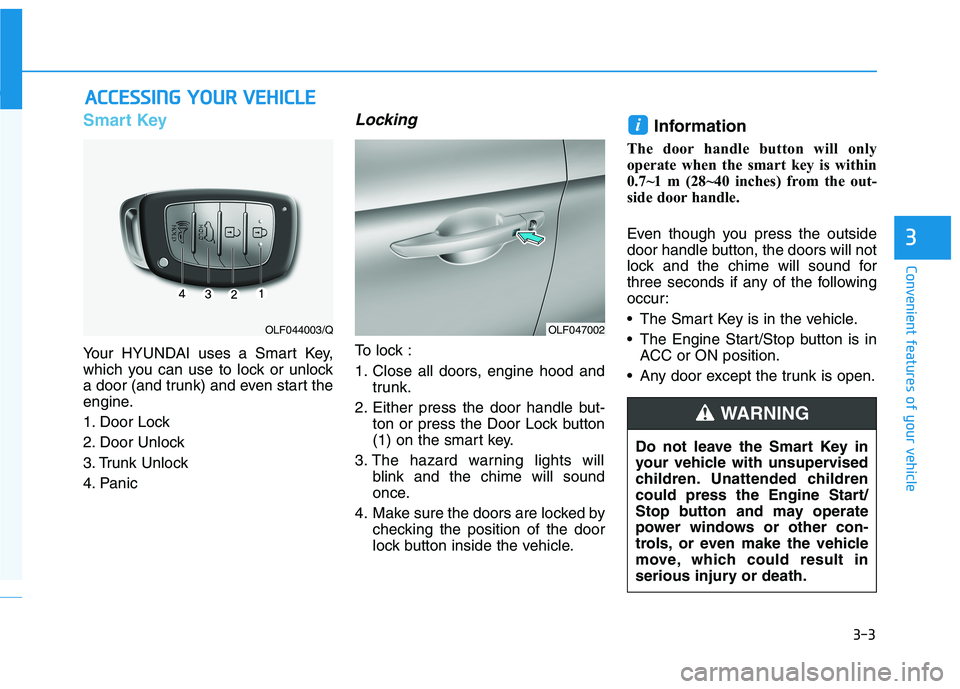
Your HYUNDAI uses a Smart Key,
which you can use to lock or unlock
a door (and trunk) and even start the
engine.
1. Door Lock
2. Door Unlock
3. Trunk Unlock
4. Panic
Locking
To lock :
1. Close all doors, engine hood and
trunk.
2. Either press the door handle but- ton or press the Door Lock button
(1) on the smart key.
3. The hazard warning lights will blink and the chime will sound
once.
4. Make sure the doors are locked by checking the position of the door
lock button inside the vehicle. Information
The door handle button will only
operate when the smart key is within
0.7~1 m (28~40 inches) from the out-
side door handle.
Even though you press the outside
door handle button, the doors will not
lock and the chime will sound for
three seconds if any of the following
occur:
• The Smart Key is in the vehicle.
The Engine Start/Stop button is in ACC or ON position.
Any door except the trunk is open.
i
OLF047002OLF044003/Q
Do not leave the Smart Key in
your vehicle with unsupervised
children. Unattended children
could press the Engine Start/
Stop button and may operate
power windows or other con-
trols, or even make the vehicle
move, which could result in
serious injury or death.
WARNING
Page 150 of 546
3-14
Convenient features of your vehicle
The Driver Position Memory System
is provided to store and recall the fol-
lowing memory settings with a sim-
ple button operation.
- Driver’s seat position
- Outside rearview mirror position
- Instrument panel illumination intensity
If the battery is disconnected, the
position memory will be lost and the
driving positions must be stored inthe system again.
If the Driver Position Memory
System does not operate normally,
have the system checked by an
authorized HYUNDAI dealer.
Storing Positions into Memory
1. Check that the shift lever is in P(Park) while the engine Start/Stop
button is in the ON position.
2. Adjust the driver’s seat position, outside rearview mirror position
and instrument panel illumination
intensity to positions comfortable
for the driver.
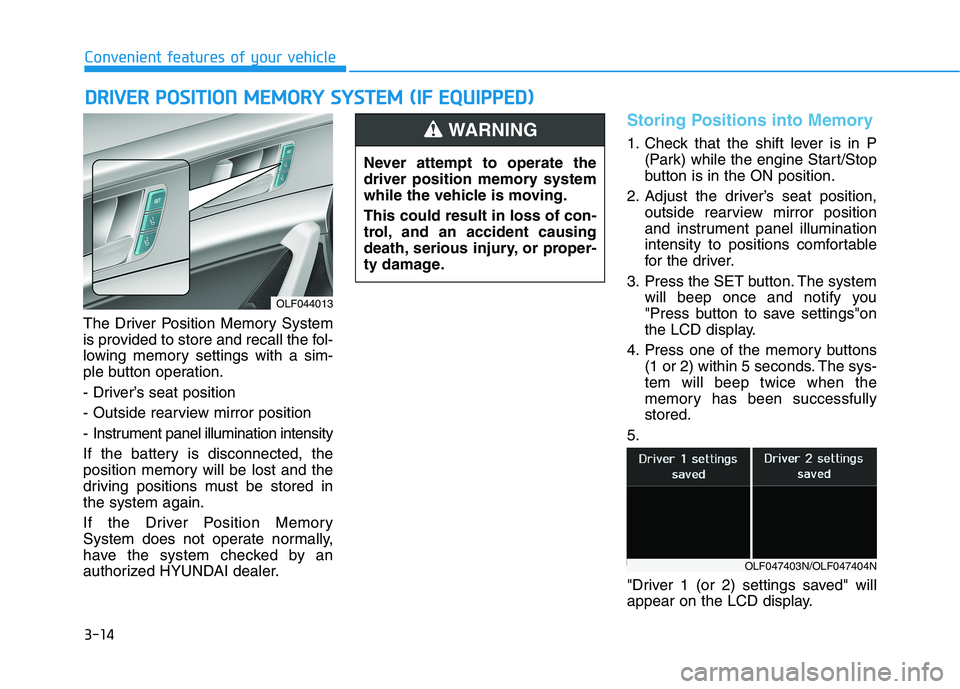
3. Press the SET button. The system will beep once and notify you
"Press button to save settings"on
the LCD display.
4. Press one of the memory buttons (1 or 2) within 5 seconds. The sys-tem will beep twice when the
memory has been successfullystored.
5.
"Driver 1 (or 2) settings saved" will
appear on the LCD display.
DD RRIIVV EERR PP OO SSIITT IIOO NN MM EEMM OORRYY SS YY SSTT EEMM (( IIFF EE QQ UUIIPP PPEEDD ))
OLF044013 Never attempt to operate the
driver position memory system
while the vehicle is moving. This could result in loss of con-
trol, and an accident causing
death, serious injury, or proper-
ty damage.
WARNING
OLF047403N/OLF047404N
Page 151 of 546
3-15
Convenient features of your vehicle
3
Recalling positions from memory
1. Check that the shift lever is in P(Park) while the engine Start/Stop
button is in the ON position.
2. Press the desired memory button (1 or 2). The system will beep
once, and then the driver's seat
position, outside rearview mirror
position and instrument panel illu-mination intensity will automatical-
ly adjust to the stored positions.
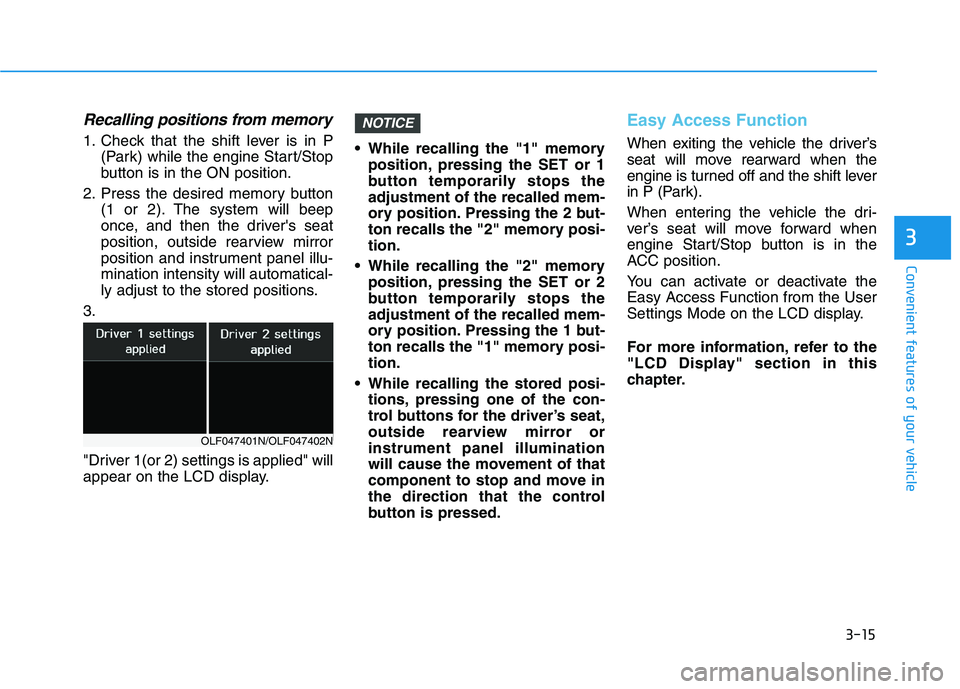
3.
"Driver 1(or 2) settings is applied" will
appear on the LCD display. While recalling the "1" memory
position, pressing the SET or 1
button temporarily stops theadjustment of the recalled mem-
ory position. Pressing the 2 but-
ton recalls the "2" memory posi-tion.
While recalling the "2" memory position, pressing the SET or 2
button temporarily stops theadjustment of the recalled mem-
ory position. Pressing the 1 but-
ton recalls the "1" memory posi-tion.
While recalling the stored posi- tions, pressing one of the con-
trol buttons for the driver’s seat,
outside rearview mirror orinstrument panel illumination
will cause the movement of that
component to stop and move in
the direction that the control
button is pressed.
Easy Access Function
When exiting the vehicle the driver’s
seat will move rearward when the
engine is turned off and the shift lever
in P (Park).
When entering the vehicle the dri-
ver’s seat will move forward when
engine Start/Stop button is in the
ACC position.
You can activate or deactivate the Easy Access Function from the User
Settings Mode on the LCD display.
For more information, refer to the
"LCD Display" section in this
chapter.
NOTICE
OLF047401N/OLF047402N
Page 152 of 546
3-16
Convenient features of your vehicleS
S TT EEEERR IINN GG WW HHEEEELL
Electric Power Steering (EPS)
The system assists you with steering
the vehicle. If the engine is turned off
or if the power steering system
becomes inoperative, you may still
steer the vehicle, but it will require
increased steering effort.
Should you notice any change in the
effort required to steer during normal
vehicle operation, have the system
checked by an authorized HYUNDAI
dealer. Information
The following symptoms may occur
during normal vehicle operation:
The steering effort may be high immediately after placing the engine
Start/Stop button is in the ON posi-
tion.
This happens as the system per-
forms the EPS system diagnostics.
When the diagnostics are complet-
ed, the steering wheel will return to
its normal condition.
A click noise may be heard from the EPS relay after the engine Start/Stop
button is in the ON/OFF position.
Motor noise may be heard when the vehicle is at a stop or at a low driving
speed.
If the outside ambient temperature is low, when you operate the steer-
ing wheel a noise from the electric
power steering may occur. As the
temperature increases, the noise will
disappear.
i
If the Electric Power Steering System does not operate nor-
mally, the warning light ( ) willilluminate on the instrument
cluster. You may steer the vehi-
cle, but it will require increased
steering efforts. Take your vehi-
cle to an authorized HYUNDAI
dealer and have the system
checked as soon as possible.
CAUTION
Page 169 of 546
3-33
Convenient features of your vehicle
3
Auto up/down window (if equipped)
Pressing or pulling up the power win-
dow switch momentarily to the sec-ond detent position (6) completely
lowers or lifts the window even when
the switch is released. To stop the
window at the desired position while
the window is in operation, pull up or
press down and release the switch.
To reset the power windows
If the power windows do not operate
normally, the automatic power win-
dow system must be reset as follows:
1. Place engine Start/Stop button is in the ON position.
2. Close the window and continue pulling up on the power window
switch for at least one second.
If the power windows do not operate
properly after resetting, have the
system checked by an authorized
HYUNDAI dealer.
Automatic reverse (if equipped)
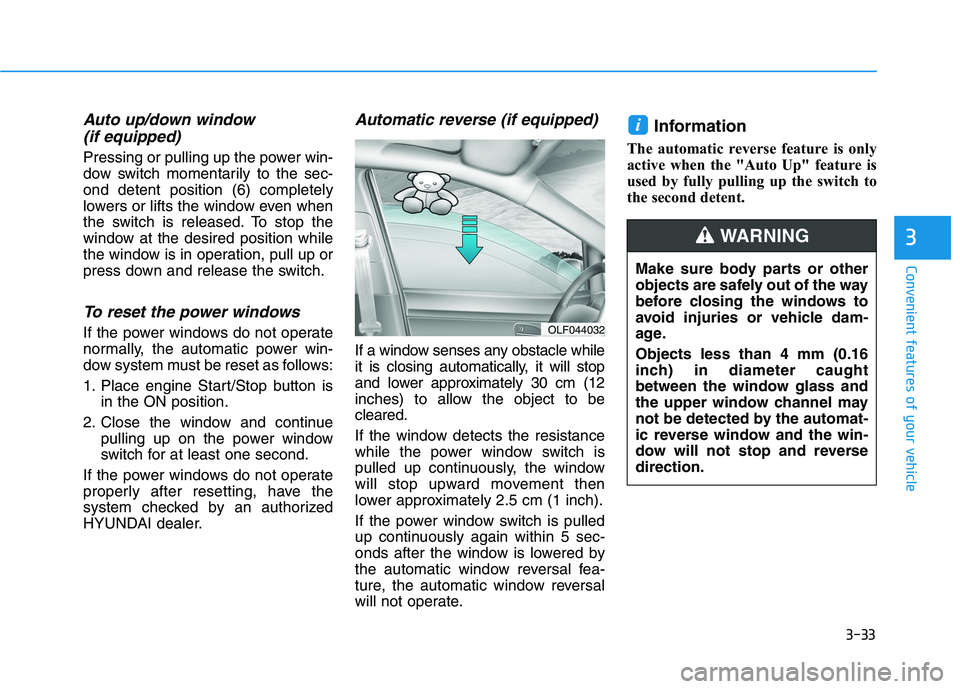
If a window senses any obstacle while
it is closing automatically, it will stop
and lower approximately 30 cm (12
inches) to allow the object to becleared.
If the window detects the resistance
while the power window switch is
pulled up continuously, the window
will stop upward movement then
lower approximately 2.5 cm (1 inch).
If the power window switch is pulled
up continuously again within 5 sec-
onds after the window is lowered by
the automatic window reversal fea-
ture, the automatic window reversal
will not operate. Information
The automatic reverse feature is only
active when the "Auto Up" feature is
used by fully pulling up the switch to
the second detent.
i
OLF044032 Make sure body parts or other
objects are safely out of the way
before closing the windows to
avoid injuries or vehicle dam-
age. Objects less than 4 mm (0.16
inch) in diameter caught
between the window glass and
the upper window channel may
not be detected by the automat-
ic reverse window and the win-
dow will not stop and reversedirection.
WARNING
Page 175 of 546
3-39
Convenient features of your vehicle
3
Hood
Opening the hood
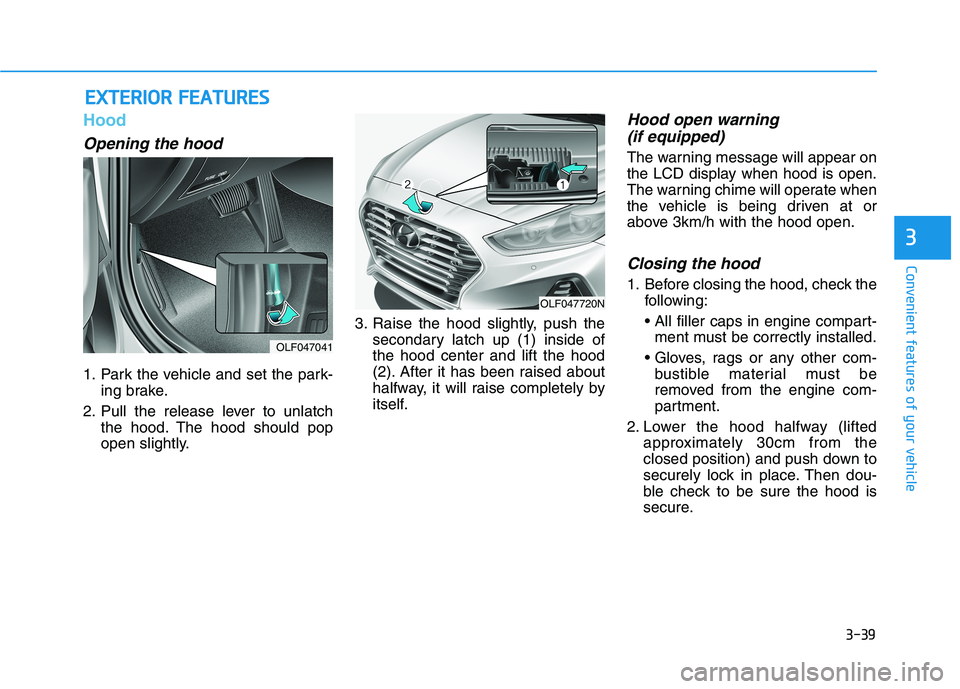
1. Park the vehicle and set the park-ing brake.
2. Pull the release lever to unlatch the hood. The hood should pop
open slightly. 3. Raise the hood slightly, push the
secondary latch up (1) inside ofthe hood center and lift the hood
(2). After it has been raised about
halfway, it will raise completely by
itself.
Hood open warning
(if equipped)
The warning message will appear on
the LCD display when hood is open.
The warning chime will operate when
the vehicle is being driven at or
above 3km/h with the hood open.
Closing the hood
1. Before closing the hood, check the following:
ment must be correctly installed.
bustible material must be
removed from the engine com-
partment.
2. Lower the hood halfway (lifted approximately 30cm from the
closed position) and push down to
securely lock in place. Then dou-
ble check to be sure the hood is
secure.
EEXX TTEERR IIOO RR FF EE AA TTUU RREESS
OLF047041
OLF047720N
Page 188 of 546
3-52Information
Make sure to refuel your vehicle
according to the "Fuel Requirements"
suggested in the Introduction chapter.
Do not spill fuel on the exterior surfaces of the vehicle. Any type of fuel spilled on painted sur-
faces may damage the paint.
If the fuel filler cap requires replacement, use only a genuine
HYUNDAI cap or the equivalent
specified for your vehicle. Anincorrect fuel filler cap canresult in a serious malfunctionof the fuel system or emission
control system.
NOTICE
i
Convenient features of your vehicle
(Continued)
Do not over-fill or top-off your
vehicle tank, which can cause
gasoline spillage.
If a fire breaks out during refu-
eling, leave the vicinity of the
vehicle, and immediately con-
tact the manager of the gasstation and then contact the
local fire department. Follow
any safety instructions they
provide.
If pressurized fuel sprays out,
it can cover your clothes or
skin and thus subject you to
the risk of fire and burns.
Always remove the fuel cap
carefully and slowly. If the cap
is venting fuel or if you hear a
hissing sound, wait until the
condition stops before com-
pletely removing the cap.
Always check that the fuel cap
is installed securely to pre-
vent fuel spillage in the eventof an accident.
(Continued)
Static electricity discharge
from the container can ignite
fuel vapors causing a fire. Once refueling has begun,
contact between your bare
hand and the vehicle shouldbe maintained until the filling
is complete.
Use only approved portable
plastic fuel containers designed
to carry and store gasoline.
When refueling, always move
the shift lever to the P (Park)
position, set the parking
brake, and place engine Start/
Stop button to the OFF posi-
tion. Sparks produced byelectrical components relatedto the engine can ignite fuel
vapors causing a fire.
Do not use matches or a lighter and do not smoke or
leave a lit cigarette in your
vehicle while at a gas station,
especially during refueling. (Continued)
Page 194 of 546
3-58
Convenient features of your vehicle
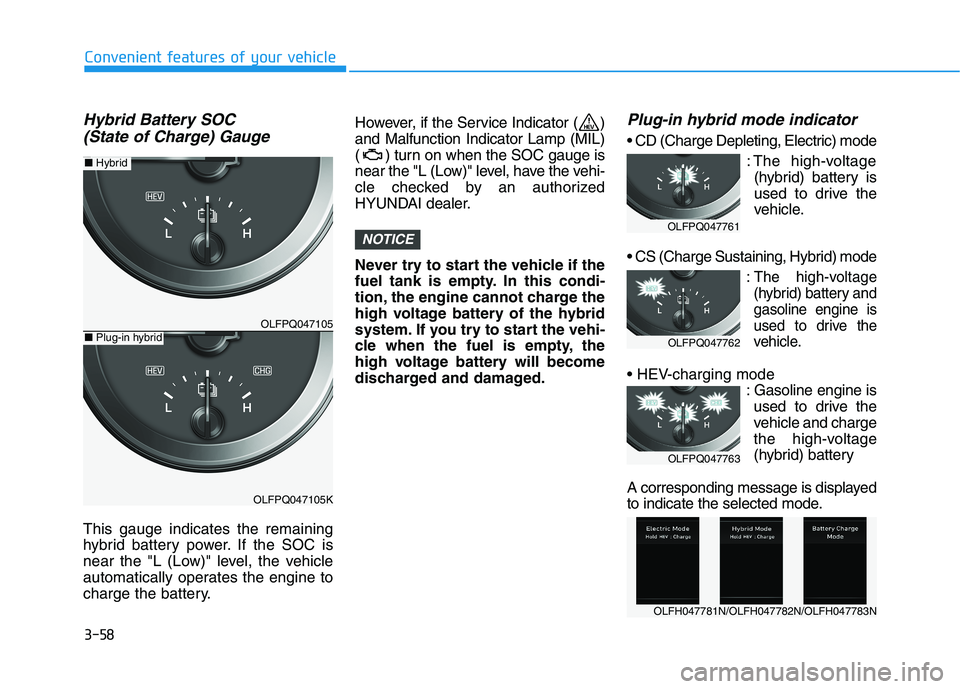
Hybrid Battery SOC (State of Charge) Gauge
This gauge indicates the remaining
hybrid battery power. If the SOC is
near the "L (Low)" level, the vehicle
automatically operates the engine to
charge the battery. However, if the Service Indicator ( )and Malfunction Indicator Lamp (MIL)
( ) turn on when the SOC gauge is
near the "L (Low)" level, have the vehi-
cle checked by an authorized
HYUNDAI dealer.
Never try to start the vehicle if the
fuel tank is empty. In this condi-
tion, the engine cannot charge the
high voltage battery of the hybrid
system. If you try to start the vehi-
cle when the fuel is empty, the
high voltage battery will become
discharged and damaged.
Plug-in hybrid mode indicator
: The high-voltage(hybrid) battery is
used to drive the
vehicle.
:The high-voltage
(hybrid) battery andgasoline engine is
used to drive the
vehicle.
: Gasoline engine isused to drive the
vehicle and charge
the high-voltage
(hybrid) battery
A corresponding message is displayed
to indicate the selected mode.
NOTICE
OLFPQ047105
OLFPQ047105K
■ Plug-in hybrid
■ Hybrid
OLFH047781N/OLFH047782N/OLFH047783N
OLFPQ047761
OLFPQ047762
OLFPQ047763