display HYUNDAI SONATA HYBRID 2020 Repair Manual
[x] Cancel search | Manufacturer: HYUNDAI, Model Year: 2020, Model line: SONATA HYBRID, Model: HYUNDAI SONATA HYBRID 2020Pages: 527, PDF Size: 64.14 MB
Page 245 of 527
05
5-97
The brake assist will turn off when:
-The driver shifts the gear to P (Park) or
D (Drive)
-The driver depresses the brake pedal
with sufficient power
-The braking has been assisted for
approximately 2 seconds
The warning will turn off when:
- The driver shifts the gear to P (Park), N
(Neutral), or D (Drive)
The brake control may not operate
properly depending on the status of the
ESC (Electronic Stability Control). There
will only be a warning when:
- The ESC (Electronic Stability Control)
warning light is on
-The ESC (Electronic Stability Control)
is engaged in a different function
Warning only
• If the system detects a risk of collision
with a pedestrian or an object, the
system will warn the driver with
audible warning and warnings on the
cluster LCD display or infotainment
system display.
• If ‘Warning Only’ is selected, braking
will not be assisted.
The warning will turn off when:
- The driver shifts the gear to P (Park), N
(Neutral), or D (Drive)
WARNING
• Reverse Parking Collision-
Avoidance Assist system may
not operate properly or may
operate unnecessarily in some
circumstances.
• Always pay extreme caution while
driving. The driver is responsible for
controlling the brake appropriately.
CAUTION
• Always pay attention to road and
traffic conditions while driving,
whether or not there is a warning.
• Playing the vehicle audio system at
high volume may prevent occupants
from hearing Reverse Parking
Collision-Avoidance Assist system
warning sounds.
• If any other warning sound, such as
seat belt warning chime, is already
generated, Reverse Parking Collision-
Avoidance Assist system warning
may not sound.
Information
The system can detect a pedestrian or an
object when:
• A pedestrian is standing behind the
vehicle.
• A large obstacle, such as a vehicle, is
parked in the rear center of the vehicle.
Page 247 of 527
05
5-99
Warning message
„„Rear view camera
ODN8A049044
„„Rear ultrasonic sensor
ODN8A049045
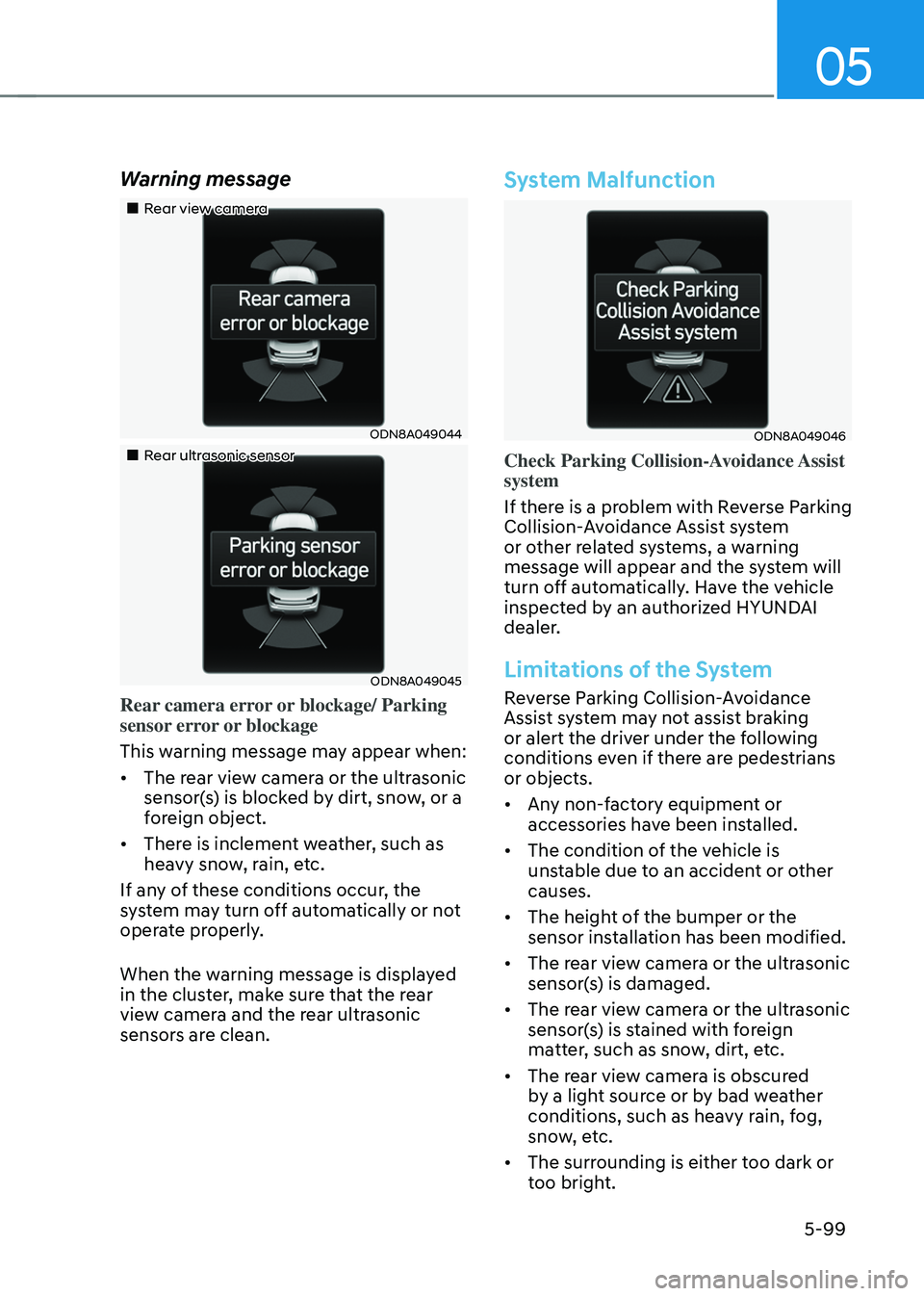
Rear camera error or blockage/ Parking
sensor error or blockage
This warning message may appear when:
• The rear view camera or the ultrasonic
sensor(s) is blocked by dirt, snow, or a
foreign object.
• There is inclement weather, such as
heavy snow, rain, etc.
If any of these conditions occur, the
system may turn off automatically or not
operate properly.
When the warning message is displayed
in the cluster, make sure that the rear
view camera and the rear ultrasonic
sensors are clean.
System Malfunction
ODN8A049046
Check Parking Collision-Avoidance Assist
system
If there is a problem with Reverse Parking
Collision-Avoidance Assist system
or other related systems, a warning
message will appear and the system will
turn off automatically. Have the vehicle
inspected by an authorized HYUNDAI
dealer.
Limitations of the System
Reverse Parking Collision-Avoidance
Assist system may not assist braking
or alert the driver under the following
conditions even if there are pedestrians
or objects.
• Any non-factory equipment or
accessories have been installed.
• The condition of the vehicle is
unstable due to an accident or other
causes.
• The height of the bumper or the
sensor installation has been modified.
• The rear view camera or the ultrasonic
sensor(s) is damaged.
• The rear view camera or the ultrasonic
sensor(s) is stained with foreign
matter, such as snow, dirt, etc.
• The rear view camera is obscured
by a light source or by bad weather
conditions, such as heavy rain, fog,
snow, etc.
• The surrounding is either too dark or
too bright.
Page 255 of 527
05
5-107
Temperature conversion
If the battery has been discharged or
disconnected, the temperature mode
display will reset to Centigrade.
To change the temperature unit from °C
to °F or °F to °C :
-Automatic climate control system
Press the AUTO button for 3 seconds
while pressing the OFF button.
-Instrument cluster
-Go to User Settings → Other → Temperature Unit.
The temperature unit on both the cluster
LCD display and the climate control
screen will change.
Air intake control
This is used to select the outside (fresh)
air position or recirculated air position.
To change the air intake control position,
push the control button.
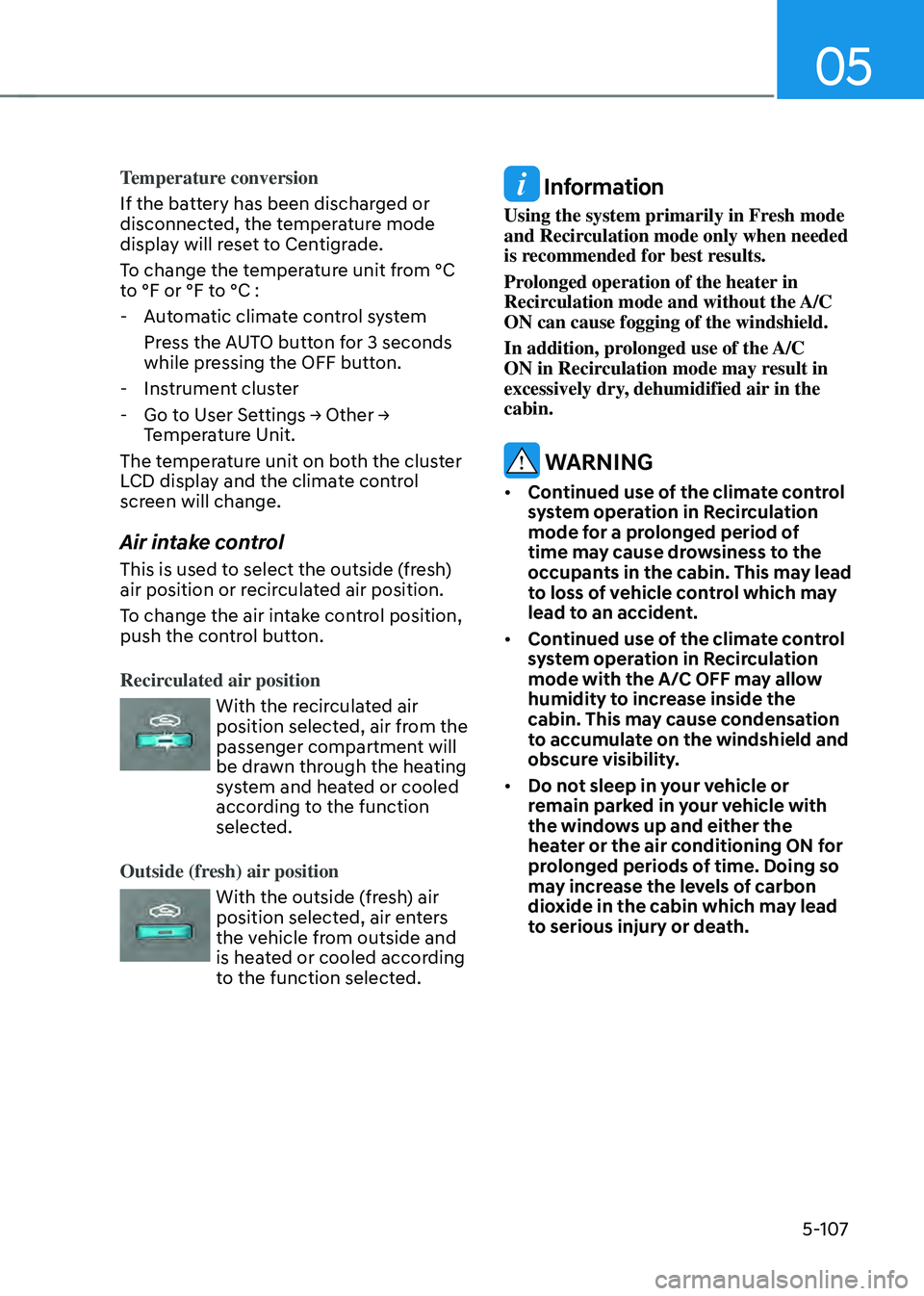
Recirculated air position
With the recirculated air position selected, air from the
passenger compartment will
be drawn through the heating
system and heated or cooled
according to the function
selected.
Outside (fresh) air position
With the outside (fresh) air position selected, air enters
the vehicle from outside and
is heated or cooled according
to the function selected.
Information
Using the system primarily in Fresh mode
and Recirculation mode only when needed
is recommended for best results.
Prolonged operation of the heater in
Recirculation mode and without the A/C
ON can cause fogging of the windshield.
In addition, prolonged use of the A/C
ON in Recirculation mode may result in
excessively dry, dehumidified air in the
cabin.
WARNING
• Continued use of the climate control
system operation in Recirculation
mode for a prolonged period of
time may cause drowsiness to the
occupants in the cabin. This may lead
to loss of vehicle control which may
lead to an accident.
• Continued use of the climate control
system operation in Recirculation
mode with the A/C OFF may allow
humidity to increase inside the
cabin. This may cause condensation
to accumulate on the windshield and
obscure visibility.
• Do not sleep in your vehicle or
remain parked in your vehicle with
the windows up and either the
heater or the air conditioning ON for
prolonged periods of time. Doing so
may increase the levels of carbon
dioxide in the cabin which may lead
to serious injury or death.
Page 265 of 527
05
5-117
CLIMATE CONTROL ADDITIONAL FEATURES
Sunroof Inside Air Recirculation
(if equipped)
When the sunroof is opened, outside
(fresh) air will be automatically selected.
At this time, if you press the air intake
control button, recirculated air position
will be selected but will change back
to outside (fresh) air after 3 minutes.
When the sunroof is closed, the air
intake position will return to the original
position that was selected.
Automatic Ventilation
The system automatically selects the
fresh mode when the climate control
system operates Floor-Level or Bi-Level
for more than 5 minutes and the outdoor
temperature is under 59°F (15°C).
Smart Seat Warmer/Air
Ventilation Seat (Automatic
Control Interworking with the
Driver’s Seat System)
(if equipped)
According to the heating and air
conditioning setting and internal and
external temperature of the vehicle,
the temperature of the seat warmer/
air ventilation seat and steering wheel
warmer are controlled automatically.
The system can be selected as follows on
the LCD or infotainment system display:
Settings → Seat → Heated/Ventilated Features → Seat Warmer/Ventilation
Washer Fluid Logic
While spraying the washer fluid on the
windshield, the air recirculation mode
is automatically operated in order to
prevent the outside air intake.
When the outside temperature is low,
the external air inflow is maintained to
prevent moisture condensed on the
window.
To set up the air recirculation
1. Start the engine.
2. Set the air flow outlet direction to
the Floor Level Mode by pressing the
mode selection button.
3. While pressing the air conditioning
button, push the recirculation mode
button over 4 times within 2 seconds.
4. If the function is set, the recirculation
button indicator will blink 6 times.
To release the air recirculation
1. Start the engine.
2. Set the air flow outlet direction to
the Floor Level Mode by pressing the
mode selection button.
3. While pressing the air conditioning
button, push the recirculation mode
button indicator over 4 times within 2
seconds.
4. If the function is released, the
recirculation button indicator will
blink 3 times.
The system can be selected as follows on
the LCD or infotainment system display
(if equipped):
Settings → Climate → Recirculate Air → Activate upon Washer Fluid Use
Page 270 of 527
![HYUNDAI SONATA HYBRID 2020 Repair Manual Convenient Features
5-122
Wireless Cellular Phone
Charging System (if equipped)
ODN8059223
[A]: Indicator light, [B]: Charging pad
On certain models, the vehicle comes
equipped with a wireless cellu](/img/35/56190/w960_56190-269.png "HYUNDAI SONATA HYBRID 2020 Repair Manual Convenient Features
5-122
Wireless Cellular Phone
Charging System (if equipped)
ODN8059223
[A]: Indicator light, [B]: Charging pad
On certain models, the vehicle comes
equipped with a wireless cellu")
Convenient Features
5-122
Wireless Cellular Phone
Charging System (if equipped)
ODN8059223
[A]: Indicator light, [B]: Charging pad
On certain models, the vehicle comes
equipped with a wireless cellular phone
charger.
The system is available when all doors
are closed, and when the ignition switch
is ON.
To charge a cellular phone
The wireless cellular phone charging
system charges only the Qi-enabled
cellular phones. Read the label on the
cellular phone accessory cover or visit
your cellular phone manufacturer’s
website to check whether your cellular
phone supports the Qi technology.
The wireless charging process starts
when you put a Qi-enabled cellular
phone on the wireless charging unit.
1. Remove other items, including the
smart key, from the wireless charging
unit. If not, the wireless charging
process may be interrupted. Place the
cellular phone on the center of the
charging pad (
).
2. The indicator light is orange when
the cellular phone is charging. The
indicator light turns green when
phone charging is complete.
3. You can turn ON or OFF the wireless
charging function in the user settings
mode on the instrument cluster. For
further information, refer to the “LCD
Display Modes” in this chapter.
If your cellular phone is not charging:
- Slightly change the position of the
cellular phone on the charging pad.
-Make sure the indicator light is
orange.
The indicator light will blink orange for 10
seconds if there is a malfunction in the
wireless charging system.
In this case, temporarily stop the
charging process, and re-attempt to
charge your cellular phone again.
The system warns you with a message
on the LCD display if the cellular phone
is still on the wireless charging unit after
the engine is turned OFF and the front
door is opened.
Information
For some manufacturers’ cellular phones,
the system may not warn you even though
the cellular phone is left on the wireless
charging unit. This is due to the particular
characteristic of the cellular phone and
not a malfunction of the wireless charging.
Page 276 of 527
Convenient Features
5-128
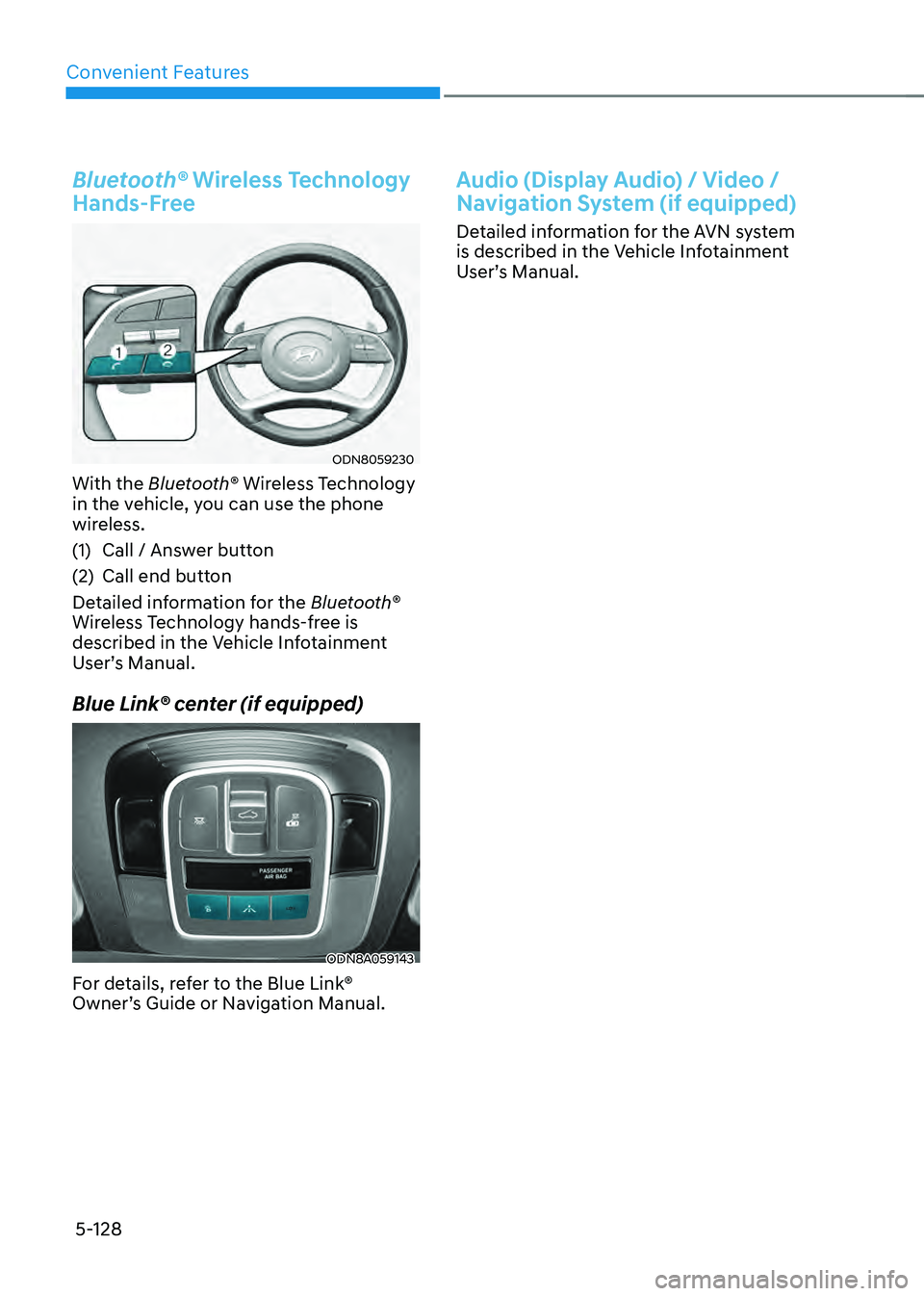
Bluetooth® Wireless Technology
Hands-Free
ODN8059230
With the Bluetooth® Wireless Technology
in the vehicle, you can use the phone
wireless.
(1) Call / Answer button
(2) Call end button
Detailed information for the Bluetooth®
Wireless Technology hands-free is
described in the Vehicle Infotainment
User’s Manual.
Blue Link® center (if equipped)
ODN8A059143
For details, refer to the Blue Link®
Owner’s Guide or Navigation Manual.
Audio (Display Audio) / Video /
Navigation System (if equipped)
Detailed information for the AVN system
is described in the Vehicle Infotainment
User’s Manual.
Page 277 of 527

While Driving
6
6. While Driving
Before Driving ........................................................................\
...........................6-5Before Entering the Vehicle ........................................................................\
.................6-5
Before Starting ........................................................................\
.....................................6-5
Ignition Switch ........................................................................\
..........................6-6Engine Start/Stop Button ........................................................................\
...................6-6
Remote Start ........................................................................\
........................................6-9
Automatic Transmission ........................................................................\
..........6-10Automatic Transmission Operation ........................................................................\
...6-10
Parking ........................................................................\
................................................6-13
LCD Display Message ........................................................................\
.........................6-14
Good Driving Practices ........................................................................\
.....................6-15
Paddle Shifter (Manual Shift Mode) ........................................................................\
..6-16
Coasting guide ........................................................................\
.........................6-17
Brake System
........................................................................\
............................6-18Power Brakes ........................................................................\
......................................6-18
Disc Brakes Wear Indicator ........................................................................\
................ 6-19
Electronic Parking Brake (EPB)
........................................................................\
..........6-19
Auto Hold ........................................................................\
............................................6-24
Anti-lock Brake System (ABS) ........................................................................\
.6-27Electronic Stability Control (ESC) ........................................................................\
.....6-28
Vehicle Stability Management (VSM) .......................................................................6-31
Hill-Start Assist Control (HAC) ........................................................................\
...........6-32
Good Braking Practices ........................................................................\
.....................6-32
Drive Mode Integrated Control System .........................................................6-33Drive Mode ........................................................................\
.........................................6-33
Drive Mode on Trip Computer ........................................................................\
...........6-37
Forward Collision – Avoidance Assist (FCA) - Sensor Fusion ......................6-38System Setting and Activation ........................................................................\
.........6-38
FCA Warning Message and Brake Control ...............................................................6-40
FCA Sensor ........................................................................\
........................................6-43
System Malfunction ........................................................................\
..........................6-45
Limitations of the System ........................................................................\
..................6-47
Junction Turning ........................................................................\
................................6-53
Page 281 of 527
06
6-5
Before Entering the Vehicle
• Be sure all windows, outside mirror(s),
and outside lights are clean and
unobstructed.
• Remove frost, snow, or ice.
• Visually check the tires for uneven
wear and damage.
• Check under the vehicle for any sign
of leaks.
• Be sure there are no obstacles behind
you if you intend to back up.
Before Starting
• Make sure the hood, the trunk, and
the doors are securely closed and
locked.
• Adjust the position of the seat and
steering wheel.
• Adjust the inside and side view
mirrors.
• Verify all the lights work.
• Fasten your seatbelt. Check that
all passengers have fastened their
seatbelts.
• Check the gauges and indicators
in the instrument panel and the
messages on the instrument display
when the ignition switch is in the ON
position.
• Check that any items you are carrying
are stored properly or fastened down
securely.
WARNING
To reduce the risk of SERIOUS INJURY or
DEATH, take the following precautions:
• ALWAYS wear your seat belt. All
passengers must be properly belted
whenever the vehicle is moving.
For more information, refer to "Seat
Belts" in chapter 3.
• Always drive defensively. Assume
other drivers or pedestrians may be
careless and make mistakes.
• Stay focused on the task of driving.
Driver distraction can cause
accidents.
• Leave plenty of space between you
and the vehicle in front of you.
WARNING
NEVER drink alcohol or take drugs and
drive.
Drinking alcohol or taking drugs and
driving is dangerous and may result in
an accident and SERIOUS INJURY or
DEATH.
Drunk driving is the number one
contributor to the highway death
toll each year. Even a small amount
of alcohol will affect your reflexes,
perceptions and judgment. Just
one drink can reduce your ability to
respond to changing conditions and
emergencies and your reaction time
gets worse with each additional drink.
Driving while under the influence
of drugs is as dangerous or more
dangerous than driving under the
influence of alcohol.
You are much more likely to have a
serious accident if you drink or take
drugs and drive. If you are drinking or
taking drugs, don't drive. Do not ride
with a driver who has been drinking
or taking drugs. Choose a designated
driver or call a taxi.
BEFORE DRIVING
Page 286 of 527
6-10
While Driving
ODN8069005
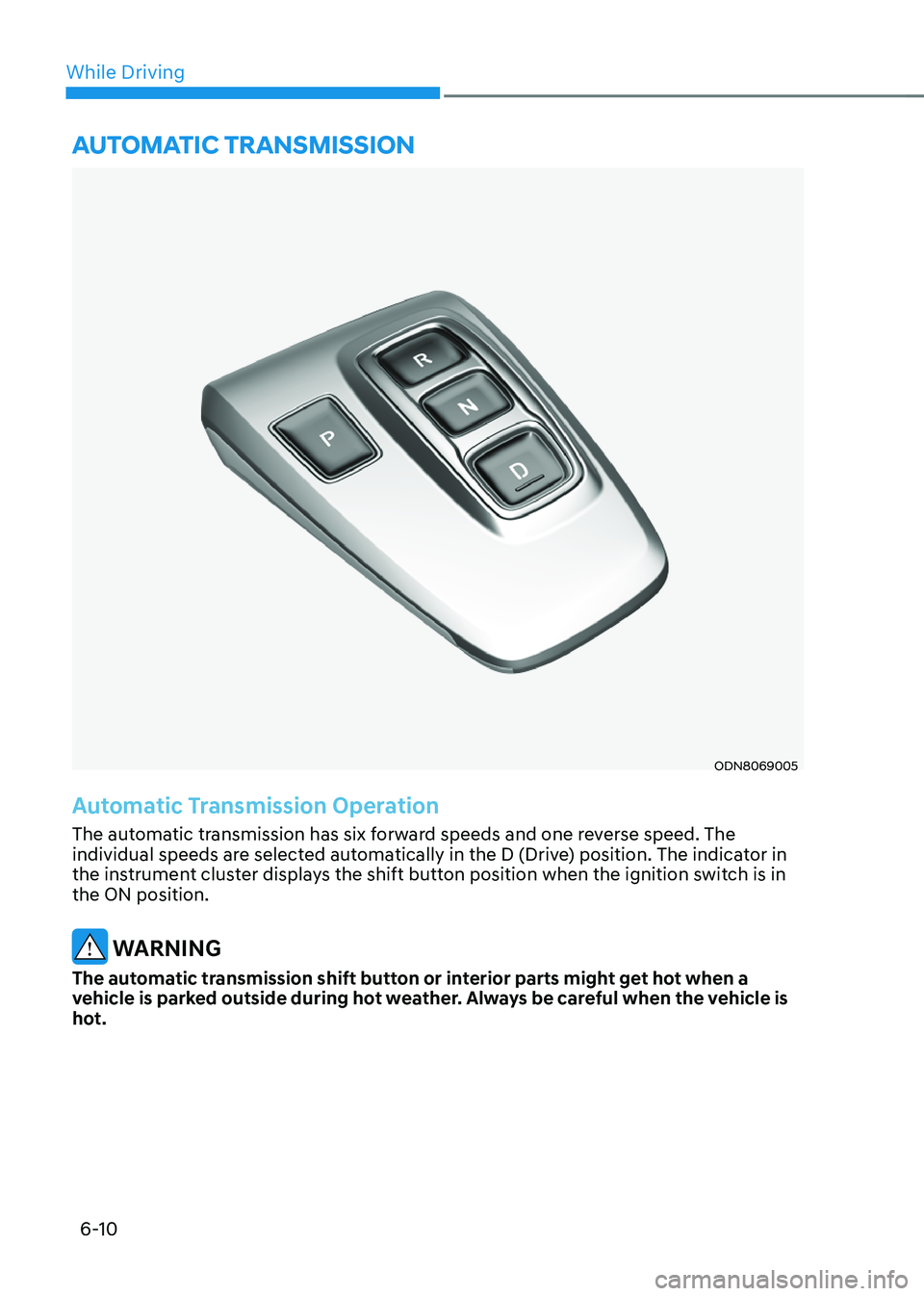
Automatic Transmission Operation
The automatic transmission has six forward speeds and one reverse speed. The
individual speeds are selected automatically in the D (Drive) position. The indicator in
the instrument cluster displays the shift button position when the ignition switch is in
the ON position.
WARNING
The automatic transmission shift button or interior parts might get hot when a
vehicle is parked outside during hot weather. Always be careful when the vehicle is
hot.
AUTOMATIC TRANSMISSION
Page 288 of 527
While Driving
6-12
D (Drive)
This is the normal driving position. The
transmission will automatically shift
through a 6-gear sequence, providing
the best fuel economy and power.
To start the vehicle forward, push the D
(Drive) button by depressing the brake
pedal with the engine ON. Then depress
the accelerator pedal smoothly.
For extra power when passing another
vehicle or driving uphill, depress the
accelerator fully. The transmission will
automatically downshift to the next
lower gear (or gears, as appropriate).
When the vehicle is stopped in D (Drive)
position, if you open the driver's door
with the seat belt unfastened, the gear is
shifted to P (Park) position automatically.
However when the vehicle moves in D
(Drive) position, if you open the driver's
door with the seat belt unfastened, the
gear may not shift to P (Park) position
automatically to protect the automatic
transmission.
Shift-lock system
For your safety, the automatic
transmission has a shift-lock system
which prevents shifting the gear from
P (Park) or N (Neutral) to R (Reverse)
or D (Drive) unless the brake pedal is
depressed.
To shift the gear from P (Park) or N
(Neutral) to R (Reverse) or D (Drive):
1. Depress and hold the brake pedal.
2. Start the engine.
3. Depress the brake pedal and push the
R (Reverse) or D (Drive) button.
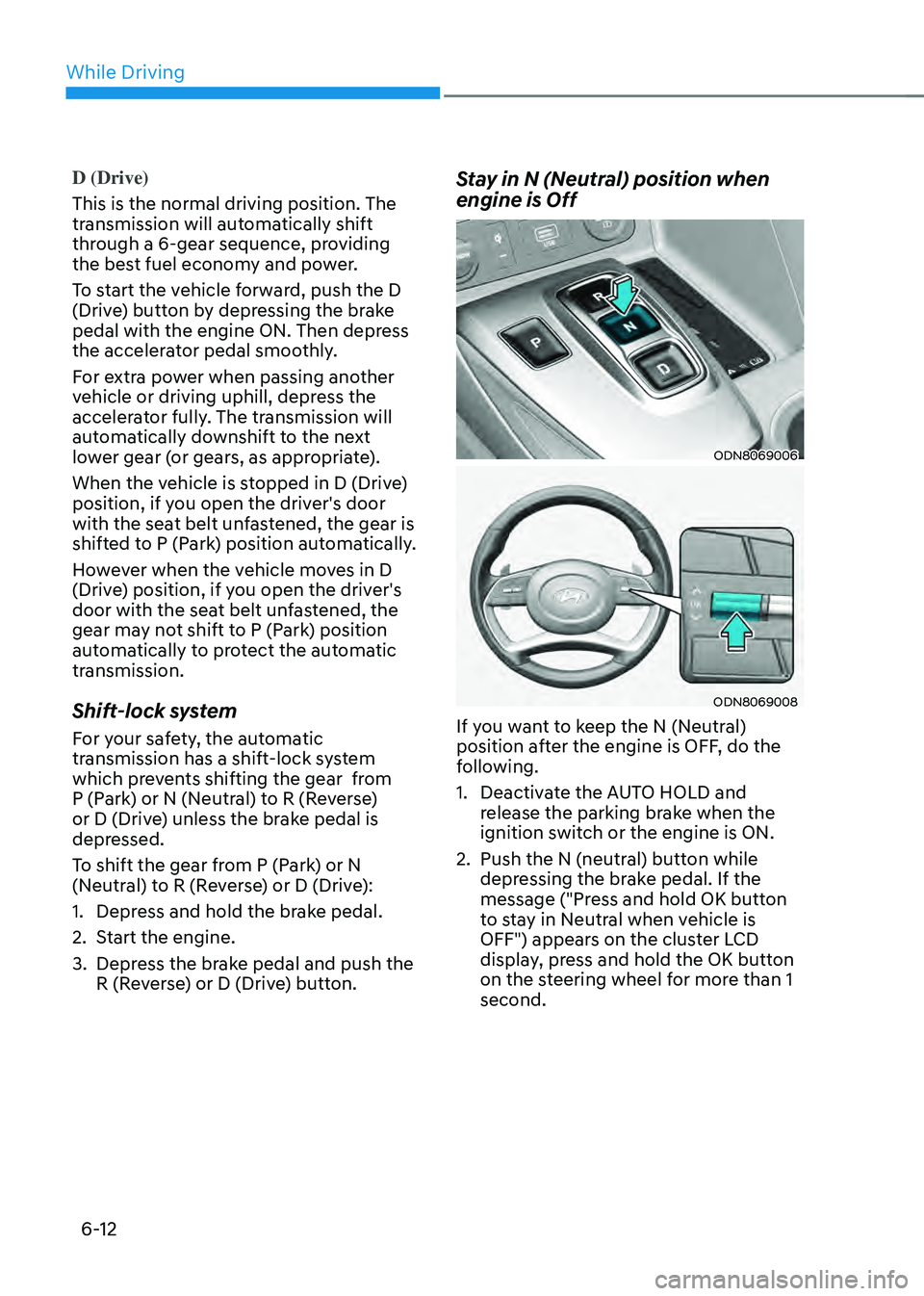
Stay in N (Neutral) position when
engine is Off
ODN8069006
ODN8069008
If you want to keep the N (Neutral)
position after the engine is OFF, do the
following.
1. Deactivate the AUTO HOLD and
release the parking brake when the
ignition switch or the engine is ON.
2. Push the N (neutral) button while
depressing the brake pedal. If the
message ("Press and hold OK button
to stay in Neutral when vehicle is
OFF") appears on the cluster LCD
display, press and hold the OK button
on the steering wheel for more than 1
second.