display HYUNDAI SONATA HYBRID 2020 Owners Manual
[x] Cancel search | Manufacturer: HYUNDAI, Model Year: 2020, Model line: SONATA HYBRID, Model: HYUNDAI SONATA HYBRID 2020Pages: 527, PDF Size: 64.14 MB
Page 367 of 527
06
6-91
To temporarily accelerate with
Smart Cruise Control on
If you want to speed up temporarily
when Smart Cruise Control is on, depress
the accelerator pedal. Increased speed
will not interfere with Smart Cruise
Control operation or change the set
speed.
To return to the set speed, take your foot
off the accelerator pedal.
If you push the SET- switch down
at increased speed, the set speed is
updated.
Information
Be careful when accelerating temporarily,
because the speed is not controlled
automatically at this time even if there is a
vehicle in front of you.
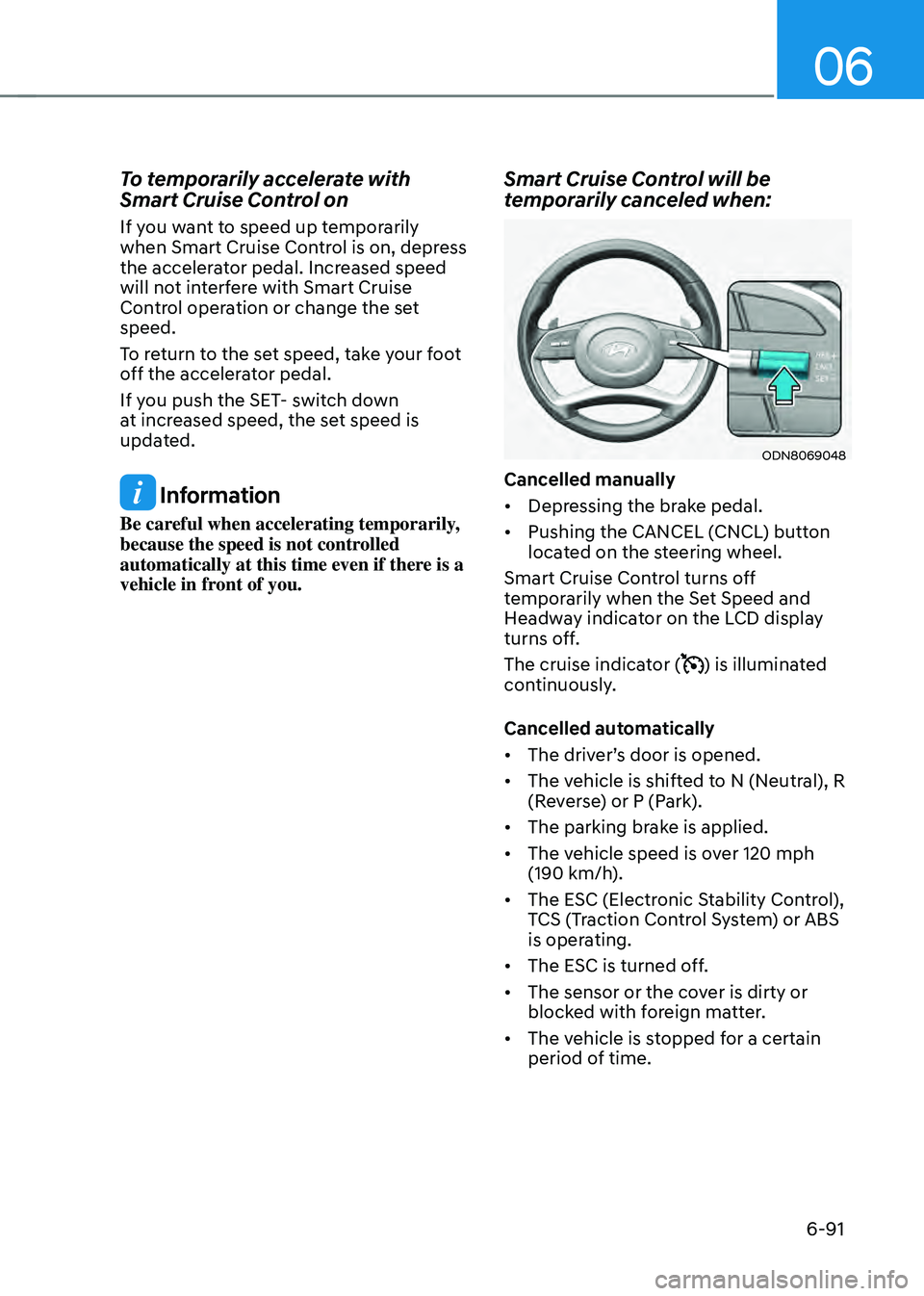
Smart Cruise Control will be
temporarily canceled when:
ODN8069048
Cancelled manually
• Depressing the brake pedal.
• Pushing the CANCEL (CNCL) button
located on the steering wheel.
Smart Cruise Control turns off
temporarily when the Set Speed and
Headway indicator on the LCD display
turns off.
The cruise indicator (
) is illuminated
continuously.
Cancelled automatically
• The driver’s door is opened.
• The vehicle is shifted to N (Neutral), R
(Reverse) or P (Park).
• The parking brake is applied.
• The vehicle speed is over 120 mph
(190 km/h).
• The ESC (Electronic Stability Control),
TCS (Traction Control System) or ABS
is operating.
• The ESC is turned off.
• The sensor or the cover is dirty or
blocked with foreign matter.
• The vehicle is stopped for a certain
period of time.
Page 368 of 527
While Driving
6-92
• The vehicle is stopped for more than
5 minutes.
• The vehicle stops and goes repeatedly
for a long period of time.
• The accelerator pedal is continuously
depressed for a long period of time.
• The accelerator pedal is continuously
depressed for more than one minute.
• The engine performance is abnormal.
• Engine rpm is in the red zone.
• The driver starts driving by pushing
the SET+ switch up/SET- switch down
or depressing the accelerator pedal,
after the vehicle is stopped by Smart
Cruise Control system with no other
vehicle ahead.
• The driver starts driving by pushing
the SET+ switch up/SET- switch down
or depressing the accelerator pedal,
after stopping the vehicle with a
vehicle stopped far away in front.
• Forward Collision-Avoidance Assist is
activated.
• The engine speed is in dangerous
range.
Each of these actions will cancel the
Smart Cruise Control operation. The Set
Speed and Headway on the LCD display
will go off.
In a condition Smart Cruise Control is
cancelled automatically, Smart Cruise
Control will not resume even though the
RES+ or SET- switch is pushed. Information
If Smart Cruise Control is cancelled by
other than the reasons mentioned, have
the vehicle inspected by an authorized
HYUNDAI dealer.
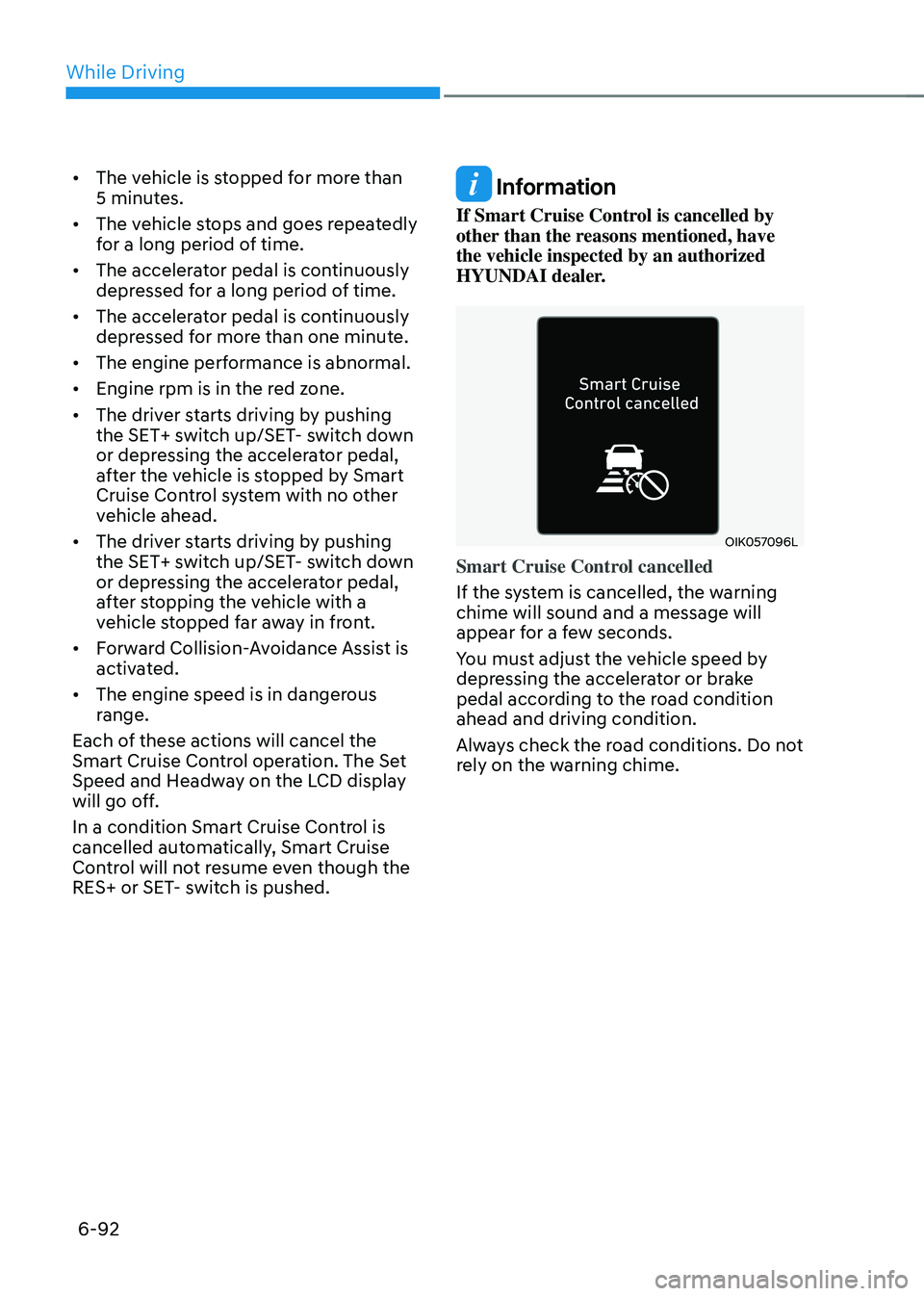
OIK057096L
Smart Cruise Control cancelled
If the system is cancelled, the warning
chime will sound and a message will
appear for a few seconds.
You must adjust the vehicle speed by
depressing the accelerator or brake
pedal according to the road condition
ahead and driving condition.
Always check the road conditions. Do not
rely on the warning chime.
Page 372 of 527
While Driving
6-96
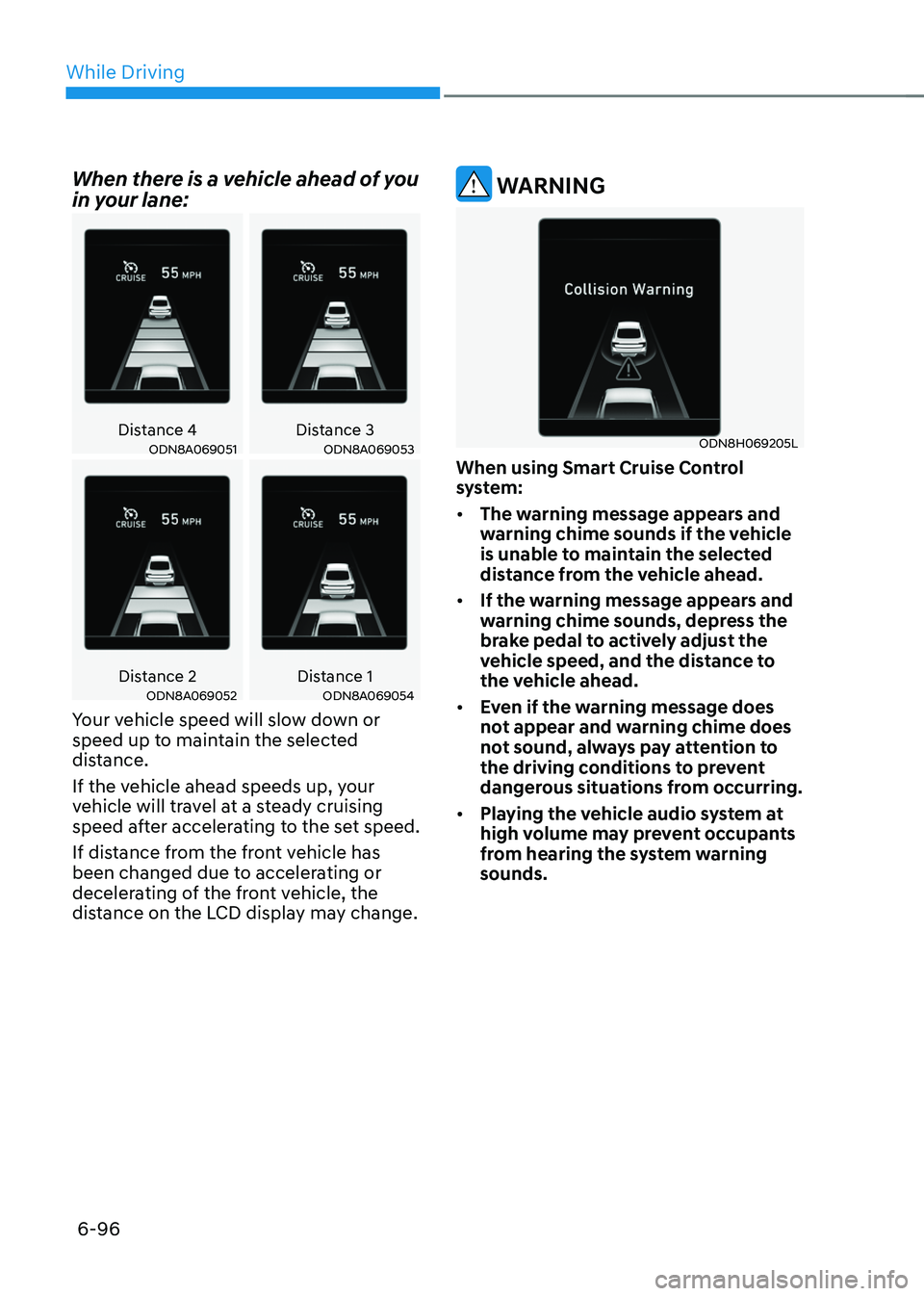
When there is a vehicle ahead of you
in your lane:
Distance 4Distance 3ODN8A069051ODN8A069053
Distance 2Distance 1ODN8A069052ODN8A069054
Your vehicle speed will slow down or
speed up to maintain the selected
distance.
If the vehicle ahead speeds up, your
vehicle will travel at a steady cruising
speed after accelerating to the set speed.
If distance from the front vehicle has
been changed due to accelerating or
decelerating of the front vehicle, the
distance on the LCD display may change.
WARNING
ODN8H069205L
When using Smart Cruise Control
system:
• The warning message appears and
warning chime sounds if the vehicle
is unable to maintain the selected
distance from the vehicle ahead.
• If the warning message appears and
warning chime sounds, depress the
brake pedal to actively adjust the
vehicle speed, and the distance to
the vehicle ahead.
• Even if the warning message does
not appear and warning chime does
not sound, always pay attention to
the driving conditions to prevent
dangerous situations from occurring.
• Playing the vehicle audio system at
high volume may prevent occupants
from hearing the system warning
sounds.
Page 374 of 527
While Driving
6-98
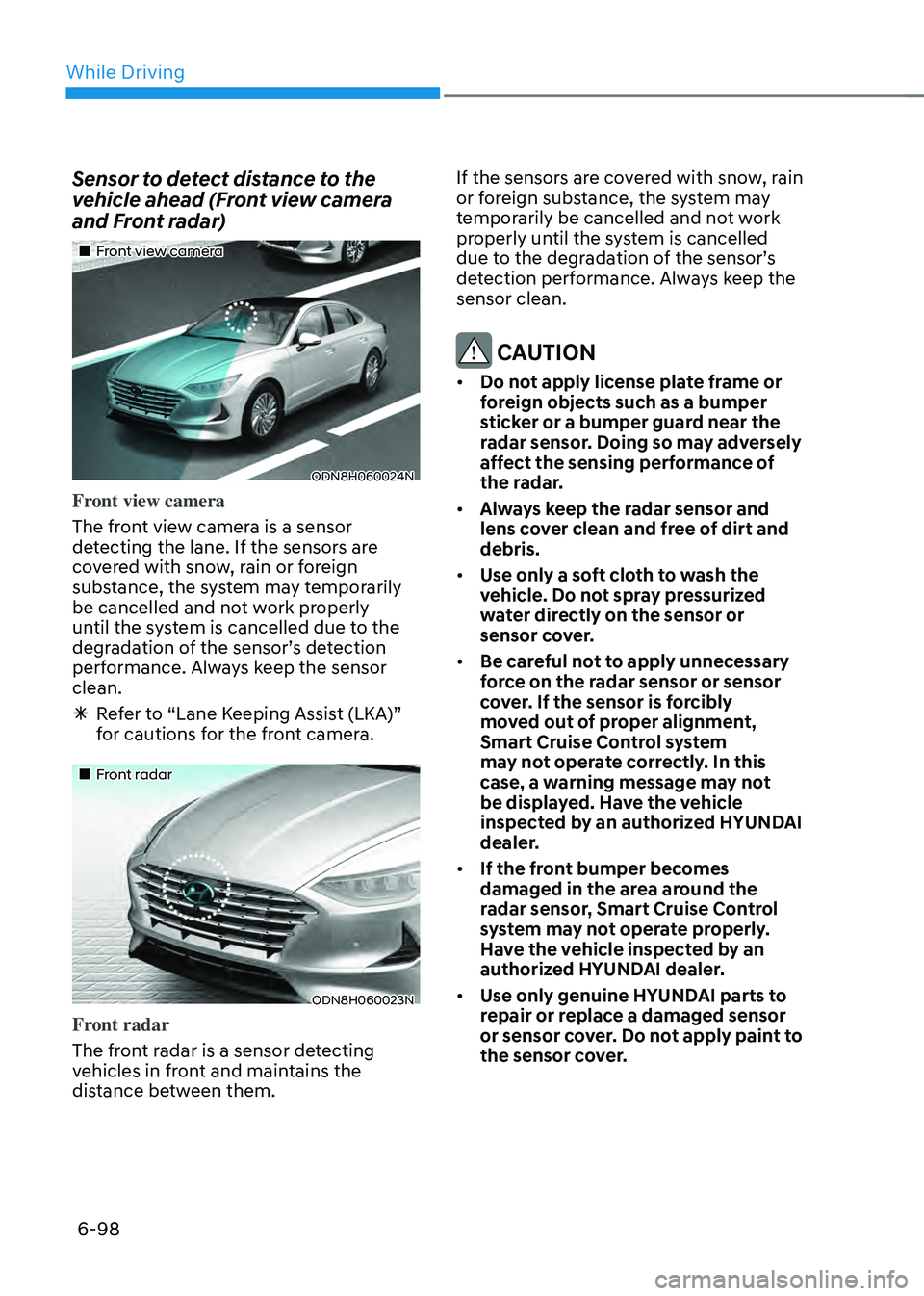
Sensor to detect distance to the
vehicle ahead (Front view camera
and Front radar)
„„Front view camera
ODN8H060024N
Front view camera
The front view camera is a sensor
detecting the lane. If the sensors are
covered with snow, rain or foreign
substance, the system may temporarily
be cancelled and not work properly
until the system is cancelled due to the
degradation of the sensor’s detection
performance. Always keep the sensor
clean.
ÃRefer to “Lane Keeping Assist (LKA)”
for cautions for the front camera.
„„Front radar
ODN8H060023N
Front radar
The front radar is a sensor detecting
vehicles in front and maintains the
distance between them. If the sensors are covered with snow, rain
or foreign substance, the system may
temporarily be cancelled and not work
properly until the system is cancelled
due to the degradation of the sensor’s
detection performance. Always keep the
sensor clean.
CAUTION
•
Do not apply license plate frame or
foreign objects such as a bumper
sticker or a bumper guard near the
radar sensor. Doing so may adversely
affect the sensing performance of
the radar.
• Always keep the radar sensor and
lens cover clean and free of dirt and
debris.
• Use only a soft cloth to wash the
vehicle. Do not spray pressurized
water directly on the sensor or
sensor cover.
• Be careful not to apply unnecessary
force on the radar sensor or sensor
cover. If the sensor is forcibly
moved out of proper alignment,
Smart Cruise Control system
may not operate correctly. In this
case, a warning message may not
be displayed. Have the vehicle
inspected by an authorized HYUNDAI
dealer.
• If the front bumper becomes
damaged in the area around the
radar sensor, Smart Cruise Control
system may not operate properly.
Have the vehicle inspected by an
authorized HYUNDAI dealer.
• Use only genuine HYUNDAI parts to
repair or replace a damaged sensor
or sensor cover. Do not apply paint to
the sensor cover.
Page 375 of 527
06
6-99
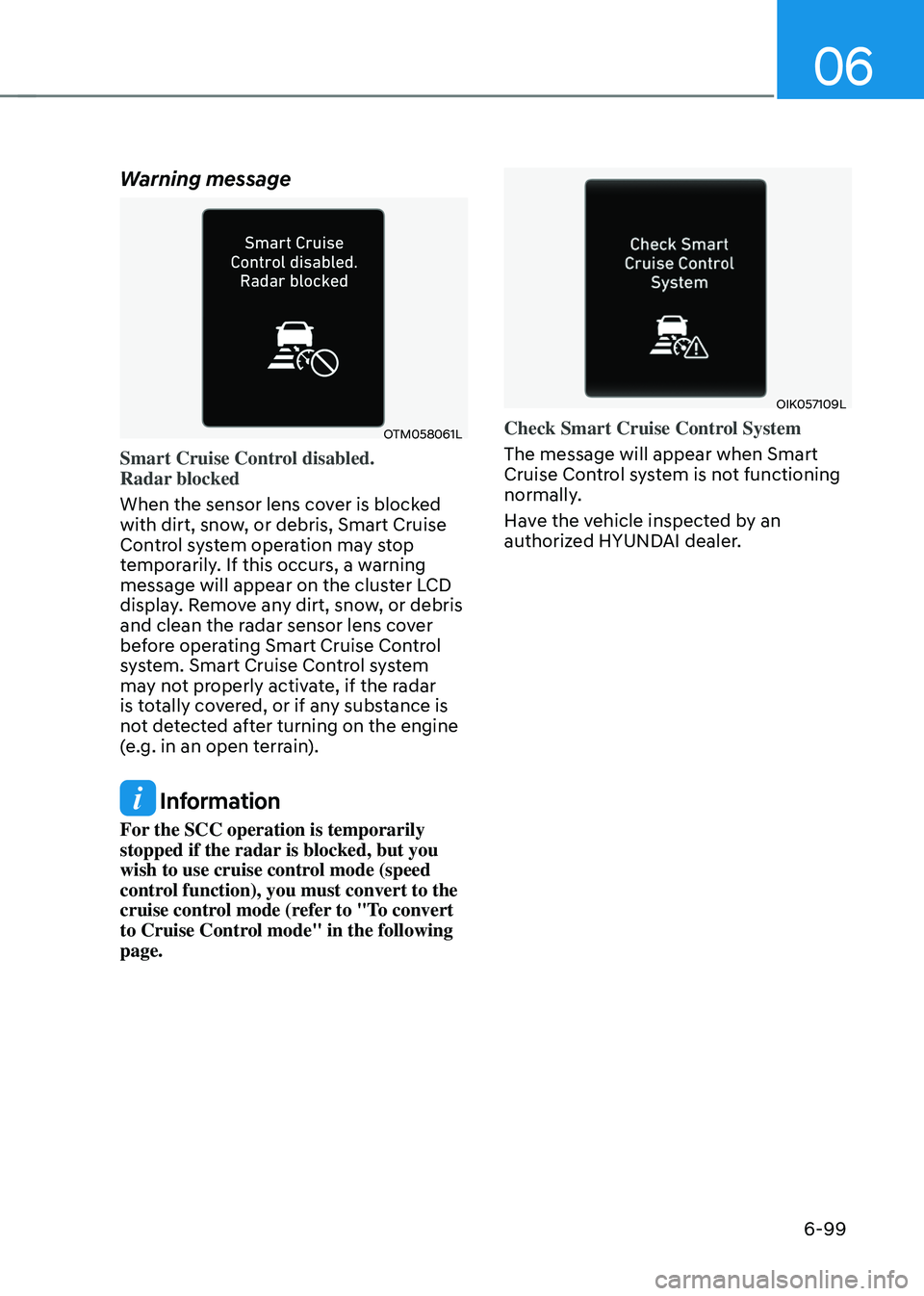
Warning message
OTM058061L
Smart Cruise Control disabled.
Radar blocked
When the sensor lens cover is blocked
with dirt, snow, or debris, Smart Cruise
Control system operation may stop
temporarily. If this occurs, a warning
message will appear on the cluster LCD
display. Remove any dirt, snow, or debris
and clean the radar sensor lens cover
before operating Smart Cruise Control
system. Smart Cruise Control system
may not properly activate, if the radar
is totally covered, or if any substance is
not detected after turning on the engine
(e.g. in an open terrain).
Information
For the SCC operation is temporarily
stopped if the radar is blocked, but you
wish to use cruise control mode (speed
control function), you must convert to the
cruise control mode (refer to "To convert
to Cruise Control mode" in the following
page.
OIK057109L
Check Smart Cruise Control System
The message will appear when Smart
Cruise Control system is not functioning
normally.
Have the vehicle inspected by an
authorized HYUNDAI dealer.
Page 382 of 527
While Driving
6-106
Information
• Navigation-based Smart Cruise Control
is limited in other countries.
• The system may not operate due to the
existence of leading vehicles and the
driving situations of the vehicle.
• The system operates regardless of
whether the sharp curve warning
appears on the navigation, but the time
gap could occur between the warning
and system operation.
• The navigation only provides curve
information within permitted speed
ranges so that the system may not
decrease its speed during extreme over-
speed driving.
• The system is not designed to work on
highways other than mentioned as a
controlled access road.
• The system automatically cancels when
you leave the highway. •
Highway Driving Assist and
Navigation-based Smart Cruise
Control uses the same symbol that indicates the status of the system.
Therefore, even if Navigation-based
Cruise Control is off, the
symbol may be displayed.
• If there is a problem with Navigation-
based Smart Cruise Control, the system
cannot be activated in the AVN system
screen, and the
symbol will turn off. However, if Highway Driving Assist
is activated, the
symbol will be displayed.
• After you pass through a tollgate on a
highway, the system operates based
on the first lane. If you enter one of
the other lanes, the system might not
properly decelerate.
• If you over speed, the system may not
decelerate the vehicle in a curve.
• Deceleration by the system may not be
sufficient if the driver accelerates while
the system is operating,
• Deceleration by the system may not be
sufficient due to road conditions such
as uneven road surfaces, narrow lanes,
etc.
• If the road is controlled, due to
construction or holiday events, the
system might not work properly.
Page 397 of 527

06
6-121
WARNING
• Always be aware of road conditions
while driving and be alert for
unexpected situations even though
Rear Cross-Traffic Collision Warning
system and Rear Cross-Traffic
Collision-Avoidance Assist system
are operating.
• Rear Cross-Traffic Collision Warning
system and Rear Cross-Traffic
Collision-Avoidance Assist system
are supplemental systems to assist
you. Do not entirely rely on the
systems. Always pay attention, while
driving, for your safety.
• Rear Cross-Traffic Collision Warning
system and Rear Cross-Traffic
Collision-Avoidance Assist system
are not substitutes for proper and
safe driving. Always drive safely and
use caution when backing up the
vehicle.
System Setting and Activation
System setting
• The driver can activate the systems
by placing the ignition switch to the
ON position and by selecting “User
Settings → Driver Assistance → Parking Safety → Rear Cross-Traffic Safety”. RCCW and RCCA turn on and get
ready to be activated when ‘Rear
Cross-Traffic safety’ is selected.
• When the engine is turned off then on
again, the systems are always ready to
be activated.
• When the system is initially turned
on and when the engine is turned off
then on again, the warning light will
illuminate for 3 seconds on the side
view mirror.
The driver can select the initial warning
activation time in the User Settings in
the LCD display or infotainment system
display by selecting ‘User Settings → Driver Assistance → Warning Timing’.
Page 398 of 527

While Driving
6-122
The options for the initial Rear Cross-
Traffic Collision Warning includes the
following:
-Normal:
When this condition is selected, the
initial Rear Cross-Traffic Collision
Warning is activated normally. If this
setting feels sensitive, change the
option to ‘Late’.
The warning activation time may feel
late if the a vehicle at the side or rear
abruptly accelerates.
-Late:
Select this warning activation time
when the traffic is light and you are
driving at a low speed.
Information
If you change the warning timing, the
warning time of other systems may
change. Always be aware before changing
the warning timing.
The driver can select the warning volume
of Rear Cross-Traffic Collision Warning
by selecting ‘User Settings → Driver Assistance → Warning Volume → High/Medium/Low’.
Information
If you change the warning volume, the
warning volume of other systems may
change. Always be aware before changing
the warning volume.
Operating conditions
To operate:
Go to the “User Settings → Driver Assistance → Parking Safety → Rear Cross-Traffic Safety” on the LCD display or
infotainment system display. The system
will turn on and standby to activate.
The system will activate when vehicle
speed is below 7 mph (10 km/h) and with
the shift button in R (Reverse).
The system will not activate when the vehicle speed exceeds 7 mph (10
km/h). The system will activate again
when the speed is below 5 mph (8
km/h).
The system’s detecting range is
approximately 1 ~ 65 ft (0.5 ~ 20 m). An
approaching vehicle will be detected if
their vehicle speed is within 5 ~ 22.5 mph
(8 ~ 36 km/h).
Note that the detecting range and
operating speed may vary under certain
conditions. As always, use caution and
pay close attention to your surroundings
when backing up your vehicle.
Page 399 of 527

06
6-123
If the vehicle detected by the radar sensors approaches from the rear left/right side of
your vehicle, the warning chime will sound, the warning light on the side view mirror
will blink and a message will appear on the LCD display or infotainment system display.
If the rear view monitor system is in activation, a message will also appear on the
infotainment system screen.
The warning will stop when:
-The detected vehicle moves out of the sensing area or
-when the vehicle is right behind your vehicle or
-when the vehicle is not approaching your vehicle or
-when the other vehicle slows down.
-The vehicle’s approaching speed is decreased.
„„Left
ODN8H069036
„„Left
ODN8069038
„„Right
ODN8H069037
„„Right
ODN8069039
Warning and System Control
Rear Cross-Traffic Collision Warning (RCCW) system
Page 400 of 527
While Driving
6-124
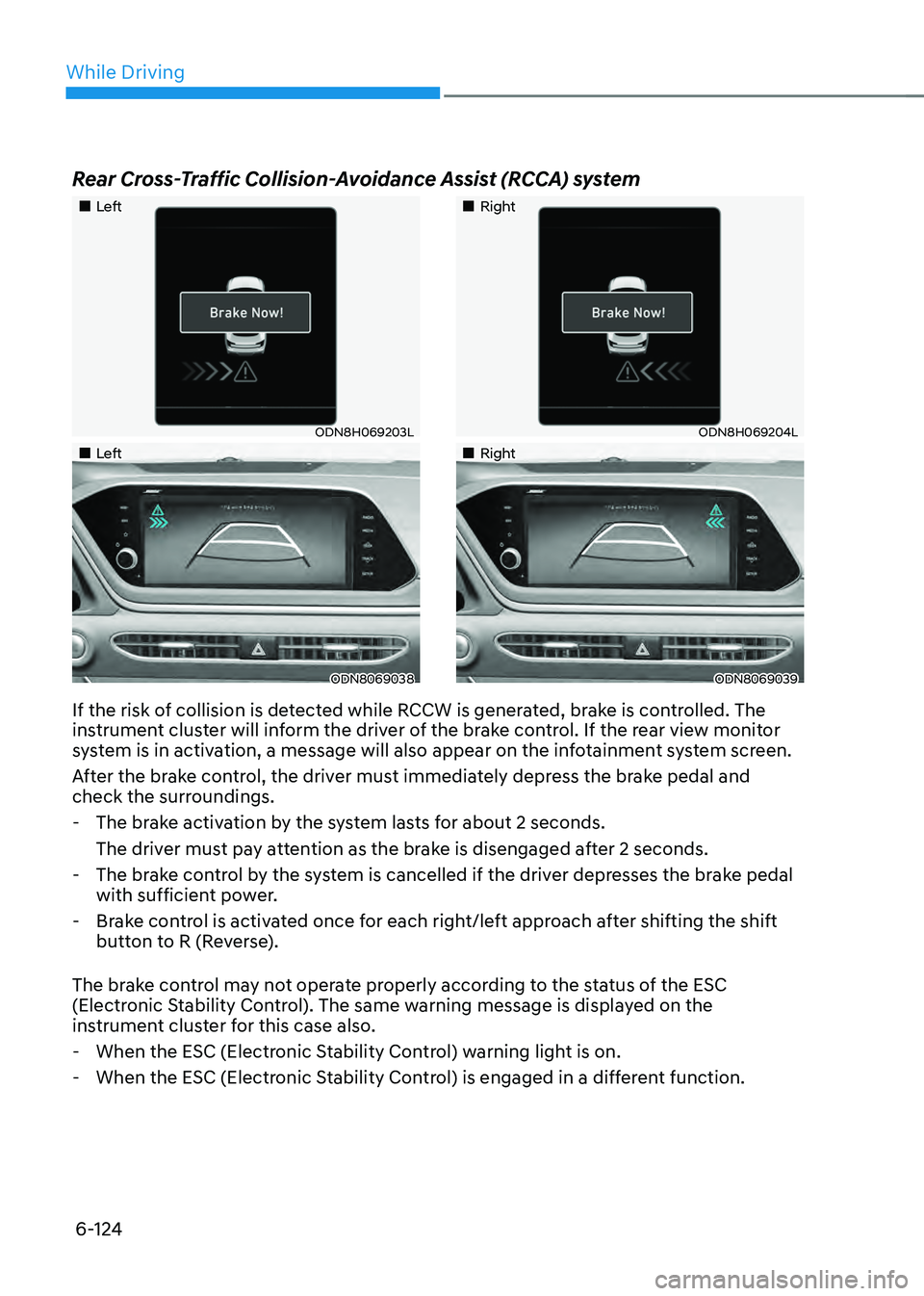
Rear Cross-Traffic Collision-Avoidance Assist (RCCA) system
„„Left
ODN8H069203L
„„Left
ODN8069038
„„Right
ODN8H069204L
„„Right
ODN8069039
If the risk of collision is detected while RCCW is generated, brake is controlled. The
instrument cluster will inform the driver of the brake control. If the rear view monitor
system is in activation, a message will also appear on the infotainment system screen.
After the brake control, the driver must immediately depress the brake pedal and
check the surroundings.
-The brake activation by the system lasts for about 2 seconds.
The driver must pay attention as the brake is disengaged after 2 seconds.
-The brake control by the system is cancelled if the driver depresses the brake pedal
with sufficient power.
-Brake control is activated once for each right/left approach after shifting the shift
button to R (Reverse).
The brake control may not operate properly according to the status of the ESC
(Electronic Stability Control). The same warning message is displayed on the
instrument cluster for this case also.
- When the ESC (Electronic Stability Control) warning light is on.
-When the ESC (Electronic Stability Control) is engaged in a different function.