wheel HYUNDAI SONATA HYBRID 2022 Owner's Manual
[x] Cancel search | Manufacturer: HYUNDAI, Model Year: 2022, Model line: SONATA HYBRID, Model: HYUNDAI SONATA HYBRID 2022Pages: 527, PDF Size: 64.14 MB
Page 124 of 527
Instrument Cluster
4-20
Press START button with key
This warning message is displayed if you
press the Engine Start/Stop button while
the warning message "Key not detected"
is displayed.
At this time, the immobilizer indicator
light blinks.
Check BRAKE SWITCH fuse
This warning message is displayed if the
brake switch fuse is disconnected.
You need to replace the fuse with a new
one before starting the engine.
If that is not possible, you can start the
engine by pressing the Engine Start/
Stop button for 10 seconds in the ACC
position.
Press START button while turning
wheel
This message is displayed if the steering
wheel does not unlock normally when
the Engine Start/Stop button is pressed.
You should press the Engine Start/Stop
button while turning the steering wheel
right and left.
Check steering wheel lock system
This message is displayed if the steering
wheel does not lock normally while the
Engine Start/Stop button is pressed to
the OFF position.
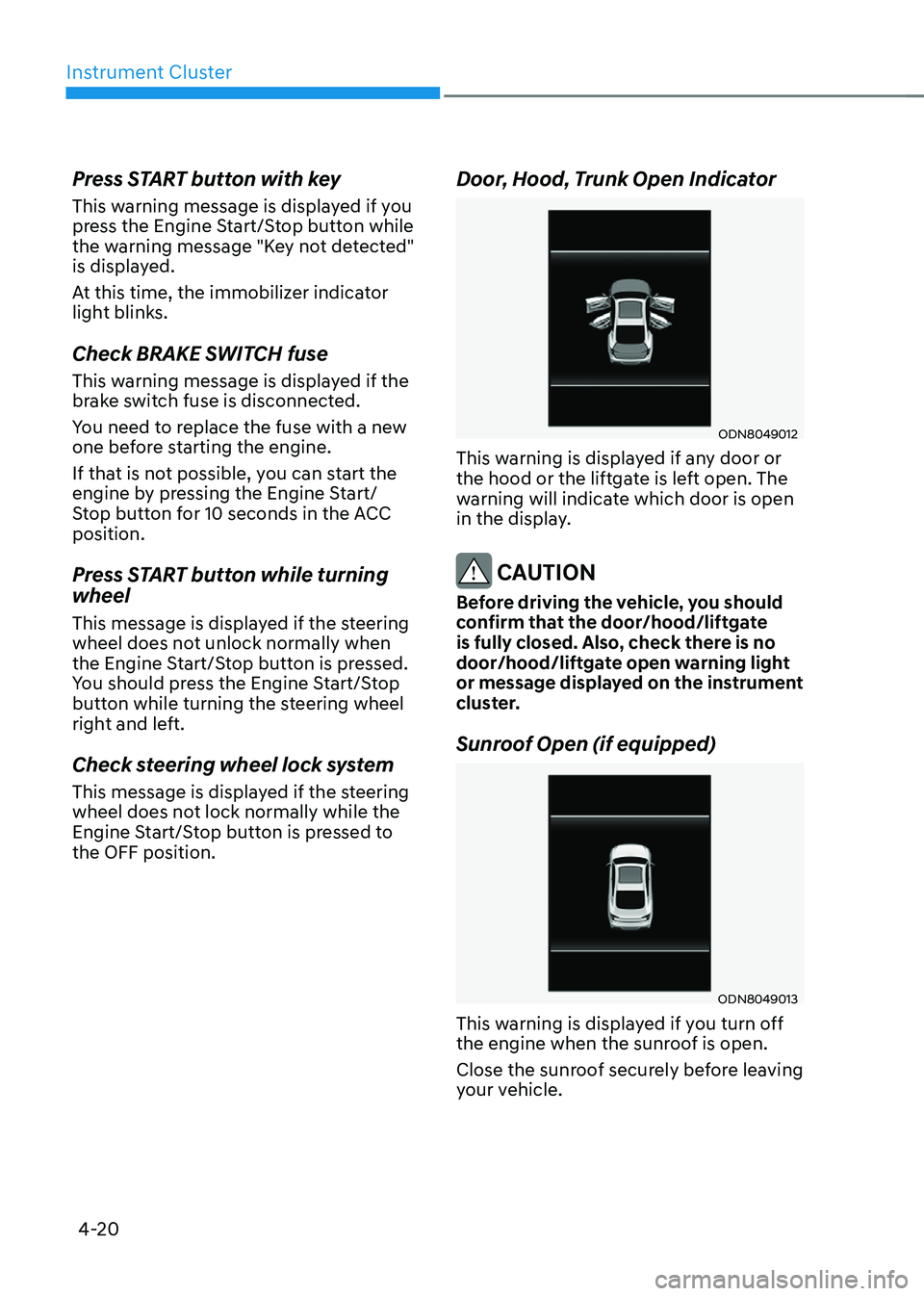
Door, Hood, Trunk Open Indicator
ODN8049012
This warning is displayed if any door or
the hood or the liftgate is left open. The
warning will indicate which door is open
in the display.
CAUTION
Before driving the vehicle, you should
confirm that the door/hood/liftgate
is fully closed. Also, check there is no
door/hood/liftgate open warning light
or message displayed on the instrument
cluster.
Sunroof Open (if equipped)
ODN8049013
This warning is displayed if you turn off
the engine when the sunroof is open.
Close the sunroof securely before leaving
your vehicle.
Page 140 of 527
Instrument Cluster
4-36
Trip Computer
The trip computer is a microcomputer-
controlled driver information system that
displays information related to driving.
Information
Some driving information stored in the
trip computer (for example Average
Vehicle Speed) resets if the battery is
disconnected.
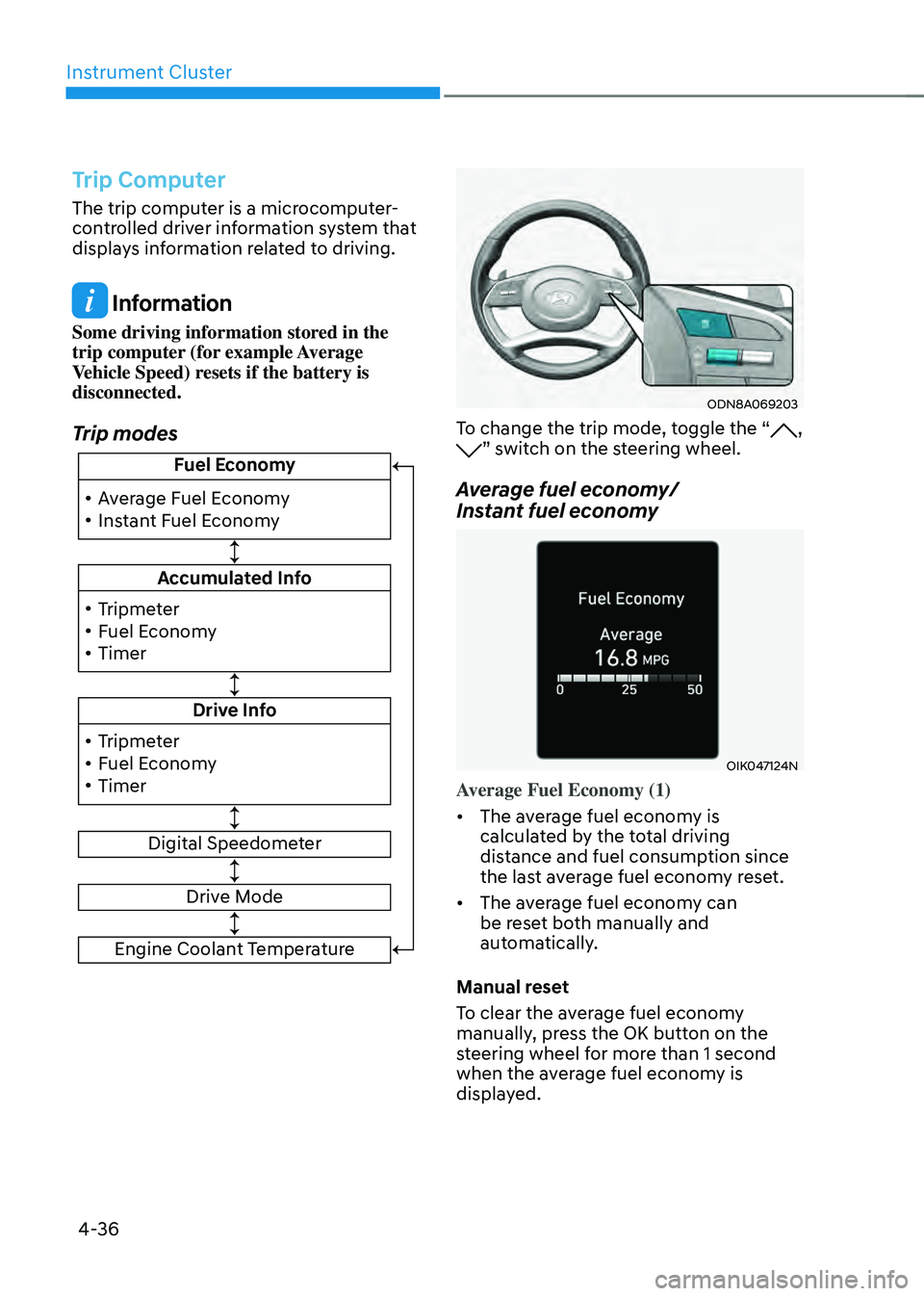
Trip modes
!ŸAverage Fuel Economy
!Ÿ Instant Fuel Economy Fuel Economy
Accumulated Info
Drive Info
Digital Speedometer
!Ÿ
Tripmeter
!Ÿ Fuel Economy
!Ÿ Timer
!Ÿ Tripmeter
!Ÿ Fuel Economy
!Ÿ Timer
Drive Mode
Engine Coolant Temperature
ODN8A069203
To change the trip mode, toggle the “, ” switch on the steering wheel.
Average fuel economy/
Instant fuel economy
OIK047124N
Average Fuel Economy (1)
•
The average fuel economy is
calculated by the total driving
distance and fuel consumption since
the last average fuel econ om y reset.
• The average fuel economy can
be reset both manually and
automatically.
Manual reset
To clear the average fuel economy
manually, press the OK button on the
steering wheel for more than 1 second
when the average fuel economy is
displayed.
Page 149 of 527

5. Convenient Features
Convenient Features
Accessing Your Vehicle ........................................................................\
.............5-5Smart Key ........................................................................\
..............................................5-5
Immobilizer System ........................................................................\
............................5-11
Hyundai Digital Key ........................................................................\
.............................5-12
Door Locks ........................................................................\
...............................5-28Operating Door Locks from Outside the Vehicle .....................................................5-28
Operating Door Locks from Inside the Vehicle ........................................................5-29
Automatic Door Lock and Unlock Features ...............................................................5-31
Rear Occupant Alert (ROA) System ........................................................................\
...5-32
Child-Protector Rear Door Locks ........................................................................\
......5-33
Vehicle Auto-Shut Off Function ........................................................................\
........5-33
Theft-Alarm System ........................................................................\
...............5-34
Driver Position Memory System
....................................................................5-35Storing Positions into Memory ........................................................................\
.........5-35
Recalling Positions from Memory ........................................................................\
.....5-36
Resetting the Driver’s Seat Memory System ............................................................5-36
Easy Access Function ........................................................................\
.........................5-37
Steering Wheel ........................................................................\
........................5-38Electric Power Steering (EPS) ........................................................................\
............5-38
Tilt Steering / Telescope Steering ........................................................................\
.....5-39
Heated Steering Wheel ........................................................................\
.....................5-40
Horn ........................................................................\
..................................................... 5-41
Mirrors ........................................................................\
.....................................5-42Inside Rearview Mirror ........................................................................\
.......................5-42
Side View Mirrors ........................................................................\
..............................5-49
Reverse Parking Aid Function ........................................................................\
...........5-50
Windows ........................................................................\
...................................5-51Power Windows ........................................................................\
..................................5-52
Panoramic SUNROOF ........................................................................\
.............5-55Sunshade ........................................................................\
............................................5-56
Sliding the Sunroof ........................................................................\
.............................5-56
Tilting the Sunroof ........................................................................\
.............................5-56
5
Page 152 of 527

Interior Features ........................................................................\
......................5-119Cup Holder ........................................................................\
.........................................5-119
Sunvisor ........................................................................\
............................................5-120
Power Outlet ........................................................................\
.....................................5-120
USB Charger ........................................................................\
......................................5-121
Wireless Cellular Phone Charging System ..............................................................5-122
Clock ........................................................................\
.................................................5-124
Clothes Hanger ........................................................................\
.................................5-124
Floor Mat Anchor(s) ........................................................................\
...........................5-125
Side Curtain ........................................................................\
.......................................5-125
Infotainment System ........................................................................\
.............5-126USB and iPod® Port ........................................................................\
..........................5-126
Antenna ........................................................................\
.............................................5-126
Steering Wheel Audio Control ........................................................................\
..........5-127
Bluetooth® Wireless Technology Hands-Free .........................................................5-128
Audio (Display Audio) / Video / Navigation System
...............................................5-128
5
Page 180 of 527
Convenient Features
5-32
Rear Occupant Alert (ROA)
System
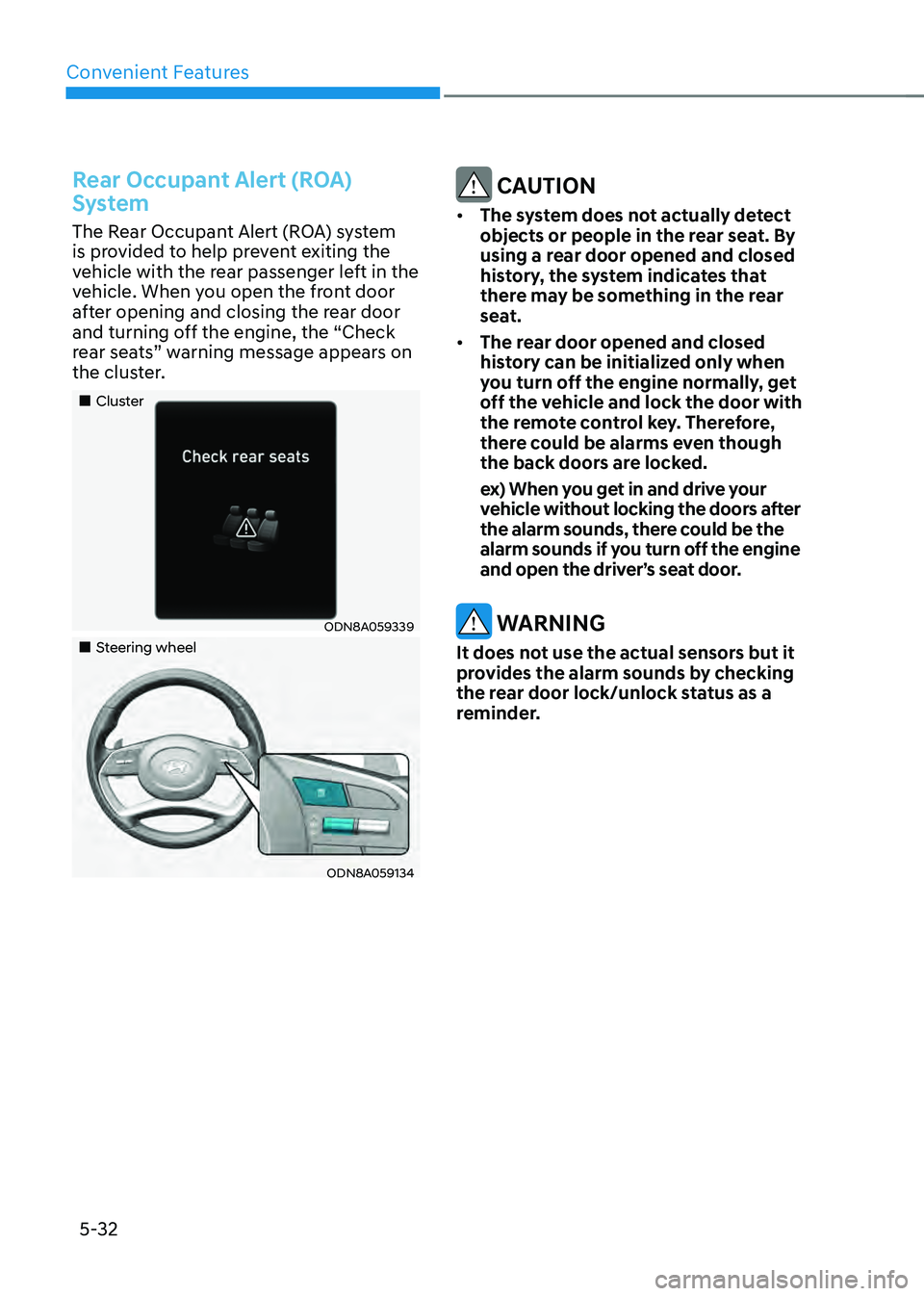
The Rear Occupant Alert (ROA) system
is provided to help prevent exiting the
vehicle with the rear passenger left in the
vehicle. When you open the front door
after opening and closing the rear door
and turning off the engine, the “Check
rear seats” warning message appears on
the cluster.
„„Cluster
ODN8A059339
„„Steering wheel
ODN8A059134
CAUTION
• The system does not actually detect
objects or people in the rear seat. By
using a rear door opened and closed
history, the system indicates that
there may be something in the rear
seat.
• The rear door opened and closed
history can be initialized only when
you turn off the engine normally, get
off the vehicle and lock the door with
the remote control key. Therefore,
there could be alarms even though
the back doors are locked.
ex) When you get in and drive your
vehicle without locking the doors after
the alarm sounds, there could be the
alarm sounds if you turn off the engine
and open the driver’s seat door.
WARNING
It does not use the actual sensors but it
provides the alarm sounds by checking
the rear door lock/unlock status as a
reminder.
Page 186 of 527
Convenient Features
5-38
STEERING WHEEL
Electric Power Steering (EPS)
The system assists you with steering the
vehicle. If the vehicle is turned off or
if the power steering system becomes
inoperative, you may still steer the
vehicle, but it will require increased
steering effort.
Also, the steering effort becomes heavier
as the vehicle’s speed increases and
becomes lighter as the vehicle’s speed
decreases for better control of the
steering wheel.
Should you notice any change in the
effort required to steer during normal
vehicle operation, have the system
checked by an authorized HYUNDAI
dealer.
CAUTION
• If the Electric Power Steering System
does not operate normally, the
warning light (
) will illuminate
on the instrument cluster. You may
steer the vehicle, but it will require
increased steering efforts. Take your
vehicle to an authorized HYUNDAI
dealer and have the system checked
as soon as possible.
• When an abnormality is detected
in the electric power steering
system, to prevent a an accident, the
steering assist function may become
inoperative. At this time, the warning
light turns on or blinks on the cluster.
The steering wheel may become
difficult to control or operate. Have
your vehicle checked immediately,
after moving the vehicle to a safe
area.
Information
The following symptoms may occur during
normal vehicle operation:
• The steering effort may be high
immediately after placing the ignition
switch in the ON position.
This happens as the system performs
the EPS system diagnostics. When the
diagnostics are completed, the steering
wheel effort will return to its normal
condition.
• When the battery voltage is low, you
might have to put more steering effort.
However, it is a temporary condition so
that it will return to normal condition
after charging the battery.
• A click noise may be heard from the
EPS relay after the ignition switch is in
the ON or LOCK/OFF position.
• Motor noise may be heard when the
vehicle is at a stop or at a low driving
speed.
• When you operate the steering wheel
in low temperatures, abnormal noise
may occur. If the temperature rises, the
noise will disappear. This is a normal
condition.
• When an error is detected from the
EPS, the steering effort assist function
may become inoperative in order to
prevent fatal accidents. Instrument
cluster warning lights may be on or the
steering effort may be high. If these
symptoms occur, drive the vehicle to
a safe area as soon as it is safe to do
so. Have the system checked by an
authorized HYUNDAI dealer as soon
as possible.
Page 187 of 527
05
5-39
Tilt Steering / Telescope Steering
When adjusting the steering wheel to a
comfortable position, adjust the steering
wheel so that it points toward your chest,
not toward your face. Make sure you can
see the instrument cluster warning lights
and gauges. After locking the lever, push
the steering wheel both up and down to
be certain it is locked in position. Always
adjust the position of the steering wheel
before driving.
WARNING
NEVER adjust the steering wheel while
driving. This may cause loss of vehicle
control resulting in an accident.
ODN8059021
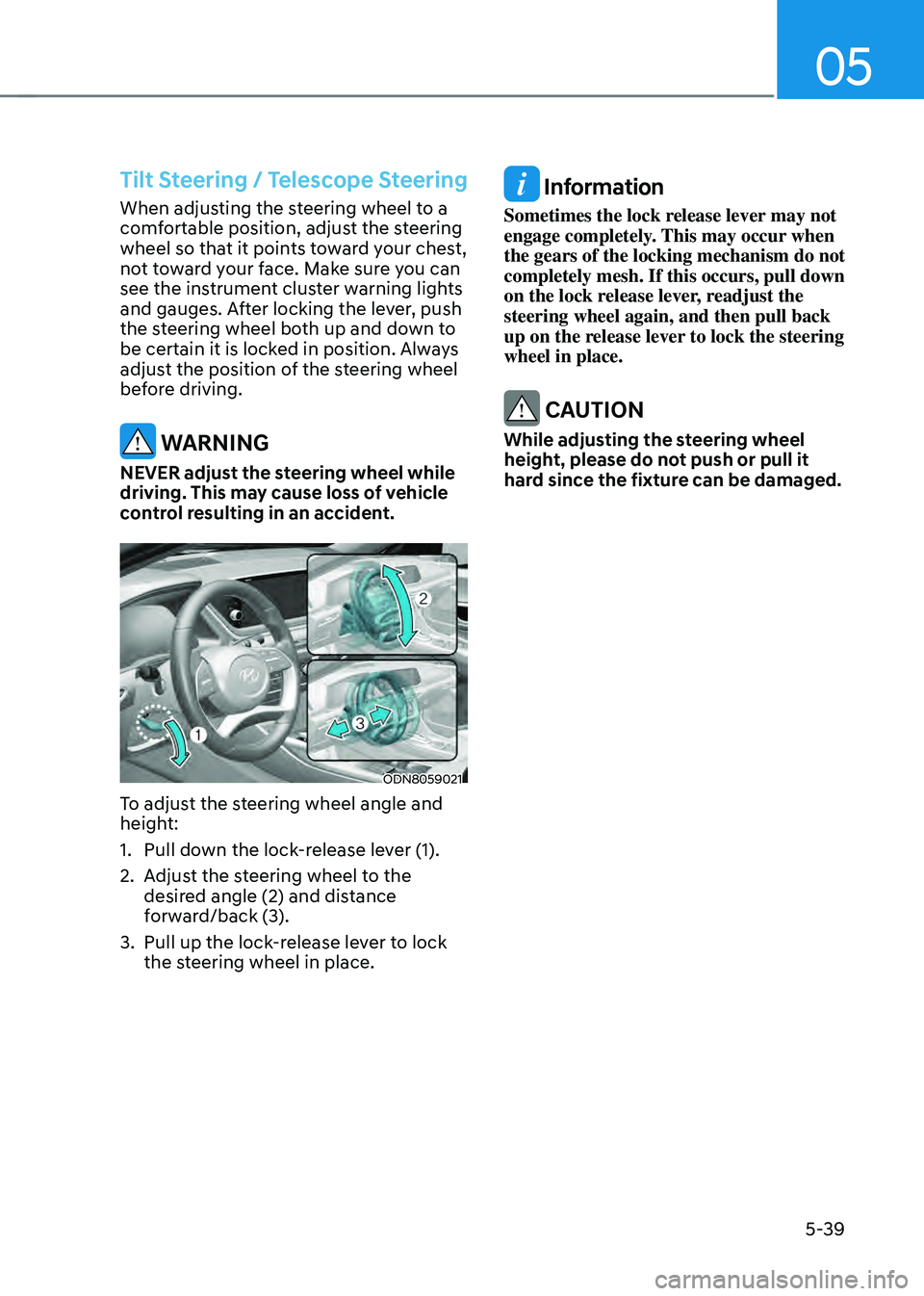
To adjust the steering wheel angle and
height:
1. Pull down the lock-release lever (1).
2. Adjust the steering wheel to the
desired angle (2) and distance
forward/back (3).
3. Pull up the lock-release lever to lock
the steering wheel in place.
Information
Sometimes the lock release lever may not
engage completely. This may occur when
the gears of the locking mechanism do not
completely mesh. If this occurs, pull down
on the lock release lever, readjust the
steering wheel again, and then pull back
up on the release lever to lock the steering
wheel in place.
CAUTION
While adjusting the steering wheel
height, please do not push or pull it
hard since the fixture can be damaged.
Page 188 of 527
Convenient Features
5-40
Heated Steering Wheel
(if equipped)
ODN8059104
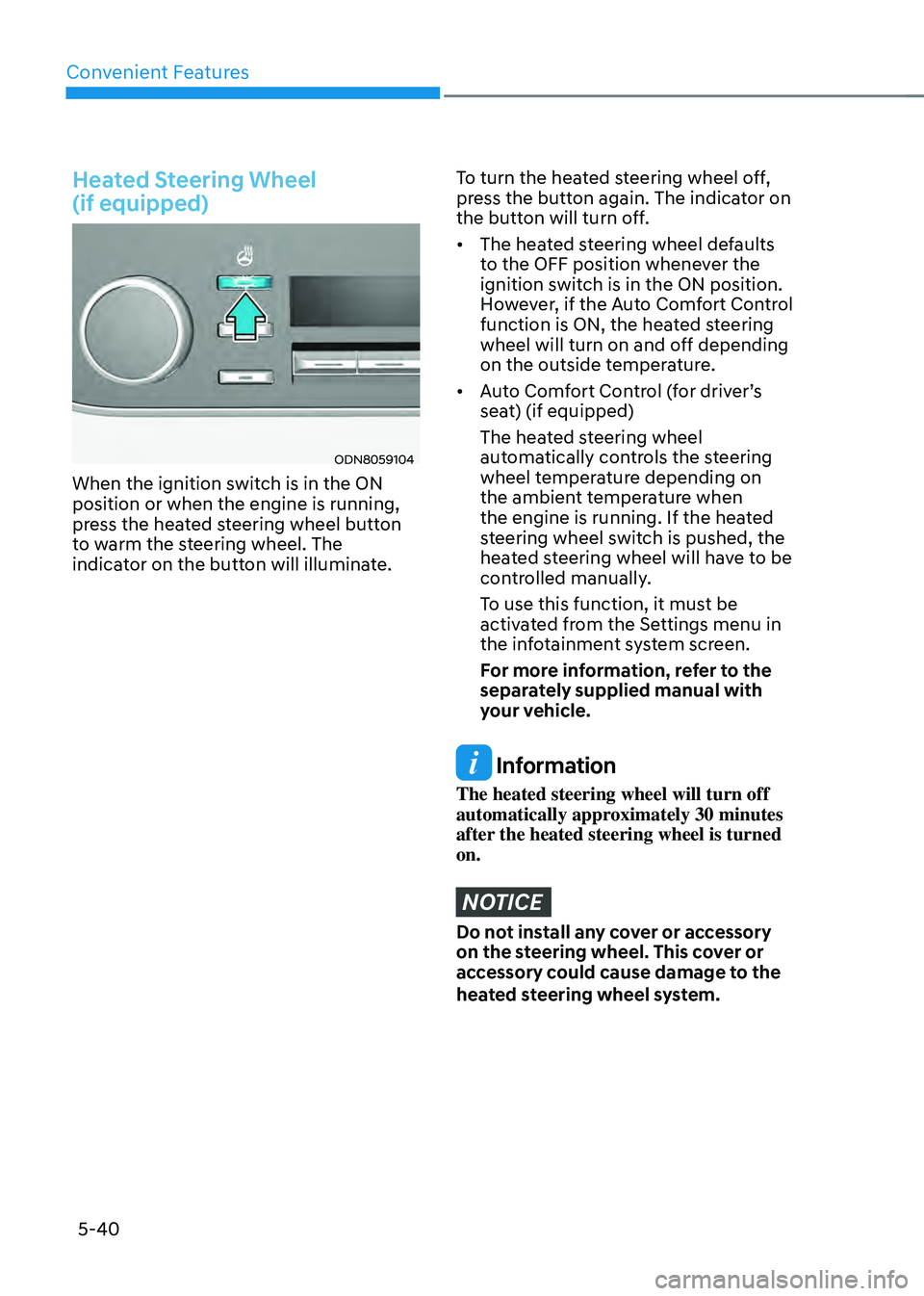
When the ignition switch is in the ON
position or when the engine is running,
press the heated steering wheel button
to warm the steering wheel. The
indicator on the button will illuminate.
To turn the heated steering wheel off,
press the button again. The indicator on
the button will turn off.
• The heated steering wheel defaults
to the OFF position whenever the
ignition switch is in the ON position.
However, if the Auto Comfort Control
function is ON, the heated steering
wheel will turn on and off depending
on the outside temperature.
• Auto Comfort Control (for driver’s
seat) (if equipped)
The heated steering wheel
automatically controls the steering
wheel temperature depending on
the ambient temperature when
the engine is running. If the heated
steering wheel switch is pushed, the
heated steering wheel will have to be
controlled manually.
To use this function, it must be
activated from the Settings menu in
the infotainment system screen.
For more information, refer to the
separately supplied manual with
your vehicle.
Information
The heated steering wheel will turn off
automatically approximately 30 minutes
after the heated steering wheel is turned
on.
NOTICE
Do not install any cover or accessory
on the steering wheel. This cover or
accessory could cause damage to the
heated steering wheel system.
Page 189 of 527
05
5-41
Horn
ODN8059022
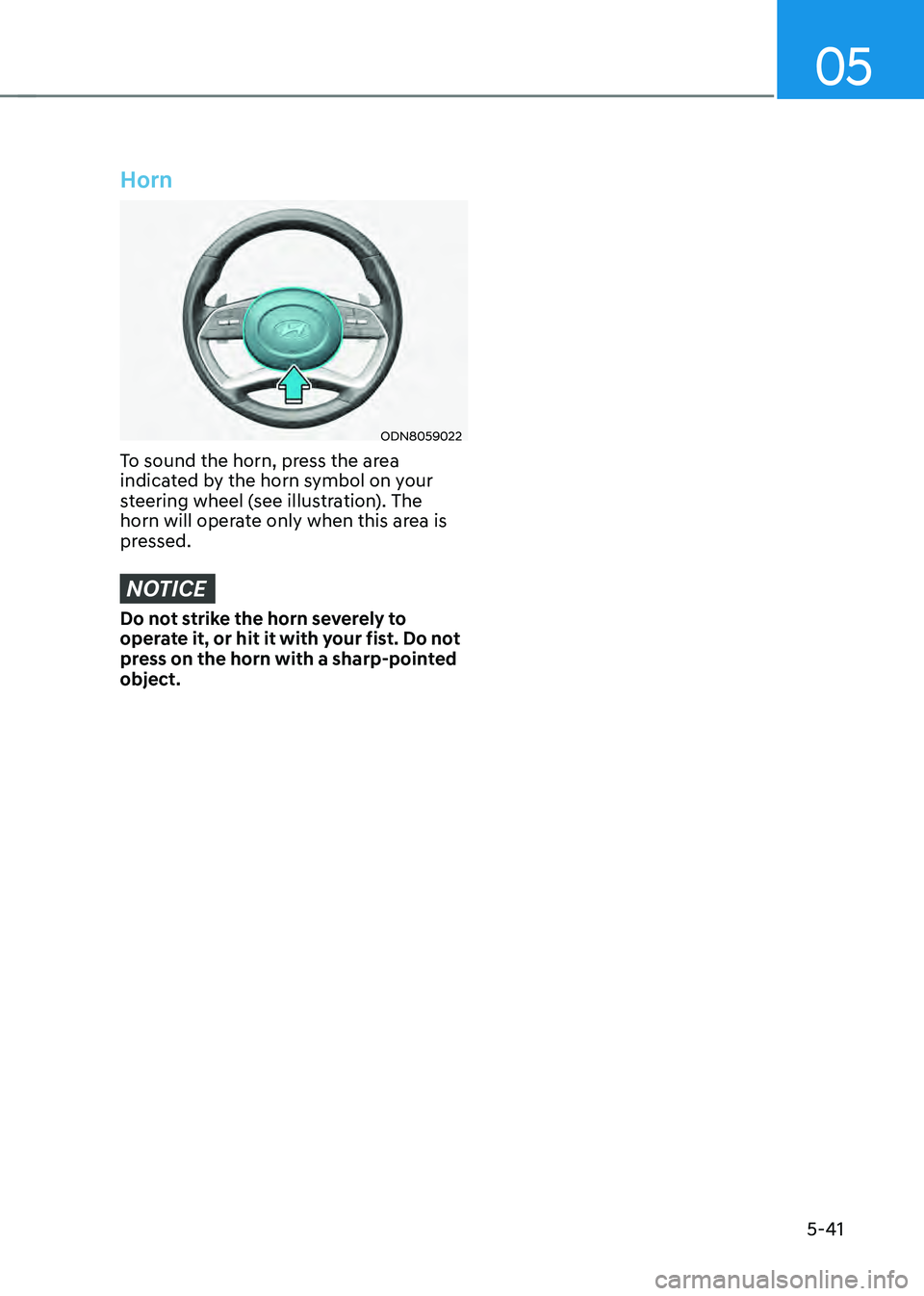
To sound the horn, press the area
indicated by the horn symbol on your
steering wheel (see illustration). The
horn will operate only when this area is
pressed.
NOTICE
Do not strike the horn severely to
operate it, or hit it with your fist. Do not
press on the horn with a sharp-pointed
object.
Page 244 of 527
Convenient Features
5-96
Operating conditions
Reverse Parking Collision-Avoidance
Assist system enters the ready status,
when ‘Active Assist’ or ‘Warning Only’
is selected in the H/UNIT system
screen and the following conditions are
satisfied:
• The trunk is closed
• The shift lever is in R (Reverse)
• Vehicle speed is below 6 mph (10
km/h)
• System components such as the rear
view camera and the rear ultrasonic
sensors are in normal conditions
The driver needs to select ‘Active Assist’
on the LCD display or infotainment
system display for collision-avoidance
assist.
The solid lines behind the vehicle in the
cluster LCD display indicates that the
system is ready to assist the driver.
Note that the system assists the driver
only once. The driver has to shift the gear
to R (Reverse) from another gear position
to reactivate the system.
The performance of Reverse Parking
Collision-Avoidance Assist system may
vary under certain conditions. If the
vehicle speed exceeds 2 mph (3 km/h),
the system can assist only pedestrian
collision avoidance.
As always, be careful when backing
up y our vehicle and be aware of your
surroundings.
Warning and System Control
Active assist
„„Cluster LCD display
ODN8A049043
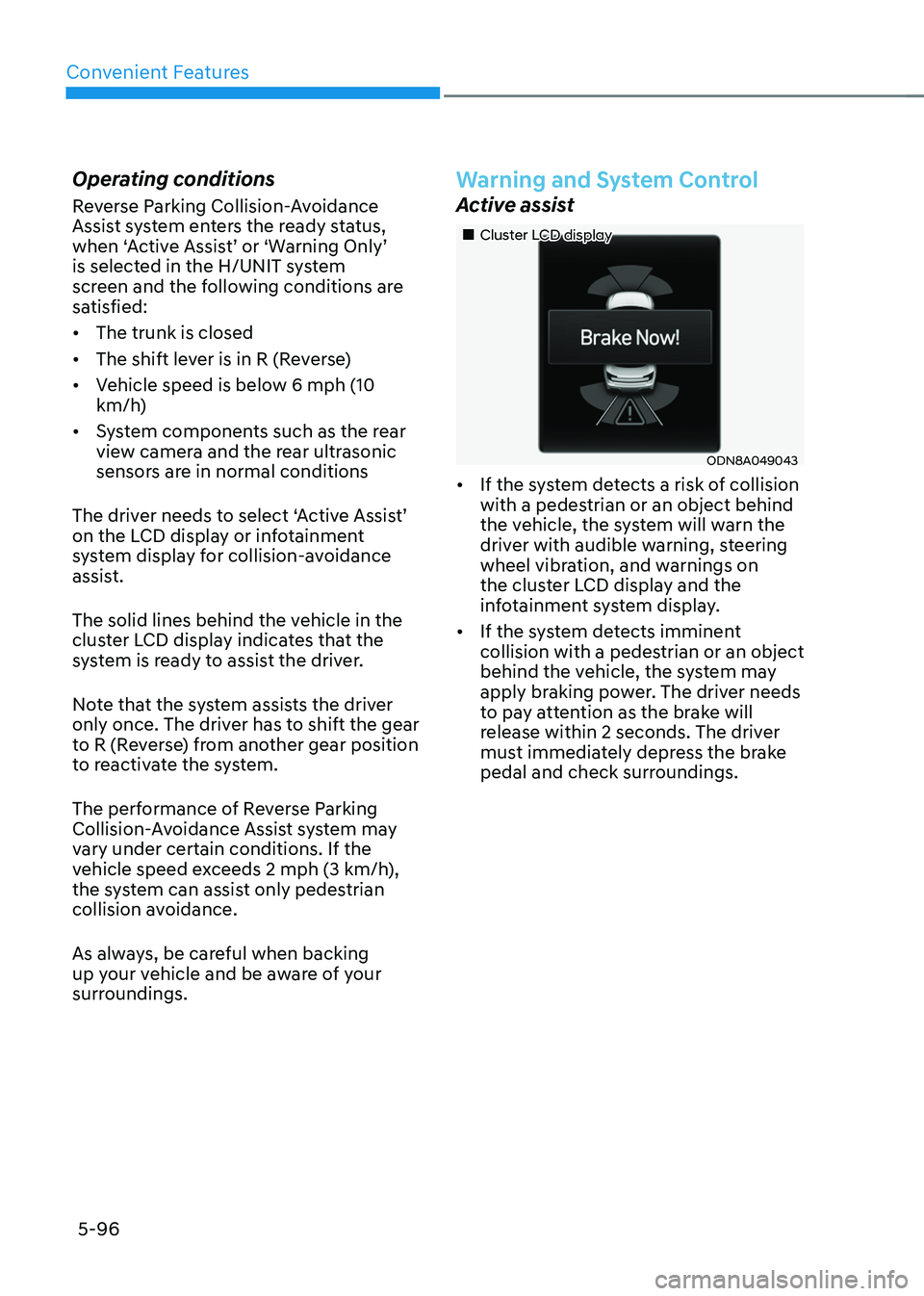
• If the system detects a risk of collision
with a pedestrian or an object behind
the vehicle, the system will warn the
driver with audible warning, steering
wheel vibration, and warnings on
the cluster LCD display and the
infotainment system display.
• If the system detects imminent
collision with a pedestrian or an object
behind the vehicle, the system may
apply braking power. The driver needs
to pay attention as the brake will
release within 2 seconds. The driver
must immediately depress the brake
pedal and check surroundings.