ECO mode Hyundai Terracan 2006 Owner's Guide
[x] Cancel search | Manufacturer: HYUNDAI, Model Year: 2006, Model line: Terracan, Model: Hyundai Terracan 2006Pages: 539, PDF Size: 18.11 MB
Page 400 of 539
1CONTROLS AND EQUIPMENT
92
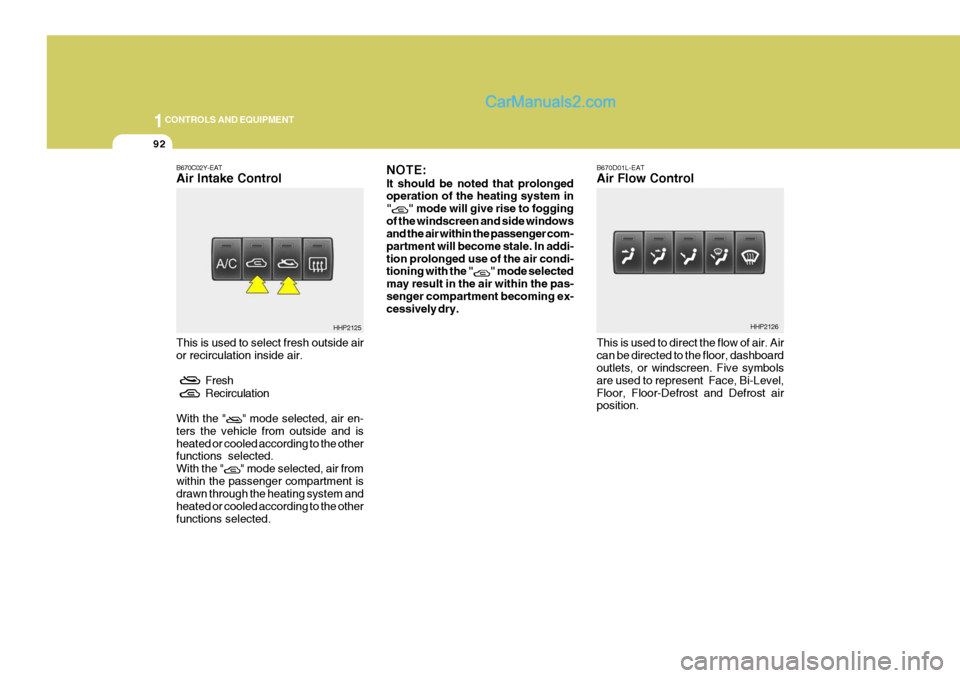
B670C02Y-EAT Air Intake Control This is used to select fresh outside air or recirculation inside air.
Fresh
Recirculation
With the "
" mode selected, air en-
ters the vehicle from outside and is heated or cooled according to the other functions selected. With the "
" mode selected, air from
within the passenger compartment is drawn through the heating system and heated or cooled according to the otherfunctions selected. NOTE: It should be noted that prolonged operation of the heating system in "
" mode will give rise to fogging
of the windscreen and side windows and the air within the passenger com- partment will become stale. In addi-tion prolonged use of the air condi- tioning with the "
" mode selected
may result in the air within the pas- senger compartment becoming ex- cessively dry. B670D01L-EAT Air Flow Control This is used to direct the flow of air. Air can be directed to the floor, dashboard outlets, or windscreen. Five symbols are used to represent Face, Bi-Level,Floor, Floor-Defrost and Defrost air position.
HHP2125HHP2126
Page 408 of 539
1CONTROLS AND EQUIPMENT
100
2. Push the "TEMP" button to set thedesired temperature. The temperature will increase to the maximum 90°F(32°C) by pushingon the button. Each push of the button will cause the temperature to increase by 1°F(0.5°C).The temperature will decrease to the minimum 62°F(17°C) by push- ing on the button. Each push ofthe button will cause the temperature to decrease by 1°F(0.5°C). NOTE: If the battery has been discharged or disconnected, the temperature mode will reset to Centigrade de- gree.This is a normal condition and you can adjust the temperature mode from Centigrade to Fahrenheit asfollows; Press the TEMP down ( ) button 3 seconds or more with the AMBbutton held down. The display shows that the unit of temperature is ad- justed to Centigrade or Fahrenheit(°C
°F or °F
°C).
HHP2142
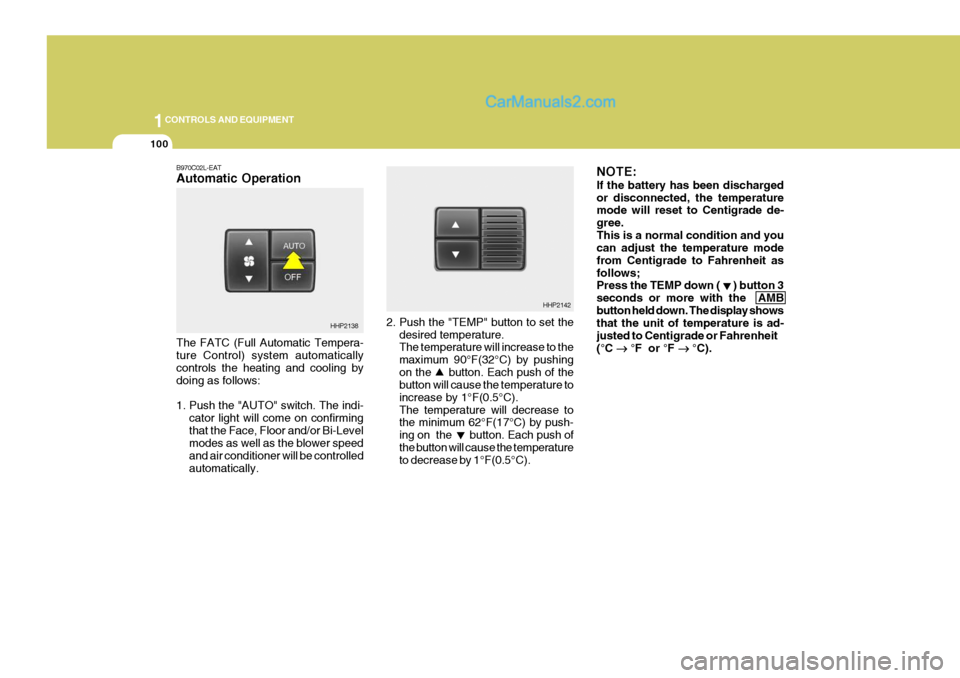
B970C02L-EAT Automatic Operation The FATC (Full Automatic Tempera- ture Control) system automatically controls the heating and cooling by doing as follows:
1. Push the "AUTO" switch. The indi-
cator light will come on confirming that the Face, Floor and/or Bi-Level modes as well as the blower speed and air conditioner will be controlledautomatically.
HHP2138
Page 410 of 539
1CONTROLS AND EQUIPMENT
102
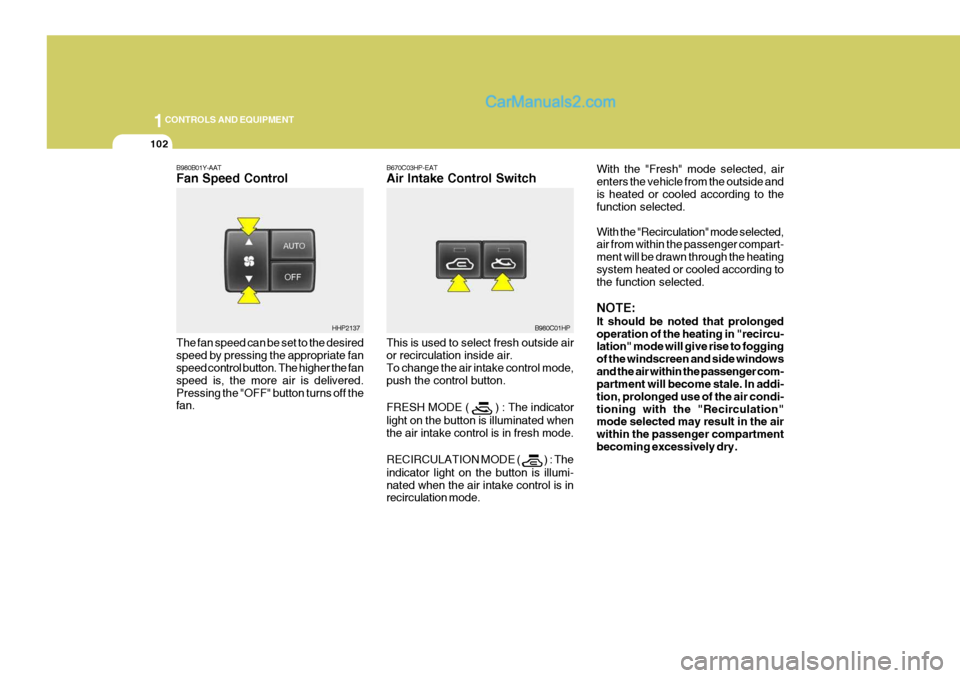
B670C03HP-EAT Air Intake Control Switch This is used to select fresh outside air or recirculation inside air. To change the air intake control mode, push the control button. FRESH MODE (
) : The indicator
light on the button is illuminated when the air intake control is in fresh mode. RECIRCULATION MODE (
) : The
indicator light on the button is illumi- nated when the air intake control is in recirculation mode. With the "Fresh" mode selected, air enters the vehicle from the outside andis heated or cooled according to the function selected. With the "Recirculation" mode selected, air from within the passenger compart- ment will be drawn through the heatingsystem heated or cooled according to the function selected. NOTE: It should be noted that prolonged operation of the heating in "recircu- lation" mode will give rise to fogging of the windscreen and side windowsand the air within the passenger com- partment will become stale. In addi- tion, prolonged use of the air condi-tioning with the "Recirculation" mode selected may result in the air within the passenger compartmentbecoming excessively dry.
B980C01HP
B980B01Y-AAT Fan Speed Control The fan speed can be set to the desired speed by pressing the appropriate fan speed control button. The higher the fan speed is, the more air is delivered.Pressing the "OFF" button turns off the fan.HHP2137
Page 419 of 539
2
DRIVING YOUR HYUNDAI
3
!WARNING:
Your vehicle is equipped with tyres designed to provide for safe ride and handling capability.Do not use a size and type of tyre and wheel that is different from the one that was originally installed on yourvehicle. It can affect the safety and performance of your vehicle, which could lead to handling failure orrollover and serious injury. When replacing the tyres, be sure to equip all four tyres with the tyre andwheel of the same size, type, tread, brand and load-carrying capacity. If you nevertheless decide to equipyour vehicle with any tyre/wheel com- bination not recommended by Hyundai for off-road driving, youshould not use these tyres for high- way driving.
BEFORE STARTING THE ENGINE
C020A02A-EAT Before you start the engine, you should always:
1. Look around the vehicle to be sure
there are no flat tyres, puddles of oil or water or other indications of pos- sible trouble.
2. After entering the car, check to be
sure the parking brake is engaged.
3. Check that all windows, and lights
are clean.
4. Check that the interior and exterior mirrors are clean and in position.
5. Check your seat, seatback and headrest to be sure they are in theirproper positions.
6. Close all the doors.
7. Fasten your seat belt and be sure that all other occupants have fas-tened theirs.
8. Turn off all lights and accessories that are not needed.
9. When you turn the ignition switch to "ON" check that all appropriate warning lights are operating and that you have sufficient fuel.
10.Check the operation of warning lights and all bulbs when key is inthe "ON" position. WARNING:
Always wear appropriate shoes when operating your vehicle. Unsuitable shoes (high heels, skiboots, etc.) may interfere with your ability to use the brake and accelera- tor pedal, and the clutch (Not allmodels).
!
Page 426 of 539
2 DRIVING YOUR HYUNDAI
10
!
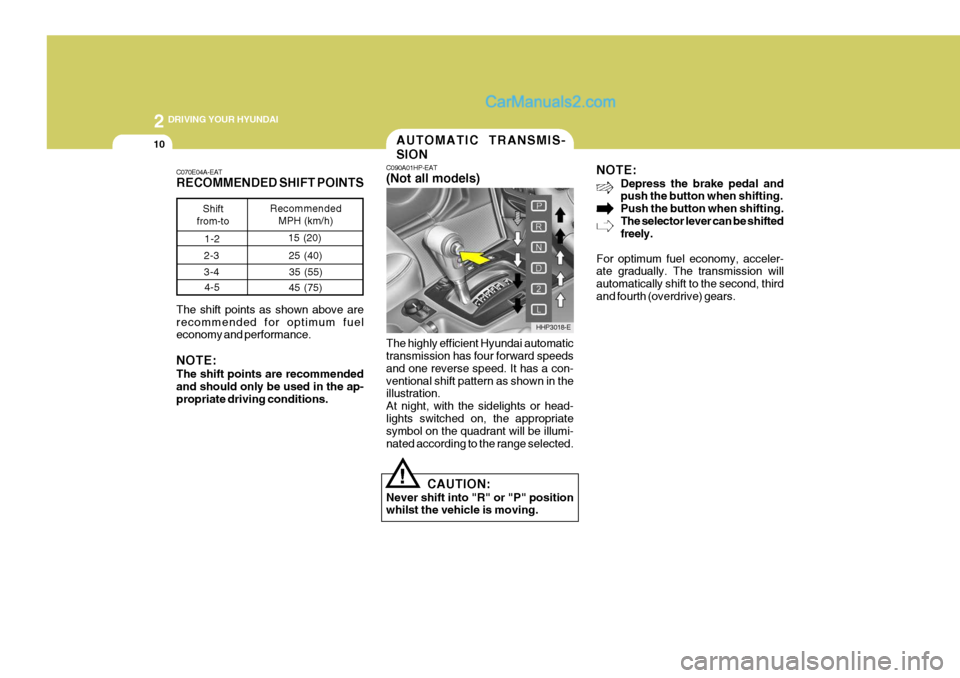
The highly efficient Hyundai automatic transmission has four forward speeds and one reverse speed. It has a con-ventional shift pattern as shown in the illustration. At night, with the sidelights or head-lights switched on, the appropriate symbol on the quadrant will be illumi- nated according to the range selected. NOTE:
Depress the brake pedal and push the button when shifting. Push the button when shifting.The selector lever can be shifted freely.
For optimum fuel economy, acceler-ate gradually. The transmission will automatically shift to the second, thirdand fourth (overdrive) gears.
CAUTION:
Never shift into "R" or "P" position whilst the vehicle is moving.
C070E04A-EAT RECOMMENDED SHIFT POINTS The shift points as shown above are recommended for optimum fuel economy and performance. NOTE: The shift points are recommended and should only be used in the ap- propriate driving conditions.
Shift
from-to Recommended
MPH (km/h)
AUTOMATIC TRANSMIS- SION
C090A01HP-EAT (Not all models)
HHP3018-E
1-2
15 (20)
2-3 3-4 4-5 25 (40)
35 (55)
45 (75)
Page 434 of 539
2 DRIVING YOUR HYUNDAI
18
2. Transfer shift knob operationAUTO
LOW
1. Stop the vehicle.
2. Depress the clutch pedal (Manual Transmission) or put the shift lever into "N(neutral)" position (Automatic Transmission)
3. Turn the transfer shift knob to "LOW" mode.
LOW
AUTO
1. Stop the vehicle.
2. Depress the clutch pedal (Manual Transmission) or put the shift lever into "N (neutral)" position (Automatic Transmission).
3. Turn the transfer shift knob to "AUTO" mode. Driving 4WD Safely
(1) Be sure to wear the seat belt.
(2) Drive at lower speeds in strong
crosswinds. Because of your vehicle's high centre of gravity, its stability will be affected in cross-winds. Slower speeds ensure bet- ter vehicle control.
(3) Check the brake condition after driving in wet or muddy conditions.Press the brake several times as you move slowly until you feel nor-mal braking forces return.
(4) Do not drive the vehicle through
water. (i.e. streams, rivers, lakes,etc.)
(5) The stopping distance of the full-
time 4WD vehicle differs very littlefrom that of the 2WD vehicle. When driving on a snow-covered road or a slippery, muddy surface,make sure that you keep a suffi- cient distance between your ve- hicle and the one ahead of you.
AUTO Mode Full power delivered to front and rear axles for increase traction. Use this mode for normal on-road operatingconditions such as dry road surfaces, wet pavement, snow-covered roads and/or off-road. LOW Mode Full power to both axles, including a lower gear ratio for low-speed applica-tions that require extra power such as dry road surfaces, wet pavement, snow-covered roads and/or off-road.Especially when increased drive power is required. "LOW" mode is not recommended ondry pavement. The 4WD LOW indicator light ( ) will be turned on to remind you that youare in the LOW mode.
Page 436 of 539
2 DRIVING YOUR HYUNDAI
20
!
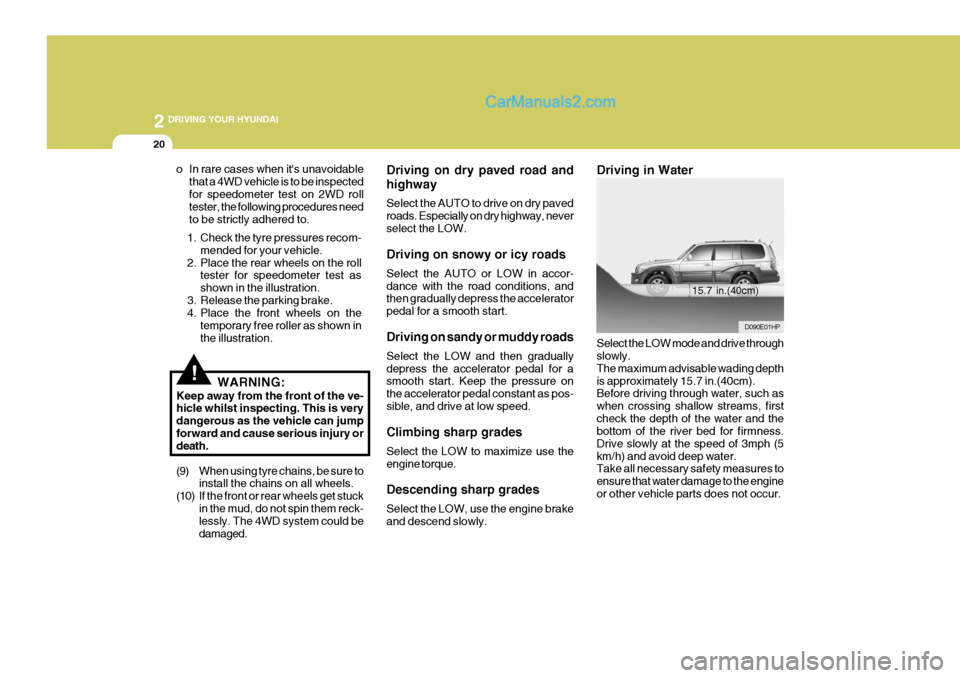
Driving in Water Select the LOW mode and drive through slowly. The maximum advisable wading depthis approximately 15.7 in.(40cm). Before driving through water, such as when crossing shallow streams, firstcheck the depth of the water and the bottom of the river bed for firmness. Drive slowly at the speed of 3mph (5km/h) and avoid deep water. Take all necessary safety measures to ensure that water damage to the engineor other vehicle parts does not occur.
o In rare cases when it's unavoidable
that a 4WD vehicle is to be inspectedfor speedometer test on 2WD roll tester, the following procedures need to be strictly adhered to. Driving on dry paved road and highway Select the AUTO to drive on dry paved roads. Especially on dry highway, neverselect the LOW. Driving on snowy or icy roads Select the AUTO or LOW in accor- dance with the road conditions, and then gradually depress the accelerator pedal for a smooth start. Driving on sandy or muddy roads Select the LOW and then gradually depress the accelerator pedal for a smooth start. Keep the pressure on the accelerator pedal constant as pos-sible, and drive at low speed. Climbing sharp grades Select the LOW to maximize use the engine torque. Descending sharp grades Select the LOW, use the engine brake and descend slowly.
D090E01HP
15.7 in.(40cm)
1. Check the tyre pressures recom-
mended for your vehicle.
2. Place the rear wheels on the roll tester for speedometer test as shown in the illustration.
3. Release the parking brake.
4. Place the front wheels on the
temporary free roller as shown in the illustration.
WARNING:
Keep away from the front of the ve- hicle whilst inspecting. This is very dangerous as the vehicle can jumpforward and cause serious injury or death.
(9) When using tyre chains, be sure to install the chains on all wheels.
(10) If the front or rear wheels get stuck in the mud, do not spin them reck- lessly. The 4WD system could be damaged.
Page 438 of 539
2 DRIVING YOUR HYUNDAI
22
!
EFFECTIVE BRAKING
HPC141A1-E Braking system performance and fric- tion material life are greatly affected by the driving style adopted. The follow- ing suggestions are made to assist inachieving the best results from the braking system.
o Anticipate the road and conditions ahead in order that heavy braking may be avoided.
o When descending long gradients,
use the engine to assist in retardingthe vehicle to minimise the possibil- ity of brake fade occurring.
o When trailer towing, ensure that the trailer brakes function correctly anduse engine braking to assist the vehicle braking system.
o Use only genuine Hyundai replace- ment brake pads and shoes to en-sure consistent friction characteris-tics and wear rates.
o After driving through deep water (e.g.
fording), the brakes may becomewet and performance reduced. Al- ways check brake efficiency after emerging from the water and dry thebrakes by lightly depressing the brake pedal several times whilst driv- ing slowly.LIMITED-SLIP DIFFEREN- TIAL (LSD)
D190A01HP-EAT (Not all models) A limited-slip differential, if equipped, is for the rear wheel differential only.The features of this limited-slip differ- ential are described below: Just as with a conventional differential,the wheel on one side is allowed to turn at a different speed from the wheel on the other side when the vehicle iscornering. The difference between the limited-slip differential and a conven- tional differential is that if the wheel onone side of the vehicle loses traction, a greater amount of torque is applied to the rear wheel on the other side toimprove traction.
WARNING:
ABS will not prevent accidents dueto improper or dangerous drivingmanoeuvres. Even though vehicle control is improved during emer- gency braking, always maintain asafe distance between you and ob- jects ahead. Vehicle speeds should always be reduced during extremeroad conditions. The braking distance for cars equipped with an anti-lock braking system may be longer than for those without it, in the following road con-ditions. These roads should be driven at reduced speeds.
o Rough, gravel or snow-covered roads.
o With tyre chains installed.
o On roads where the road surface is pitted or has different surfaceheight.
The safety features of an ABSequipped vehicle should not be testedby high speed driving or cornering. This could endanger the safety of yourself or others.
! CAUTION:
o Never start the engine with the gearshift lever placed in the for- ward or reverse whilst one of therear wheels is jacked up and the other in contact with the ground; doing so may cause the vehicle tojump forward.
o Use only recommended oil for
LSD in the rear axle.See page 9-4 for the recommended oil descriptions.
Page 439 of 539
2
DRIVING YOUR HYUNDAI
23
o Apply the parking brake only when the vehicle is at rest.
o Since the power assistance pro- vided by the brake servo is derived from the engine, coasting with theengine turned off or towing of the vehicle with the engine turned off will result in greatly increased pedalpressures being required to stop the vehicle.
o Do not hold the vehicle on the up- grade with the accelerator pedal.This can cause the transmission to overheat. Always use the brakepedal or parking brake.
o Use caution when parking on a hill.
Engage the parking brake and placethe gear selector lever in "P" (auto- matic transaxle) or in first or reverse gear (manual transaxle). If your caris facing downhill, turn the front wheels into the curb to help keep the car from rolling. If your car is facinguphill, turn the front wheels away from the curb to help keep the car from rolling. If there is no curb or if itis required by other conditions to keep the car from rolling, block the wheels.DRIVING FOR ECONOMY
C140A02A-EAT You can save fuel and get more miles from your car if you follow these sug-gestions:
o Drive smoothly. Accelerate at a moderate rate. Don't make "jack- rabbit" starts or full-throttle shifts and maintain a steady cruising speed. Don't race between stoplights. Try to adjust your speed to that of the other traffic so you don't have to change speeds unnecessarily. Avoid heavy traffic whenever possible. Always maintain a safe distance from other vehicles so you can avoid unneces- sary braking. This also reduces brake wear.
o Drive at a moderate speed. The faster you drive, the more fuel your car uses. Driving at a moderate speed, especially on the motorway, is one of the most effective ways to reduce fuel consumption.
o Don't "ride" the brake or clutch pedal. This can increase fuel consumption and also increase wear on these com- ponents. In addition, driving with your foot resting on the brake pedal may cause the brakes to overheat, which reduces their effectiveness and may lead to more serious consequences. o Take care of your tyres. Keep them
inflated to the recommended pres- sure. Incorrect inflation, either too much or too little, results in unnec- essary tyre wear. Check the tyrepressures at least once a month.
o Be sure that the wheels are aligned
correctly. Improper alignment canresult from hitting curbs or driving too fast over irregular surfaces. Poor alignment causes faster tyre wearand may also result in other prob- lems as well as greater fuel con- sumption.
o Keep your car in good condition. For better fuel economy and reducedmaintenance costs, maintain yourcar in accordance with the mainte- nance schedule in Section 5. If you drive your car in severe conditions,more frequent maintenance is re- quired (see Section 5 for details).
o Keep your car clean. For maximum service, your Hyundai should bekept clean and free of corrosive materials. It is especially importantthat mud, dirt, ice, etc. not be al- lowed to accumulate on the under- side of the car. This extra weight canresult in increased fuel consumption and also contribute to corrosion.
Page 467 of 539
4
CORROSION PREVENTION AND APPEARANCE CARE
5
4
APPEARANCE CARE
5
JE100A1-E SEAT BELTS Seat belts should be cleaned only with a mild soap solution. Strong deter-gents, solvents or bleaches may dam- age the belt webbing and therefore re- duce the effectiveness of the belt. Beltswhich display signs of fraying, wear or cuts should be replaced.INTERIOR VALETING
JE110A1-E The soft trim and carpets should be maintained with the regular use of a vacuum cleaner. Heavy soiling should be removed with a dry cleaning agentrecommended for this purpose follow- ing the instructions of the product manufacturer. Paint thinner, solventsor other such cleaning materials should not be used since damage to the up- holstery may result. JE120A1-E WINDOWS A proprietary glass cleaner should be used to clean the inside of the win-dows. However, the rear heated windscreen must only be cleaned us- ing a light horizontal cleaning action.Care should be exercised to avoid the use of abrasive cleaners or contact with items of jewellery which may dam-age the heating elements. YE010A1-E To Clean Leather Upholstery (Not all models) In the normal course of use, leather upholstered surfaces will, like any material, pick-up dust and dirt. Thisdust and dirt MUST be cleaned off or it may work into the surface of the leather, causing damage.Fine leather needs care. This care, as with all fine things, need not be elabo- rate, but should include cleaning whennecessary. Washing leather thoroughly with soap and water will keep your leather lustrous, beautiful and ensureyou have many years of wear. Take a piece of cheese cloth and using any mild soap and lukewarm water,work up a good lather. Thoroughly wash the leather. Wipe clean with a slightly damp cloth and dry with softcloth. Do this as often as the leather becomes soiled.