change time HYUNDAI TUCSON 2014 User Guide
[x] Cancel search | Manufacturer: HYUNDAI, Model Year: 2014, Model line: TUCSON, Model: HYUNDAI TUCSON 2014Pages: 542, PDF Size: 7.59 MB
Page 139 of 542
3-53
Convenient features of your vehicle
3
Erasing HomeLink®
buttons
Individual buttons cannot be erased.
However, to erase all three pro-
grammed buttons:
1. Press and hold the two outer
HomeLink ®
buttons until the indi-
cator light begins to flash-after 20
seconds.
2. Release both buttons. Do not hold for longer than 30 seconds.
The Integrated HomeLink ®
Wireless
Control System is now in the training
(learn) mode and can be pro-
grammed at any time following the
appropriate steps in the Programming
chapters above. NVS ®
is a registered trademark and
Z-Nav™ is a trademark of the Gentex
Corporation, Zeeland, Michigan.HomeLink ®
is a registered trademark
owned by Johnson Controls,
Incorporated, Milwaukee, Wisconsin.
FCC ID: NZLZTVHL3
IC: 4112A-ZTVHL3 This device complies with Part 15 of the FCC Rules.
Operation is subject to the following
two conditions:
1. This device may not cause harm-
ful interference, and
2. This device must accept any inter- ference received, including inter-
ference that may cause undesired
operation.
Electric chromic mirror (ECM)
with HomeLink ®
system,
compass and Blue Link ®
(if equipped)
Your vehicle may be equipped with a
Gentex Automatic-Dimming Mirror
with a Z-Nav™ Electronic Compass
Display and an Integrated HomeLink ®
Wireless Control System. During
nighttime driving, this feature willautomatically detect and reduce
rearview mirror glare while the com-
pass indicates the direction the vehi-
cle is pointed. The HomeLink ®
Universal Transceiver allows you to
activate your garage door(s), electric
gate, home lighting, etc.
The transceiver has been testedand complies with FCC and
Industry Canada rules. Changes
or modifications not expressly
approved by the party responsi-
ble for compliance could voidthe user's authority to operate
the device.
WARNING
Page 144 of 542
3-58
Convenient features of your vehicle
Programming
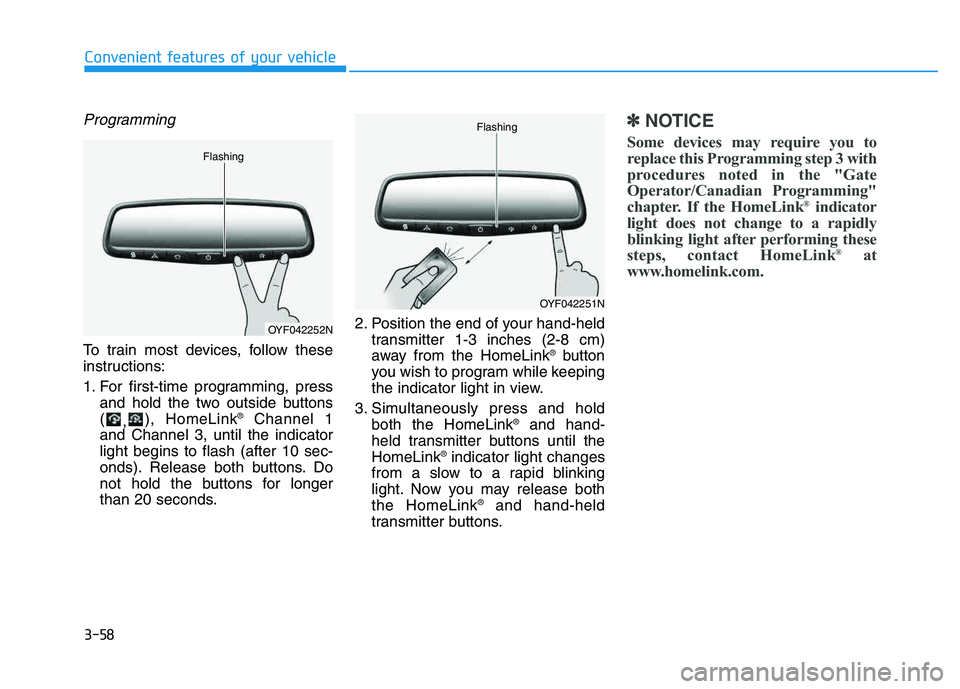
To train most devices, follow these
instructions:
1. For first-time programming, pressand hold the two outside buttons ( ,), HomeLink ®
Channel 1
and Channel 3, until the indicatorlight begins to flash (after 10 sec-
onds). Release both buttons. Do
not hold the buttons for longer
than 20 seconds. 2. Position the end of your hand-held
transmitter 1-3 inches (2-8 cm)
away from the HomeLink ®
button
you wish to program while keeping
the indicator light in view.
3. Simultaneously press and hold both the HomeLink ®
and hand-
held transmitter buttons until theHomeLink ®
indicator light changes
from a slow to a rapid blinking
light. Now you may release boththe HomeLink ®
and hand-held
transmitter buttons.
✽✽ NOTICE
Some devices may require you to
replace this Programming step 3 with
procedures noted in the "Gate
Operator/Canadian Programming"
chapter. If the HomeLink ®
indicator
light does not change to a rapidly
blinking light after performing these
steps, contact HomeLink ®
at
www.homelink.com.
OYF042252N
Flashing
OYF042251N
Flashing
Page 169 of 542
3-83
Convenient features of your vehicle
3
Turn signals and lane changesignals
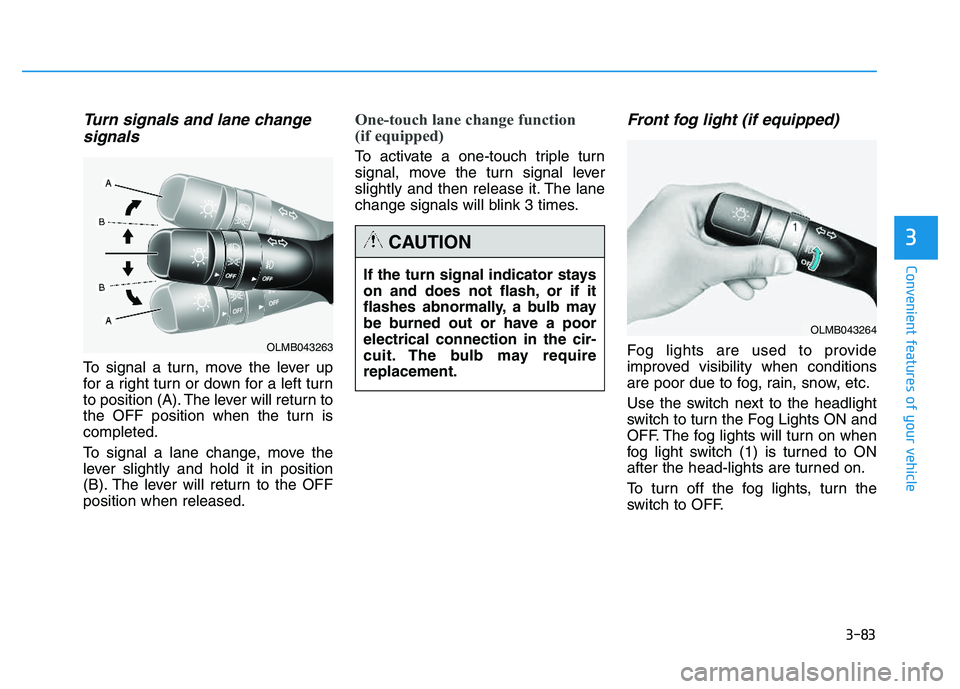
To signal a turn, move the lever up
for a right turn or down for a left turn
to position (A). The lever will return to
the OFF position when the turn iscompleted.
To signal a lane change, move the
lever slightly and hold it in position
(B). The lever will return to the OFFposition when released.
One-touch lane change function
(if equipped)
To activate a one-touch triple turn
signal, move the turn signal lever
slightly and then release it. The lane
change signals will blink 3 times.
Front fog light (if equipped)
Fog lights are used to provide
improved visibility when conditions
are poor due to fog, rain, snow, etc.
Use the switch next to the headlight
switch to turn the Fog Lights ON and
OFF. The fog lights will turn on when
fog light switch (1) is turned to ON
after the head-lights are turned on.
To turn off the fog lights, turn the
switch to OFF.
If the turn signal indicator stays
on and does not flash, or if it
flashes abnormally, a bulb may
be burned out or have a poorelectrical connection in the cir-
cuit. The bulb may requirereplacement.
CAUTION
OLMB043264
OLMB043263
Page 186 of 542
3-100
Convenient features of your vehicle
✽✽NOTICE
When using the air conditioning system, monitor the engine temper-
ature gauge closely while driving
up hills or in heavy traffic when
outside temperatures are high. Air
conditioning system operation may
cause engine overheating.
Continue to use the blower fan but
turn the air conditioning system off
if the engine temperature gauge
indicates engine overheating.
When opening the windows in humid weather, air conditioning
may create water droplets inside
the vehicle. Since excessive water
droplets may cause damage to
electrical equipment, air condi-
tioning should only be operated
with the windows closed. Air conditioning system operation
tips
If the vehicle has been parked in
direct sunlight during hot weather,
open the windows for a short time
to let the hot air inside the vehicle
escape.
To help reduce moisture inside of the windows on rainy or humid
days, decrease the humidity inside
the vehicle by operating the airconditioning system.
During air conditioning system operation, you may occasionallynotice a slight change in enginespeed as the air conditioning com-
pressor cycles. This is a normal
system operation characteristic.
Use the air conditioning system every month for a few minutes to
ensure maximum system perform-
ance. When using the air conditioning
system, you may notice clear water
dripping (or even puddling) on the
ground under the passenger side
of the vehicle. This is a normal sys-
tem operation characteristic.
Operating the air conditioning sys- tem in the recirculated air position
provides maximum cooling, how-
ever, continual operation in this
mode may cause the air inside the
vehicle to become stale.
During cooling operation, you may occasionally notice a misty air flow
because of rapid cooling and
humid air intake. This is a normal
system operation characteristics.
Page 187 of 542
3-101
Convenient features of your vehicle
3
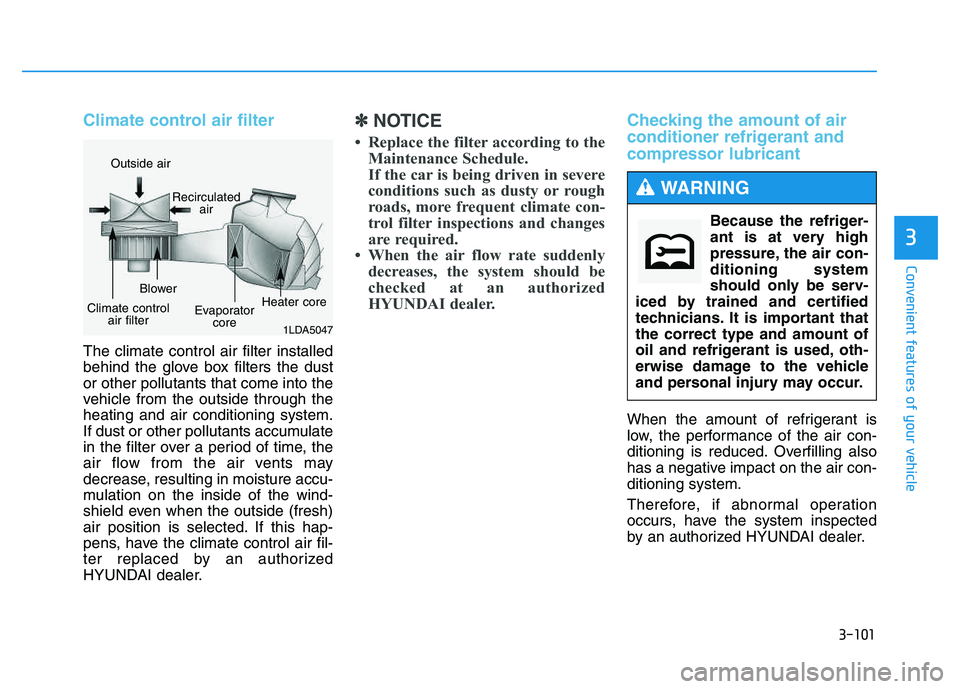
Climate control air filter
The climate control air filter installed
behind the glove box filters the dust or other pollutants that come into the
vehicle from the outside through the heating and air conditioning system.
If dust or other pollutants accumulate
in the filter over a period of time, the
air flow from the air vents may
decrease, resulting in moisture accu-
mulation on the inside of the wind-
shield even when the outside (fresh)
air position is selected. If this hap-
pens, have the climate control air fil-
ter replaced by an authorized
HYUNDAI dealer.
✽✽NOTICE
Replace the filter according to the Maintenance Schedule.
If the car is being driven in severe
conditions such as dusty or rough
roads, more frequent climate con-
trol filter inspections and changes
are required.
When the air flow rate suddenly decreases, the system should be
checked at an authorized
HYUNDAI dealer.Checking the amount of air
conditioner refrigerant and compressor lubricant
When the amount of refrigerant is
low, the performance of the air con-
ditioning is reduced. Overfilling also
has a negative impact on the air con-ditioning system.
Therefore, if abnormal operation
occurs, have the system inspected
by an authorized HYUNDAI dealer.
1LDA5047
Outside air
Recirculatedair
Climate control air filter Blower
Evaporatorcore Heater core
Because the refriger-
ant is at very high
pressure, the air con-ditioning system
should only be serv-
iced by trained and certified
technicians. It is important thatthe correct type and amount of
oil and refrigerant is used, oth-
erwise damage to the vehicle
and personal injury may occur.
WARNING
Page 214 of 542
4-3
Multimedia System
Steering wheel audio control (if equipped)
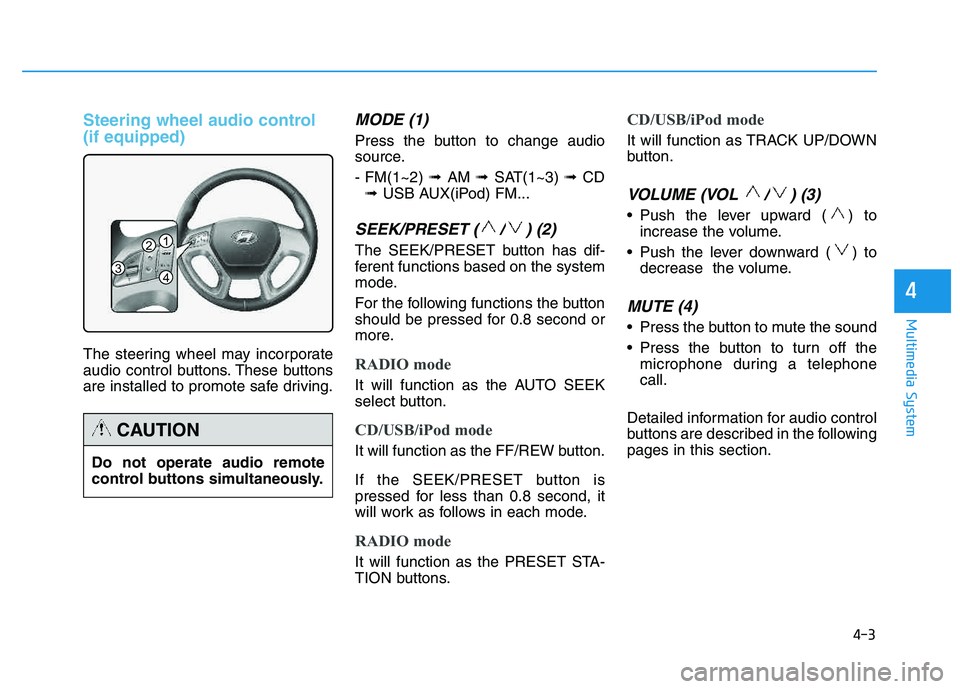
The steering wheel may incorporate
audio control buttons. These buttons
are installed to promote safe driving.
MODE (1)
Press the button to change audio
source. - FM(1~2) ➟ AM ➟ SAT(1~3) ➟ CD
➟ USB AUX(iPod) FM...
SEEK/PRESET ( / ) (2)
The SEEK/PRESET button has dif-
ferent functions based on the system
mode.
For the following functions the button
should be pressed for 0.8 second or
more.
RADIO mode
It will function as the AUTO SEEK
select button.
CD/USB/iPod mode
It will function as the FF/REW button.
If the SEEK/PRESET button is
pressed for less than 0.8 second, it
will work as follows in each mode.
RADIO mode
It will function as the PRESET STA-
TION buttons.
CD/USB/iPod mode
It will function as TRACK UP/DOWN
button.
VOLUME (VOL / ) (3)
• Push the lever upward ( ) to
increase the volume.
Push the lever downward ( ) to decrease the volume.
MUTE (4)
Press the button to mute the sound
Press the button to turn off themicrophone during a telephone call.
Detailed information for audio control
buttons are described in the followingpages in this section.
4
1
3
2
4
Do not operate audio remote
control buttons simultaneously.
CAUTION
Page 223 of 542
4-12
Multimedia System
✽✽NOTICE - USING THE
iPod ®
DEVICE
Some iPod ®
models may not
support communication proto-
col and files may not properly
play.
Supported iPod ®
models:
- iPhone ®
3GS/4
- iPod ®
touch 1st~4th generation
- iPod ®
nano 1st~6th generation
- iPod ®
classic
The order of search or playback of songs in the iPod ®
can be dif-
ferent from the order searched
in the audio system.
If the iPod ®
is disabled due to its
own malfunction, reset the
iPod ®
. (Reset: Refer to iPod ®
manual)
An iPod ®
may not operate nor-
mally on low battery. (Continued)(Continued)
Some iPod
®
devices, such as the
iPhone ®
, can be connected
through the Bluetooth®
Wireless
Technology interface. The
device must have audio
Bluetooth ®
Wireless Technology
capability (such as for stereo
headphone Bluetooth®
Wireless
Technology).
The device can play, but it will
not be controlled by the audio
system.
To use iPod ®
features within the
audio, use the cable provided
upon purchasing an iPod ®
device.
Skipping or improper operation may occur depending on the
characteristics of your iPod ®
/
iPhone ®
device.
If your iPhone ®
is connected to
both the Bluetooth®
Wireless
Technology and USB, the sound
may not be properly played. In
your iPhone ®
, select the Dock
connector or Bluetooth®
Wireless Technology to change
the sound output (source). (Continued)(Continued)
When connecting iPod
®
with the
iPod ®
Power Cable, insert the
connector to the multimedia
socket completely. If not insert-
ed completely, communications
between iPod ®
and audio may
be interrupted.
When adjusting the sound effects of the iPod ®
and the
audio system, the sound effects
of both devices will overlap and
might reduce or distort the
quality of the sound.
Deactivate (turn off) the equal- izer function of an iPod ®
when
adjusting the audio system’s
volume, and turn off the equal-
izer of the audio system when
using the equalizer of an iPod ®
.
When not using iPod ®
with car
audio, detach the iPod ®
cable
from iPod ®
. Otherwise, iPod ®
may remain in accessory mode,
and may not work properly.
Page 228 of 542
4-17
Multimedia System
4
SSYY SSTT EEMM CC OO NNTTRR OO LLLLEE RR SS AA NN DD
F
F UU NNCCTT IIOO NNSS
❈ Display and settings may differ
depending on the selected audio.
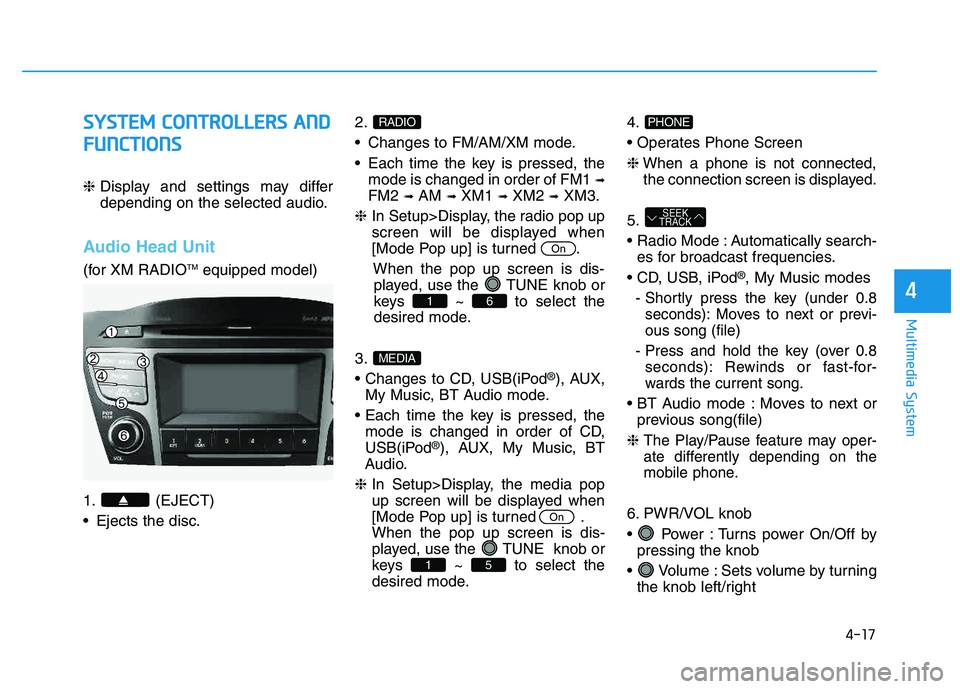
Audio Head Unit
(for XM RADIO TM
equipped model)
1. (EJECT)
Ejects the disc. 2.
Changes to FM/AM/XM mode.
Each time the key is pressed, the
mode is changed in order of FM1 ➟
FM2 ➟AM ➟XM1 ➟XM2 ➟XM3.
❈ In Setup>Display, the radio pop up
screen will be displayed when
[Mode Pop up] is turned .
When the pop up screen is dis-played, use the TUNE knob or
keys ~ to select the
desired mode.
3.
®), AUX,
My Music, BT Audio mode.
mode is changed in order of CD,
USB(iPod
®), AUX, My Music, BT
Audio.
❈ In Setup>Display, the media pop
up screen will be displayed when
[Mode Pop up] is turned .When the pop up screen is dis-
played, use the TUNE knob or
keys ~ to select the
desired mode. 4.
❈
When a phone is not connected,
the connection screen is displayed.
5.
Automatically search- es for broadcast frequencies.
®, My Music modes
- Shortly press the key (under 0.8 seconds): Moves to next or previ- ous song (file)
- Press and hold the key (over 0.8 seconds): Rewinds or fast-for-
wards the current song.
Moves to next or previous song(file)
❈
The Play/Pause feature may oper-
ate differently depending on the
mobile phone.
6. PWR/VOL knob
Power : Turns power On/Off by pressing the knob
Volume : Sets volume by turning the knob left/right
SEEK
TRACK
PHONE
51
On
MEDIA
61
On
RADIO
Page 230 of 542
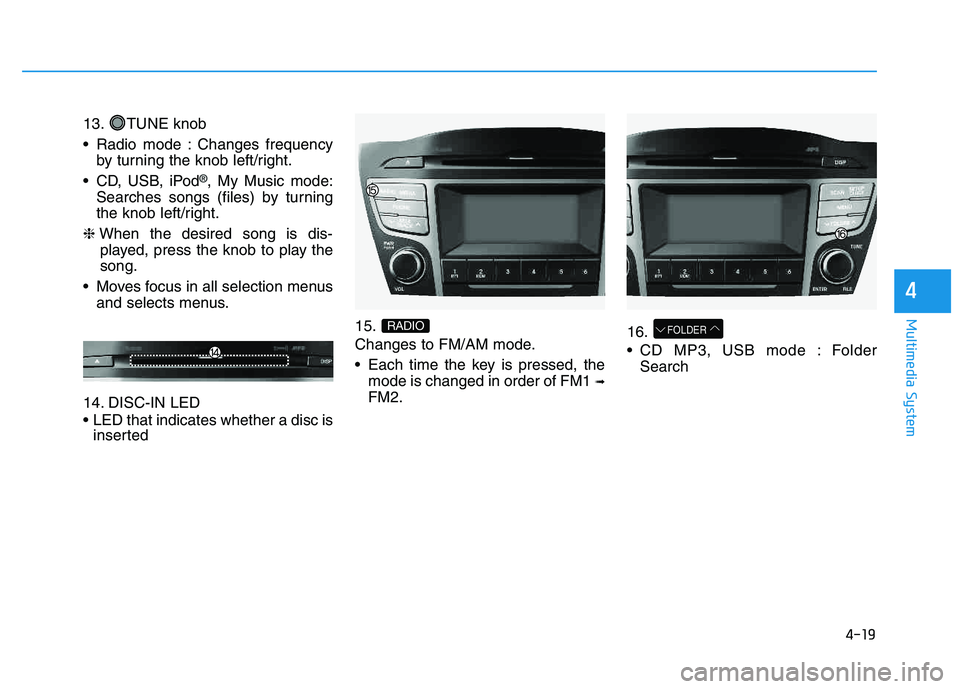
4-19
Multimedia System
4
13. TUNE knob
Radio mode : Changes frequencyby turning the knob left/right.
CD, USB, iPod
®, My Music mode:
Searches songs (files) by turning
the knob left/right.
❈ When the desired song is dis-
played, press the knob to play thesong.
Moves focus in all selection menus and selects menus.
14. DISC-IN LED
LED that indicates whether a disc is inserted 15.
Changes to FM/AM mode.
Each time the key is pressed, the
mode is changed in order of FM1 ➟
FM2. 16.
CD MP3, USB mode : Folder
Search
FOLDERRADIO
Page 231 of 542
![HYUNDAI TUCSON 2014 User Guide 4-20
Multimedia System
SSEE TT UU PP
D
D iiss pp llaa yy SS eettttiinn ggss
Press the key Select
[Display] through TUNE knob or
key Select menu through
Mode Pop up
[Mode Pop up] Changes / selec](/img/35/56203/w960_56203-230.png "HYUNDAI TUCSON 2014 User Guide 4-20
Multimedia System
SSEE TT UU PP
D
D iiss pp llaa yy SS eettttiinn ggss
Press the key Select
[Display] through TUNE knob or
key Select menu through
Mode Pop up
[Mode Pop up] Changes / selec")
4-20
Multimedia System
SSEE TT UU PP
D
D iiss pp llaa yy SS eettttiinn ggss
Press the key Select
[Display] through TUNE knob or
key Select menu through
Mode Pop up
[Mode Pop up] Changes / selection mode
or key to display the mode change pop up screen.
Text Scroll
[Text Scroll] Set /
Maintains scroll
: Scrolls only one (1) time.
Media Display
When playing an MP3 file, select the
desired display info from ‘Folder/File’
or ‘Album/Artist/Song’.
SS oouunn dd SS eettttiinn ggss
Press the key Select [Sound]
through TUNE knob or key
Select menu through 2
RDM
SETUP
CLOCK
Off
On
OffOn
MEDIA
RADIO
OffOn
1
RPT
SETUP
CLOCK
TUNE knob
TUNE knob