mirror HYUNDAI TUCSON 2015 User Guide
[x] Cancel search | Manufacturer: HYUNDAI, Model Year: 2015, Model line: TUCSON, Model: HYUNDAI TUCSON 2015Pages: 653, PDF Size: 8.45 MB
Page 148 of 653
3-62
Convenient features of your vehicle
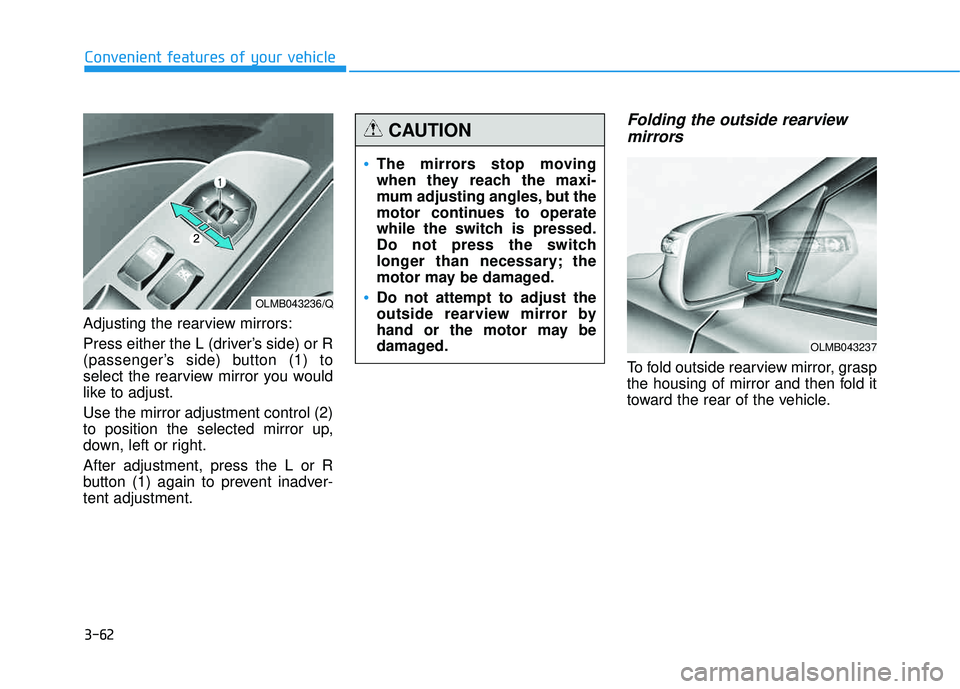
Adjusting the rearview mirrors:
Press either the L (driver’s side) or R
(passenger’s side) button (1) to
select the rearview mirror you would
like to adjust. Use the mirror adjustment control (2)
to position the selected mirror up,
down, left or right. After adjustment, press the L or R
button (1) again to prevent inadver-tent adjustment.
Folding the outside rearviewmirrors
To fold outside rearview mirror, grasp
the housing of mirror and then fold it
toward the rear of the vehicle.
OLMB043236/Q
The mirrors stop moving
when they reach the maxi-
mum adjusting angles, but the
motor continues to operate
while the switch is pressed.
Do not press the switch
longer than necessary; the
motor may be damaged.
Do not attempt to adjust the
outside rearview mirror by
hand or the motor may be
damaged.
CAUTION
OLMB043237
Page 172 of 653
3-86
Convenient features of your vehicle
Vanity mirror lamp (if equipped)
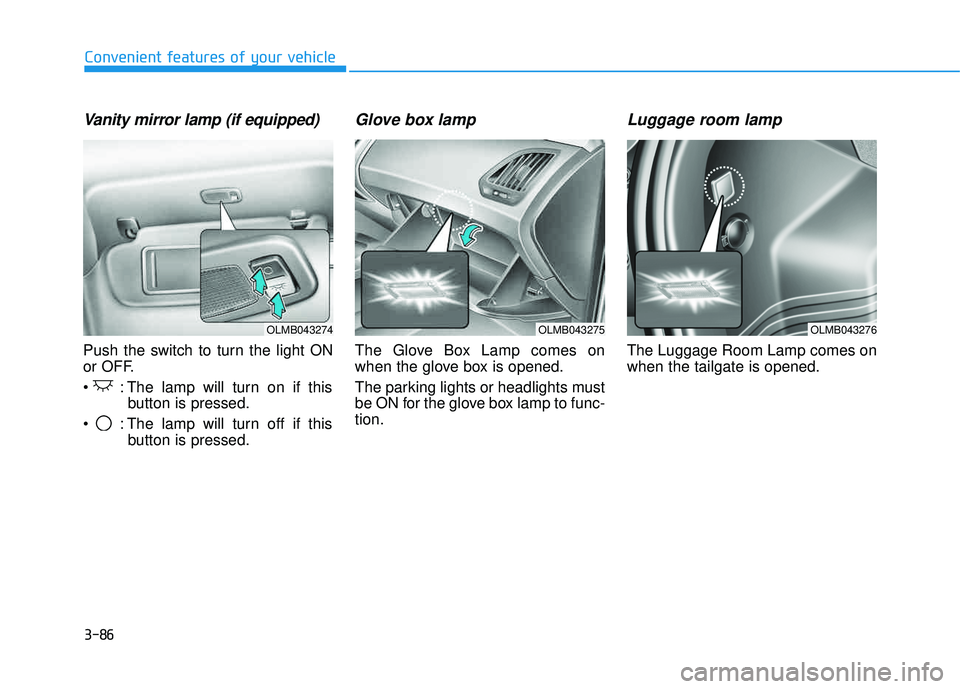
Push the switch to turn the light ON
or OFF.
: The lamp will turn on if thisbutton is pressed.
: The lamp will turn off if this button is pressed.
Glove box lamp
The Glove Box Lamp comes on
when the glove box is opened.
The parking lights or headlights must
be ON for the glove box lamp to func-tion.
Luggage room lamp
The Luggage Room Lamp comes onwhen the tailgate is opened.
OLMB043274OLMB043276OLMB043275
Page 178 of 653
3-92
Convenient features of your vehicle
Outside rearview mirrordefroster (if equipped)
If your vehicle is equipped with the
outside rearview mirror defrosters,
they will operate at the same time you
turn on the rear window defroster.
Front windshield defroster (if equipped)
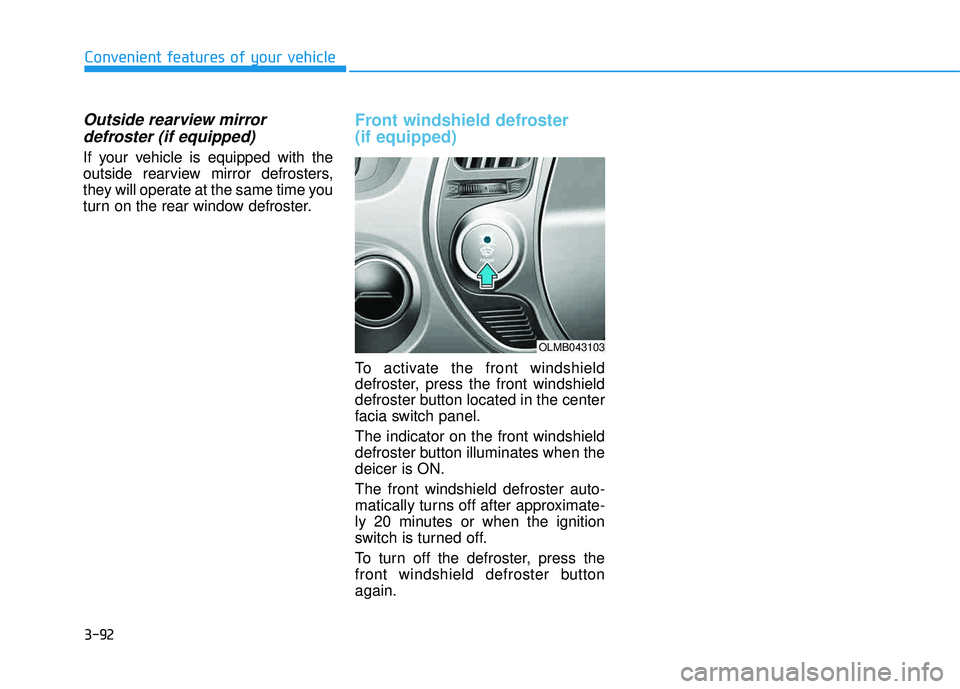
To activate the front windshield
defroster, press the front windshield
defroster button located in the center
facia switch panel. The indicator on the front windshield
defroster button illuminates when thedeicer is ON. The front windshield defroster auto-
matically turns off after approximate-
ly 20 minutes or when the ignition
switch is turned off.
To turn off the defroster, press the
front windshield defroster buttonagain.
OLMB043103
Page 198 of 653
3-112
Convenient features of your vehicle
For maximum defrosting, set thetemperature control to the maxi-
mum clockwise setting (hot), and
the fan speed control to the highestspeed.
If warm air to the floor is desired while defrosting or defogging, setthe mode to the floor-defrost posi-tion.
Before driving, clear all snow and ice from the windshield, rear win-
dow, outside rear view mirrors, and
all side windows.
Clear all snow and ice from the hood and air inlet in the cowl grill to
improve heater and defroster effi-ciency and to reduce the probabili-
ty of fogging up the inside of thewindshield.Manual climate control system
To defog inside windshield
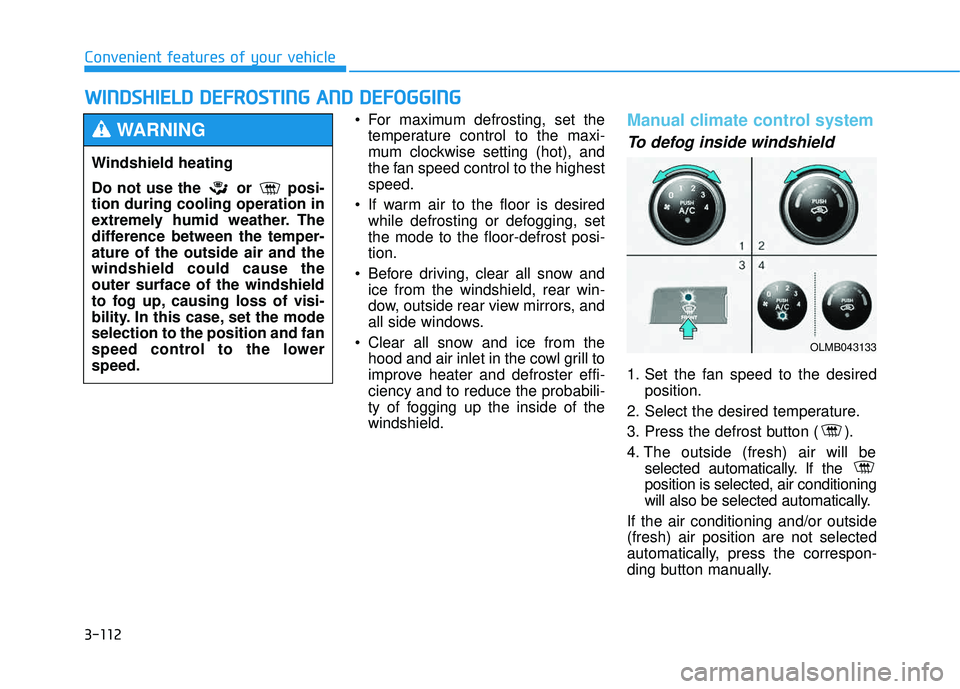
1. Set the fan speed to the desired position.
2. Select the desired temperature.
3. Press the defrost button ( ).
4. The outside (fresh) air will be selected automatically. If the position is selected, air conditioning
will also be selected automatically.
If the air conditioning and/or outside(fresh) air position are not selected
automatically, press the correspon-
ding button manually.
WW IINN DDSSHH IIEE LLDD DD EEFFRR OO SSTT IINN GG AA NN DD DD EEFFOO GGGGIINN GG
Windshield heating
Do not use the or posi- tion during cooling operation in
extremely humid weather. The
difference between the temper-ature of the outside air and thewindshield could cause theouter surface of the windshield
to fog up, causing loss of visi-
bility. In this case, set the modeselection to the position and fan
speed control to the lowerspeed.
WARNING
OLMB043133
Page 205 of 653
3-119
Convenient features of your vehicle
3
Cup holderSunvisor
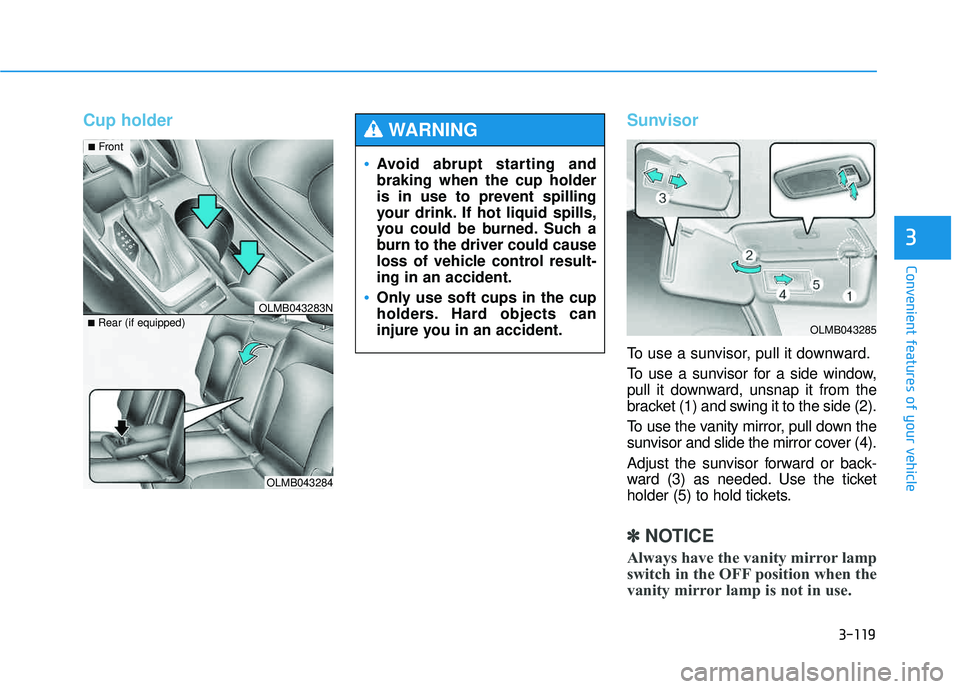
To use a sunvisor, pull it downward.
To use a sunvisor for a side window,
pull it downward, unsnap it from the
bracket (1) and swing it to the side (2).
To use the vanity mirror, pull down the
sunvisor and slide the mirror cover (4).
Adjust the sunvisor forward or back-
ward (3) as needed. Use the ticket
holder (5) to hold tickets.
✽✽
NOTICE
Always have the vanity mirror lamp
switch in the OFF position when the
vanity mirror lamp is not in use.
OLMB043284
■
Rear (if equipped)
OLMB043283N
■Front
Avoid abrupt starting and braking when the cup holder
is in use to prevent spilling
your drink. If hot liquid spills,
you could be burned. Such a
burn to the driver could cause
loss of vehicle control result-ing in an accident.
Only use soft cups in the cup
holders. Hard objects can
injure you in an accident.
WARNING
OLMB043285
Page 333 of 653
4-122
Multimedia System
BBlluu ee LL iinn kk ®®
Hyundai aims to offer differentiated
customer values through a ‘Connected
Car Life,’ which is to provide con-
sumers with fast and reliable IT tech-
nology. As consumers’ lifestylesbecome more and more mobile in
thanks to remarkable advances in
smart phones, tablet PCs and overall
wireless telecommunication, new
lifestyle patterns demand seamless
connection between one’s office,
home, outdoors and automobiles.
Automobile companies are now faced
with the task of shifting their paradigm
from vehicle-centered services to cus-
tomer value-centered services, with
the ultimate goal of securing global
leadership in the field of vehicle IT and
telematics. Hyundai Motor plans to achieve this
by realizing a terminal platform flexi-
ble to changes in IT technology,
cooperating with global IT compa-
nies, creating an eco-system and
providing the latest contents & serv-
ices based on an open environment.
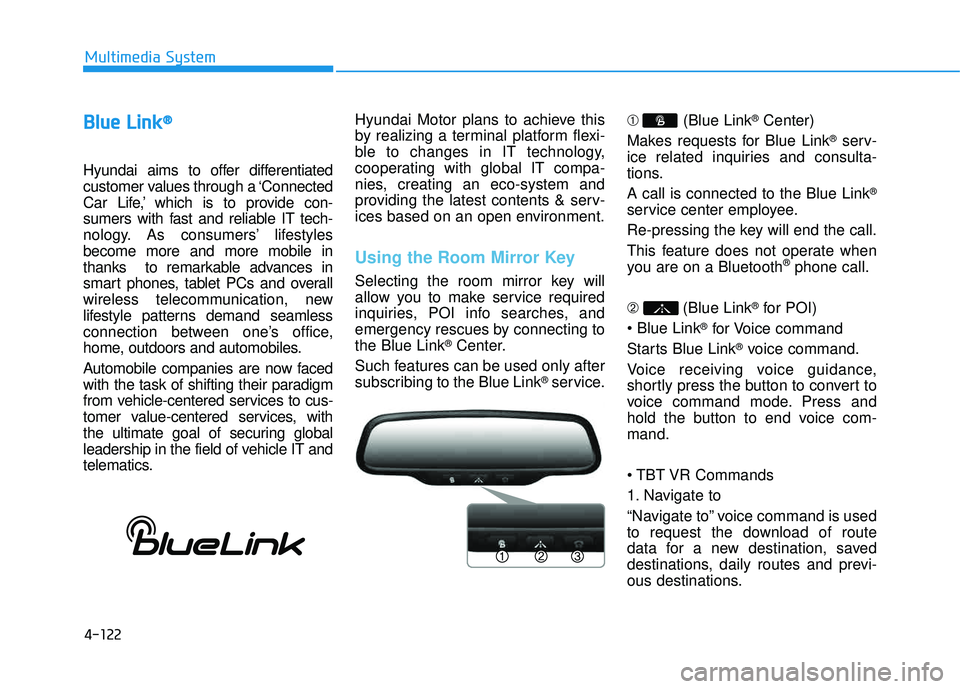
Using the Room Mirror Key
Selecting the room mirror key will
allow you to make service required
inquiries, POI info searches, and
emergency rescues by connecting tothe Blue Link
®Center.
Such features can be used only after
subscribing to the Blue Link
®service. ➀
(Blue Link
®Center)
Makes requests for Blue Link
®serv-
ice related inquiries and consulta-
tions. A call is connected to the Blue Link
®
service center employee.
Re-pressing the key will end the call.
This feature does not operate when
you are on a Bluetooth
®phone call.
➁ (Blue Link
®for POI)
®for Voice command
Starts Blue Link
®voice command.
Voice receiving voice guidance,
shortly press the button to convert to
voice command mode. Press and
hold the button to end voice com-mand.
Commands
1. Navigate to
“Navigate to” voice command is used
to request the download of route
data for a new destination, saved
destinations, daily routes and previ-
ous destinations.
Page 443 of 653
4-232
Multimedia System
BBlluu ee LL iinn kk ®®
Hyundai aims to offer differentiated
customer values through a ‘Connected
Car Life,’ which is to provide con-
sumers with fast and reliable IT tech-
nology. As consumers’ lifestylesbecome more and more mobile in
thanks to remarkable advances in
smart phones, tablet PCs and overall
wireless telecommunication, new
lifestyle patterns demand seamless
connection between one’s office,
home, outdoors and automobiles.
Automobile companies are now faced
with the task of shifting their paradigm
from vehicle-centered services to cus-
tomer value-centered services, with
the ultimate goal of securing global
leadership in the field of vehicle IT and
telematics. Hyundai Motor plans to achieve this
by realizing a terminal platform flexi-
ble to changes in IT technology,
cooperating with global IT compa-
nies, creating an eco-system and
providing the latest contents & serv-
ices based on an open environment.
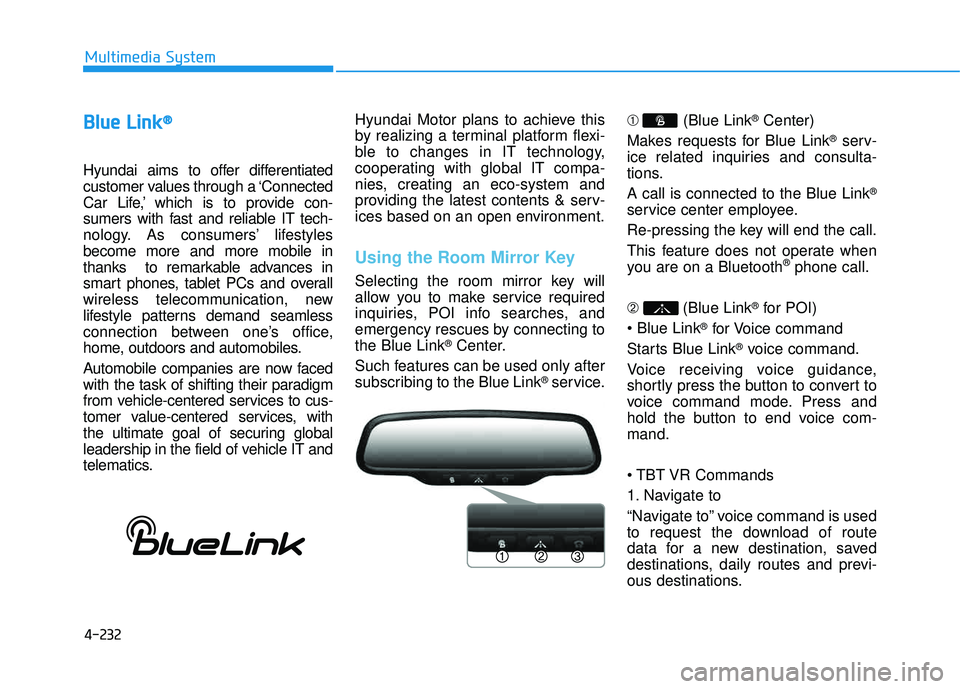
Using the Room Mirror Key
Selecting the room mirror key will
allow you to make service required
inquiries, POI info searches, and
emergency rescues by connecting tothe Blue Link
®Center.
Such features can be used only after
subscribing to the Blue Link
®service. ➀
(Blue Link
®Center)
Makes requests for Blue Link
®serv-
ice related inquiries and consulta-
tions. A call is connected to the Blue Link
®
service center employee.
Re-pressing the key will end the call.
This feature does not operate when
you are on a Bluetooth
®phone call.
➁ (Blue Link
®for POI)
®for Voice command
Starts Blue Link
®voice command.
Voice receiving voice guidance,
shortly press the button to convert to
voice command mode. Press and
hold the button to end voice com-mand.
Commands
1. Navigate to
“Navigate to” voice command is used
to request the download of route
data for a new destination, saved
destinations, daily routes and previ-
ous destinations.
Page 449 of 653
5-3
Driving your vehicle
Before entering the vehicle
• Be sure all windows, outside mir-ror(s), and outside lights are clean
and unobstructed.
Remove frost, snow, or ice.
Visually check the tires for uneven wear and damage.
Check under the vehicle for any sign of leaks.
Be sure there are no obstacles behind you if you intend to back up.
Before starting
Make sure the hood, the tailgate,and the doors are securely closed
and locked.
Adjust the position of the seat and steering wheel.
Adjust the inside and outside rearview mirrors.
Verify all the lights work.
Fasten your seatbelt. Check that all passengers have fastened their
seatbelts.
Check the gauges and indicators in the instrument panel and the mes-
sages on the instrument display
when the ignition switch is in theON position.
Check that any items you are car- rying are stored properly or fas-
tened down securely.
5
CALIFORNIA PROPOSITION 65
WARNING
Engine exhaust and a wide vari- ety of automobile components
including components found inthe interior furnishings in a
vehicle, contain or emit harmful
chemicals known to the State of
California to cause cancer and
birth defects and reproductive
harm. In addition, certain fluids
contained in vehicles and cer-
tain products of components
contain or emit chemicals
known to the State of California
to cause cancer and birth
defects or other reproductiveharm.
WARNING
BBEEFFOO RREE DD RRIIVV IINN GG
Page 496 of 653
5-50
Driving your vehicle
Smooth cornering
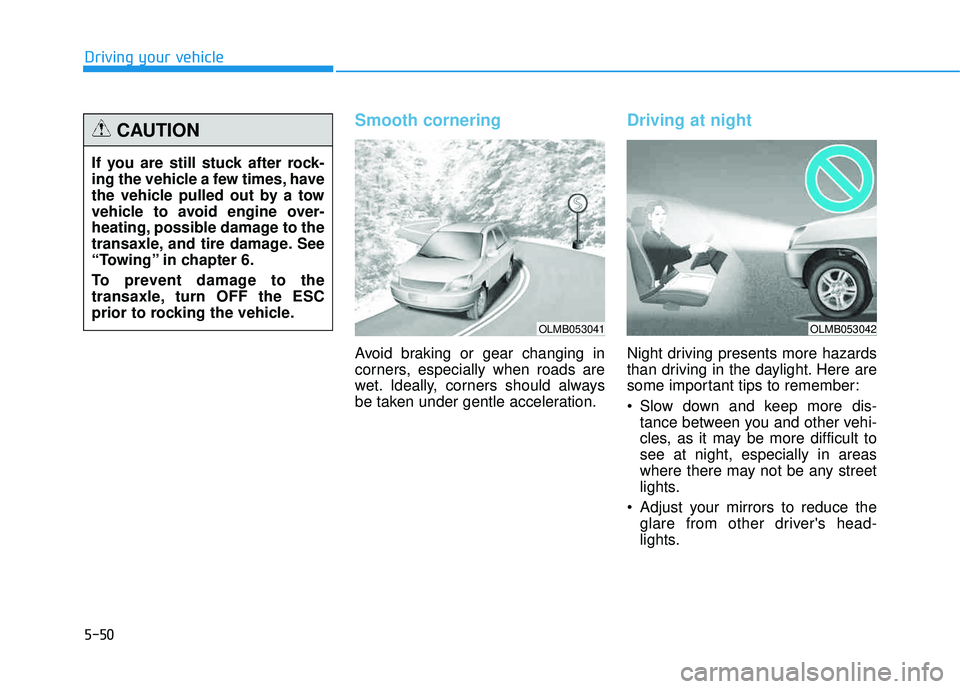
Avoid braking or gear changing in
corners, especially when roads are
wet. Ideally, corners should always
be taken under gentle acceleration.
Driving at night
Night driving presents more hazards
than driving in the daylight. Here are
some important tips to remember:
Slow down and keep more dis-tance between you and other vehi-
cles, as it may be more difficult tosee at night, especially in areas
where there may not be any street
lights.
Adjust your mirrors to reduce the glare from other driver's head-
lights.
If you are still stuck after rock-
ing the vehicle a few times, have
the vehicle pulled out by a tow
vehicle to avoid engine over-
heating, possible damage to the
transaxle, and tire damage. See
“Towing” in chapter 6.
To prevent damage to the
transaxle, turn OFF the ESC
prior to rocking the vehicle.
CAUTION
OLMB053041OLMB053042
Page 610 of 653
7-69
7
Maintenance
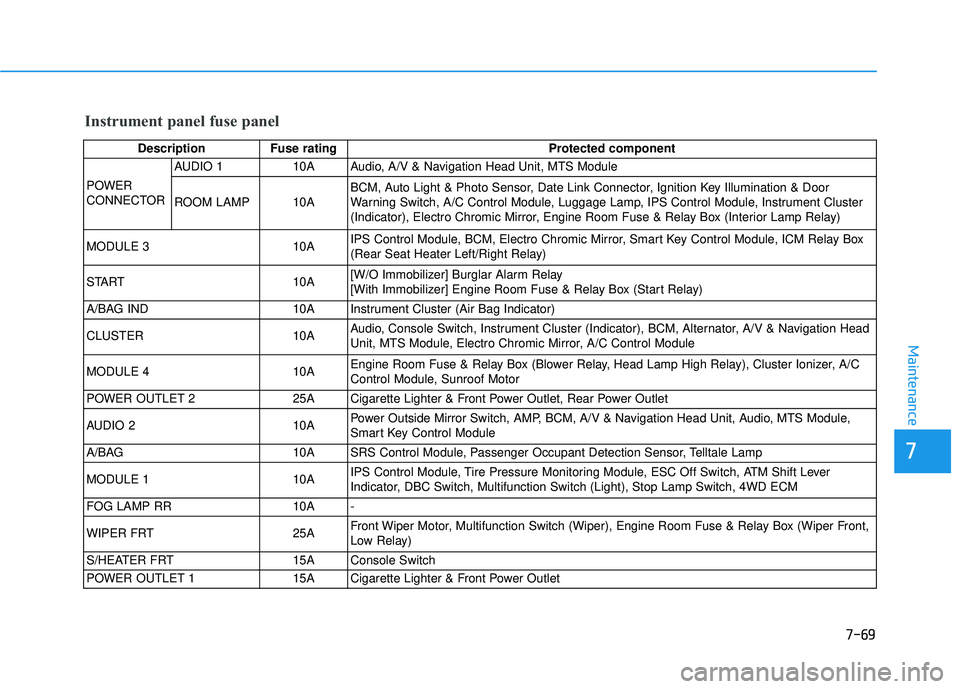
Instrument panel fuse panel
Description Fuse ratingProtected component
POWER
CONNECTOR AUDIO 1 10A Audio, A/V & Navigation Head Unit, MTS Module
ROOM LAMP 10A
BCM, Auto Light & Photo Sensor, Date Link Connector, Ignition Key Illumination & Door
Warning Switch, A/C Control Module, Luggage Lamp, IPS Control Module, Instrument Cluster
(Indicator), Electro Chromic Mirror, Engine Room Fuse & Relay Box (Interior Lamp Relay)
MODULE 3 10A IPS Control Module, BCM, Electro Chromic Mirror, Smart Key Control Module, ICM Relay Box
(Rear Seat Heater Left/Right Relay)
START 10A [W/O Immobilizer] Burglar Alarm Relay
[With Immobilizer] Engine Room Fuse & Relay Box (Start Relay)
A/BAG IND 10A Instrument Cluster (Air Bag Indicator)
CLUSTER 10A Audio, Console Switch, Instrument Cluster (Indicator), BCM, Alternator, A/V & Navigation Head
Unit, MTS Module, Electro Chromic Mirror, A/C Control Module
MODULE 4 10A Engine Room Fuse & Relay Box (Blower Relay, Head Lamp High Relay), Cluster Ionizer, A/C
Control Module, Sunroof Motor
POWER OUTLET 2 25A Cigarette Lighter & Front Power Outlet, Rear Power Outlet
AUDIO 2 10A Power Outside Mirror Switch, AMP, BCM, A/V & Navigation Head Unit, Audio, MTS Module,
Smart Key Control Module
A/BAG 10A SRS Control Module, Passenger Occupant Detection Sensor, Telltale Lamp
MODULE 1 10A IPS Control Module, Tire Pressure Monitoring Module, ESC Off Switch, ATM Shift Lever
Indicator, DBC Switch, Multifunction Switch (Light), Stop Lamp Switch, 4WD ECM
FOG LAMP RR 10A -
WIPER FRT 25A Front Wiper Motor, Multifunction Switch (Wiper), Engine Room Fuse & Relay Box (Wiper Front,
Low Relay)
S/HEATER FRT 15A Console Switch
POWER OUTLET 1 15A Cigarette Lighter & Front Power Outlet