warning light Hyundai Tucson 2019 - RHD (UK, Australia) Owner's Guide
[x] Cancel search | Manufacturer: HYUNDAI, Model Year: 2019, Model line: Tucson, Model: Hyundai Tucson 2019Pages: 685, PDF Size: 17.76 MB
Page 101 of 685
3-9
Convenient features of your vehicle
Even though you press the outside
door handle button, the doors will not
lock and the chime will sound for three
seconds if any of the following occur:
• The Smart Key is in the vehicle.
• The Engine Start/Stop button is inACC or ON position.
• Any door except the tailgate is open.Unlocking
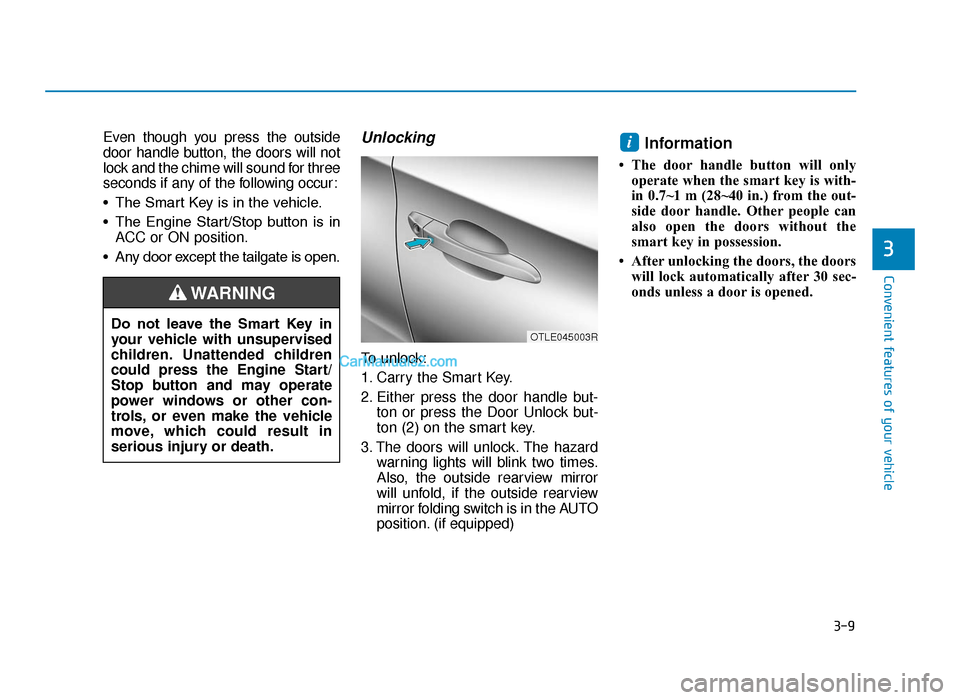
To unlock:
1. Carry the Smart Key.
2. Either press the door handle but- ton or press the Door Unlock but-
ton (2) on the smart key.
3. The doors will unlock. The hazard warning lights will blink two times.
Also, the outside rearview mirror
will unfold, if the outside rearview
mirror folding switch is in the AUTO
position. (if equipped)
Information
• The door handle button will onlyoperate when the smart key is with-
in 0.7~1 m (28~40 in.) from the out-
side door handle. Other people can
also open the doors without the
smart key in possession.
• After unlocking the doors, the doors will lock automatically after 30 sec-
onds unless a door is opened.
i
3
Do not leave the Smart Key in
your vehicle with unsupervised
children. Unattended children
could press the Engine Start/
Stop button and may operate
power windows or other con-
trols, or even make the vehicle
move, which could result in
serious injury or death.
WARNING
OTLE045003R
TLe UK 3a(~109).qxp 6/12/2018 2:20 PM Page 9
Page 102 of 685
3-10
Convenient features of your vehicle
Tailgate unlocking
To unlock:
1. Carry the smart key.
2. Either press the tailgate handlebutton or press the Tailgate Unlock
button (3) on the smart key for
more than one second.
3. The hazard warning lights will blink two times. The tailgate will unlock.
The power tailgate will unlock and
then open (if equipped).
For more details, refer to “Power
tailgate” in this chapter.
Information
After unlocking the tailgate, the tail-
gate will lock automatically after 30
seconds unless the tailgate is opened.
Start-up
You can start the engine without insert-
ing the key. For detailed information
refer to the Engine Start/Stop but-
ton in chapter 5.
To prevent damaging the smart key:
• Keep the smart key away from water or any liquid and fire. If the
inside of the smart key gets
damp (due to drinks or moisture),
or is heated, internal circuit may
malfunction, excluding the car
from the warranty.
• Avoid dropping or throwing the smart key.
• Protect the smart key from extreme temperatures.
Always have the smart key with
you when leaving the vehicle. If
the smart key is left near the vehi-
cle, the vehicle battery may be dis-
charged.
Mechanical key
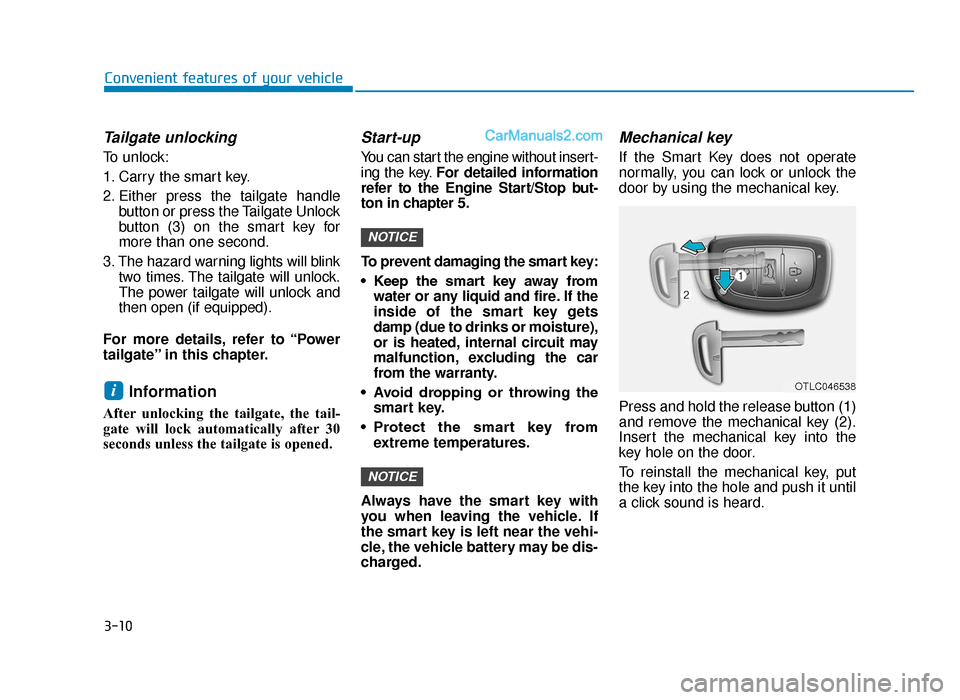
If the Smart Key does not operate
normally, you can lock or unlock the
door by using the mechanical key.
Press and hold the release button (1)
and remove the mechanical key (2).
Insert the mechanical key into the
key hole on the door.
To reinstall the mechanical key, put
the key into the hole and push it until
a click sound is heard.
NOTICE
NOTICE
iOTLC046538
TLe UK 3a(~109).qxp 6/12/2018 2:21 PM Page 10
Page 112 of 685
3-20
Convenient features of your vehicle
This system helps to protect your
vehicle and valuables. The horn will
sound and the hazard warning lights
will blink continuously if any of the
following occurs:
- A door is opened without using the remote key or smart key.
- The tailgate is opened without using the remote key or smart key.
- The engine bonnet is opened.
The alarm continues for 30 seconds,
then the system resets. To turn off
the alarm, unlock the doors with the
remote key or smart key.
The Theft Alarm System automatical-
ly sets 30 seconds after you lock the
doors and the tailgate. For the system
to activate, you must lock the doors
and the tailgate from outside the vehi-
cle with the remote key or smart key
or by pressing the button on the out-
side of the door handles with the
smart key in your possession.
The hazard warning lights will blink
and the chime will sound once to
indicate the system is armed. Once the security system is set, open-
ing any door, the tailgate, or the bon-
net without using the remote key or
smart key will cause the alarm to acti-
vate.
The Theft Alarm System will not set if
the bonnet, the tailgate, or any door
is not fully closed. If the system will
not set, check the bonnet, the tail-
gate, or the doors are fully closed.
Do not attempt to alter this system or
add other devices to it.
Information
• Do not lock the doors until all pas-
sengers have left the vehicle. If the
remaining passenger leaves the
vehicle when the system is armed,
the alarm will be activated.
• If the vehicle is not disarmed with the remote key or smart key, open
the doors by using the mechanical
key and place the ignition switch in
the ON position (for remote key) or
start the engine (for smart key) and
wait for 30 seconds.
• When the system is disarmed but a door or tailgate is not opened within 30
seconds, the system will be rearmed.
i
THEFT-ALARM SYSTEM (IF EQUIPPED)
TLe UK 3a(~109).qxp 6/12/2018 2:21 PM Page 20
Page 115 of 685
3-23
Convenient features of your vehicle
3
Tilt steering / Telescope steeringInformation
After adjustment, sometimes the lock-
release lever may not lock the steering
wheel.
It is not a malfunction. This occurs
when two gears are not engaged cor-
rectly. In this case, adjust the steering
wheel again and then lock the steering
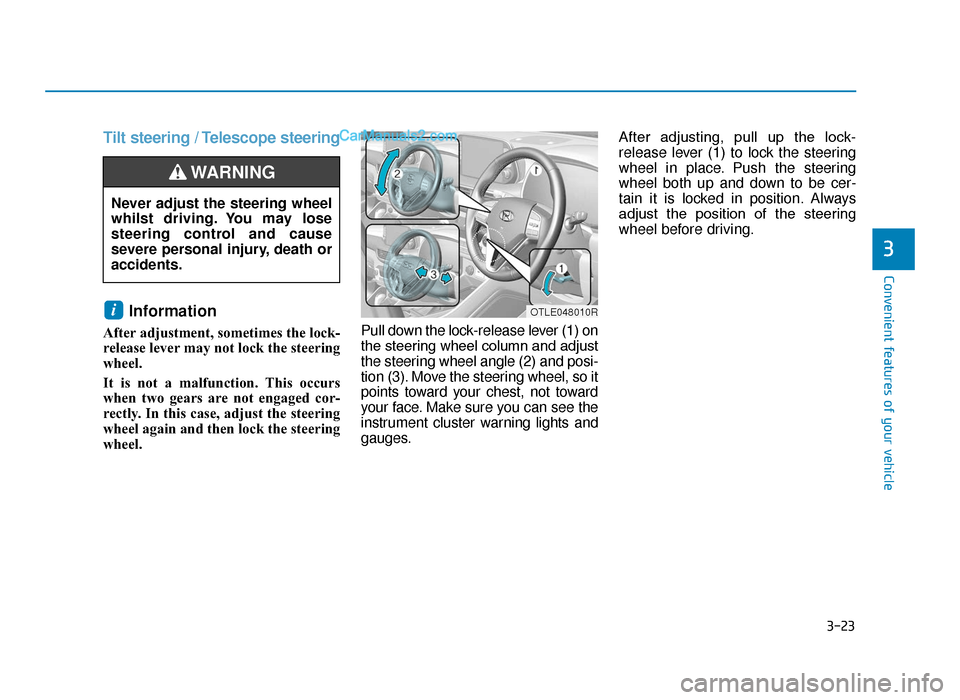
wheel. Pull down the lock-release lever (1) on
the steering wheel column and adjust
the steering wheel angle (2) and posi-
tion (3). Move the steering wheel, so it
points toward your chest, not toward
your face. Make sure you can see the
instrument cluster warning lights and
gauges.After adjusting, pull up the lock-
release lever (1) to lock the steering
wheel in place. Push the steering
wheel both up and down to be cer-
tain it is locked in position. Always
adjust the position of the steering
wheel before driving.
i
Never adjust the steering wheel
whilst driving. You may lose
steering control and cause
severe personal injury, death or
accidents.
WARNING
OTLE048010R
TLe UK 3a(~109).qxp 6/12/2018 2:21 PM Page 23
Page 117 of 685
3-25
Convenient features of your vehicle
3
MIRRORS
Inside rearview mirror
Before you start driving, adjust the
rearview mirror to the centre on the
view through the rear window.When cleaning the mirror, use a
paper towel or similar material
dampened with glass cleaner. Do
not spray glass cleaner directly on
the mirror as that may cause the
liquid cleaner to enter the mirror
housing.
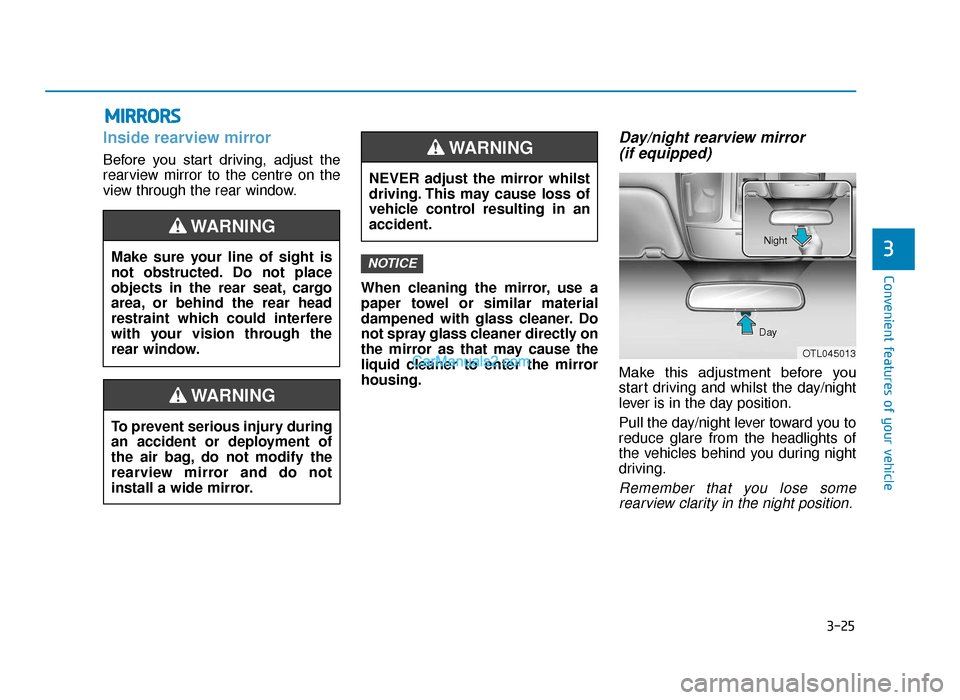
Day/night rearview mirror (if equipped)
Make this adjustment before you
start driving and whilst the day/night
lever is in the day position.
Pull the day/night lever toward you to
reduce glare from the headlights of
the vehicles behind you during night
driving.
Remember that you lose some
rearview clarity in the night position.
NOTICEMake sure your line of sight is
not obstructed. Do not place
objects in the rear seat, cargo
area, or behind the rear head
restraint which could interfere
with your vision through the
rear window.
WARNING
To prevent serious injury during
an accident or deployment of
the air bag, do not modify the
rearview mirror and do not
install a wide mirror.
WARNING
NEVER adjust the mirror whilst
driving. This may cause loss of
vehicle control resulting in an
accident.
WARNING
OTL045013
Day Night
TLe UK 3a(~109).qxp 6/12/2018 2:22 PM Page 25
Page 125 of 685
3-33
Convenient features of your vehicle
3
The ignition switch must be in the ON
position to be able to raise or lower
the windows. Each door has a Power
Window switch to control that door's
window. The driver has a Power
Window Lock switch which can block
the operation of passenger windows.
The power windows will operate for
approximately 30 seconds after the
ignition switch is placed in the ACC
or OFF position. However, if the front
doors are opened, the Power
Windows cannot be operated even
within the 30 second period.Information
• In cold and wet climates, power win-dows may not work properly due to
freezing conditions.
• Whilst driving with the rear windows down or with the sunroof (if
equipped) opened (or partially
opened), your vehicle may demon-
strate a wind buffeting or pulsation
noise. This noise is normal and can be
reduced or eliminated by taking the
following actions. If the noise occurs
with one or both of the rear windows
down, partially lower both front win-
dows approximately 2.5 cm (1 inch).
If you experience the noise with the
sunroof open, slightly close the sun-
roof.
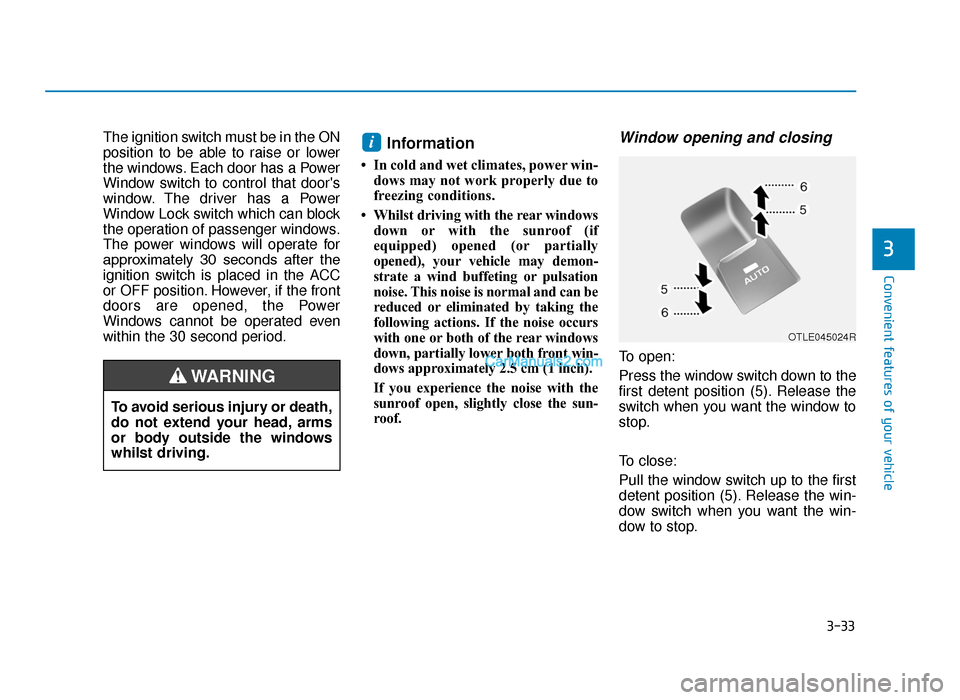
Window opening and closing
To open:
Press the window switch down to the
first detent position (5). Release the
switch when you want the window to
stop.
To close:
Pull the window switch up to the first
detent position (5). Release the win-
dow switch when you want the win-
dow to stop.
i
To avoid serious injury or death,
do not extend your head, arms
or body outside the windows
whilst driving.
WARNING
OTLE045024R
TLe UK 3a(~109).qxp 6/12/2018 2:23 PM Page 33
Page 133 of 685
3-41
Convenient features of your vehicle
3
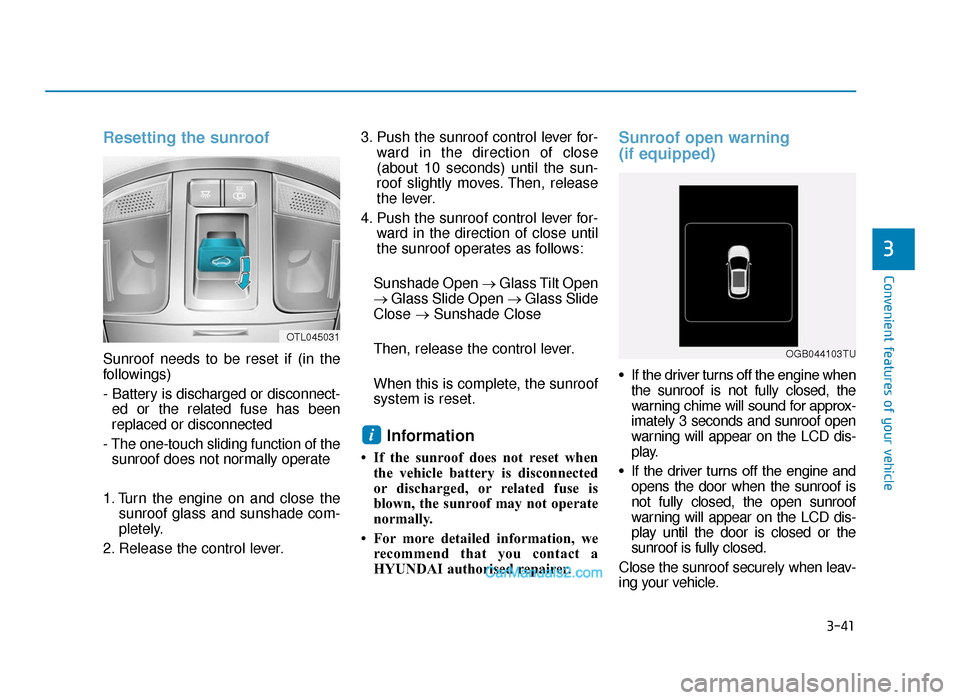
Resetting the sunroof
Sunroof needs to be reset if (in the
followings)
- Battery is discharged or disconnect-ed or the related fuse has been
replaced or disconnected
- The one-touch sliding function of the sunroof does not normally operate
1. Turn the engine on and close the sunroof glass and sunshade com-
pletely.
2. Release the control lever. 3. Push the sunroof control lever for-
ward in the direction of close
(about 10 seconds) until the sun-
roof slightly moves. Then, release
the lever.
4. Push the sunroof control lever for- ward in the direction of close until
the sunroof operates as follows:
Sunshade Open → Glass Tilt Open
→ Glass Slide Open → Glass Slide
Close →Sunshade Close
Then, release the control lever.
When this is complete, the sunroof
system is reset.
Information
• If the sunroof does not reset when the vehicle battery is disconnected
or discharged, or related fuse is
blown, the sunroof may not operate
normally.
• For more detailed information, we recommend that you contact a
HYUNDAI authorised repairer.
Sunroof open warning
(if equipped)
• If the driver turns off the engine whenthe sunroof is not fully closed, the
warning chime will sound for approx-
imately 3 seconds and sunroof open
warning will appear on the LCD dis-
play.
• If the driver turns off the engine and opens the door when the sunroof is
not fully closed, the open sunroof
warning will appear on the LCD dis-
play until the door is closed or the
sunroof is fully closed.
Close the sunroof securely when leav-
ing your vehicle.
i
OTL045031
OGB044103TU
TLe UK 3a(~109).qxp 6/12/2018 2:23 PM Page 41
Page 134 of 685
3-42
Convenient features of your vehicle
Bonnet
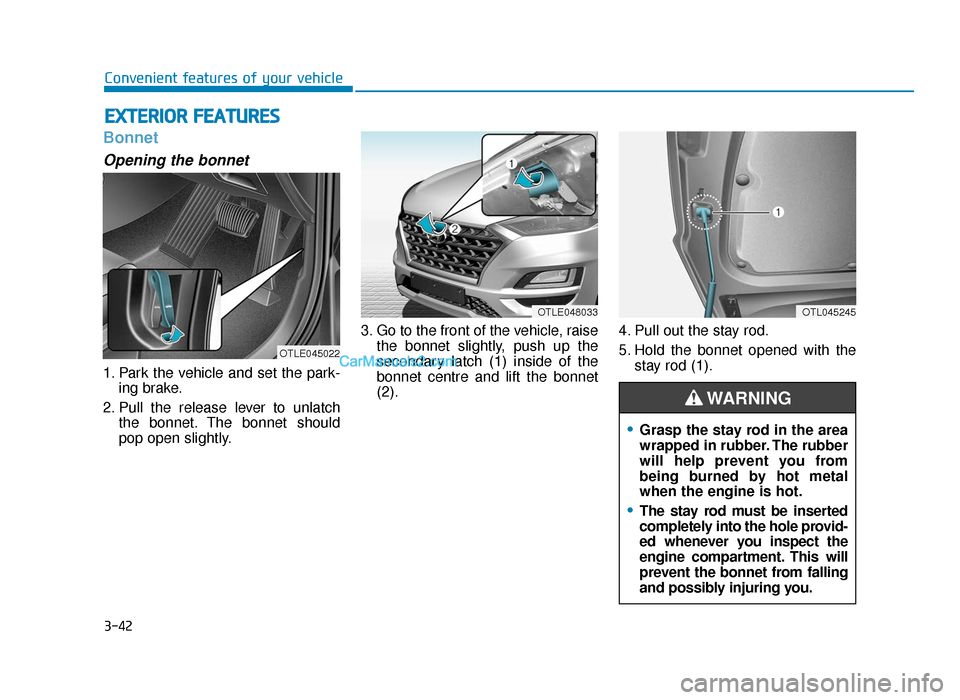
Opening the bonnet
1. Park the vehicle and set the park-ing brake.
2. Pull the release lever to unlatch the bonnet. The bonnet should
pop open slightly. 3. Go to the front of the vehicle, raise
the bonnet slightly, push up the
secondary latch (1) inside of the
bonnet centre and lift the bonnet
(2). 4. Pull out the stay rod.
5. Hold the bonnet opened with the
stay rod (1).
EXTERIOR FEATURES
OTLE048033OTL045245
OTLE045022
•Grasp the stay rod in the area
wrapped in rubber. The rubber
will help prevent you from
being burned by hot metal
when the engine is hot.
•The stay rod must be inserted
completely into the hole provid-
ed whenever you inspect the
engine compartment. This will
prevent the bonnet from falling
and possibly injuring you.
WARNING
TLe UK 3a(~109).qxp 6/12/2018 2:23 PM Page 42
Page 135 of 685
3-43
Convenient features of your vehicle
3
Closing the bonnet
1. Before closing the bonnet, checkthe following:
• All filler caps in engine compart- ment must be correctly installed.
• Gloves, rags or any other com- bustible material must be removed
from the engine compartment.
2. Return the stay rod to its clip to prevent it from rattling.
3. Lower the bonnet halfway (lifted approximately 30cm from the closed
position) and push down to securely
lock in place. Then double check to
be sure the bonnet is secure.
•Before closing the bonnet,
ensure that all obstructions
are removed from the bonnet
opening. Closing the bonnet
with an obstruction present in
the bonnet opening may
result in property damage or
severe personal injury.
•Do not leave gloves, rags or
any other combustible materi-
al in the engine compartment.
Doing so may cause a heat-
induced fire.
•Do not move the vehicle with
the bonnet raised. The view will
be blocked and the bonnet
could fall or be damaged.
WARNING
Always double check to be sure
that the bonnet is firmly latched
before driving away. Check there
is no bonnet open warning light
or message displayed on the
instrument cluster. If the bonnet
is not latched whilst the vehicle
is moving, the chime will sound
to warn the driver the bonnet is
not fully latched. Driving with the
bonnet opened may cause a total
loss of visibility, which might
result in an accident.
WARNING
TLe UK 3a(~109).qxp 6/12/2018 2:23 PM Page 43
Page 148 of 685
3-56
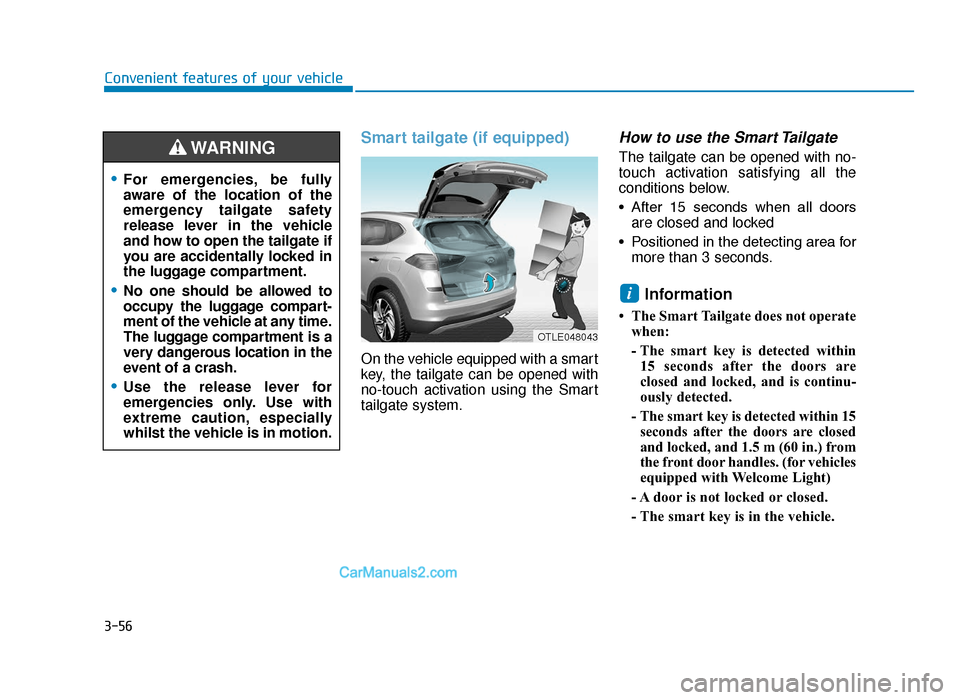
Smart tailgate (if equipped)
On the vehicle equipped with a smart
key, the tailgate can be opened with
no-touch activation using the Smart
tailgate system.
How to use the Smart Tailgate
The tailgate can be opened with no-
touch activation satisfying all the
conditions below.
• After 15 seconds when all doorsare closed and locked
• Positioned in the detecting area for more than 3 seconds.
Information
• The Smart Tailgate does not operatewhen:
- The smart key is detected within15 seconds after the doors are
closed and locked, and is continu-
ously detected.
- The smart key is detected within 15 seconds after the doors are closed
and locked, and 1.5 m (60 in.) from
the front door handles. (for vehicles
equipped with Welcome Light)
- A door is not locked or closed.
- The smart key is in the vehicle.
i
Convenient features of your vehicle
•For emergencies, be fully
aware of the location of the
emergency tailgate safety
release lever in the vehicle
and how to open the tailgate if
you are accidentally locked in
the luggage compartment.
•No one should be allowed to
occupy the luggage compart-
ment of the vehicle at any time.
The luggage compartment is a
very dangerous location in the
event of a crash.
•Use the release lever for
emergencies only. Use with
extreme caution, especially
whilst the vehicle is in motion.
WARNING
OTLE048043
TLe UK 3a(~109).qxp 6/12/2018 2:25 PM Page 56