chapter 8 HYUNDAI TUCSON 2022 Manual Online
[x] Cancel search | Manufacturer: HYUNDAI, Model Year: 2022, Model line: TUCSON, Model: HYUNDAI TUCSON 2022Pages: 638, PDF Size: 82.3 MB
Page 470 of 638
07
7-107
Highway Driving Assist
Operation
Highway Driving Assist display and
control
You can see the status of the Highway
Driving Assist operation in the Driving
Assist mode on the cluster. Refer to “LCD
Display Modes” section in chapter 4.
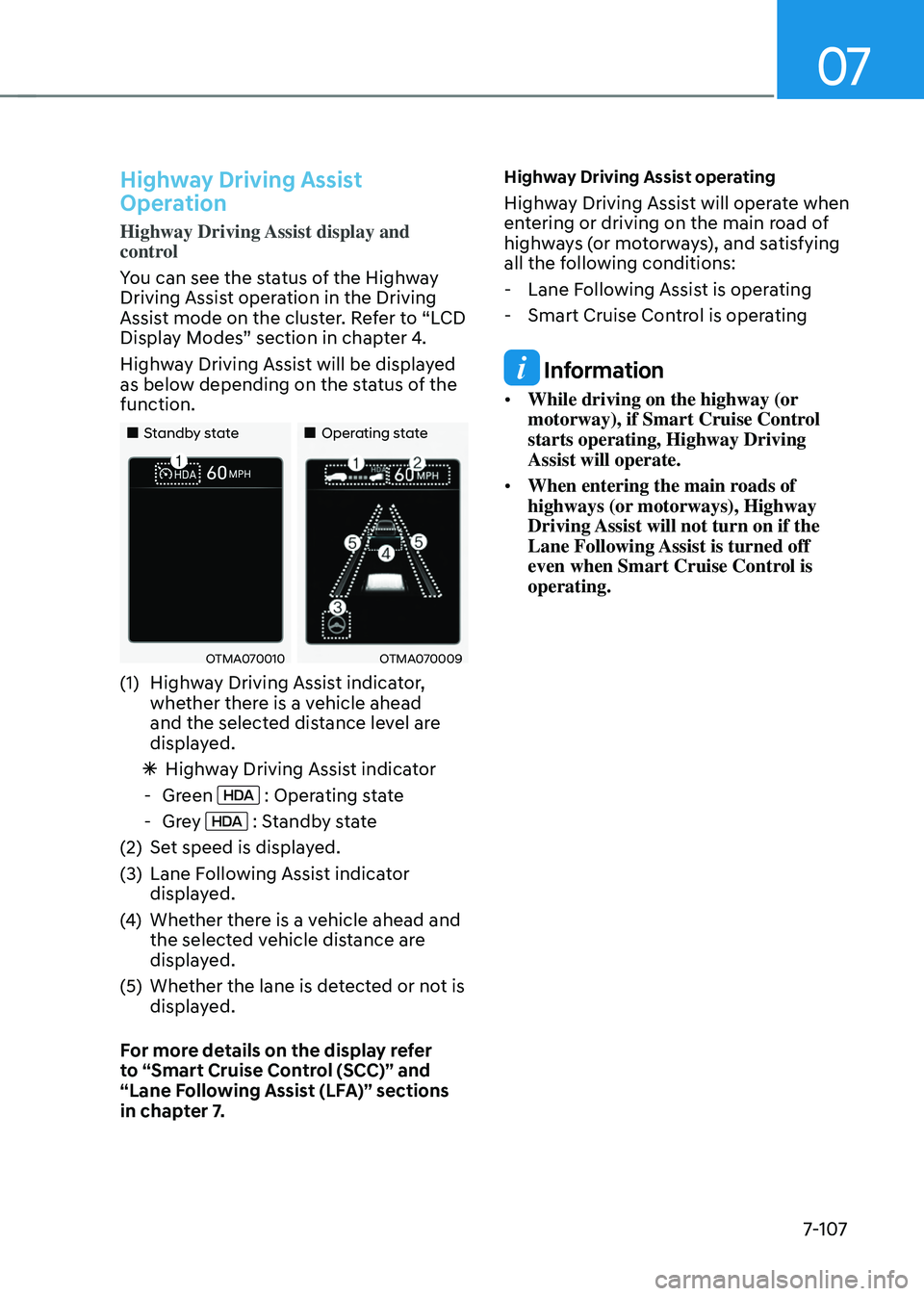
Highway Driving Assist will be displayed
as below depending on the status of the
function.
„„Standby state„„Operating state
OTMA070010OTMA070009
(1) Highway Driving Assist indicator,
whether there is a vehicle ahead
and the selected distance level are
displayed.
ÃHighway Driving Assist indicator
-Green : Operating state
-Grey : Standby state
(2) Set speed is displayed.
(3) Lane Following Assist indicator
displayed.
(4) Whether there is a vehicle ahead and
the selected vehicle distance are
displayed.
(5) Whether the lane is detected or not is
displayed.
For more details on the display refer
to “Smart Cruise Control (SCC)” and
“Lane Following Assist (LFA)” sections
in chapter 7.
Highway Driving Assist operating
Highway Driving Assist will operate when
entering or driving on the main road of
highways (or motorways), and satisfying
all the following conditions:
- Lane Following Assist is operating
-Smart Cruise Control is operating
Information
• While driving on the highway (or
motorway), if Smart Cruise Control
starts operating, Highway Driving
Assist will operate.
• When entering the main roads of
highways (or motorways), Highway
Driving Assist will not turn on if the
Lane Following Assist is turned off
even when Smart Cruise Control is
operating.
Page 474 of 638
07
7-111
Limitations of Highway Driving
Assist
Highway Driving Assist may not operate
normally, or may not operate under the
following circumstances:
• The map information and the
actual road is different because the
navigation is not updated
• The map information and the actual
road is different because of real-time
GPS data or map information error
• The infotainment system is overloaded
by simultaneously performing
functions such as route search, video
playback, voice recognition, etc.
• GPS signals are blocked in areas such
as a tunnel
• The driver goes off course or the
route to the destination is changed or
canceled by resetting the navigation
• The vehicle enters a service station or
rest area
• Android Auto or Car Play is operating
• The navigation cannot detect the
current vehicle position (ex: elevated
roads including overpass adjacent to
general roads or nearby roads exist in
a parallel way)
Information
For more details on the limitations of
the front view camera, front radar, front
corner radar and rear corner radar, refer
to “Forward Collision-Avoidance Assist
(FCA)” section in chapter 7.
Information
This device complies with Part 15 of the
FCC rules.
Operation is subject to the following three
conditions:
1. This device may not cause harmful
interference, and
2. This device must accept any
interference received, including
interference that may cause undesired
operation.
3. Changes or modifications not expressly
approved by the party responsible
for compliance could void the user's
authority to operate the device.
Information
Radio frequency radiation exposure
information:
This equipment complies with FCC
radiation exposure limits set forth for an
uncontrolled environment.
This equipment should be installed and
operated with minimum distance of 8 in.
(20 cm) between the radiator (antenna)
and your body.
This transmitter must not be co-located or
operating in conjunction with any other
antenna or transmitter.
Page 485 of 638
Driver assistance system
7-122
REAR CROSS-TRAFFIC COLLISION-AVOIDANCE ASSIST
(RCCA) (IF EQUIPPED)
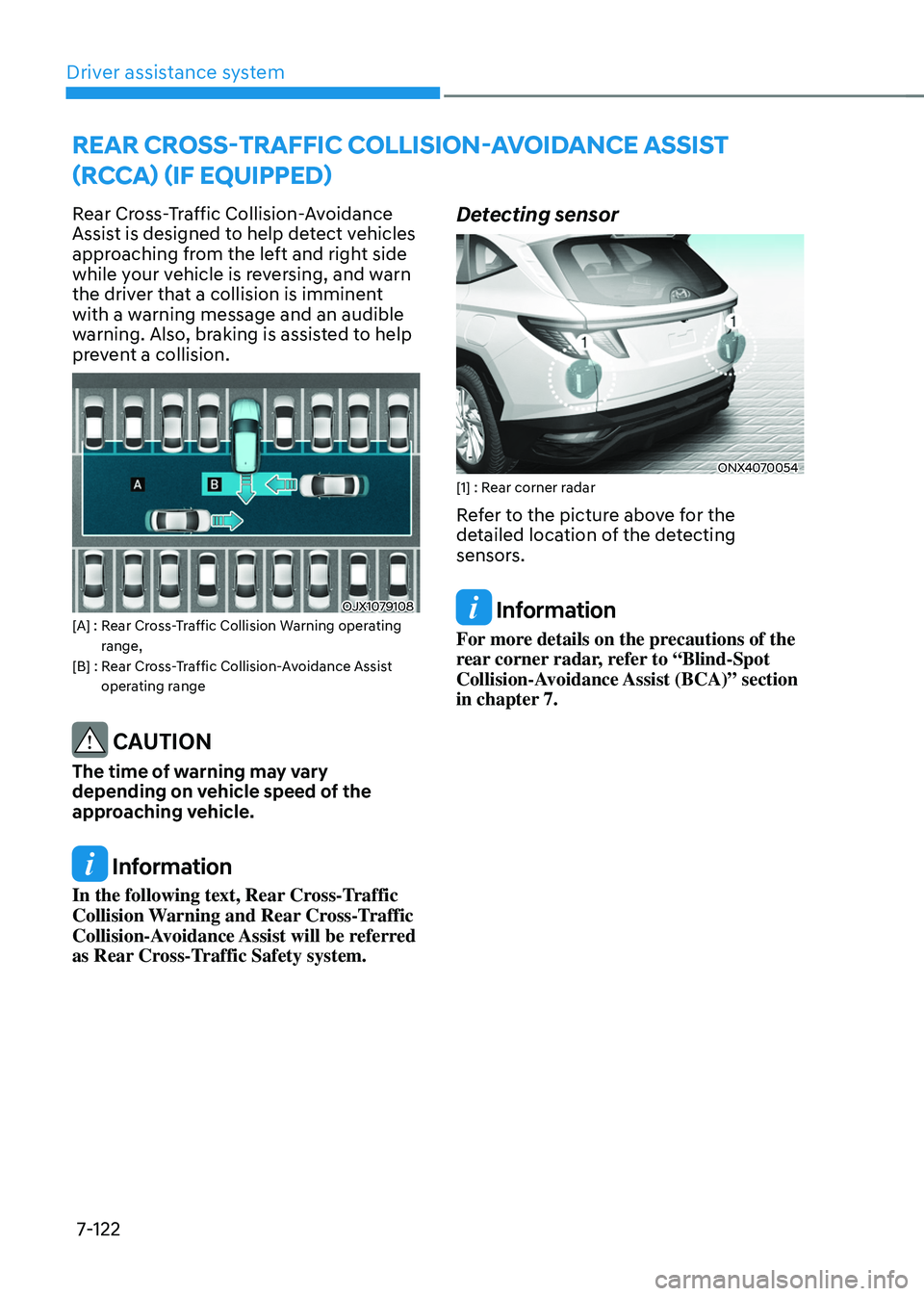
Rear Cross-Traffic Collision-Avoidance
Assist is designed to help detect vehicles
approaching from the left and right side
while your vehicle is reversing, and warn
the driver that a collision is imminent
with a warning message and an audible
warning. Also, braking is assisted to help
prevent a collision.
OJX1079108[A] : Rear Cross-Traffic Collision Warning operating range,[B] : Rear Cross-Traffic Collision-Avoidance Assist operating range
CAUTION
The time of warning may vary
depending on vehicle speed of the
approaching vehicle.
Information
In the following text, Rear Cross-Traffic
Collision Warning and Rear Cross-Traffic
Collision-Avoidance Assist will be referred
as Rear Cross-Traffic Safety system.
Detecting sensor
ONX4070054[1] : Rear corner radar
Refer to the picture above for the
detailed location of the detecting
sensors.
Information
For more details on the precautions of the
rear corner radar, refer to “Blind-Spot
Collision-Avoidance Assist (BCA)” section
in chapter 7.
Page 492 of 638
07
7-129
WARNING
• Even though the warning message
does not appear on the cluster, Rear
Cross-Traffic Safety system may not
operate properly.
• Rear Cross-Traffic Safety system may
not operate properly in an area (for
example: open terrain), where any
substance are not detected after
turning ON the engine.
CAUTION
Turn off Rear Cross-Traffic Safety
system to install a trailer, carrier, etc.,
or remove the trailer, carrier, etc. to use
Rear Cross-Traffic Safety system.
Limitations of Rear Cross-Traffic
Safety system
Rear Cross-Traffic Safety system may
not operate normally, or the system
may operate unexpectedly under the
following circumstances:
• Departing from where trees or grass
are overgrown
• Departing from where roads are wet
• Speed of the approaching vehicle is
fast or slow
Braking control may not work, driver’s attention is required in the following
circumstances:
• The vehicle severely vibrates while
driving over a bumpy road, uneven
road or concrete patch
• Driving on a slippery surface due to
snow, water puddle, ice, etc.
• The tire pressure is low or a tire is
damaged
• The brake is reworked
• Remote Smart Parking Assist is
operating (if equipped)
Information
For more details on the limitations of the
rear corner radar, refer to “Blind-Spot
Collision-Avoidance Assist (BCA)” section
in chapter 7.
WARNING
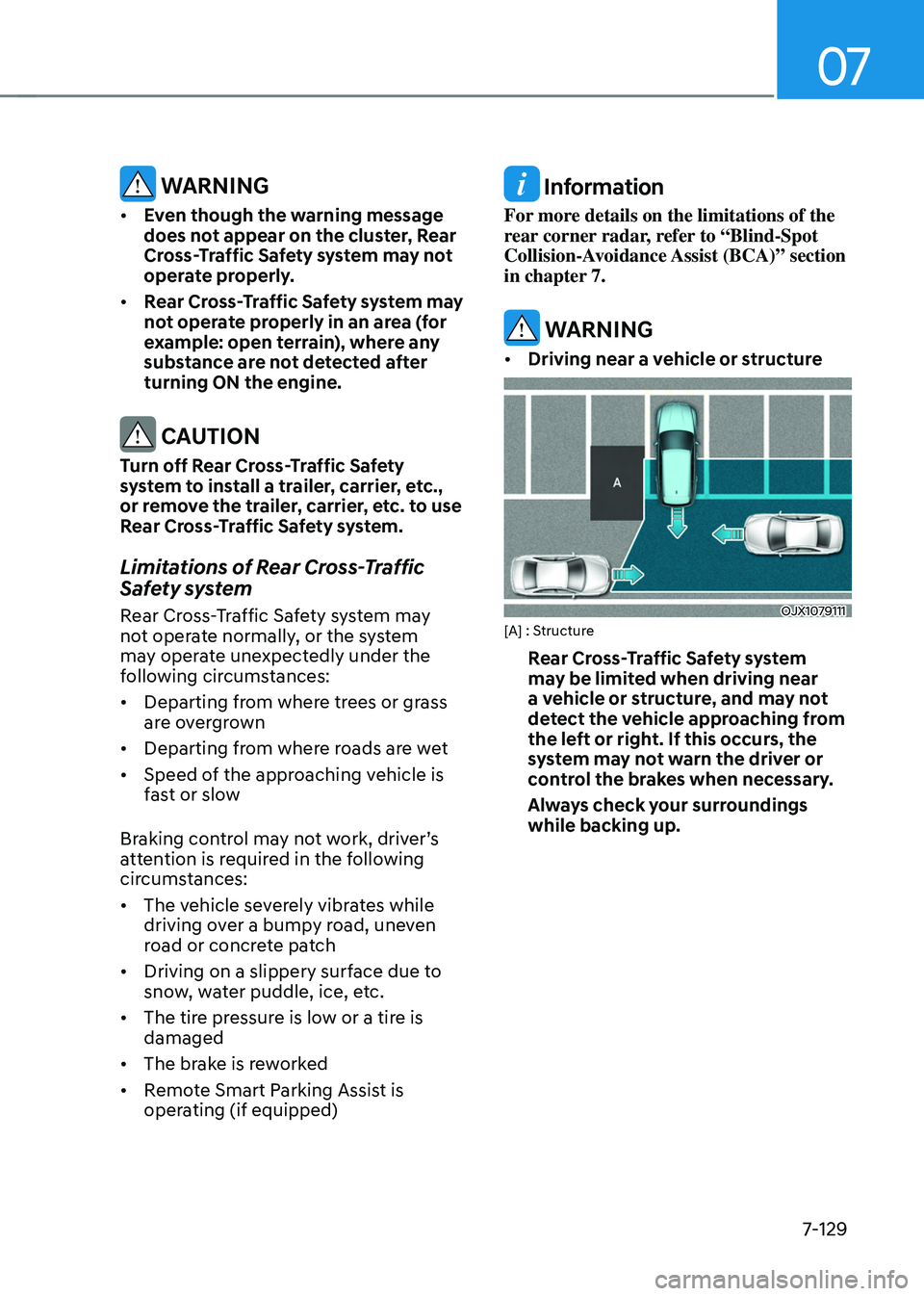
• Driving near a vehicle or structure
OJX1079111[A] : Structure
Rear Cross-Traffic Safety system
may be limited when driving near
a vehicle or structure, and may not
detect the vehicle approaching from
the left or right. If this occurs, the
system may not warn the driver or
control the brakes when necessary.
Always check your surroundings
while backing up.
Page 512 of 638
07
7-149
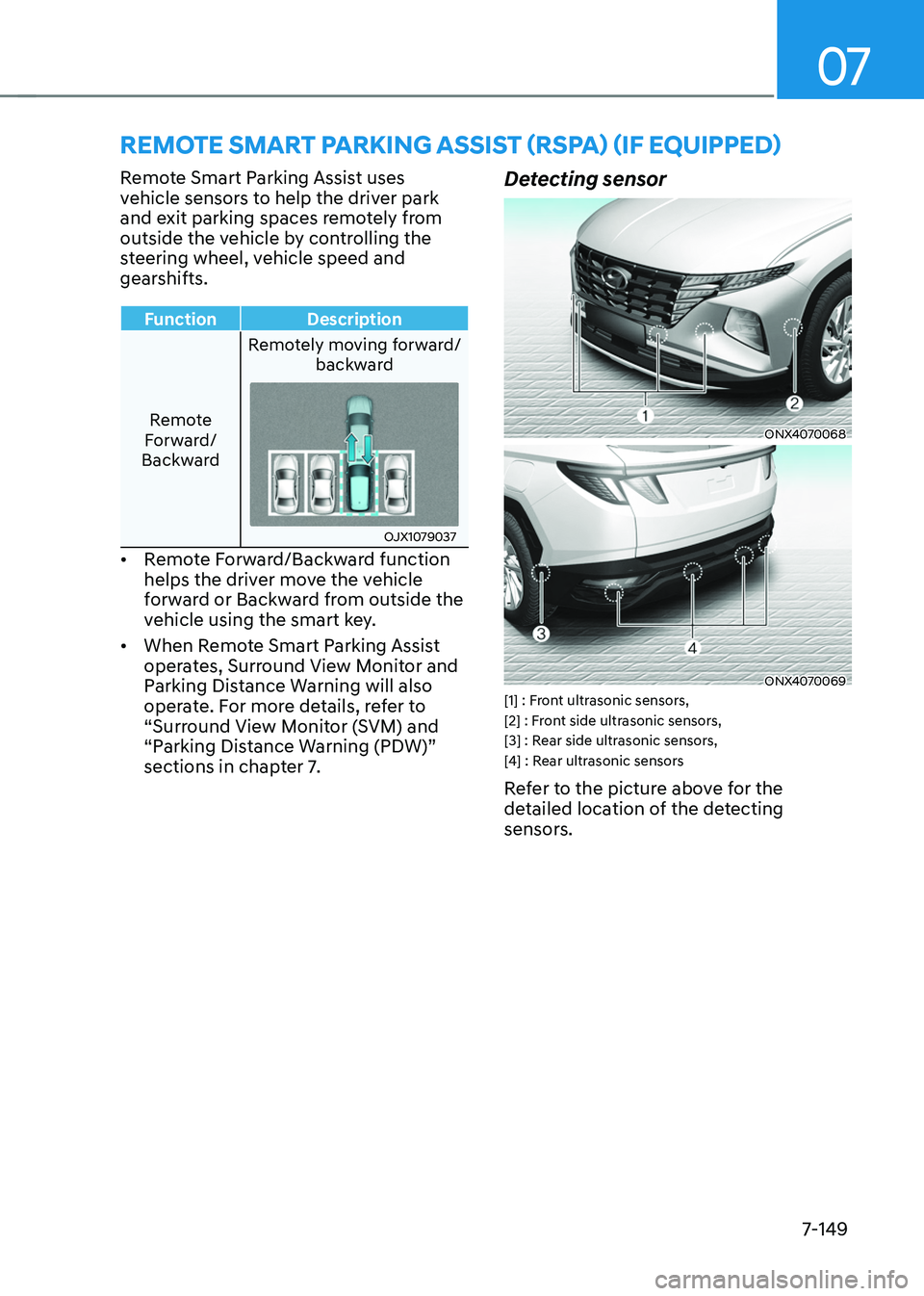
REMOTE SMART PARKING ASSIST (RSPA) (IF EQUIPPED)
Remote Smart Parking Assist uses
vehicle sensors to help the driver park
and exit parking spaces remotely from
outside the vehicle by controlling the
steering wheel, vehicle speed and
gearshifts.
FunctionDescription
Remote
Forward/
Backward Remotely moving forward/
backward
OJX1079037
• Remote Forward/Backward function
helps the driver move the vehicle
forward or Backward from outside the
vehicle using the smart key.
• When Remote Smart Parking Assist
operates, Surround View Monitor and
Parking Distance Warning will also
operate. For more details, refer to
“Surround View Monitor (SVM) and
“Parking Distance Warning (PDW)”
sections in chapter 7.
Detecting sensor
ONX4070068
ONX4070069[1] : Front ultrasonic sensors,
[2] : Front side ultrasonic sensors,
[3] : Rear side ultrasonic sensors,
[4] : Rear ultrasonic sensors
Refer to the picture above for the
detailed location of the detecting
sensors.
Page 516 of 638
07
7-153
Remote Forward/Backward
Operating order
Remote Forward/Backward operates in
the following order:
1. Getting ready to remotely move
forward and backward
2. Remotely moving forward and
backward
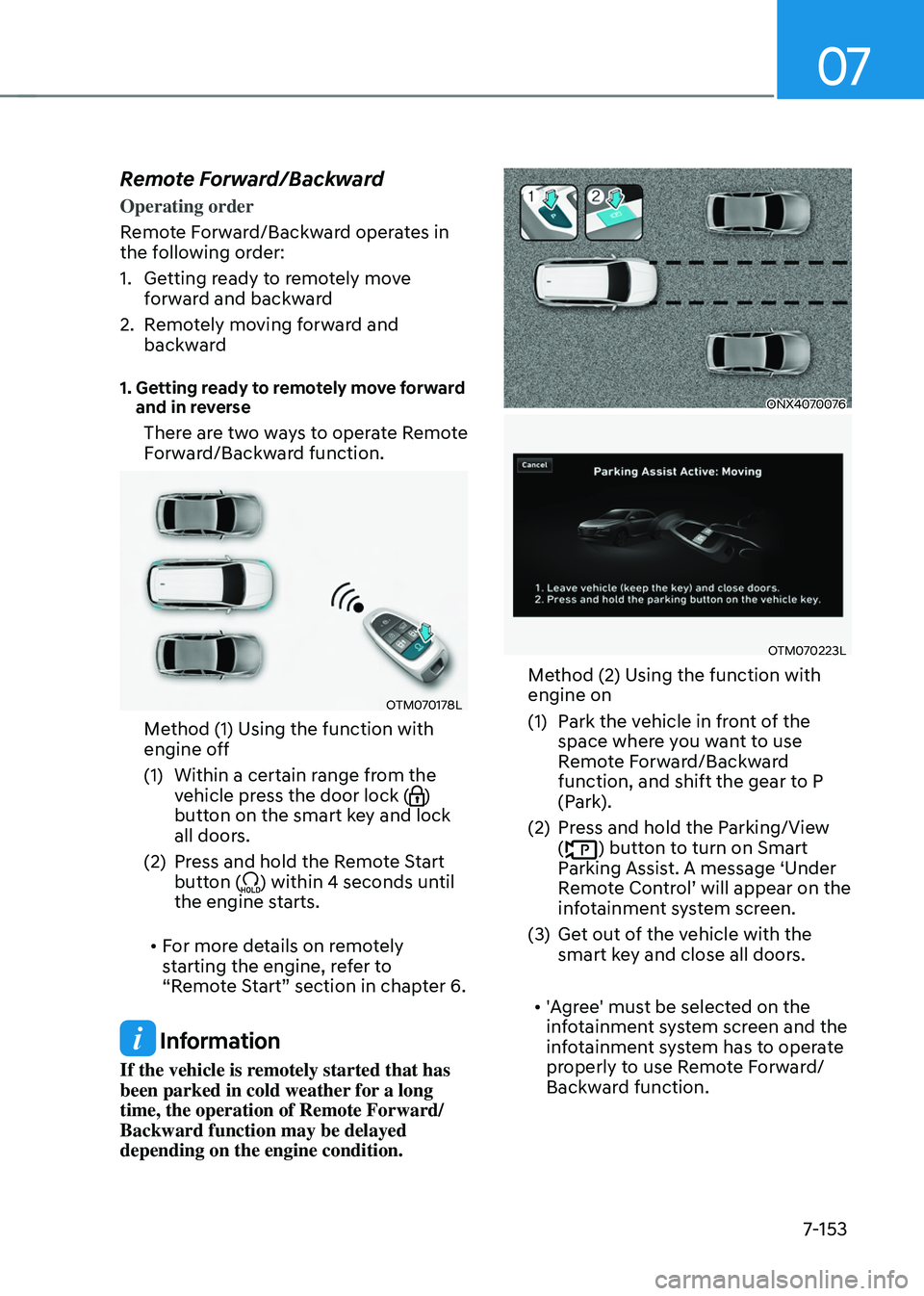
1. Getting ready to remotely move forward and in reverse
There are two ways to operate Remote
Forward/Backward function.
OTM070178L
Method (1) Using the function with
engine off
(1) Within a certain range from the
vehicle press the door lock ()
button on the smart key and lock
all doors.
(2) Press and hold the Remote Start
button () within 4 seconds until
the engine starts.
• For more details on remotely
starting the engine, refer to
“Remote Start” section in chapter 6.
Information
If the vehicle is remotely started that has
been parked in cold weather for a long
time, the operation of Remote Forward/
Backward function may be delayed
depending on the engine condition.
ONX4070076
OTM070223L
Method (2) Using the function with
engine on
(1) Park the vehicle in front of the
space where you want to use
Remote Forward/Backward
function, and shift the gear to P
(Park).
(2) Press and hold the Parking/View
() button to turn on Smart
Parking Assist. A message ‘Under
Remote Control’ will appear on the infotainment system screen.
(3) Get out of the vehicle with the
smart key and close all doors.
• 'Agree' must be selected on the
infotainment system screen and the
infotainment system has to operate
properly to use Remote Forward/
Backward function.
Page 529 of 638
08
8-3
If you have a flat tire while
driving
If a tire goes flat while you are driving:
• Take your foot off the accelerator
pedal and let the vehicle slow down
while driving straight ahead. Do not
apply the brakes immediately or
attempt to pull off the road as this
may cause loss of vehicle control
resulting in an accident. When the
vehicle has slowed to such a speed
that it is safe to do so, brake carefully
and pull off the road. Drive off the
road as far as possible and park on
firm, level ground. If you are on a
divided highway, do not park in the
median area between the two traffic
lanes.
• When the vehicle is stopped, press the
hazard warning flasher button, shift
the gear to P (Park), apply the parking
brake, and press the Engine Start/Stop
button to the OFF position.
• Have all passengers get out of the
vehicle. Be sure they all get out on the
side of the vehicle that is away from
traffic.
• When changing a flat tire, follow the
instructions provided later in this
chapter.
IF THE ENGINE WILL NOT
S TA RT
• Be sure to shift the gear to N (Neutral)
or P (Park). The engine starts only
when the gear is in N (Neutral) or P
(Park).
• Turn on the interior light. If the light
dims or goes out when you operate
the starter, the battery is drained.
See instructions for “Jump Starting”
provided in this chapter.
• Check the fuel level and add fuel if
necessary.
If the vehicle still does not start, we
recommend that you call an authorized
HYUNDAI dealer for assistance.
NOTICE
Push or pull starting the vehicle may
cause the catalytic converter to
overload which can lead to damage to
the emission control system.
Page 535 of 638
08
8-9
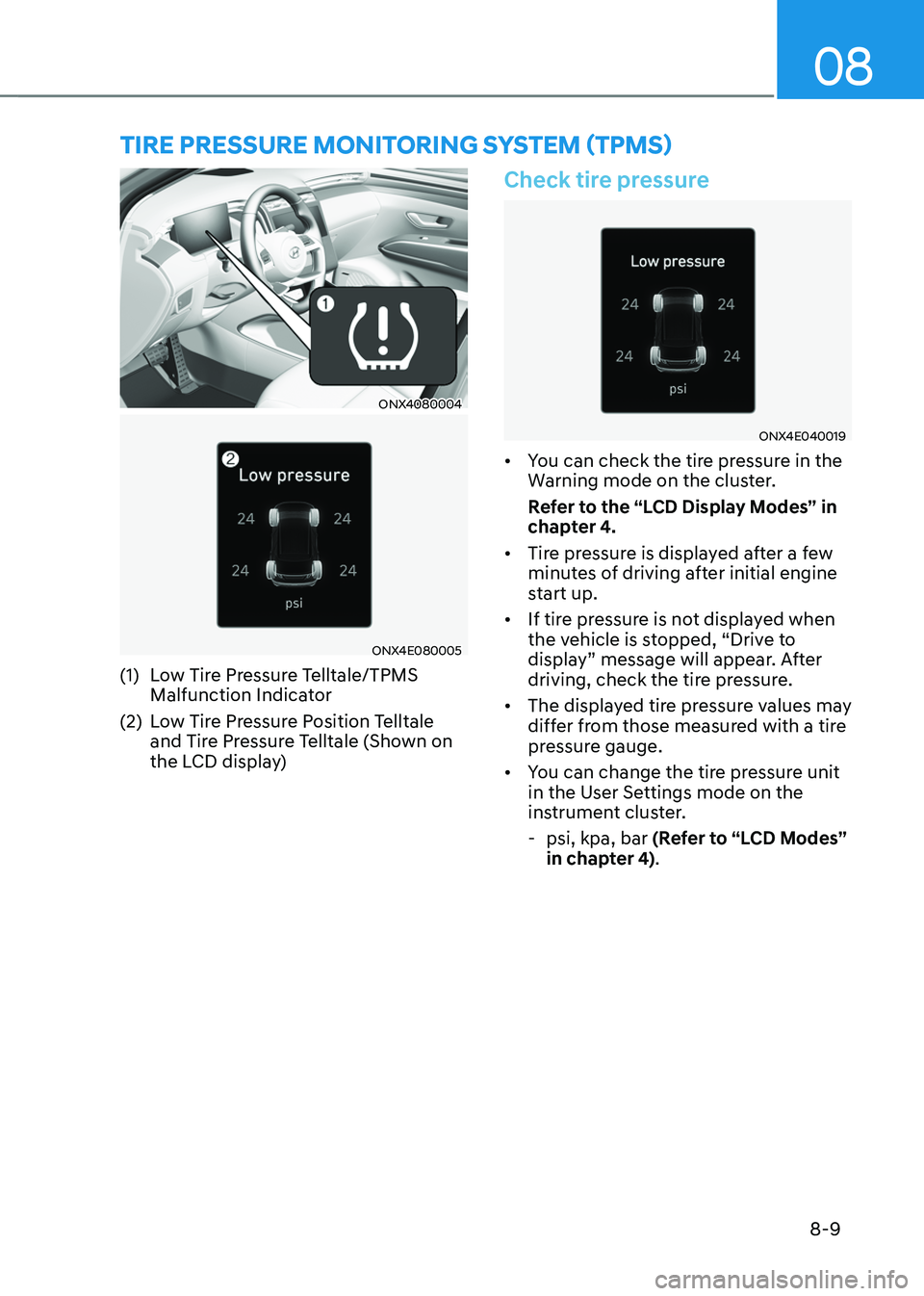
ONX4080004
ONX4E080005
(1) Low Tire Pressure Telltale/TPMS
Malfunction Indicator
(2) Low Tire Pressure Position Telltale
and Tire Pressure Telltale (Shown on
the LCD display)
Check tire pressure
ONX4E040019
• You can check the tire pressure in the
Warning mode on the cluster.
Refer to the “LCD Display Modes” in
chapter 4.
• Tire pressure is displayed after a few
minutes of driving after initial engine
start up.
• If tire pressure is not displayed when
the vehicle is stopped, “Drive to
display” message will appear. After
driving, check the tire pressure.
• The displayed tire pressure values may
differ from those measured with a tire
pressure gauge.
• You can change the tire pressure unit
in the User Settings mode on the
instrument cluster.
-psi, kpa, bar (Refer to “LCD Modes”
in chapter 4).
TIRE PRESSURE MONITORING SYSTEM (TPMS)
Page 543 of 638
08
8-17
WARNING
Wheels may have sharp edges. Handle
them carefully to avoid possible severe
injury. Before putting the wheel into
place, be sure that there is nothing on
the hub or wheel (such as mud, tar,
gravel, etc.) that interferes with the
wheel from fitting solidly against the
hub.
If there is, remove it. If there is not
good contact on the mounting surface
between the wheel and hub, the wheel
nuts could come loose and cause the
loss of a wheel. Loss of a wheel may
result in loss of control of the vehicle.
This may cause serious injury or death.
10. Install the spare tire onto the studs of
the hub.
11. Tighten the lug nuts with your fingers
onto the studs with the smaller end of
the lug nuts closest to the wheel.
12. Lower the vehicle to the ground
by turning the jack handle
counterclockwise.
OTL065007
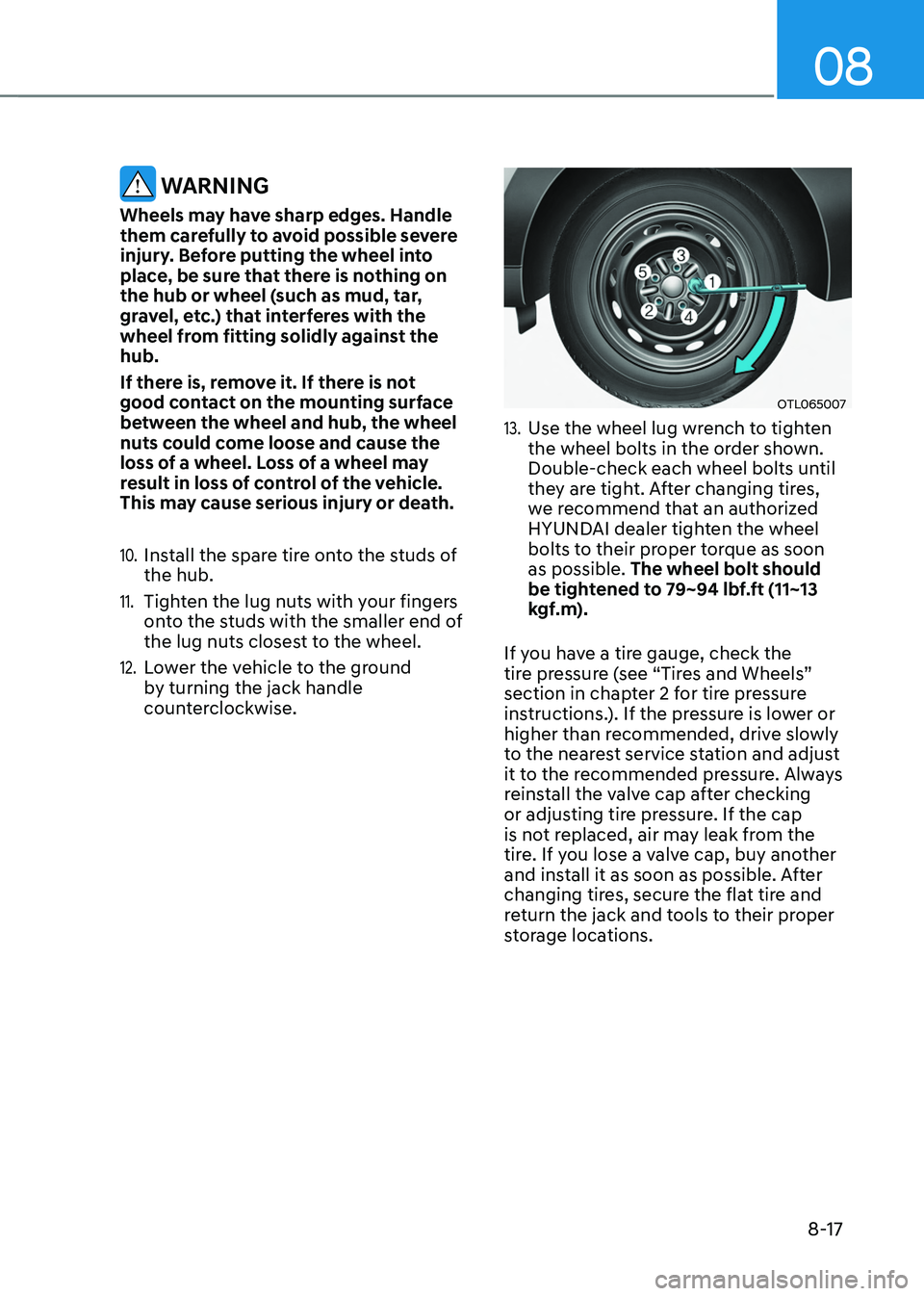
13. Use the wheel lug wrench to tighten
the wheel bolts in the order shown.
Double-check each wheel bolts until
they are tight. After changing tires,
we recommend that an authorized
HYUNDAI dealer tighten the wheel
bolts to their proper torque as soon
as possible. The wheel bolt should
be tightened to 79~94 lbf.ft (11~13
kgf.m).
If you have a tire gauge, check the
tire pressure (see “Tires and Wheels”
section in chapter 2 for tire pressure
instructions.). If the pressure is lower or
higher than recommended, drive slowly
to the nearest service station and adjust
it to the recommended pressure. Always
reinstall the valve cap after checking
or adjusting tire pressure. If the cap
is not replaced, air may leak from the
tire. If you lose a valve cap, buy another
and install it as soon as possible. After
changing tires, secure the flat tire and
return the jack and tools to their proper
storage locations.
Page 554 of 638
Maintenance
9-4
You should exercise the utmost care
to prevent damage to your vehicle and
injury to yourself whenever performing
any maintenance or inspection
procedures.
We recommend you have your
vehicle maintained and repaired by
an authorized HYUNDAI dealer. An
authorized HYUNDAI dealer meets
HYUNDAI’s high service quality
standards and receives technical support
from HYUNDAI in order to provide you
with a high level of service satisfaction.
Owner’s responsibility
Maintenance service and record
retention are the owner’s responsibility.
You should retain documents that show
proper maintenance has been performed
on your vehicle in accordance with
the scheduled maintenance service
charts shown on the following pages.
You need this information to establish
your compliance with the servicing
and maintenance requirements of your
vehicle warranties.
Detailed warranty information is
provided in your Owner’s Handbook &
Warranty Information booklet.
Repairs and adjustments required as a
result of improper maintenance or a lack
of required maintenance are not covered.
Owner maintenance precautions
Inadequate, incomplete or insufficient
servicing may result in operational
problems with your vehicle that could
lead to vehicle damage, an accident, or
personal injury. This chapter provides
instructions only for the maintenance
items that are easy to perform.
Your vehicle should not be modified
in any way. Such modifications may
adversely affect the performance, safety
or durability of your vehicle and may, in
addition, violate conditions of the limited
warranties covering the vehicle.
NOTICE
Improper owner maintenance during
the warranty period may affect
warranty coverage. For details, read
the separate Service Passport provided
with the vehicle. If you’re unsure
about any servicing or maintenance
procedure, we recommend that the
system be serviced by an authorized
HYUNDAI dealer.
MAINTENANCE SERVICES