display HYUNDAI VELOSTER 2011 Owner's Manual
[x] Cancel search | Manufacturer: HYUNDAI, Model Year: 2011, Model line: VELOSTER, Model: HYUNDAI VELOSTER 2011Pages: 386, PDF Size: 7.79 MB
Page 205 of 386
4131
Features of your vehicle
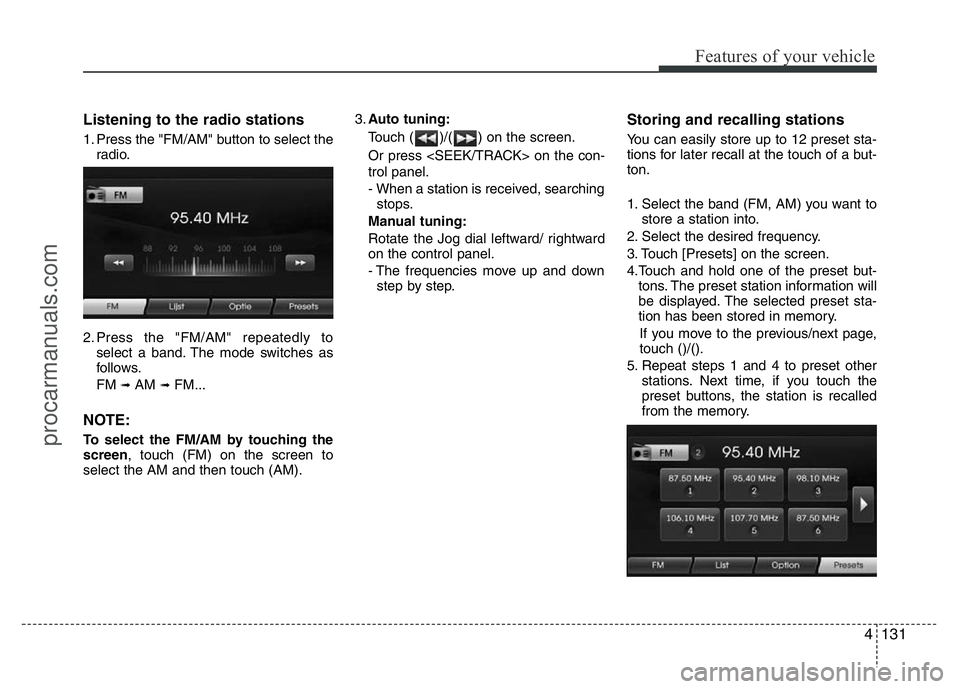
Listening to the radio stations
1. Press the "FM/AM" button to select the
radio.
2. Press the "FM/AM" repeatedly to
select a band. The mode switches as
follows.
FM
➟AM ➟FM...
NOTE:
To select the FM/AM by touching the
screen, touch (FM) on the screen to
select the AM and then touch (AM).3.Auto tuning:
Touch ( )/( ) on the screen.
Or press
trol panel.
- When a station is received, searching
stops.
Manual tuning:
Rotate the Jog dial leftward/ rightward
on the control panel.
- The frequencies move up and down
step by step.
Storing and recalling stations
You can easily store up to 12 preset sta-
tions for later recall at the touch of a but-
ton.
1. Select the band (FM, AM) you want to
store a station into.
2. Select the desired frequency.
3. Touch [Presets] on the screen.
4.Touch and hold one of the preset but-
tons. The preset station information will
be displayed. The selected preset sta-
tion has been stored in memory.
If you move to the previous/next page,
touch ()/().
5. Repeat steps 1 and 4 to preset other
stations. Next time, if you touch the
preset buttons, the station is recalled
from the memory.
procarmanuals.com
Page 220 of 386
513
Driving your vehicle
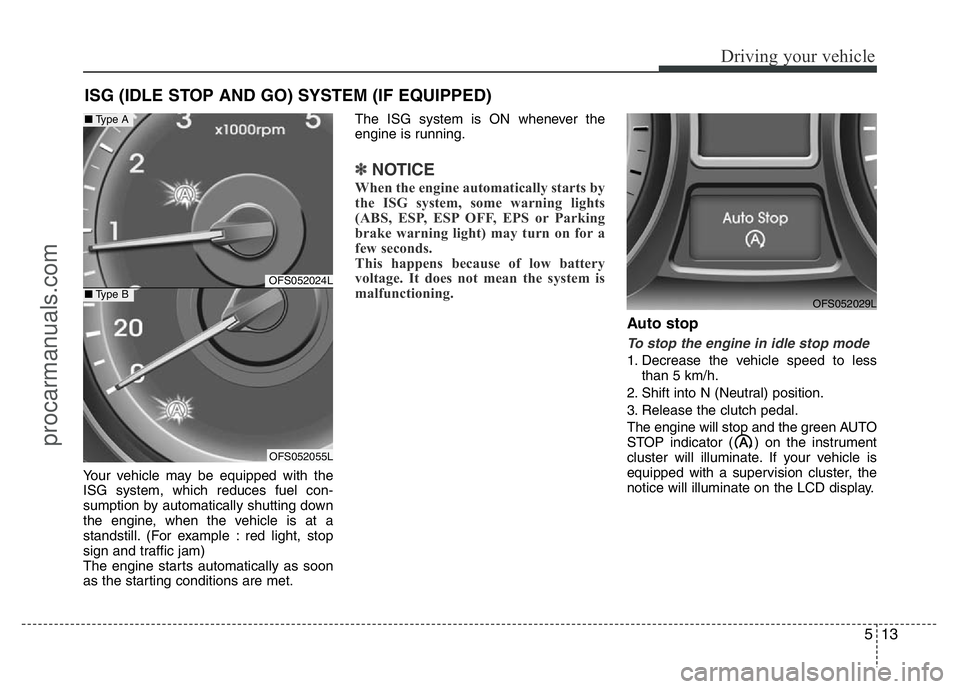
Your vehicle may be equipped with the
ISG system, which reduces fuel con-
sumption by automatically shutting down
the engine, when the vehicle is at a
standstill. (For example : red light, stop
sign and traffic jam)
The engine starts automatically as soon
as the starting conditions are met.The ISG system is ON whenever the
engine is running.
✽NOTICE
When the engine automatically starts by
the ISG system, some warning lights
(ABS, ESP, ESP OFF, EPS or Parking
brake warning light) may turn on for a
few seconds.
This happens because of low battery
voltage. It does not mean the system is
malfunctioning.
Auto stop
To stop the engine in idle stop mode
1. Decrease the vehicle speed to less
than 5 km/h.
2. Shift into N (Neutral) position.
3. Release the clutch pedal.
The engine will stop and the green AUTO
STOP indicator ( ) on the instrument
cluster will illuminate. If your vehicle is
equipped with a supervision cluster, the
notice will illuminate on the LCD display.
ISG (IDLE STOP AND GO) SYSTEM (IF EQUIPPED)
OFS052029L
OFS052024L
OFS052055L
■Type A
■Type B
procarmanuals.com
Page 221 of 386
Driving your vehicle
14 5
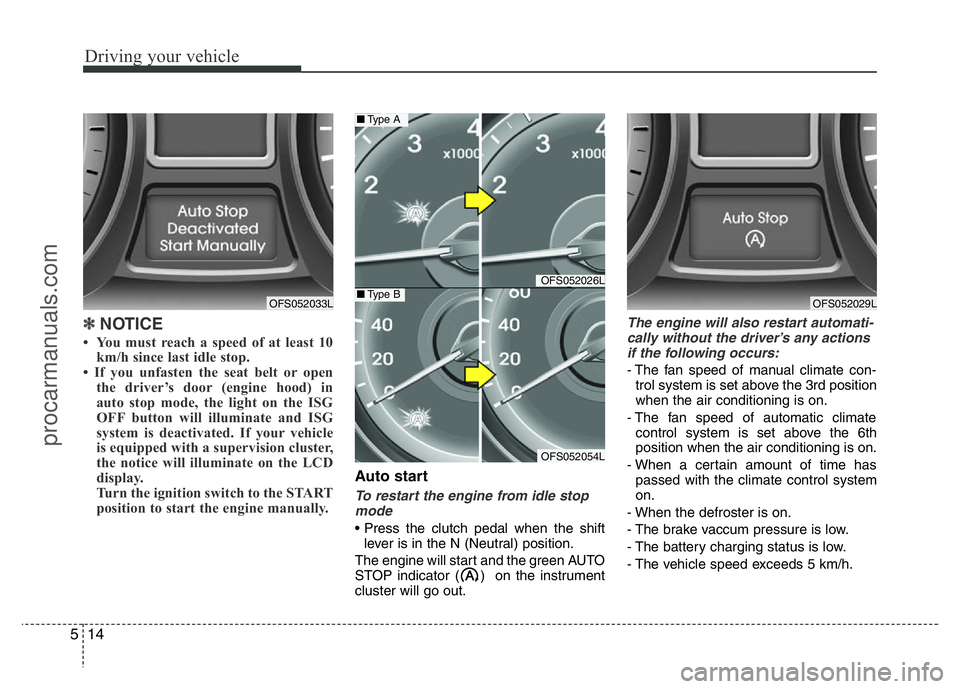
✽NOTICE
• You must reach a speed of at least 10
km/h since last idle stop.
• If you unfasten the seat belt or open
the driver’s door (engine hood) in
auto stop mode, the light on the ISG
OFF button will illuminate and ISG
system is deactivated. If your vehicle
is equipped with a supervision cluster,
the notice will illuminate on the LCD
display.
Turn the ignition switch to the START
position to start the engine manually.
Auto start
To restart the engine from idle stop
mode
• Press the clutch pedal when the shift
lever is in the N (Neutral) position.
The engine will start and the green AUTO
STOP indicator ( ) on the instrument
cluster will go out.
The engine will also restart automati-
cally without the driver’s any actions
if the following occurs:
- The fan speed of manual climate con-
trol system is set above the 3rd position
when the air conditioning is on.
- The fan speed of automatic climate
control system is set above the 6th
position when the air conditioning is on.
- When a certain amount of time has
passed with the climate control system
on.
- When the defroster is on.
- The brake vaccum pressure is low.
- The battery charging status is low.
- The vehicle speed exceeds 5 km/h.
OFS052033L
OFS052026L
OFS052054L
■Type A
■Type BOFS052029L
procarmanuals.com
Page 222 of 386
515
Driving your vehicle
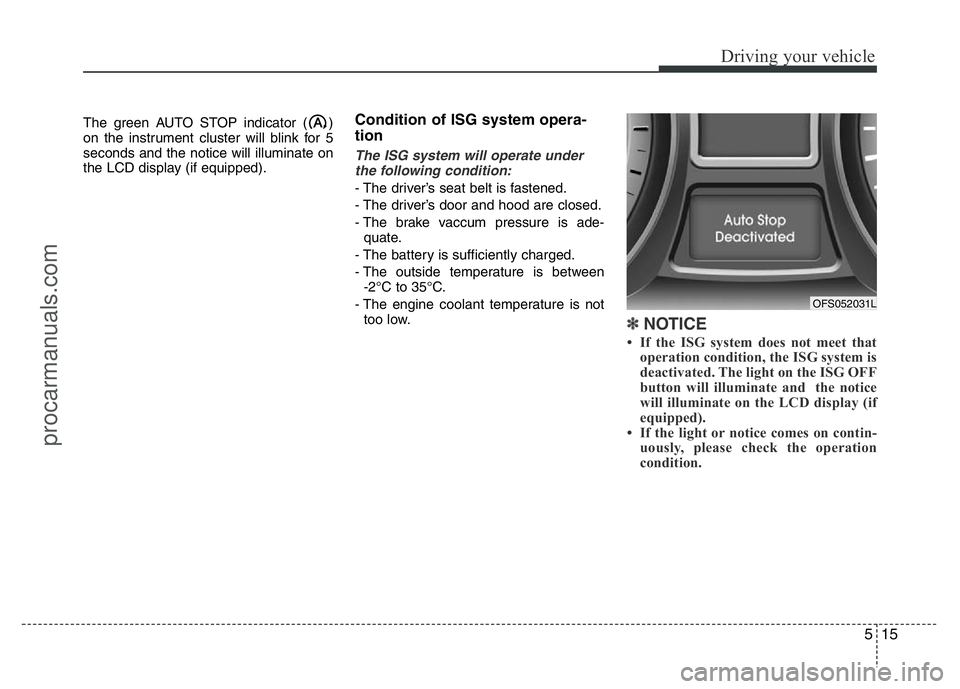
The green AUTO STOP indicator ( )
on the instrument cluster will blink for 5
seconds and the notice will illuminate on
the LCD display (if equipped).Condition of ISG system opera-
tion
The ISG system will operate under
the following condition:
- The driver’s seat belt is fastened.
- The driver’s door and hood are closed.
- The brake vaccum pressure is ade-
quate.
- The battery is sufficiently charged.
- The outside temperature is between
-2°C to 35°C.
- The engine coolant temperature is not
too low.
✽NOTICE
• If the ISG system does not meet that
operation condition, the ISG system is
deactivated. The light on the ISG OFF
button will illuminate and the notice
will illuminate on the LCD display (if
equipped).
• If the light or notice comes on contin-
uously, please check the operation
condition.
OFS052031L
procarmanuals.com
Page 223 of 386
Driving your vehicle
16 5
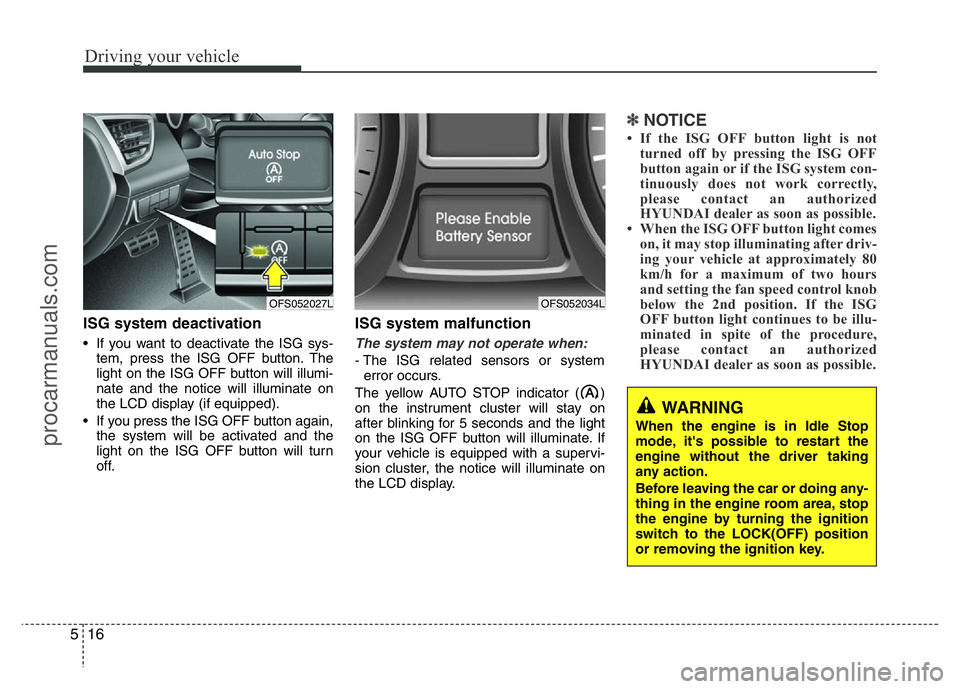
ISG system deactivation
• If you want to deactivate the ISG sys-
tem, press the ISG OFF button. The
light on the ISG OFF button will illumi-
nate and the notice will illuminate on
the LCD display (if equipped).
• If you press the ISG OFF button again,
the system will be activated and the
light on the ISG OFF button will turn
off.
ISG system malfunction
The system may not operate when:
- The ISG related sensors or system
error occurs.
The yellow AUTO STOP indicator ( )
on the instrument cluster will stay on
after blinking for 5 seconds and the light
on the ISG OFF button will illuminate. If
your vehicle is equipped with a supervi-
sion cluster, the notice will illuminate on
the LCD display.
✽NOTICE
• If the ISG OFF button light is not
turned off by pressing the ISG OFF
button again or if the ISG system con-
tinuously does not work correctly,
please contact an authorized
HYUNDAI dealer as soon as possible.
• When the ISG OFF button light comes
on, it may stop illuminating after driv-
ing your vehicle at approximately 80
km/h for a maximum of two hours
and setting the fan speed control knob
below the 2nd position. If the ISG
OFF button light continues to be illu-
minated in spite of the procedure,
please contact an authorized
HYUNDAI dealer as soon as possible.
WARNING
When the engine is in Idle Stop
mode, it's possible to restart the
engine without the driver taking
any action.
Before leaving the car or doing any-
thing in the engine room area, stop
the engine by turning the ignition
switch to the LOCK(OFF) position
or removing the ignition key.
OFS052027LOFS052034L
procarmanuals.com
Page 228 of 386
521
Driving your vehicle
For smooth operation, depress the brake
pedal when shifting from N (Neutral) to a
forward or reverse gear.
WARNING
• Always check the surrounding
areas near your vehicle for peo-
ple, especially children, before
shifting a car into D (Drive) or R
(Reverse).
• Before leaving the driver’s seat,
always make sure the shift lever
is in the P (Park) position; then
set the parking brake fully and
shut the engine off. Unexpected
and sudden vehicle movement
can occur if these precautions
are not followed in the order iden-
tified.
WARNING-DCT
• If the vehicle is held by applying
accelerator pedal at the hill, the
transmission and clutch will be
damaged. To hold at the hill, use
the parking brake or foot brake.
• An overload of the clutch is indi-
cated by a longitudinal judder
and a blinking display. To exclude
a clutch-damage, the clutch is
opened and the torque flow inter-
rupted. If the clutch is opened,
apply the foot brake and wait
some minutes before driving
again.
• Ignoring the warnings can lead to
severe injuries and damage on
the car.
• If the LCD warning is active, the
foot brake has to be applied.
• When the problem of gear system
occurs, the transaxle indicator
will blink. For your safety, take
your vehicle to an authorized
HYUNDAI dealer and have the
system checked.
(Continued)
(Continued)
• When the clutch is overheated,
the safe protection mode oper-
ates. According to the safe pro-
tection mode, the transaxle indi-
cator blinks with buzzer sound. In
this time, the LCD warning about
safe protection mode also dis-
plays. In this condition, the driv-
ing may not be smoothly. If you
ignore this warning, the driving
condition is getting worse and
the system may have problem. To
return the normal driving condi-
tion, apply the foot brake and
stop the vehicle for few minutes
before driving off.
• While shifting the gear automati-
cally, you may feel a correspon-
ding shifting of gear. However, it
is not malfunction.
procarmanuals.com
Page 278 of 386
What to do in an emergency
18 6
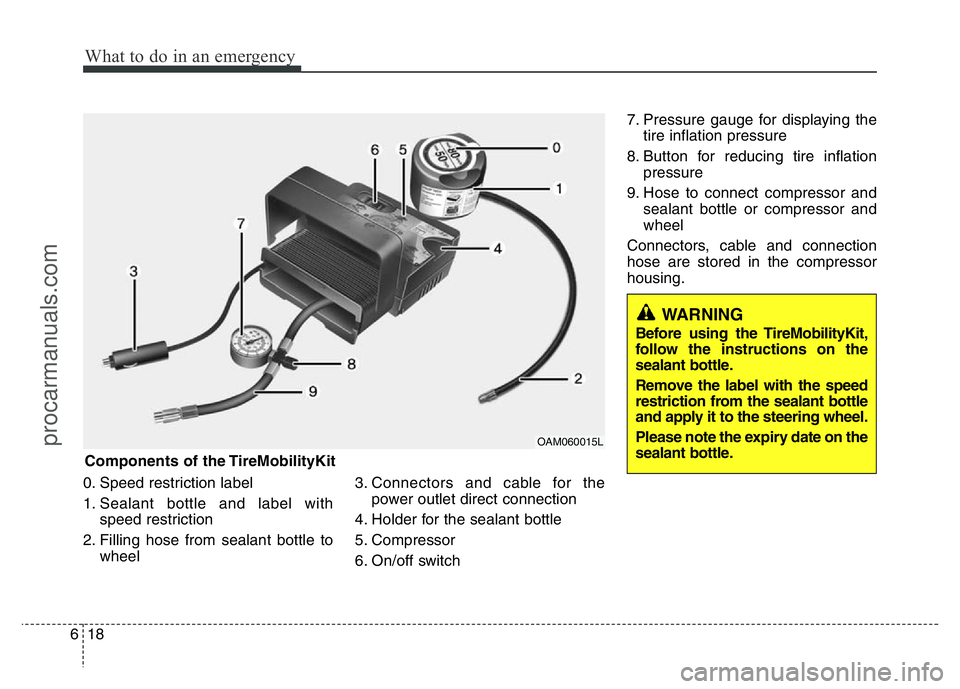
0. Speed restriction label
1. Sealant bottle and label with
speed restriction
2. Filling hose from sealant bottle to
wheel3. Connectors and cable for the
power outlet direct connection
4. Holder for the sealant bottle
5. Compressor
6. On/off switch7. Pressure gauge for displaying the
tire inflation pressure
8. Button for reducing tire inflation
pressure
9. Hose to connect compressor and
sealant bottle or compressor and
wheel
Connectors, cable and connection
hose are stored in the compressor
housing.
WARNING
Before using the TireMobilityKit,
follow the instructions on the
sealant bottle.
Remove the label with the speed
restriction from the sealant bottle
and apply it to the steering wheel.
Please note the expiry date on the
sealant bottle.
Components of the TireMobilityKit
OAM060015L
procarmanuals.com
Page 345 of 386
753
Maintenance
Tire speed ratings
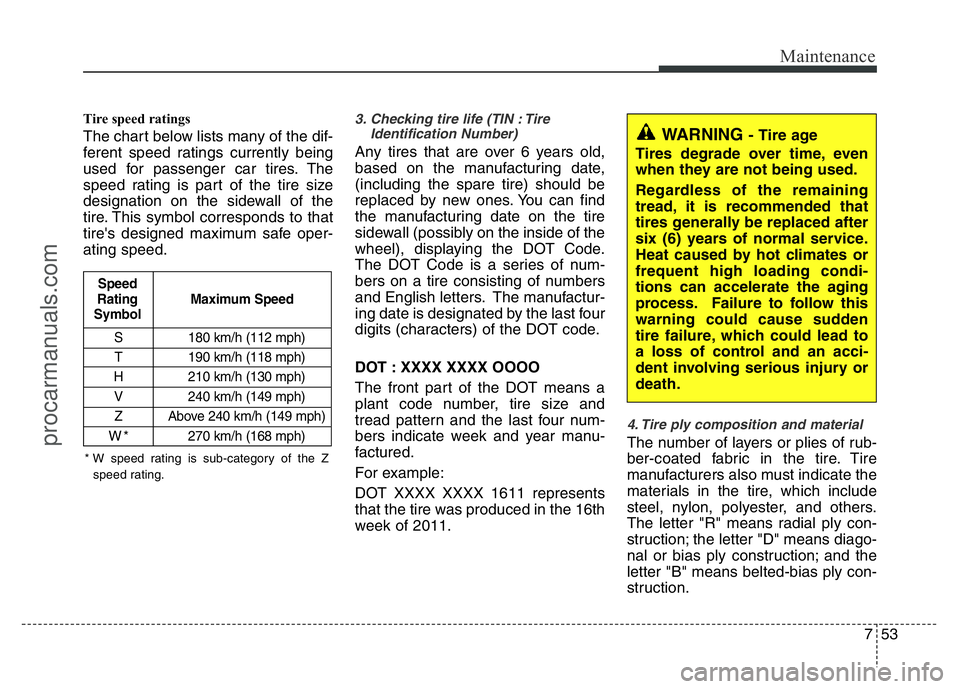
The chart below lists many of the dif-
ferent speed ratings currently being
used for passenger car tires. The
speed rating is part of the tire size
designation on the sidewall of the
tire. This symbol corresponds to that
tire's designed maximum safe oper-
ating speed.
3. Checking tire life (TIN : Tire
Identification Number)
Any tires that are over 6 years old,
based on the manufacturing date,
(including the spare tire) should be
replaced by new ones. You can find
the manufacturing date on the tire
sidewall (possibly on the inside of the
wheel), displaying the DOT Code.
The DOT Code is a series of num-
bers on a tire consisting of numbers
and English letters. The manufactur-
ing date is designated by the last four
digits (characters) of the DOT code.
DOT : XXXX XXXX OOOO
The front part of the DOT means a
plant code number, tire size and
tread pattern and the last four num-
bers indicate week and year manu-
factured.
For example:
DOT XXXX XXXX 1611 represents
that the tire was produced in the 16th
week of 2011.
4. Tire ply composition and material
The number of layers or plies of rub-
ber-coated fabric in the tire. Tire
manufacturers also must indicate the
materials in the tire, which include
steel, nylon, polyester, and others.
The letter "R" means radial ply con-
struction; the letter "D" means diago-
nal or bias ply construction; and the
letter "B" means belted-bias ply con-
struction.
S 180 km/h (112 mph)
T 190 km/h (118 mph)
H 210 km/h (130 mph)
V 240 km/h (149 mph)
Z Above 240 km/h (149 mph)
W*270 km/h (168 mph)
Maximum Speed Speed
Rating
Symbol
WARNING - Tire age
Tires degrade over time, even
when they are not being used.
Regardless of the remaining
tread, it is recommended that
tires generally be replaced after
six (6) years of normal service.
Heat caused by hot climates or
frequent high loading condi-
tions can accelerate the aging
process. Failure to follow this
warning could cause sudden
tire failure, which could lead to
a loss of control and an acci-
dent involving serious injury or
death.
* W speed rating is sub-category of the Z
speed rating.
procarmanuals.com