change time HYUNDAI VELOSTER 2020 User Guide
[x] Cancel search | Manufacturer: HYUNDAI, Model Year: 2020, Model line: VELOSTER, Model: HYUNDAI VELOSTER 2020Pages: 480, PDF Size: 6.16 MB
Page 138 of 480
3-4
Unlocking your vehicle
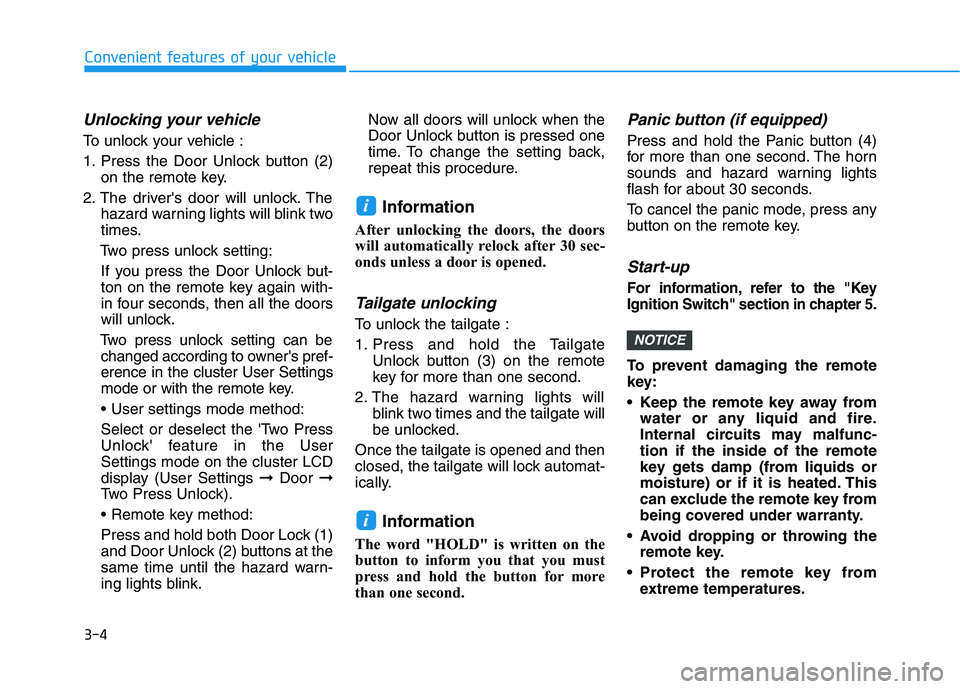
To unlock your vehicle :
1. Press the Door Unlock button (2)
on the remote key.
2. The driver's door will unlock. The
hazard warning lights will blink two
times.
Two press unlock setting:
If you press the Door Unlock but-
ton on the remote key again with-
in four seconds, then all the doors
will unlock.
Two press unlock setting can be
changed according to owner's pref-
erence in the cluster User Settings
mode or with the remote key.
• User settings mode method:
Select or deselect the 'Two Press
Unlock' feature in the User
Settings mode on the cluster LCD
display (User Settings ➞Door ➞
Two Press Unlock).
Press and hold both Door Lock (1)
and Door Unlock (2) buttons at the
same time until the hazard warn-
ing lights blink.Now all doors will unlock when the
Door Unlock button is pressed one
time. To change the setting back,
repeat this procedure.
Information
After unlocking the doors, the doors
will automatically relock after 30 sec-
onds unless a door is opened.
Tailgate unlocking
To unlock the tailgate :
1. Press and hold the Tailgate
Unlock button (3) on the remote
key for more than one second.
2. The hazard warning lights will
blink two times and the tailgate will
be unlocked.
Once the tailgate is opened and then
closed, the tailgate will lock automat-
ically.
Information
The word "HOLD" is written on the
button to inform you that you must
press and hold the button for more
than one second.
Panic button (if equipped)
Press and hold the Panic button (4)
for more than one second. The horn
sounds and hazard warning lights
flash for about 30 seconds.
To cancel the panic mode, press any
button on the remote key.
Start-up
For information, refer to the "Key
Ignition Switch" section in chapter 5.
To prevent damaging the remote
key:
• Keep the remote key away from
water or any liquid and fire.
Internal circuits may malfunc-
tion if the inside of the remote
key gets damp (from liquids or
moisture) or if it is heated. This
can exclude the remote key from
being covered under warranty.
Avoid dropping or throwing the
remote key.
Protect the remote key from
extreme temperatures.
NOTICE
i
i
Convenient features of your vehicle
Page 147 of 480

3-13
Convenient features of your vehicle
The transponder in your key is an
important part of the immobilizer
system. It is designed to give
years of trouble-free service, how-
ever you should avoid exposure to
moisture, static electricity and
rough handling. Immobilizer sys-
tem malfunction could occur.
Information
This device complies with Industry
Canada RSS-210 standard.
Operation is subject to the following
three conditions:
1. This device may not cause harmful
interference, and
2. This device must accept any inter-
ference received, including interfer-
ence that may cause undesired
operation.
3. Changes or modifications not
expressly approved by the party
responsible for compliance could
void the user's authority to operate
the device.
"Limp Home" Mode and Related
Procedures
If the immobilizer warning indicator
blinks for five seconds when the igni-
tion key is turned to the "ON" posi-
tion, this indicates the immobilizer
system requires service. The engine
cannot be started without using the
procedure below.
The following procedure describes
how to start the engine using the
limp home function (0, 1, 2, 3 as a
sample password).
You can get a limp home pass-
word when the vehicle is first
delivered to you. If you do not
have a password, consult your
authorized HYUNDAI dealer.1. To activate the password, turn the
ignition key "ON" and "OFF"
according to the digit numbers.
The immobilizer indicator will blink
along with the operation of the
ignition key. For example, turn the
ignition key once for digit number
"1", and twice for "2", and so on.
For the digit number "0", you must
cycle the ignition key 10 times.
2. Wait for 3~10 seconds.
3. You may set the remaining num-
ber of digits by following steps 1
and 2.
4. If all of the four password digits
have been successfully entered,
turn the ignition key "ON" and
check that the immobilizer indica-
tor illuminates. From this time, you
have to start your engine within 30
seconds. If you try to start your
engine after 30 seconds, your
engine will not start.
NOTICE
i
NOTICE
3
Page 150 of 480
3-16
Convenient features of your vehicle
Smart key
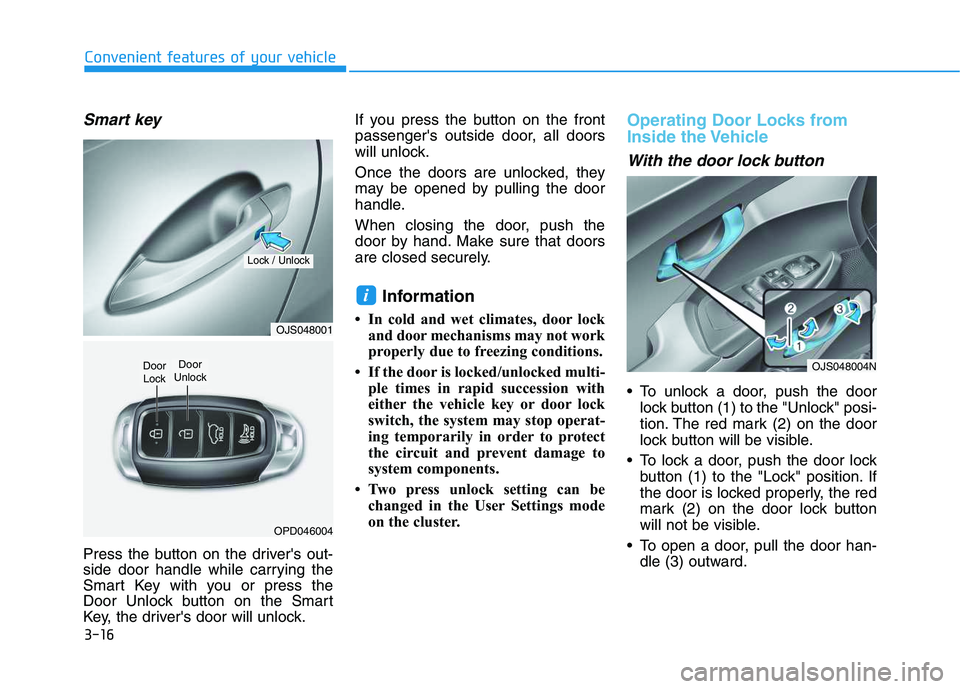
Press the button on the driver's out-
side door handle while carrying the
Smart Key with you or press the
Door Unlock button on the Smart
Key, the driver's door will unlock.If you press the button on the front
passenger's outside door, all doors
will unlock.
Once the doors are unlocked, they
may be opened by pulling the door
handle.
When closing the door, push the
door by hand. Make sure that doors
are closed securely.
Information
• In cold and wet climates, door lock
and door mechanisms may not work
properly due to freezing conditions.
• If the door is locked/unlocked multi-
ple times in rapid succession with
either the vehicle key or door lock
switch, the system may stop operat-
ing temporarily in order to protect
the circuit and prevent damage to
system components.
• Two press unlock setting can be
changed in the User Settings mode
on the cluster.
Operating Door Locks from
Inside the Vehicle
With the door lock button
To unlock a door, push the door
lock button (1) to the "Unlock" posi-
tion. The red mark (2) on the door
lock button will be visible.
To lock a door, push the door lock
button (1) to the "Lock" position. If
the door is locked properly, the red
mark (2) on the door lock button
will not be visible.
To open a door, pull the door han-
dle (3) outward.
i
OJS048001
OPD046004
Door
Unlock
Lock / Unlock
Door
LockOJS048004N
Page 155 of 480
3-21
Convenient features of your vehicle
3
S ST
TE
EE
ER
RI
IN
NG
G
W
WH
HE
EE
EL
L
Electric Power Steering (EPS)
The system assists you with steering
the vehicle. If the vehicle is turned off
or if the power steering system
becomes inoperative, you may still
steer the vehicle, but it will require
increased steering effort.
Should you notice any change in the
effort required to steer during normal
vehicle operation, have the system
checked by an authorized HYUNDAI
dealer.
Information
The following symptoms may occur
during normal vehicle operation:
• The steering effort may be high
immediately after placing the igni-
tion switch in the ON position.
This happens as the system per-
forms the EPS system diagnostics.
When the diagnostics are complet-
ed, the steering wheel effort will
return to its normal condition.
• A click noise may be heard from the
EPS relay after the ignition switch is
in the ON or LOCK/OFF position.• Motor noise may be heard when the
vehicle is at a stop or at a low driv-
ing speed.
• When you operate the steering
wheel in low temperatures, abnor-
mal noise may occur. If the temper-
ature rises, the noise will disappear.
This is a normal condition.
• When an error is detected from the
EPS, the steering effort assist func-
tion will not be activated in order to
help prevent fatal accidents.
Instrument cluster warning lights
may be on or the steering effort may
be high. If these symptoms occur,
drive the vehicle to a safe area as
soon as it is safe to do so. Have the
system checked by an authorized
HYUNDAI dealer as soon as possi-
ble.
i
If the Electric Power Steering
System does not operate nor-
mally, the warning light ( )
will illuminate on the instru-
ment cluster. You may steer
the vehicle, but it will require
increased steering efforts.
Take your vehicle to an
authorized HYUNDAI dealer
and have the system checked
as soon as possible.
When abnormality is detected
in the electric power steering
system, to prevent an acci-
dent, the steering assist func-
tion will stop. At this time, the
warning light turns on or
blinks on the cluster. The
steering wheel may become
difficult to control or operate.
Have your vehicle checked
immediately, after moving the
vehicle to a safe zone.
CAUTION
Page 221 of 480
5-3
Driving your vehicle
5
Carbon monoxide (CO) gas is toxic. Breathing CO can cause unconsciousness and death.
Engine exhaust contains carbon monoxide which cannot be seen or smelled.
Do not inhale engine exhaust.
If at any time you smell engine exhaust inside the vehicle, open the windows immediately. Exposure to CO can cause
unconsciousness and death by asphyxiation.
Be sure the exhaust system does not leak.
The exhaust system should be checked whenever the vehicle is raised to change the oil or for any other purpose. If
you hear a change in the sound of the exhaust or if you drive over something that strikes the underneath side of the
vehicle, have the exhaust system checked as soon as possible by an authorized HYUNDAI dealer.
Do not run the engine in an enclosed area.
Letting the engine idle in your garage, even with the garage door open, is a hazardous practice. Run the engine only
long enough to start the engine and to move the vehicle out of the garage.
Avoid idling the engine for prolonged periods with people inside the vehicle.
If it is necessary to idle the engine for a prolonged period with people inside the vehicle, be sure to do so only in an
open area with the air intake set at "Fresh" and fan control set to high so fresh air is drawn into the interior.
Keep the air intakes clear.
To assure proper operation of the ventilation system, keep the ventilation air intakes located in front of the windshield
clear of snow, ice, leaves, or other obstructions.
If you must drive with the tailgate open:
Close all windows.
Open instrument panel air vents.
Set the air intake control at "Fresh", the air flow control at "Floor" or "Face", and the fan control set to high.
WARNING
Page 244 of 480
![HYUNDAI VELOSTER 2020 User Guide 5-26
Driving your vehicle
With the shift lever in the D posi-
tion
The paddle shifter will operate when
the vehicle speed is more than 6
mph (10 km/h).
Pull the [+] or [-] paddle shifter once
to shif](/img/35/58890/w960_58890-243.png "HYUNDAI VELOSTER 2020 User Guide 5-26
Driving your vehicle
With the shift lever in the D posi-
tion
The paddle shifter will operate when
the vehicle speed is more than 6
mph (10 km/h).
Pull the [+] or [-] paddle shifter once
to shif")
5-26
Driving your vehicle
With the shift lever in the D posi-
tion
The paddle shifter will operate when
the vehicle speed is more than 6
mph (10 km/h).
Pull the [+] or [-] paddle shifter once
to shift up or down one gear and the
system changes from automatic
mode to manual mode.
When the vehicle speed is lower
than 6 mph (10 km/h), if you depress
the accelerator pedal for more than 5
seconds or if you move the shift lever
from D (Drive) to manual shift mode
and move it from manual shift mode
to D (Drive) again, the system
changes from manual mode to auto-
matic mode.
With the shift lever in the manual
shift mode
Pull the [+] or [-] paddle shifter once
to shift up or down one gear.
Information
If the [+] and [-] paddle shifters are
pulled at the same time, gear change
may not occur.
Shift-lock release
If the shift lever cannot be moved
from the P (Park) position into R
(Reverse) position with the brake
pedal depressed, continue depress-
ing the brake, and then do the follow-
ing:
1. Place the ignition switch in the
LOCK/OFF position.
2. Apply the parking brake.
3. Push the shift-lock release button
(1) .
4. Move the shift lever while pushing
the shift-lock release button.
5. Stop pushing the shift-lock release
button.If you need to use the shift-lock
release, have your vehicle inspected
by an authorized HYUNDAI dealer
as soon as possible.
i
OJS058007
Page 245 of 480
5-27
Driving your vehicle
5
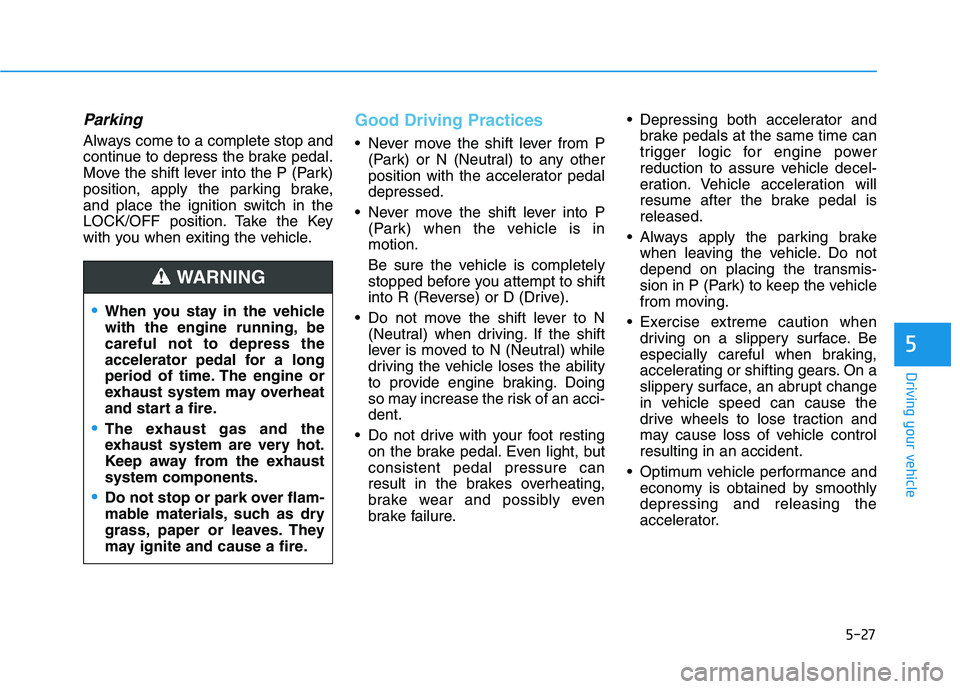
Parking
Always come to a complete stop and
continue to depress the brake pedal.
Move the shift lever into the P (Park)
position, apply the parking brake,
and place the ignition switch in the
LOCK/OFF position. Take the Key
with you when exiting the vehicle.
Good Driving Practices
Never move the shift lever from P
(Park) or N (Neutral) to any other
position with the accelerator pedal
depressed.
Never move the shift lever into P
(Park) when the vehicle is in
motion.
Be sure the vehicle is completely
stopped before you attempt to shift
into R (Reverse) or D (Drive).
Do not move the shift lever to N
(Neutral) when driving. If the shift
lever is moved to N (Neutral) while
driving the vehicle loses the ability
to provide engine braking. Doing
so may increase the risk of an acci-
dent.
Do not drive with your foot resting
on the brake pedal. Even light, but
consistent pedal pressure can
result in the brakes overheating,
brake wear and possibly even
brake failure. Depressing both accelerator and
brake pedals at the same time can
trigger logic for engine power
reduction to assure vehicle decel-
eration. Vehicle acceleration will
resume after the brake pedal is
released.
Always apply the parking brake
when leaving the vehicle. Do not
depend on placing the transmis-
sion in P (Park) to keep the vehicle
from moving.
Exercise extreme caution when
driving on a slippery surface. Be
especially careful when braking,
accelerating or shifting gears. On a
slippery surface, an abrupt change
in vehicle speed can cause the
drive wheels to lose traction and
may cause loss of vehicle control
resulting in an accident.
Optimum vehicle performance and
economy is obtained by smoothly
depressing and releasing the
accelerator.
When you stay in the vehicle
with the engine running, be
careful not to depress the
accelerator pedal for a long
period of time. The engine or
exhaust system may overheat
and start a fire.
The exhaust gas and the
exhaust system are very hot.
Keep away from the exhaust
system components.
Do not stop or park over flam-
mable materials, such as dry
grass, paper or leaves. They
may ignite and cause a fire.
WARNING
Page 255 of 480
![HYUNDAI VELOSTER 2020 User Guide 5-37
Driving your vehicle
5
With the shift lever in the D posi-
tion
The paddle shifter will operate when
the vehicle speed is more than 6
mph (10 km/h).
Pull the [+] or [-] paddle shifter once
to sh](/img/35/58890/w960_58890-254.png "HYUNDAI VELOSTER 2020 User Guide 5-37
Driving your vehicle
5
With the shift lever in the D posi-
tion
The paddle shifter will operate when
the vehicle speed is more than 6
mph (10 km/h).
Pull the [+] or [-] paddle shifter once
to sh")
5-37
Driving your vehicle
5
With the shift lever in the D posi-
tion
The paddle shifter will operate when
the vehicle speed is more than 6
mph (10 km/h).
Pull the [+] or [-] paddle shifter once
to shift up or down one gear and the
system changes from automatic
mode to manual mode.
When the vehicle speed is lower
than 6 mph (10 km/h), if you depress
the accelerator pedal for more than 5
seconds or if you move the shift lever
from D (Drive) to Ds (drive sporty)
mode and move it from Ds (drive
sporty) mode to D (Drive) again, the
system changes from manual mode
to automatic mode.
With the shift lever in the manual
shift mode
Pull the [+] or [-] paddle shifter once
to shift up or down one gear.
Information
If the [+] and [-] paddle shifters are
pulled at the same time, gear shift may
not occur.
Shift-lock system
For your safety, the dual clutch trans-
mission has a shift-lock system
which prevents shifting the transmis-
sion from P (Park) into R (Reverse)
unless the brake pedal is depressed.
To shift the transmission from P
(Park) into R (Reverse):
1. Depress and hold the brake pedal.
2. Start the engine or place the igni-
tion switch in the ON position.
3. Move the shift lever.
Shift-lock release
If the shift lever cannot be moved from
the P (Park) position into R (Reverse)
position with the brake pedal
depressed, continue depressing the
brake, and then do the following:
1. Place the ignition switch in the
LOCK/OFF position.
2. Apply the parking brake.
3. Push the shift-lock release button
(1).
4. Move the shift lever while pushing
the shift-lock release button.
5. Stop pushing the shift-lock release
button.
i
OJS058007
Page 261 of 480
5-43
Driving your vehicle
5
Anti-lock Brake System (ABS)
ABS is an electronic braking system
that helps prevent a braking skid.
ABS allows the driver to steer and
brake at the same time.
Using ABS
To obtain the maximum benefit from
your ABS in an emergency situation,
do not attempt to modulate your
brake pressure and do not try to
pump your brakes. Depress your
brake pedal as hard as possible.
When you apply your brakes under
conditions which may lock the
wheels, you may hear sounds from
the brakes, or feel a corresponding
sensation in the brake pedal. This is
normal and it means your ABS is
active.
ABS does not reduce the time or dis-
tance it takes to stop the vehicle.
Always maintain a safe distance from
the vehicle in front of you.
ABS will not prevent a skid that
results from sudden changes in
direction, such as trying to take a
corner too fast or making a sudden
lane change. Always drive at a safe
speed for the road and weather con-
ditions. The safety features of an ABS
or ESC equipped vehicle should
not be tested by high speed
driving or cornering. This could
endanger the safety of yourself
or others.
An Anti-Lock Braking System
(ABS) or an Electronic Stability
Control (ESC) system will not
prevent accidents due to
improper or dangerous driving
maneuvers. Even though vehi-
cle control is improved during
emergency braking, always
maintain a safe distance
between you and objects ahead
of you. Vehicle speeds should
always be reduced during
extreme road conditions. The
braking distance for cars
equipped with ABS or ESC may
be longer than for those without
these systems in the following
road conditions.
Drive your vehicle at reduced
speeds during the following
conditions:
Rough, gravel or snow-cov-
ered roads.
On roads where the road sur-
face is pitted or has different
surface height.
WARNING
Page 269 of 480
5-51
Driving your vehicle
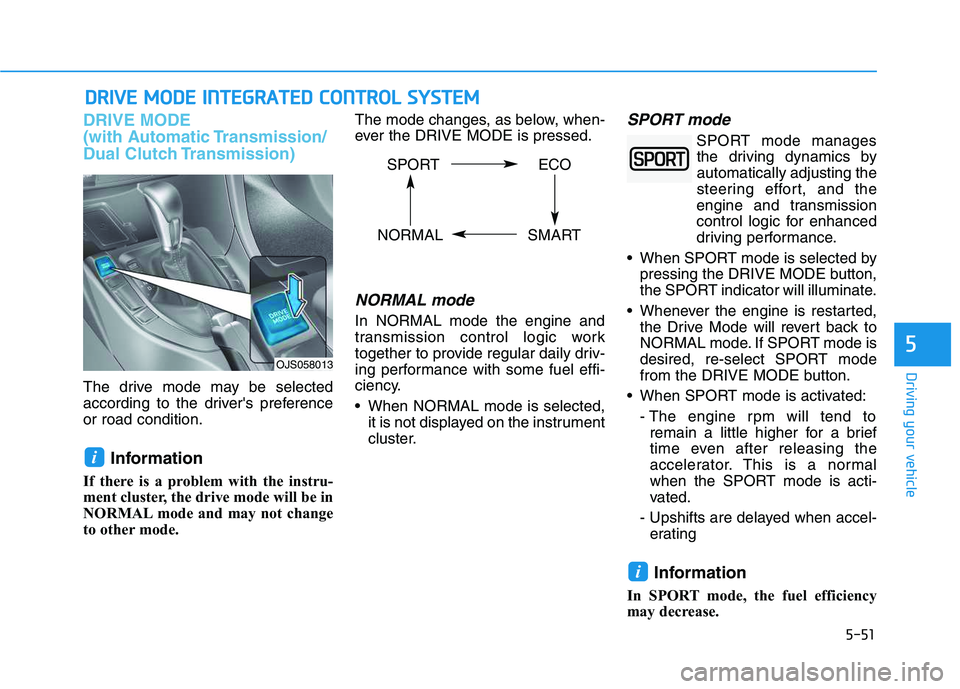
DRIVE MODE
(with Automatic Transmission/
Dual Clutch Transmission)
The drive mode may be selected
according to the driver's preference
or road condition.
Information
If there is a problem with the instru-
ment cluster, the drive mode will be in
NORMAL mode and may not change
to other mode. The mode changes, as below, when-
ever the DRIVE MODE is pressed.
NORMAL mode
In NORMAL mode the engine and
transmission control logic work
together to provide regular daily driv-
ing performance with some fuel effi-
ciency.
When NORMAL mode is selected,
it is not displayed on the instrument
cluster.
SPORT mode
SPORT mode manages
the driving dynamics by
automatically adjusting the
steering effort, and the
engine and transmission
control logic for enhanced
driving performance.
When SPORT mode is selected by
pressing the DRIVE MODE button,
the SPORT indicator will illuminate.
Whenever the engine is restarted,
the Drive Mode will revert back to
NORMAL mode. If SPORT mode is
desired, re-select SPORT mode
from the DRIVE MODE button.
When SPORT mode is activated:
- The engine rpm will tend to
remain a little higher for a brief
time even after releasing the
accelerator. This is a normal
when the SPORT mode is acti-
vated.
- Upshifts are delayed when accel-
erating
Information
In SPORT mode, the fuel efficiency
may decrease.
i
i
D DR
RI
IV
VE
E
M
MO
OD
DE
E
I
IN
NT
TE
EG
GR
RA
AT
TE
ED
D
C
CO
ON
NT
TR
RO
OL
L
S
SY
YS
ST
TE
EM
M
5
OJS058013
SPORT ECO
NORMAL SMART