sensor HYUNDAI VELOSTER 2020 Owner's Guide
[x] Cancel search | Manufacturer: HYUNDAI, Model Year: 2020, Model line: VELOSTER, Model: HYUNDAI VELOSTER 2020Pages: 480, PDF Size: 6.16 MB
Page 287 of 480
5-69
Driving your vehicle
5
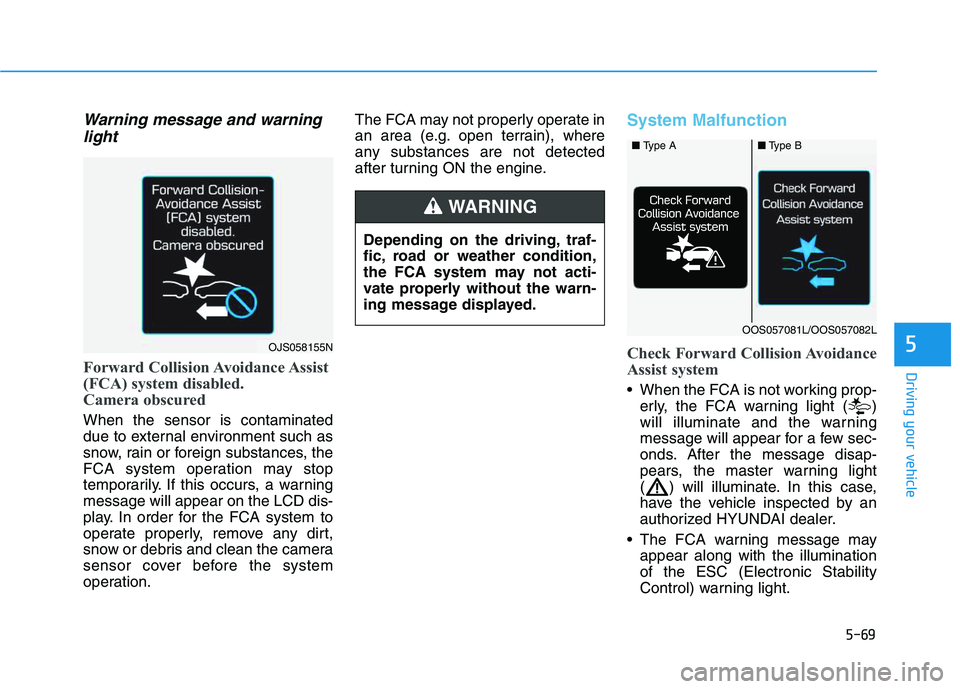
Warning message and warning
light
Forward Collision Avoidance Assist
(FCA) system disabled.
Camera obscured
When the sensor is contaminated
due to external environment such as
snow, rain or foreign substances, the
FCA system operation may stop
temporarily. If this occurs, a warning
message will appear on the LCD dis-
play. In order for the FCA system to
operate properly, remove any dirt,
snow or debris and clean the camera
sensor cover before the system
operation.The FCA may not properly operate in
an area (e.g. open terrain), where
any substances are not detected
after turning ON the engine.
System Malfunction
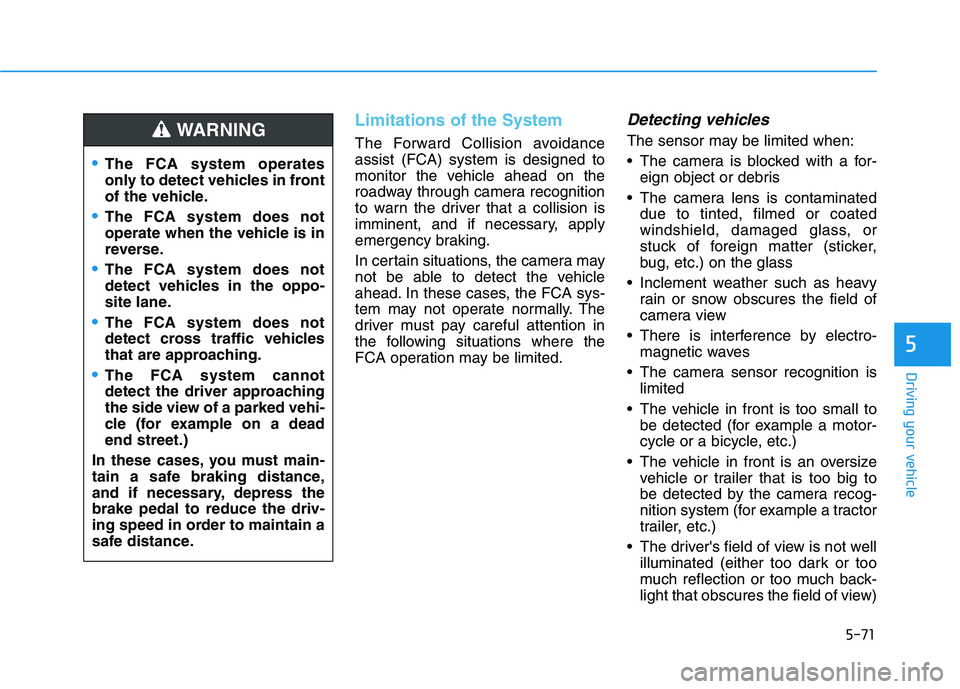
Check Forward Collision Avoidance
Assist system
When the FCA is not working prop-
erly, the FCA warning light ( )
will illuminate and the warning
message will appear for a few sec-
onds. After the message disap-
pears, the master warning light
( ) will illuminate. In this case,
have the vehicle inspected by an
authorized HYUNDAI dealer.
The FCA warning message may
appear along with the illumination
of the ESC (Electronic Stability
Control) warning light.
OJS058155N
■ Type A■Type B
OOS057081L/OOS057082L
Depending on the driving, traf-
fic, road or weather condition,
the FCA system may not acti-
vate properly without the warn-
ing message displayed.
WARNING
Page 289 of 480
5-71
Driving your vehicle
5
Limitations of the System
The Forward Collision avoidance
assist (FCA) system is designed to
monitor the vehicle ahead on the
roadway through camera recognition
to warn the driver that a collision is
imminent, and if necessary, apply
emergency braking.
In certain situations, the camera may
not be able to detect the vehicle
ahead. In these cases, the FCA sys-
tem may not operate normally. The
driver must pay careful attention in
the following situations where the
FCA operation may be limited.
Detecting vehicles
The sensor may be limited when:
The camera is blocked with a for-
eign object or debris
The camera lens is contaminated
due to tinted, filmed or coated
windshield, damaged glass, or
stuck of foreign matter (sticker,
bug, etc.) on the glass
Inclement weather such as heavy
rain or snow obscures the field of
camera view
There is interference by electro-
magnetic waves
The camera sensor recognition is
limited
The vehicle in front is too small to
be detected (for example a motor-
cycle or a bicycle, etc.)
The vehicle in front is an oversize
vehicle or trailer that is too big to
be detected by the camera recog-
nition system (for example a tractor
trailer, etc.)
The driver's field of view is not well
illuminated (either too dark or too
much reflection or too much back-
light that obscures the field of view)
The FCA system operates
only to detect vehicles in front
of the vehicle.
The FCA system does not
operate when the vehicle is in
reverse.
The FCA system does not
detect vehicles in the oppo-
site lane.
The FCA system does not
detect cross traffic vehicles
that are approaching.
The FCA system cannot
detect the driver approaching
the side view of a parked vehi-
cle (for example on a dead
end street.)
In these cases, you must main-
tain a safe braking distance,
and if necessary, depress the
brake pedal to reduce the driv-
ing speed in order to maintain a
safe distance.
WARNING
Page 294 of 480
5-76
Driving your vehicle
The Forward Collision-avoidance
Assist (FCA) system is designed to
help detect and monitor the vehicle
ahead or detect a pedestrian (if
equipped) in the roadway through
radar signals and camera recogni-
tion to warn the driver that a collision
is imminent, and if necessary, apply
emergency braking.
System Setting and Activation
System setting
The driver can activate the FCA by
placing the ignition switch to the
ON position and by selecting:
''User Settings →Driver
Assistance →Forward Collision-
Avoidance Assist (FCA)''
The FCA deactivates, when the driv-
er deselects the system setting.
F FO
OR
RW
WA
AR
RD
D
C
CO
OL
LL
LI
IS
SI
IO
ON
N-
-A
AV
VO
OI
ID
DA
AN
NC
CE
E
A
AS
SS
SI
IS
ST
T
(
(F
FC
CA
A)
)
S
SY
YS
ST
TE
EM
M
(
(F
FU
US
SI
IO
ON
N
S
SE
EN
NS
SO
OR
R)
)
(
(I
IF
F
E
EQ
QU
UI
IP
PP
PE
ED
D)
)
Take the following precautions
when using the Forward
Collision-avoidance Assist (FCA)
system:
This system is only a supple-
mental system and it is not
intended to, nor does it replace
the need for extreme care and
attention of the driver. The
sensing range and objects
detectable by the sensors are
limited. Pay attention to the
road conditions at all times.
NEVER drive too fast in accor-
dance with the road condi-
tions or while cornering.
Always drive cautiously to
prevent unexpected and sud-
den situations from occur-
ring. The Forward Collision
Avoidance system may not
always stop the vehicle com-
pletely and is only intended to
help mitigate a collision that
is imminent.
WARNING
Page 298 of 480
5-80
Driving your vehicle
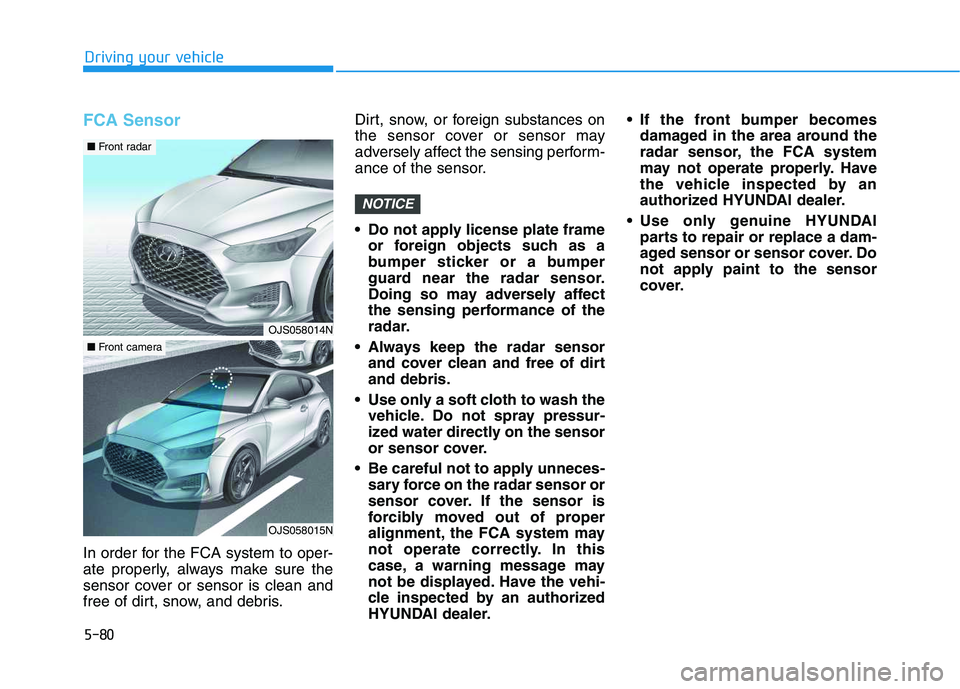
FCA Sensor
In order for the FCA system to oper-
ate properly, always make sure the
sensor cover or sensor is clean and
free of dirt, snow, and debris.Dirt, snow, or foreign substances on
the sensor cover or sensor may
adversely affect the sensing perform-
ance of the sensor.
Do not apply license plate frame
or foreign objects such as a
bumper sticker or a bumper
guard near the radar sensor.
Doing so may adversely affect
the sensing performance of the
radar.
Always keep the radar sensor
and cover clean and free of dirt
and debris.
Use only a soft cloth to wash the
vehicle. Do not spray pressur-
ized water directly on the sensor
or sensor cover.
Be careful not to apply unneces-
sary force on the radar sensor or
sensor cover. If the sensor is
forcibly moved out of proper
alignment, the FCA system may
not operate correctly. In this
case, a warning message may
not be displayed. Have the vehi-
cle inspected by an authorized
HYUNDAI dealer. If the front bumper becomes
damaged in the area around the
radar sensor, the FCA system
may not operate properly. Have
the vehicle inspected by an
authorized HYUNDAI dealer.
Use only genuine HYUNDAI
parts to repair or replace a dam-
aged sensor or sensor cover. Do
not apply paint to the sensor
cover.
NOTICE
OJS058014N
■Front radar
OJS058015N
■Front camera
Page 299 of 480
5-81
Driving your vehicle
5
NEVER install any accessories
or stickers on the front wind-
shield, nor tint the front wind-
shield.
NEVER locate any reflective
objects (i.e. white paper, mirror)
over the dashboard. Any light
reflection may cause a malfunc-
tion of the system.
Pay extreme caution to keep the
camera out of water.
NEVER disassemble the camera
assembly, nor apply any impact
on the camera assembly.
Playing the vehicle audio sys-
tem at high volume may offset
the system warning sounds.
Information
Have the system checked by an
authorized HYUNDAI dealer when:
• The windshield glass is replaced.
• The sensor cover or sensor gets
damaged or replaced.
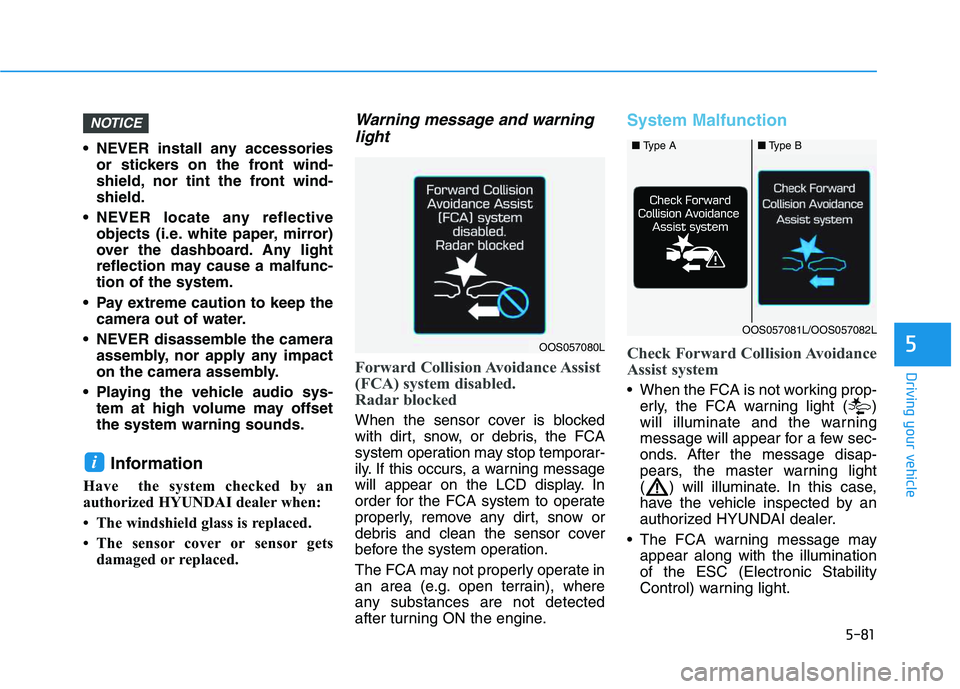
Warning message and warning
light
Forward Collision Avoidance Assist
(FCA) system disabled.
Radar blocked
When the sensor cover is blocked
with dirt, snow, or debris, the FCA
system operation may stop temporar-
ily. If this occurs, a warning message
will appear on the LCD display. In
order for the FCA system to operate
properly, remove any dirt, snow or
debris and clean the sensor cover
before the system operation.
The FCA may not properly operate in
an area (e.g. open terrain), where
any substances are not detected
after turning ON the engine.
System Malfunction
Check Forward Collision Avoidance
Assist system
When the FCA is not working prop-
erly, the FCA warning light ( )
will illuminate and the warning
message will appear for a few sec-
onds. After the message disap-
pears, the master warning light
( ) will illuminate. In this case,
have the vehicle inspected by an
authorized HYUNDAI dealer.
The FCA warning message may
appear along with the illumination
of the ESC (Electronic Stability
Control) warning light.
i
NOTICE
OOS057080L
■ Type A■Type B
OOS057081L/OOS057082L
Page 300 of 480
5-82
Driving your vehicle
Occupants may get injured, if
the vehicle abruptly stops by
the activated FCA system. Pay
extreme caution.
Even if there is any problem in
the FCA system’s brake con-
trol function, general braking
performance will operate nor-
mally. In this case, the brake
control function which oper-
ates when the collision is
imminent will not activate.
The FCA is only a supplemen-
tal system for the driver's con-
venience. The driver should
hold the responsibility to con-
trol the vehicle operation. Do
not solely depend on the FCA
system. Rather, maintain a
safe braking distance, and, if
necessary, depress the brake
pedal to reduce the driving
speed.
In certain instances and
under certain driving condi-
tions, the FCA system may
activate prematurely. This ini-
tial warning message appears
on the LCD display with a
warning chime.
Also, in certain instances the
front radar sensor or camera
recognition system may not
detect the vehicle or pedestri-
an ahead. The FCA system
may not activate and the
warning message will not be
displayed.
WARNING If there is a malfunction with
the FCA system, the Forward
Collision avoidance assist
system is not applied even
though the braking system is
operating normally.
If the vehicle in front stops
suddenly, you may have less
control of the brake system.
Therefore, always keep a safe
distance between your vehicle
and the vehicle in front of you.
The FCA system may activate
during braking and the vehi-
cle may stop suddenly shift-
ing loose objects toward the
passengers. Always keep
loose objects secured.
The FCA system may not acti-
vate if the driver applies the
brake pedal to avoid a colli-
sion.
The brake control may be
insufficient, possibly causing
a collision, if a vehicle in front
abruptly stops. Always pay
extreme caution.
Page 301 of 480
5-83
Driving your vehicle
5
Limitations of the System
The Forward Collision avoidance
assist (FCA) system is designed to
monitor the vehicle ahead or a
pedestrian on the roadway through
radar signals and camera recogni-
tion to warn the driver that a collision
is imminent, and if necessary, apply
emergency braking.
In certain situations, the radar sen-
sor or the camera may not be able to
detect the vehicle or pedestrian
ahead. In these cases, the FCA sys-
tem may not operate normally. The
driver must pay careful attention in
the following situations where the
FCA operation may be limited.
Detecting vehicles
The sensor may be limited when:
The radar sensor or camera is
blocked with a foreign object or
debris
Inclement weather such as heavy
rain or snow obscures the field of
view of the radar sensor or camera
There is interference by electro-
magnetic waves
There is severe irregular reflection
from the radar sensor
The radar/camera sensor recogni-
tion is limited
The vehicle in front is too small to
be detected (for example a motor-
cycle or a bicycle, etc.)
The vehicle in front is an oversize
vehicle or trailer that is too big to
be detected by the camera recog-
nition system (for example a tractor
trailer, etc.)
The driver's field of view is not well
illuminated (either too dark or too
much reflection or too much back-
light that obscures the field of view)
The vehicle in front does not have
their rear lights properly turned ON In these cases, you must main-
tain a safe braking distance,
and if necessary, depress the
brake pedal to reduce the driv-
ing speed in order to maintain a
safe distance.
The FCA system operates
only to detect vehicles or
pedestrians in front of the
vehicle.
The FCA system does not
operate when the vehicle is in
reverse.
The FCA system is not
designed to detect other
objects on the road such as
animals.
The FCA system does not
detect vehicles in the oppo-
site lane.
The FCA system does not
detect cross traffic vehicles
that are approaching.
The FCA system cannot
detect the driver approaching
the side view of a parked vehi-
cle (for example on a dead
end street.)
WARNING
Page 302 of 480
5-84
Driving your vehicle
The outside brightness changes
suddenly, for example when enter-
ing or exiting a tunnel
Light coming from a street light or
an oncoming vehicle is reflected on
a wet road surface such as a pud-
dle in the road
The field of view in front is
obstructed by sun glare
The windshield glass is fogged up;
a clear view of the road is obstruct-
ed
The vehicle in front is driving errat-
ically
The vehicle drives through a con-
struction area, on an unpaved
road, or above metal materials,
such as a railway
The vehicle drives inside a building,
such as a basement parking lot
The adverse road conditions cause
excessive vehicle vibrations while
driving
The vehicle in front is moving verti-
cally to the driving direction
The vehicle in front is stopped ver-
tically
The vehicle in front is driving
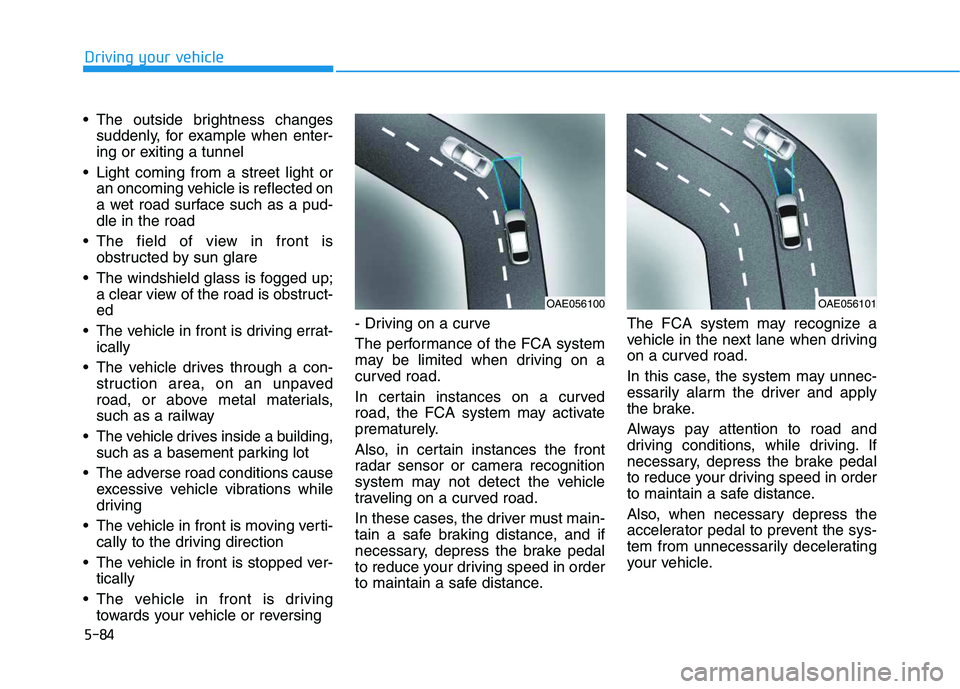
towards your vehicle or reversing- Driving on a curve
The performance of the FCA system
may be limited when driving on a
curved road.
In certain instances on a curved
road, the FCA system may activate
prematurely.
Also, in certain instances the front
radar sensor or camera recognition
system may not detect the vehicle
traveling on a curved road.
In these cases, the driver must main-
tain a safe braking distance, and if
necessary, depress the brake pedal
to reduce your driving speed in order
to maintain a safe distance.The FCA system may recognize a
vehicle in the next lane when driving
on a curved road.
In this case, the system may unnec-
essarily alarm the driver and apply
the brake.
Always pay attention to road and
driving conditions, while driving. If
necessary, depress the brake pedal
to reduce your driving speed in order
to maintain a safe distance.
Also, when necessary depress the
accelerator pedal to prevent the sys-
tem from unnecessarily decelerating
your vehicle.
OAE056100OAE056101
Page 304 of 480
5-86
Driving your vehicle
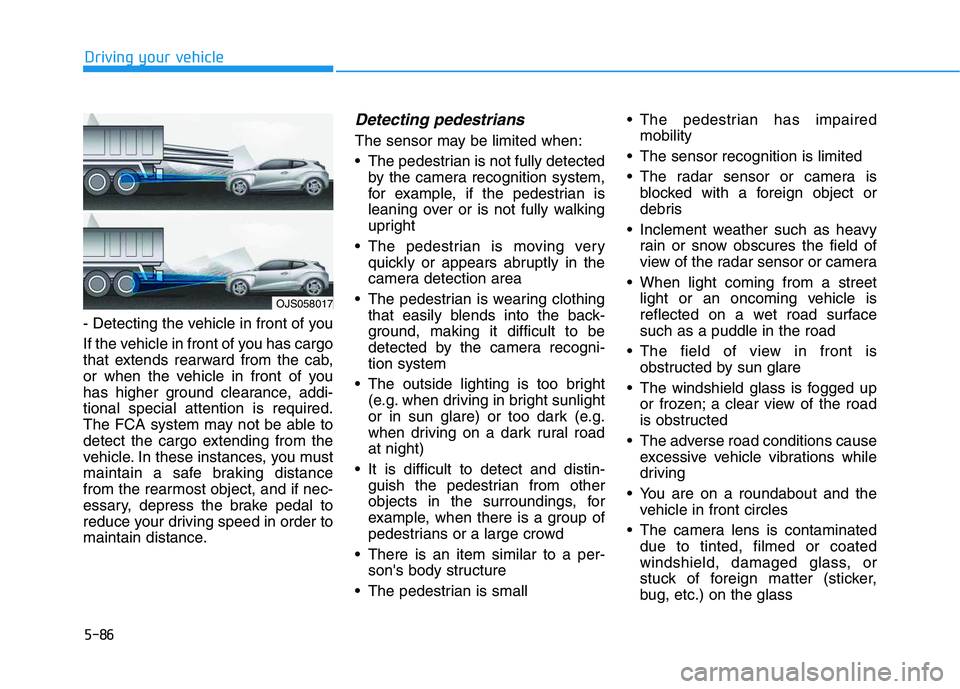
- Detecting the vehicle in front of you
If the vehicle in front of you has cargo
that extends rearward from the cab,
or when the vehicle in front of you
has higher ground clearance, addi-
tional special attention is required.
The FCA system may not be able to
detect the cargo extending from the
vehicle. In these instances, you must
maintain a safe braking distance
from the rearmost object, and if nec-
essary, depress the brake pedal to
reduce your driving speed in order to
maintain distance.
Detecting pedestrians
The sensor may be limited when:
The pedestrian is not fully detected
by the camera recognition system,
for example, if the pedestrian is
leaning over or is not fully walking
upright
The pedestrian is moving very
quickly or appears abruptly in the
camera detection area
The pedestrian is wearing clothing
that easily blends into the back-
ground, making it difficult to be
detected by the camera recogni-
tion system
The outside lighting is too bright
(e.g. when driving in bright sunlight
or in sun glare) or too dark (e.g.
when driving on a dark rural road
at night)
It is difficult to detect and distin-
guish the pedestrian from other
objects in the surroundings, for
example, when there is a group of
pedestrians or a large crowd
There is an item similar to a per-
son's body structure
The pedestrian is small The pedestrian has impaired
mobility
The sensor recognition is limited
The radar sensor or camera is
blocked with a foreign object or
debris
Inclement weather such as heavy
rain or snow obscures the field of
view of the radar sensor or camera
When light coming from a street
light or an oncoming vehicle is
reflected on a wet road surface
such as a puddle in the road
The field of view in front is
obstructed by sun glare
The windshield glass is fogged up
or frozen; a clear view of the road
is obstructed
The adverse road conditions cause
excessive vehicle vibrations while
driving
You are on a roundabout and the
vehicle in front circles
The camera lens is contaminated
due to tinted, filmed or coated
windshield, damaged glass, or
stuck of foreign matter (sticker,
bug, etc.) on the glass
OJS058017
Page 308 of 480
5-90
Driving your vehicle
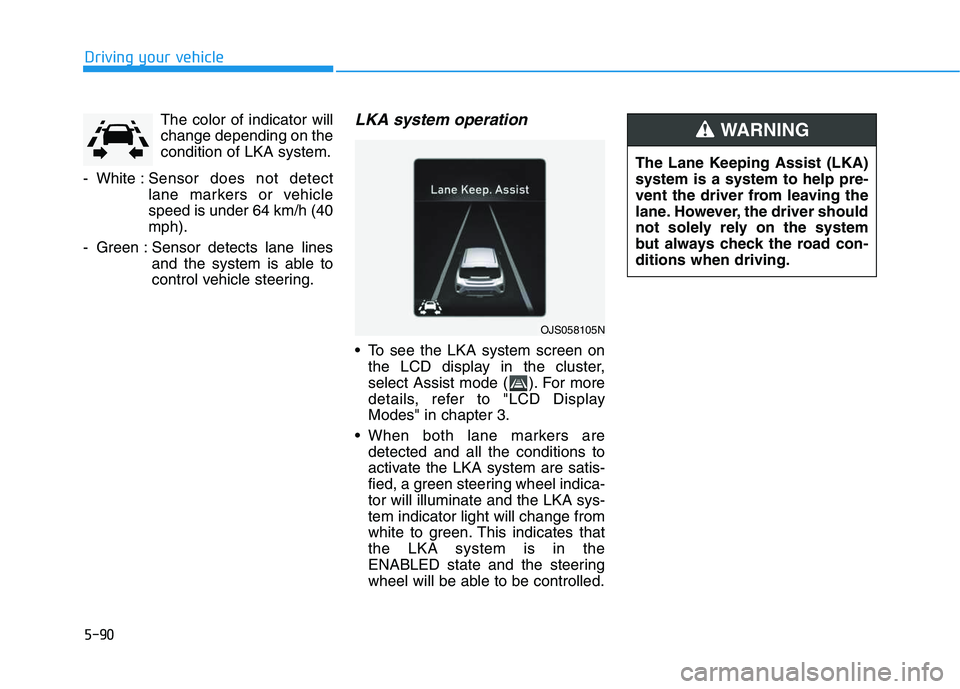
The color of indicator will
change depending on the
condition of LKA system.
- White :Sensor does not detect
lane markers or vehicle
speed is under 64 km/h (40
mph).
- Green : Sensor detects lane lines
and the system is able to
control vehicle steering.
LKA system operation
To see the LKA system screen on
the LCD display in the cluster,
select Assist mode ( ). For more
details, refer to "LCD Display
Modes" in chapter 3.
When both lane markers are
detected and all the conditions to
activate the LKA system are satis-
fied, a green steering wheel indica-
tor will illuminate and the LKA sys-
tem indicator light will change from
white to green. This indicates that
the LKA system is in the
ENABLED state and the steering
wheel will be able to be controlled.
The Lane Keeping Assist (LKA)
system is a system to help pre-
vent the driver from leaving the
lane. However, the driver should
not solely rely on the system
but always check the road con-
ditions when driving.
WARNING
OJS058105N