display HYUNDAI VELOSTER 2021 Service Manual
[x] Cancel search | Manufacturer: HYUNDAI, Model Year: 2021, Model line: VELOSTER, Model: HYUNDAI VELOSTER 2021Pages: 482, PDF Size: 37.54 MB
Page 207 of 482
3-125
Convenient features of your vehicle
3
A smart phone or a tablet PC may
get warmer during the re-charging
process. It does not indicate any
malfunction with the charging sys-
tem.
A smart phone or a tablet PC,
which adopts a different re-charg-
ing method, may not be properly
re-charged. In this case, use an
exclusive charger of your device.
The charging terminal is only to
recharge a device. Do not use the
charging terminal either to turn ON
an audio or to play media on the
AVN.Wireless Cellular Phone
Charging System (if equipped)
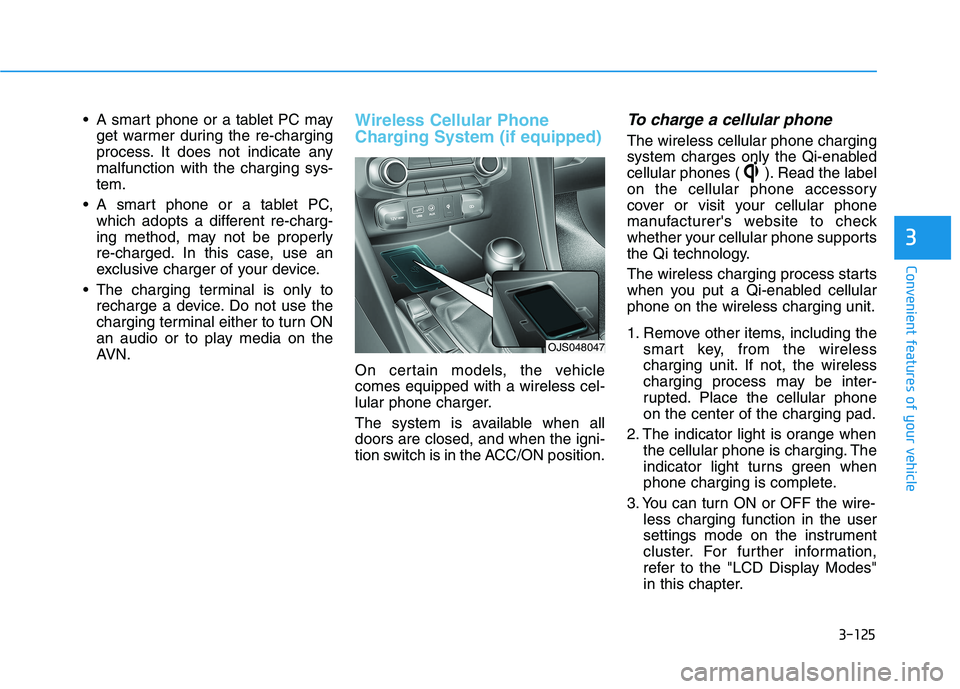
On certain models, the vehicle
comes equipped with a wireless cel-
lular phone charger.
The system is available when all
doors are closed, and when the igni-
tion switch is in the ACC/ON position.
To charge a cellular phone
The wireless cellular phone charging
system charges only the Qi-enabled
cellular phones ( ). Read the label
on the cellular phone accessory
cover or visit your cellular phone
manufacturer's website to check
whether your cellular phone supports
the Qi technology.
The wireless charging process starts
when you put a Qi-enabled cellular
phone on the wireless charging unit.
1. Remove other items, including the
smart key, from the wireless
charging unit. If not, the wireless
charging process may be inter-
rupted. Place the cellular phone
on the center of the charging pad.
2. The indicator light is orange when
the cellular phone is charging. The
indicator light turns green when
phone charging is complete.
3. You can turn ON or OFF the wire-
less charging function in the user
settings mode on the instrument
cluster. For further information,
refer to the "LCD Display Modes"
in this chapter.
OJS048047
Page 208 of 482
3-126
Convenient features of your vehicle
If your cellular phone is not charging:
- Slightly change the position of the
cellular phone on the charging pad.
- Make sure the indicator light is
orange.
The indicator light will blink orange
for 10 seconds if there is a malfunc-
tion in the wireless charging system.
In this case, temporarily stop the
charging process, and re-attempt to
charge your cellular phone again.
The system warns you with a mes-
sage on the LCD display if the cellular
phone is still on the wireless charging
unit after the engine is turned OFF
and the front door is opened.
Information
For some manufacturer's cellular
phones, the system may not warn you
even though the cellular phone is left
on the wireless charging unit. This is
due to the particular characteristic of
the cellular phone and not a malfunc-
tion of the wireless charging. The wireless cellular phone
charging system may not sup-
port certain cellular phones,
which are not verified for the Qi
specification ( ).
When placing your cellular
phone on the charging mat,
position the phone in the middle
of the mat for optimal charging
performance. If your cell phone
is off to the side, the charging
rate may be less and in some
cases the cell phone may experi-
ence higher heat conduction.
In some cases, the wireless
charging may stop temporarily
when the Smart Key is used,
either when starting the vehicle or
locking/unlocking the doors, etc.
When charging certain cellular
phones, the charging indicator
may not change to green when
the cell phone is fully charged. The wireless charging process
may temporarily stop due to the
"self-protection" function of the
cellular phone, when tempera-
ture abnormally increases inside
the wireless cellular phone
charging system. The wireless
charging process restarts, when
temperature falls to a certain
level.
The wireless charging process
may temporarily stop when
there is any metallic item, such
as a coin, between the wireless
cellular phone charging system
and cellular phone.
When charging some cell phones
with the case still applied, the
wireless charging speed may
decrease and the wireless charg-
ing may stop.
If the cellular phone has a thick
cover, the wireless charging may
not be possible.
If the cell phone is not complete-
ly contacting the charging pad,
wireless charging may not oper-
ate properly.
NOTICE
i
Page 209 of 482
3-127
Convenient features of your vehicle
3
Some magnetic items like credit
cards, phone cards or rail tickets
may be damaged if left with the
cellular phone during the charg-
ing process.
If the cellular phone without the
wireless charging function or
the metallic items are placed on
the charging pad, it may cause
slight noise. This noise does not
affect the cellular phone and the
vehicle, because this noise is an
operating sound during deter-
mining the item on the charging
pad.
If the ignition switch is OFF, the
charging also stops.
Information
This device complies with part 15 of
the FCC Rules.
Operation is subject to the following
two conditions:
1. This device may not cause harmful
interference, and
2. This device must accept any inter-
ference received, including interfer-
ence that may cause undesired
operation.
Clock
Vehicles with Audio system
Select the [SETUP]button on the
audio system ➟Select [Date/Time].
Set time: Set the time displayed on
the audio screen.
Time format: Choose between 12-
hour and 24-hour time formats.
Vehicles with Navigation system
Select the Settings menu on the
Navigation system➟Select
[Date/Time].
GPS time: Displays time according
to the received GNSS time.
24-hour: Switches to 12 hour or 24
hour.
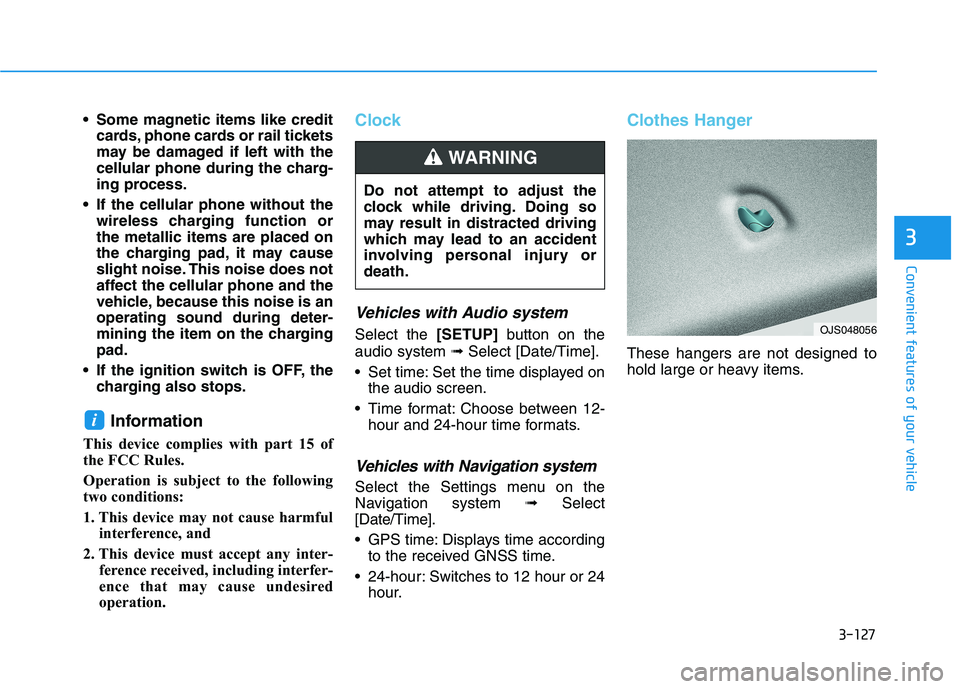
Clothes Hanger
These hangers are not designed to
hold large or heavy items.
i
Do not attempt to adjust the
clock while driving. Doing so
may result in distracted driving
which may lead to an accident
involving personal injury or
death.
WARNING
OJS048056
Page 213 of 482
Infotainment System
Infotainment System..............................................4-2
AUX, USB and iPod®Port ...............................................4-2
Antenna ...............................................................................4-2
Steering Wheel Audio Controls ......................................4-3
Bluetooth®Wireless Technology Hands-Free ...........4-4
Audio (Display Audio) / Video /
Navigation System (AVN).................................................4-4
4
Page 216 of 482
4-4
Infotainment System
Bluetooth®Wireless
Technology Hands-Free
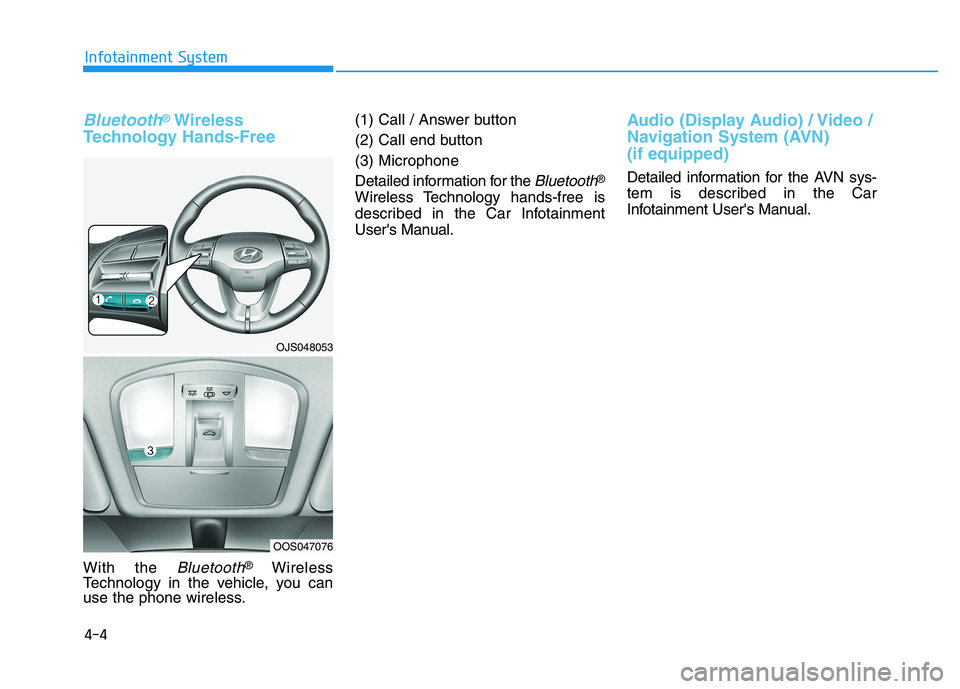
With the Bluetooth®Wireless
Technology in the vehicle, you can
use the phone wireless.(1) Call / Answer button
(2) Call end button
(3) Microphone
Detailed information for the
Bluetooth®
Wireless Technology hands-free is
described in the Car Infotainment
User's Manual.
Audio (Display Audio) / Video /
Navigation System (AVN)
(if equipped)
Detailed information for the AVN sys-
tem is described in the Car
Infotainment User's Manual.
OJS048053
OOS047076
Page 217 of 482
Driving your vehicle
5
Before Driving ........................................................5-4
Before Entering the Vehicle ...........................................5-4
Before Starting ..................................................................5-4
Ignition Switch ........................................................5-6
Key Ignition Switch ...........................................................5-6
Engine Start/Stop Button................................................5-9
Manual Transmission ...........................................5-18
Manual Transmission Operation ..................................5-18
Good Driving Practices ..................................................5-20
Automatic Transmission ......................................5-22
Automatic Transmission Operation .............................5-22
Good Driving Practices ..................................................5-27
Dual clutch Transmission ....................................5-29
Dual Clutch Transmission Operation ..........................5-29
LCD display for transmission temperature and
warning message.............................................................5-31
Good Driving Practices ..................................................5-38
Braking System ....................................................5-40
Power Brakes ...................................................................5-40
Disc Brakes Wear Indicator ..........................................5-41
Parking Brake .................................................................5-41
Anti-lock Brake System (ABS) ....................................5-43
Electronic Stability Control (ESC)................................5-45
Vehicle Stability Management (VSM).........................5-47Hill-Start Assist Control (HAC) ....................................5-48
Good Braking Practices .................................................5-49
Drive Mode Integrated Control System ............5-51
DRIVE MODE (with Automatic Transmission/
Dual Clutch Transmission) .............................................5-51
SPORT MODE (with Manual Transmission) ..............5-53
Blind-Spot Collision Warning (BCW) System...5-55
BCW (Blind-Spot Collision Warning) ..........................5-56
RCCW (Rear Cross-Traffic Collision Warning) .........5-58
Blind Spot Collision Warning - Sensor Location .....5-60
Limitations of the System .............................................5-61
Forward Collision-Avoidance Assist (FCA)
System (Camera) ..................................................5-63
System Setting and Activation.....................................5-63
FCA Warning Message and System Control ............5-65
FCA Sensor .......................................................................5-67
System Malfunction .......................................................5-68
Limitations of the System .............................................5-70
Forward Collision-Avoidance Assist (FCA)
System (Fusion Sensor) ......................................5-75
System Setting and Activation.....................................5-75
FCA Warning Message and System Control ............5-77
FCA Sensor .......................................................................5-79
System Malfunction .......................................................5-80
Limitations of the System .............................................5-82
Page 220 of 482
5-4
Driving your vehicle
Before Entering the Vehicle
• Be sure all windows, outside mir-
ror(s), and outside lights are clean
and unobstructed.
Remove frost, snow, or ice.
Visually check the tires for uneven
wear and damage.
Check under the vehicle for any
sign of leaks.
Be sure there are no obstacles
behind you if you intend to back up.
Before Starting
Make sure the hood, the liftgate,
and the doors are securely closed
and locked.
Adjust the position of the seat and
steering wheel.
Adjust the inside and outside
rearview mirrors.
Verify all the lights work.
Fasten your seatbelt. Check that all
passengers have fastened their
seatbelts.
Check the gauges and indicators in
the instrument panel and the mes-
sages on the instrument display
when the ignition switch is in the
ON position.
Check that any items you are car-
rying are stored properly or fas-
tened down securely. CALIFORNIA PROPOSITION 65
WARNING
Engine exhaust and a wide vari-
ety of automobile components
including components found in
the interior furnishings in a
vehicle, contain or emit harmful
chemicals known to the State of
California to cause cancer and
birth defects and reproductive
harm. In addition, certain fluids
contained in vehicles and cer-
tain products of components
contain or emit chemicals
known to the State of California
to cause cancer and birth
defects or other reproductive
harm.WARNING
B BE
EF
FO
OR
RE
E
D
DR
RI
IV
VI
IN
NG
G
Page 239 of 482
5-23
Driving your vehicle
5
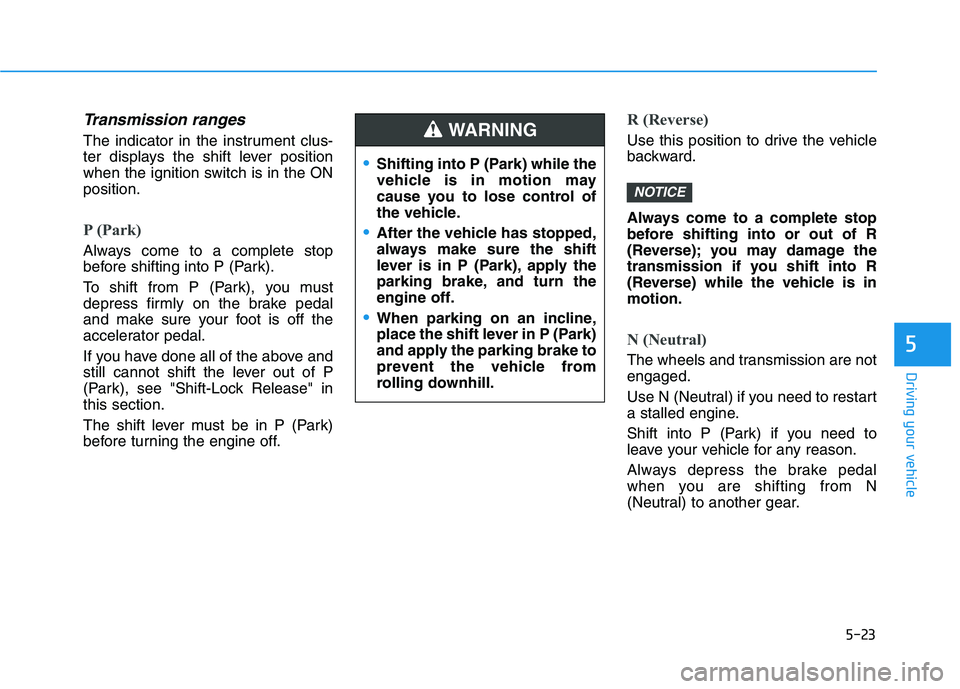
Transmission ranges
The indicator in the instrument clus-
ter displays the shift lever position
when the ignition switch is in the ON
position.
P (Park)
Always come to a complete stop
before shifting into P (Park).
To shift from P (Park), you must
depress firmly on the brake pedal
and make sure your foot is off the
accelerator pedal.
If you have done all of the above and
still cannot shift the lever out of P
(Park), see "Shift-Lock Release" in
this section.
The shift lever must be in P (Park)
before turning the engine off.
R (Reverse)
Use this position to drive the vehicle
backward.
Always come to a complete stop
before shifting into or out of R
(Reverse); you may damage the
transmission if you shift into R
(Reverse) while the vehicle is in
motion.
N (Neutral)
The wheels and transmission are not
engaged.
Use N (Neutral) if you need to restart
a stalled engine.
Shift into P (Park) if you need to
leave your vehicle for any reason.
Always depress the brake pedal
when you are shifting from N
(Neutral) to another gear.
NOTICE
Shifting into P (Park) while the
vehicle is in motion may
cause you to lose control of
the vehicle.
After the vehicle has stopped,
always make sure the shift
lever is in P (Park), apply the
parking brake, and turn the
engine off.
When parking on an incline,
place the shift lever in P (Park)
and apply the parking brake to
prevent the vehicle from
rolling downhill.
WARNING
Page 247 of 482
5-31
Driving your vehicle
5
Always come to a complete stop
before shifting into D (Drive) or
R (Reverse).
Do not put the shift lever in N
(Neutral) while driving.
LCD display for transmission
temperature and warning mes-
sage
Transmission temperature
gauge
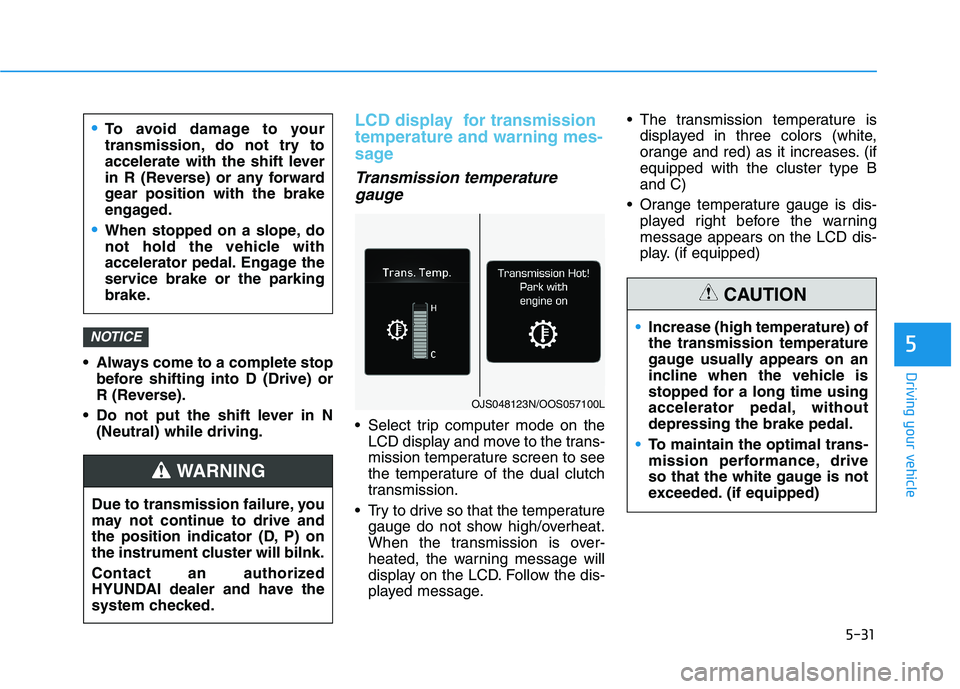
Select trip computer mode on the
LCD display and move to the trans-
mission temperature screen to see
the temperature of the dual clutch
transmission.
Try to drive so that the temperature
gauge do not show high/overheat.
When the transmission is over-
heated, the warning message will
display on the LCD. Follow the dis-
played message. The transmission temperature is
displayed in three colors (white,
orange and red) as it increases. (if
equipped with the cluster type B
and C)
Orange temperature gauge is dis-
played right before the warning
message appears on the LCD dis-
play. (if equipped)
NOTICE
To avoid damage to your
transmission, do not try to
accelerate with the shift lever
in R (Reverse) or any forward
gear position with the brake
engaged.
When stopped on a slope, do
not hold the vehicle with
accelerator pedal. Engage the
service brake or the parking
brake.
Due to transmission failure, you
may not continue to drive and
the position indicator (D, P) on
the instrument cluster will bilnk.
Contact an authorized
HYUNDAI dealer and have the
system checked.
WARNING
OJS048123N/OOS057100L
Increase (high temperature) of
the transmission temperature
gauge usually appears on an
incline when the vehicle is
stopped for a long time using
accelerator pedal, without
depressing the brake pedal.
To maintain the optimal trans-
mission performance, drive
so that the white gauge is not
exceeded. (if equipped)
CAUTION
Page 248 of 482
5-32
Driving your vehicle
DCT warning messages
Steep grade
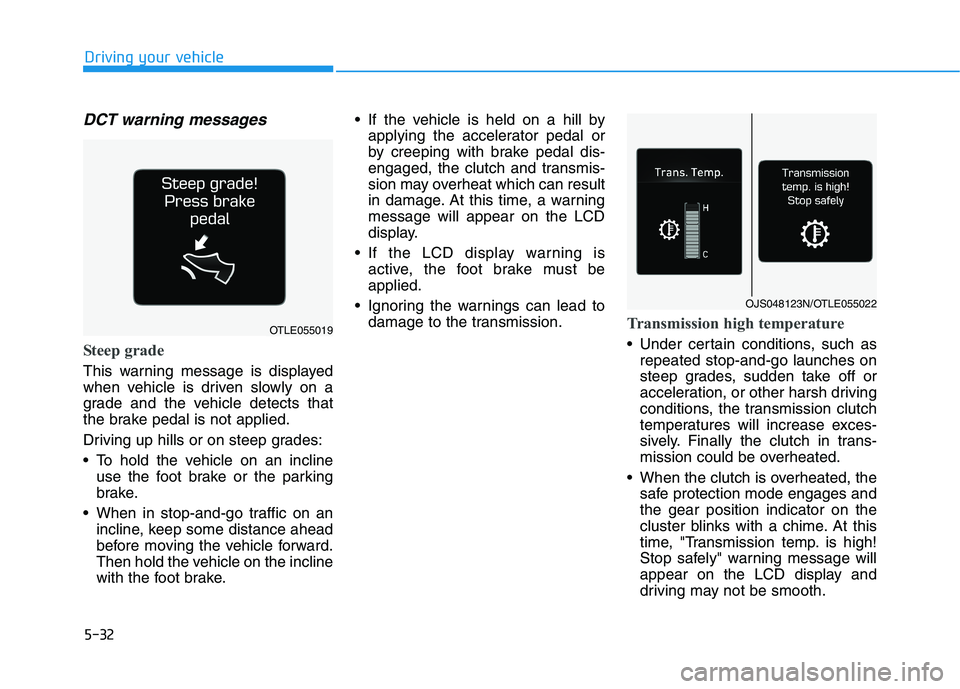
This warning message is displayed
when vehicle is driven slowly on a
grade and the vehicle detects that
the brake pedal is not applied.
Driving up hills or on steep grades:
To hold the vehicle on an incline
use the foot brake or the parking
brake.
When in stop-and-go traffic on an
incline, keep some distance ahead
before moving the vehicle forward.
Then hold the vehicle on the incline
with the foot brake. If the vehicle is held on a hill by
applying the accelerator pedal or
by creeping with brake pedal dis-
engaged, the clutch and transmis-
sion may overheat which can result
in damage. At this time, a warning
message will appear on the LCD
display.
If the LCD display warning is
active, the foot brake must be
applied.
Ignoring the warnings can lead to
damage to the transmission.
Transmission high temperature
Under certain conditions, such as
repeated stop-and-go launches on
steep grades, sudden take off or
acceleration, or other harsh driving
conditions, the transmission clutch
temperatures will increase exces-
sively. Finally the clutch in trans-
mission could be overheated.
When the clutch is overheated, the
safe protection mode engages and
the gear position indicator on the
cluster blinks with a chime. At this
time, "Transmission temp. is high!
Stop safely" warning message will
appear on the LCD display and
driving may not be smooth.
OJS048123N/OTLE055022
OTLE055019