light HYUNDAI VELOSTER TURBO 2016 Owner's Manual
[x] Cancel search | Manufacturer: HYUNDAI, Model Year: 2016, Model line: VELOSTER TURBO, Model: HYUNDAI VELOSTER TURBO 2016Pages: 406, PDF Size: 7.83 MB
Page 83 of 406
Features of your vehicle
6 4
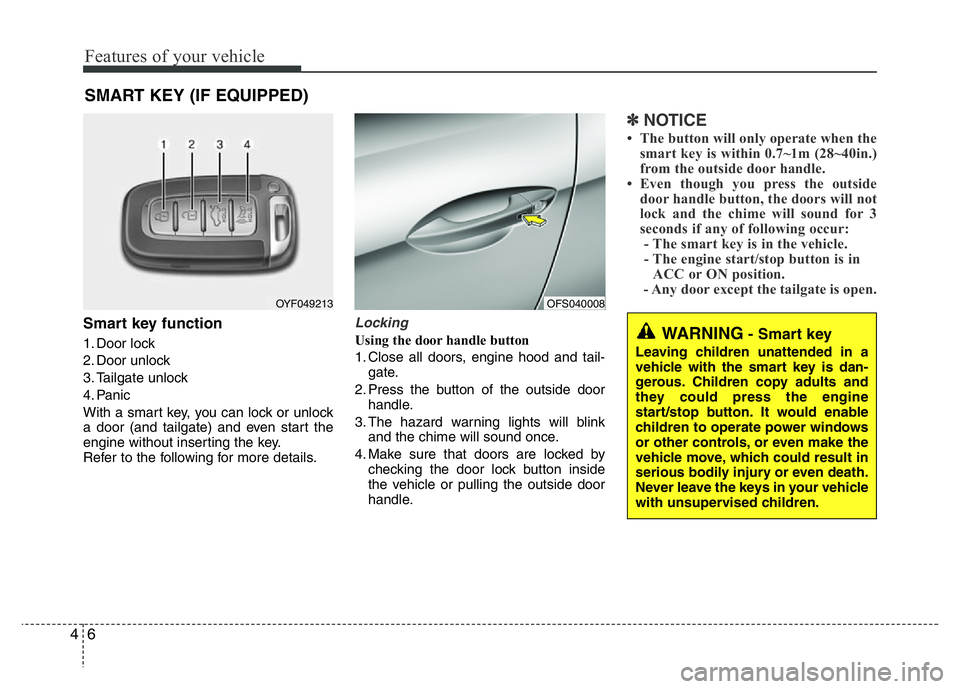
Smart key function
1. Door lock
2. Door unlock
3. Tailgate unlock
4. Panic
With a smart key, you can lock or unlock
a door (and tailgate) and even start the
engine without inserting the key.
Refer to the following for more details.
Locking
Using the door handle button
1. Close all doors, engine hood and tail-
gate.
2. Press the button of the outside door
handle.
3. The hazard warning lights will blink
and the chime will sound once.
4. Make sure that doors are locked by
checking the door lock button inside
the vehicle or pulling the outside door
handle.
✽NOTICE
• The button will only operate when the
smart key is within 0.7~1m (28~40in.)
from the outside door handle.
• Even though you press the outside
door handle button, the doors will not
lock and the chime will sound for 3
seconds if any of following occur:
- The smart key is in the vehicle.
- The engine start/stop button is in
ACC or ON position.
- Any door except the tailgate is open.
SMART KEY (IF EQUIPPED)
OYF049213
WARNING- Smart key
Leaving children unattended in a
vehicle with the smart key is dan-
gerous. Children copy adults and
they could press the engine
start/stop button. It would enable
children to operate power windows
or other controls, or even make the
vehicle move, which could result in
serious bodily injury or even death.
Never leave the keys in your vehicle
with unsupervised children.
OFS040008
Page 84 of 406
47
Features of your vehicle
Using the button on the smart key
1 Close all doors, engine hood and tail-
gate.
2. Press the lock button(1).
3. The hazard warning lights will blink
and the chime will sound once.
4. Make sure that doors are locked by
checking the door lock button inside or
pulling the outside door handle.Unlocking
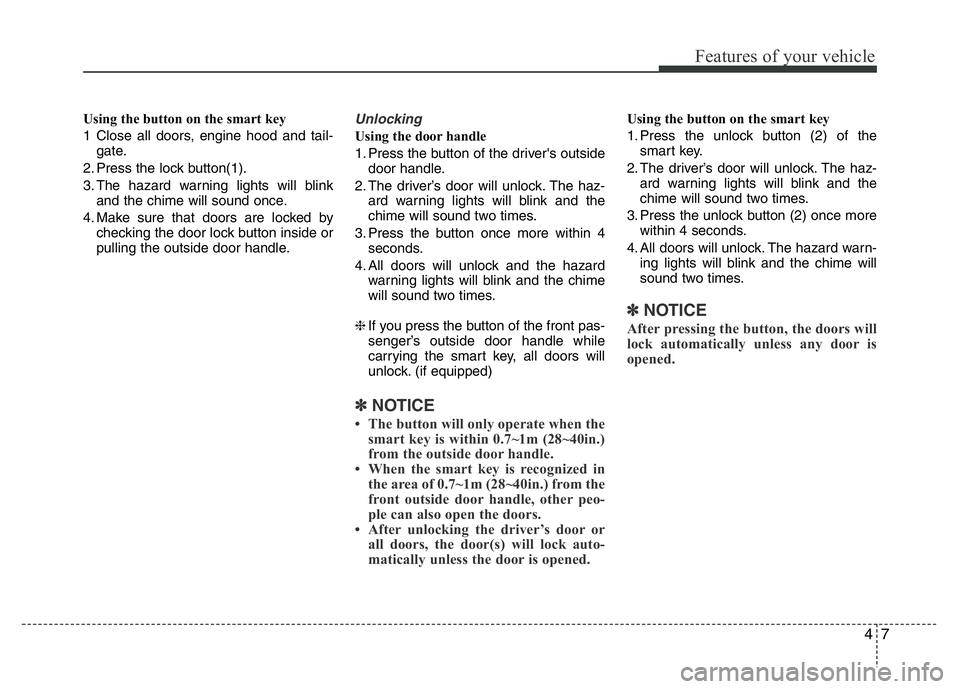
Using the door handle
1. Press the button of the driver's outside
door handle.
2. The driver’s door will unlock. The haz-
ard warning lights will blink and the
chime will sound two times.
3. Press the button once more within 4
seconds.
4. All doors will unlock and the hazard
warning lights will blink and the chime
will sound two times.
❈If you press the button of the front pas-
senger’s outside door handle while
carrying the smart key, all doors will
unlock. (if equipped)
✽NOTICE
• The button will only operate when the
smart key is within 0.7~1m (28~40in.)
from the outside door handle.
• When the smart key is recognized in
the area of 0.7~1m (28~40in.) from the
front outside door handle, other peo-
ple can also open the doors.
• After unlocking the driver’s door or
all doors, the door(s) will lock auto-
matically unless the door is opened.
Using the button on the smart key
1. Press the unlock button (2) of the
smart key.
2. The driver’s door will unlock. The haz-
ard warning lights will blink and the
chime will sound two times.
3. Press the unlock button (2) once more
within 4 seconds.
4. All doors will unlock. The hazard warn-
ing lights will blink and the chime will
sound two times.
✽NOTICE
After pressing the button, the doors will
lock automatically unless any door is
opened.
Page 85 of 406
Features of your vehicle
8 4
Tailgate unlocking
Using the tailgate handle button
1. Carry the smart key.
2. Press the tailgate handle button.
3. When all doors are locked, the hazard
warning lights will blink two times.
Once the tailgate is opened and then
closed, the tailgate will lock automati-
cally.
✽NOTICE
The button will only operate when the
smart key is within 0.7~1m (28~40in.)
from the tailgate handle.
Using the button on the smart key
1. Press the tailgate unlock button(3) for
more than 1 second.
2. When all doors are locked, the hazard
warning lights will blink two times.
Panic
1. Press the panic button(4) for more than
1.5 second.
2. The horn sounds and hazard warning
light flash for about 30 seconds.
✽NOTICE
To stop the horn and lights, press any
button on the smart key.
Start-up
You can start the engine without inserting
the key. For detailed information refer to
the “Engine start/stop button” in section 5.
Loss of the smart key
A maximum of 2 smart keys can be reg-
istered to a single vehicle.
If you happen to lose your smart key, you
will not be able to start the engine. You
should immediately take the vehicle and
remaining key to your authorized
HYUNDAI dealer(tow the vehicle, if nec-
essary) to protect it from potential theft.
Smart key precautions
• The smart key will not work if any of
the following occur:
- The smart key is close to a radio
transmitter such as a radio station or
an airport which can interfere with
normal operation of the smart key.
- The smart key is near a mobile two
way radio system or a cellular phone.
- Another vehicle’s smart key is being
operated close to your vehicle.
When the smart key does not work cor-
rectly, open and close the door with the
mechanical key and contact an author-
ized HYUNDAI dealer.
• If the smart key is in close proximity to
your cell phone or smart phone, the
signal from the smart key could be
blocked by normal operation of your
cell phone or smart phone. This is
especially important when the phone is
active such as making call, receiving
calls, text messaging, and/or send-
ing/receiving emails. Avoid placing the
smart key and your cell phone or smart
phone in the same pants or jacket
pocket and maintain adequate dis-
tance between the two devices.
Page 88 of 406
411
Features of your vehicle
Battery replacement
A smart key battery should last for sever-
al years, but if the smart key is not work-
ing properly, try replacing the battery with
a new one. If you are unsure how to use
your smart key or replace the battery,
contact an authorized HYUNDAI dealer.
✽NOTICE
The circuit inside the smart key can
have a problem if exposed to moisture
or static electricity. If you are unsure
how to use your smart key or replace the
battery, contact an authorized
HYUNDAI dealer.
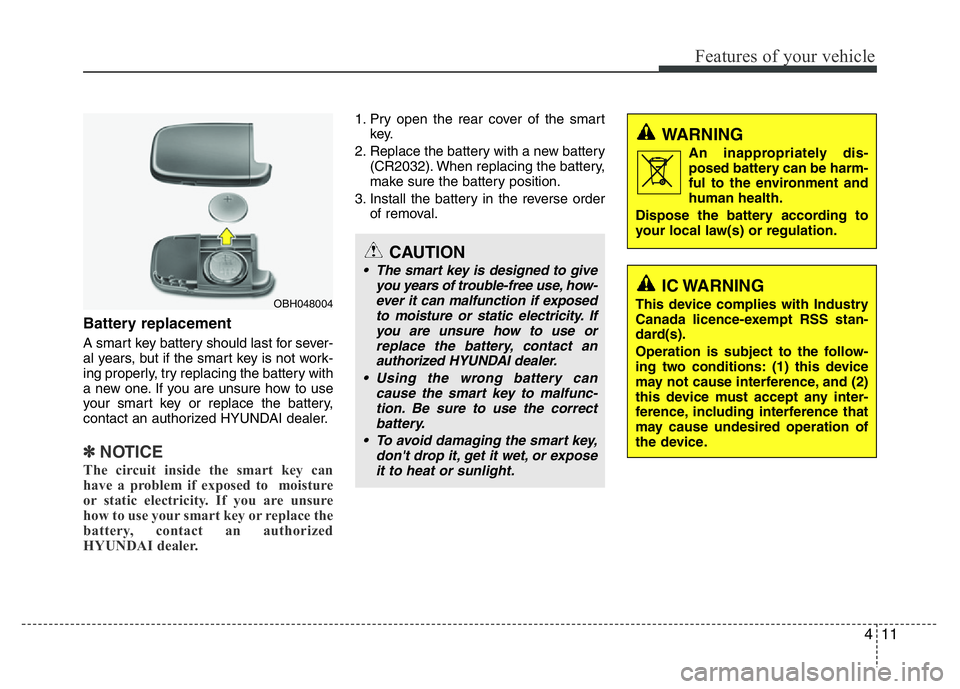
1. Pry open the rear cover of the smart
key.
2. Replace the battery with a new battery
(CR2032). When replacing the battery,
make sure the battery position.
3. Install the battery in the reverse order
of removal.
CAUTION
• The smart key is designed to give
you years of trouble-free use, how-
ever it can malfunction if exposed
to moisture or static electricity. If
you are unsure how to use or
replace the battery, contact an
authorized HYUNDAI dealer.
• Using the wrong battery can
cause the smart key to malfunc-
tion. Be sure to use the correct
battery.
• To avoid damaging the smart key,
don't drop it, get it wet, or expose
it to heat or sunlight.
WARNING
An inappropriately dis-
posed battery can be harm-
ful to the environment and
human health.
Dispose the battery according to
your local law(s) or regulation.
OBH048004
IC WARNING
This device complies with Industry
Canada licence-exempt RSS stan-
dard(s).
Operation is subject to the follow-
ing two conditions: (1) this device
may not cause interference, and (2)
this device must accept any inter-
ference, including interference that
may cause undesired operation of
the device.
Page 89 of 406
Features of your vehicle
12 4
Remote keyless entry system
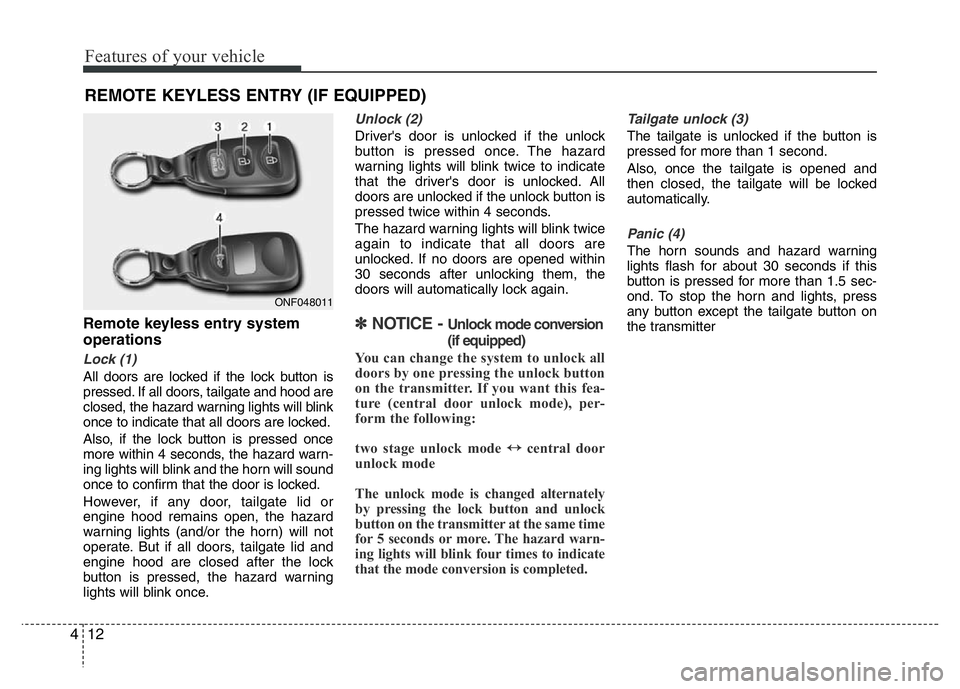
operations
Lock (1)
All doors are locked if the lock button is
pressed. If all doors, tailgate and hood are
closed, the hazard warning lights will blink
once to indicate that all doors are locked.
Also, if the lock button is pressed once
more within 4 seconds, the hazard warn-
ing lights will blink and the horn will sound
once to confirm that the door is locked.
However, if any door, tailgate lid or
engine hood remains open, the hazard
warning lights (and/or the horn) will not
operate. But if all doors, tailgate lid and
engine hood are closed after the lock
button is pressed, the hazard warning
lights will blink once.
Unlock (2)
Driver's door is unlocked if the unlock
button is pressed once. The hazard
warning lights will blink twice to indicate
that the driver's door is unlocked. All
doors are unlocked if the unlock button is
pressed twice within 4 seconds.
The hazard warning lights will blink twice
again to indicate that all doors are
unlocked. If no doors are opened within
30 seconds after unlocking them, the
doors will automatically lock again.
✽NOTICE - Unlock mode conversion
(if equipped)
You can change the system to unlock all
doors by one pressing the unlock button
on the transmitter. If you want this fea-
ture (central door unlock mode), per-
form the following:
two stage unlock mode
↔central door
unlock mode
The unlock mode is changed alternately
by pressing the lock button and unlock
button on the transmitter at the same time
for 5 seconds or more. The hazard warn-
ing lights will blink four times to indicate
that the mode conversion is completed.
Tailgate unlock (3)
The tailgate is unlocked if the button is
pressed for more than 1 second.
Also, once the tailgate is opened and
then closed, the tailgate will be locked
automatically.
Panic (4)
The horn sounds and hazard warning
lights flash for about 30 seconds if this
button is pressed for more than 1.5 sec-
ond. To stop the horn and lights, press
any button except the tailgate button on
the transmitter
REMOTE KEYLESS ENTRY (IF EQUIPPED)
ONF048011
Page 91 of 406

Features of your vehicle
14 4
Battery replacement
The transmitter uses a 3 volt lithium bat-
tery which will normally last for several
years. When replacement is necessary,
use the following procedure.
1. Insert a slim tool into the slot and gently
pry open the transmitter center cover.
2. Replace the battery with a new battery
(CR2032). When replacing the battery,
make sure the battery position.
3. Install the battery in the reverse order
of removal.
For replacement transmitters, see an
authorized HYUNDAI dealer for transmit-
ter reprogramming.
CAUTION
• The transmitter is designed to
give you years of trouble-free
use, however it can malfunction if
exposed to moisture or static
electricity. If you are unsure how
to use your transmitter or replace
the battery, contact an authorized
HYUNDAI dealer.
• Using the wrong battery can cause
the transmitter to malfunction. Be
sure to use the correct battery.
• To avoid damaging the transmit-
ter, don't drop it, get it wet, or
expose it to heat or sunlight.WARNING
An inappropriately dis-
posed battery can be harm-
ful to the environment and
human health.
Dispose the battery according to
your local law(s) or regulation.
ONF048120IC WARNING
This device complies with Industry
Canada licence-exempt RSS stan-
dard(s).
Operation is subject to the follow-
ing two conditions: (1) this device
may not cause interference, and (2)
this device must accept any inter-
ference, including interference that
may cause undesired operation of
the device.
Page 92 of 406
415
Features of your vehicle
THEFT-ALARM SYSTEM
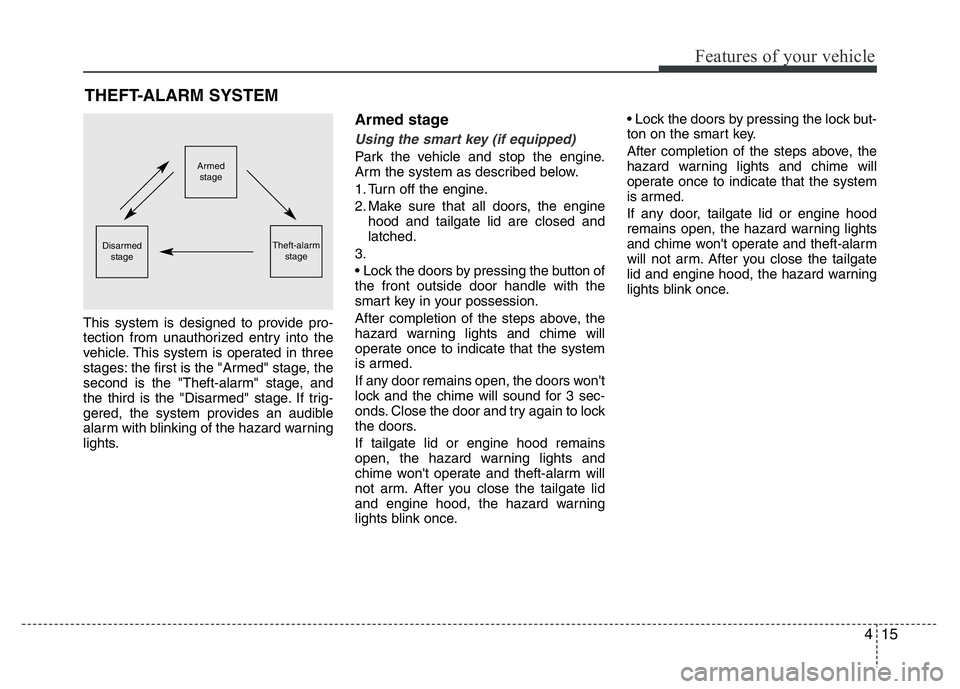
This system is designed to provide pro-
tection from unauthorized entry into the
vehicle. This system is operated in three
stages: the first is the "Armed" stage, the
second is the "Theft-alarm" stage, and
the third is the "Disarmed" stage. If trig-
gered, the system provides an audible
alarm with blinking of the hazard warning
lights.
Armed stage
Using the smart key (if equipped)
Park the vehicle and stop the engine.
Arm the system as described below.
1. Turn off the engine.
2. Make sure that all doors, the engine
hood and tailgate lid are closed and
latched.
3.
• Lock the doors by pressing the button of
the front outside door handle with the
smart key in your possession.
After completion of the steps above, the
hazard warning lights and chime will
operate once to indicate that the system
is armed.
If any door remains open, the doors won't
lock and the chime will sound for 3 sec-
onds. Close the door and try again to lock
the doors.
If tailgate lid or engine hood remains
open, the hazard warning lights and
chime won't operate and theft-alarm will
not arm. After you close the tailgate lid
and engine hood, the hazard warning
lights blink once.• Lock the doors by pressing the lock but-
ton on the smart key.
After completion of the steps above, the
hazard warning lights and chime will
operate once to indicate that the system
is armed.
If any door, tailgate lid or engine hood
remains open, the hazard warning lights
and chime won't operate and theft-alarm
will not arm. After you close the tailgate
lid and engine hood, the hazard warning
lights blink once.Armed
stage
Theft-alarm
stageDisarmed
stage
Page 93 of 406
Features of your vehicle
16 4
Using the transmitter (if equipped)
Park the vehicle and stop the engine.
Arm the system as described below.
1. Turn off the engine and remove the
ignition key from the ignition switch.
2. Make sure that all doors, the engine
hood and tailgate lid are closed and
latched.
3. Lock the doors by pressing the lock
button on the transmitter.
After completion of the steps above, the
hazard warning lights will blink once to
indicate that the system is armed. If the
lock button is pressed once more within 4
seconds, hazard warning lights blink and
the horn sounds once to confirm that the
system is armed.
If any door, tailgate lid or engine hood
remains open, the hazard warning lights
(or/and horn) won't operate and theft-
alarm will not arm. After you close all
doors, tailgate lid and engine hood, the
hazard warning lights blink once.
Using the mechanical key
Park the vehicle and stop the engine.
Arm the system as described below.
1. Turn off the engine and remove the key
from the ignition switch(if equipped).
2. Make sure that all doors, the engine
hood and tailgate lid are closed and
latched.
3. Lock the doors by inserting the key into
the key hole on the front outside door
handle and turning the key toward the
front of the vehicle.
If any door, tailgate lid or engine hood
remains open, the theft-alarm will not
arm.
✽NOTICE
If you lock or unlock the doors by using
the mechanical key, the hazard warning
light won't operate.
Do not arm the system until all pas-
sengers have left the vehicle. If the
system is armed while a passenger(s)
remains in the vehicle, the alarm may
be activated when the remaining pas-
senger(s) leave the vehicle. If any
door (or tailgate) or engine hood is
opened within 30 seconds after the
system enters the armed stage, the
system is disarmed to prevent an
unnecessary alarm.
Page 94 of 406
417
Features of your vehicle
Theft-alarm stage
The alarm will be activated if any of the
following occurs while the system is
armed.
• A door is opened without using the
transmitter (or smart key or mechani-
cal key).
• The tailgate is opened without using
the transmitter (or smart key).
• The engine hood is opened.
The horn will sound and the hazard
warning lights will blink continuously for
approximately 30 seconds. The alarm will
repeat once more unless the system is
disarmed. To turn off the system, unlock
the doors with the mechanical key or
transmitter or smart key.
Opening the tailgate with the
alarm armed (if equipped)
When the alarm is armed, the alarm will
not sound if the tailgate lid is opened with
the transmitter (or smart key).
Once the tailgate is opened and then
closed, the tailgate will be locked auto-
matically and the system will be armed
again.
Also, if any of the doors or hood is
opened while the tailgate lid is open and
the alarm is armed, the alarm will sound.
Disarmed stage
Using the smart key (if equipped)
The system will be disarmed when the
doors are unlocked by pressing the
unlock button on the smart key or press-
ing the lock/unlock button of the front out-
side door handle with the smart key in
your possession.
After unlocking the doors, the hazard
warning lights and chime will operate
twice to indicate that the system is dis-
armed.
After unlocking the doors, if any door is
not opened within 30 seconds, the sys-
tem will be rearmed.
Using the transmitter (if equipped)
The system will be disarmed when the
doors are unlocked by pressing the
unlock button on the transmitter.
After unlocking the doors, the hazard
warning lights will blink twice to indicate
that the system is disarmed.
After unlocking the doors, if any door is
not opened within 30 seconds, the sys-
tem will be rearmed.
Page 95 of 406
Features of your vehicle
18 4
Using the mechanical key
The system will be disarmed when the
doors are unlocked with the mechanical
key.
✽NOTICE
If you lock or unlock the doors by using
the mechanical key, the hazard warning
light and chime sound won't operate.
✽NOTICE
• Avoid trying to start the engine while
the alarm is activated. The vehicle
starting motor is disabled during the
theft-alarm stage.
If the system is not disarmed with the
transmitter, insert the key into the
ignition switch, turn the ignition
switch to the ON position and wait for
30 seconds. Then the system will be
disarmed.
• If you lose your keys, consult your
authorized HYUNDAI dealer.CAUTION
Do not change, alter or adjust the
theft-alarm system because it could
cause the theft-alarm system to
malfunction and should only be
serviced by an authorized HYUNDAI
dealer.
Malfunctions caused by improper
alterations, adjustments or modifi-
cations to the theft-alarm system
are not covered by your vehicle
manufacturer warranty.