tow HYUNDAI VELOSTER TURBO 2016 Owners Manual
[x] Cancel search | Manufacturer: HYUNDAI, Model Year: 2016, Model line: VELOSTER TURBO, Model: HYUNDAI VELOSTER TURBO 2016Pages: 406, PDF Size: 7.83 MB
Page 23 of 406
37
Safety features of your vehicle
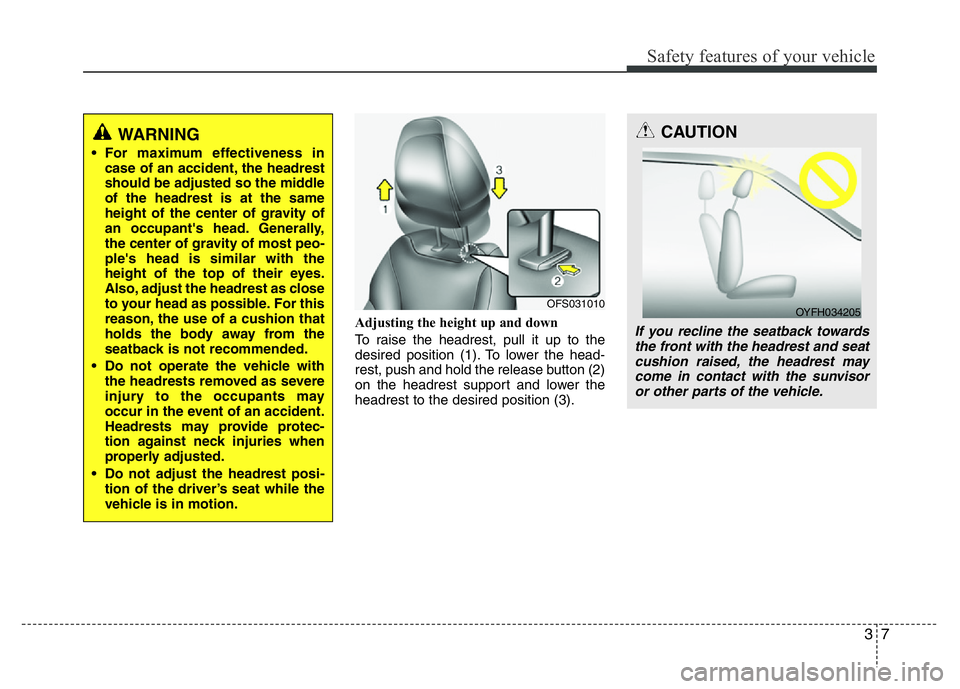
Adjusting the height up and down
To raise the headrest, pull it up to the
desired position (1). To lower the head-
rest, push and hold the release button (2)
on the headrest support and lower the
headrest to the desired position (3).
OFS031010
WARNING
• For maximum effectiveness in
case of an accident, the headrest
should be adjusted so the middle
of the headrest is at the same
height of the center of gravity of
an occupant's head. Generally,
the center of gravity of most peo-
ple's head is similar with the
height of the top of their eyes.
Also, adjust the headrest as close
to your head as possible. For this
reason, the use of a cushion that
holds the body away from the
seatback is not recommended.
• Do not operate the vehicle with
the headrests removed as severe
injury to the occupants may
occur in the event of an accident.
Headrests may provide protec-
tion against neck injuries when
properly adjusted.
• Do not adjust the headrest posi-
tion of the driver’s seat while the
vehicle is in motion.
CAUTION
If you recline the seatback towards
the front with the headrest and seat
cushion raised, the headrest may
come in contact with the sunvisor
or other parts of the vehicle.
OYFH034205
Page 46 of 406
Safety features of your vehicle
30 3
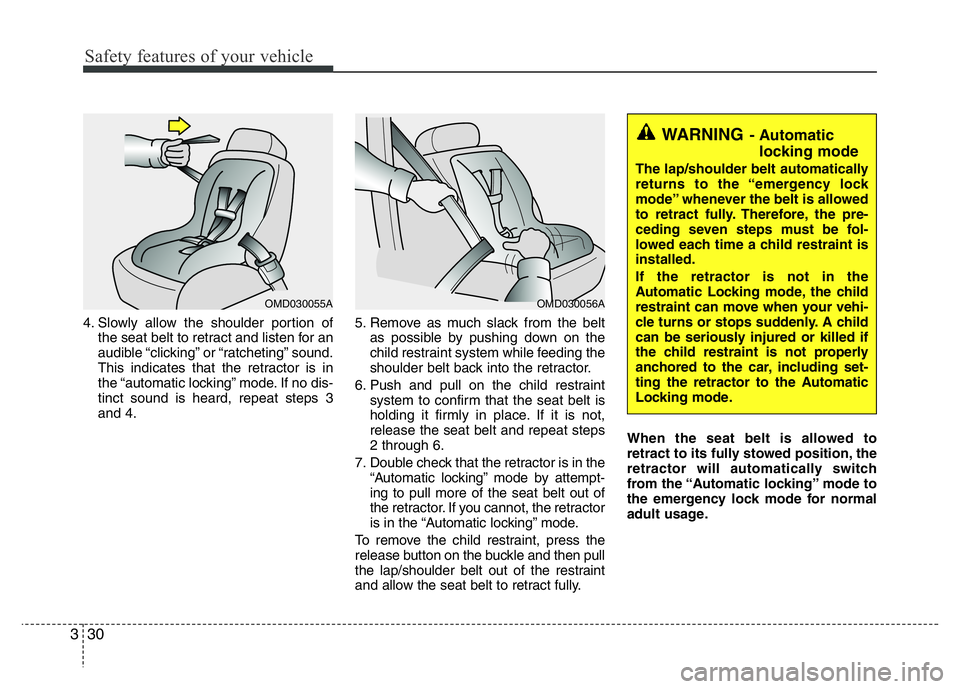
4. Slowly allow the shoulder portion of
the seat belt to retract and listen for an
audible “clicking” or “ratcheting” sound.
This indicates that the retractor is in
the “automatic locking” mode. If no dis-
tinct sound is heard, repeat steps 3
and 4.5. Remove as much slack from the belt
as possible by pushing down on the
child restraint system while feeding the
shoulder belt back into the retractor.
6. Push and pull on the child restraint
system to confirm that the seat belt is
holding it firmly in place. If it is not,
release the seat belt and repeat steps
2 through 6.
7. Double check that the retractor is in the
“Automatic locking” mode by attempt-
ing to pull more of the seat belt out of
the retractor. If you cannot, the retractor
is in the “Automatic locking” mode.
To remove the child restraint, press the
release button on the buckle and then pull
the lap/shoulder belt out of the restraint
and allow the seat belt to retract fully.When the seat belt is allowed to
retract to its fully stowed position, the
retractor will automatically switch
from the “Automatic locking” mode to
the emergency lock mode for normal
adult usage.
OMD030056A
WARNING- Automatic
locking mode
The lap/shoulder belt automatically
returns to the “emergency lock
mode” whenever the belt is allowed
to retract fully. Therefore, the pre-
ceding seven steps must be fol-
lowed each time a child restraint is
installed.
If the retractor is not in the
Automatic Locking mode, the child
restraint can move when your vehi-
cle turns or stops suddenly. A child
can be seriously injured or killed if
the child restraint is not properly
anchored to the car, including set-
ting the retractor to the Automatic
Locking mode.
OMD030055A
Page 58 of 406
Safety features of your vehicle
42 3
Front passenger seat adult occupants
who are properly seated and wearing the
seat belt properly, should not cause the
passenger air bag to be automatically
turned OFF. For small adults it may be
turned OFF, however, if the occupant
does not sit in the seat properly (for
example, by not sitting upright, by sitting
on the edge of the seat, or by otherwise
being out of position), this could cause
the sensor to turn the air bag OFF.
You will find the PASSENGER AIR BAG
"OFF" indicator on the center facia panel.
This system detects the conditions 1~4 in
the following table and activates or deacti-
vates the front passenger air bag based
on these conditions.Always be sure that you and all vehicle
occupants are seated and restrained
properly (sitting upright with the seat in
an upright position, centered on the seat
cushion, with the person's legs comfort-
ably extended, feet on the floor, and
wearing the safety belt properly) for the
most effective protection by the air bag
and the safety belt.• The OCS may not function properly if
the passenger takes actions which can
affect the classification system. These
include:
(1) Failing to sit in an upright position.
(2) Leaning against the door or center
console.
(3) Sitting towards the sides or the
front of the seat.
(4) Putting legs on the dashboard or
resting them on other locations.
(5) Improperly wearing the safety belt.
(6) Reclining the seat back.
(7) Unauthorized replacement of seat
cover.
(8) Covering seat with blanket
Page 60 of 406
Safety features of your vehicle
44 3
1KMN3663
1KMN3664
1KMN3665
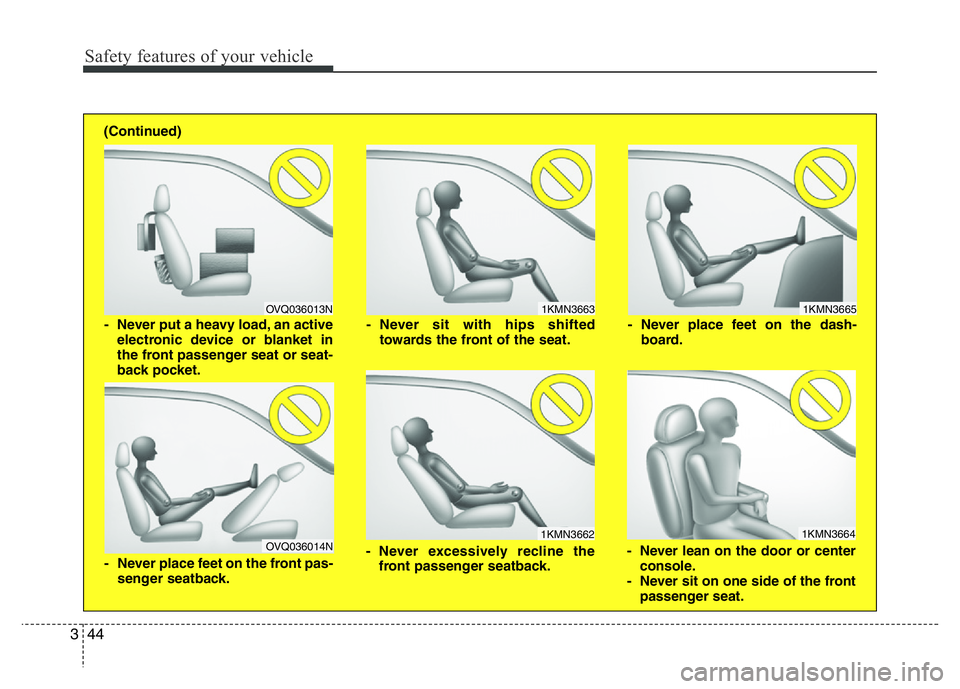
- Never sit with hips shifted
towards the front of the seat.
- Never lean on the door or center
console.
- Never sit on one side of the front
passenger seat. - Never place feet on the dash-
board.
OVQ036013N
1KMN3662
- Never put a heavy load, an active
electronic device or blanket in
the front passenger seat or seat-
back pocket.
- Never excessively recline the
front passenger seatback.
OVQ036014N
- Never place feet on the front pas-
senger seatback. (Continued)
Page 75 of 406
359
Safety features of your vehicle
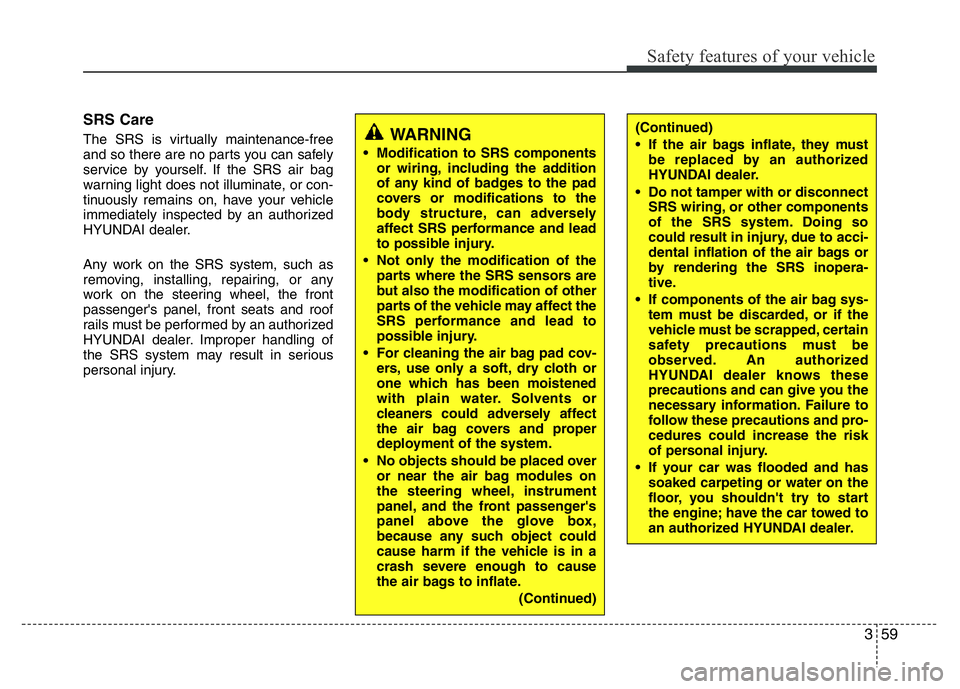
SRS Care
The SRS is virtually maintenance-free
and so there are no parts you can safely
service by yourself. If the SRS air bag
warning light does not illuminate, or con-
tinuously remains on, have your vehicle
immediately inspected by an authorized
HYUNDAI dealer.
Any work on the SRS system, such as
removing, installing, repairing, or any
work on the steering wheel, the front
passenger's panel, front seats and roof
rails must be performed by an authorized
HYUNDAI dealer. Improper handling of
the SRS system may result in serious
personal injury.WARNING
• Modification to SRS components
or wiring, including the addition
of any kind of badges to the pad
covers or modifications to the
body structure, can adversely
affect SRS performance and lead
to possible injury.
• Not only the modification of the
parts where the SRS sensors are
but also the modification of other
parts of the vehicle may affect the
SRS performance and lead to
possible injury.
• For cleaning the air bag pad cov-
ers, use only a soft, dry cloth or
one which has been moistened
with plain water. Solvents or
cleaners could adversely affect
the air bag covers and proper
deployment of the system.
• No objects should be placed over
or near the air bag modules on
the steering wheel, instrument
panel, and the front passenger's
panel above the glove box,
because any such object could
cause harm if the vehicle is in a
crash severe enough to cause
the air bags to inflate.
(Continued)
(Continued)
• If the air bags inflate, they must
be replaced by an authorized
HYUNDAI dealer.
• Do not tamper with or disconnect
SRS wiring, or other components
of the SRS system. Doing so
could result in injury, due to acci-
dental inflation of the air bags or
by rendering the SRS inopera-
tive.
• If components of the air bag sys-
tem must be discarded, or if the
vehicle must be scrapped, certain
safety precautions must be
observed. An authorized
HYUNDAI dealer knows these
precautions and can give you the
necessary information. Failure to
follow these precautions and pro-
cedures could increase the risk
of personal injury.
• If your car was flooded and has
soaked carpeting or water on the
floor, you shouldn't try to start
the engine; have the car towed to
an authorized HYUNDAI dealer.
Page 85 of 406
Features of your vehicle
8 4
Tailgate unlocking
Using the tailgate handle button
1. Carry the smart key.
2. Press the tailgate handle button.
3. When all doors are locked, the hazard
warning lights will blink two times.
Once the tailgate is opened and then
closed, the tailgate will lock automati-
cally.
✽NOTICE
The button will only operate when the
smart key is within 0.7~1m (28~40in.)
from the tailgate handle.
Using the button on the smart key
1. Press the tailgate unlock button(3) for
more than 1 second.
2. When all doors are locked, the hazard
warning lights will blink two times.
Panic
1. Press the panic button(4) for more than
1.5 second.
2. The horn sounds and hazard warning
light flash for about 30 seconds.
✽NOTICE
To stop the horn and lights, press any
button on the smart key.
Start-up
You can start the engine without inserting
the key. For detailed information refer to
the “Engine start/stop button” in section 5.
Loss of the smart key
A maximum of 2 smart keys can be reg-
istered to a single vehicle.
If you happen to lose your smart key, you
will not be able to start the engine. You
should immediately take the vehicle and
remaining key to your authorized
HYUNDAI dealer(tow the vehicle, if nec-
essary) to protect it from potential theft.
Smart key precautions
• The smart key will not work if any of
the following occur:
- The smart key is close to a radio
transmitter such as a radio station or
an airport which can interfere with
normal operation of the smart key.
- The smart key is near a mobile two
way radio system or a cellular phone.
- Another vehicle’s smart key is being
operated close to your vehicle.
When the smart key does not work cor-
rectly, open and close the door with the
mechanical key and contact an author-
ized HYUNDAI dealer.
• If the smart key is in close proximity to
your cell phone or smart phone, the
signal from the smart key could be
blocked by normal operation of your
cell phone or smart phone. This is
especially important when the phone is
active such as making call, receiving
calls, text messaging, and/or send-
ing/receiving emails. Avoid placing the
smart key and your cell phone or smart
phone in the same pants or jacket
pocket and maintain adequate dis-
tance between the two devices.
Page 93 of 406
Features of your vehicle
16 4
Using the transmitter (if equipped)
Park the vehicle and stop the engine.
Arm the system as described below.
1. Turn off the engine and remove the
ignition key from the ignition switch.
2. Make sure that all doors, the engine
hood and tailgate lid are closed and
latched.
3. Lock the doors by pressing the lock
button on the transmitter.
After completion of the steps above, the
hazard warning lights will blink once to
indicate that the system is armed. If the
lock button is pressed once more within 4
seconds, hazard warning lights blink and
the horn sounds once to confirm that the
system is armed.
If any door, tailgate lid or engine hood
remains open, the hazard warning lights
(or/and horn) won't operate and theft-
alarm will not arm. After you close all
doors, tailgate lid and engine hood, the
hazard warning lights blink once.
Using the mechanical key
Park the vehicle and stop the engine.
Arm the system as described below.
1. Turn off the engine and remove the key
from the ignition switch(if equipped).
2. Make sure that all doors, the engine
hood and tailgate lid are closed and
latched.
3. Lock the doors by inserting the key into
the key hole on the front outside door
handle and turning the key toward the
front of the vehicle.
If any door, tailgate lid or engine hood
remains open, the theft-alarm will not
arm.
✽NOTICE
If you lock or unlock the doors by using
the mechanical key, the hazard warning
light won't operate.
Do not arm the system until all pas-
sengers have left the vehicle. If the
system is armed while a passenger(s)
remains in the vehicle, the alarm may
be activated when the remaining pas-
senger(s) leave the vehicle. If any
door (or tailgate) or engine hood is
opened within 30 seconds after the
system enters the armed stage, the
system is disarmed to prevent an
unnecessary alarm.
Page 96 of 406

419
Features of your vehicle
Operating door locks from out-
side the vehicle
• Turn the key toward the rear of the
vehicle to unlock and toward the front
of the vehicle to lock.
• If you lock the door with a key, all vehi-
cle doors will lock automatically.
(if equipped)
• From the driver’s door, turn the key
toward the rear of the vehicle once to
unlock the driver’s door and once more
within 4 seconds to unlock all doors.
(if equipped)• Doors can also be locked and
unlocked with the transmitter (or smart
key).
• Once the doors are unlocked, they may
be opened by pulling the door handle.
• When closing the door, push the door
by hand. Make sure that the doors are
closed securely.
✽NOTICE
• In cold and wet climates, door locks
and door mechanisms may not work
properly due to freezing conditions.
• If the door is locked/unlocked multi-
ple times in rapid succession with
either the vehicle key or door lock
switch, the system may stop operating
temporarily in order to protect the
circuit and prevent damage to system
components.
✽NOTICE - Unlock mode conversion
(if equipped)
You can change the system to unlock all
doors by turning the key to the right once.
If you want this feature (central door
unlock mode), perform the following:
two stage unlock mode
↔central door
unlock mode
The unlock mode is changed alternately
by pressing the lock button and unlock
button on the transmitter at the same time
for 4 seconds or more. The hazard warn-
ing lights will blink four times to indicate
that the mode conversion is completed.
DOOR LOCKS
WARNING
• If you don't close the door
securely, the door may open
again.
• Be careful that someone's body
and hands are not trapped when
closing the door.
OFS040009
UnlockLock
Page 120 of 406
443
Features of your vehicle
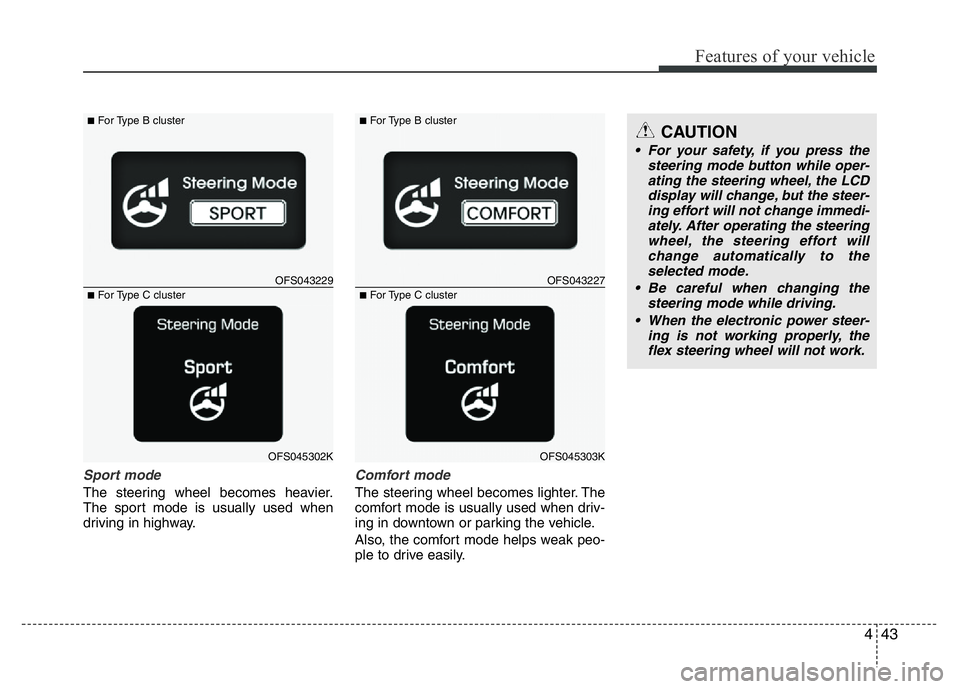
Sport mode
The steering wheel becomes heavier.
The sport mode is usually used when
driving in highway.
Comfort mode
The steering wheel becomes lighter. The
comfort mode is usually used when driv-
ing in downtown or parking the vehicle.
Also, the comfort mode helps weak peo-
ple to drive easily.
OFS043229
■For Type B cluster
OFS045302K
■For Type C clusterOFS043227
■For Type B cluster
OFS045303K
■For Type C cluster
CAUTION
• For your safety, if you press the
steering mode button while oper-
ating the steering wheel, the LCD
display will change, but the steer-
ing effort will not change immedi-
ately. After operating the steering
wheel, the steering effort will
change automatically to the
selected mode.
• Be careful when changing the
steering mode while driving.
• When the electronic power steer-
ing is not working properly, the
flex steering wheel will not work.
Page 122 of 406
445
Features of your vehicle
MIRRORS
Inside rearview mirror
Adjust the rearview mirror so that the
center view through the rear window is
seen. Make this adjustment before you
start driving.
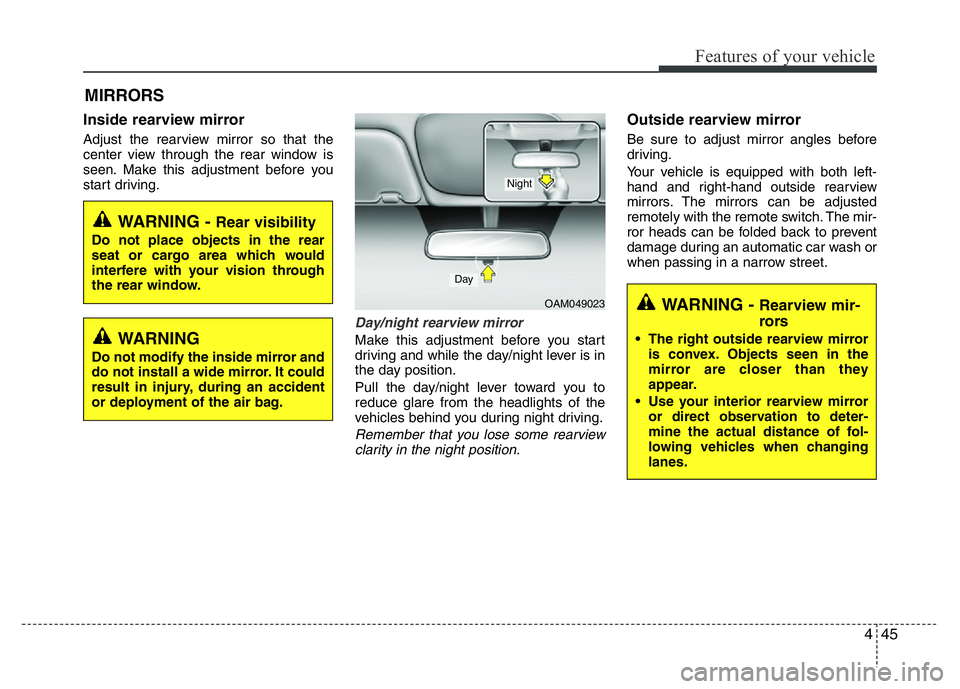
Day/night rearview mirror
Make this adjustment before you start
driving and while the day/night lever is in
the day position.
Pull the day/night lever toward you to
reduce glare from the headlights of the
vehicles behind you during night driving.
Remember that you lose some rearview
clarity in the night position.
Outside rearview mirror
Be sure to adjust mirror angles before
driving.
Your vehicle is equipped with both left-
hand and right-hand outside rearview
mirrors. The mirrors can be adjusted
remotely with the remote switch. The mir-
ror heads can be folded back to prevent
damage during an automatic car wash or
when passing in a narrow street.
WARNING - Rear visibility
Do not place objects in the rear
seat or cargo area which would
interfere with your vision through
the rear window.
WARNING
Do not modify the inside mirror and
do not install a wide mirror. It could
result in injury, during an accident
or deployment of the air bag.
OAM049023
Day
Night
WARNING - Rearview mir-
rors
• The right outside rearview mirror
is convex. Objects seen in the
mirror are closer than they
appear.
• Use your interior rearview mirror
or direct observation to deter-
mine the actual distance of fol-
lowing vehicles when changing
lanes.