light HYUNDAI XG350 2005 Owner's Guide
[x] Cancel search | Manufacturer: HYUNDAI, Model Year: 2005, Model line: XG350, Model: HYUNDAI XG350 2005Pages: 247, PDF Size: 7.28 MB
Page 75 of 247
1
FEATURES OF YOUR HYUNDAI
63
!
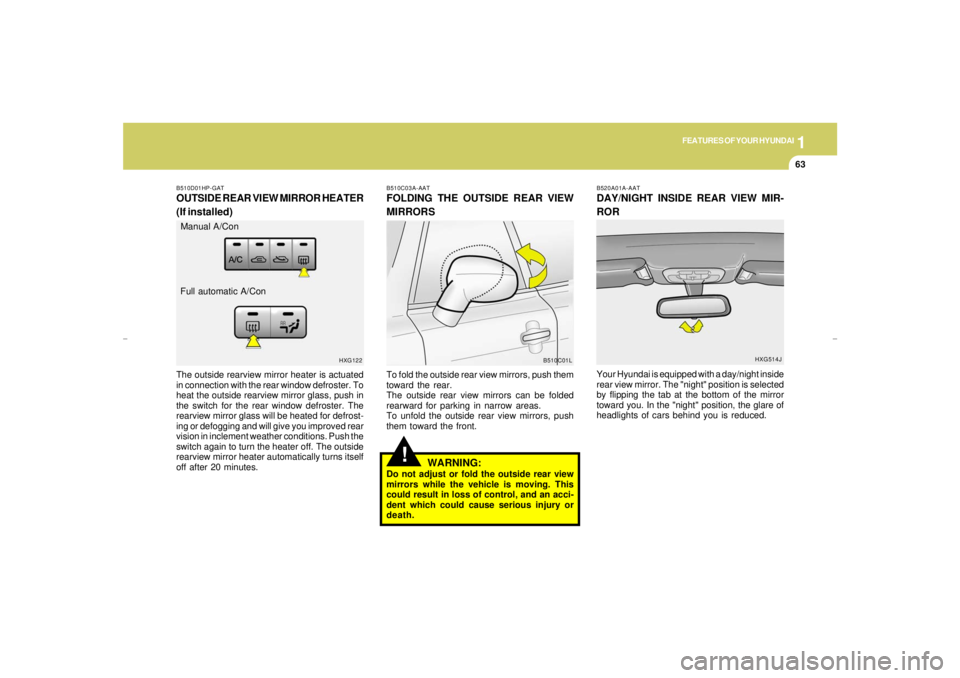
B510C03A-AATFOLDING THE OUTSIDE REAR VIEW
MIRRORSTo fold the outside rear view mirrors, push them
toward the rear.
The outside rear view mirrors can be folded
rearward for parking in narrow areas.
To unfold the outside rear view mirrors, push
them toward the front.
WARNING:
Do not adjust or fold the outside rear view
mirrors while the vehicle is moving. This
could result in loss of control, and an acci-
dent which could cause serious injury or
death.
B510D01HP-GATOUTSIDE REAR VIEW MIRROR HEATER
(If installed)The outside rearview mirror heater is actuated
in connection with the rear window defroster. To
heat the outside rearview mirror glass, push in
the switch for the rear window defroster. The
rearview mirror glass will be heated for defrost-
ing or defogging and will give you improved rear
vision in inclement weather conditions. Push the
switch again to turn the heater off. The outside
rearview mirror heater automatically turns itself
off after 20 minutes.
B510C01L HXG122
Manual A/Con
Full automatic A/Con
B520A01A-AATDAY/NIGHT INSIDE REAR VIEW MIR-
RORYour Hyundai is equipped with a day/night inside
rear view mirror. The "night" position is selected
by flipping the tab at the bottom of the mirror
toward you. In the "night" position, the glare of
headlights of cars behind you is reduced.
HXG514J
xgflhma-1.p656/16/04, 3:03 PM 63
Page 76 of 247
1FEATURES OF YOUR HYUNDAI64
HOMELINK MIRROR
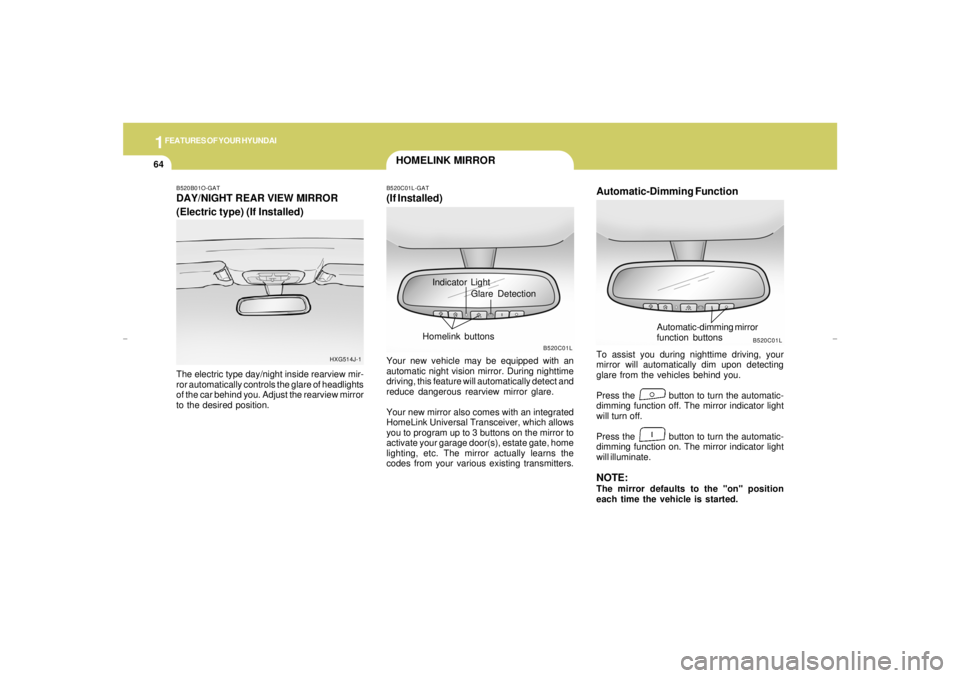
Automatic-Dimming FunctionTo assist you during nighttime driving, your
mirror will automatically dim upon detecting
glare from the vehicles behind you.
Press the button to turn the automatic-
dimming function off. The mirror indicator light
will turn off.
Press the button to turn the automatic-
dimming function on. The mirror indicator light
will illuminate.NOTE:The mirror defaults to the "on" position
each time the vehicle is started.
B520C01L
Automatic-dimming mirror
function buttons
B520B01O-GATDAY/NIGHT REAR VIEW MIRROR
(Electric type) (If Installed)The electric type day/night inside rearview mir-
ror automatically controls the glare of headlights
of the car behind you. Adjust the rearview mirror
to the desired position.
HXG514J-1
Indicator Light
B520C01L-GAT(If Installed)Your new vehicle may be equipped with an
automatic night vision mirror. During nighttime
driving, this feature will automatically detect and
reduce dangerous rearview mirror glare.
Your new mirror also comes with an integrated
HomeLink Universal Transceiver, which allows
you to program up to 3 buttons on the mirror to
activate your garage door(s), estate gate, home
lighting, etc. The mirror actually learns the
codes from your various existing transmitters.
B520C01L
Glare Detection
Homelink buttons
xgflhma-1.p656/16/04, 3:03 PM 64
Page 77 of 247
1
FEATURES OF YOUR HYUNDAI
65
!!
HOMELINK PROGRAMMING
CAUTION:o Make sure people and/or objects are out
of the way of any garage doors or gates
you may be operating during the pro-
gramming procedures.
o Keep original transmitters for potential
future programming needs, or in case
you sell the vehicle.
o In the event you do sell your vehicle, it's
recommended you erase your pro-
grammed HomeLink mirror buttons.
WARNING:
Do not use HomeLink with any garage door
opener that lacks the safety stop and re-
verse feature as required by federal safety
standards (includes garage doors manu-
factured before April 1, 1982), as these
doors can increase the risk of serious injury
or death. Call 1-800-355-3515 or visit
www.homelink.com for more information.
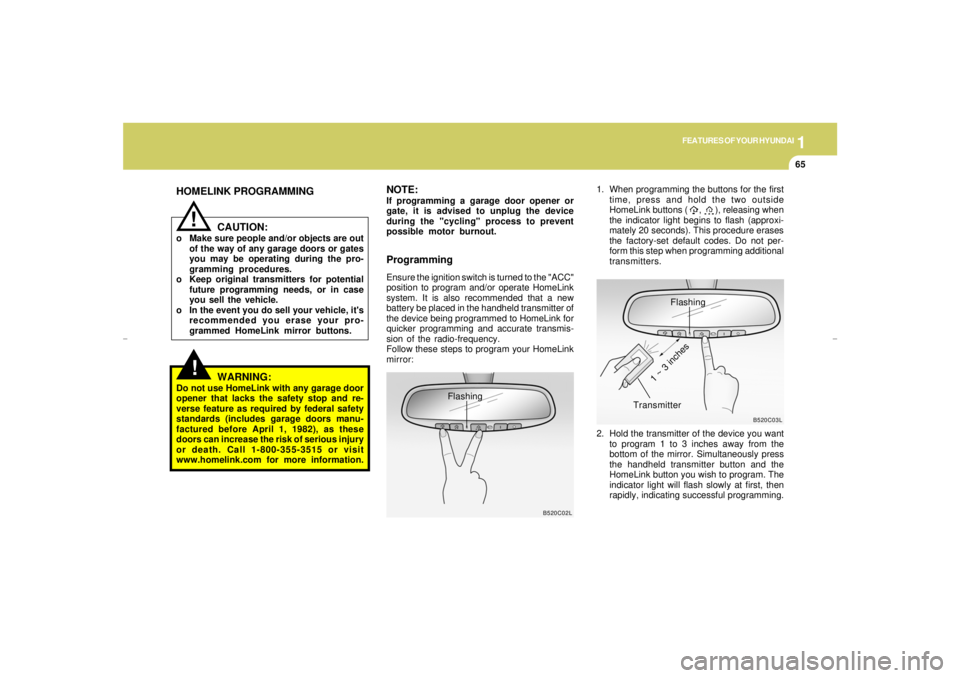
ProgrammingEnsure the ignition switch is turned to the "ACC"
position to program and/or operate HomeLink
system. It is also recommended that a new
battery be placed in the handheld transmitter of
the device being programmed to HomeLink for
quicker programming and accurate transmis-
sion of the radio-frequency.
Follow these steps to program your HomeLink
mirror:1. When programming the buttons for the first
time, press and hold the two outside
HomeLink buttons ( , ), releasing when
the indicator light begins to flash (approxi-
mately 20 seconds). This procedure erases
the factory-set default codes. Do not per-
form this step when programming additional
transmitters.
B520C02L
Flashing
NOTE:If programming a garage door opener or
gate, it is advised to unplug the device
during the "cycling" process to prevent
possible motor burnout.
Flashing
2. Hold the transmitter of the device you want
to program 1 to 3 inches away from the
bottom of the mirror. Simultaneously press
the handheld transmitter button and the
HomeLink button you wish to program. The
indicator light will flash slowly at first, then
rapidly, indicating successful programming.
B520C03L
Transmitter
1 ~ 3 inches
xgflhma-1.p656/16/04, 3:03 PM 65
Page 78 of 247
1FEATURES OF YOUR HYUNDAI66
Operating HomeLinkSimply press the appropriate HomeLink button
to activate the trained product (garage door,
security system, entry door lock, estate gate,
lighting, etc.). The original handheld transmit-
ters may also be used at any time.
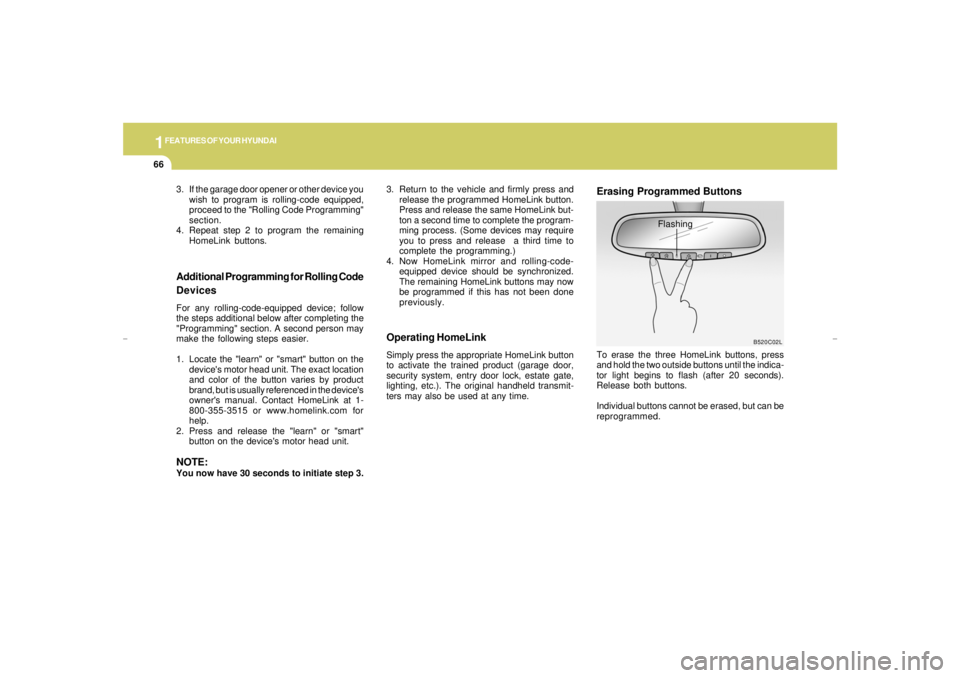
Erasing Programmed ButtonsTo erase the three HomeLink buttons, press
and hold the two outside buttons until the indica-
tor light begins to flash (after 20 seconds).
Release both buttons.
Individual buttons cannot be erased, but can be
reprogrammed.
Additional Programming for Rolling Code
DevicesFor any rolling-code-equipped device; follow
the steps additional below after completing the
"Programming" section. A second person may
make the following steps easier.
1. Locate the "learn" or "smart" button on the
device's motor head unit. The exact location
and color of the button varies by product
brand, but is usually referenced in the device's
owner's manual. Contact HomeLink at 1-
800-355-3515 or www.homelink.com for
help.
2. Press and release the "learn" or "smart"
button on the device's motor head unit.NOTE:You now have 30 seconds to initiate step 3.
B520C02L
Flashing 3. If the garage door opener or other device you
wish to program is rolling-code equipped,
proceed to the "Rolling Code Programming"
section.
4. Repeat step 2 to program the remaining
HomeLink buttons.3. Return to the vehicle and firmly press and
release the programmed HomeLink button.
Press and release the same HomeLink but-
ton a second time to complete the program-
ming process. (Some devices may require
you to press and release a third time to
complete the programming.)
4. Now HomeLink mirror and rolling-code-
equipped device should be synchronized.
The remaining HomeLink buttons may now
be programmed if this has not been done
previously.
xgflhma-1.p656/16/04, 3:03 PM 66
Page 79 of 247
1
FEATURES OF YOUR HYUNDAI
67
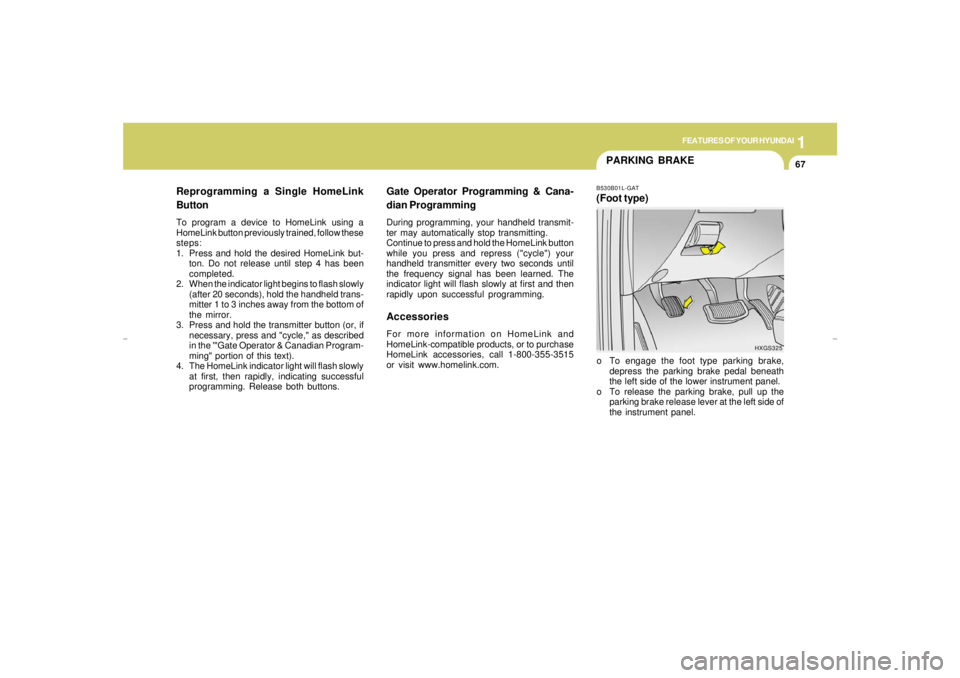
PARKING BRAKEB530B01L-GAT(Foot type)o To engage the foot type parking brake,
depress the parking brake pedal beneath
the left side of the lower instrument panel.
o To release the parking brake, pull up the
parking brake release lever at the left side of
the instrument panel.
Gate Operator Programming & Cana-
dian ProgrammingDuring programming, your handheld transmit-
ter may automatically stop transmitting.
Continue to press and hold the HomeLink button
while you press and repress ("cycle") your
handheld transmitter every two seconds until
the frequency signal has been learned. The
indicator light will flash slowly at first and then
rapidly upon successful programming.AccessoriesFor more information on HomeLink and
HomeLink-compatible products, or to purchase
HomeLink accessories, call 1-800-355-3515
or visit www.homelink.com.
HXGS325
Reprogramming a Single HomeLink
ButtonTo program a device to HomeLink using a
HomeLink button previously trained, follow these
steps:
1. Press and hold the desired HomeLink but-
ton. Do not release until step 4 has been
completed.
2. When the indicator light begins to flash slowly
(after 20 seconds), hold the handheld trans-
mitter 1 to 3 inches away from the bottom of
the mirror.
3. Press and hold the transmitter button (or, if
necessary, press and "cycle," as described
in the '"Gate Operator & Canadian Program-
ming" portion of this text).
4. The HomeLink indicator light will flash slowly
at first, then rapidly, indicating successful
programming. Release both buttons.
xgflhma-1.p656/16/04, 3:03 PM 67
Page 81 of 247
1
FEATURES OF YOUR HYUNDAI
69
!
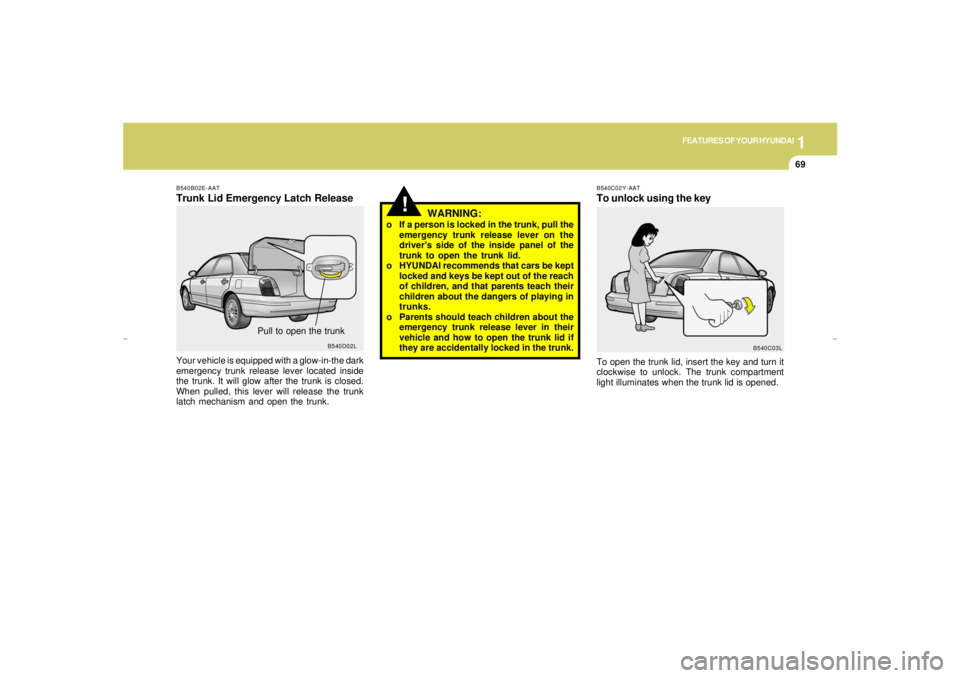
B540B02E-AATTrunk Lid Emergency Latch ReleaseYour vehicle is equipped with a glow-in-the dark
emergency trunk release lever located inside
the trunk. It will glow after the trunk is closed.
When pulled, this lever will release the trunk
latch mechanism and open the trunk.
Pull to open the trunk
B540D02L
WARNING:
o If a person is locked in the trunk, pull the
emergency trunk release lever on the
driver's side of the inside panel of the
trunk to open the trunk lid.
o HYUNDAI recommends that cars be kept
locked and keys be kept out of the reach
of children, and that parents teach their
children about the dangers of playing in
trunks.
o Parents should teach children about the
emergency trunk release lever in their
vehicle and how to open the trunk lid if
they are accidentally locked in the trunk.
B540C02Y-AATTo unlock using the keyTo open the trunk lid, insert the key and turn it
clockwise to unlock. The trunk compartment
light illuminates when the trunk lid is opened.
B540C03L
xgflhma-1.p656/16/04, 3:03 PM 69
Page 82 of 247
1FEATURES OF YOUR HYUNDAI70
!
HXGS255
WARNING:
o The fuel cap must be tightened at least
3 clicks, otherwise light will illum-
inate.
o Gasoline vapors are dangerous. Before
refueling, always stop the engine and
never allow sparks or open flames near
the filler area. If you need to replace the
filler cap, use a genuine Hyundai re-
placement part.
REMOTE FUEL-FILLER LID
RELEASE
B550A02Y-AATHIGH-MOUNTED REAR STOP LIGHTIn addition to the lower-mounted rear stoplights
on either side of the car, the high mounted rear
stoplight in the center of the rear window also
lights when the brakes are applied.
B550A03L
HXGS207 B560A03Y-AAT
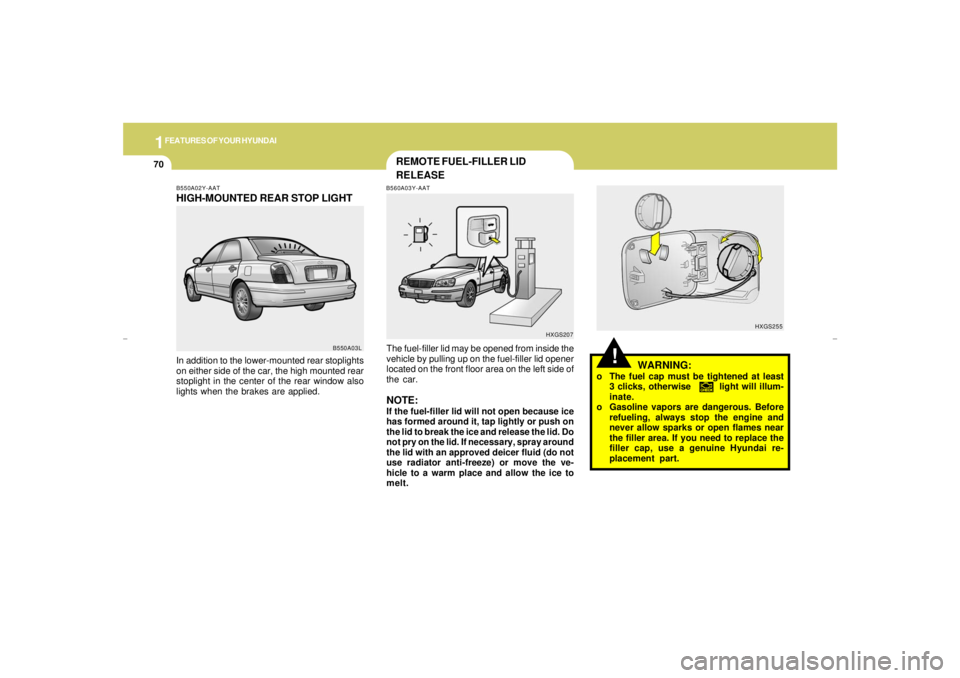
The fuel-filler lid may be opened from inside the
vehicle by pulling up on the fuel-filler lid opener
located on the front floor area on the left side of
the car.NOTE:If the fuel-filler lid will not open because ice
has formed around it, tap lightly or push on
the lid to break the ice and release the lid. Do
not pry on the lid. If necessary, spray around
the lid with an approved deicer fluid (do not
use radiator anti-freeze) or move the ve-
hicle to a warm place and allow the ice to
melt.
xgflhma-1.p656/16/04, 3:03 PM 70
Page 83 of 247
1
FEATURES OF YOUR HYUNDAI
71
WARNING:
o If you open the fuel filler cap during high
ambient temperatures, a slight "pres-
sure sound" may be heard. This is nor-
mal and not a cause for concern.
Whenever you open the fuel filler cap,
turn it slowly.
o Make sure the fuel filler cap is replaced
and securely seated after fueling. Failure
to replace or fully seat the fuel filler cap
will result in fuel vapors escaping into
the atmosphere and the MIL indicator
illuminating.
o Do not "TOP-OFF" after the first nozzle
shut off when refueling.
o Automotive fuels are flammable/explo-
sive materials. When refueling, please
note the following guidelines carefully.
o Before touching the fuel nozzle or fuel
filler cap, have one's hands in contact
with metal parts away from the filler neck
to discharge static electricity.
o Do not get back in the vehicle while
refueling. Do not operate anything that
can produce static electricity. Static elec-
tricity discharge can ignite fuel vapors
resulting in explosion.
!
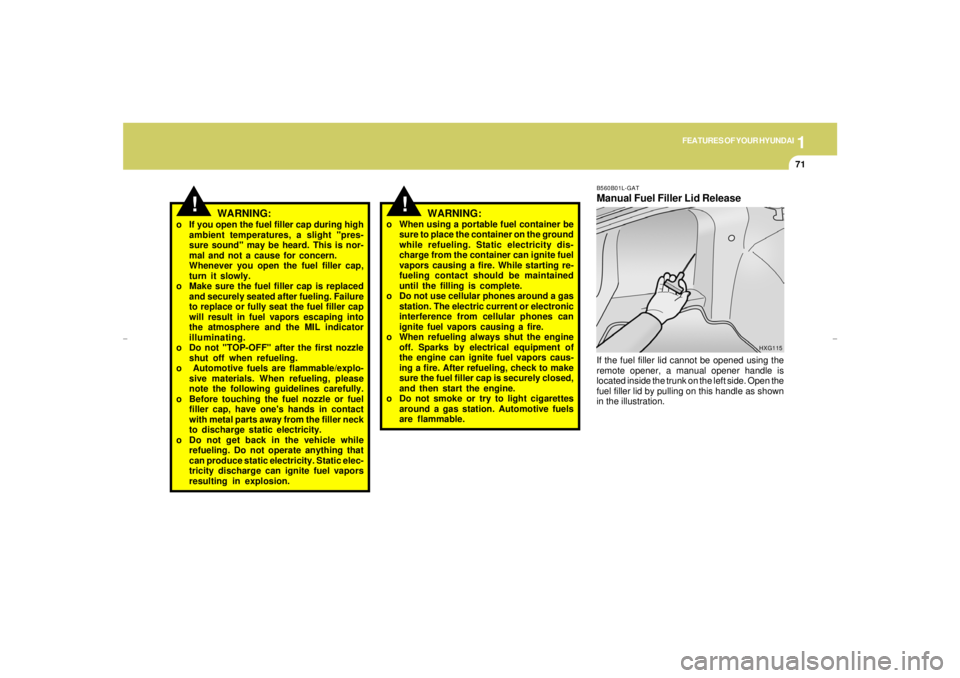
B560B01L-GATManual Fuel Filler Lid ReleaseIf the fuel filler lid cannot be opened using the
remote opener, a manual opener handle is
located inside the trunk on the left side. Open the
fuel filler lid by pulling on this handle as shown
in the illustration.
HXG115
!
WARNING:
o When using a portable fuel container be
sure to place the container on the ground
while refueling. Static electricity dis-
charge from the container can ignite fuel
vapors causing a fire. While starting re-
fueling contact should be maintained
until the filling is complete.
o Do not use cellular phones around a gas
station. The electric current or electronic
interference from cellular phones can
ignite fuel vapors causing a fire.
o When refueling always shut the engine
off. Sparks by electrical equipment of
the engine can ignite fuel vapors caus-
ing a fire. After refueling, check to make
sure the fuel filler cap is securely closed,
and then start the engine.
o Do not smoke or try to light cigarettes
around a gas station. Automotive fuels
are flammable.
xgflhma-1.p656/16/04, 3:04 PM 71
Page 86 of 247
1FEATURES OF YOUR HYUNDAI74
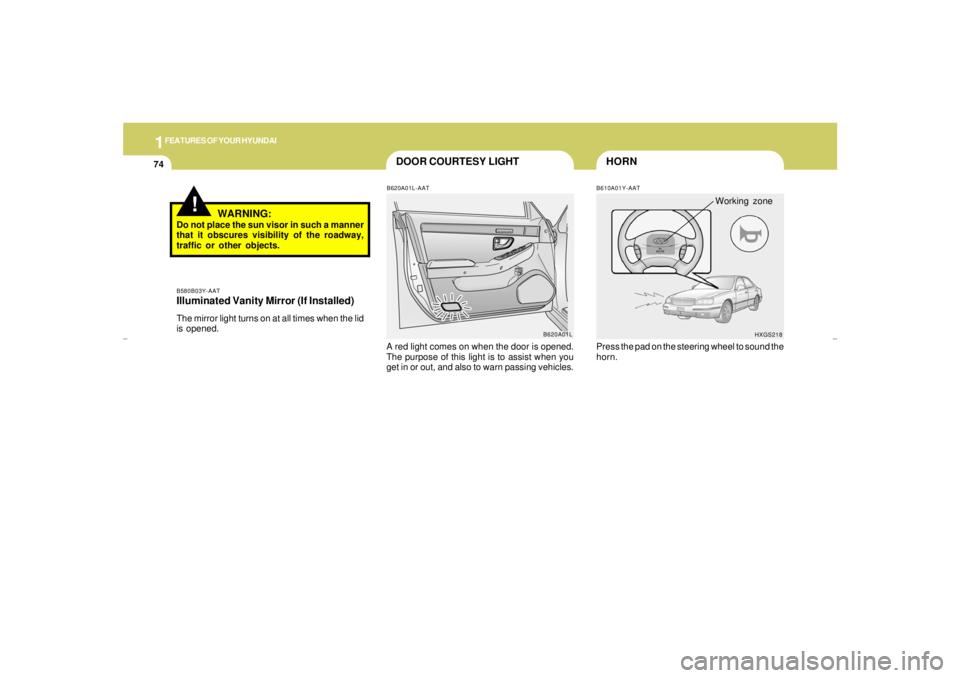
DOOR COURTESY LIGHT
HORNB610A01Y-AAT
B620A01L B620A01L-AAT
A red light comes on when the door is opened.
The purpose of this light is to assist when you
get in or out, and also to warn passing vehicles.
HXGS218
Working zone
Press the pad on the steering wheel to sound the
horn.
!
WARNING:
Do not place the sun visor in such a manner
that it obscures visibility of the roadway,
traffic or other objects.B580B03Y-AATIlluminated Vanity Mirror (If Installed)The mirror light turns on at all times when the lid
is opened.
xgflhma-1.p656/16/04, 3:04 PM 74
Page 88 of 247
1FEATURES OF YOUR HYUNDAI76
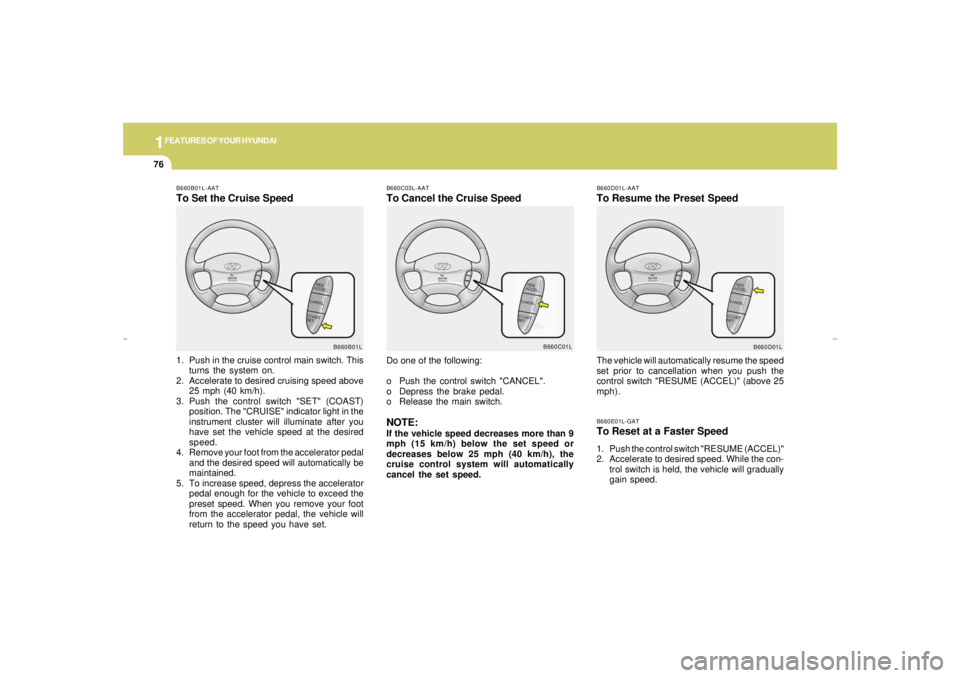
B660E01L-GATTo Reset at a Faster Speed1. Push the control switch "RESUME (ACCEL)"
2. Accelerate to desired speed. While the con-
trol switch is held, the vehicle will gradually
gain speed.
B660C03L-AATTo Cancel the Cruise Speed
B660D01L-AATTo Resume the Preset Speed
Do one of the following:
o Push the control switch "CANCEL".
o Depress the brake pedal.
o Release the main switch.NOTE:If the vehicle speed decreases more than 9
mph (15 km/h) below the set speed or
decreases below 25 mph (40 km/h), the
cruise control system will automatically
cancel the set speed.The vehicle will automatically resume the speed
set prior to cancellation when you push the
control switch "RESUME (ACCEL)" (above 25
mph).
B660C01L
B660D01L B660B01L-AAT
To Set the Cruise Speed1. Push in the cruise control main switch. This
turns the system on.
2. Accelerate to desired cruising speed above
25 mph (40 km/h).
3. Push the control switch "SET" (COAST)
position. The "CRUISE" indicator light in the
instrument cluster will illuminate after you
have set the vehicle speed at the desired
speed.
4. Remove your foot from the accelerator pedal
and the desired speed will automatically be
maintained.
5. To increase speed, depress the accelerator
pedal enough for the vehicle to exceed the
preset speed. When you remove your foot
from the accelerator pedal, the vehicle will
return to the speed you have set.
B660B01L
xgflhma-1.p656/16/04, 3:04 PM 76