steering INFINITI EX 2012 User Guide
[x] Cancel search | Manufacturer: INFINITI, Model Year: 2012, Model line: EX, Model: INFINITI EX 2012Pages: 506, PDF Size: 7.27 MB
Page 164 of 506

holding the SET switch for more than 10
seconds while the ignition switch is in the
ACC position.
The indicator lights on the memory
switches (1 and 2) will blink once when
the function is canceled, and the indicator
lights will blink twice when the function is
activated.
MEMORY STORAGEGUID-1C3A99E4-375E-45E2-BED3-7CC50A6635A6
button
on the Intelligent Key. If the indicator
light blinks, the Intelligent Key is linked
to that memory setting.
Push the ignition switch to the OFF posi-
tion, and then push the UNLOCK
button on the Intelligent Key. The driver’s
seat, steering wheel and outside mirrors will move to the memorized position or to
the exit position when the entry/exit
function is set to active.
Confirming memory storageGUID-A5EE0B0A-D274-443D-BC37-60209121DE87
Page 169 of 506

Steering-wheel-mounted controls for audio...
Page 193 of 506

4-26Monitor, climate, audio, phone and voice recognition systems
The vehicle width and predicted course
lines are wider than the actual width and
course.
SAA1897
1. Visually check that the parking space issafe before parking your vehicle.
2. The rearview of the vehicle is displayed on the screen
*Aas illustrated when
the selector lever is moved to the R
(Reverse) position.
SAA1898
3. Slowly back up the vehicle adjusting the steering wheel so that the predicted
course lines
*Benter the parking
space
*C.
4. Maneuver the steering wheel to make the vehicle width guide lines
*Dparallel to the parking space*Cwhile
Page 202 of 506
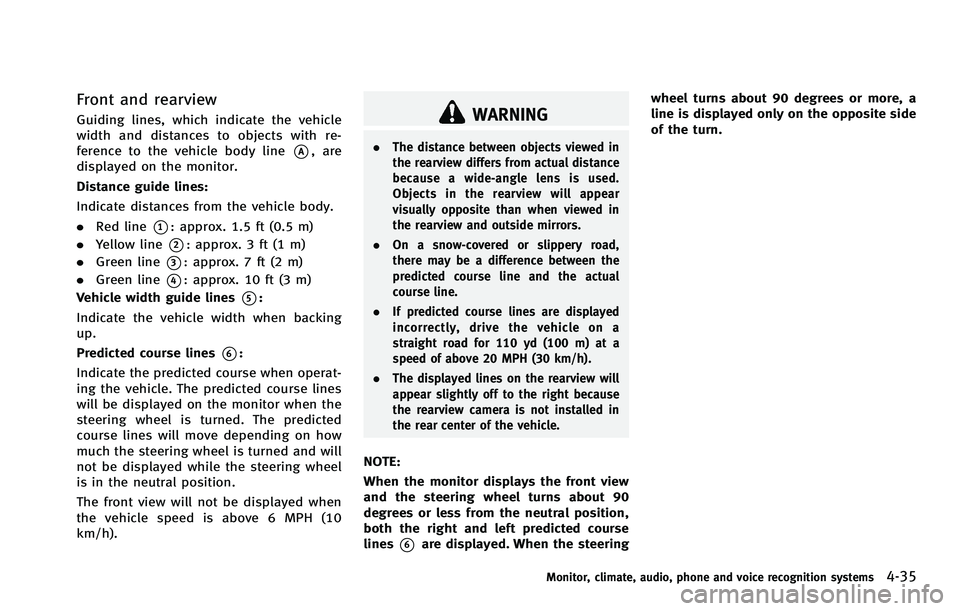
WARNING
.The distance between objects viewed in
the rearview differs from actual distance
because a wide-angle lens is used.
Objects in the rearview will appear
visually opposite than when viewed in
the rearview and outside mirrors.
. On a snow-covered or slippery road,
there may be a difference between the
predicted course line and the actual
course line.
. If predicted course lines are displayed
incorrectly, drive the vehicle on a
straight road for 110 yd (100 m) at a
speed of above 20 MPH (30 km/h).
. The displayed lines on the rearview will
appear slightly off to the right because
the rearview camera is not installed in
the rear center of the vehicle.
NOTE:
When the monitor displays the front view
and the steering wheel turns about 90
degrees or less from the neutral position,
both the right and left predicted course
lines
*6are displayed. When the steering wheel turns about 90 degrees or more, a
line is displayed only on the opposite side
of the turn.
Monitor, climate, audio, phone and voice recognition systems4-35
Page 262 of 506

SAA1534
With navigation system
SAA1506
Without navigation system
1. Audio source switch
2. Menu control switch (models with
navigation system) or audio tuning
switch (models without navigation
system)
3. Volume control switch 4. Back switch
STEERING-WHEEL-MOUNTED CON-
TROLS FOR AUDIO
GUID-1F1450BB-2D2C-4477-A859-B65C752945DA
Page 271 of 506

4-104Monitor, climate, audio, phone and voice recognition systems
tags allow easy dialing using the
INFINITI Voice Recognition system.
(See“INFINITI Voice Recognition system
(models with navigation system)” later
in this section.)
To delete an entry, select the “Delete”key
at step 3.
SAA2524
MAKING A CALLGUID-D3E00526-410A-4E9F-AB53-B9100533FB33
button on the steering
wheel. The “PHONE”screen will appear
on the display.
2. Select the “Handset Phonebook” key
on the “PHONE” menu.
3. Select the desired entry from the list.
4. Confirm the correct entry by selecting for the correct number from the list.
SAA2621
5. Select the “Call”key to start dialing the
number.
There are different methods to make a call.
Select one of the following options instead
of “Handset Phonebook” in step 2 above.
. Vehicle Phonebook
Select an entry stored in the Vehicle’s
Phonebook.
. Call History
Select an outgoing, incoming or missed
call downloaded from your cell phone
(depending on your phone’s compat-
ibility).
Page 272 of 506
.Dial Number
Input the phone number manually
using the keypad displayed on the
screen. (See “INFINITI Voice Recognition
system (models with navigation sys-
tem)” earlier in this section.)
SAA2525
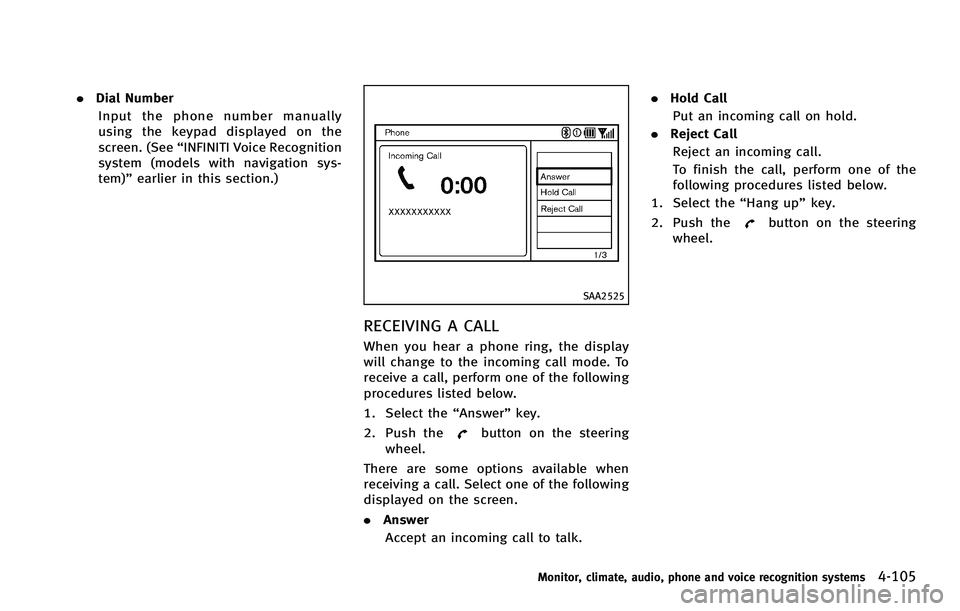
RECEIVING A CALLGUID-6F43A1A1-EE11-4E04-8279-8274439D20B9
button on the steering
wheel.
There are some options available when
receiving a call. Select one of the following
displayed on the screen.
. Answer
Accept an incoming call to talk. .
Hold Call
Put an incoming call on hold.
. Reject Call
Reject an incoming call.
To finish the call, perform one of the
following procedures listed below.
1. Select the “Hang up”key.
2. Push the
button on the steering
wheel.
Monitor, climate, audio, phone and voice recognition systems4-105
Page 278 of 506

Bluetooth trademark:
Bluetooth®is a trademark
owned by Bluetooth SIG, Inc.,
and licensed to Visteon Cor-
poration.
SAA2642
CONTROL BUTTONSGUID-63652779-89CA-4B8E-9C76-4E7CBD5CCC5Dbutton
Push the button to initiate a VR
session or answer an incoming call.
You can also use the button to skip
through system feedback and to enter
commands during a call.
2. PHONE END
button
Push the button to cancel a VR
session or end a call.
VOICE RECOGNITION SYSTEMGUID-5F71B0CA-D9EA-4D2D-857A-80C28F02800C
switch on the steering wheel is pushed
before the initialization completes, the
system will not accept any command.
Before starting:
GUID-4D508F5D-FA8E-49D6-A9E2-6F8E76C17033
Page 279 of 506
4-112Monitor, climate, audio, phone and voice recognition systems
following:
.Keep the interior of the vehicle as quiet
as possible. Close the windows to
eliminate the surrounding noises (traf-
fic noises, vibration sounds, etc.),
which may prevent the system from
recognizing the voice commands cor-
rectly.
. Wait until a tone sounds before speak-
ing a command.
. Speak a voice command within 5
seconds after the beep sound. If no
voice command is given, the system
will ask you for a number. If no further
command is given, the session ends.
. Speak in a natural voice without paus-
ing between words.
SAA2643
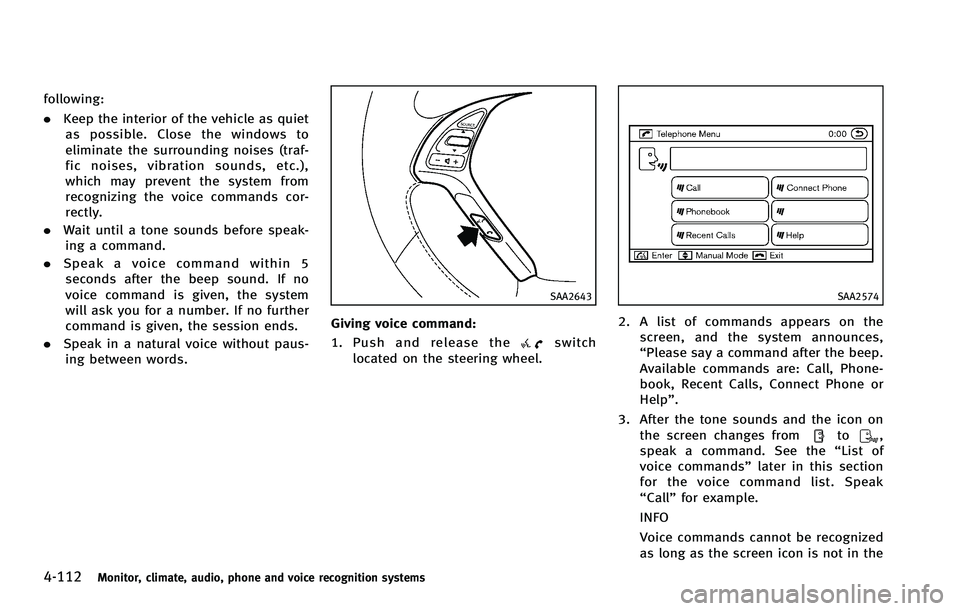
Giving voice command:GUID-4D508F5D-FA8E-49D6-A9E2-6F8E76C17033switch
located on the steering wheel.
SAA2574
2. A list of commands appears on the screen, and the system announces,
“Please say a command after the beep.
Available commands are: Call, Phone-
book, Recent Calls, Connect Phone or
Help”.
3. After the tone sounds and the icon on the screen changes from
to,
speak a command. See the “List of
voice commands” later in this section
for the voice command list. Speak
“Call” for example.
INFO
Voice commands cannot be recognized
as long as the screen icon is not in the
Page 280 of 506

command recognition mode.
4. The system acknowledges the com-
mand and announces the next set of
available commands.
5. After the tone sounds, speak the phone number.
6. When you have finished speaking the phone number, the system repeats it
back and announces the available
commands.
7. After system responds, speak “Dial”
and the system dials the spoken
numbers.
Operating tips:
GUID-4D508F5D-FA8E-49D6-A9E2-6F8E76C17033
.
. If the command is not recognized, the
system announces, “Please say again”.
Repeat the command in a clear voice.
. Push the
switch or the BACKbutton
once to return to the previous screen.
. If you want to cancel the command,
push the
switch. The message
“Voice input is canceled” will be
announced. If you want to adjust the
volume of the system feedback, push
the volume control buttons [+] or [−] on
the steering wheel or use the audio system volume knob while the system
is making an announcement.
How to speak commands:
GUID-4D508F5D-FA8E-49D6-A9E2-6F8E76C17033
switch.
Monitor, climate, audio, phone and voice recognition systems4-113