steering INFINITI EX 2012 Owner's Manual
[x] Cancel search | Manufacturer: INFINITI, Model Year: 2012, Model line: EX, Model: INFINITI EX 2012Pages: 506, PDF Size: 7.27 MB
Page 283 of 506

4-116Monitor, climate, audio, phone and voice recognition systems
SAA2575
PAIRING PROCEDUREGUID-505E2AB8-A505-45F5-ADCE-027E4A52E197
button on the steering
wheel. The system announces the
available commands.
2. Speak: “Connect Phone”. The system
acknowledges the command and an-
nounces the next set of available
commands.
SAA2576
3. Speak: “Add Phone”. The system ac-
knowledges the command and asks
you to initiate connecting from the
phone handset.
INFO:
The Add Phone command is not avail-
able when the vehicle is moving.
SAA2577
4. When asked to enter a PIN code to connect a Bluetooth®cellular phone,
enter the code “1234”.
The code is always “1234”regardless
of the number of phones paired.
The connecting procedure of a cellular
phone varies according to each cellular
phone. See the cellular phone Owner’s
Manual for more information.
Page 285 of 506
4-118Monitor, climate, audio, phone and voice recognition systems
SAA2580
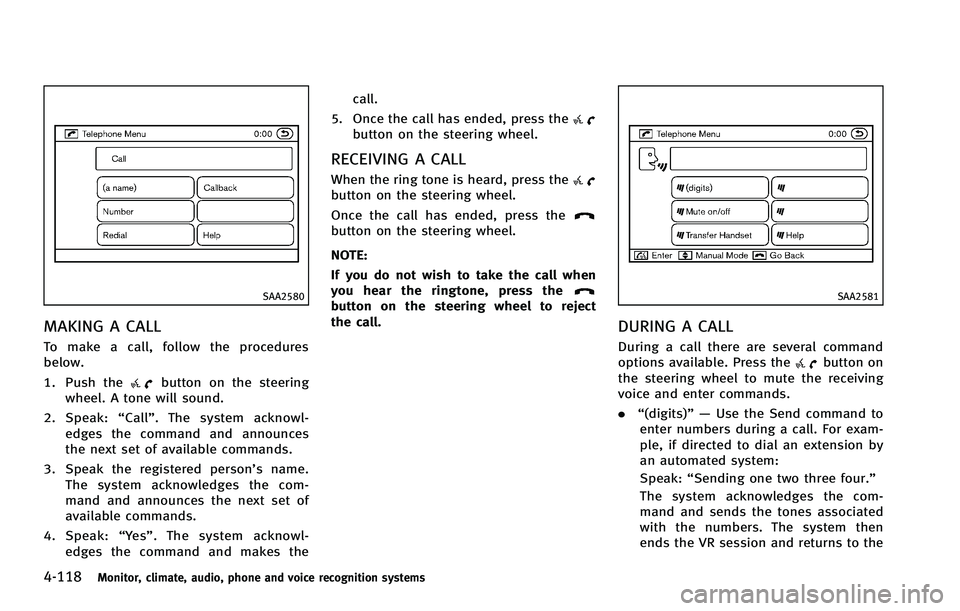
MAKING A CALLGUID-9E2976C3-F4B5-409A-B0C0-2BDF8CBB6D5F
button on the steering
wheel. A tone will sound.
2. Speak: “Call”. The system acknowl-
edges the command and announces
the next set of available commands.
3. Speak the registered person’s name. The system acknowledges the com-
mand and announces the next set of
available commands.
4. Speak: “Yes”. The system acknowl-
edges the command and makes the call.
5. Once the call has ended, press the
button on the steering wheel.
RECEIVING A CALLGUID-43C21EB8-312B-4748-B3E5-5FA3BA571EBB
button on the steering wheel.
Once the call has ended, press the
button on the steering wheel.
NOTE:
If you do not wish to take the call when
you hear the ringtone, press the
button on the steering wheel to reject
the call.SAA2581
DURING A CALLGUID-BCB8CBF5-BE4D-48B9-A485-28D463A549DE
button on
the steering wheel to mute the receiving
voice and enter commands.
. “(digits)” — Use the Send command to
enter numbers during a call. For exam-
ple, if directed to dial an extension by
an automated system:
Speak: “Sending one two three four.”
The system acknowledges the com-
mand and sends the tones associated
with the numbers. The system then
ends the VR session and returns to the
Page 293 of 506

4-126Monitor, climate, audio, phone and voice recognition systems
Voice Recognition.
SAA2534
Let’s PracticeGUID-CEB24665-1937-41AD-8E91-E94C0E5C3181
switch on the
steering wheel.
3. Speak the displayed number after the tone. The evaluation screen will be
displayed and the result can be con-
firmed.
SAA2533
Useful tips for correct operationGUID-C9E09F86-96F6-4B3F-AA7F-ECCEF1C7D699
Page 294 of 506

USING THE SYSTEMGUID-5C6975DD-FEFF-4469-A81D-6B1128DD1C3E
switch is pushed before the
initialization completes, the display will
show the message: “System not ready.” or
a beep sounds.
Before startingGUID-1AA78604-9900-498E-8A6B-23026EDA496ASAA1588
Giving voice commandsGUID-27706B5B-B2CE-4A70-A392-017F8C780B1Dswitch located on
the steering wheel.
Monitor, climate, audio, phone and voice recognition systems4-127
Page 295 of 506

4-128Monitor, climate, audio, phone and voice recognition systems
SAA2535
2. A list of commands appears on thescreen, and the system announces,
“Would you like to access Phone,
Navigation, Information, Audio or
Help?”.
3. After the tone sounds and the icon on the screen changes from
to,
speak a command.
Selecting the “Practice”key will start
the practice mode. See “Let’s Practice”
earlier in this section.
4. Continue to follow the voice menu
prompts and speak after the tone
sounds until your desired operation is
completed. Selecting the
“Help”key can display
the detailed information of the each
command.
Operating tips:
GUID-4D508F5D-FA8E-49D6-A9E2-6F8E76C17033
switch. The
message, “Voice canceled” will be
announced.
. To skip the voice guidance function and
give the command immediately, press
the TALK
switch to interrupt the
system. Remember to speak after the
tone.
. If you want to adjust the volume of the
system feedback, push the volume
control buttons [+] or [−] on the steering switch or use the audio system
volume knob while the system is
making an announcement.
How to speak numbers:
GUID-4D508F5D-FA8E-49D6-A9E2-6F8E76C17033
Page 296 of 506

of phone digit entry can improve recogni-
tion performance.
When speaking a house number, speak the
number“0”as“zero ”. If the letter “o (Oh)”
is included in the house number, it will not
be recognized as the number “0 (zero)”
even if you speak “oh”instead of “zero”.
Please speak “zero”for the number “0
(zero)”, “oh”for the letter “o (oh)”
Send digits using dial tone:
GUID-4D508F5D-FA8E-49D6-A9E2-6F8E76C17033switch during a
phone call.
. The menu will be launched and you will
be provided with the following gui-
dance: "Please say the digits to dial".
. After guidance, say the digits of the
number you want to send. After this,
the digits that have been recognized
will be read out.
. If you press the ENTER button on the
steering wheel or on the INFINITI con-
troller, the selected digits will be sent.
Monitor, climate, audio, phone and voice recognition systems4-129
Page 299 of 506

4-132Monitor, climate, audio, phone and voice recognition systems
Voice command examplesGUID-EE13DCC8-0C1B-4B52-BC3B-BC0301FD3E8D
SAA1588
Example 1 - Placing a call to the phone
number 800-662-6200:
GUID-4D508F5D-FA8E-49D6-A9E2-6F8E76C17033switch located on
the steering wheel.
SAA2535
2. The system announces, “Would you like
to access Phone, Navigation, Informa-
tion, Audio or Help?”
3. Speak “Phone”.
Page 302 of 506

SAA1588
Example 2 - Placing an international call to
the phone number 011-81-111-222-3333:
GUID-4D508F5D-FA8E-49D6-A9E2-6F8E76C17033switch located on
the steering wheel.
SAA2535
2. The system announces, “Would you like
to access Phone, Navigation, Informa-
tion or Help?”
3. Speak “Phone”.
SAA2536
4. Speak“International Call ”.
Monitor, climate, audio, phone and voice recognition systems4-135
Page 313 of 506

4-146Monitor, climate, audio, phone and voice recognition systems
.When the air conditioner is in the AUTO
mode, the fan speed decreases auto-
matically for easy recognition.
. Wait until a tone sounds before speak-
ing a command.
. Speak in a natural voice without paus-
ing between words.
SAA1588
Giving voice commandGUID-7F94FAE2-9E25-4029-8785-6A533D5F2058switch
located on the steering wheel.
SAA2548
2. A list of commands appears on the
screen, and the system announces,
“Please say a command”.
3. After the tone sounds and the icon on the screen changes from
to,
speak a command.
Operating tips:
GUID-4D508F5D-FA8E-49D6-A9E2-6F8E76C17033
.
. The list displayed can be scrolled by
tilting the menu control switch on the
steering wheel.
. If the command is not recognized, the
system announces, “Please say again”.
Page 314 of 506

Repeat the command in a clear voice.
. Push the BACK button once to return to
the previous screen.
. If you want to cancel the command,
push and hold the TALK
switch for
1 second. The message “Voice can-
celed” will be announced.
. To skip the voice guidance function and
give the command immediately, press
the TALK
switch to interrupt the
system. Remember to speak after the
tone.
. If you want to adjust the volume of the
system feedback, push the volume
control switch (+ or −) on the steering
wheel or use the audio system volume
knob while the system is making an
announcement.
How to speak numbers:
GUID-4D508F5D-FA8E-49D6-A9E2-6F8E76C17033
switch during a
phone call.
. The menu will be launched and you will
be provided with the following gui-
dance: "Please say the digits to dial".
. After guidance, say the digits of the
number you want to send. After this, the digits that have been recognized
will be read out.
. If you press the ENTER button on the
steering wheel or on the INFINITI con-
troller, the selected digits will be sent.
Monitor, climate, audio, phone and voice recognition systems4-147