light INFINITI EX 2012 Service Manual
[x] Cancel search | Manufacturer: INFINITI, Model Year: 2012, Model line: EX, Model: INFINITI EX 2012Pages: 506, PDF Size: 7.27 MB
Page 117 of 506

2-44Instruments and controls
GUID-1B76D948-A232-4DD1-85F0-9D8D60470EE3
SIC3602
For driving or starting the vehicle on snowy
roads or slippery areas, turn on the SNOW
mode switch. The indicator light
*1on the
switch will illuminate. When the SNOW
mode is activated, engine output is con-
trolled to avoid wheel spin.
Turn off the SNOW mode for normal
driving.
GUID-7AEE2596-75BE-4DC0-AAD8-3BA40F09793D
SIC3844
The vehicle should be driven with the
Intelligent Brake Assist (IBA) system on
for most driving conditions.
The Intelligent Brake Assist (IBA) system
will sound a warning chime to alert the
driver when the vehicle is traveling too
close to the vehicle ahead and will apply
the brake control if necessary.
To turn off the system, push the IBA OFF
switch. The
indicator will illuminate.
The IBA system will remain in the last ON
or OFF state it was left in until it is
manually changed by pushing the IBA OFF
switch.
GUID-7DA31BFA-F3D3-4D04-8BAF-031A5FF806AF
JVS0033X
The vehicle should be driven with the
Vehicle Dynamic Control (VDC) system on
for most driving conditions.
If the vehicle is stuck in mud or snow, the
VDC system reduces the engine output to
reduce wheel spin. The engine speed will
be reduced even if the accelerator is
depressed to the floor. If maximum engine
power is needed to free a stuck vehicle,
turn the VDC system off.
To turn off the VDC system, push the VDC
OFF switch. The
indicator will illumi-
nate.
Push the VDC OFF switch again or restart
SNOW MODE SWITCH INTELLIGENT BRAKE ASSIST (IBA) OFF
SWITCH (if so equipped)VEHICLE DYNAMIC CONTROL (VDC) OFF
SWITCH
Page 119 of 506

2-46Instruments and controls
GUID-CA7378E6-B4AD-4D7B-8E72-A03EB7B30A7F
SIC3867
Center console
SIC3631
FrontThe power outlet is used for powering
electrical accessories such as cellular
telephones.
CAUTION
.
The outlet and plug may be hot during or
immediately after use.
. Do not use with accessories that exceed
a 12 volt, 120W (10A) power draw. Do
not use double adapters or more than
one electrical accessory.
. Use power outlet with the engine run-
ning to avoid discharging the vehicle
battery.
. Avoid using power outlet when the air
conditioner, headlights or rear window
defroster is on.
. This power outlet is not designed for use
with a cigarette lighter unit.
. Push the plug in as far as it will go. If
good contact is not made, the plug may
overheat or the internal temperature
fuse may blow.
. Before inserting or disconnecting a plug,
be sure the electrical accessory being
used is turned OFF. .
When not in use, be sure to close the
cap. Do not allow water or any liquid to
contact the outlet.
POWER OUTLET
Page 121 of 506

2-48Instruments and controls
SIC3246
SUNGLASSES HOLDERGUID-7444FFC3-1180-4DA0-889A-EF22DA69B8A8
WARNING
Keep the sunglasses holder closed while
driving to prevent an accident.
To open the sunglasses holder, push*1.
CAUTION
.Do not use for anything other than
glasses. .
Do not leave glasses in the sunglasses
holder while parking in direct sunlight.
The heat may damage the glasses.
SIC3866
GLOVE BOXGUID-CB86453A-F160-47C9-9B7D-A973522418C0
WARNING
Keep glove box lid closed while driving to
help prevent injury in an accident or a
sudden stop.
To open the glove box, pull the handle*1.
To close, push the lid in until the lock
latches.
To lock
*2/unlock*3the glove box, use
the mechanical key. For the mechanical key
usage, see “Keys”in the“3. Pre-driving
Page 130 of 506

WARNING
There are some small distances immediately
before the closed position which cannot be
detected. Make sure that all passengers
have their hands, etc., inside the vehicle
before closing the moonroof.
If the control unit detects something
caught in the moonroof when it is closing,
the moonroof will be immediately opened.
The auto reverse function can be activated
when the moonroof is closed by automatic
operation when the ignition switch is in the
ON position or for about 45 seconds after
the ignition switch is pushed to the OFF
position.
If the moonroof cannot be closed auto-
matically when the auto reverse function
activates due to a malfunction, push and
hold the CLOSE
*1side of the moonroofswitch.
Depending on the environment or driving
conditions, the auto reverse function may
be activated if an impact or load similar to
something being caught in the moonroof
occurs.
If the moonroof does not operateGUID-60DBC464-2E80-4548-9317-AE572BD32A01
SIC3642
To activate or deactivate the welcome light
function, perform the following procedure.
Note that the function is set to disabled as
the factory default setting.
1. Push the ignition switch to the ON
position.
2. Open the driver’s side door.
3. Within 20 seconds after the ignition switch is pushed to the ON position,
push the door open request switch on
the driver’s side door handle for more
than 5 seconds with the driver’s door
open.
Instruments and controls2-57
WELCOME LIGHT
Page 131 of 506
2-58Instruments and controls
4. A chime sounds when the setting iscompleted.
Once the welcome light function is active,
the puddle light
*Aand the passenger
cabin illumination will illuminate when you
approach the vehicle with the Intelligent
Key (within approximately 3.3 feet (1 m) of
the antenna built inside the door handles)
and the following conditions are met.
. All doors are closed and locked.
. The ignition switch is in the LOCK or OFF
position.
. The Intelligent Key is outside the
vehicle.
. The puddle light operates within a set
duration.
The welcome light function will be deacti-
vated automatically if it does not operate
within a set duration to prevent battery
discharge. Note that the duration is set to
14 days.
GUID-830CFA4B-7BC2-4EB5-B729-3DEBD5B2F404
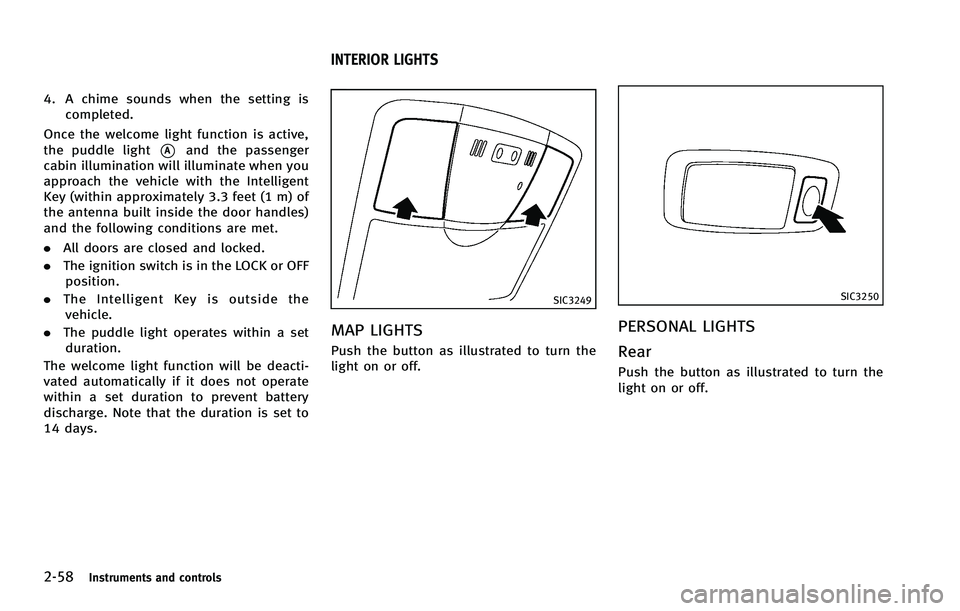
SIC3249
MAP LIGHTSGUID-90C1CDC9-88EE-483F-A6B5-9B7CF87C9FA8
SIC3250
PERSONAL LIGHTSGUID-427C090A-E791-4E67-B530-6B20EBFA79D8
Page 132 of 506

SIC3251
INTERIOR LIGHT CONTROL SWITCHGUID-D0E2EF38-2D5D-4501-AA23-4F24DD8B41E1
CAUTION
Do not use for extended periods of time with
the engine stopped. This could result in a
discharged battery.
Instruments and controls2-59
Page 133 of 506
2-60Instruments and controls
GUID-E3368CF8-A3EF-4DAC-9176-8558DF7C9907
SIC3869
The light on the vanity mirror will turn on
when the cover on the vanity mirror is
opened.
When the cover is closed, the light will turn
off.
The lights will also turn off after 15
minutes when the lights remain illumi-
nated to prevent the battery from becom-
ing discharged.
GUID-65B14C49-101C-46AA-9AC8-BE69E9C5943F
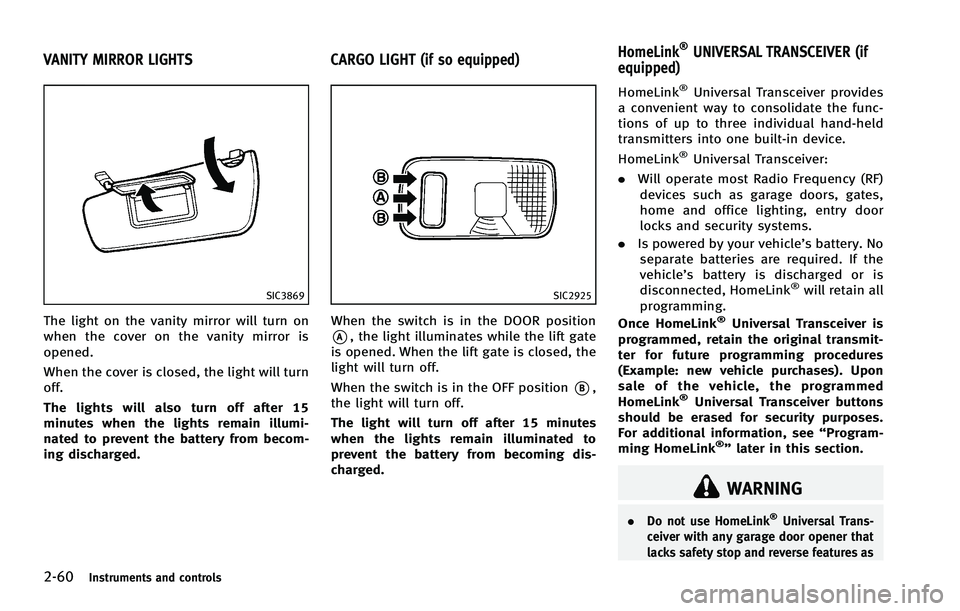
SIC2925
When the switch is in the DOOR position
*A, the light illuminates while the lift gate
is opened. When the lift gate is closed, the
light will turn off.
When the switch is in the OFF position
*B,
the light will turn off.
The light will turn off after 15 minutes
when the lights remain illuminated to
prevent the battery from becoming dis-
charged.
GUID-BBDE6354-59FD-4B7D-831F-DCCDCD8C2E6F
WARNING
. Do not use HomeLink®Universal Trans-
ceiver with any garage door opener that
lacks safety stop and reverse features as
VANITY MIRROR LIGHTS CARGO LIGHT (if so equipped) HomeLink®UNIVERSAL TRANSCEIVER (if
equipped)
Page 134 of 506
SIC3182
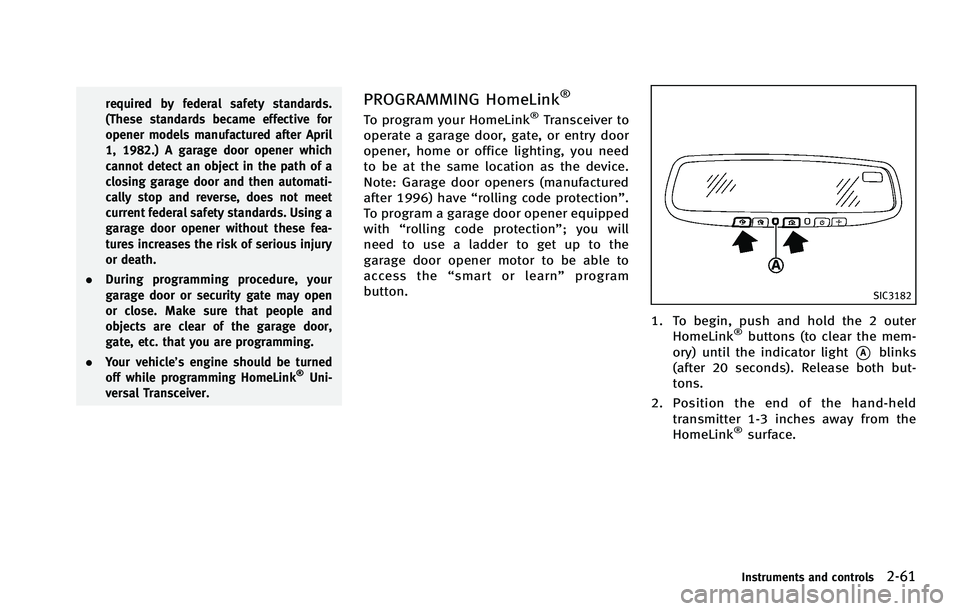
1. To begin, push and hold the 2 outerHomeLink®buttons (to clear the mem-
ory) until the indicator light
*Ablinks
(after 20 seconds). Release both but-
tons.
2. Position the end of the hand-held
transmitter 1-3 inches away from the
HomeLink
®surface.
Instruments and controls2-61
Page 135 of 506

2-62Instruments and controls
SIC3183
3. Using both hands, simultaneously pushand hold both the HomeLink®button
you want to program and the hand-held
transmitter button.
DO NOT release the buttons until step 4
has been completed.
4. Hold down both buttons until the
indicator light on HomeLink
®flashes,
changing from a “slow blink”to a
“rapid blink”. This could take up to 90
seconds. When the indicator light
blinks rapidly, both buttons may be
released. The rapidly flashing light
indicates successful programming. To
activate the garage door or other programmed device, push and hold
the programmed HomeLink
®button -
releasing when the device begins to
activate.
5. If the indicator light on HomeLink
®
blinks rapidly for two seconds and then
turns solid, HomeLink®has picked up a
“rolling code” garage door opener
signal. You will need to proceed with
the next steps to train HomeLink
®,
completing the programming may re-
quire a ladder and another person for
convenience.
6. Push and release the program button located on the garage door opener’s
motor to activate the “training mode”.
This button is usually located near the
antenna wire that hangs down from the
motor. If the wire originates from under
a light lens, you will need to remove the
lens to access the training button.
NOTE:
Once you have pushed and released
the training button on the garage door
opener’s motor and the “training light”
is lit, you have 30 seconds in which to
perform step 7. For convenience, use
the help of a second person to assist
when performing this step. 7. Quickly (within 30 seconds of pushing
and releasing the garage door opener
training button) and firmly push and
release the HomeLink
®button you’ve
just programmed. Push and release the
HomeLink
®button up to three times to
complete the training.
8. Your HomeLink
®button should now be
programmed. To program the remaining
HomeLink
®buttons for additional door
or gate openers, follow steps 2 through
8 only.
NOTE:
Do not repeat step 1 unless you want to
“clear” all previously programmed
HomeLink
®buttons.
If you have any questions or are having
difficulty programming your HomeLink
®
buttons, please refer to the HomeLink®
web site at: www.homelink.com or call 1-
800-355-3515.
Page 143 of 506

3-6Pre-driving checks and adjustments
position (UNLOCK) for
more than 5 seconds.
4. When activated, the hazard indicator will flash twice. When deactivated, the
hazard indicator will flash once.
5. The ignition switch must be placed in the OFF and ON position again between
each setting change.
When the automatic door unlock system is
deactivated, the doors do not unlock when
the ignition switch is placed in the OFF
position. To unlock the door manually, use
the inside lock knob or the power door lock
switch (driver’s or front passenger’s side).
SPA2535
CHILD SAFETY REAR DOOR LOCKGUID-7AF8CF4F-8984-4F1B-86CF-38E6A6F2CFAE
WARNING
. Radio waves could adversely affect
electric medical equipment. Those who
use a pacemaker should contact the
electric medical equipment manufacturer
for the possible influences before use.
. The Intelligent Key transmits radio
waves when the buttons are pushed.
The FAA advises that the radio waves
may affect aircraft navigation and com-
munication systems. Do not operate the
Intelligent Key while on an airplane.
Make sure that the buttons are not
operated unintentionally when the unit
is stored for a flight.
The Intelligent Key system can operate all
the door locks using the remote controller
function or pushing the request switch on
the vehicle without taking the key out from
a pocket or purse. The operating environ-
ment and/or conditions may affect the
Intelligent Key system operation.
Be sure to read the following before using
the Intelligent Key system.
INTELLIGENT KEY SYSTEM