warning INFINITI EX 2012 Repair Manual
[x] Cancel search | Manufacturer: INFINITI, Model Year: 2012, Model line: EX, Model: INFINITI EX 2012Pages: 506, PDF Size: 7.27 MB
Page 116 of 506
GUID-3516DC6E-9566-4A0B-B66F-0C326A5AC4A3
SSD1156
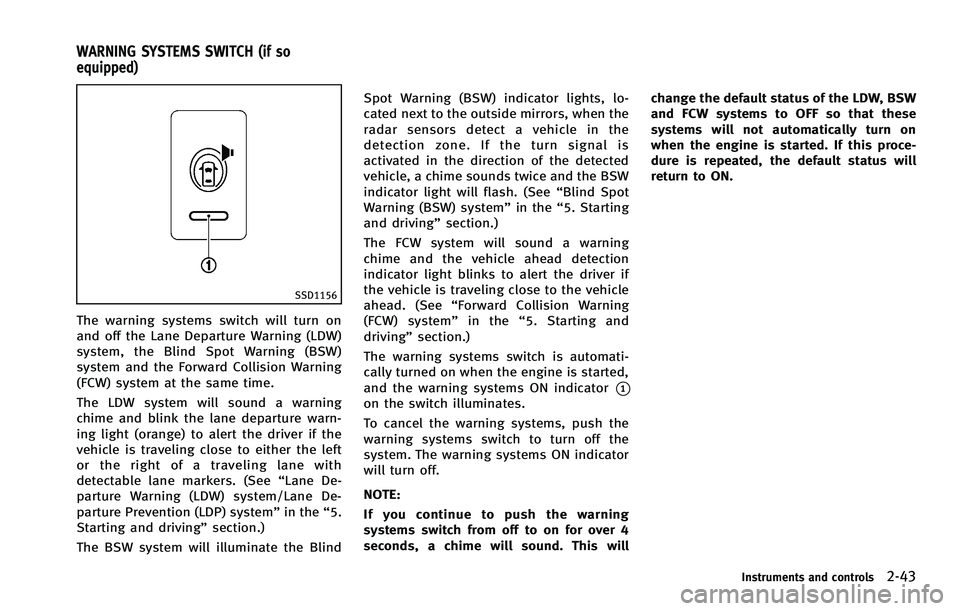
The warning systems switch will turn on
and off the Lane Departure Warning (LDW)
system, the Blind Spot Warning (BSW)
system and the Forward Collision Warning
(FCW) system at the same time.
The LDW system will sound a warning
chime and blink the lane departure warn-
ing light (orange) to alert the driver if the
vehicle is traveling close to either the left
or the right of a traveling lane with
detectable lane markers. (See“Lane De-
parture Warning (LDW) system/Lane De-
parture Prevention (LDP) system” in the“5.
Starting and driving” section.)
The BSW system will illuminate the Blind Spot Warning (BSW) indicator lights, lo-
cated next to the outside mirrors, when the
radar sensors detect a vehicle in the
detection zone. If the turn signal is
activated in the direction of the detected
vehicle, a chime sounds twice and the BSW
indicator light will flash. (See
“Blind Spot
Warning (BSW) system” in the“5. Starting
and driving” section.)
The FCW system will sound a warning
chime and the vehicle ahead detection
indicator light blinks to alert the driver if
the vehicle is traveling close to the vehicle
ahead. (See “Forward Collision Warning
(FCW) system” in the“5. Starting and
driving” section.)
The warning systems switch is automati-
cally turned on when the engine is started,
and the warning systems ON indicator
*1on the switch illuminates.
To cancel the warning systems, push the
warning systems switch to turn off the
system. The warning systems ON indicator
will turn off.
NOTE:
If you continue to push the warning
systems switch from off to on for over 4
seconds, a chime will sound. This will change the default status of the LDW, BSW
and FCW systems to OFF so that these
systems will not automatically turn on
when the engine is started. If this proce-
dure is repeated, the default status will
return to ON.
Instruments and controls2-43
WARNING SYSTEMS SWITCH (if so
equipped)
Page 117 of 506

2-44Instruments and controls
GUID-1B76D948-A232-4DD1-85F0-9D8D60470EE3
SIC3602
For driving or starting the vehicle on snowy
roads or slippery areas, turn on the SNOW
mode switch. The indicator light
*1on the
switch will illuminate. When the SNOW
mode is activated, engine output is con-
trolled to avoid wheel spin.
Turn off the SNOW mode for normal
driving.
GUID-7AEE2596-75BE-4DC0-AAD8-3BA40F09793D
SIC3844
The vehicle should be driven with the
Intelligent Brake Assist (IBA) system on
for most driving conditions.
The Intelligent Brake Assist (IBA) system
will sound a warning chime to alert the
driver when the vehicle is traveling too
close to the vehicle ahead and will apply
the brake control if necessary.
To turn off the system, push the IBA OFF
switch. The
indicator will illuminate.
The IBA system will remain in the last ON
or OFF state it was left in until it is
manually changed by pushing the IBA OFF
switch.
GUID-7DA31BFA-F3D3-4D04-8BAF-031A5FF806AF
JVS0033X
The vehicle should be driven with the
Vehicle Dynamic Control (VDC) system on
for most driving conditions.
If the vehicle is stuck in mud or snow, the
VDC system reduces the engine output to
reduce wheel spin. The engine speed will
be reduced even if the accelerator is
depressed to the floor. If maximum engine
power is needed to free a stuck vehicle,
turn the VDC system off.
To turn off the VDC system, push the VDC
OFF switch. The
indicator will illumi-
nate.
Push the VDC OFF switch again or restart
SNOW MODE SWITCH INTELLIGENT BRAKE ASSIST (IBA) OFF
SWITCH (if so equipped)VEHICLE DYNAMIC CONTROL (VDC) OFF
SWITCH
Page 121 of 506

2-48Instruments and controls
SIC3246
SUNGLASSES HOLDERGUID-7444FFC3-1180-4DA0-889A-EF22DA69B8A8
WARNING
Keep the sunglasses holder closed while
driving to prevent an accident.
To open the sunglasses holder, push*1.
CAUTION
.Do not use for anything other than
glasses. .
Do not leave glasses in the sunglasses
holder while parking in direct sunlight.
The heat may damage the glasses.
SIC3866
GLOVE BOXGUID-CB86453A-F160-47C9-9B7D-A973522418C0
WARNING
Keep glove box lid closed while driving to
help prevent injury in an accident or a
sudden stop.
To open the glove box, pull the handle*1.
To close, push the lid in until the lock
latches.
To lock
*2/unlock*3the glove box, use
the mechanical key. For the mechanical key
usage, see “Keys”in the“3. Pre-driving
Page 123 of 506

2-50Instruments and controls
SSS0831
SEAT-MOUNTED JACKET HANGER (if
so equipped)
GUID-B5EA838E-2449-4A2B-88B3-985E17B5A97F
SIC3248
COAT HOOKSGUID-967014A4-B654-44F1-A0BC-FAC4FD4136DC
CAUTION
Do not place items which are more than 2 lb
(1 kg) on the hook.
SIC4072
LUGGAGE HOOKSGUID-901A4A86-EDAC-4B5B-90D1-45F288B31AFE
WARNING
.Always make sure that the cargo is
properly secured. Use the suitable ropes
and hooks.
. Unsecured cargo can become dangerous
in an accident or sudden stop.
Page 125 of 506

2-52Instruments and controls
SIC3638
To remove the cargo cover, stow the cover
and pull the holder to the opposite side
*3.
WARNING
.Never put anything on the cargo cover,
no matter how small. Any object on it
could cause an injury in an accident or
sudden stop.
. Do not leave the cargo cover in the
vehicle with it disengaged from the
holder.
. Properly secure all cargo with ropes or straps to help prevent it from sliding or
shifting. Do not place cargo higher than
the seatbacks. In a sudden stop or
collision, unsecured cargo could cause
personal injury.
. If the cargo cover contacts the top tether
strap when it is attached to the top
tether anchor, remove the cargo cover
from the vehicle or secure it on the cargo
floor below its attachment location. If
the cargo cover is not removed, it may
damage the top tether strap during a
collision. Your child could be seriously
injured or killed in a collision if the child
restraint top tether strap is damaged.
. Do not allow cargo to contact the top
tether strap when it is attached to the
top tether anchor. Properly secure the
cargo so it does not contact the top
tether strap. Cargo that is not properly
secured or cargo that contacts the top
tether strap may damage the top tether
strap during a collision. Your child could
be seriously injured or killed in a
collision if the child restraint top tether
strap is damaged.
. Do not use the cargo cover if the rear
seats are folded down.
SIC3639
ROOF RACK (if so equipped)GUID-7DEE6FFA-E022-4DE5-BDD5-66ABFFAF8000
Page 126 of 506

WARNING
.Drive extra carefully when the vehicle is
loaded at or near the cargo carrying
capacity, especially if the significant
portion of that load is carried on the
roof rack.
. Heavy loading of the roof rack has the
potential to affect the vehicle stability
and handling during sudden or unusual
handling maneuvers.
. Roof rack load should be evenly dis-
tributed.
. Do not exceed maximum roof rack load
weight capacity.
. Properly secure all cargo with ropes or
straps to help prevent it from sliding or
shifting. In a sudden stop or collision,
unsecured cargo could cause personal
injury.
CAUTION
Use care when placing or removing items
from the roof rack. If you cannot comfortably
lift the items onto the roof rack from the
ground, use a ladder or stool.
GUID-C17FF611-9489-44AF-8A8E-A9D7C6C3FC14
WARNING
.Make sure that all passengers have their
hands, etc. inside the vehicle while it is
in motion and before closing the win-
dows. Use the window lock switch to
prevent unexpected use of the power
windows.
. Do not leave children unattended inside
the vehicle. They could unknowingly
activate switches or controls and be-
come trapped in the window. Unat-
tended children could become involved
in serious accidents.
The power windows operate when the
ignition switch is in the ON position or for
about 45 seconds after the ignition switch
is pushed to the OFF position. If the
driver’s or front passenger’s door is
opened during this period of about 45
seconds, power to the windows is can-
celed.
Instruments and controls2-53
WINDOWS
Page 128 of 506

SIC3285
Automatic operation (for front door
windows)
GUID-076BDDA9-6A3F-4D13-8169-6A98C70146CF
WARNING
There are some small distances immediately
before the closed position which cannot be
detected. Make sure that all passengers
have their hands, etc., inside the vehicle
before closing the window.
If the control unit detects something
caught in the window as it is closing, the
window will be immediately lowered.
The auto reverse function can be activated
when the window is closed by automatic
operation when the ignition switch is in the
ON position or for 45 seconds after the
ignition switch is pushed to the OFF
position.
Depending on the environment or driving
conditions, the auto reverse function may
be activated if an impact or load similar to
something being caught in the window
occurs.
If the windows do not close auto-
matically
GUID-80A9B731-0D29-4BBD-B59D-23726BCFBC92
Page 129 of 506

2-56Instruments and controls
GUID-36CBB3A9-507A-49BD-95E0-991B2A8C1DB4
WARNING
.In an accident you could be thrown from
the vehicle through an open moonroof.
Always use seat belts and child re-
straints.
. Do not allow anyone to stand up or
extend any portion of their body out of
the moonroof opening while the vehicle
is in motion or while the moonroof is
closing.
CAUTION
.Remove water drops, snow, ice or sand
from the moonroof before opening.
. Do not place any heavy object on the
moonroof or surrounding area.
AUTOMATIC MOONROOFGUID-1E35E90B-4C54-407D-9665-69E54D000E95
SIC3243
SunshadeGUID-77092B0E-D066-4B33-8D8E-70236B4B5BCA
Page 130 of 506

WARNING
There are some small distances immediately
before the closed position which cannot be
detected. Make sure that all passengers
have their hands, etc., inside the vehicle
before closing the moonroof.
If the control unit detects something
caught in the moonroof when it is closing,
the moonroof will be immediately opened.
The auto reverse function can be activated
when the moonroof is closed by automatic
operation when the ignition switch is in the
ON position or for about 45 seconds after
the ignition switch is pushed to the OFF
position.
If the moonroof cannot be closed auto-
matically when the auto reverse function
activates due to a malfunction, push and
hold the CLOSE
*1side of the moonroofswitch.
Depending on the environment or driving
conditions, the auto reverse function may
be activated if an impact or load similar to
something being caught in the moonroof
occurs.
If the moonroof does not operateGUID-60DBC464-2E80-4548-9317-AE572BD32A01
SIC3642
To activate or deactivate the welcome light
function, perform the following procedure.
Note that the function is set to disabled as
the factory default setting.
1. Push the ignition switch to the ON
position.
2. Open the driver’s side door.
3. Within 20 seconds after the ignition switch is pushed to the ON position,
push the door open request switch on
the driver’s side door handle for more
than 5 seconds with the driver’s door
open.
Instruments and controls2-57
WELCOME LIGHT
Page 133 of 506
2-60Instruments and controls
GUID-E3368CF8-A3EF-4DAC-9176-8558DF7C9907
SIC3869
The light on the vanity mirror will turn on
when the cover on the vanity mirror is
opened.
When the cover is closed, the light will turn
off.
The lights will also turn off after 15
minutes when the lights remain illumi-
nated to prevent the battery from becom-
ing discharged.
GUID-65B14C49-101C-46AA-9AC8-BE69E9C5943F
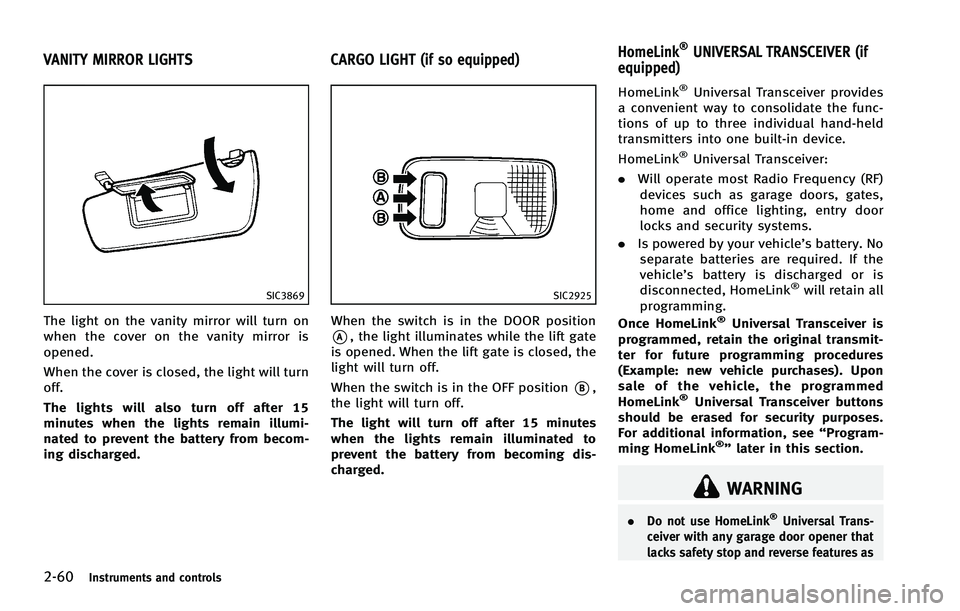
SIC2925
When the switch is in the DOOR position
*A, the light illuminates while the lift gate
is opened. When the lift gate is closed, the
light will turn off.
When the switch is in the OFF position
*B,
the light will turn off.
The light will turn off after 15 minutes
when the lights remain illuminated to
prevent the battery from becoming dis-
charged.
GUID-BBDE6354-59FD-4B7D-831F-DCCDCD8C2E6F
WARNING
. Do not use HomeLink®Universal Trans-
ceiver with any garage door opener that
lacks safety stop and reverse features as
VANITY MIRROR LIGHTS CARGO LIGHT (if so equipped) HomeLink®UNIVERSAL TRANSCEIVER (if
equipped)