parking brake INFINITI EX 2012 Owners Manual
[x] Cancel search | Manufacturer: INFINITI, Model Year: 2012, Model line: EX, Model: INFINITI EX 2012Pages: 506, PDF Size: 7.27 MB
Page 15 of 506

0-8Illustrated table of contents
GUID-422CC4D1-5AAE-4B93-824E-764A57BE67BE
SSI0624
1. Side ventilator (P.4-43)
2. Meters and gauges (P.2-6)
3. Center ventilator (P.4-43)
4. Center display (P.4-3)
5. Clock (P.2-45)
6. Hazard warning flasher switch (P.2-40)7. Center multi-function control panel
—Navigation system* (if so
equipped)
— Vehicle information and setting
buttons (P.4-10)
— Bluetooth
®Hands-Free Phone Sys- tem (with navigation system) (P.4-98)
—
Bluetooth
®Hands-Free Phone Sys-
tem (if so equipped) (without naviga-
tion system) (P.4-109)
— Around View Monitor (if so
equipped) (P.4-31)
— Rearview monitor (if so equipped)
(P.4-24)
8. Front passenger supplemental air bag (P.1-39)
9. Fuse box cover (P.8-22)
10. Parking brake (P.5-18)
11. Push-button ignition switch (P.5-9)
12. Front passenger air bag status light (P.1-44)
13. Power outlet (P.2-46)
14. Rear window defroster switch (P.2-35)
15. Automatic climate control system (P.4-43)
16. Audio system (P.4-52)
17. Glove box lid release handle (P.2-48)
*: Refer to the separate Navigation System
Owner’s Manual.
INSTRUMENT PANEL
Page 78 of 506

GUID-0EC59BA9-750D-4844-BDCD-47D6D1842B7F
SSI0624
1. Side ventilator (P.4-43)
2. Meters and gauges (P.2-6)
3. Center ventilator (P.4-43)
4. Center display (P.4-3)
5. Clock (P.2-45)
6. Hazard warning flasher switch (P.2-40)7. Center multi-function control panel
—Navigation system* (if so
equipped)
— Vehicle information and setting
buttons (P.4-10)
— Bluetooth
®Hands-Free Phone Sys- tem (with navigation system) (P.4-98)
—
Bluetooth
®Hands-Free Phone Sys-
tem (if so equipped) (without naviga-
tion system) (P.4-109)
— Around View Monitor (if so
equipped) (P.4-31)
— Rearview monitor (if so equipped)
(P.4-24)
8. Front passenger supplemental air bag (P.1-39)
9. Fuse box cover (P.8-22)
10. Parking brake (P.5-18)
11. Push-button ignition switch (P.5-9)
12. Front passenger air bag status light (P.1-44)
13. Power outlet (P.2-46)
14. Rear window defroster switch (P.2-35)
15. Automatic climate control system (P.4-43)
16. Audio system (P.4-52)
17. Glove box lid release handle (P.2-48)
*: Refer to the separate Navigation System
Owner’s Manual.
Instruments and controls2-5
INSTRUMENT PANEL
Page 94 of 506
you when leaving the vehicle.
Light reminder chimeGUID-1B22F352-E676-4579-BB46-88A9F17E26A1
orposition and the ignition switch
in the ACC, OFF or LOCK position.
Turn the light switch off when you leave the
vehicle.
Parking brake reminder chimeGUID-963DEE0A-5736-4637-8320-7F5EB75D7F6D
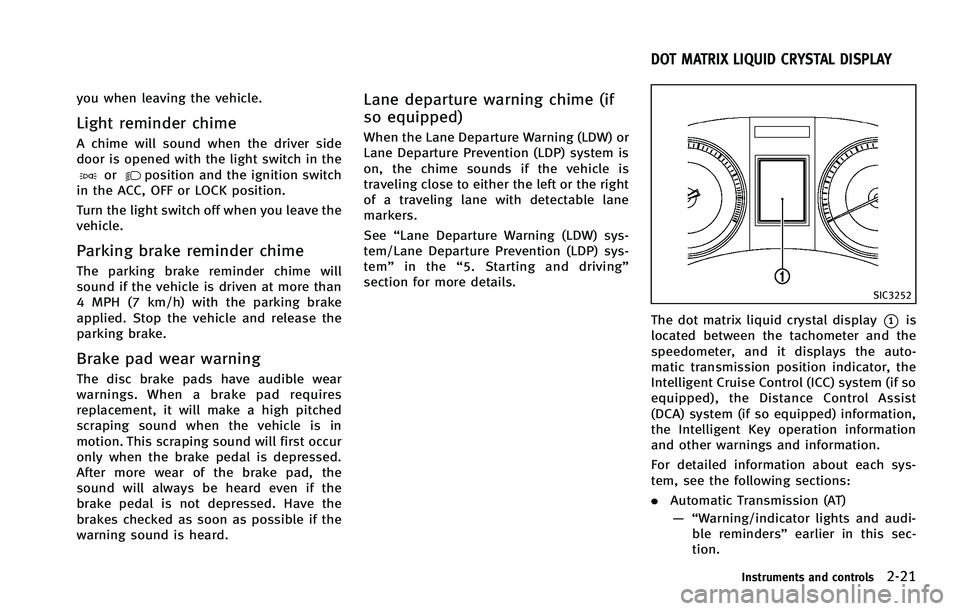
SIC3252
The dot matrix liquid crystal display*1is
located between the tachometer and the
speedometer, and it displays the auto-
matic transmission position indicator, the
Intelligent Cruise Control (ICC) system (if so
equipped), the Distance Control Assist
(DCA) system (if so equipped) information,
the Intelligent Key operation information
and other warnings and information.
For detailed information about each sys-
tem, see the following sections:
. Automatic Transmission (AT)
— “Warning/indicator lights and audi- ble reminders” earlier in this sec-
tion.
Instruments and controls2-21
DOT MATRIX LIQUID CRYSTAL DISPLAY
Page 98 of 506
8. Parking brake release warningGUID-AFFC301D-6E7E-42DB-9FCF-71954EFE0C50
Page 111 of 506
2-38Instruments and controls
position. Turn the headlight switch to theposition for full illumination when
driving at night.
If the parking brake is applied before the
engine is started, the daytime running
lights do not illuminate. The daytime
running lights illuminate once the parking
brake is released. The daytime running
lights will remain on until the ignition
switch is pushed to the OFF position.
WARNING
When the daytime running light system is
active, tail lights on your vehicle are not on.
It is necessary at dusk to turn on your headlights. Failure to do so could cause an
accident injuring yourself and others.
Adaptive Front lighting System
(AFS) (if so equipped)
GUID-B262714A-208E-426E-A47D-5D395AB017A0
Page 190 of 506

images, stop the vehicle in a safe location
and apply the parking brake.
SAA2492
Full Screen Display:GUID-4D508F5D-FA8E-49D6-A9E2-6F8E76C17033
(Start)
Select the “
”key to start playing
the slideshow.
.
(Stop)
Select the “
”key to stop the
slideshow.
.
(Next)
Select the “
”key to display the next file.
.
(Previous)
Select the “
”key to display the
previous file.
Setting the Image Viewer:
GUID-4D508F5D-FA8E-49D6-A9E2-6F8E76C17033
Page 194 of 506

referring to the predicted course lines.
5. When the vehicle is parked in the space completely, move the selector lever to
the P (Park) position and apply the
parking brake.
DIFFERENCE BETWEEN PREDICTED
AND ACTUAL DISTANCES
GUID-3499FB08-D1D0-4961-BF79-70F42E162429
SAA1978
Backing up on a steep uphillGUID-150E2026-9B8B-4548-B93A-C115D0465117
Page 290 of 506

2. Sit in the driver’s seat with the enginerunning, the parking brake on, and the
transmission in Park.
3. Press the
button.
4. Speak: “Help”. The system acknowl-
edges the command and announces
the next set of available commands.
5. Speak: "Voice Adaptation". The system acknowledges the command and dis-
plays the voice adaptation mode
screen.
6. Voice memory A or memory B is
selected automatically. If both memory
locations are already in use, the system
will prompt you to overwrite one.
Follow the instructions provided by
the system.
7. When preparation is complete and you are ready to begin, press the
button.
8. The voice adaptation mode will be
explained. Follow the instructions pro-
vided by the system.
9. When training is finished, the system will tell you an adequate number of
phrases have been recorded.
10. The system will ask you to say your name. Follow the instructions to regis- ter your name.
11. The system will announce that voice adaptation has been completed and
the system is ready.
The voice adaptation mode will stop if:
. The
button is pressed in voice
adaptation mode.
. The vehicle is driven during voice
adaptation mode.
. The ignition switch is turned to the OFF
or LOCK position.
GUID-0BDB2017-A08A-4CB1-A128-9719487DE6B5
switch, and the voice
command menu prompts are turned off.
Review the expanded command list, which
is available when this mode is active. Note
that in this mode the recognition success
rate may be affected as the number of
available commands and the ways of
speaking each command are increased.
To switch one mode to another, see each
mode description later in this section.
To improve the recognition success rate
Monitor, climate, audio, phone and voice recognition systems4-123
INFINITI VOICE RECOGNITION SYSTEM
(models with navigation system)
Page 334 of 506

SSD0712
Selector lever
To move the selector lever,
: Push the button while depressing the brake pedal,
: Push the button,
: Just move the selector lever.
ShiftingGUID-7B81BABF-9D35-40AD-BF35-15C44FA22CA9
WARNING
Apply the parking brake if the selector lever
is in any position while the engine is not
running. Failure to do so could cause the
vehicle to move unexpectedly or roll away
and result in serious personal injury or
property damage.
CAUTION
Make sure the vehicle is completely stopped
and the transmission is in the P (Park)
position.
P (Park) position:GUID-4D508F5D-FA8E-49D6-A9E2-6F8E76C17033
CAUTION
Use this position only when the vehicle is
completely stopped.
R (Reverse):GUID-4D508F5D-FA8E-49D6-A9E2-6F8E76C17033
Page 337 of 506

5-18Starting and driving
WARNING
.Be sure the parking brake is fully
released before driving. Failure to do so
can cause brake failure and lead to an
accident.
. Do not release the parking brake from
outside the vehicle.
. Do not use the gear shift in place of the
parking brake. When parking, be sure
the parking brake is fully engaged.
. Do not leave children unattended in a
vehicle. They could release the parking
brake and cause an accident.
PARKING BRAKE