ad blue INFINITI EX 2013 Owner's Guide
[x] Cancel search | Manufacturer: INFINITI, Model Year: 2013, Model line: EX, Model: INFINITI EX 2013Pages: 498, PDF Size: 2.5 MB
Page 279 of 498

4-114Monitor, climate, audio, phone and voice recognition systems
call.
. “Mute on/off”— Use the Mute com-
mand to mute the user’s voice so the
other party cannot hear it.
Use the mute command again to
unmute the user’s voice.
. “Transfer Handset”— Use the Transfer
Handset command to transfer the call
from the Bluetooth
®Hands-Free Phone
System to a cellular phone when
privacy is desired. The system an-
nounces, “Transfer Handset. The call
is transferred to the handset only.” The
system then ends the VR session.
The Transfer Call command can also be
issued again to return to a hands-free
call through the vehicle.
. “Help”— The system announces the
available commands.
NOTE:
If the other party ends the call or the
cellular phone network connection is lost
while the Mute feature is on, the Mute
feature may need to be reset to “off.”
SAA2582
PHONE SETTINGS
Call
.(a name)
If there are entries stored in the Phone
Book, a number associated with a
name and location can be dialed. See
“Phone book registration” in this sec-
tion to learn how to store entries. When
prompted by the system, say the name
of the phone book entry to call.
The system acknowledges the name. If
there are multiple locations associated
with the name, the system asks the
user to choose the location. Once the name and location are con-
firmed, the system begins the call.
. Number
When prompted by the system, speak
the number to call.
. Redial
Use the Redial command to call the last
number of outgoing calls. The system
acknowledges the command, repeats
the number and begins dialing. If a
redial number does not exist, the
system announces, “There is no num-
ber to redial” and ends the VR session.
. Callback
Use the Callback command to call the
last number in incoming calls. The
system acknowledges the command,
repeats the number and begins dialing.
If an incoming call number does not
exist, the system announces, “There is
no number to call back” and ends the
VR session.
. Help
The system announces the available
commands.
Page 280 of 498

SAA2583
Phonebook
.(a name)
Use the name command to seek the
name and locations registered in the
phonebook in alphabetical order. When
the system acknowledges the alphabet
the user spoke, the system announces
all registered names and locations
beginning with that alphabet.
Playback of the list can be stopped at
any time by pressing a button on the
steering wheel. The system ends the VR
session. .
List Names
Use the List Names command to hear
the names and locations registered in
the phonebook. When the system
acknowledges the command, the sys-
tem announces all voicetags registered
in the system.
Playback of the list can be stopped at
any time by pressing a button on the
steering wheel. The system ends the VR
session.
. Transfer Entry
Use the Transfer Entry command to
transfer the phonebook data stored in a
cellular phone to the system.
The system acknowledges the com-
mand and asks the user to initiate a
transfer from the phone handset. The
new contact phone number will be
transferred from the cellular phone via
a Bluetooth
®communication link.
The transfer procedure varies according
to each cellular phone. See the cellular
phone Owner’s Manual for more infor-
mation. The system repeats the number
and prompts the user for the next
command. After entering numbers,
choose “Store.”
The system confirms the name, location and number. The system then asks if
the user would like to store another
location for the same name. If the user
does not wish to store another location,
the system ends the VR session.
. Delete Entry
Use the Delete Entry command to
delete a specific number or all numbers
in the phonebook. The system an-
nounces the names of the phone
numbers already stored in the system.
The system then gives the option to
delete a specific number or all num-
bers. Once the user chooses to delete a
number or all numbers, the system
asks the user to confirm.
. Help
The system announces the available
commands.
Monitor, climate, audio, phone and voice recognition systems4-115
Page 281 of 498

4-116Monitor, climate, audio, phone and voice recognition systems
SAA2584
Recent Calls
.Incoming
Use the Incoming command to make a
call viewing the list of incoming calls.
. Missed
Use the Missed command to make a
call viewing the list of missed calls.
. Outgoing
Use the Outgoing command to make a
call viewing the list of outgoing calls.
. Redial
Use the Redial command to dial the last
outgoing call. .
Callback
Use the Callback command to dial the
last incoming call.
. Help
The system announces the available
commands.
SAA2585
Connect Phone
. Add Phone
Use the Pair Phone command to con-
nect a compatible phone to the Blue-
tooth
®Hands-Free Phone System.
When asked to enter a PIN code to
connect a Bluetooth
®cellular phone,
enter the code “1234”.
The code is always “1234”regardless
of the number of phones connected. Up
to 5 phones can be connected. If the
user tries to connect a sixth phone, the
system announces that the user must
first delete one phone or replace an
Page 282 of 498

existing phone. If the user tries to
connect a phone that has already been
connected to the vehicle system, the
system announces the name that the
phone is already using. The connecting
procedure will then be cancelled.
The Add Phone command is not avail-
able when the vehicle is moving.
. Select Phone
Use the Select Phone command to
select a phone of lesser priority when
two or more phones connected with
Bluetooth
®Hands-Free Phone System
are in the vehicle at the same time.
The system asks the user to name the
phone and confirm the selection.
Once the selection is confirmed, the
selected phone remains active until the
ignition switch is turned OFF or a new
phone is selected.
. Delete Phone
Use the Delete Phone command to
delete a specific phone or all phones
from Bluetooth
®Hands-Free Phone
System. The system announces the
names of the phones already paired
with the system and their priority level.
The system then gives the option to
delete a specific phone, all phones or listen to the list again. Once the user
chooses to delete a phone or all
phones, the system asks the user to
confirm.
NOTE:
When the user deletes a phone, the
associated phone book for that phone will
also be deleted.
. Replace Phone
Use the Replace Phone command to
change the priority level of the active
phone.
The priority level determines which
phone is active when more than one
paired Bluetooth
®phone is in the
vehicle.
The system states the priority level of
the active phone and asks for a new
priority level (1, 2, 3, 4, 5).
If the new priority level is already being
used for another phone, the two
phones will swap priority levels.
For example, if the current priority levels
are:
Priority Level 1 = Phone A
Priority Level 2 = Phone B
Priority Level 3 = Phone C and you change the priority level of Phone
C to Level 1, then:
Priority Level 1 = Phone C
Priority Level 2 = Phone B
Priority Level 3 = Phone A
.
Bluetooth
®On/Off
Use the Bluetooth®On/Off command
to turn on/off Bluetooth®Hands-Free
Phone System.
. Help
The system announces the available
commands.
VOICE ADAPTATION MODE
The Voice Adaptation mode allows up to
two users with different dialects to train
the system to improve recognition accu-
racy. By repeating a number of commands,
the users can create a voice model of their
own voice that is stored in the system. The
system is capable of storing a different
voice adaptation model for each connected
phone.
Training procedure
1. Position the vehicle in a reasonably quiet outdoor location.
Monitor, climate, audio, phone and voice recognition systems4-117
Page 302 of 498

Audio Commands:
CommandAction
CD Starts to play a CD.
FM Turns to the FM band, selecting the station last played.
AM Turns to the AM band, selecting the station last played.
XM Turns to the SiriusXM Satellite Radio band, selecting the channel last played.
USB Turns on the USB memory.
Bluetooth
®Audio Turns on the Bluetooth®audio player.
Monitor, climate, audio, phone and voice recognition systems4-137
Page 311 of 498

4-146Monitor, climate, audio, phone and voice recognition systems
TROUBLESHOOTING GUIDE
The system should respond correctly to all voice commands without difficulty. If problems are encountered, follow the solutions given in
this guide for the appropriate error.
Where the solutions are listed by number, try each solution in turn, starting with number one, until the problem is resolved.
Symptom/error messageSolution
The system fails to interpret the command correctly. 1. Ensure that the command format is valid, see “Command List”earlier in this section.
2. Speak clearly without pausing between words and at a level appropriate to the ambient noise level.
3. Ensure that the ambient noise level is not excessive, for example, windows open or defrost on.
NOTE:
If it is too noisy to use the phone, it is likely that voice commands will not be recognized.
4. If optional words of the command have been omitted, then the command should be tried with these in place.
The system consistently selects the wrong voicetag in
the phonebook. 1. Ensure that the voicetag requested matches what was originally stored. (See
“Bluetooth
®Hands-Free Phone
System (models with navigation system)” earlier in this section; page 4-93.)
2. Replace one of the voicetags being confused with a different voicetag.
Page 431 of 498
8-8Maintenance and do-it-yourself
The engine cooling system is filled at the
factory with a pre-diluted mixture of 50%
Genuine NISSAN Long Life Antifreeze/Cool-
ant (blue) and 50% water to provide year-
round anti-freeze and coolant protection.
The antifreeze solution contains rust and
corrosion inhibitors. Additional engine
cooling system additives are not neces-
sary.
WARNING
.Never remove the radiator or coolant
reservoir cap when the engine is hot.
Wait until the engine and radiator cool
down. Serious burns could be caused by
high pressure fluid escaping from the
radiator. See precautions in “If your
vehicle overheats” in the“6. In case of
emergency” section of this manual.
. The radiator is equipped with a pressure
type radiator cap. To prevent engine
damage, use only a genuine NISSAN
radiator cap.
CAUTION
.Never use any cooling system additives
such as radiator sealer. Additives may
clog the cooling system and cause
damage to the engine, transmission
and/or cooling system.
. When adding or replacing coolant, be
sure to use only Genuine NISSAN Long
Life Antifreeze/Coolant (blue) or equiva-
lent. Genuine NISSAN Long Life Anti-
freeze/Coolant (blue) is pre-diluted to
provide antifreeze protection to −348F
(−378C). If additional freeze protection is
needed due to weather where you
operate your vehicle, add Genuine
NISSAN Long Life Antifreeze/Coolant
(blue) concentrate following the direc-
tions on the container. If an equivalent
coolant other than Genuine NISSAN Long
Life Antifreeze/Coolant (blue) is used,
follow the coolant manufacturer’ s in-
structions to maintain minimum anti-
freeze protection to −348F(−378C). The
use of other types of coolant solutions
other than Genuine NISSAN Long Life
Antifreeze/Coolant (blue) or equivalent
may damage the engine cooling system. .
The life expectancy of the factory-fill
coolant is 105,000 miles (168,000 km)
or 7 years. Mixing any other type of
coolant other than Genuine NISSAN Long
Life Antifreeze/Coolant (blue), including
Genuine NISSAN Long Life Antifreeze/
Coolant (green), or the use of non-
distilled water will reduce the life
expectancy of the factory-fill coolant.
Refer to the INFINITI Service and Main-
tenance Guide for more details.
ENGINE COOLING SYSTEM
Page 432 of 498
SDI2198
CHECKING ENGINE COOLANT LEVEL
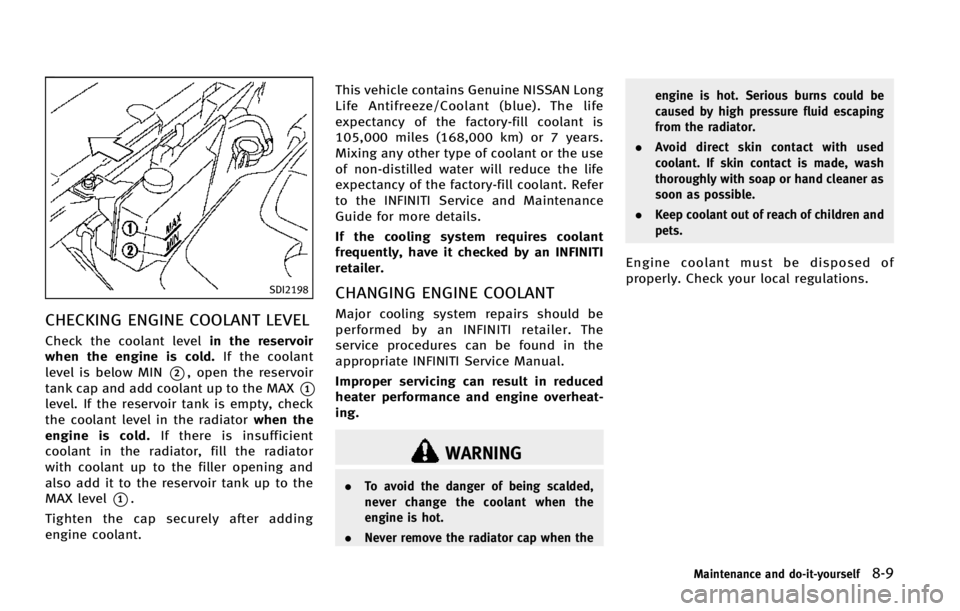
Check the coolant levelin the reservoir
when the engine is cold. If the coolant
level is below MIN
*2, open the reservoir
tank cap and add coolant up to the MAX
*1
level. If the reservoir tank is empty, check
the coolant level in the radiator when the
engine is cold. If there is insufficient
coolant in the radiator, fill the radiator
with coolant up to the filler opening and
also add it to the reservoir tank up to the
MAX level
*1.
Tighten the cap securely after adding
engine coolant. This vehicle contains Genuine NISSAN Long
Life Antifreeze/Coolant (blue). The life
expectancy of the factory-fill coolant is
105,000 miles (168,000 km) or 7 years.
Mixing any other type of coolant or the use
of non-distilled water will reduce the life
expectancy of the factory-fill coolant. Refer
to the INFINITI Service and Maintenance
Guide for more details.
If the cooling system requires coolant
frequently, have it checked by an INFINITI
retailer.
CHANGING ENGINE COOLANT
Major cooling system repairs should be
performed by an INFINITI retailer. The
service procedures can be found in the
appropriate INFINITI Service Manual.
Improper servicing can result in reduced
heater performance and engine overheat-
ing.
WARNING
.
To avoid the danger of being scalded,
never change the coolant when the
engine is hot.
. Never remove the radiator cap when the engine is hot. Serious burns could be
caused by high pressure fluid escaping
from the radiator.
. Avoid direct skin contact with used
coolant. If skin contact is made, wash
thoroughly with soap or hand cleaner as
soon as possible.
. Keep coolant out of reach of children and
pets.
Engine coolant must be disposed of
properly. Check your local regulations.
Maintenance and do-it-yourself8-9
Page 467 of 498

9-2Technical and consumer information
The following are approximate capacities. The actual refill capacities may be a little different. When refilling, follow the procedure
instructed in the“8. Maintenance and do-it-yourself” section to determine the proper refill capacity.
Capacity (Approximate)
Recommended specifications
US measure Imp measure Liter
Fuel 20 gal 16-5/8 gal 76 See “Fuel recommendation”later in this section.
Engine oil*1
Drain and refill With oil filter change 5-1/8 qt 4-3/8 qt4.9
.Engine oil with API Certification Mark*2*3
. Viscosity SAE 5W-30
Without oil filter change 4-7/8 qt4 qt4.6
Cooling system With reservoir 9-1/2 qt 7-7/8 qt 9.0
Pre-diluted Genuine NISSAN Long Life Antifreeze/Coolant (blue) or equivalent
Reservoir 7/8 qt3/4 qt 0.8
Automatic transmission fluid ———Genuine NISSAN Matic S ATF*4
Differential gear oil ———Genuine NISSAN Differential Oil Hypoid Super GL-5 80W-90 or API GL-5 Viscosity SAE 80W-90*5
Transfer fluid ———Genuine NISSAN Matic J ATF*6
Power steering fluid (PSF) Refill to the proper oil level according to the instructions in
the“8. Maintenance and do-it-yourself” section.Genuine NISSAN PSF or equivalent*7
Brake fluid Genuine NISSAN Super Heavy Duty Brake Fluid*8 or equivalent DOT 3
Multi-purpose grease ———NLGI No. 2 (Lithium soap base)
Air conditioning system refrigerant ———HFC-134a (R-134a)*9
Air conditioning system lubricants ———NISSAN A/C System Oil
Type S or exact equivalent
Window washer fluid ———Genuine NISSAN Windshield Washer Concentrate Cleaner & Antifreeze or equivalent
*1:
For additional information, see “Engine oil”in the“8. Maintenance and do-it-yourself” section for changing engine oil.*2:For additional information, see later in this paragraph for engine oil and oil filter recommendation.*3:INFINITI recommends Genuine NISSAN Ester Oil available from an INFINITI retailer.*4:Using automatic transmission fluid other than Genuine NISSAN Matic S ATF will cause deterioration in driveability and automatic transmission durability, and may damage the automatic
transmission, which is not covered by the INFINITI new vehicle limited warranty.
*5:For hot climates, viscosity SAE 90 is suitable for ambient temperatures above 328F(0 8C).*6:Using transfer fluid other than Genuine NISSAN Matic J ATF will cause deterioration in driveability and transfer durability, and may damage the transfer, which is not covered by the INFINITI new
vehicle limited warranty.
*7:DEXRONTMVI type ATF may also be used.*8:Available in mainland US through an INFINITI retailer.*9:For additional information, see“Vehicle identification”later in this section for air conditioner specification label.
CAPACITIES AND RECOMMENDED FUEL/
LUBRICANTS
Page 488 of 498
10 Index
A
ABS (Anti-lock Braking System) ......................... 5-85
Adaptive front lighting system (AFS) .................. 2-37
Advanced air bag system .................................. 1-42
Aiming control, Adaptive front lighting
system (AFS) ..................................................... 2-37
Air bag systemAdvanced air bag system ............................. 1-42
Front passenger air bag and status light ...... 1-44
Front-seat mounted side-impact
supplemental air bag system ....................... 1-47
Roof-mounted curtain side-impact
supplemental air bag system ....................... 1-47
Air bag warning labels ...................................... 1-50
Air bag warning light ............................... 1-50, 2-15
Air cleaner housing filter ................................... 8-19
Air conditioner
Air conditioner service ................................. 4-52
Air conditioner specification label ................ 9-12
Air conditioning system refrigerant and
lubricant recommendations .................. 4-52, 9-6
Automatic climate control ............................ 4-44
In-cabin microfilter ....................................... 4-52
Alarm, How to stop alarm (see vehicle
security system) ................................................ 2-30
Alcohol, drugs and driving .................................. 5-8
All-wheel drive (AWD) ........................................ 5-79
All-wheel drive (AWD) warning light .................. 2-11
Antenna ............................................................ 4-92
Anti-lock Braking System (ABS) ......................... 5-85 Anti-lock braking system (ABS) warning light .... 2-11
Appearance care
Exterior appearance care ................................ 7-2
Interior appearance care ................................ 7-4
Armrest ............................................................. 1-10
Around view monitor ......................................... 4-31
Audible reminders ............................................ 2-19
Audio operation precautions ............................. 4-53
Audio system .................................................... 4-53 Steering wheel audio controls ...................... 4-90
Autolight system ............................................... 2-35
Automatic Automatic climate control .................. 4-45, 4-48
Automatic transmission fluid (ATF) ............... 8-12
Climate control ............................................ 4-44
Door locks ..................................................... 3-5
Drive positioner ........................................... 3-26
Driving with automatic transmission ............ 5-14
Moonroof ..................................................... 2-55
Seat positioner ............................................ 3-26
Average fuel consumption and speed ................ 2-27
Avoiding collision and rollover ............................ 5-6
B
Back door (See lift gate) ................................... 3-18
Battery .............................................................. 8-15 Battery saver system ................................... 2-37
Intelligent Key .............................................. 8-24
Variable voltage control system ................... 8-17 Before starting the engine ................................ 5-12
Belts (See drive belts) ....................................... 8-17
Blind Spot Warning (BSW) system ..................... 5-27
Blind Spot Warning (BSW) system
warning light .................................................... 2-11
Bluetooth
®hands-free phone system
(models with navigation system) ....................... 4-93
Bluetooth
®hands-free phone system
(models without navigation system) ................ 4-104
Bluetooth
®streaming audio ............................. 4-82
Booster seats .................................................... 1-34
Brake Anti-lock Braking System (ABS) .................... 5-85
Brake fluid ................................................... 8-13
Brake system ............................................... 5-81
Parking brake operation ............................... 5-18
Warning light ............................................... 2-11
Break-in schedule ............................................. 5-78
Brightness control Display ON/OFF button ................................ 4-10
Instrument panel ......................................... 2-38
Bulb check/instrument panel ............................ 2-10
Bulb replacement .............................................. 8-26
C
Cabin air filter ................................................... 4-52
Capacities and recommended fuel/lubricants ...... 9-2
Car phone or CB radio ...................................... 4-93
Card holder ....................................................... 2-48