display INFINITI FX 2012 Owners Manual
[x] Cancel search | Manufacturer: INFINITI, Model Year: 2012, Model line: FX, Model: INFINITI FX 2012Pages: 522, PDF Size: 3.51 MB
Page 352 of 522
SSD0884
SSD0885
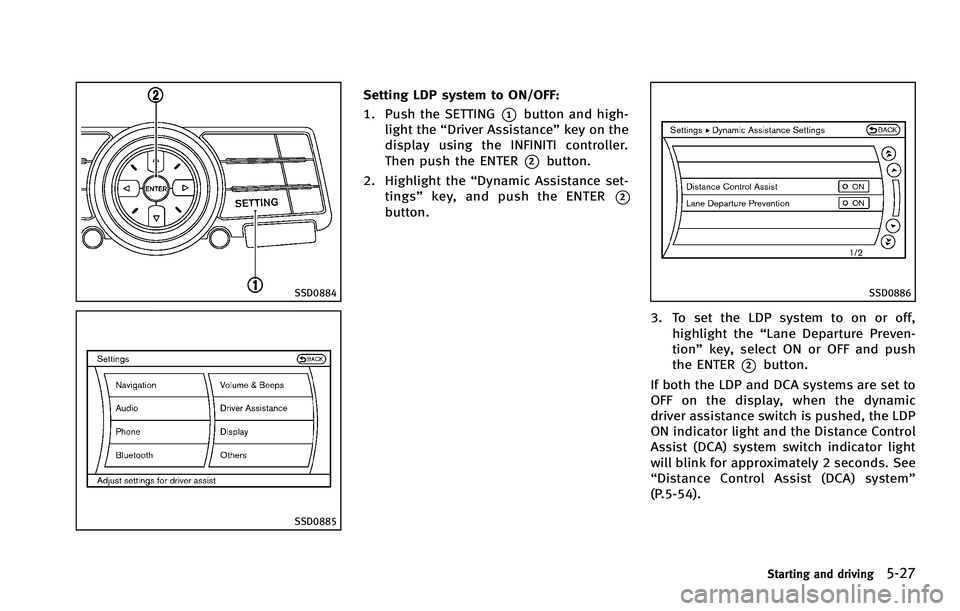
Setting LDP system to ON/OFF:
1. Push the SETTING
*1button and high-
light the “Driver Assistance” key on the
display using the INFINITI controller.
Then push the ENTER
*2button.
2. Highlight the “Dynamic Assistance set-
tings” key, and push the ENTER
*2button.
SSD0886
3. To set the LDP system to on or off,
highlight the “Lane Departure Preven-
tion” key, select ON or OFF and push
the ENTER
*2button.
If both the LDP and DCA systems are set to
OFF on the display, when the dynamic
driver assistance switch is pushed, the LDP
ON indicator light and the Distance Control
Assist (DCA) system switch indicator light
will blink for approximately 2 seconds. See
“ Distance Control Assist (DCA) system”
(P.5-54).
Starting and driving5-27
Page 354 of 522
SSD0453
LANE CAMERA UNIT MAINTENANCE
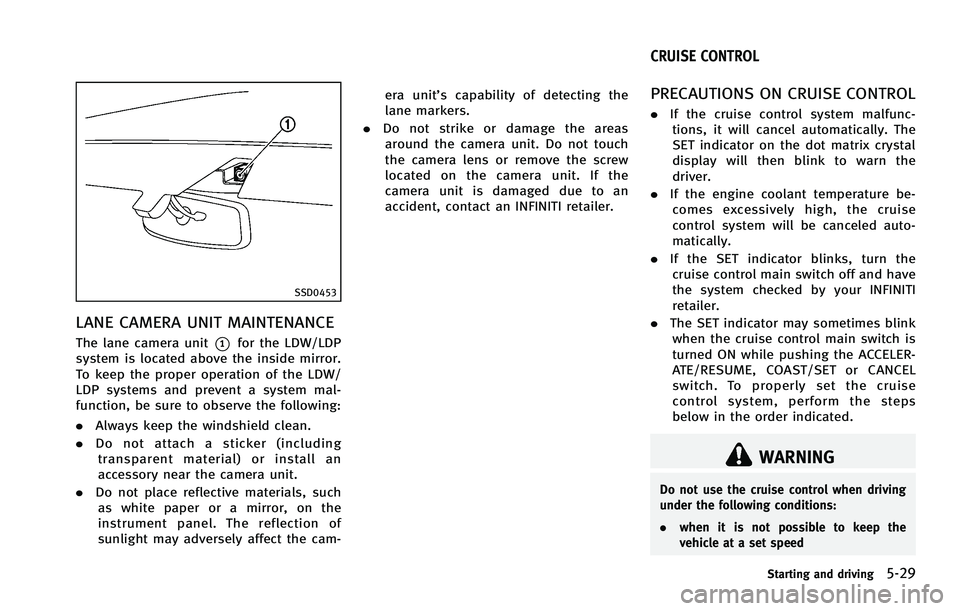
The lane camera unit*1for the LDW/LDP
system is located above the inside mirror.
To keep the proper operation of the LDW/
LDP systems and prevent a system mal-
function, be sure to observe the following:
. Always keep the windshield clean.
. Do not attach a sticker (including
transparent material) or install an
accessory near the camera unit.
. Do not place reflective materials, such
as white paper or a mirror, on the
instrument panel. The reflection of
sunlight may adversely affect the cam- era unit’s capability of detecting the
lane markers.
. Do not strike or damage the areas
around the camera unit. Do not touch
the camera lens or remove the screw
located on the camera unit. If the
camera unit is damaged due to an
accident, contact an INFINITI retailer.
PRECAUTIONS ON CRUISE CONTROL
. If the cruise control system malfunc-
tions, it will cancel automatically. The
SET indicator on the dot matrix crystal
display will then blink to warn the
driver.
. If the engine coolant temperature be-
comes excessively high, the cruise
control system will be canceled auto-
matically.
. If the SET indicator blinks, turn the
cruise control main switch off and have
the system checked by your INFINITI
retailer.
. The SET indicator may sometimes blink
when the cruise control main switch is
turned ON while pushing the ACCELER-
ATE/RESUME, COAST/SET or CANCEL
switch. To properly set the cruise
control system, perform the steps
below in the order indicated.
WARNING
Do not use the cruise control when driving
under the following conditions:
. when it is not possible to keep the
vehicle at a set speed
Starting and driving5-29
CRUISE CONTROL
Page 357 of 522
5-32Starting and driving
accidents or to control the vehicle’s
speed in emergency situations. Do not
use cruise control except in appropriate
road and traffic conditions.
. In the conventional (fixed speed) cruise
control mode, a warning chime will not
sound to warn you if you are too close to
the vehicle ahead. Pay special attention
to the distance between your vehicle and
the vehicle ahead of you or a collision
could occur.
SSD0913
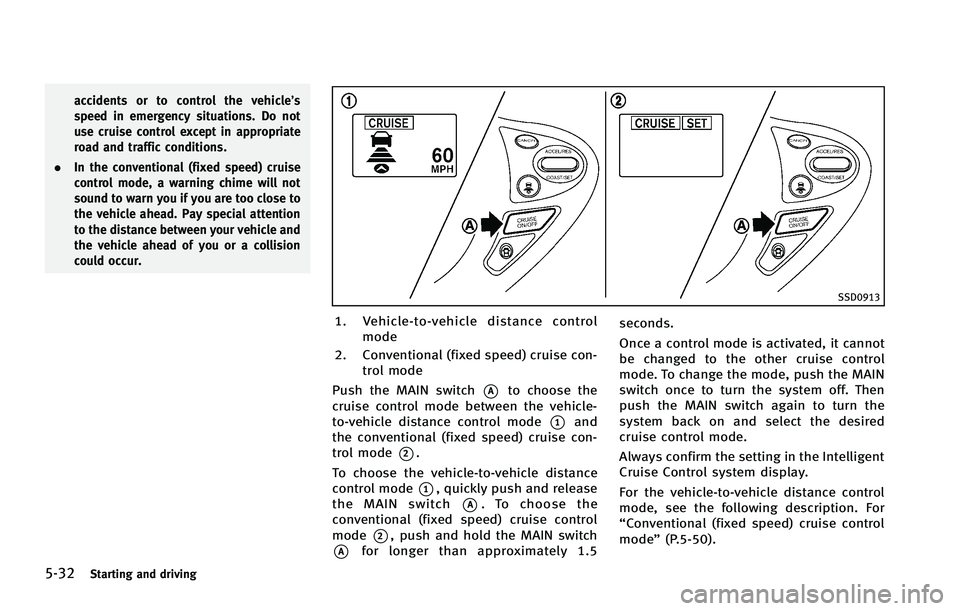
1. Vehicle-to-vehicle distance control
mode
2. Conventional (fixed speed) cruise con- trol mode
Push the MAIN switch
*Ato choose the
cruise control mode between the vehicle-
to-vehicle distance control mode
*1and
the conventional (fixed speed) cruise con-
trol mode
*2.
To choose the vehicle-to-vehicle distance
control mode
*1, quickly push and release
the MAIN switch
*A. To choose the
conventional (fixed speed) cruise control
mode
*2, push and hold the MAIN switch
*Afor longer than approximately 1.5 seconds.
Once a control mode is activated, it cannot
be changed to the other cruise control
mode. To change the mode, push the MAIN
switch once to turn the system off. Then
push the MAIN switch again to turn the
system back on and select the desired
cruise control mode.
Always confirm the setting in the Intelligent
Cruise Control system display.
For the vehicle-to-vehicle distance control
mode, see the following description. For
“Conventional (fixed speed) cruise control
mode”
(P.5-50).
Page 361 of 522

5-36Starting and driving
ough. If this occurs, the ICC system will
sound a warning chime and blink the
system display to notify the driver to take
necessary action.
The system will cancel and a warning
chime will sound if the speed is below
approximately 15 MPH (24 km/h) and a
vehicle is not detected ahead. The system
will also disengage when the vehicle goes
above the maximum set speed.
See“Approach warning” (P.5-46).
The following items are controlled in the
vehicle-to-vehicle distance control mode:
. When there are no vehicles traveling
ahead, the vehicle-to-vehicle distance
control mode maintains the speed set
by the driver. The set speed range is
between approximately 20 and 90 MPH
(32 and 144 km/h).
. When there is a vehicle traveling ahead,
the vehicle-to-vehicle distance control
mode adjusts the speed to maintain the
distance, selected by driver, from the
vehicle ahead. The adjusting speed
range is up to the set speed. If the
vehicle ahead comes to a stop, the
vehicle decelerates to a standstill with-
in the limitations of the system. The
system will cancel once it judges a standstill with a warning chime.
. When the vehicle traveling ahead has
moved out from its lane of travel, the
vehicle-to-vehicle distance control
mode accelerates and maintains vehi-
cle speed up to the set speed.
The ICC system does not control vehicle
speed or warn you when you approach
stationary and slow moving vehicles. You
must pay attention to vehicle operation to
maintain proper distance from vehicles
ahead when approaching toll gates or
traffic congestion.
Page 364 of 522
SSD0914
Intelligent cruise control switch
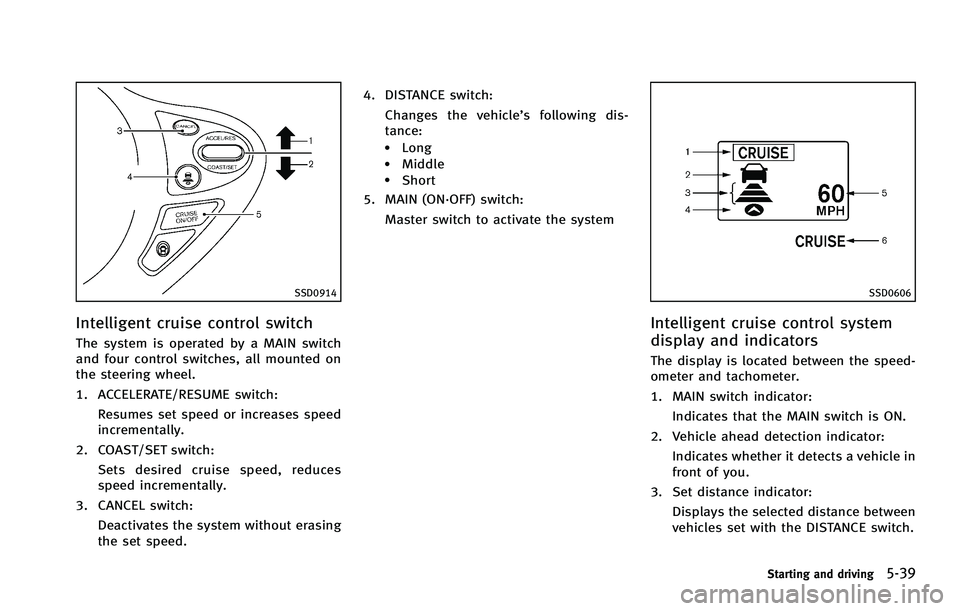
The system is operated by a MAIN switch
and four control switches, all mounted on
the steering wheel.
1. ACCELERATE/RESUME switch:Resumes set speed or increases speed
incrementally.
2. COAST/SET switch: Sets desired cruise speed, reduces
speed incrementally.
3. CANCEL switch:
Deactivates the system without erasing
the set speed. 4. DISTANCE switch:
Changes the vehicle’s following dis-
tance:
.Long.Middle.Short
5. MAIN (ON·OFF) switch:
Master switch to activate the system
SSD0606
Intelligent cruise control system
display and indicators
The display is located between the speed-
ometer and tachometer.
1. MAIN switch indicator:Indicates that the MAIN switch is ON.
2. Vehicle ahead detection indicator: Indicates whether it detects a vehicle in
front of you.
3. Set distance indicator: Displays the selected distance between
vehicles set with the DISTANCE switch.
Starting and driving5-39
Page 365 of 522

5-40Starting and driving
4. Indicates your vehicle
5. Set vehicle speed indicator:Indicates the set vehicle speed.
For Canadian models, the speed is
displayed in km/h.
6. Intelligent Cruise Control system warn- ing light (orange):
The light comes on if there is a
malfunction in the ICC system.
SSD0607
When the ignition switch is pushed to the
ON position, the indicators come on as
illustrated to check for a burned-out bulb,
and it turns off when the engine is started.
SSD0915
Operating vehicle-to-vehicle dis-
tance control mode
To turn on the cruise control, quickly push
and release the MAIN switch
*Aon. The
cruise indicator light, set distance indicator
and set vehicle speed indicator come on
and in a standby state for setting.
Page 368 of 522

SSD0610
1. System set display with vehicle ahead
2. System set display without vehicleahead
System operation
WARNING
Normally when controlling the distance to a
vehicle ahead, this system automatically
accelerates or decelerates your vehicle
according to the speed of the vehicle ahead.
Depress the accelerator to properly accel-
erate your vehicle when acceleration is
required for a lane change. Depress the brake pedal when deceleration is required to
maintain a safe distance to the vehicle
ahead due to its sudden braking or if a
vehicle cuts in. Always stay alert when
using the ICC system.
The driver sets the desired vehicle speed
based on the road conditions. The ICC
system maintains the set vehicle speed,
similar to standard cruise control, as long
as no vehicle is detected in the lane ahead.
The ICC system displays the set speed.Vehicle detected ahead:
When a vehicle is detected in the lane
ahead, the ICC system decelerates the
vehicle by controlling the throttle and
applying the brakes to match the speed
of a slower vehicle ahead. The system then
controls the vehicle speed based on the
speed of the vehicle ahead to maintain the
driver selected distance.
The stoplights of the vehicle come on and
the brake pedal depresses when braking is
performed by the ICC system.
When the brake operates, a noise may be
heard. This is not a malfunction.
When a vehicle ahead is detected, the
vehicle ahead detection indicator comes
on. The ICC system will also display the set
speed and selected distance.
Vehicle ahead not detected:
When a vehicle is no longer detected
ahead, the ICC system gradually acceler-
ates your vehicle to resume the previously
set vehicle speed. The ICC system then
maintains the set speed.
When a vehicle is no longer detected the
vehicle ahead detection indicator turns off.
If a vehicle ahead appears during accel-
eration to the set vehicle speed or any time
Starting and driving5-43
Page 371 of 522

5-46Starting and driving
SSD0613C
.The distance to the vehicle ahead will
change according to the vehicle speed.
The higher the vehicle speed, the
longer the distance.
. If the engine is stopped, the set
distance becomes “long”. (Each time
the engine is started, the initial setting becomes
“long”.)
Approach warning
If your vehicle comes closer to the vehicle
ahead due to rapid deceleration of that
vehicle or if another vehicle cuts in, the
system warns the driver with the chime and ICC system display. Decelerate by
depressing the brake pedal to maintain a
safe vehicle distance if:
.
The chime sounds.
. The vehicle ahead detection and set
distance indicator blink.
The warning chime may not sound in some
cases when there is a short distance
between vehicles. Some examples are:
. When the vehicles are traveling at the
same speed and the distance between
vehicles is not changing
. When the vehicle ahead is traveling
faster and the distance between vehi-
cles is increasing
. When a vehicle cuts in near your vehicle
The warning chime will not sound when:
. the vehicle approaches other vehicles
that are parked or moving slowly.
. the accelerator pedal is depressed,
overriding the system.
Page 372 of 522

SSD0284A
NOTE:
The approach warning chime may sound
and the system display may blink when
the ICC sensor detects some reflectors
*Awhich are fitted on vehicles in other lanes
or on the side of the road. This may cause
the ICC system to decelerate or accelerate
the vehicle. The ICC sensor may detect
these reflectors when the vehicle is driven
on winding roads, hilly roads or when
entering or exiting a curve. The ICC sensor
may also detect reflectors on narrow roads
or in road construction zones. In these
cases you will have to manually control
the proper distance ahead of your vehicle.Also, the sensor sensitivity can be affected
by vehicle operation (steering maneuver or
driving position in the lane) or traffic or
vehicle condition (for example, if a vehicle
is being driven with some damage).
Automatic cancellation
A chime sounds under the following con-
ditions and the control is automatically
canceled.
.
When the vehicle ahead is not detected
and your vehicle is traveling below the
speed of 15 MPH (24 km/h)
. When the system judges the vehicle is
at standstill
. When the selector lever is not in the D,
DS or Manual mode
. When the windshield wipers are operat-
ing at low (LO) or high speed (HI). If the
vehicle is equipped with a rain sensing
auto-wiper, the system may cancel
when the wipers are set to intermittent
(INT).
. When the parking brake is applied
. When the SNOW mode switch is turned
ON
. When the VDC system is turned off
. When ABS or VDC (including the trac-
tion control system) operates .
When driving into a strong light (for
example, sunlight)
. When distance measurement becomes
impaired due to adhesion of dirt or
obstruction to the sensor
. When a wheel slips
Starting and driving5-47
Page 373 of 522

5-48Starting and driving
SSD0614
Warning light and display
Condition A:
Under the following conditions, the Intelli-
gent Cruise Control system is automatically
canceled. The chime will sound and the
system will not be able to be set.
.When the VDC system is turned off
. When the VDC or ABS (including the
traction control system) operates
. When a tire slips
. When the SNOW mode switch is turned
ON
. When driving into a strong light (for
example, sunlight) Action to take:
When the conditions listed above are no
longer present, turn the system off using
the Intelligent Cruise Control MAIN Switch.
Turn the ICC system back on to use the
system.
SSD0615
Condition B:
When the sensor window is dirty, making it
impossible to detect a vehicle ahead, the
ICC system is automatically canceled.
The chime sounds and the system warning
light (orange) will come on and the “CLEAN
SENSOR” indicator will appear.
Action to take:
If the warning light comes on, park the
vehicle in a safe place, turn the engine off.
Clean the sensor window with a soft cloth
and then perform the settings again.