ECO mode INFINITI FX 2012 Manual Online
[x] Cancel search | Manufacturer: INFINITI, Model Year: 2012, Model line: FX, Model: INFINITI FX 2012Pages: 522, PDF Size: 3.51 MB
Page 268 of 522
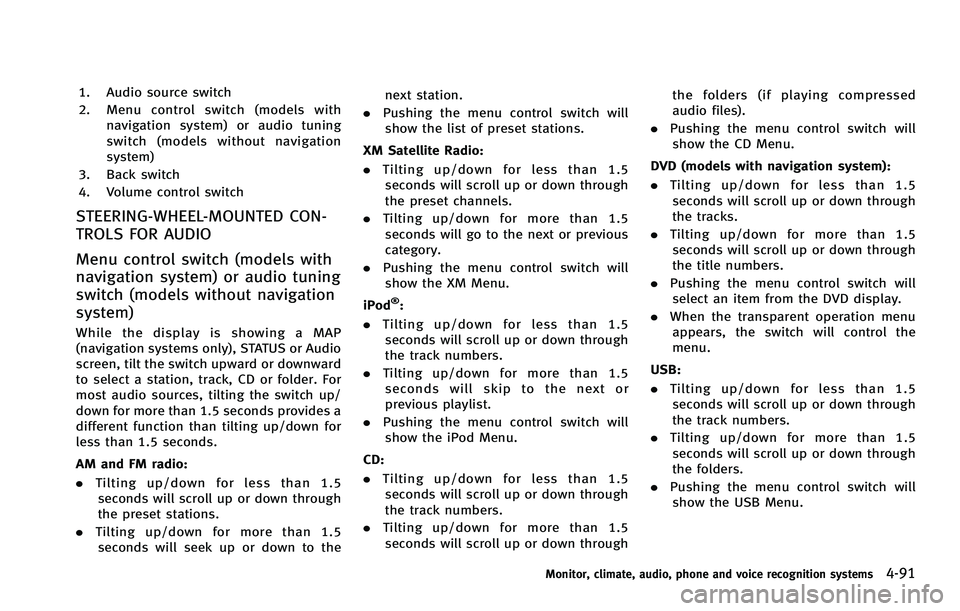
1. Audio source switch
2. Menu control switch (models withnavigation system) or audio tuning
switch (models without navigation
system)
3. Back switch
4. Volume control switch
STEERING-WHEEL-MOUNTED CON-
TROLS FOR AUDIO
Menu control switch (models with
navigation system) or audio tuning
switch (models without navigation
system)
While the display is showing a MAP
(navigation systems only), STATUS or Audio
screen, tilt the switch upward or downward
to select a station, track, CD or folder. For
most audio sources, tilting the switch up/
down for more than 1.5 seconds provides a
different function than tilting up/down for
less than 1.5 seconds.
AM and FM radio:
. Tilting up/down for less than 1.5
seconds will scroll up or down through
the preset stations.
. Tilting up/down for more than 1.5
seconds will seek up or down to the next station.
. Pushing the menu control switch will
show the list of preset stations.
XM Satellite Radio:
. Tilting up/down for less than 1.5
seconds will scroll up or down through
the preset channels.
. Tilting up/down for more than 1.5
seconds will go to the next or previous
category.
. Pushing the menu control switch will
show the XM Menu.
iPod
®:
. Tilting up/down for less than 1.5
seconds will scroll up or down through
the track numbers.
. Tilting up/down for more than 1.5
seconds will skip to the next or
previous playlist.
. Pushing the menu control switch will
show the iPod Menu.
CD:
. Tilting up/down for less than 1.5
seconds will scroll up or down through
the track numbers.
. Tilting up/down for more than 1.5
seconds will scroll up or down through the folders (if playing compressed
audio files).
. Pushing the menu control switch will
show the CD Menu.
DVD (models with navigation system):
. Tilting up/down for less than 1.5
seconds will scroll up or down through
the tracks.
. Tilting up/down for more than 1.5
seconds will scroll up or down through
the title numbers.
. Pushing the menu control switch will
select an item from the DVD display.
. When the transparent operation menu
appears, the switch will control the
menu.
USB:
. Tilting up/down for less than 1.5
seconds will scroll up or down through
the track numbers.
. Tilting up/down for more than 1.5
seconds will scroll up or down through
the folders.
. Pushing the menu control switch will
show the USB Menu.
Monitor, climate, audio, phone and voice recognition systems4-91
Page 269 of 522
4-92Monitor, climate, audio, phone and voice recognition systems
Music Box®(if so equipped):
. Tilting up/down for less than 1.5
seconds will scroll up or down through
the track numbers.
. Tilting up/down for more than 1.5
seconds will scroll up or down through
the albums (folders) (if playing com-
pressed audio files).
. Pushing the menu control switch will
show the Music Box
®Menu.
Bluetooth streaming audio (models with
navigation system):
. Tilting up/down for less than 1.5
seconds will scroll up or down through
the track numbers.
BACK switch
Push this switch to go back to the previous
screen or cancel the selection if it is not
completed.
Volume control switches
Push the upper (+) or lower (−) side switch
to increase or decrease the volume.
Audio source switch
Push the audio source switch to change
the mode as follows. .
Models with navigation system
AM ?FM1 ?FM2 ?XM1 ?XM2 ?
XM3 ?CD/DVD ?Music Box
®(if so
equipped) ?USB/iPod®?Bluetooth®
streaming audio
. Models without navigation system
AM ?FM1 ?FM2 ?XM1 ?XM2 ?
XM3 ?CD ?Music Box
®(if so
equipped) ?USB/iPod®
Media not connected/inserted will be
skipped.
ANTENNA
Window antenna (if so equipped)
The antenna pattern is printed inside the
rear window.
CAUTION
. Do not place metalized film near the rear
window glass or attach any metal parts
to it. This may cause poor reception or
noise.
. When cleaning the inside of the rear
window, be careful not to scratch or
damage the rear window antenna.
Lightly wipe along the antenna with a dampened soft cloth.
Page 270 of 522
SAA2102
Roof antenna
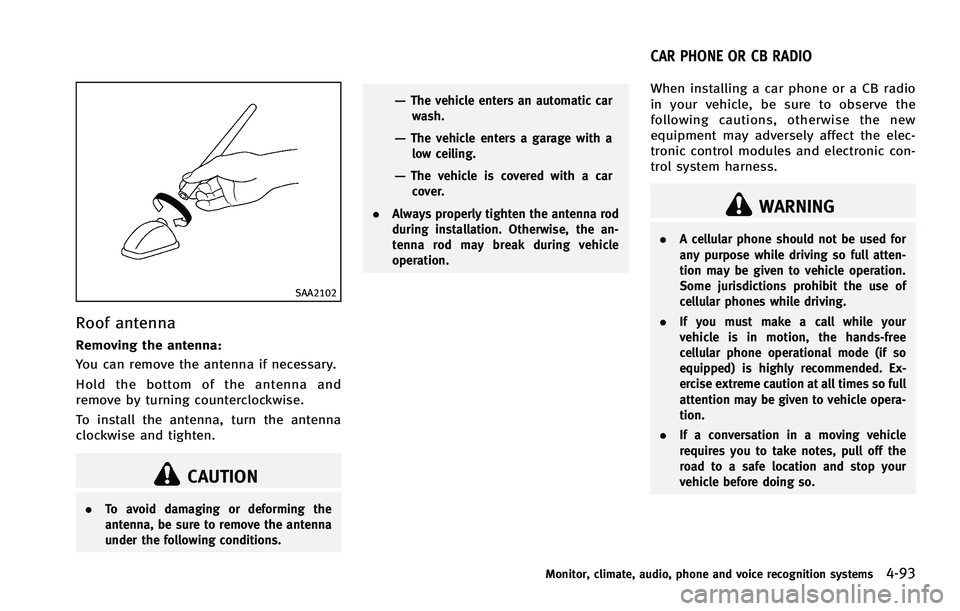
Removing the antenna:
You can remove the antenna if necessary.
Hold the bottom of the antenna and
remove by turning counterclockwise.
To install the antenna, turn the antenna
clockwise and tighten.
CAUTION
.To avoid damaging or deforming the
antenna, be sure to remove the antenna
under the following conditions.
—The vehicle enters an automatic car
wash.
—The vehicle enters a garage with alow ceiling.
—The vehicle is covered with a carcover.
. Always properly tighten the antenna rod
during installation. Otherwise, the an-
tenna rod may break during vehicle
operation.
When installing a car phone or a CB radio
in your vehicle, be sure to observe the
following cautions, otherwise the new
equipment may adversely affect the elec-
tronic control modules and electronic con-
trol system harness.
WARNING
.A cellular phone should not be used for
any purpose while driving so full atten-
tion may be given to vehicle operation.
Some jurisdictions prohibit the use of
cellular phones while driving.
. If you must make a call while your
vehicle is in motion, the hands-free
cellular phone operational mode (if so
equipped) is highly recommended. Ex-
ercise extreme caution at all times so full
attention may be given to vehicle opera-
tion.
. If a conversation in a moving vehicle
requires you to take notes, pull off the
road to a safe location and stop your
vehicle before doing so.
Monitor, climate, audio, phone and voice recognition systems4-93
CAR PHONE OR CB RADIO
Page 271 of 522
4-94Monitor, climate, audio, phone and voice recognition systems
CAUTION
.Keep the antenna as far away as
possible from the electronic control
modules.
. Keep the antenna wire more than 8 in
(20 cm) away from the electronic control
system harness. Do not route the anten-
na wire next to any harness.
. Adjust the antenna standing-wave ratio
as recommended by the manufacturer.
. Connect the ground wire from the CB
radio chassis to the body.
. For details, consult an INFINITI retailer.
WARNING
.Use a phone after stopping your vehicle
in a safe location. If you have to use a
phone while driving, exercise extreme
caution at all times so full attention may
be given to vehicle operation.
. If you find yourself unable to devote full
attention to vehicle operation while
talking on the phone, pull off the road
to a safe location and stop your vehicle
before doing so.
CAUTION
To avoid draining the vehicle battery, use a
phone after starting the engine.
Your INFINITI is equipped with Bluetooth®
Hands-Free Phone System. If you are an
owner of a compatible Bluetooth®enabled
cellular phone, you can set up the wireless
connection between your cellular phone
and the in-vehicle phone module. With
Bluetooth
®wireless technology, you can
make or receive a telephone call with your
cellular phone in your pocket. Once a cellular phone is connected to the
in-vehicle phone module, no phone con-
necting procedure is required anymore.
Your phone is automatically connected
with the in-vehicle phone module when
the ignition switch is pushed to the ON
position with the registered cellular phone
turned on and carried in the vehicle.
You can register up to 5 different Blue-
tooth
®cellular phones in the in-vehicle
phone module. However, you can talk on
only one cellular phone at a time.
The INFINITI Voice Recognition system
supports the phone commands, so dialing
a phone number using your voice is
possible. For more details, see “INFINITI
Voice Recognition System (models with
navigation system)” (P.4-120).
Before using the Bluetooth
®Hands-Free
Phone System, refer to the following notes.
. Wireless LAN (Wi-Fi) and the Bluetooth
®
functions share the same frequency
band (2.4 GHz). Using the Bluetooth®
and the wireless LAN functions at the
same time may slow down or discon-
nect the communication and cause
undesired noise. It is recommended
that you turn off the wireless LAN (Wi-
Fi) when using the Bluetooth
®func-
Bluetooth®HANDS-FREE PHONE SYSTEM
(models with navigation system)
Page 273 of 522
4-96Monitor, climate, audio, phone and voice recognition systems
must accept any interference, including
interference that may cause undesired
operation of the device.
. This Class B digital apparatus meets all
requirements of the Canadian Interfer-
ence-Causing Equipment Regulations.
Bluetooth trademark:
Bluetooth®is a trademark
owned by Bluetooth SIG, Inc.,
and licensed to Clarion Co., Ltd.
VOICE COMMANDS
You can use voice commands to operate
various Bluetooth®Hands-Free Phone Sys-
tem features using the INFINITI Voice
Recognition system.
For more details, see “INFINITI Voice
Recognition System (models with naviga-
tion system)” (P.4-120).SAA2248
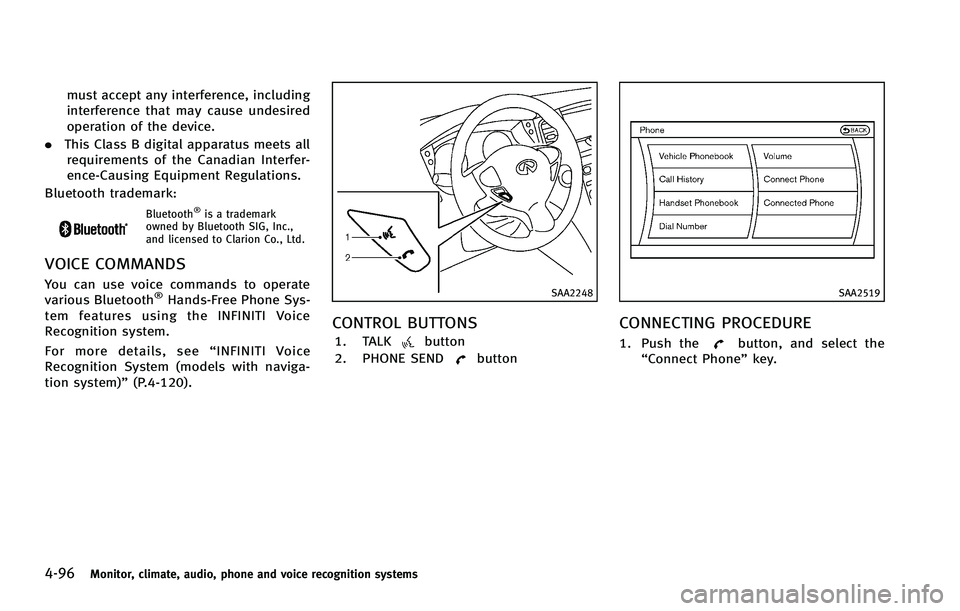
CONTROL BUTTONS
1. TALKbutton
2. PHONE SEND
button
SAA2519
CONNECTING PROCEDURE
1. Push thebutton, and select the
“Connect Phone” key.
Page 275 of 522

4-98Monitor, climate, audio, phone and voice recognition systems
SAA2522
3. Choose the method for entering thephonebook entry. For this example,
select “Enter Number by Keypad”.
4. Enter the digits and select the “OK”
key. (See “How to use touch screen
(models with navigation system)” (P.4-
5).)
SAA2523
5. Select the “Voicetag”key to record a
name to speak when using the INFINITI
Voice Recognition system.
6. Select the “Store”key and prepare to
speak the name after the tone.
7. When the voicetag is successfully saved, select the “OK”key to save the
phonebook entry.
8. After the phonebook entry is saved, it will show a screen that is ready to call
the number. Press the BACK button to
return to the Vehicle Phonebook.
There are different methods to input a
phone number. Select one of the following options instead of
“Enter Number by Key-
pad” in step 3.
. Copy from Call History
The system will show a list of incoming,
outgoing or missed calls that were
downloaded from the connected cellu-
lar phone (depending on the phone’s
compatibility). Select one of these
entries to save in the vehicle phone-
book.
. Copy from the Handset
The system will show the connected
cellular phone’s phonebook that was
downloaded (depending on the
phone’s compatibility). Select one of
these entries to save in the vehicle
phonebook.
Page 276 of 522

SAA2620
Editing the Vehicle Phonebook
1. Push thebutton and select the
“Vehicle Phonebook” key.
2. Select the desired entry from the displayed list.
3. Select the “Edit”key.
4. Select the desired item to change.
SAA2523
The following editing items are available:
. Entry #
Changes the displayed number of the
selected entry.
. Name
Edit the name of the entry using the
keypad displayed on the screen.
. Number
Edit the phone number using the key-
pad displayed on the screen.
. Type
Select an icon from the icon list.
. Voicetag
Confirm and store the voicetag. Voice- tags allow easy dialing using the
INFINITI Voice Recognition system.
(See
“INFINITI Voice Recognition System
(models with navigation system)” (P.4-
120).)
To delete an entry, select the “Delete”key
at step 3.
Monitor, climate, audio, phone and voice recognition systems4-99
Page 277 of 522

4-100Monitor, climate, audio, phone and voice recognition systems
SAA2524
MAKING A CALL
To make a call, follow this procedure.
1. Push the
button on the steering
wheel. The “PHONE”screen will appear
on the display.
2. Select the “Handset Phonebook” key
on the “PHONE” menu.
3. Select the desired entry from the list.
4. Confirm the correct entry by selecting for the correct number from the list.
SAA2621
5. Select the “Call”key to start dialing the
number.
There are different methods to make a call.
Select one of the following options instead
of “Handset Phonebook” in step 2 above.
. Vehicle Phonebook
Select an entry stored in the Vehicle’s
Phonebook.
. Call History
Select an outgoing, incoming or missed
call downloaded from your cell phone
(depending on your phone’s compat-
ibility). .
Dial Number
Input the phone number manually
using the keypad displayed on the
screen. (See “How to use touch screen
(models with navigation system)” (P.4-
5).)
Page 278 of 522
SAA2525
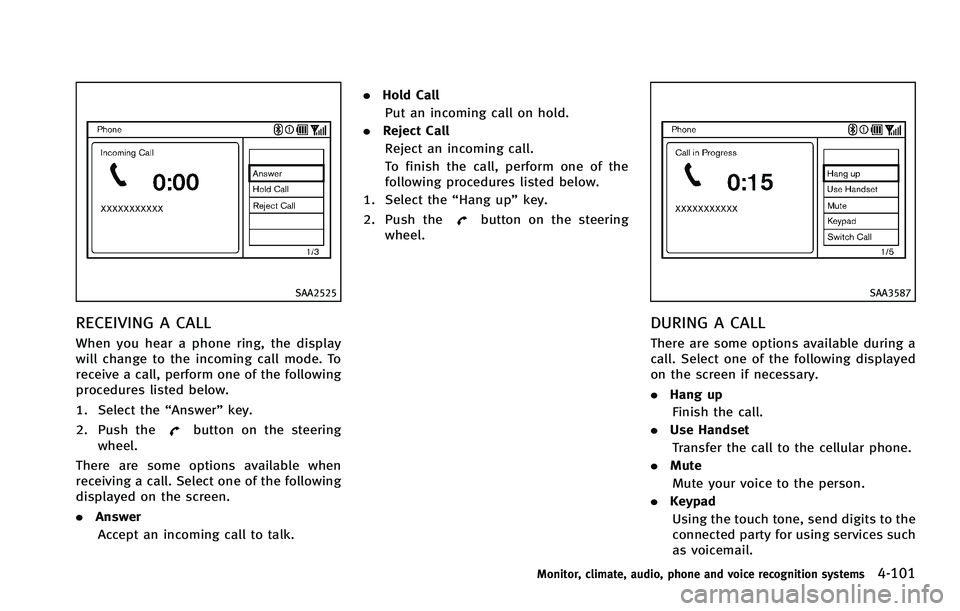
RECEIVING A CALL
When you hear a phone ring, the display
will change to the incoming call mode. To
receive a call, perform one of the following
procedures listed below.
1. Select the“Answer”key.
2. Push the
button on the steering
wheel.
There are some options available when
receiving a call. Select one of the following
displayed on the screen.
. Answer
Accept an incoming call to talk. .
Hold Call
Put an incoming call on hold.
. Reject Call
Reject an incoming call.
To finish the call, perform one of the
following procedures listed below.
1. Select the “Hang up”key.
2. Push the
button on the steering
wheel.
SAA3587
DURING A CALL
There are some options available during a
call. Select one of the following displayed
on the screen if necessary.
. Hang up
Finish the call.
. Use Handset
Transfer the call to the cellular phone.
. Mute
Mute your voice to the person.
. Keypad
Using the touch tone, send digits to the
connected party for using services such
as voicemail.
Monitor, climate, audio, phone and voice recognition systems4-101
Page 279 of 522

4-102Monitor, climate, audio, phone and voice recognition systems
.Cancel Mute
This will appear after “Mute”is se-
lected. Mute will be canceled.
. Switch Call*
Select “Switch Call” to answer another
incoming call. By selecting “Hang up”,
you can end a call and can speak to a
caller who is on hold again.
* This function may not be usable,
depending on the model of phone
To adjust the person’s voice to be louder or
quieter, push the volume control switch (+
or −) on the steering wheel or turn the
volume control knob on the instrument
panel while talking on the phone. This
adjustment is also available in the SETTING
mode.
JVH0136M
PHONE SETTING
To set up the Bluetooth®Hands-Free
Phone System to your preferred settings,
push the SETTING button on the instrument
panel and select the “PHONE”key.
Edit Vehicle Phonebook
To edit the vehicle phonebook, use the
same procedure as described in “Vehicle
phonebook” (P.4-97).
Delete Phonebook
The vehicle phonebook entries can be
deleted all at the same time or one by one.
Download Handset Phonebook
Download the contacts registered in a
Bluetooth®cellular phone. Availability of
this function depends on each cellular
phone. The memory downloading proce-
dure from the cellular phone also varies
according to each cellular phone. See
cellular phone Owner’s Manual for details.
When “Auto Download” is active, the
system will automatically re-download the
entries registered in the phone everytime it
is paired with the vehicle, even after you
delete the entries from your vehicle’ s
handset memory.
Volume & Ringtone
The following kinds of phone volume can
be set.
. Ringtone/Incoming Call/Outgoing Call
To increase or decrease the volume,
select the “Ringtone”, “Incoming Call”
or “Outgoing Call” key and adjust it
with the INFINITI controller.
. Automatic Hold
When this function is activated, an
incoming phone call is automatically
held.