drive INFINITI FX35 2004 Service Manual
[x] Cancel search | Manufacturer: INFINITI, Model Year: 2004, Model line: FX35, Model: INFINITI FX35 2004Pages: 4449, PDF Size: 99.66 MB
Page 926 of 4449

INTELLIGENT KEY SYSTEM
BL-119
C
D
E
F
G
H
J
K
L
MA
B
BL
Revision: 2004 November 2004 FX35/FX45
DOOR LOCK FUNCTION MALFUNCTION
Before conducting the diagnosis in the following table, check all power door lock system function. Refer to BL-
22, "POWER DOOR LOCK SYSTEM" .
Symptom Diagnoses service procedure Refer to page
Door lock/unlock does not operate when door
request switch operation is used (power door
lock system is normal).1. Check door lock/unlock settingBL-115
2. Check outside key antennaBL-135
3. Intelligent Key inspectionBL-147
4. Replace Intelligent Key unitBL-146
Door lock/unlock do not operate using door
request switch operated (power door lock sys-
tem is normal).1. Check door switchBL-1282. Check key switch (Intelligent Key unit input)BL-124
3. Check ignition knob switchBL-127
4. Replace Intelligent Key unitBL-146
Driver side selective door unlock function does
not operate, when door request switch is oper-
ated.
(All other door lock function is OK.)1. Check selective door unlock settingBL-115
2. Replace BCMBCS-15
Passenger side selective door unlock function
does not operate, when door request switch is
operated.
(All other door lock function is OK.)1. Check selective door unlock settingBL-115
2. Check passenger side select unlock relayBL-144
3. Replace Intelligent Key unitBL-146
Hazard lamps do not flash during door lock
operation using door request switch operated.
(Turn signal lamp operation is normal.)
(All other door lock function is OK.)1. Check key reminder settingBL-115
2. Replace BCMBCS-15
3. Replace Intelligent Key unitBL-146
Hazard lamps do not flash during door lock
operation using door request switch operated.
(Turn signal lamps do not operate.)Check hazard functionBL-145
Intelligent Key warning buzzer does not sound
during door lock/unlock operation using Intelli-
gent Key (regardless of whether Intelligent Key
remote controller button or request switch oper-
ation is used).1. Check if the operation confirmation Intelligent Key
warning buzzer was cancelled by the CONSULT-II
settings change functionBL-115
2. Check Intelligent Key warning buzzerBL-134
3. Replace Intelligent Key unitBL-146
Door lock/unlock operation confirmation Intelli-
gent Key warning buzzer sounds, but door lock
actuator does not operate. (And hazard lamps
do not flash.)1. Check CAN communicationBL-123
2. Replace Intelligent Key unitBL-146
Page 935 of 4449
BL-128
INTELLIGENT KEY SYSTEM
Revision: 2004 November 2004 FX35/FX45
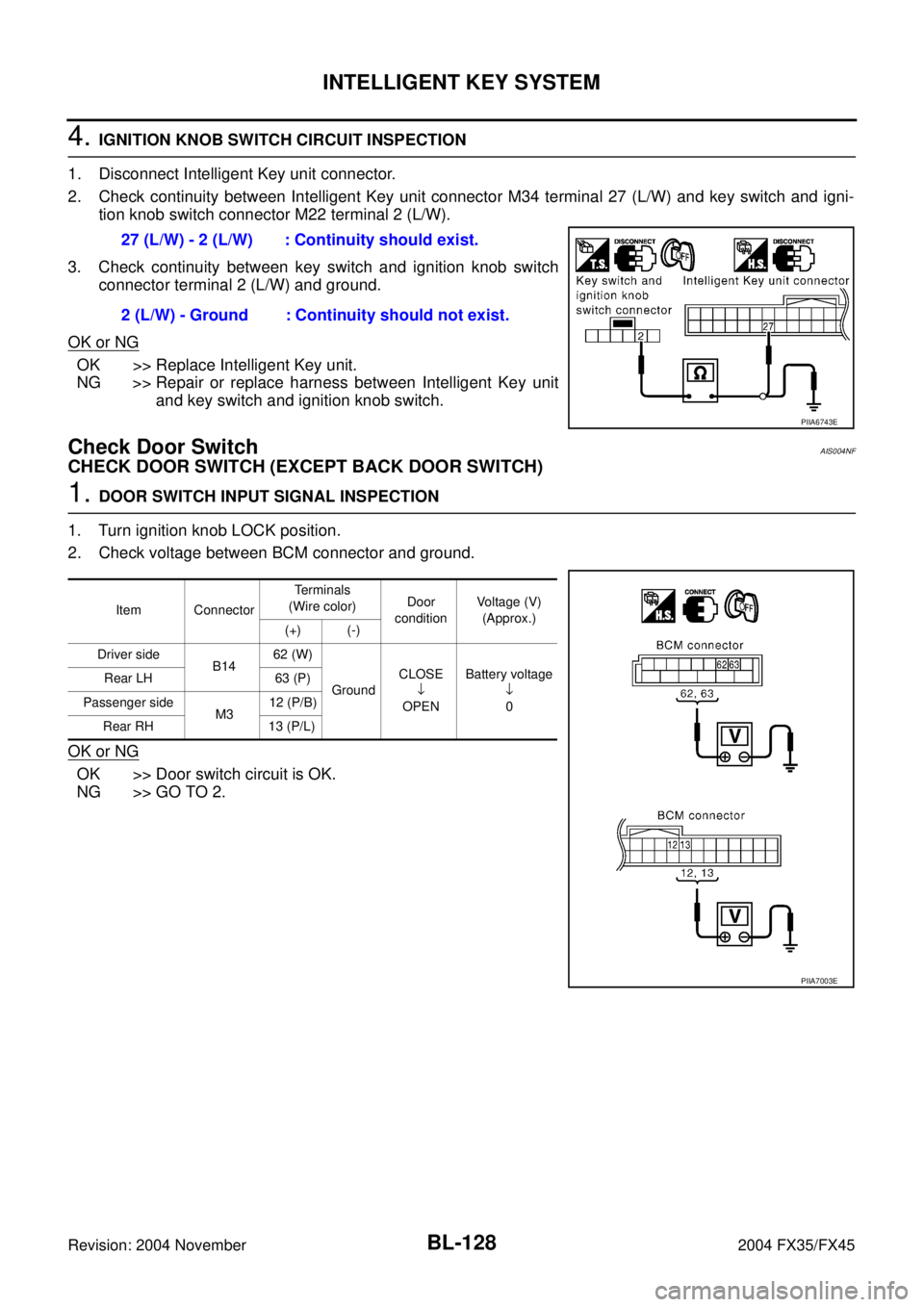
4. IGNITION KNOB SWITCH CIRCUIT INSPECTION
1. Disconnect Intelligent Key unit connector.
2. Check continuity between Intelligent Key unit connector M34 terminal 27 (L/W) and key switch and igni-
tion knob switch connector M22 terminal 2 (L/W).
3. Check continuity between key switch and ignition knob switch
connector terminal 2 (L/W) and ground.
OK or NG
OK >> Replace Intelligent Key unit.
NG >> Repair or replace harness between Intelligent Key unit
and key switch and ignition knob switch.
Check Door SwitchAIS004NF
CHECK DOOR SWITCH (EXCEPT BACK DOOR SWITCH)
1. DOOR SWITCH INPUT SIGNAL INSPECTION
1. Turn ignition knob LOCK position.
2. Check voltage between BCM connector and ground.
OK or NG
OK >> Door switch circuit is OK.
NG >> GO TO 2.27 (L/W) - 2 (L/W) : Continuity should exist.
2 (L/W) - Ground : Continuity should not exist.
PIIA6743E
Item ConnectorTerminals
(Wire color)Door
conditionVoltage (V)
(Approx.)
(+) (-)
Driver side
B1462 (W)
GroundCLOSE
↓
OPENBattery voltage
↓
0 Rear LH 63 (P)
Passenger side
M312 (P/B)
Rear RH 13 (P/L)
PIIA7003E
Page 936 of 4449

INTELLIGENT KEY SYSTEM
BL-129
C
D
E
F
G
H
J
K
L
MA
B
BL
Revision: 2004 November 2004 FX35/FX45
2. DOOR SWITCH CIRCUIT INSPECTION
1. Disconnect door switch and BCM connector.
2. Check continuity between door switch connector B26, B36, B46, B206 terminals 1 and BCM connector
M3, B14 terminals 62, 12, 63, 13.
3. Check continuity between door switch connector B26, B36, B46,
B206 terminal 1 and ground.
OK or NG
OK >> GO TO 3.
NG >> Repair or replace harness.
3. DOOR SWITCH INSPECTION
Check continuity between door switch terminal 1 and ground part of door switch.
OK or NG
OK >> Check door switch case ground condition.
NG >> Replace door switch.
CHECK BACK DOOR SWITCH
1. CHECK BACK DOOR SWITCH INPUT SIGNAL
Check voltage between BCM connector and ground.
OK or NG
OK >> Back door switch circuit is OK.
NG >> GO TO 2.Driver side door
1 (W) –62 (W) : Continuity should exist.
Passenger side door
1 (SB) – 12 (P/B) : Continuity should exist.
Rear door LH
1 (P) – 63 (P) : Continuity should exist.
Rear door RH
1 (P) – 13 (P/L) : Continuity should exist.
1 (W, SB, P) – Ground : Continuity should not exist.
PIIA7004E
Terminal Door switch condition Continuity
1 Ground part of door switchPushed No
Released Yes
PIIA3351E
ConnectorTerminals (Wire color)
ConditionVoltage (V)
(Approx.)
(+) (–)
B14 58 (L) GroundOPEN 0
CLOSE 9
PIIA6229E
Page 938 of 4449

INTELLIGENT KEY SYSTEM
BL-131
C
D
E
F
G
H
J
K
L
MA
B
BL
Revision: 2004 November 2004 FX35/FX45
5. CHECK BCM OUTPUT SIGNAL
1. Connect BCM connector.
2. Check voltage between BCM connector and ground.
OK or NG
OK >> Check condition of harness and connector.
NG >> Replace BCM.
Check Unlock SensorAIS004NG
1. UNLOCK SENSOR POWER SUPPLY INSPECTION
Check voltage between Intelligent Key unit connector and ground.
OK or NG
OK >> Unlock sensor is OK.
NG >> GO TO 2.
2. UNLOCK SENSOR CIRCUIT INSPECTION
1. Turn ignition knob LOCK position.
2. Disconnect Intelligent Key unit and front door lock assembly (driver side) connector.
3. Check continuity between Intelligent Key unit connector M34 terminal 28 (W/B) and front door lock
assembly (driver side) connector D10 terminal 4 (W).
OK or NG
OK >> GO TO 3.
NG >> Repair or replace harness between Intelligent Key unit
and front door lock assembly (driver side). 58 (L) – Ground : Approx. 9V
PIIA6229E
ConnectorTerminals (Wire color)
ConditionVoltage (V)
(Approx.)
(+) (-)
M34 28 (W/B) GroundDriver side door lock is
locked5
Driver side door lock is
unlocked0
PIIA6802E
28 (W/B) – 4 (W) : Continuity should exist.
PIIA6803E
Page 939 of 4449

BL-132
INTELLIGENT KEY SYSTEM
Revision: 2004 November 2004 FX35/FX45
3. UNLOCK SENSOR GROUND CIRCUIT INSPECTION
Check continuity between front door lock assembly (driver side) connector D10 terminal 5 (B) and ground.
OK or NG
OK >> GO TO 4.
NG >> Repair or replace harness.
4. INTELLIGENT KEY UNIT OUTPUT SIGNAL INSPECTION
1. Connect Intelligent Key unit connector.
2. Driver side door lock is locked.
3. Check voltage between Intelligent Key unit connector M34 terminal 28 (W/B) and ground.
OK or NG
OK >> Replace front door lock assembly (driver side)
NG >> Replace Intelligent Key unit.
Check Door Request SwitchAIS004NH
1. DOOR REQUEST SWITCH INSPECTION
With CONSULT-II
Display “DR REQ SW” (driver door), “AS REQ SW” (passenger door) and “BD/TR REQ SW” (back door) on
DATA MONITOR screen, and check if ON-OFF display is linked to door request switch operation.
OK or NG
OK >> Door request switch is OK.
NG >> GO TO 2.5 (B) – Ground : Continuity should exist.
PIIA6804E
28 (W/B) – Ground : Approx. 5V
PIIA6802E
Press door request switch. : ON
Release door request switch. : OFF
Page 940 of 4449

INTELLIGENT KEY SYSTEM
BL-133
C
D
E
F
G
H
J
K
L
MA
B
BL
Revision: 2004 November 2004 FX35/FX45
2. DOOR REQUEST SWITCH SIGNAL INSPECTION
1. Turn ignition knob LOCK position.
2. Disconnect door request switch connector.
3. Check voltage between door request switch connector D12 (driver door), D42 (passenger door), D113
(back door) terminal 1 and ground.
OK or NG
OK >> GO TO 3.
NG >> GO TO 5.
3. DOOR REQUEST SWITCH OPERATION INSPECTION
Check continuity between door request switch D12 (driver door), D42 (passenger door), D113 (back door) ter-
minals 1 and 2.
OK or NG
OK >> GO TO 4.
NG >> Replace door request switch.
4. DOOR REQUEST SWITCH GROUND CIRCUIT INSPECTION
Check continuity between door request switch connector D12 (driver side), D42 (passenger side), D113 (back
door) terminal 2 (B) and ground.
OK or NG
OK >> Check harness connection.
NG >> Repair or replace door request switch ground circuit.Driver 1 (SB) - Ground : Approx. 5V
Passenger 1 (GY) - Ground : Approx. 5V
Back door 1 (GY) - Ground : Approx. 5V
PIIA6744E
1 - 2
Press door request
switch.: Continuity should exist.
Return door request
switch.: Continuity should not exist.
PIIA9930E
2 (B) - Ground : Continuity should exist.
PIIA6746E
Page 941 of 4449

BL-134
INTELLIGENT KEY SYSTEM
Revision: 2004 November 2004 FX35/FX45
5. DOOR REQUEST SWITCH CIRCUIT INSPECTION
1. Disconnect Intelligent Key unit connector.
2. Check continuity between Intelligent Key unit connector M34 terminals 5 (driver door), 25 (passenger
door), and 29 (back door) and door request switch connector D12 (driver door), D42 (passenger door),
D113 (back door) terminal 1.
3. Check continuity between door request switch connector D12
(driver door), D42 (passenger door), D113 (back door) terminal
1 and ground.
OK or NG
OK >> Replace Intelligent Key unit.
NG >> Repair or replace harness between Intelligent Key unit and door request switch.
Check Intelligent Key Warning BuzzerAIS004NI
1. INTELLIGENT KEY WARNING BUZZER POWER SUPPLY CIRCUIT INSPECTION
1. Turn ignition knob LOCK position.
2. Disconnect Intelligent Key warning buzzer connector.
3. Check voltage between Intelligent Key warning buzzer connector D11 (driver side), D41 (passenger side)
terminal 1 (L) and ground.
OK or NG
OK >> GO TO 2.
NG >> Repair or replace Intelligent Key warning buzzer power
supply circuit.
2. INTELLIGENT KEY WARNING BUZZER CIRCUIT INSPECTION
1. Disconnect Intelligent Key unit connector.
2. Check continuity between Intelligent Key unit connector M34 terminal 4 and Intelligent Key warning
buzzer connector D11 (driver side), D41 (passenger side) terminal 2 (G).
3. Check continuity between Intelligent Key warning buzzer con-
nector D11 (driver side), D41 (passenger side) terminal 2 (G)
and ground.
OK or NG
OK >> GO TO 3.
NG >> Repair or replace harness between Intelligent Key warn-
ing buzzer and Intelligent Key unit. Driver 5 (W/L) - 1 (SB) : Continuity should exist.
Passenger 25 (W/R) - 1 (GY) : Continuity should exist.
Back door 29 (GY) - 1 (GY) : Continuity should exist.
1 - Ground : Continuity should not exist.
PIIA6747E
1 (L) - Ground : Battery voltage
PIIA6748E
4 (LG) - 2 (G) : Continuity should exist.
2 (G) - Ground : Continuity should not exist.
PIIA6749E
Page 942 of 4449

INTELLIGENT KEY SYSTEM
BL-135
C
D
E
F
G
H
J
K
L
MA
B
BL
Revision: 2004 November 2004 FX35/FX45
3. INTELLIGENT KEY WARNING BUZZER OPERATION INSPECTION
Connect battery power supply to Intelligent Key warning buzzer connector D11 (driver side), D41 (passenger
side) terminals 1 and 2, and check the operation.
OK or NG
OK >> Intelligent Key warning buzzer is OK.
NG >> Replace Intelligent Key warning buzzer
Check Outside Key AntennaAIS004NJ
1. OUTSIDE KEY ANTENNA POWER SUPPLY INSPECTION
Push each door request switch, and use an oscilloscope to check voltage waveform of harness between Intel-
ligent Key unit connector M34 terminals 17 (back door), 19 (driver and rear LH door), and 37 (passenger and
rear RH door) and ground.
OK or NG
OK >> GO TO 2.
NG >> GO TO 3.1 (BAT+) - 2 (BAT-) : the buzzer sounds
PIIA6750E
Terminal (Wire color)
ConditionSignal
(Reference value)
(+) (-)
Back door:
17 (OR/L)
GroundPush each
door request
switch Driver, rear LH:
19 (SB)
Passenger,
rear RH
37 (G)
MIIB0375ESIIA1910J
Page 943 of 4449
BL-136
INTELLIGENT KEY SYSTEM
Revision: 2004 November 2004 FX35/FX45
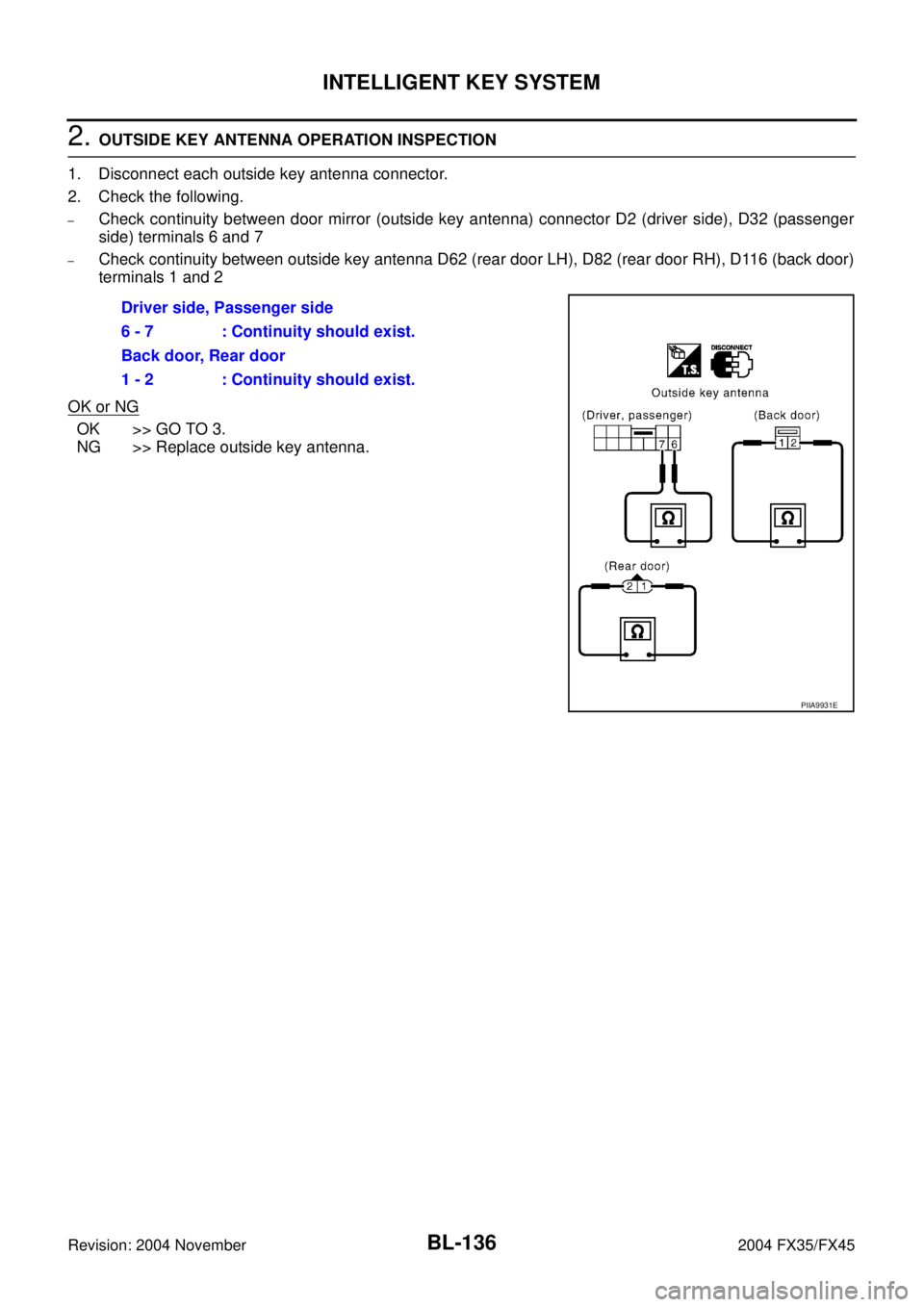
2. OUTSIDE KEY ANTENNA OPERATION INSPECTION
1. Disconnect each outside key antenna connector.
2. Check the following.
–Check continuity between door mirror (outside key antenna) connector D2 (driver side), D32 (passenger
side) terminals 6 and 7
–Check continuity between outside key antenna D62 (rear door LH), D82 (rear door RH), D116 (back door)
terminals 1 and 2
OK or NG
OK >> GO TO 3.
NG >> Replace outside key antenna.Driver side, Passenger side
6 - 7 : Continuity should exist.
Back door, Rear door
1 - 2 : Continuity should exist.
PIIA9931E
Page 944 of 4449

INTELLIGENT KEY SYSTEM
BL-137
C
D
E
F
G
H
J
K
L
MA
B
BL
Revision: 2004 November 2004 FX35/FX45
3. OUTSIDE KEY ANTENNA CIRCUIT INSPECTION
1. Disconnect Intelligent Key unit connector.
2. Check continuity between each outside key antenna connector D2 (driver side), D32 (passenger side),
D62 (rear door LH), D82 (rear door RH), D116 (back door) terminals 1, 2, 6, 7 and Intelligent Key unit con-
nector M34 terminals 17, 18, 19, 20, 37, and 38.
3. Check continuity between each out side key antenna connector
terminals 1, 2, 6, 7 and ground.
OK or NG
OK >> Replace Intelligent Key unit.
NG >> Replace harness between outside key antenna and Intelligent Key unit. Back door1 (L/B) - 17 (OR/L): Continuity should exist.
2 (W/B) - 18 (PU/R): Continuity should exist.
Driver side7 (BR/W) - 19 (SB): Continuity should exist.
6 (R/Y) - 20 (R/G): Continuity should exist.
Passenger side7 (G/Y) - 37 (G): Continuity should exist.
6 (L/Y) - 38 (PU/W): Continuity should exist.
Rear door LH1 (G/Y) - 19 (SB): Continuity should exist.
2 (PU/W) - 20 (R/G): Continuity should exist.
Rear door RH1 (G/Y) - 37 (G): Continuity should exist.
2 (PU/W) - 38 (PU/W): Continuity should exist.
Back door1 (L/B) - Ground: Continuity should not exist.
2 (W/B) - Ground: Continuity should not exist.
Rear door
(LH, RH)1 (G/Y) - Ground: Continuity should not exist.
2 (PU/W) - Ground: Continuity should not exist.
Driver side7 (BR/W) - Ground: Continuity should not exist.
6 (R/Y) - Ground: Continuity should not exist.
Passenger
side7 (G/Y) - Ground: Continuity should not exist.
6 (L/Y) - Ground: Continuity should not exist.
PIIA9932E