air INFINITI FX35 2004 Service Manual
[x] Cancel search | Manufacturer: INFINITI, Model Year: 2004, Model line: FX35, Model: INFINITI FX35 2004Pages: 4449, PDF Size: 99.66 MB
Page 881 of 4449

BL-74
REMOTE KEYLESS ENTRY SYSTEM
Revision: 2004 November 2004 FX35/FX45
2. CHECK DOOR SWITCH CIRCUIT
1. Turn ignition switch OFF.
2. Disconnect door switch and BCM connector.
3. Check continuity between door switch connector B26, B36, B46,
B206 terminals 1 and BCM connector M3, B14 terminals 62, 12,
63, 13.
4. Check continuity between door switch connector B26, B36, B46,
B206 terminal 1 and ground.
OK or NG
OK >> GO TO 3.
NG >> Repair or replace harness.
3. CHECK DOOR SWITCH
Check continuity between door switch terminal 1 and ground part of
door switch.
OK or NG
OK >> Check door switch case ground condition.
NG >> Replace door switch.Driver side door
1 (W) – 62 (W) : Continuity should exist.
Passenger side door
1 (SB) – 12 (P/B) : Continuity should exist.
Rear door LH
1 (P) – 63 (P) : Continuity should exist.
Rear door RH
1 (P) – 13 (P/L) : Continuity should exist.
1 (W, SB, P) – Ground : Continuity should not exist.
PIIA7004E
Terminal Door switch condition Continuity
1 Ground part of door switchPushed No
Released Yes
PIIA3351E
Page 882 of 4449
REMOTE KEYLESS ENTRY SYSTEM
BL-75
C
D
E
F
G
H
J
K
L
MA
B
BL
Revision: 2004 November 2004 FX35/FX45
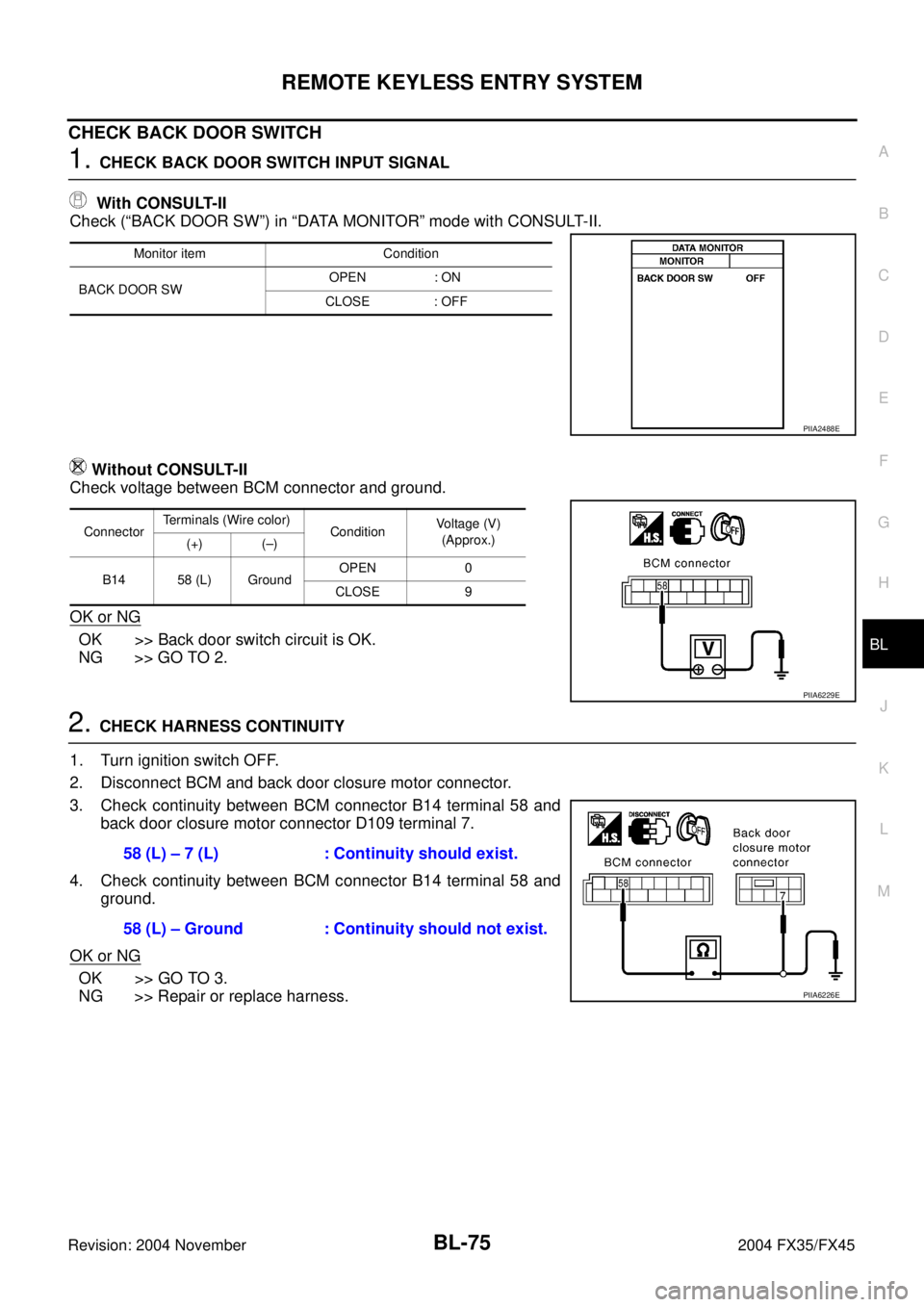
CHECK BACK DOOR SWITCH
1. CHECK BACK DOOR SWITCH INPUT SIGNAL
With CONSULT-II
Check (“BACK DOOR SW”) in “DATA MONITOR” mode with CONSULT-II.
Without CONSULT-II
Check voltage between BCM connector and ground.
OK or NG
OK >> Back door switch circuit is OK.
NG >> GO TO 2.
2. CHECK HARNESS CONTINUITY
1. Turn ignition switch OFF.
2. Disconnect BCM and back door closure motor connector.
3. Check continuity between BCM connector B14 terminal 58 and
back door closure motor connector D109 terminal 7.
4. Check continuity between BCM connector B14 terminal 58 and
ground.
OK or NG
OK >> GO TO 3.
NG >> Repair or replace harness.
Monitor item Condition
BACK DOOR SWOPEN : ON
CLOSE : OFF
PIIA2488E
ConnectorTerminals (Wire color)
ConditionVoltage (V)
(Approx.)
(+) (–)
B14 58 (L) GroundOPEN 0
CLOSE 9
PIIA6229E
58 (L) – 7 (L) : Continuity should exist.
58 (L) – Ground : Continuity should not exist.
PIIA6226E
Page 883 of 4449

BL-76
REMOTE KEYLESS ENTRY SYSTEM
Revision: 2004 November 2004 FX35/FX45
3. CHECK GROUND CIRCUIT
Check continuity between back door closure motor connector D109
terminal 8 and ground.
OK or NG
OK >> GO TO 4.
NG >> Repair or replace harness.
4. CHECK BACK DOOR SWITCH
Check continuity between back door closure motor D109 terminals 7
and 8.
OK or NG
OK >> GO TO 5.
NG >> Replace back door closure motor.
5. CHECK BCM OUTPUT SIGNAL
1. Connect BCM connector.
2. Check voltage between BCM connector and ground.
OK or NG
OK >> Check condition of harness and connector.
NG >> Replace BCM.8 (B) – Ground : Continuity should exist.
PIIA6170E
Terminals Back door condition Continuity
78Open Yes
Close No
PIIA9934E
58 (L) – Ground : Approx. 9V
PIIA6229E
Page 885 of 4449

BL-78
REMOTE KEYLESS ENTRY SYSTEM
Revision: 2004 November 2004 FX35/FX45
Check IPDM E/R OperationAIS004MO
1. CHECK IPDM E/R INPUT VOLTAGE
Check voltage between IPDM E/R connector E9 terminal 51 and
ground.
OK or NG
OK >> Replace IPDM E/R.
NG >> GO TO 2.
2. CHECK IPDM E/R HARNESS
1. Turn ignition switch OFF.
2. Disconnect IPDM E/R and horn relay connector.
3. Check continuity between IPDM E/R connector E9 terminal 51
and horn relay connector E10 terminal 1.
OK or NG
OK >> Check harness connection.
NG >> Repair or replace harness.51 (SB) – Ground : Battery voltage
PIIA6403E
51 (SB) – 1 (SB) : Continuity should exist.
PIIA6404E
Page 931 of 4449

BL-124
INTELLIGENT KEY SYSTEM
Revision: 2004 November 2004 FX35/FX45
Check Intelligent Key Unit Power Supply and Ground CircuitAIS004NB
1. CHECK POWER SUPPLY CIRCUIT
1. Turn ignition knob OFF position.
2. Disconnect Intelligent Key unit connector M34 and measure the
connector terminal (+) and ground (-) shown in the following
table.
OK or NG
OK >> GO TO 2.
NG >> Repair or replace Intelligent Key power supply circuit.
2. CHECK GROUND CIRCUIT
Check continuity between Intelligent Key unit connector M34 termi-
nal 12 (B) and ground.
OK or NG
OK >> Power supply and ground circuits are normal.
NG >> Repair or replace the Intelligent Key unit ground circuit.
Check Key Switch (Intelligent Key Unit Input)AIS004NC
1. KEY SWITCH INSPECTION
With CONSULT-II
Display “KEY SW” on DATA MONITOR screen, and check if ON-OFF display is linked to insertion of mechan-
ical key in ignition knob.
OK or NG
OK >> Key switch is OK.
NG >> GO TO 2.
Terminal
(wire color)Signal Designa-
tionIgnition switchVoltage (V)
(Approx.)
6 (G/R)Ignition power
supplyON Battery voltage
10 (LG/R)ACC power sup-
plyACC Battery voltage
11 (L/R)Battery power
supplyOFF Battery voltage
MIIB0360E
12 (B) - Ground : Continuity should exist.
MIIB0361E
When key is inserted in ignition knob : ON
When key is removed in ignition knob : OFF
Page 932 of 4449

INTELLIGENT KEY SYSTEM
BL-125
C
D
E
F
G
H
J
K
L
MA
B
BL
Revision: 2004 November 2004 FX35/FX45
2. KEY SWITCH POWER SUPPLY CIRCUIT INSPECTION
1. Remove mechanical key from ignition knob.
2. Disconnect key switch and ignition knob switch connector.
3. Check voltage between key switch and ignition knob switch connector M22 terminal 3 (L/R) and ground.
OK or NG
OK >> GO TO 3.
NG >> Repair or replace key switch power supply circuit.
3. KEY SWITCH OPERATION INSPECTION
Check continuity between key switch and ignition knob switch terminals 3 and 4.
OK or NG
OK >> GO TO 4.
NG >> Replace key switch.
4. KEY SWITCH CIRCUIT INSPECTION
1. Disconnect Intelligent Key unit connector.
2. Check continuity between Intelligent Key unit connector M34 terminal 7 (B/W) and key switch and ignition
knob switch connector M22 terminal 4 (B/W).
3. Check continuity between key switch and ignition knob switch
connector M22 terminal 4 (B/W) and ground.
OK or NG
OK >> Replace Intelligent key unit.
NG >> Repair or replace harness between Intelligent Key unit
and key switch and ignition knob switch. 3 (L/R) - Ground : Battery voltage
PIIA6738E
Terminals Condition Continuity
3 – 4Key is inserted in ignition key cylinder. Yes
Key is removed from ignition key cylinder. No
PIIA6140E
7 (B/W) - 4 (B/W) : Continuity should exist.
4 (B/W) - Ground : Continuity should not exist.
PIIA6740E
Page 933 of 4449

BL-126
INTELLIGENT KEY SYSTEM
Revision: 2004 November 2004 FX35/FX45
Check Key Switch (BCM Input)AIS004ND
1. KEY SWITCH POWER SUPPLY CIRCUIT INSPECTION
1. Turn ignition knob OFF position.
2. Disconnect key switch and ignition knob switch connector.
3. Check voltage between key switch and ignition knob switch con-
nector M22 terminal 3 (L/R) and ground.
OK or NG
OK >> GO TO 2.
NG >> Check harness between key switch and ignition knob
switch and fuse.
2. KEY SWITCH INSPECTION
Check continuity between key switch and ignition knob switch as fol-
lows.
OK or NG
OK >> GO TO 3.
NG >> Replace key switch and ignition knob switch.
3. KEY SWITCH SIGNAL CIRCUIT INSPECTION
1. Disconnect key switch and ignition knob switch connector and
BCM connector.
2. Check continuity between key switch and ignition knob switch
connector M22 terminal 4 (B/W) and BCM connector M3 termi-
nal 37 (B/W).
3. Check continuity between key switch and ignition knob switch
connector M22 terminal 4 (B/W) and ground.
OK or NG
OK >> Key switch (BCM input) circuit is OK.
NG >> Repair or replace harness between key switch and ignition knob switch and BCM.3 (L/R) – Ground : Battery voltage.
PIIA5093E
Terminals Condition Continuity
3 – 4Key is inserted in ignition key cylinder. Yes
Key is removed from ignition key cylinder. No
PIIA6140E
4 (B/W) – 37 (B/W) : Continuity should exist.
4 (B/W) – Ground : Continuity should not exist.
PIIA5095E
Page 934 of 4449

INTELLIGENT KEY SYSTEM
BL-127
C
D
E
F
G
H
J
K
L
MA
B
BL
Revision: 2004 November 2004 FX35/FX45
Check Ignition Knob SwitchAIS004NE
1. IGNITION KNOB SWITCH INSPECTION
With CONSULT-II
Display “PUSH SW” on DATA MONITOR screen, and check if ON/OFF display is linked to ignition knob oper-
ation.
OK or NG
OK >> Ignition knob switch is OK.
NG >> GO TO 2.
2. IGNITION KNOB SWITCH POWER SUPPLY CIRCUIT INSPECTION
1. Turn ignition knob LOCK position.
2. Disconnect key switch and ignition knob switch connector.
3. Check voltage between key switch and ignition knob switch connector M22 terminal 1 (L/R) and ground.
OK or NG
OK >> GO TO 3.
NG >> Repair or replace key switch and ignition knob switch
power supply circuit.
3. IGNITION KNOB SWITCH OPERATION INSPECTION
Check continuity between key switch and ignition knob switch terminals 1 and 2.
OK or NG
OK >> GO TO 4.
NG >> Replace key switch and ignition knob switch.Press ignition knob. : ON
Return ignition knob (release hands
from ignition knob): OFF
1 (L/R) - Ground : Battery voltage
PIIA6741E
Press ignition knob. : Continuity should exist.
Return ignition knob
(release hands from
ignition knob).: Continuity should not exist.
PIIA9929E
Page 935 of 4449
BL-128
INTELLIGENT KEY SYSTEM
Revision: 2004 November 2004 FX35/FX45
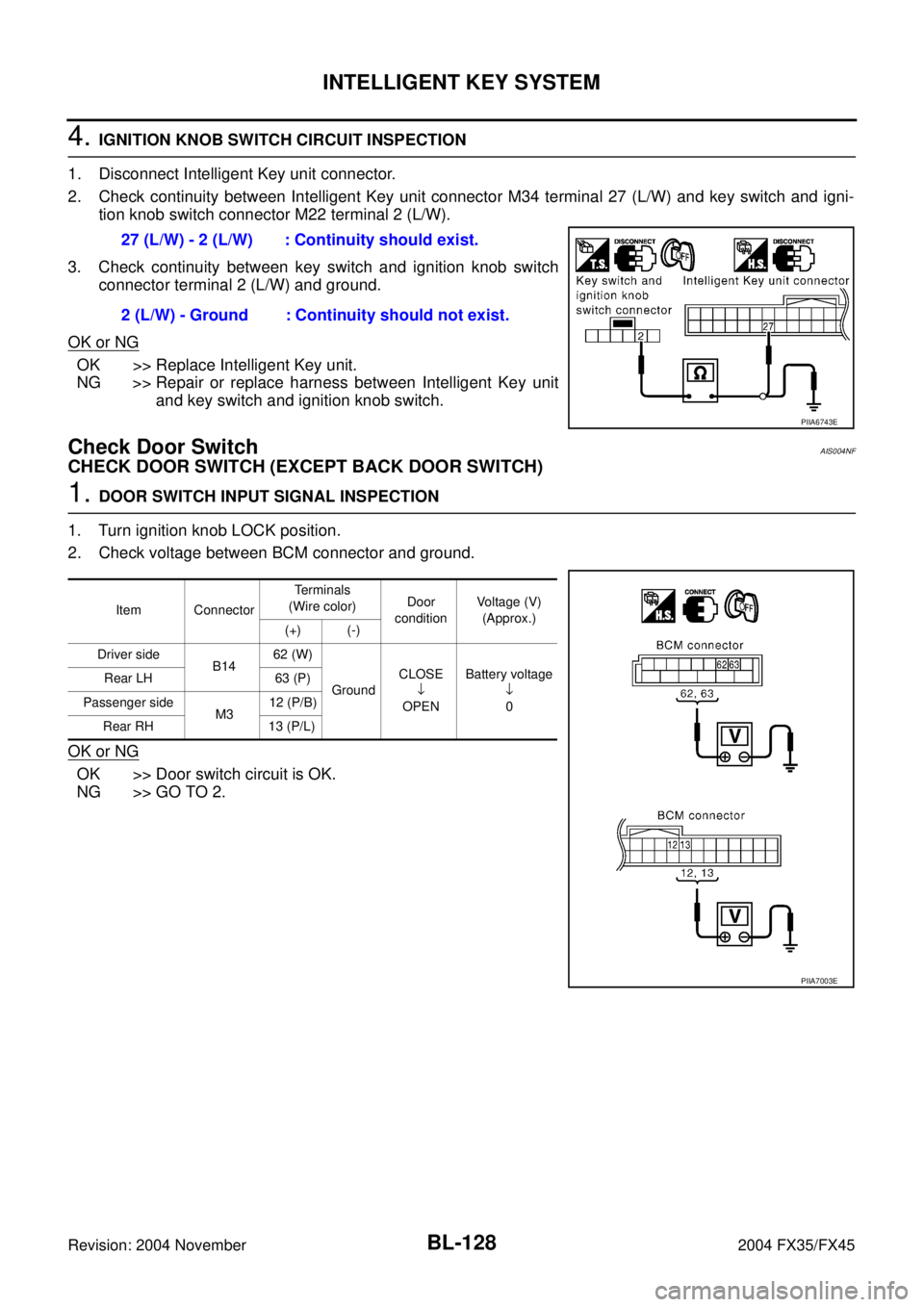
4. IGNITION KNOB SWITCH CIRCUIT INSPECTION
1. Disconnect Intelligent Key unit connector.
2. Check continuity between Intelligent Key unit connector M34 terminal 27 (L/W) and key switch and igni-
tion knob switch connector M22 terminal 2 (L/W).
3. Check continuity between key switch and ignition knob switch
connector terminal 2 (L/W) and ground.
OK or NG
OK >> Replace Intelligent Key unit.
NG >> Repair or replace harness between Intelligent Key unit
and key switch and ignition knob switch.
Check Door SwitchAIS004NF
CHECK DOOR SWITCH (EXCEPT BACK DOOR SWITCH)
1. DOOR SWITCH INPUT SIGNAL INSPECTION
1. Turn ignition knob LOCK position.
2. Check voltage between BCM connector and ground.
OK or NG
OK >> Door switch circuit is OK.
NG >> GO TO 2.27 (L/W) - 2 (L/W) : Continuity should exist.
2 (L/W) - Ground : Continuity should not exist.
PIIA6743E
Item ConnectorTerminals
(Wire color)Door
conditionVoltage (V)
(Approx.)
(+) (-)
Driver side
B1462 (W)
GroundCLOSE
↓
OPENBattery voltage
↓
0 Rear LH 63 (P)
Passenger side
M312 (P/B)
Rear RH 13 (P/L)
PIIA7003E
Page 936 of 4449

INTELLIGENT KEY SYSTEM
BL-129
C
D
E
F
G
H
J
K
L
MA
B
BL
Revision: 2004 November 2004 FX35/FX45
2. DOOR SWITCH CIRCUIT INSPECTION
1. Disconnect door switch and BCM connector.
2. Check continuity between door switch connector B26, B36, B46, B206 terminals 1 and BCM connector
M3, B14 terminals 62, 12, 63, 13.
3. Check continuity between door switch connector B26, B36, B46,
B206 terminal 1 and ground.
OK or NG
OK >> GO TO 3.
NG >> Repair or replace harness.
3. DOOR SWITCH INSPECTION
Check continuity between door switch terminal 1 and ground part of door switch.
OK or NG
OK >> Check door switch case ground condition.
NG >> Replace door switch.
CHECK BACK DOOR SWITCH
1. CHECK BACK DOOR SWITCH INPUT SIGNAL
Check voltage between BCM connector and ground.
OK or NG
OK >> Back door switch circuit is OK.
NG >> GO TO 2.Driver side door
1 (W) –62 (W) : Continuity should exist.
Passenger side door
1 (SB) – 12 (P/B) : Continuity should exist.
Rear door LH
1 (P) – 63 (P) : Continuity should exist.
Rear door RH
1 (P) – 13 (P/L) : Continuity should exist.
1 (W, SB, P) – Ground : Continuity should not exist.
PIIA7004E
Terminal Door switch condition Continuity
1 Ground part of door switchPushed No
Released Yes
PIIA3351E
ConnectorTerminals (Wire color)
ConditionVoltage (V)
(Approx.)
(+) (–)
B14 58 (L) GroundOPEN 0
CLOSE 9
PIIA6229E