belt INFINITI FX35 2004 Workshop Manual
[x] Cancel search | Manufacturer: INFINITI, Model Year: 2004, Model line: FX35, Model: INFINITI FX35 2004Pages: 4449, PDF Size: 99.66 MB
Page 1310 of 4449

WARNING CHIME
DI-67
C
D
E
F
G
H
I
J
L
MA
B
DI
Revision: 2004 November 2004 FX35/FX45
4. Touch “BUZZER” or “BCM”.
5. Select “DATA MONITOR”, “ACTIVE TEST” or “SELF-DIAG
RESULTS”.
DATA MONITOR
Operation Procedure
1. Touch “BUZZER” on “SELECT TEST ITEM” screen.
2. Touch “DATA MONITOR” on “SELECT DIAG MODE” screen.
3. Touch “ALL SIGNALS” or “SELECTION FROM MENU” on “DATA MONITOR” screen.
4. If “SELECTION FROM MENU” is selected, touch the desired monitor item. If “ALL SIGNALS” is selected,
all items required to control are monitored.
5. Touch “START”.
6. During monitoring, touching “RECORD” can start recording the monitored item status.
Data Monitor Item
ACTIVE TEST
Operation Procedure
1. Touch “BUZZER” on “SELECT TEST ITEM” screen.
2. Touch “ACTIVE TEST” on “SELECT DIAG MODE” screen.
3. Touch the item to be tested, and check the operation.
4. During the operation check, touching “OFF” deactivates the operation.
Active Test Item
SELF-DIAGNOSTIC RESULTS
Operation Procedure
1. Touch “BCM” on “SELECT TEST ITEM” screen.
2. Touch “SELF-DIAG RESULTS” on “SELECT DIAG MODE” screen.
3. Self-diagnostic results are displayed.
SKIA5788E
ALL SIGNALS Monitors main items.
SELECTION FROM MENU Selects and monitors items.
Monitored item [Unit] ALL SIGNALSSELECTION
FROM MENUContents
IGN ON SW [ON/OFF] X X Indicates [ON/OFF] condition of ignition switch.
KEY ON SW [ON/OFF] X X Indicates [ON/OFF] condition of key switch.
DOOR SW-DR [ON/OFF] X X Indicates [ON/OFF] condition of front door switch (driver side).
TAIL LAMP SW [ON/OFF] X X Indicates [ON/OFF] condition of lighting switch.
Test item Malfunction is detected when···
LIGHT WARN ALMThis test is able to check light warning chime operation. Light warning chime sounds for 2 seconds
after touching “ON” on CONSULT-ll screen.
IGN KEY WARN ALMThis test is able to check key warning chime operation. Key warning chime sounds for 2 seconds
after touching “ON” on CONSULT-ll screen.
SEAT BELT WARN TESTThis test is able to check seat belt warning chime operation. Seat belt warning chime sounds for 2
seconds after touching “ON” on CONSULT-ll screen.
Page 1311 of 4449
![INFINITI FX35 2004 Workshop Manual DI-68
WARNING CHIME
Revision: 2004 November 2004 FX35/FX45
Display Item List
NOTE:
If “CAN communication [U1000]” is indicated, after printing the monitor item, go to “CAN system”. Refer to
LA](/img/42/57021/w960_57021-1310.png "INFINITI FX35 2004 Workshop Manual DI-68
WARNING CHIME
Revision: 2004 November 2004 FX35/FX45
Display Item List
NOTE:
If “CAN communication [U1000]” is indicated, after printing the monitor item, go to “CAN system”. Refer to
LA")
DI-68
WARNING CHIME
Revision: 2004 November 2004 FX35/FX45
Display Item List
NOTE:
If “CAN communication [U1000]” is indicated, after printing the monitor item, go to “CAN system”. Refer to
LAN-4, "
Precautions When Using CONSULT-II" .
All Warnings Are Not OperatedAKS005NU
1. CHECK CHIME OPERATION
Select “BUZZER” on CONSULT-ll, and perform “LIGHT WARN
ALM”, “IGN KEY WARN ALM” or “SEAT BELT WARN” of “ACTIVE
TEST”.
Does chime sound?
YES >> Replace BCM. Refer to BCS-15, "Removal and Installa-
tion of BCM" .
NO >> GO TO 2.
2. CHECK UNIFIED METER AND A/C AMP. INPUT SIGNAL
Select “METER A/C AMP” on CONSULT-II. Operate switches meet
the requirements to sounds warning chime with “BUZZER” of “DATA
MONITOR” and check operation status.
OK or NG
OK >> Replace combination meter.
NG >> Replace BCM. Refer to BCS-15, "
Removal and Installa-
tion of BCM" .
Monitored Item CONSULT-ll display Description
CAN communication CAN communication [U1000] Malfunction is detected in CAN communication.
SKIA6331E
When meet the requirements to
sounds warning chime: BUZZER ON
Except above : BUZZER OFF
PKIA2063E
Page 1312 of 4449

WARNING CHIME
DI-69
C
D
E
F
G
H
I
J
L
MA
B
DI
Revision: 2004 November 2004 FX35/FX45
Key Warning Chime and Light Warning Chime Does Not Operate (Seat Belt
Warning Chime Does Operate)
AKS005NV
1. CHECK BCM INPUT SIGNAL
With CONSULT-ll
1. Select “BCM”.
2. With “DATA MONITOR” of “BUZZER”, confirm “DOOR SW-DR”
when the driver side door is operated.
Without CONSULT-ll
Check voltage between BCM harness connector B14 terminal 62
(W) and ground.
OK or NG
OK >> Replace BCM. Refer to BCS-15, "Removal and Installa-
tion of BCM" .
NG >> GO TO 2.
2. CHECK FRONT DOOR SWITCH (DRIVER SIDE) CIRCUIT
1. Turn ignition switch OFF.
2. Disconnect BCM connector and front door switch (driver side) connector.
3. Check continuity between BCM harness connector B14 terminal
62 (W) and front door switch (driver side) harness connector
B26 terminal 1 (W).
4. Check continuity between BCM harness connector B14 terminal
62 (W) and ground.
OK or NG
OK >> GO TO 3.
NG >> Repair harness or connector.When driver side door
is opened: DOOR SW-DR ON
When driver side door
is closed: DOOR SW-DR OFF
SKIA2003E
When driver side door is opened : Approx. 0V
When driver side door is closed : Approx. 12V
SKIA8220E
Continuity should exist.
Continuity should not exist.
SKIA5046E
Page 1313 of 4449

DI-70
WARNING CHIME
Revision: 2004 November 2004 FX35/FX45
3. CHECK FRONT DOOR SWITCH (DRIVER SIDE)
Check front door switch (driver side).
OK or NG
OK >> Replace BCM. Refer to BCS-15, "Removal and Installa-
tion of BCM" .
NG >> Replace front door switch (driver side).
Key Warning Chime Does Not Operate (Without Intelligent Key)AKS005NW
1. CHECK FUSE
Check if the key switch 15A fuse [No. 22, located in the fuse block (J/B)] is blown. Refer to DI-59, "
Wiring Dia-
gram — CHIME —" .
Is the fuse blown?
YES >> Replace fuse. Be sure to repair the cause of malfunction before installing new fuse.
NO >> GO TO 2.
2. CHECK WARNING CHIME OPERATION
Check the chime under conditions in exception of key warning chime (without Intelligent Key) operation.
Does warning chime sound?
YES >> GO TO 3.
NO >> Go to DI-68, "
All Warnings Are Not Operated" or DI-69, "Key Warning Chime and Light Warning
Chime Does Not Operate (Seat Belt Warning Chime Does Operate)" . When driver side door
switch is released: Continuity should exist.
When driver side door
switch is pushed: Continuity should not exist.
PKIA3718E
Page 1315 of 4449

DI-72
WARNING CHIME
Revision: 2004 November 2004 FX35/FX45
5. CHECK KEY SWITCH CIRCUIT
1. Disconnect BCM connector.
2. Check continuity between BCM harness connector M3 terminal
37 (B/W) and key switch harness connector M23 terminal 1 (B/
W).
3. Check continuity between BCM harness connector M3 terminal
37 (B/W) and ground.
OK or NG
OK >> GO TO 6.
NG >> Repair harness or connector.
6. CHECK KEY SWITCH POWER SUPPLY CIRCUIT
Check voltage between key switch harness connector M23 terminal
2 (L/R) and ground.
OK or NG
OK >> Replace BCM. Refer to BCS-15, "Removal and Installa-
tion of BCM" .
NG >> Check harness for open or short between key switch
and fuse.
Key Warning Chime Does Not Operate (With Intelligent Key, When Mechanical
Key Is Used)
AKS0079U
1. CHECK FUSE
Check if the key switch and ignition knob switch 10A fuse (No. 38, located in the fuse and fusible link box) is
blown. Refer to DI-59, "
Wiring Diagram — CHIME —" .
Is the fuse blown?
YES >> Replace fuse. Be sure to repair the cause of malfunction before installing new fuse.
NO >> GO TO 2.
2. CHECK WARNING CHIME OPERATION
Check the chime under conditions in exception of key warning chime (when mechanical key is used) opera-
tion.
Does warning chime sound?
YES >> GO TO 3.
NO >> Go to DI-68, "
All Warnings Are Not Operated" or DI-69, "Key Warning Chime and Light Warning
Chime Does Not Operate (Seat Belt Warning Chime Does Operate)" . Continuity should exist.
Continuity should not exist.
SKIA5050E
Battery voltage should exist.
SKIA5051E
Page 1317 of 4449

DI-74
WARNING CHIME
Revision: 2004 November 2004 FX35/FX45
6. CHECK KEY SWITCH CIRCUIT
1. Disconnect BCM connector.
2. Check continuity between BCM harness connector M3 terminal
37 (B/W) and key switch and ignition knob switch harness con-
nector M22 terminal 4 (B/W).
3. Check continuity between BCM harness connector M3 terminal
37 (B/W) and ground.
OK or NG
OK >> Replace BCM. Refer to BCS-15, "Removal and Installa-
tion of BCM" .
NG >> Repair harness or connector.
Key Warning Chime Does Not Operate (With Intelligent Key, When Intelligent
Key Is Carried With The Driver)
AKS0079V
1. CHECK WARNING CHIME OPERATION
Check the chime under conditions in exception of key warning chime (when Intelligent Key is carried with the
driver) operation.
Does warning chime sound?
YES >> GO TO 2.
NO >> Go to DI-68, "
All Warnings Are Not Operated" or DI-69, "Key Warning Chime and Light Warning
Chime Does Not Operate (Seat Belt Warning Chime Does Operate)" .
2. CHECK INTELLIGENT KEY UNIT SELF-DIAGNOSTIC
Perform the Intelligent Key unit self-diagnosis. Refer to BL-114, "
CONSULT-II Functions" .
OK or NG
OK >> GO TO 3.
NG >> Check the applicable parts.Continuity should exist.
Continuity should not exist.
SKIA5062E
Page 1320 of 4449
WARNING CHIME
DI-77
C
D
E
F
G
H
I
J
L
MA
B
DI
Revision: 2004 November 2004 FX35/FX45
Seat Belt Warning Chime Does Not OperateAKS005NX
1. CHECK WARNING CHIME OPERATION
Check the chime under conditions in exception of seat belt warning chime operation.
Does warning chime sound?
YES >> GO TO 2.
NO >> Go to DI-68, "
All Warnings Are Not Operated" .
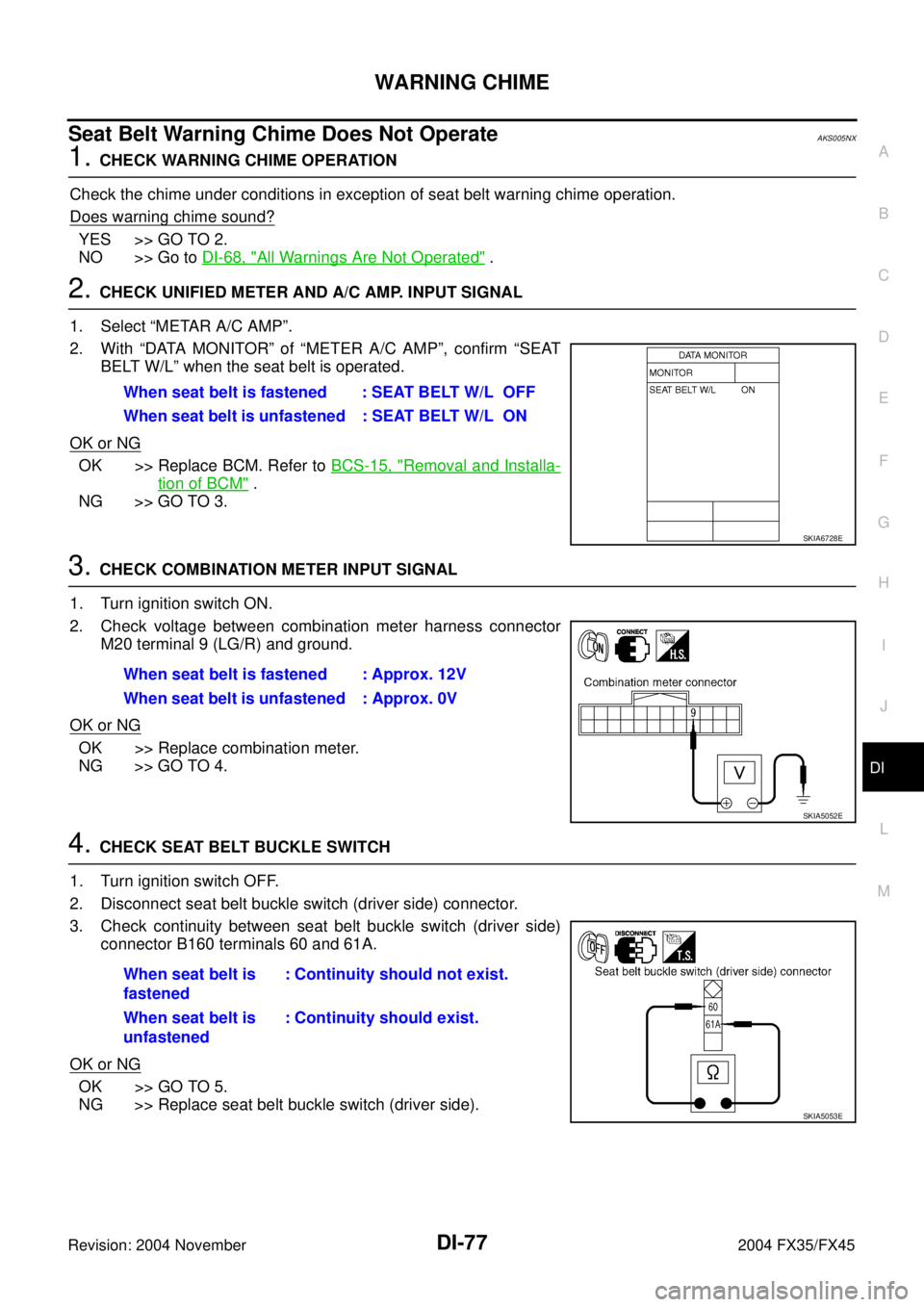
2. CHECK UNIFIED METER AND A/C AMP. INPUT SIGNAL
1. Select “METAR A/C AMP”.
2. With “DATA MONITOR” of “METER A/C AMP”, confirm “SEAT
BELT W/L” when the seat belt is operated.
OK or NG
OK >> Replace BCM. Refer to BCS-15, "Removal and Installa-
tion of BCM" .
NG >> GO TO 3.
3. CHECK COMBINATION METER INPUT SIGNAL
1. Turn ignition switch ON.
2. Check voltage between combination meter harness connector
M20 terminal 9 (LG/R) and ground.
OK or NG
OK >> Replace combination meter.
NG >> GO TO 4.
4. CHECK SEAT BELT BUCKLE SWITCH
1. Turn ignition switch OFF.
2. Disconnect seat belt buckle switch (driver side) connector.
3. Check continuity between seat belt buckle switch (driver side)
connector B160 terminals 60 and 61A.
OK or NG
OK >> GO TO 5.
NG >> Replace seat belt buckle switch (driver side).When seat belt is fastened : SEAT BELT W/L OFF
When seat belt is unfastened : SEAT BELT W/L ON
SKIA6728E
When seat belt is fastened : Approx. 12V
When seat belt is unfastened : Approx. 0V
SKIA5052E
When seat belt is
fastened: Continuity should not exist.
When seat belt is
unfastened: Continuity should exist.
SKIA5053E
Page 1321 of 4449
DI-78
WARNING CHIME
Revision: 2004 November 2004 FX35/FX45
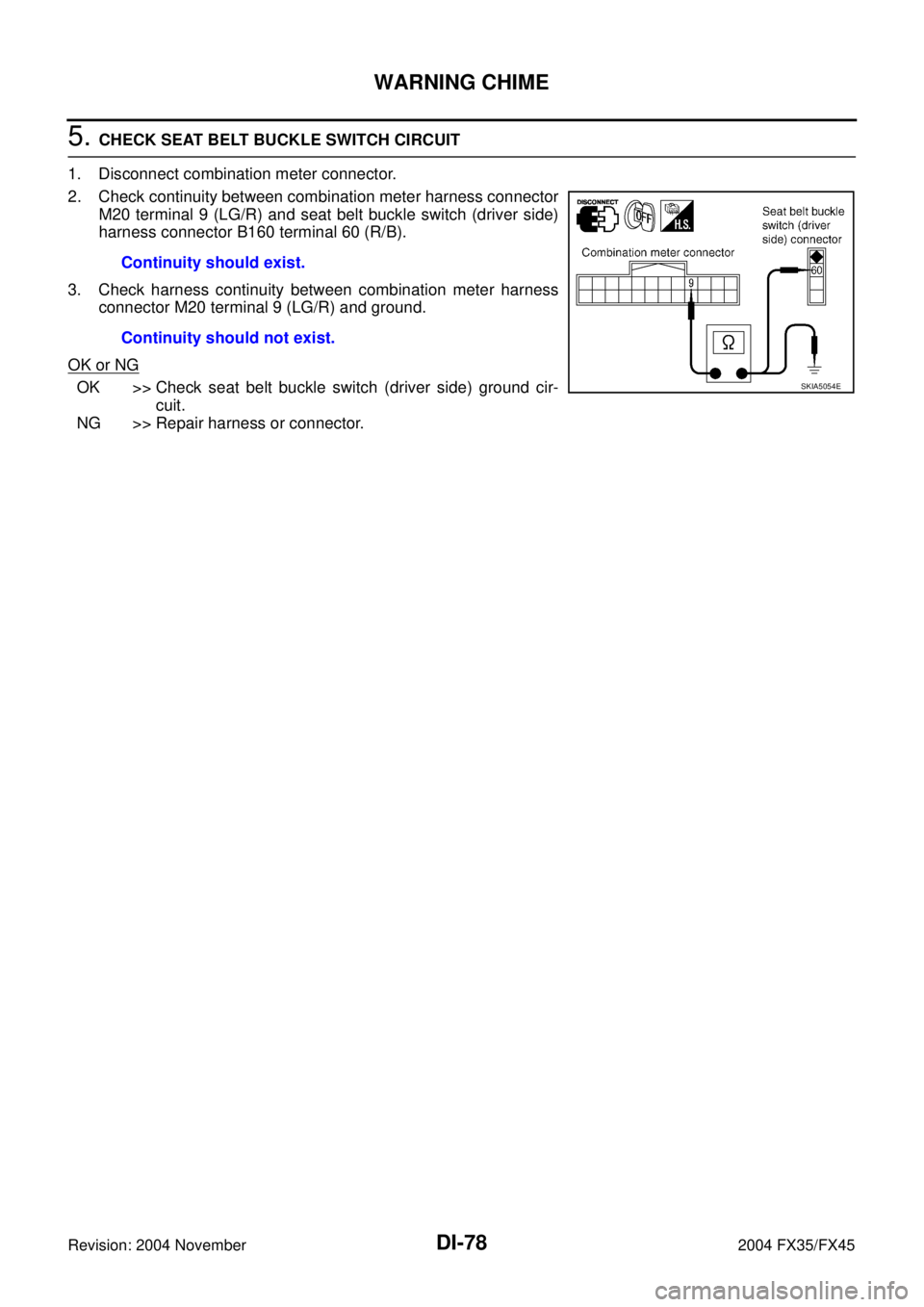
5. CHECK SEAT BELT BUCKLE SWITCH CIRCUIT
1. Disconnect combination meter connector.
2. Check continuity between combination meter harness connector
M20 terminal 9 (LG/R) and seat belt buckle switch (driver side)
harness connector B160 terminal 60 (R/B).
3. Check harness continuity between combination meter harness
connector M20 terminal 9 (LG/R) and ground.
OK or NG
OK >> Check seat belt buckle switch (driver side) ground cir-
cuit.
NG >> Repair harness or connector.Continuity should exist.
Continuity should not exist.SKIA5054E
Page 1342 of 4449

EC-1
ENGINE CONTROL SYSTEM
B ENGINE
CONTENTS
C
D
E
F
G
H
I
J
K
L
M
SECTION EC
A
EC
Revision: 2004 November 2004 FX35/FX45
ENGINE CONTROL SYSTEM
VQ35DE
INDEX FOR DTC ...................................................... 15
Alphabetical Index .................................................. 15
DTC No. Index ....................................................... 19
PRECAUTIONS ........................................................ 23
Precautions for Supplemental Restraint System
(SRS) “AIR BAG” and “SEAT BELT PRE-TEN-
SIONER” ................................................................ 23
On Board Diagnostic (OBD) System of Engine and
A/T .......................................................................... 23
Precaution .............................................................. 23
Wiring Diagrams and Trouble Diagnosis ................ 26
PREPARATION ......................................................... 27
Special Service Tools ............................................. 27
Commercial Service Tools ...................................... 28
ENGINE CONTROL SYSTEM .................................. 29
System Diagram ..................................................... 29
Vacuum Hose Drawing ........................................... 30
System Chart ......................................................... 31
Multiport Fuel Injection (MFI) System .................... 32
Electronic Ignition (EI) System ............................... 34
Air Conditioning Cut Control ................................... 35
Fuel Cut Control (at No Load and High Engine
Speed) .................................................................... 35
CAN communication .............................................. 36
BASIC SERVICE PROCEDURE .............................. 37
Idle Speed and Ignition Timing Check .................... 37
Idle Speed/Ignition Timing/Idle Mixture Ratio
Adjustment ............................................................. 38
Accelerator Pedal Released Position Learning ...... 49
Throttle Valve Closed Position Learning ................ 49
Idle Air Volume Learning ........................................ 49
Fuel Pressure Check .............................................. 51
ON BOARD DIAGNOSTIC (OBD) SYSTEM ............ 53
Introduction ............................................................ 53
Two Trip Detection Logic ........................................ 53
Emission-Related Diagnostic Information .............. 54
IVIS (Infiniti Vehicle Immobilizer System — NATS) ... 68
Malfunction Indicator Lamp (MIL) ........................... 68
OBD System Operation Chart ................................ 72TROUBLE DIAGNOSIS ............................................ 77
Trouble Diagnosis Introduction ............................... 77
DTC Inspection Priority Chart ................................. 80
Fail-Safe Chart ....................................................... 82
Basic Inspection ..................................................... 83
Symptom Matrix Chart ............................................ 88
Engine Control Component Parts Location ............ 92
Circuit Diagram ....................................................... 98
ECM Harness Connector Terminal Layout ...........100
ECM Terminals and Reference Value ...................100
CONSULT-II Function ...........................................109
Generic Scan Tool (GST) Function .......................122
CONSULT-II Reference Value in Data Monitor .....125
Major Sensor Reference Graph in Data Monitor
Mode .....................................................................129
TROUBLE DIAGNOSIS - SPECIFICATION VALUE .131
Description ............................................................131
Testing Condition ..................................................131
Inspection Procedure ............................................131
Diagnostic Procedure ...........................................132
TROUBLE DIAGNOSIS FOR INTERMITTENT INCI-
DENT .......................................................................135
Description ............................................................135
Diagnostic Procedure ...........................................135
POWER SUPPLY AND GROUND CIRCUIT ...........136
Wiring Diagram .....................................................136
Diagnostic Procedure ...........................................137
Ground Inspection ................................................141
DTC U1000, U1001 CAN COMMUNICATION LINE .142
Description ............................................................142
On Board Diagnosis Logic ....................................142
DTC Confirmation Procedure ...............................142
Wiring Diagram .....................................................143
Diagnostic Procedure ...........................................144
DTC P0011, P0021 IVT CONTROL ........................145
Description ............................................................145
CONSULT-II Reference Value in Data Monitor Mode
.145
On Board Diagnosis Logic ....................................146
Page 1348 of 4449

EC-7
C
D
E
F
G
H
I
J
K
L
M
ECA
Revision: 2004 November 2004 FX35/FX45Component Inspection ......................................... 575
Removal and Installation ...................................... 575
DTC P2138 APP SENSOR ..................................... 576
Component Description ........................................ 576
CONSULT-II Reference Value in Data Monitor Mode
. 576
On Board Diagnosis Logic ................................... 576
DTC Confirmation Procedure ............................... 577
Wiring Diagram .................................................... 578
Diagnostic Procedure ........................................... 579
Component Inspection ......................................... 584
Removal and Installation ...................................... 584
IGNITION SIGNAL .................................................. 585
Component Description ........................................ 585
Wiring Diagram .................................................... 586
Diagnostic Procedure ........................................... 591
Component Inspection ......................................... 595
Removal and Installation ...................................... 596
INJECTOR CIRCUIT ............................................... 597
Component Description ........................................ 597
CONSULT-II Reference Value in Data Monitor Mode
. 597
Wiring Diagram .................................................... 598
Diagnostic Procedure ........................................... 599
Component Inspection ......................................... 602
Removal and Installation ...................................... 602
FUEL PUMP CIRCUIT ............................................ 603
Description ........................................................... 603
CONSULT-II Reference Value in Data Monitor Mode
. 603
Wiring Diagram .................................................... 604
Diagnostic Procedure ........................................... 605
Component Inspection ......................................... 608
Removal and Installation ...................................... 608
REFRIGERANT PRESSURE SENSOR ................. 609
Component Description ........................................ 609
Wiring Diagram .................................................... 610
Diagnostic Procedure ............................................ 611
Removal and Installation ...................................... 613
ELECTRICAL LOAD SIGNAL ................................ 614
Description ........................................................... 614
CONSULT-II Reference Value in Data Monitor Mode
. 614
Diagnostic Procedure ........................................... 614
ICC BRAKE SWITCH ............................................. 615
Component Description ........................................ 615
CONSULT-II Reference Value in Data Monitor Mode
. 615
Wiring Diagram .................................................... 616
Diagnostic Procedure ........................................... 617
Component Inspection ......................................... 622
ASCD BRAKE SWITCH ......................................... 624
Component Description ........................................ 624
CONSULT-II Reference Value in Data Monitor Mode
. 624
Wiring Diagram .................................................... 625
Diagnostic Procedure ........................................... 626
Component Inspection ......................................... 631ASCD INDICATOR ..................................................632
Component Description ........................................632
CONSULT-II Reference Value in Data Monitor Mode
.632
Wiring Diagram .....................................................633
Diagnostic Procedure ...........................................634
SNOW MODE SWITCH ..........................................635
Description ............................................................635
CONSULT-II Reference Value in the Data Monitor
Mode .....................................................................635
Wiring Diagram .....................................................636
Diagnostic Procedure ...........................................637
Component Inspection ..........................................640
MIL AND DATA LINK CONNECTOR ......................641
Wiring Diagram .....................................................641
EVAPORATIVE EMISSION SYSTEM .....................643
Description ............................................................643
Component Inspection ..........................................646
Removal and Installation ......................................647
How to Detect Fuel Vapor Leakage ......................647
ON BOARD REFUELING VAPOR RECOVERY
(ORVR) ....................................................................650
System Description ...............................................650
Diagnostic Procedure ...........................................651
Component Inspection ..........................................653
POSITIVE CRANKCASE VENTILATION ...............655
Description ............................................................655
Component Inspection ..........................................655
AUTOMATIC SPEED CONTROL DEVICE (ASCD) .657
System Description ...............................................657
Component Description ........................................659
SERVICE DATA AND SPECIFICATIONS (SDS) ....660
Fuel Pressure .......................................................660
Idle Speed and Ignition Timing .............................660
Calculated Load Value ..........................................660
Mass Air Flow Sensor ...........................................660
Intake Air Temperature Sensor .............................660
Engine Coolant Temperature Sensor ...................660
Heated Oxygen Sensor 1 Heater .........................660
Heated Oxygen sensor 2 Heater ..........................660
Crankshaft Position Sensor (POS) .......................660
Camshaft Position Sensor (PHASE) ....................660
Throttle Control Motor ...........................................660
Injector ..................................................................661
Fuel Pump ............................................................661
VK45DE
INDEX FOR DTC .....................................................662
Alphabetical Index ................................................662
DTC No. Index ......................................................665
PRECAUTIONS ......................................................670
Precautions for Supplemental Restraint System
(SRS) “AIR BAG” and “SEAT BELT PRE-TEN-
SIONER” ...............................................................670
On Board Diagnostic (OBD) System of Engine and
A/T ........................................................................670
Precaution ............................................................670
Wiring Diagrams and Trouble Diagnosis ..............673