Ac system INFINITI FX35 2006 Service Manual
[x] Cancel search | Manufacturer: INFINITI, Model Year: 2006, Model line: FX35, Model: INFINITI FX35 2006Pages: 4462, PDF Size: 57.74 MB
Page 545 of 4462

TROUBLE DIAGNOSIS ATC-99
C
D E
F
G H
I
K L
M A
B
AT C
Revision: 2006 December 2006 FX35/FX45
Insufficient HeatingNJS000EB
SYMPTOM: Insufficient heating
INSPECTION FLOW
*1 ATC-60, "Operational Check"*2ATC-71, "Air Mix Door Motor Circuit"*3AT C - 5 3 , "FUNCTION CONFIRMA-
TION PROCEDURE", see No. 4 to
6.
*4 ATC-53, "
FUNCTION CONFIRMA-
TION PROCEDURE", see No. 13. *5
ATC-64, "
LAN System Circuit"*6AT C - 7 7 , "Blower Motor Circuit"
*7 EC-210, "DTC P0117, P0118 ECT
SENSOR" (VQ35DE) or EC-879,
"DTC P0117, P0118 ECT SEN-
SOR" (VK45DE) *8
CO-11, "
Changing Engine Coolant"
(VQ35DE) or CO-38, "
Changing
Engine Coolant" (VK45DE) *9
CO-15, "
Checking Radiator Cap"
(VQ35DE) or CO-43, "
Checking
Radiator Cap" (VK45DE)
SJIA1593E
Page 555 of 4462

TROUBLE DIAGNOSIS ATC-109
C
D E
F
G H
I
K L
M A
B
AT C
Revision: 2006 December 2006 FX35/FX45
Sunload Sensor CircuitNJS000EH
COMPONENT DESCRIPTION
Sunload Sensor
The sunload sensor is located on the passenger’s side front
defroster grille. It detects sunload entering through windshield by
means of a photo diode. The sensor converts the sunload into a cur-
rent value which is then input into the unified meter and A/C amp.
SUNLOAD INPUT PROCESS
The unified meter and A/C amp. also includes a processing circuit which averages the variations in detected
sunload over a period of time. This prevents drastic swings in the ATC system operation due to small or quick
variations in detected sunload.
For example, consider driving along a road bordered by an occasional group of large trees. The sunload
detected by the sunload sensor will vary whenever the trees obstruct the sunlight. The processing circuit aver-
ages the detected sunload over a period of time, so that the (insignificant) effect of the trees momentarily
obstructing the sunlight does not cause any change in the ATC system operation. On the other hand, shortly
after entering a long tunnel, the system will recognize the change in sunload, and the system will react accord-
ingly.
DIAGNOSIS PROCEDURE FOR SUNLOAD SENSOR
SYMPTOM: Sunload sensor circuit is open or shorted. (25 or −25 is
indicated on unified meter and A/C amp. as a result of performing
self-diagnosis STEP-2.)
1. CHECK VOLTAGE BETWEEN SUNLOAD SENSOR AND GROUND
1. Disconnect sunload sensor connector.
2. Turn ignition switch ON.
3. Check voltage between sunload sensor harness connector M87 terminal 1 and ground.
OK or NG
OK >> GO TO 2.
NG >> GO TO 4.
RJIA2026E
RJIA1455E
1 – Ground : Approx. 5 V
RJIA2027E
Page 571 of 4462

HEATER & COOLING UNIT ASSEMBLY ATC-125
C
D E
F
G H
I
K L
M A
B
AT C
Revision: 2006 December 2006 FX35/FX45
HEATER & COOLING UNIT ASSEMBLYPFP:27110
Removal and InstallationNJS000EU
REMOVAL
1. Use a refrigerant collecting equipment (for HFC-134a) to discharge the refrigerant.
2. Drain coolant from cooling system. Refer to CO-11, "
Changing Engine Coolant" (VQ35DE) or CO-38,
"Changing Engine Coolant" (VK45DE).
3. Remove cowl top cover. Refer to EI-23, "
COWL TOP" .
4. Remove high-pressure pipe 2 mounting clip.
5. Remove low-pressure flexible hose bracket mounting bolt. Refer to ATC-146, "
Removal and Installation of
Low-pressure Flexible Hose" .
6. Disconnect low-pressure pipe 1 and high-pressure pipe 2 from evaporator.
a. Set a disconnector [high-pressure side (SST: 9253089908), low- pressure side (SST: 9253089916)] on A/C piping.
b. Slide a disconnector toward vehicle front until it clicks.
c. Slide A/C piping toward vehicle front and disconnect it.
CAUTION:
Cap or wrap the joint of the pipe with suitable material such
as vinyl tape to avoid the entry of air.
7. Remove electric throttle control actuator (VQ35DE). Refer to EM-19, "
INTAKE MANIFOLD COLLECTOR" .
8. Disconnect two heater hoses from heater core.
9. Remove instrument panel assembly. Refer to IP-10, "
INSTRUMENT PANEL ASSEMBLY" .
10. Remove blower unit. Refer to ATC-120, "
BLOWER UNIT" .
RJIA2037E
RJIA2041E
RJIA2077E
Page 583 of 4462
REFRIGERANT LINES ATC-137
C
D E
F
G H
I
K L
M A
B
AT C
Revision: 2006 December 2006 FX35/FX45
REFRIGERANT LINESPFP:92600
HFC-134a (R-134a) Service ProcedureNJS000F0
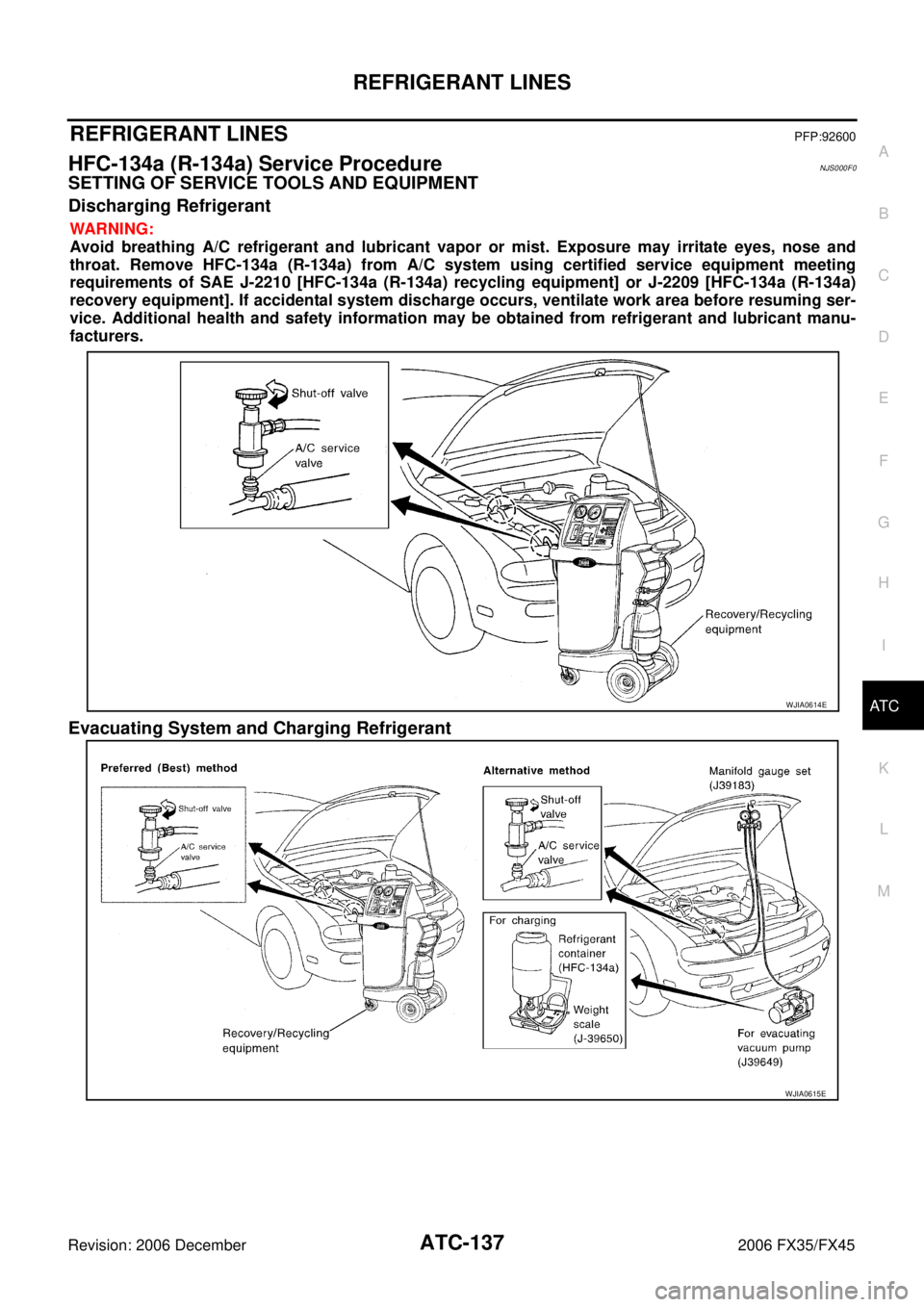
SETTING OF SERVICE TOOLS AND EQUIPMENT
Discharging Refrigerant
WARNING:
Avoid breathing A/C refrigerant and lubricant vapor or mist. Exposure may irritate eyes, nose and
throat. Remove HFC-134a (R-134a) from A/C system using certified service equipment meeting
requirements of SAE J-2210 [HFC-134a (R-134a) recycling equipment] or J-2209 [HFC-134a (R-134a)
recovery equipment]. If accidental system discharge occurs, ventilate work area before resuming ser-
vice. Additional health and safety information may be obtained from refrigerant and lubricant manu-
facturers.
Evacuating System and Charging Refrigerant
WJIA0614E
WJIA0615E
Page 602 of 4462

ATC-156
REFRIGERANT LINES
Revision: 2006 December 2006 FX35/FX45
Checking for Refrigerant LeaksNJS000FE
Perform a visual inspection of all refrigeration parts, fittings, hoses and components for signs of A/C lubricant
leakage, damage and corrosion. A/C lubricant leakage may indicate an area of refrigerant leakage. Allow
extra inspection time in these areas when using either an electrical leak detector or fluorescent dye leak
detector (SST: J-42220).
If dye is observed, confirm the leak with an electrical leak detector. It is possible a prior leak was repaired and
not properly cleaned.
When searching for leaks, do not stop when one leak is found but continue to check for additional leaks at all
system components and connections.
When searching for refrigerant leaks using an electrical leak detector, move the probe along the suspected
leak area at 1 to 2 inches per second and no further than 1/4 inch from the component.
CAUTION:
Moving the electrical leak detector probe slower and closer to the suspected leak area will improve the
chances of finding a leak.
Checking System for Leaks Using the Fluorescent Leak DetectorNJS000FF
1. Check A/C system for leaks using the UV lamp and safety goggles (SST: J-42220) in a low sunlight area (area without windows preferable). Illuminate all components, fittings and lines. The dye will appear as a
bright green/yellow area at the point of leakage. Fluorescent dye observed at the evaporator drain open-
ing indicates an evaporator core assembly (tubes, core or expansion valve) leak.
2. If the suspected area is difficult to see, use an adjustable mirror or wipe the area with a clean shop rag or cloth, with the UV lamp for dye residue.
3. After the leak is repaired, remove any residual dye using dye cleaner (SST: J-43872) to prevent future misdiagnosis.
4. Perform a system performance check and verify the leak repair with an approved electrical leak detector.
NOTE:
Other gases in the work area or substances on the A/C components, for example, anti-freeze, windshield
washer fluid, solvents and lubricants, may falsely trigger the leak detector. Make sure the surfaces to be
checked are clean.
Clean with a dry cloth or blow off with shop air.
Do not allow the sensor tip of the detector to contact with any substance. This can also cause false readings
and may damage the detector.
Dye InjectionNJS000FG
(This procedure is only necessary when recharging the system or when the compressor has seized and was
replaced.)
1. Check A/C system static (at rest) pressure. Pressure must be at least 345 kPa (3.52 kg/cm
2 , 50 psi).
2. Pour one bottle (1/4 ounce / 7.4 cc) of the A/C refrigerant dye into the injector tool (SST: J-41459).
3. Connect the injector tool to the A/C low-pressure side service valve.
4. Start engine and switch A/C ON.
5. When the A/C operating (compressor running), inject one bottle (1/4 ounce / 7.4 cc) of fluorescent dye through the low-pressure service valve using dye injector tool (SST: J-41459) (refer to the manufacture’s
operating instructions).
6. With the engine still running, disconnect the injector tool from the service valve. CAUTION:
Be careful the A/C system or replacing a component, pour the dye directly into the open system
connection and proceed with the service procedures.
7. Operate the A/C system for a minimum of 20 minutes to mix the dye with the system oil. Depending on the leak size, operating conditions and location of the leak, it may take from minutes to days for the dye to
penetrate a leak and become visible.
8. Attach a blue label as necessary.
Page 604 of 4462
ATC-158
REFRIGERANT LINES
Revision: 2006 December 2006 FX35/FX45
CHECKING PROCEDURE
To prevent inaccurate or false readings, make sure there is no refrigerant vapor, shop chemicals, or cigarette
smoke in the vicinity of the vehicle. Perform the leak test in calm area (low air/wind movement) so that the
leaking refrigerant is not dispersed.
1. Stop engine.
2. Connect a suitable A/C manifold gauge set (SST: J-39183) to the A/C service valves.
3. Check if the A/C refrigerant pressure is at least 345 kPa (3.52 kg/cm
2 , 50 psi) above 16 °C (61 °F). If less
than specification, recover/evacuate and recharge the system with the specified amount of refrigerant.
NOTE:
At temperatures below 16 °C (61 °F), leaks may not be detected since the system may not reach 345 kPa
(3.52 kg/cm
2 , 50 psi).
4. Perform the leak test from the high-pressure side (compressor discharge a to evaporator inlet h) to the low-pressure side [evaporator drain hose i to shaft seal o (VK45DE) or n (VQ35DE)]. Refer to ATC-139,
"Components" . Perform a leak check for the following areas carefully. Clean the component to be
checked and move the leak detected probe completely around the connection/component.
Compressor
Check the fitting of high- and low-pressure flexible hoses, relief valve and shaft seal.
Condenser
Check the fitting of high-pressure flexible hose and pipe, refrigerant pressure sensor.
Liquid tank
Check the fitting of refrigerant connection.
Service valves
Check all around the service valves. Ensure service valve caps are secured on the service valves (to pre-
vent leaks).
NOTE:
After removing A/C manifold gauge set from service valves, wipe any residue from valves to prevent any
false readings by leak detector.
Cooling unit (Evaporator)
With engine OFF, turn blower fan on “High” for at least 15 seconds to dissipate any refrigerant trace in the
cooling unit. Wait a minimum of 10 minutes accumulation time (refer to the manufacturer’s recommended
procedure for actual wait time) before inserting the leak detector probe into the drain hose.
Keep the probe inserted for at least 10 seconds. Use caution not to contaminate the probe tip with water
or dirt that may be in the drain hose.
5. If a leak detector detects a leak, verify at least once by blowing compressed air into area of suspected leak, then repeat check as outlined above.
6. Do not stop when one leak is found. Continue to check for additional leaks at all system components. If no leaks are found, perform steps 7 - 10.
7. Start the engine.
8. Set the A/C control as follows;
a. A/C switch: ON
b. Mode door position: VENT (Ventilation)
c. Intake position: Recirculation
d. Temperature setting: Max. cold
e. Fan speed: High
9. Run engine at 1,500 rpm for at least 2 minutes.
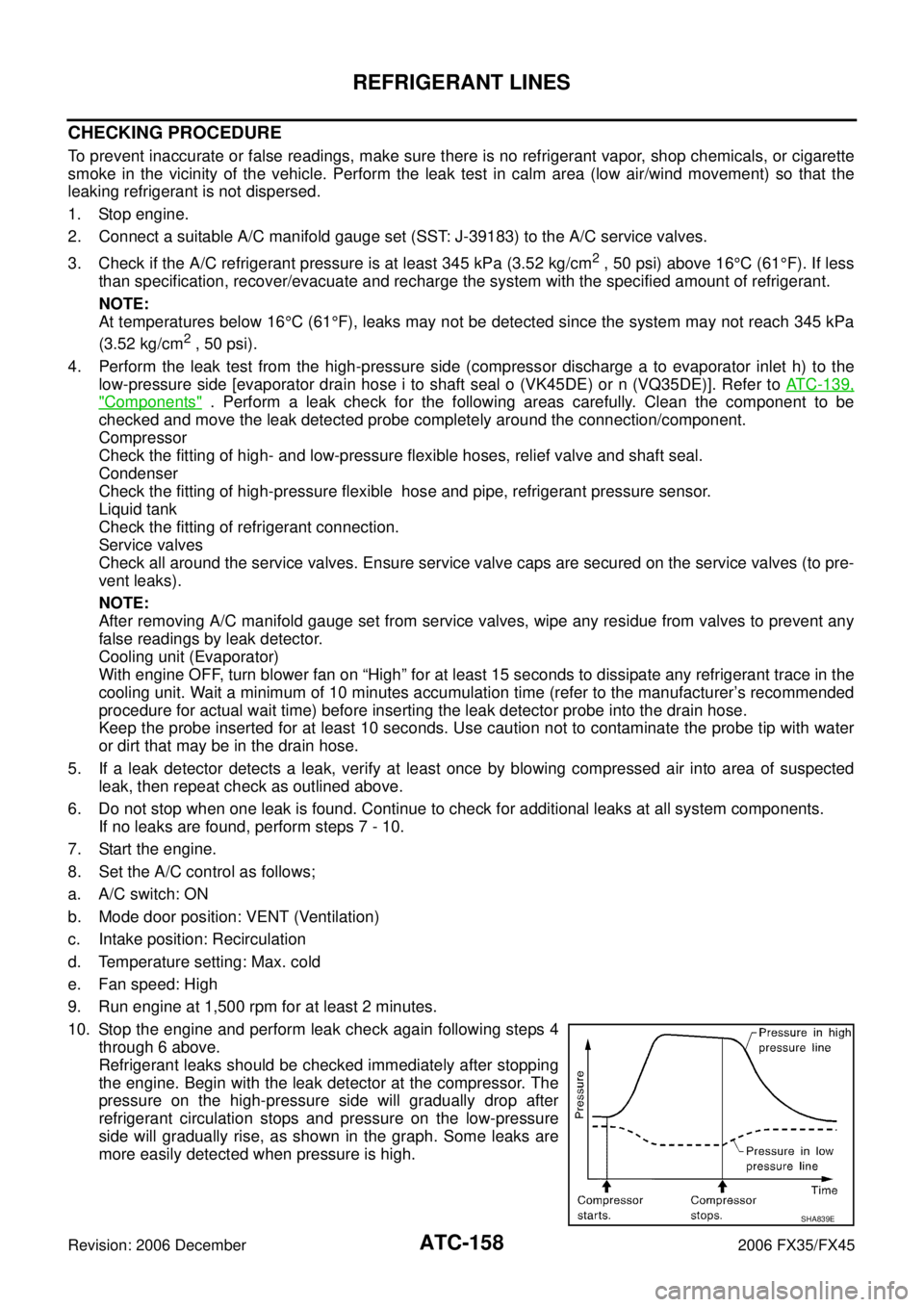
10. Stop the engine and perform leak check again following steps 4 through 6 above.
Refrigerant leaks should be checked immediately after stopping
the engine. Begin with the leak detector at the compressor. The
pressure on the high-pressure side will gradually drop after
refrigerant circulation stops and pressure on the low-pressure
side will gradually rise, as shown in the graph. Some leaks are
more easily detected when pressure is high.
SHA839E
Page 605 of 4462

REFRIGERANT LINES ATC-159
C
D E
F
G H
I
K L
M A
B
AT C
Revision: 2006 December 2006 FX35/FX45
11. Before connecting recovery/recycling recharging equipment to vehicle, check recovery/recycling recharg- ing equipment gauges. No refrigerant pressure should be displayed. If pressure is displayed, recover
refrigerant from equipment lines and then check refrigerant purity.
12. Confirm refrigerant purity in supply tank using recovery/recycling recharging equipment and refrigerant identifier.
13. Confirm refrigerant purity in vehicle A/C system using recovery/recycling recharging equipment and refrig- erant identifier.
14. Discharge A/C system using approved refrigerant recovery equipment. Repair the leaking fitting or com- ponent if necessary.
15. Evacuate and recharge A/C system and perform the leak test to confirm no refrigerant leaks.
16. Perform A/C performance test to ensure system works properly.
Page 606 of 4462
ATC-160
SERVICE DATA AND SPECIFICATIONS (SDS)
Revision: 2006 December 2006 FX35/FX45
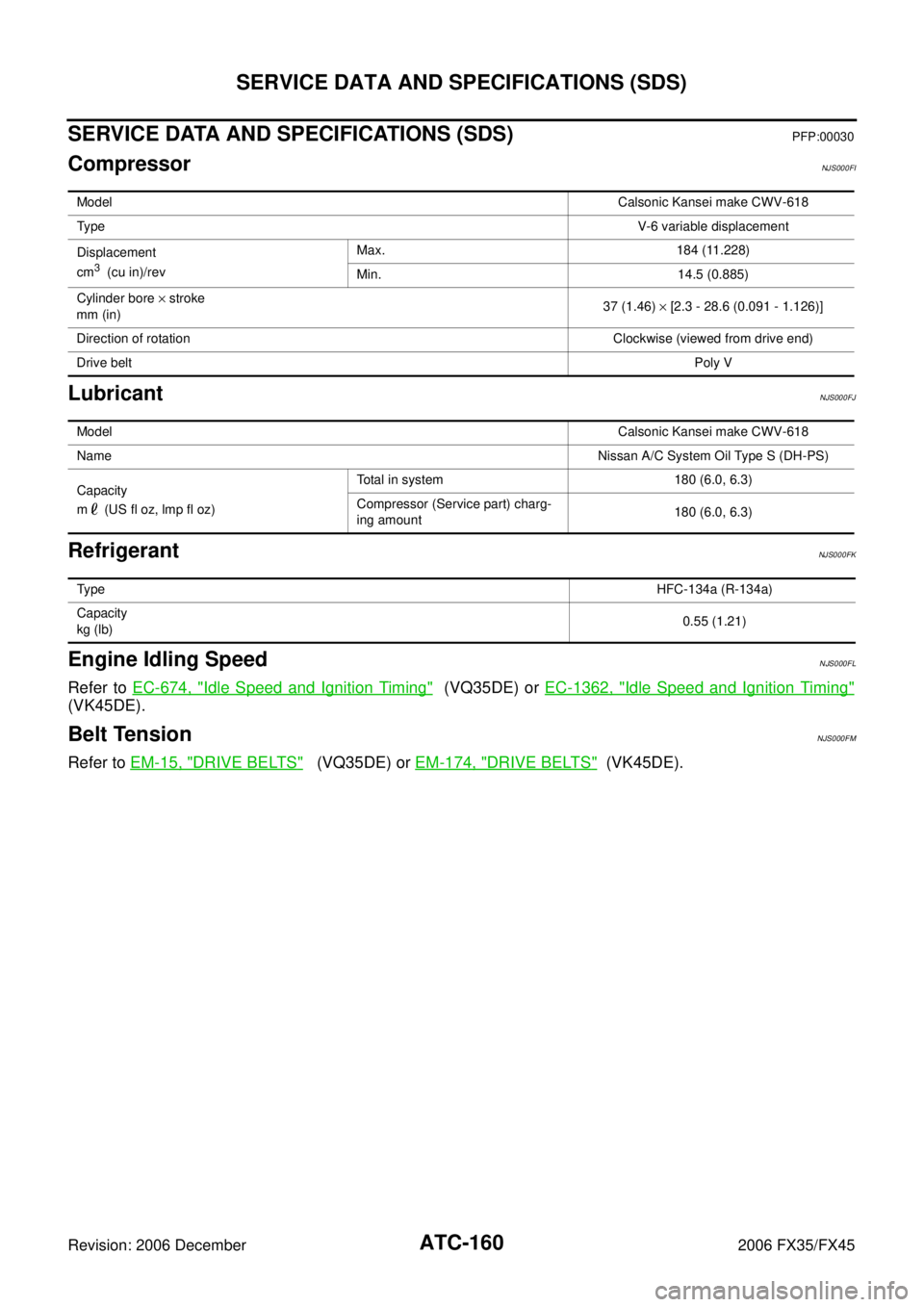
SERVICE DATA AND SPECIFICATIONS (SDS)PFP:00030
CompressorNJS000FI
LubricantNJS000FJ
RefrigerantNJS000FK
Engine Idling SpeedNJS000FL
Refer to EC-674, "Idle Speed and Ignition Timing" (VQ35DE) or EC-1362, "Idle Speed and Ignition Timing"
(VK45DE).
Belt TensionNJS000FM
Refer to EM-15, "DRIVE BELTS" (VQ35DE) or EM-174, "DRIVE BELTS" (VK45DE).
Model Calsonic Kansei make CWV-618
Ty p e V-6 variable displacement
Displacement
cm
3 (cu in)/rev Max. 184 (11.228)
Min. 14.5 (0.885)
Cylinder bore × stroke
mm (in) 37 (1.46)
× [2.3 - 28.6 (0.091 - 1.126)]
Direction of rotation Clockwise (viewed from drive end)
Drive belt Poly V
ModelCalsonic Kansei make CWV-618
Name Nissan A/C System Oil Type S (DH-PS)
Capacity
m (US fl oz, lmp fl oz) Total in system 180 (6.0, 6.3)
Compressor (Service part) charg-
ing amount 180 (6.0, 6.3)
Ty p e
HFC-134a (R-134a)
Capacity
kg (lb) 0.55 (1.21)
Page 607 of 4462

AV-1
AUDIO VISUAL, NAVIGATION & TELEPHONE SYS- TEM
K ELECTRICAL
CONTENTS
C
D E
F
G H
I
J
L
M
SECTION AV
A
B
AV
Revision: 2006 December 2006 FX35/FX45
AUDIO VISUAL, NAVIGATION & TELEPHONE SYSTEM
PRECAUTIONS ..................................................... ..... 4
Precautions for Supplemental Restraint System
(SRS) “AIR BAG” and “SEAT BELT PRE-TEN-
SIONER” ............................................................. ..... 4
PREPARATION ...................................................... ..... 5
Commercial Service Tools ................................... ..... 5
AUDIO .................................................................... ..... 6
System Description ............................................. ..... 6
AUDIO SYSTEM .............................................. ..... 6
SPEED SENSITIVE VOLUME SYSTEM ......... ..... 7
Component Parts Location .................................. ..... 7
Schematic — AUDIO — / With Navigation System ..... 8
Wiring Diagram — AUDIO — / With Navigation Sys-
tem ...................................................................... ..... 9
Schematic — AUDIO — Without Navigation System ... 19
Wiring Diagram — AUDIO — / Without Navigation
System ................................................................ ... 20
Terminals and Reference Value for Audio Unit .... ... 29
Terminals and Reference Value for BOSE Speaker
Amp. .................................................................... ... 31
Terminals and Reference Value for A/C and AV
Switch .................................................................. ... 33
Terminals and Reference Value for Woofer ......... ... 34
Terminals and Reference Value for Satellite Radio
Tuner ................................................................... ... 34
A/C and AV Switch Self-Diagnosis Function ....... ... 35
STARTING THE SELF-DIAGNOSIS MODE .... ... 35
DIAGNOSIS FUNCTION .................................. ... 35
EXITING THE SELF-DIAGNOSIS MODE ........ ... 35
Trouble Diagnosis ............................................... ... 36
Power Supply Circuit Inspection ......................... ... 37
Audio Steering Wheel Switch Inspection ............. ... 38
A/C and AV Switch Inspection ............................. ... 40
BOSE Speaker Amp. Inspection ......................... ... 40
Vehicle Speed Signal Inspection ......................... ... 41
Locking CD Auto-Changer Mechanism ............... ... 42
DAMPER LOCK PROCEDURE ....................... ... 42
Removal and Installation of Audio Unit ............... ... 43
REMOVAL ........................................................ ... 43
INSTALLATION ................................................ ... 43 Disassembly and Assembly for Audio Unit ..........
... 43
DISASSEMBLY ................................................ ... 43
ASSEMBLY ...................................................... ... 43
Removal and Installation for A/C and AV Switch . ... 44
REMOVAL ........................................................ ... 44
INSTALLATION ................................................ ... 44
Removal and Installation for Front Door Speaker ... 44
REMOVAL ........................................................ ... 44
INSTALLATION ................................................ ... 44
Removal and Installation for Rear Door Speaker ... 44 REMOVAL ........................................................ ... 44
INSTALLATION ................................................ ... 44
Removal and Installation for Instrument Speaker ... 45 REMOVAL ........................................................ ... 45
INSTALLATION ................................................ ... 45
Removal and Installation for Tweeter .................. ... 45
REMOVAL ........................................................ ... 45
INSTALLATION ................................................ ... 45
Removal and Installation for Woofer (BOSE Sys-
tem) ..................................................................... ... 45
REMOVAL ........................................................ ... 45
INSTALLATION ................................................ ... 45
Removal and Installation for BOSE Speaker Amp. ... 46
REMOVAL ........................................................ ... 46
INSTALLATION ................................................ ... 46
Removal and Installation of Satellite Radio Tuner ... 47
REMOVAL ........................................................ ... 47
INSTALLATION ................................................ ... 47
Removal and Installation of Satellite Radio Antenna ... 47
REMOVAL ........................................................ ... 47
INSTALLATION ................................................ ... 47
ANTENNA .............................................................. ... 48
System Description .............................................. ... 48
Wiring Diagram — M/ANT — .............................. ... 49
Terminals and Reference Value for Audio Unit .... ... 50
Antenna Amp. Inspection .................................... ... 50
Location of Antenna ............................................. ... 51
RADIO ANTENNA AND GPS ANTENNA ......... ... 51
SATELLITE RADIO ANTENNA ........................ ... 51
Window Antenna Repair ...................................... ... 52
Page 608 of 4462

AV-2Revision: 2006 December 2006 FX35/FX45 CHECK ELEMENT ...........................................
... 52
Removal and Installation of Roof Antenna .......... ... 53
REMOVAL ........................................................ ... 53
INSTALLATION ................................................. ... 53
Removal and Installation of Satellite Radio Antenna ... 53
INTEGRATED DISPLAY SYSTEM ......................... ... 54
System Description .............................................. ... 54
INTEGRATED DISPLAY SYSTEM ................... ... 54
Component Description ....................................... ... 55
DISPLAY CONTROL UNIT ............................... ... 55
DISPLAY ........................................................... ... 55
A/C AND AV SWITCH ...................................... ... 55
CAN Communication Unit .................................... ... 55
Component Parts Location .................................. ... 55
Schematic — INF/D — ........................................ ... 56
Wiring Diagram — INF/D — ................................ ... 57
Schematic — COMM — ...................................... ... 63
Wiring Diagram — COMM — .............................. ... 64
Terminals and Reference Value for Display Control
Unit ...................................................................... ... 69
Terminals and Reference Value for Display ......... ... 72
Terminals and Reference Value for A/C and AV
Switch .................................................................. ... 74
Special Note for Trouble Diagnosis ..................... ... 75
On Board Self-Diagnosis Function ...................... ... 75
DESCRIPTION ................................................. ... 75
DIAGNOSIS ITEM ............................................ ... 75
Self-Diagnosis Mode (DCU) ................................ ... 76
OPERATION PROCEDURE ............................. ... 76
SELF-DIAGNOSIS RESULT ............................ ... 77
Confirmation/Adjustment Mode ........................... ... 79
OPERATION PROCEDURE ............................. ... 79
DISPLAY DIAGNOSIS ...................................... ... 80
VEHICLE SIGNALS .......................................... ... 80
AUTO CLIMATE CONTROL ............................. ... 81
CAN DIAG SUPPORT MONITOR ....................... ... 81
OPERATION PROCEDURE ............................. ... 81
A/C and AV Switch Self-Diagnosis Function ........ ... 82
STARTING THE SELF-DIAGNOSIS MODE ..... ... 82
DIAGNOSIS FUNCTION .................................. ... 82
EXITING THE SELF-DIAGNOSIS MODE ........ ... 82
CAN Communication Check ................................ ... 83
Unable to Operate System with A/C and AV Switch ... 84
All Images Are Not Displayed .............................. ... 86
Tint Is Strange for The RGB Image ..................... ... 88
RGB Image Is Rolling .......................................... ... 90
Values for All Items in The TRIP Screen Do Not
Change ................................................................ ... 91
Values for Items, “Driving Distance” and “Average
Speed” Do Not Change ....................................... ... 91
Values for All Items in The FUEL ECONOMY Screen
Do Not Change .................................................... ... 91
Example of Symptoms Possible No Malfunction . ... 92
DISPLAY ........................................................... ... 92
Removal and Installation of Display ..................... ... 92
Removal and Installation of Display Control Unit . ... 92
REMOVAL ........................................................ ... 92
INSTALLATION ................................................. ... 92
Removal and Installation of A/C and AV Switch .. ... 92 NAVIGATION SYSTEM ..........................................
... 93
System Description .............................................. ... 93
NAVIGATION SYSTEM .................................... ... 94
Component Description ....................................... ... 97
NAVI CONTROL UNIT ...................................... ... 97
GPS ANTENNA ................................................ ... 97
DISPLAY CONTROL UNIT ............................... ... 97
DISPLAY ........................................................... ... 98
A/C AND AV SWITCH ....................................... ... 98
CAN Communication Unit .................................... ... 98
Component Parts Location .................................. ... 98
Schematic — NAVI — .......................................... ... 99
Wiring Diagram — NAVI — .................................. .100
Schematic — COMM — ....................................... .107
Wiring Diagram — COMM — ............................... .108
Terminals and Reference Value for NAVI Control
Unit ....................................................................... .113
Terminals and Reference Value for Display Control
Unit ....................................................................... .115
Terminals and Reference Value for Display ......... .119
Terminals and Reference Value for A/C and AV
Switch .................................................................. .121
Special Note for Trouble Diagnosis ...................... .122
On Board Self-Diagnosis Function ....................... .122
DESCRIPTION ................................................. .122
DIAGNOSIS ITEM ............................................ .122
Self-Diagnosis Mode (DCU) ................................. .123
OPERATION PROCEDURE ............................. .123
SELF-DIAGNOSIS RESULT ............................. .124
Self-Diagnosis Mode (NAVI) ................................ .126
OPERATION PROCEDURE ............................. .126
SELF-DIAGNOSIS RESULT ............................. .128
Confirmation/Adjustment Mode ............................ .129
OPERATION PROCEDURE ............................. .129
DISPLAY DIAGNOSIS ...................................... .130
VEHICLE SIGNALS .......................................... .130
AUTO CLIMATE CONTROL ............................. .131
NAVIGATION .................................................... .131
CAN DIAG SUPPORT MONITOR ....................... .136
OPERATION PROCEDURE ............................. .136
A/C and AV Switch Self-Diagnosis Function ........ .137
STARTING THE SELF-DIAGNOSIS MODE ..... .137
DIAGNOSIS FUNCTION .................................. .137
EXITING THE SELF-DIAGNOSIS MODE ........ .137
CAN Communication Check ................................ .138
Unable to Operate System with A/C and AV Switch .139
All Images Are Not Displayed .............................. .141
Status Screen for Audio and A/C Is Not Displayed
When Showing Map Screen ................................ .143
Vehicle Mark Is Not Displayed Properly ............... .144
Tint Is Strange for The RGB Image ...................... .145
Tint Is Strange for The RGB Image (Only NAVI
Screen) ................................................................ .147
RGB Image Is Rolling .......................................... .149
Values for All Items in The TRIP Screen Do Not
Change ................................................................ .150
Values for Items, “Driving Distance” and “Average
Speed” Do Not Change ........................................ .150
Values for All Items in The FUEL ECONOMY Screen