instrument panel INFINITI FX35 2007 User Guide
[x] Cancel search | Manufacturer: INFINITI, Model Year: 2007, Model line: FX35, Model: INFINITI FX35 2007Pages: 4366, PDF Size: 55.42 MB
Page 571 of 4366

HEATER & COOLING UNIT ASSEMBLY ATC-125
C
D E
F
G H
I
K L
M A
B
AT C
Revision: 2006 July 2007 FX35/FX45
HEATER & COOLING UNIT ASSEMBLYPFP:27110
Removal and InstallationNJS000EU
REMOVAL
1. Use a refrigerant collecting equipment (for HFC-134a) to discharge the refrigerant.
2. Drain coolant from cooling system. Refer to CO-11, "
Changing Engine Coolant" (VQ35DE) or CO-38,
"Changing Engine Coolant" (VK45DE).
3. Remove cowl top cover. Refer to EI-23, "
COWL TOP" .
4. Remove high-pressure pipe 2 mounting clip.
5. Remove low-pressure flexible hose bracket mounting bolt. Refer to ATC-146, "
Removal and Installation of
Low-pressure Flexible Hose" .
6. Disconnect low-pressure pipe 1 and high-pressure pipe 2 from evaporator.
a. Set a disconnector [high-pressure side (SST: 9253089908), low- pressure side (SST: 9253089916)] on A/C piping.
b. Slide a disconnector toward vehicle front until it clicks.
c. Slide A/C piping toward vehicle front and disconnect it.
CAUTION:
Cap or wrap the joint of low-pressure pipe 1, 2 and high-
pressure pipe 2, 3 with suitable material such as vinyl tape
to avoid the entry of air.
7. Remove electric throttle control actuator (VQ35DE). Refer to EM-19, "
INTAKE MANIFOLD COLLECTOR" .
8. Disconnect two heater hoses from heater core.
9. Remove instrument panel and pad. Refer to IP-10, "
INSTRUMENT PANEL ASSEMBLY" .
10. Remove blower unit. Refer to ATC-120, "
BLOWER UNIT" .
RJIA2037E
RJIA2077E
RJIA2041E
Page 577 of 4366
AIR MIX DOOR MOTOR ATC-131
C
D E
F
G H
I
K L
M A
B
AT C
Revision: 2006 July 2007 FX35/FX45
AIR MIX DOOR MOTOR PFP:27732
Removal and InstallationNJS000EX
REMOVAL
Driver Side
1. Set the temperature control switch (driver side) at 18 °C (60 °F), and then disconnect the battery cable from
the negative terminal.
2. Remove instrument driver lower panel. Refer to IP-10, "
INSTRUMENT PANEL ASSEMBLY" .
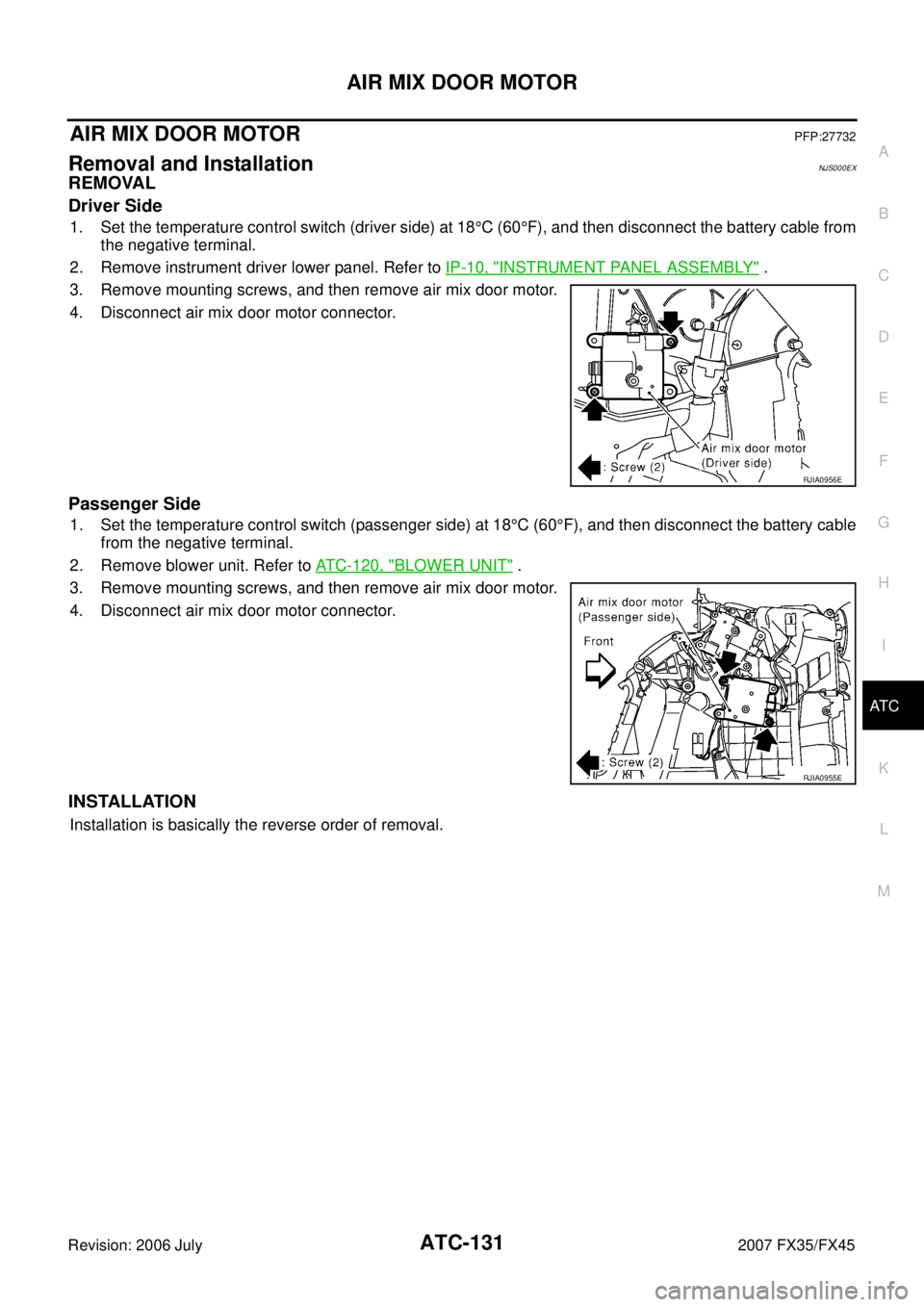
3. Remove mounting screws, and then remove air mix door motor.
4. Disconnect air mix door motor connector.
Passenger Side
1. Set the temperature control switch (passenger side) at 18 °C (60 °F), and then disconnect the battery cable
from the negative terminal.
2. Remove blower unit. Refer to ATC-120, "
BLOWER UNIT" .
3. Remove mounting screws, and then remove air mix door motor.
4. Disconnect air mix door motor connector.
INSTALLATION
Installation is basically the reverse order of removal.
RJIA0956E
RJIA0955E
Page 579 of 4366
DUCTS AND GRILLES ATC-133
C
D E
F
G H
I
K L
M A
B
AT C
Revision: 2006 July 2007 FX35/FX45
DUCTS AND GRILLESPFP:27860
Removal and InstallationNJS000EZ
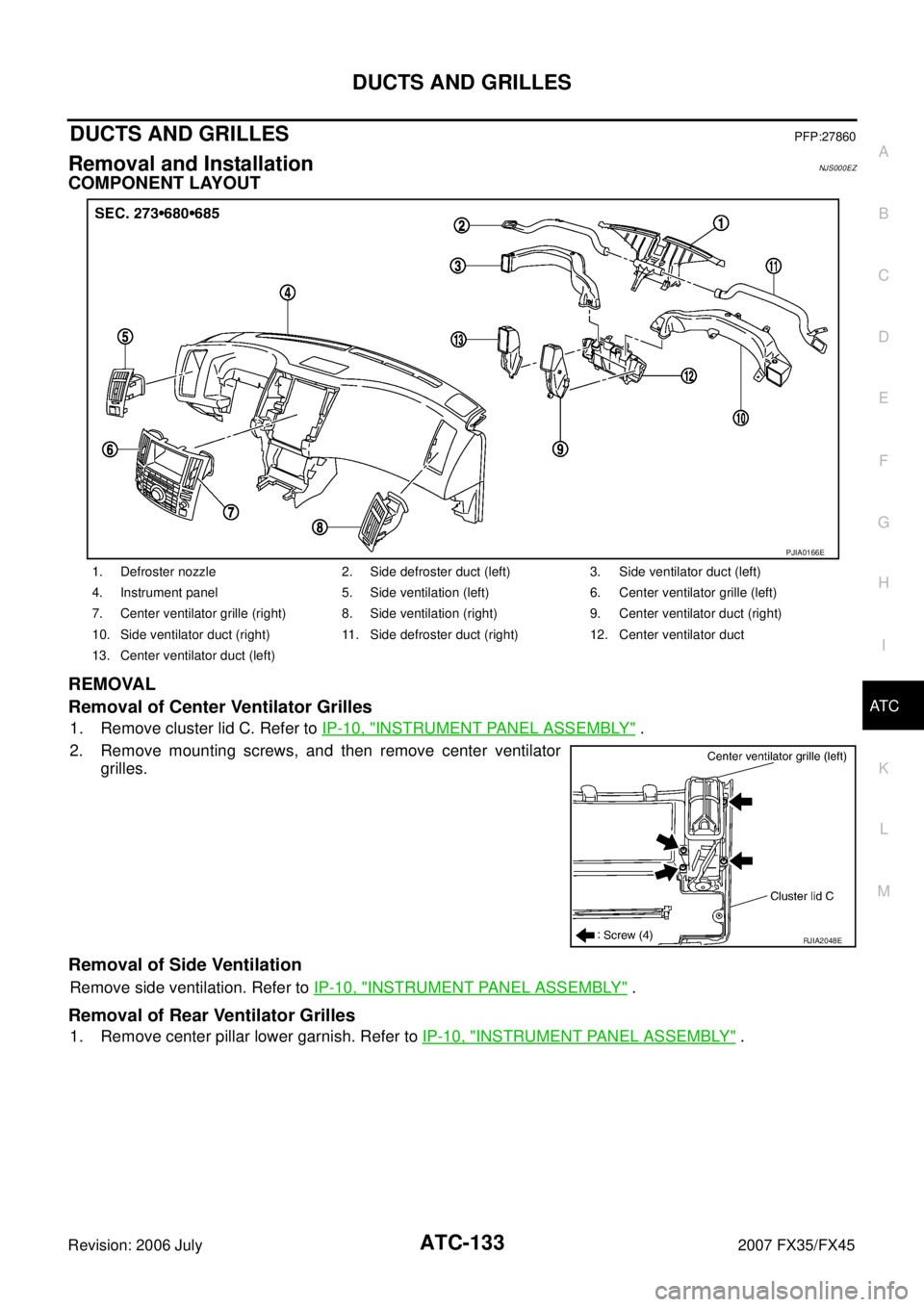
COMPONENT LAYOUT
REMOVAL
Removal of Center Ventilator Grilles
1. Remove cluster lid C. Refer to IP-10, "INSTRUMENT PANEL ASSEMBLY" .
2. Remove mounting screws, and then remove center ventilator grilles.
Removal of Side Ventilation
Remove side ventilation. Refer to IP-10, "INSTRUMENT PANEL ASSEMBLY" .
Removal of Rear Ventilator Grilles
1. Remove center pillar lower garnish. Refer to IP-10, "INSTRUMENT PANEL ASSEMBLY" .
1. Defroster nozzle 2. Side defroster duct (left) 3. Side ventilator duct (left)
4. Instrument panel 5. Side ventilation (left) 6. Center ventilator grille (left)
7. Center ventilator grille (right) 8. Side ventilation (right) 9. Center ventilator duct (right)
10. Side ventilator duct (right) 11. Side defroster duct (right) 12. Center ventilator duct
13. Center ventilator duct (left)
PJIA0166E
RJIA2048E
Page 580 of 4366
ATC-134
DUCTS AND GRILLES
Revision: 2006 July 2007 FX35/FX45
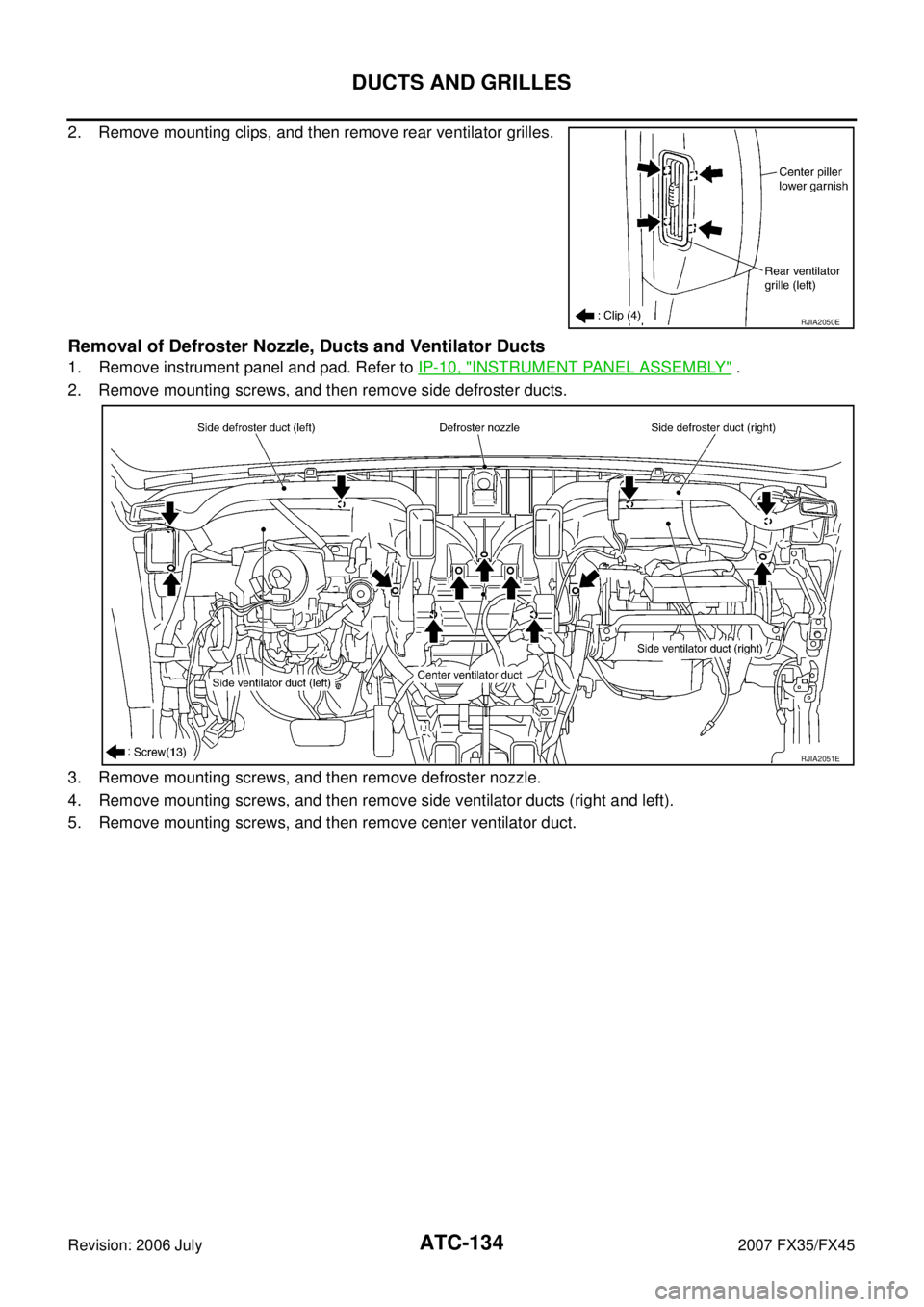
2. Remove mounting clips, and then remove rear ventilator grilles.
Removal of Defroster Nozzle, Ducts and Ventilator Ducts
1. Remove instrument panel and pad. Refer to IP-10, "INSTRUMENT PANEL ASSEMBLY" .
2. Remove mounting screws, and then remove side defroster ducts.
3. Remove mounting screws, and then remove defroster nozzle.
4. Remove mounting screws, and then remove side ventilator ducts (right and left).
5. Remove mounting screws, and then remove center ventilator duct.
RJIA2050E
RJIA2051E
Page 581 of 4366
DUCTS AND GRILLES ATC-135
C
D E
F
G H
I
K L
M A
B
AT C
Revision: 2006 July 2007 FX35/FX45
Removal of Rear Ventilator Ducts
1. Remove center console. Refer to IP-10, "INSTRUMENT PANEL ASSEMBLY" .
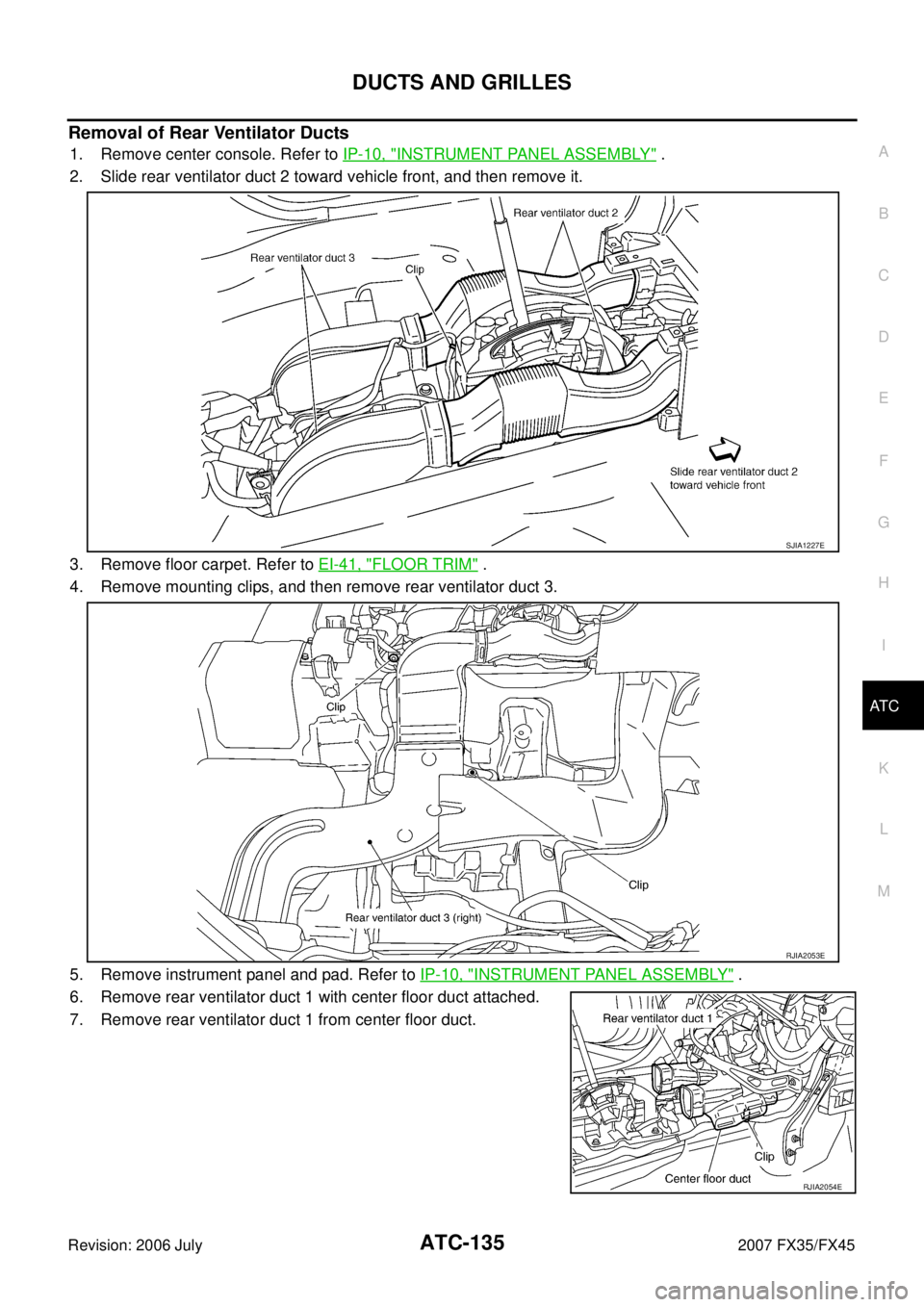
2. Slide rear ventilator duct 2 toward vehicle front, and then remove it.
3. Remove floor carpet. Refer to EI-41, "
FLOOR TRIM" .
4. Remove mounting clips, and then remove rear ventilator duct 3.
5. Remove instrument panel and pad. Refer to IP-10, "
INSTRUMENT PANEL ASSEMBLY" .
6. Remove rear ventilator duct 1 with center floor duct attached.
7. Remove rear ventilator duct 1 from center floor duct.
SJIA1227E
RJIA2053E
RJIA2054E
Page 582 of 4366

ATC-136
DUCTS AND GRILLES
Revision: 2006 July 2007 FX35/FX45
Removal of Foot Ducts
1. Remove heater & cooling unit assembly. Refer to ATC-125, "HEATER & COOLING UNIT ASSEMBLY" .
2. Remove mounting screws, and then remove air mix door motor (right), mode door motor, evaporator cover and foot duct (right).
3. Remove foot duct (left).
Removal of Floor Ducts
1. Remove floor carpet. Refer to EI-41, "FLOOR TRIM" .
2. Remove mounting clips, and then remove side floor ducts.
3. Remove instrument panel and pad. Refer to IP-10, "
INSTRU-
MENT PANEL ASSEMBLY" .
4. Remove mounting clip, and then remove center floor duct with rear ventilator duct 1 attached.
5. Remove center floor duct from rear ventilator duct 1.
INSTALLATION
Installation is basically the reverse order of removal.
RJIA0962E
RJIA2055E
RJIA2054E
Page 649 of 4366
AUDIO AV-43
C
D E
F
G H
I
J
L
M A
B
AV
Revision: 2006 July 2007 FX35/FX45
Removal and Installation of Audio UnitNKS003B2
REMOVAL
1. Perform damper lock operation. Refer to AV- 4 2 , "Locking CD Auto-Changer Mechanism" .
2. Remove cluster lid C. Refer to IP-10, "
INSTRUMENT PANEL ASSEMBLY" .
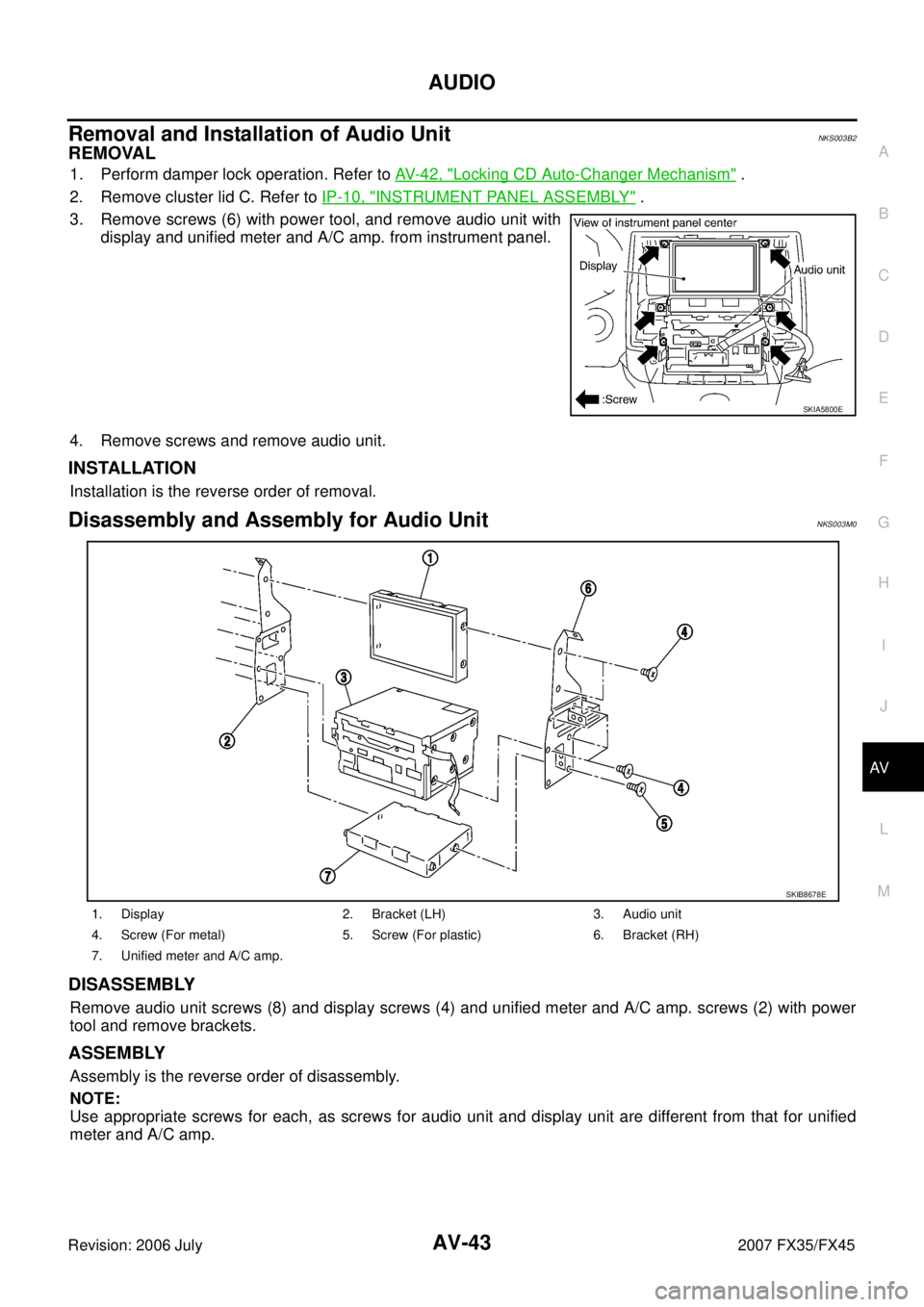
3. Remove screws (6) with power tool, and remove audio unit with display and unified meter and A/C amp. from instrument panel.
4. Remove screws and remove audio unit.
INSTALLATION
Installation is the reverse order of removal.
Disassembly and Assembly for Audio UnitNKS003M0
DISASSEMBLY
Remove audio unit screws (8) and display screws (4) and unified meter and A/C amp. screws (2) with power
tool and remove brackets.
ASSEMBLY
Assembly is the reverse order of disassembly.
NOTE:
Use appropriate screws for each, as screws for audio unit and display unit are different from that for unified
meter and A/C amp.
SKIA5800E
1. Display 2. Bracket (LH) 3. Audio unit
4. Screw (For metal) 5. Screw (For plastic) 6. Bracket (RH)
7. Unified meter and A/C amp.
SKIB8678E
Page 650 of 4366
AV-44
AUDIO
Revision: 2006 July 2007 FX35/FX45
Removal and Installation for A/C and AV SwitchNKS003B4
REMOVAL
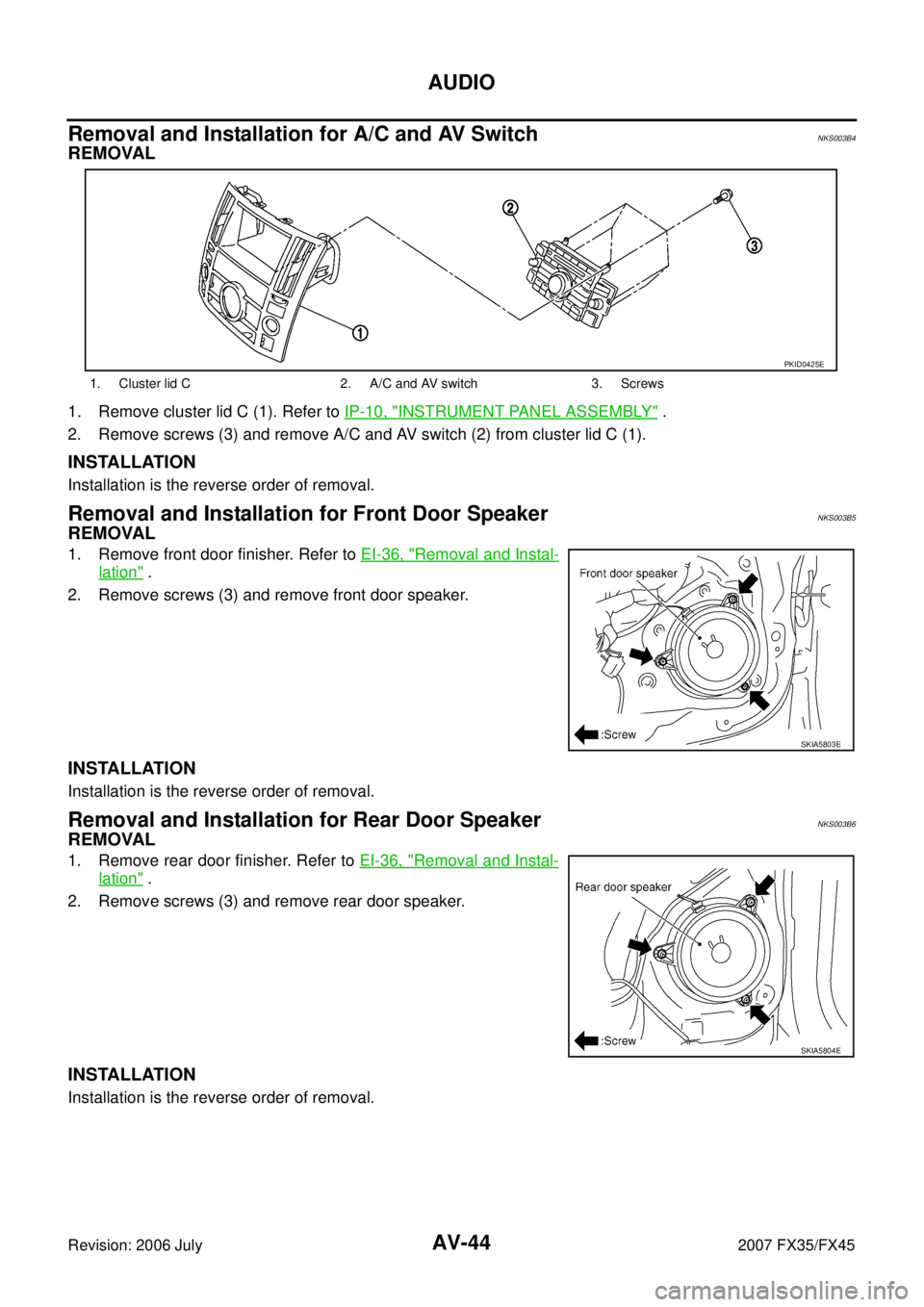
1. Remove cluster lid C (1). Refer to IP-10, "INSTRUMENT PANEL ASSEMBLY" .
2. Remove screws (3) and remove A/C and AV switch (2) from cluster lid C (1).
INSTALLATION
Installation is the reverse order of removal.
Removal and Installation for Front Door SpeakerNKS003B5
REMOVAL
1. Remove front door finisher. Refer to EI-36, "Removal and Instal-
lation" .
2. Remove screws (3) and remove front door speaker.
INSTALLATION
Installation is the reverse order of removal.
Removal and Installation for Rear Door SpeakerNKS003B6
REMOVAL
1. Remove rear door finisher. Refer to EI-36, "Removal and Instal-
lation" .
2. Remove screws (3) and remove rear door speaker.
INSTALLATION
Installation is the reverse order of removal.
1. Cluster lid C 2. A/C and AV switch 3. Screws
PKID0425E
SKIA5803E
SKIA5804E
Page 651 of 4366
AUDIO AV-45
C
D E
F
G H
I
J
L
M A
B
AV
Revision: 2006 July 2007 FX35/FX45
Removal and Installation for Instrument SpeakerNKS003B7
REMOVAL
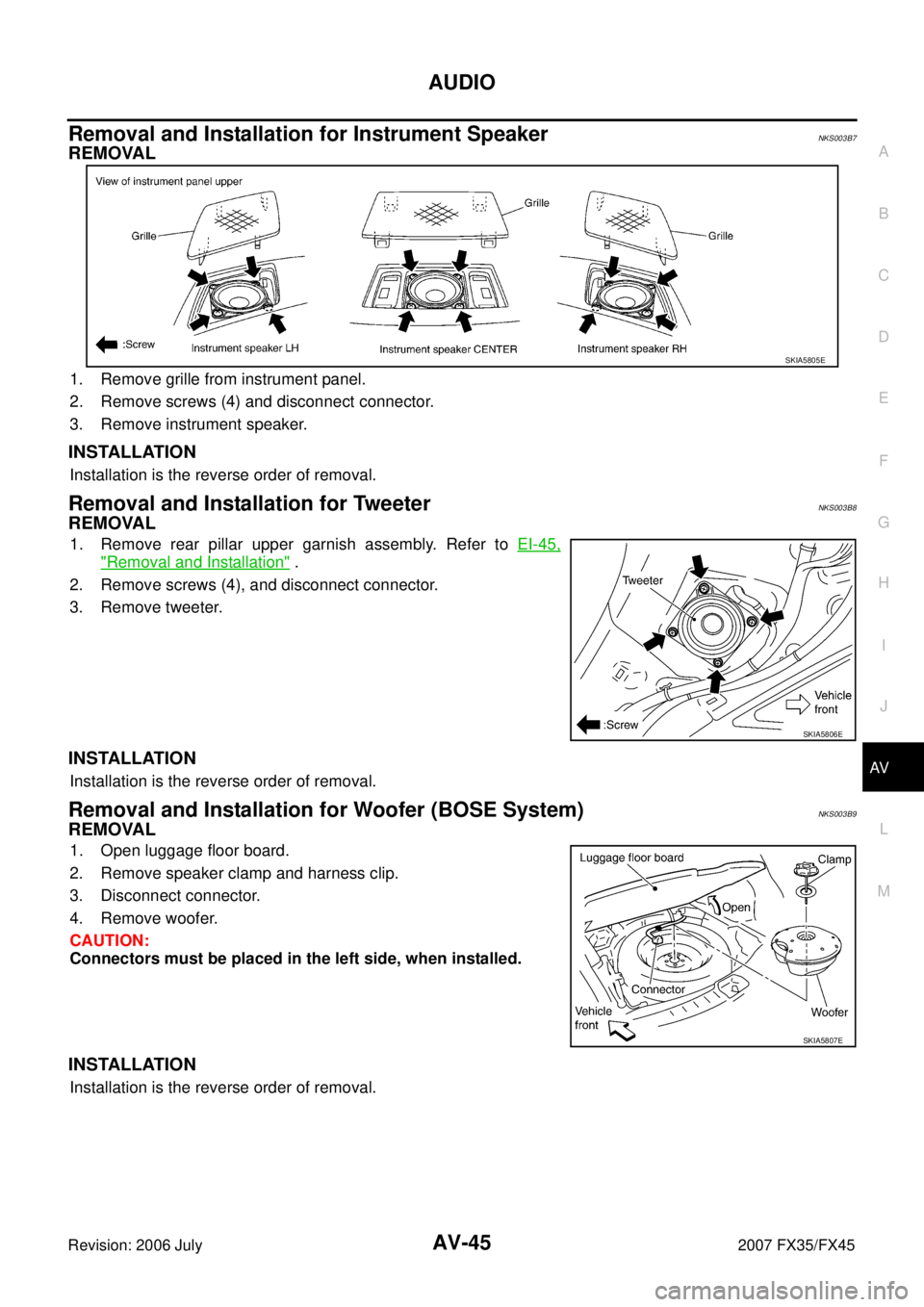
1. Remove grille from instrument panel.
2. Remove screws (4) and disconnect connector.
3. Remove instrument speaker.
INSTALLATION
Installation is the reverse order of removal.
Removal and Installation for TweeterNKS003B8
REMOVAL
1. Remove rear pillar upper garnish assembly. Refer to EI-45,
"Removal and Installation" .
2. Remove screws (4), and disconnect connector.
3. Remove tweeter.
INSTALLATION
Installation is the reverse order of removal.
Removal and Installation for Woofer (BOSE System)NKS003B9
REMOVAL
1. Open luggage floor board.
2. Remove speaker clamp and harness clip.
3. Disconnect connector.
4. Remove woofer.
CAUTION:
Connectors must be placed in the left side, when installed.
INSTALLATION
Installation is the reverse order of removal.
SKIA5805E
SKIA5806E
SKIA5807E
Page 659 of 4366
ANTENNA AV-53
C
D E
F
G H
I
J
L
M A
B
AV
Revision: 2006 July 2007 FX35/FX45
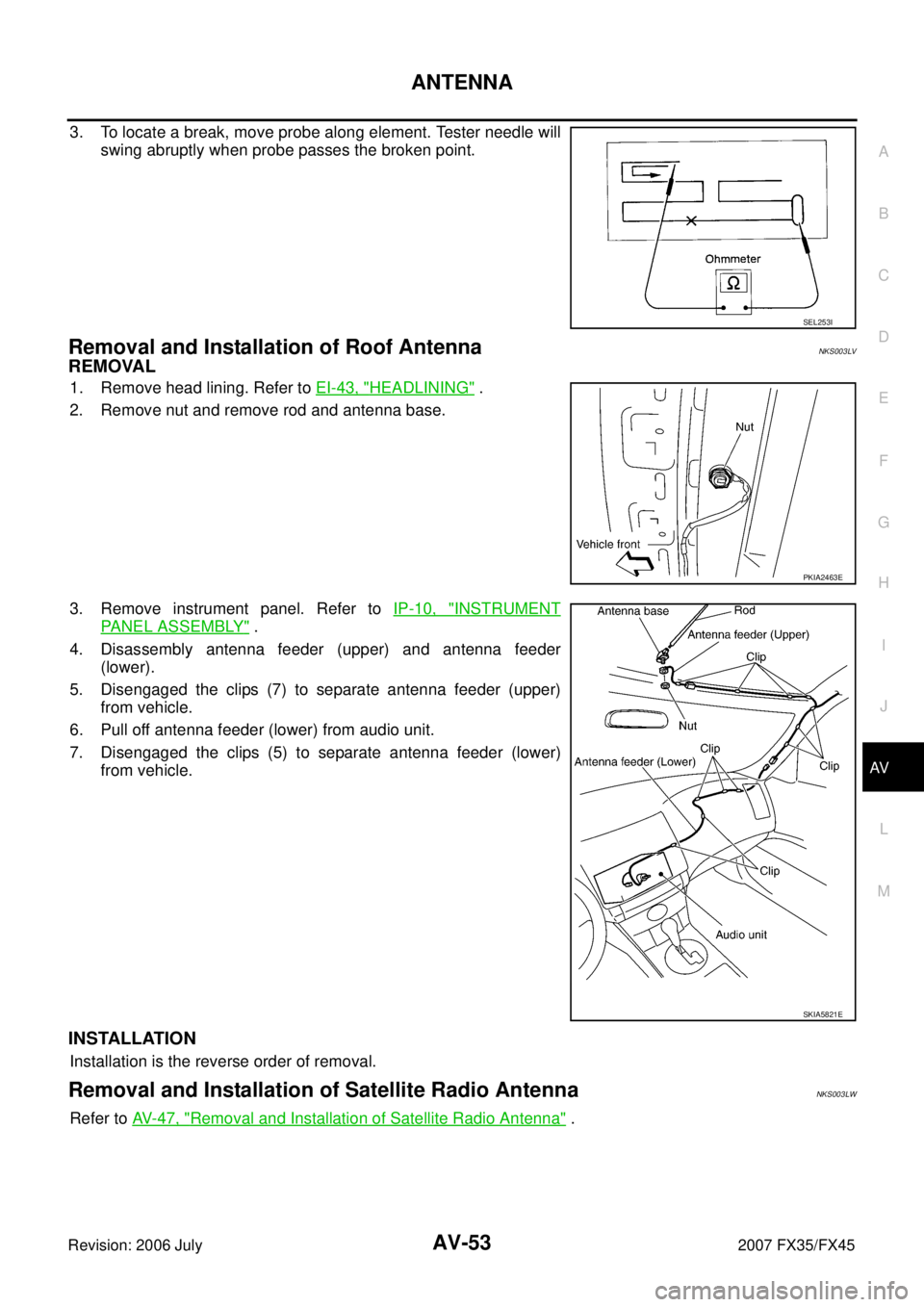
3. To locate a break, move probe along element. Tester needle will
swing abruptly when probe passes the broken point.
Removal and Installation of Roof AntennaNKS003LV
REMOVAL
1. Remove head lining. Refer to EI-43, "HEADLINING" .
2. Remove nut and remove rod and antenna base.
3. Remove instrument panel. Refer to IP-10, "
INSTRUMENT
PANEL ASSEMBLY" .
4. Disassembly antenna feeder (upper) and antenna feeder (lower).
5. Disengaged the clips (7) to separate antenna feeder (upper) from vehicle.
6. Pull off antenna feeder (lower) from audio unit.
7. Disengaged the clips (5) to separate antenna feeder (lower) from vehicle.
INSTALLATION
Installation is the reverse order of removal.
Removal and Installation of Satellite Radio AntennaNKS003LW
Refer to AV- 4 7 , "Removal and Installation of Satellite Radio Antenna" .
SEL253I
PKIA2463E
SKIA5821E