height adjustment INFINITI FX35 2008 User Guide
[x] Cancel search | Manufacturer: INFINITI, Model Year: 2008, Model line: FX35, Model: INFINITI FX35 2008Pages: 3924, PDF Size: 81.37 MB
Page 1201 of 3924

LANE DEPARTURE WARNING SYSTEMDI-75
< SERVICE INFORMATION >
C
DE
F
G H
I
J
L
M A
B
DI
N
O P
Measure the wheel arch height. And calculate “Dh”.
NOTE:
“Dh” may be calculated as a minus value.
AIMING ADJUSTMENT
Operation Procedure
CAUTION:
Perform the adjustment under unloaded vehicle condition.
LDW indicator is turned off after the remo val/installation, and blinks after replacement.
NOTE:
When the DTC (C1B01 CAM AIMING INCMP) is disp layed on CONSULT-III screen, perform the aiming
adjustment after erasing the DTC.
1. Select “Work Support” on LDW with CONSULT-III.
2. Select “AUTO AIM”.
3. Confirm following.
a. The target should be accurately placed.
b. The vehicle should be stopped.
4. Select “Start” to perform aiming.
CAUTION:
Never Select “Start” when the target is not placed.
5. Input “Dh”, and then select “Start”. NOTE:
Check the value “Dh”. Refer to "VEHICLE HEIGHT CHECK".
CAUTION:
Never change “Ht” and “Dt”.
6. Check it display item.
a. “Normally Completed” is displayed, then selecting “Completion”.
b. Perform the following services when displa yed “SUSPENSION” or “ABNORMALLY COMPLETED”.
NOTE:
Replace camera unit if “SUSPENSION” is repeatedly indicated though the above tw o service is performed.
7. Check if “Normally Completed” is displayed and close the aiming adjustment procedure by selecting
“End”.
Check After The Adjustment
1. Perform self-diagnosis of LDW camera unit. Refer to DI-81, "CONSULT-III Function (LDW)".
2. Test the LDW system operation by running test. Refer to DI-71, "
Action Test".
Dh [mm] = (Hfl + Hfr)
÷ 2 − 840
where, Hfl: Front left wheel arch height [mm]
Hfr: Front right wheel arch height [mm]
SKIB3164E
Displays item Service procedure
SUSPENSION 00H Routine not activated
Position the target appropriately again. Perform the aiming again.
Refer to "Camera Aiming Adjustment".
10H Writing error
ABNORMALLY COMPLETED —
3AA93ABC3ACD3AC03ACA3AC03AC63AC53A913A773A893A873A873A8E3A773A983AC73AC93AC03AC3
3A893A873A873A8F3A773A9D3AAF3A8A3A8C3A863A9D3AAF3A8B3A8C
Page 1210 of 3924
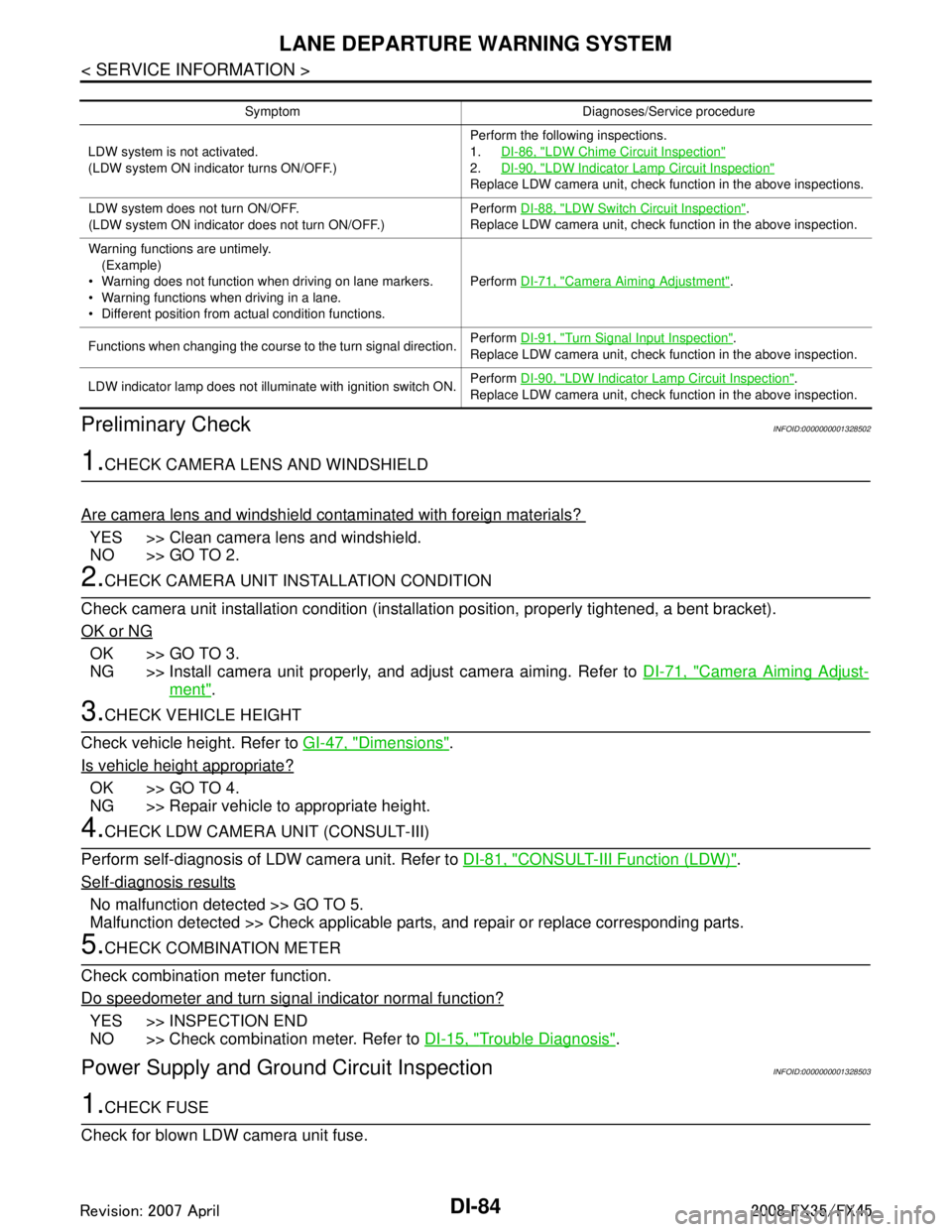
DI-84
< SERVICE INFORMATION >
LANE DEPARTURE WARNING SYSTEM
Preliminary Check
INFOID:0000000001328502
1.CHECK CAMERA LENS AND WINDSHIELD
Are camera lens and windshield contaminated with foreign materials?
YES >> Clean camera lens and windshield.
NO >> GO TO 2.
2.CHECK CAMERA UNIT IN STALLATION CONDITION
Check camera unit installation condition (installat ion position, properly tightened, a bent bracket).
OK or NG
OK >> GO TO 3.
NG >> Install camera unit properly, and adjust camera aiming. Refer to DI-71, "
Camera Aiming Adjust-
ment".
3.CHECK VEHICLE HEIGHT
Check vehicle height. Refer to GI-47, "
Dimensions".
Is vehicle height appropriate?
OK >> GO TO 4.
NG >> Repair vehicle to appropriate height.
4.CHECK LDW CAMERA UNIT (CONSULT-III)
Perform self-diagnosis of LDW camera unit. Refer to DI-81, "
CONSULT-III Function (LDW)".
Self
-diagnosis results
No malfunction detected >> GO TO 5.
Malfunction detected >> Check applicable parts, and repair or replace corresponding parts.
5.CHECK COMBINATION METER
Check combination meter function.
Do speedometer and turn signal indicator normal function?
YES >> INSPECTION END
NO >> Check combination meter. Refer to DI-15, "
Trouble Diagnosis".
Power Supply and Ground Circuit InspectionINFOID:0000000001328503
1.CHECK FUSE
Check for blown LDW camera unit fuse.
Symptom Diagnoses/Service procedure
LDW system is not activated.
(LDW system ON indicator turns ON/OFF.) Perform the following inspections.
1.
DI-86, "
LDW Chime Circuit Inspection"
2.DI-90, "LDW Indicator Lamp Circuit Inspection"
Replace LDW camera unit, check function in the above inspections.
LDW system does not turn ON/OFF.
(LDW system ON indicator does not turn ON/OFF.) Perform
DI-88, "
LDW Switch Circuit Inspection".
Replace LDW camera unit, check function in the above inspection.
Warning functions are untimely. (Example)
Warning does not function when driving on lane markers.
Warning functions when driving in a lane.
Different position from actual condition functions. Perform
DI-71, "
Camera Aiming Adjustment".
Functions when changing the course to the turn signal direction. Perform
DI-91, "
Turn Signal Input Inspection".
Replace LDW camera unit, check function in the above inspection.
LDW indicator lamp does not illuminate with ignition switch ON. Perform
DI-90, "
LDW Indicator Lamp Circuit Inspection".
Replace LDW camera unit, check function in the above inspection.
3AA93ABC3ACD3AC03ACA3AC03AC63AC53A913A773A893A873A873A8E3A773A983AC73AC93AC03AC3
3A893A873A873A8F3A773A9D3AAF3A8A3A8C3A863A9D3AAF3A8B3A8C
Page 1780 of 3924
![INFINITI FX35 2008 User Guide
EC-540
< SERVICE INFORMATION >[VQ35DE]
DTC P2A00, P2A03 A/F SENSOR 1
5. Also check harness for short to ground and short to power.
OK or NG
OK >> GO TO 9.
NG >> Repair open circuit or short to ground](/img/42/57017/w960_57017-1779.png "INFINITI FX35 2008 User Guide
EC-540
< SERVICE INFORMATION >[VQ35DE]
DTC P2A00, P2A03 A/F SENSOR 1
5. Also check harness for short to ground and short to power.
OK or NG
OK >> GO TO 9.
NG >> Repair open circuit or short to ground")
EC-540
< SERVICE INFORMATION >[VQ35DE]
DTC P2A00, P2A03 A/F SENSOR 1
5. Also check harness for short to ground and short to power.
OK or NG
OK >> GO TO 9.
NG >> Repair open circuit or short to ground or short to power in harness or connectors.
9.CHECK AIR FUEL RATIO (A/F) SENSOR 1 HEATER
Refer to EC-158, "
Component Inspection".
OK or NG
OK >> GO TO 10.
NG >> GO TO 11.
10.CHECK INTERMITTENT INCIDENT
Perform EC-139
.
OK or NG
OK >> GO TO 11.
NG >> Repair or replace.
11 .REPLACE AIR FUEL RATIO (A/F) SENSOR 1
Replace malfunctioning air fuel ratio (A/F) sensor 1.
CAUTION:
Discard any air fuel ratio (A/F) sensor which has b een dropped from a height of more than 0.5 m
(19.7 in) onto a hard surface such as a concrete floor; use a new one.
Before installing new air fuel ratio (A/F) sensor, clean exhaust system threads using Heated Oxygen
Sensor Thread Cleaner tool J-43897-18 or J- 43897-12 and approved anti-seize lubricant.
>> GO TO 12.
12.CONFIRM A/F ADJUSTMENT DATA
1. Turn ignition switch ON.
2. Select “A/F ADJ-B1” and “A/F ADJ-B2” in “DATA MONITOR” mode with CONSULT-III.
3. Make sure that “0.000” is displayed on CONSULT-III screen.
OK or NG
OK >> INSPECTION END
NG >> GO TO 13.
13.CLEAR THE SELF-LEARNING DATA.
With CONSULT-III
1. Start engine and warm it up to normal operating temperature.
2. Select “SELF-LEARNING CONT” in “WORK SUPPORT” mode with CONSULT-III.
3. Clear the self-learning control coefficient by touching “CLEAR”.
Without CONSULT-III
1. Start engine and warm it up to normal operating temperature.
2. Turn ignition switch OFF.
116176
275277
535557
656658
Continuity should not exist.
3AA93ABC3ACD3AC03ACA3AC03AC63AC53A913A773A893A873A873A8E3A773A983AC73AC93AC03AC3
3A893A873A873A8F3A773A9D3AAF3A8A3A8C3A863A9D3AAF3A8B3A8C
Page 2377 of 3924
![INFINITI FX35 2008 User Guide
DTC P2A00, P2A03 A/F SENSOR 1EC-1137
< SERVICE INFORMATION > [VK45DE]
C
D
E
F
G H
I
J
K L
M A
EC
NP
O
5. Also check harness for short to power.
OK or NG
OK >> GO TO 9.
NG >> Repair open circuit or sh](/img/42/57017/w960_57017-2376.png "INFINITI FX35 2008 User Guide
DTC P2A00, P2A03 A/F SENSOR 1EC-1137
< SERVICE INFORMATION > [VK45DE]
C
D
E
F
G H
I
J
K L
M A
EC
NP
O
5. Also check harness for short to power.
OK or NG
OK >> GO TO 9.
NG >> Repair open circuit or sh")
DTC P2A00, P2A03 A/F SENSOR 1EC-1137
< SERVICE INFORMATION > [VK45DE]
C
D
E
F
G H
I
J
K L
M A
EC
NP
O
5. Also check harness for short to power.
OK or NG
OK >> GO TO 9.
NG >> Repair open circuit or short to ground or short to power in harness or connectors.
9.CHECK A/F SENSOR 1 HEATER
Refer to EC-744, "
Component Inspection".
OK or NG
OK >> GO TO 10.
NG >> GO TO 11.
10.CHECK INTERMITTENT INCIDENT
Perform EC-717
.
OK or NG
OK >> GO TO 11.
NG >> Repair or replace.
11 .REPLACE AIR FUEL RATIO (A/F) SENSOR 1
Replace malfunctioning air f uel ratio (A/F) sensor 1.
CAUTION:
Discard any A/F sensor which has been dropped from a height of more than 0.5 m (19.7 in) onto a
hard surface such as a concrete floor; use a new one.
Before installing new A/F senso r, clean exhaust system threads using Oxygen Sensor Thread
Cleaner tool J-43897-18 or J-43897-12 and approved anti-seize lubricant.
>> GO TO 12.
12.CONFIRM A/F ADJUSTMENT DATA
1. Turn ignition switch ON.
2. Select “A/F ADJ-B1” and “A/F ADJ-B2” in “DATA MONITOR” mode with CONSULT-III.
3. Make sure that “0.000” is displayed on CONSULT-III screen.
OK or NG
OK >> INSPECTION END
NG >> GO TO 13.
13.CLEAR THE SELF-LEARNING DATA.
With CONSULT-III
1. Start engine and warm it up to normal operating temperature.
2. Select “SELF-LEARNING CONT” in “W ORK SUPPORT” mode with CONSULT-III.
3. Clear the self-learning control coefficient by touching “CLEAR”.
Without CONSULT-III
1. Start engine and warm it up to normal operating temperature.
2. Turn ignition switch OFF.
3. Disconnect mass air flow sensor (1) harness connector.
4. Restart engine and let it idle for at least 5 seconds.
5. Stop engine and reconnect mass air flow sensor harness con- nector.
6. Make sure DTC P0102 is displayed.
7. Erase the DTC memory. Refer to EC-633, "
Emission-related
Diagnostic Information".
8. Make sure DTC P0000 is displayed.
>> GO TO 14.
Continuity should not exist.
PBIB3230E
3AA93ABC3ACD3AC03ACA3AC03AC63AC53A913A773A893A873A873A8E3A773A983AC73AC93AC03AC3
3A893A873A873A8F3A773A9D3AAF3A8A3A8C3A863A9D3AAF3A8B3A8C
Page 2814 of 3924
FRONT FINAL DRIVE ASSEMBLYFFD-23
< SERVICE INFORMATION >
CEF
G H
I
J
K L
M A
B
FFD
N
O P
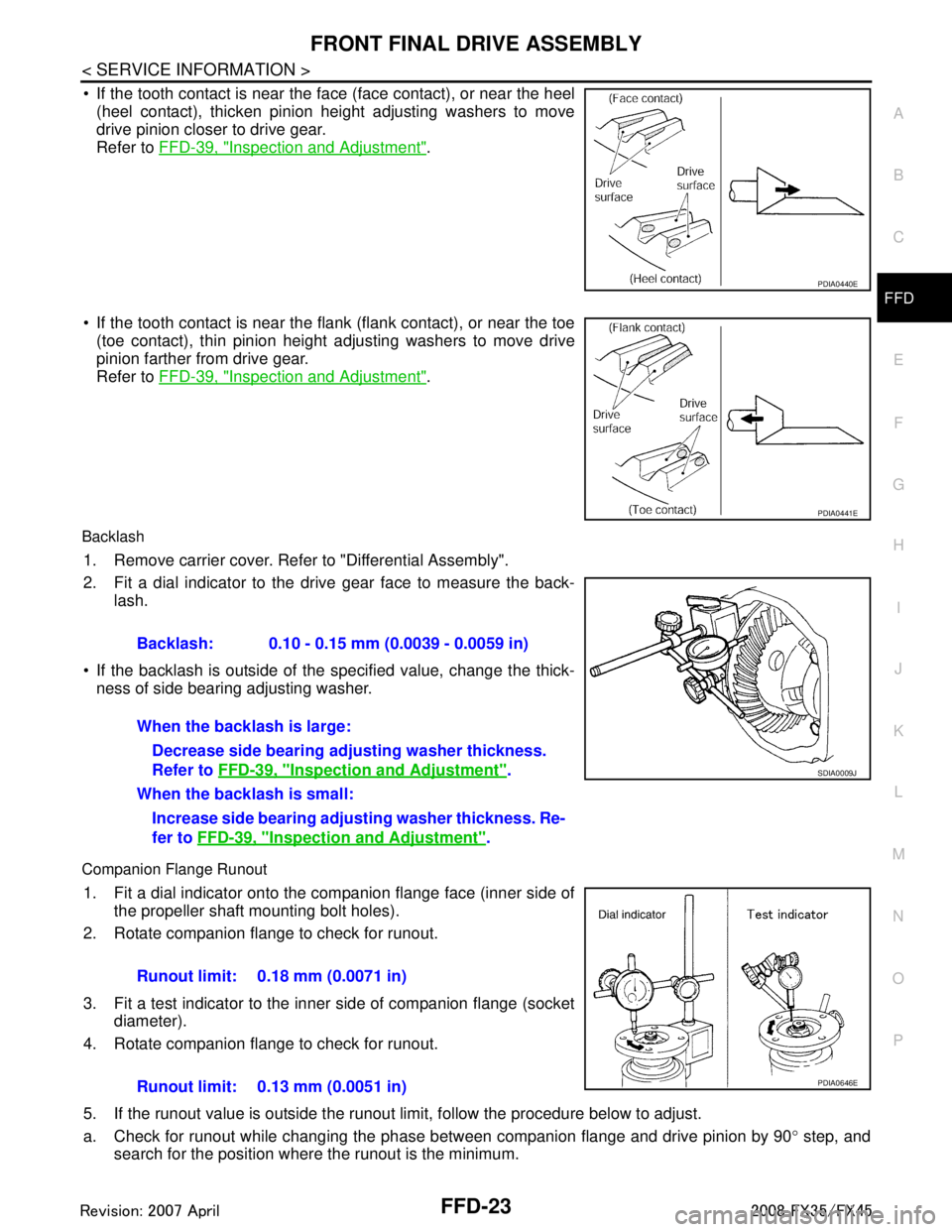
If the tooth contact is near the face (face contact), or near the heel (heel contact), thicken pinion height adjusting washers to move
drive pinion closer to drive gear.
Refer to FFD-39, "
Inspection and Adjustment".
If the tooth contact is near the flank (flank contact), or near the toe
(toe contact), thin pinion height adjusting washers to move drive
pinion farther from drive gear.
Refer to FFD-39, "
Inspection and Adjustment".
Backlash
1. Remove carrier cover. Refer to "Differential Assembly".
2. Fit a dial indicator to the drive gear face to measure the back-
lash.
If the backlash is outside of the specified value, change the thick- ness of side bearing adjusting washer.
Companion Flange Runout
1. Fit a dial indicator onto the companion flange face (inner side of the propeller shaft mounting bolt holes).
2. Rotate companion flange to check for runout.
3. Fit a test indicator to the inner side of companion flange (socket diameter).
4. Rotate companion flange to check for runout.
5. If the runout value is outside the runout limit, follow the procedure below to adjust.
a. Check for runout while changing the phase between companion flange and drive pinion by 90 ° step, and
search for the position where the runout is the minimum.
PDIA0440E
PDIA0441E
Backlash: 0.10 - 0.15 mm (0.0039 - 0.0059 in)
When the backlash is large:
Decrease side bearing adju sting washer thickness.
Refer to FFD-39, "
Inspection and Adjustment".
When the backlash is small: Increase side bearing adjust ing washer thickness. Re-
fer to FFD-39, "
Inspection and Adjustment".
SDIA0009J
Runout limit: 0.18 mm (0.0071 in)
Runout limit: 0.13 mm (0.0051 in)
PDIA0646E
3AA93ABC3ACD3AC03ACA3AC03AC63AC53A913A773A893A873A873A8E3A773A983AC73AC93AC03AC3
3A893A873A873A8F3A773A9D3AAF3A8A3A8C3A863A9D3AAF3A8B3A8C
Page 2819 of 3924
FFD-28
< SERVICE INFORMATION >
FRONT FINAL DRIVE ASSEMBLY
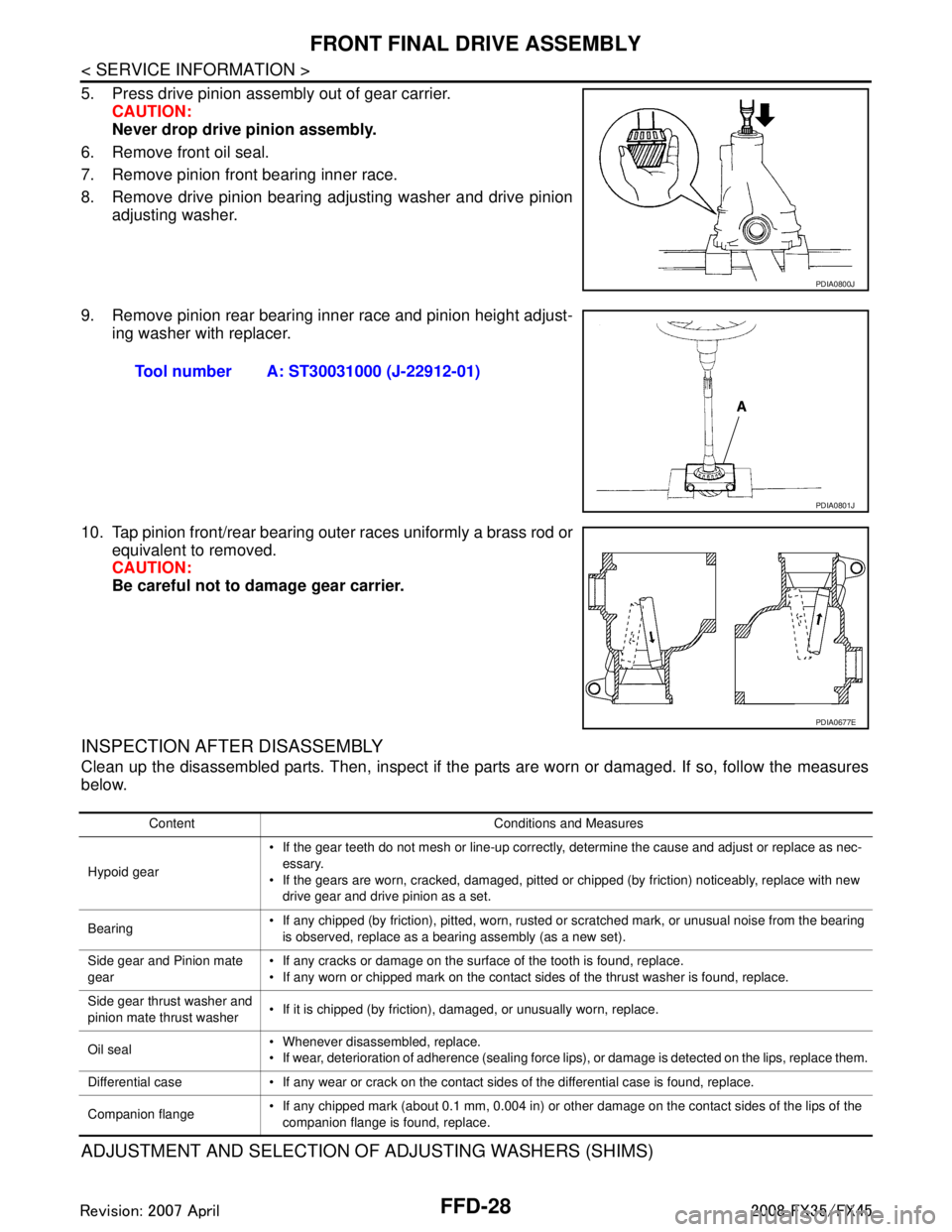
5. Press drive pinion assembly out of gear carrier.CAUTION:
Never drop drive pinion assembly.
6. Remove front oil seal.
7. Remove pinion front bearing inner race.
8. Remove drive pinion bearing adjusting washer and drive pinion adjusting washer.
9. Remove pinion rear bearing inner race and pinion height adjust- ing washer with replacer.
10. Tap pinion front/rear bearing outer races uniformly a brass rod or equivalent to removed.
CAUTION:
Be careful not to damage gear carrier.
INSPECTION AFTER DISASSEMBLY
Clean up the disassembled parts. Then, inspect if the parts are worn or damaged. If so, follow the measures
below.
ADJUSTMENT AND SELECTION OF ADJUSTING WASHERS (SHIMS)
PDIA0800J
Tool number A: ST30031000 (J-22912-01)
PDIA0801J
PDIA0677E
Content Conditions and Measures
Hypoid gear If the gear teeth do not mesh or line-up correctly, determine the cause and adjust or replace as nec-
essary.
If the gears are worn, cracked, damaged, pitted or chipped (by friction) noticeably, replace with new drive gear and drive pinion as a set.
Bearing If any chipped (by friction), pitted, worn, rusted or scratched mark, or unusual noise from the bearing
is observed, replace as a bearing assembly (as a new set).
Side gear and Pinion mate
gear If any cracks or damage on the surface of the tooth is found, replace.
If any worn or chipped mark on the contact sides of the thrust washer is found, replace.
Side gear thrust washer and
pinion mate thrust washer If it is chipped (by friction), damaged, or unusually worn, replace.
Oil seal Whenever disassembled, replace.
If wear, deterioration of adherence (sealing force lips), or damage is detected on the lips, replace them.
Differential case If any wear or crack on the contact sides of the differential case is found, replace.
Companion flange If any chipped mark (about 0.1 mm, 0.004 in) or other damage on the contact sides of the lips of the
companion flange is found, replace.
3AA93ABC3ACD3AC03ACA3AC03AC63AC53A913A773A893A873A873A8E3A773A983AC73AC93AC03AC3
3A893A873A873A8F3A773A9D3AAF3A8A3A8C3A863A9D3AAF3A8B3A8C
Page 2822 of 3924
FRONT FINAL DRIVE ASSEMBLYFFD-31
< SERVICE INFORMATION >
CEF
G H
I
J
K L
M A
B
FFD
N
O P
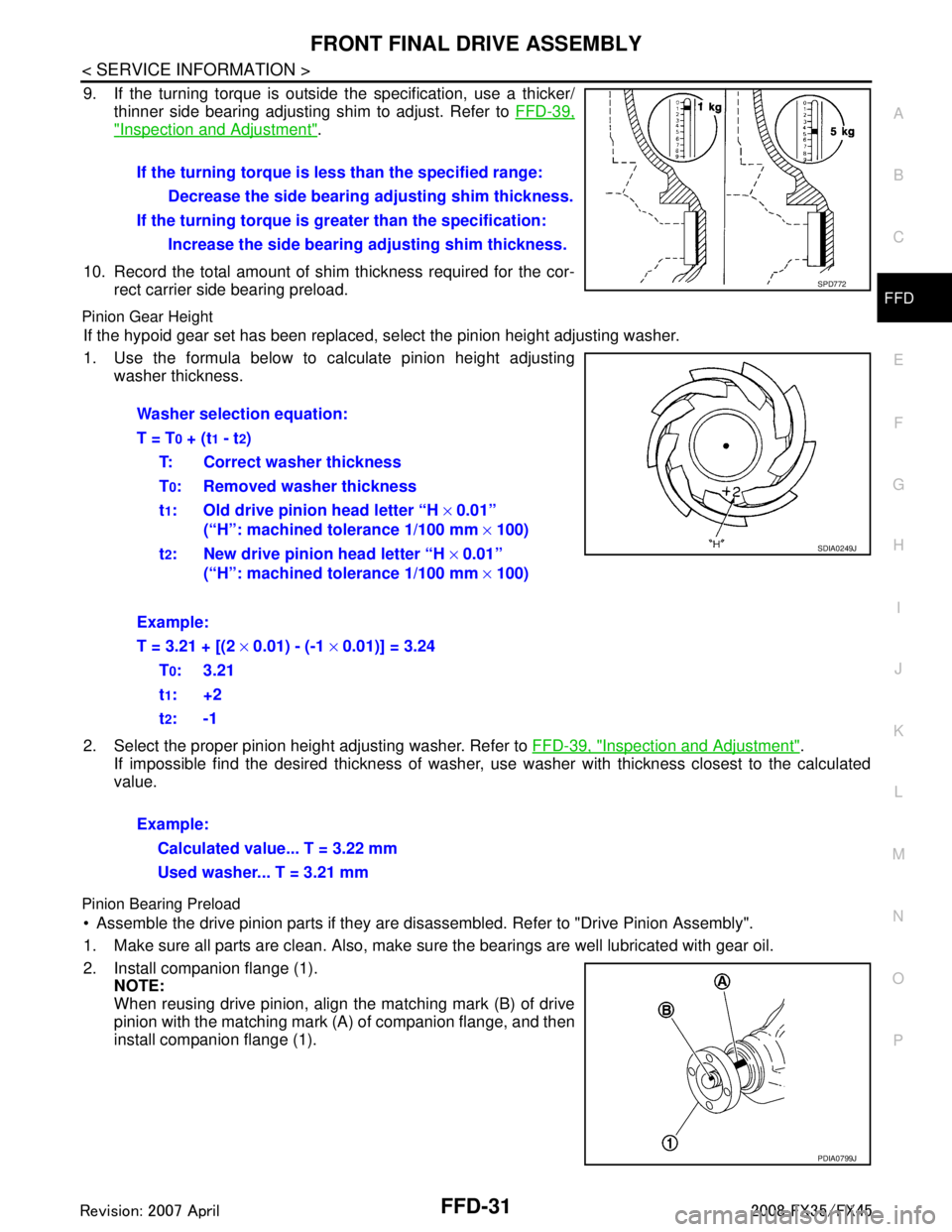
9. If the turning torque is outside the specification, use a thicker/ thinner side bearing adjusting shim to adjust. Refer to FFD-39,
"Inspection and Adjustment".
10. Record the total amount of shim thickness required for the cor- rect carrier side bearing preload.
Pinion Gear Height
If the hypoid gear set has been replaced, se lect the pinion height adjusting washer.
1. Use the formula below to calculate pinion height adjusting washer thickness.
2. Select the proper pinion height adjusting washer. Refer to FFD-39, "
Inspection and Adjustment".
If impossible find the desired thickness of washer, us e washer with thickness closest to the calculated
value.
Pinion Bearing Preload
Assemble the drive pinion parts if they are disassembled. Refer to "Drive Pinion Assembly".
1. Make sure all parts are clean. Also, make sure the bearings are well lubricated with gear oil.
2. Install companion flange (1). NOTE:
When reusing drive pinion, align the matching mark (B) of drive
pinion with the matching mark (A) of companion flange, and then
install companion flange (1).If the turning torque is l
ess than the specified range:
Decrease the side bearing adjusting shim thickness.
If the turning torque is gr eater than the specification:
Increase the side bearing adjusting shim thickness.
SPD772
Washer selection equation:
T = T
0 + (t1 - t2)
T: Correct washer thickness
T
0: Removed washer thickness
t
1: Old drive pinion head letter “H × 0.01”
(“H”: machined tolerance 1/100 mm × 100)
t
2: New drive pinion head letter “H × 0.01”
(“H”: machined tolerance 1/100 mm × 100)
Example:
T = 3.21 + [(2 × 0.01) - (-1 × 0.01)] = 3.24
T
0:3.21
t
1:+2
t
2:-1
Example: Calculated value... T = 3.22 mm
Used washer... T = 3.21 mm
SDIA0249J
PDIA0799J
3AA93ABC3ACD3AC03ACA3AC03AC63AC53A913A773A893A873A873A8E3A773A983AC73AC93AC03AC3
3A893A873A873A8F3A773A9D3AAF3A8A3A8C3A863A9D3AAF3A8B3A8C
Page 3178 of 3924

LT-76
< SERVICE INFORMATION >
FRONT FOG LAMP
3. Adjust front fog lamps using adjusting screw so that the top edgeof the high intensity zone is 100 mm (3.94 in) below the height of
front fog lamp centers as shown at left.
When performing adjustment, if necessary, cover headlampsand opposite front fog lamp.
Bulb ReplacementINFOID:0000000001328341
1. Remove fender protector (front). Refer to EI-24, "Component
Parts Location", EI-14, "Component Parts Location".
2. Disconnect front fog lamp connector.
3. Turn bulb socket counterclockwise and unlock it.
CAUTION:
Never touch the glass of bulb directly by hand. Keepgrease and other oily matters away from it. Never touch
bulb by hand while it is lit or right after being turned off.
Burning may result.
Never leave bulb out of front fog lamp reflector for a long time because dust, moisture smoke,
etc. May affect the performance of front fog lamp . When replacing bulb, be sure to replace it with
new one.
Removal and InstallationINFOID:0000000001328342
REMOVAL
1. Remove front bumper fascia. Refer to EI-14, "Component Parts
Location".
2. Remove front fog lamp mounting bolt.
3. Pull out front fog lamp from vehicle and disconnect front fog lamp connector.
INSTALLATION
Installation is the reverse order of removal.
PKIB1673E
Front fog lamp : 12 V - 35 W (H8)
PKIC9689E
PKIC9690E
3AA93ABC3ACD3AC03ACA3AC03AC63AC53A913A773A893A873A873A8E3A773A983AC73AC93AC03AC3
3A893A873A873A8F3A773A9D3AAF3A8A3A8C3A863A9D3AAF3A8B3A8C
Page 3560 of 3924
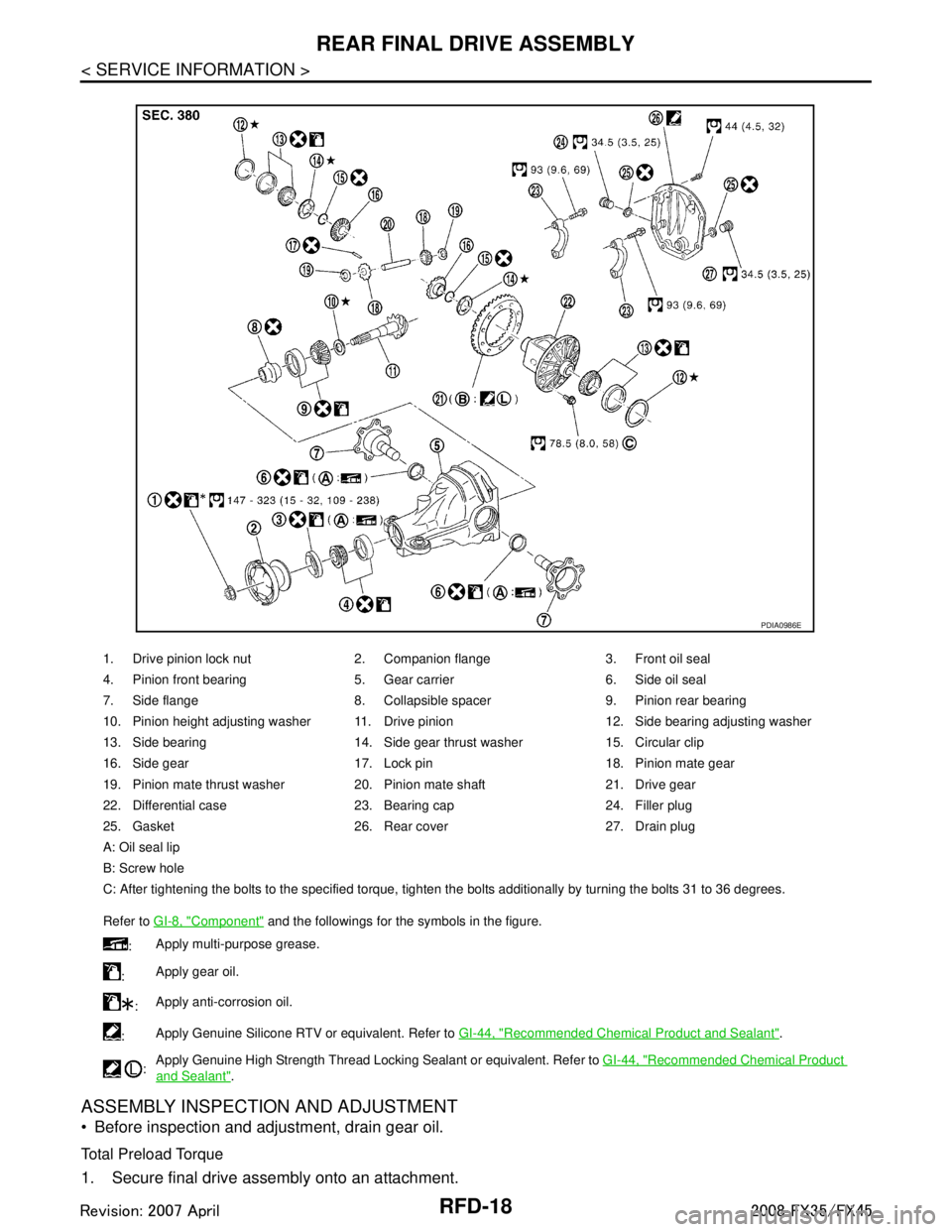
RFD-18
< SERVICE INFORMATION >
REAR FINAL DRIVE ASSEMBLY
ASSEMBLY INSPECTION AND ADJUSTMENT
Before inspection and adjustment, drain gear oil.
Total Preload Torque
1. Secure final drive assembly onto an attachment.
1. Drive pinion lock nut 2. Companion flange 3. Front oil seal
4. Pinion front bearing 5. Gear carrier 6. Side oil seal
7. Side flange 8. Collapsible spacer 9. Pinion rear bearing
10. Pinion height adjusting washer 11. Drive pinion 12. Side bearing adjusting washer
13. Side bearing 14. Side gear thrust washer 15. Circular clip
16. Side gear 17. Lock pin 18. Pinion mate gear
19. Pinion mate thrust washer 20. Pinion mate shaft 21. Drive gear
22. Differential case 23. Bearing cap 24. Filler plug
25. Gasket 26. Rear cover 27. Drain plug
A: Oil seal lip
B: Screw hole
C: After tightening the bolts to the specified torque, tighten the bolts additionally by turning the bolts 31 to 36 degrees.
Refer to GI-8, "
Component" and the followings for the symbols in the figure.
: Apply multi-purpose grease.
: Apply gear oil.
: Apply anti-corrosion oil.
: Apply Genuine Silicone RTV or equivalent. Refer to
GI-44, "
Recommended Chemical Product and Sealant".
: Apply Genuine High Strength Thread Locking Sealant or equivalent. Refer to
GI-44, "
Recommended Chemical Product
and Sealant".
PDIA0986E
3AA93ABC3ACD3AC03ACA3AC03AC63AC53A913A773A893A873A873A8E3A773A983AC73AC93AC03AC3
3A893A873A873A8F3A773A9D3AAF3A8A3A8C3A863A9D3AAF3A8B3A8C
Page 3563 of 3924
REAR FINAL DRIVE ASSEMBLYRFD-21
< SERVICE INFORMATION >
CEF
G H
I
J
K L
M A
B
RFD
N
O P
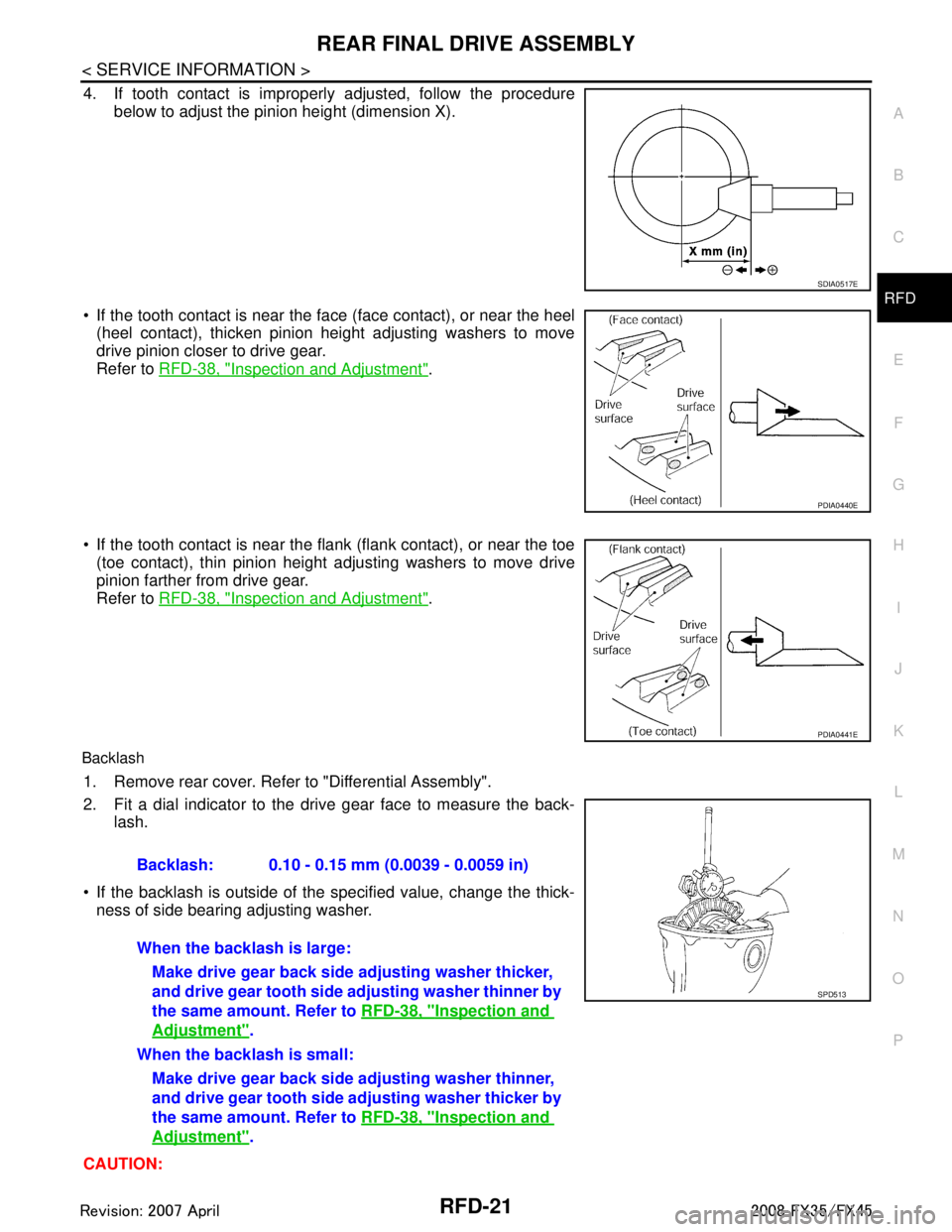
4. If tooth contact is improperly adjusted, follow the procedure
below to adjust the pinion height (dimension X).
If the tooth contact is near the face (face contact), or near the heel (heel contact), thicken pinion height adjusting washers to move
drive pinion closer to drive gear.
Refer to RFD-38, "
Inspection and Adjustment".
If the tooth contact is near the flank (flank contact), or near the toe
(toe contact), thin pinion height adjusting washers to move drive
pinion farther from drive gear.
Refer to RFD-38, "
Inspection and Adjustment".
Backlash
1. Remove rear cover. Refer to "Differential Assembly".
2. Fit a dial indicator to the drive gear face to measure the back-
lash.
If the backlash is outside of the specified value, change the thick- ness of side bearing adjusting washer.
CAUTION:
SDIA0517E
PDIA0440E
PDIA0441E
Backlash: 0.10 - 0.15 mm (0.0039 - 0.0059 in)
When the backlash is large: Make drive gear back side adjusting washer thicker,
and drive gear tooth side adjusting washer thinner by
the same amount. Refer to RFD-38, "
Inspection and
Adjustment".
When the backlash is small: Make drive gear back side adjusting washer thinner,
and drive gear tooth side ad justing washer thicker by
the same amount. Refer to RFD-38, "
Inspection and
Adjustment".
SPD513
3AA93ABC3ACD3AC03ACA3AC03AC63AC53A913A773A893A873A873A8E3A773A983AC73AC93AC03AC3
3A893A873A873A8F3A773A9D3AAF3A8A3A8C3A863A9D3AAF3A8B3A8C