key battery INFINITI FX35 2008 User Guide
[x] Cancel search | Manufacturer: INFINITI, Model Year: 2008, Model line: FX35, Model: INFINITI FX35 2008Pages: 3924, PDF Size: 81.37 MB
Page 792 of 3924

BL-58
< SERVICE INFORMATION >
REMOTE KEYLESS ENTRY SYSTEM
Terminal and Reference Value for BCM
INFOID:0000000001327818
Te r m i - nal Wire
Color ItemSignal In-
put/ out- put Condition
Voltage (V)
Approx.
1PU Key ring illumination output
signal
Output Key ring illumination is lighting. Battery voltage
Key ring illumination is being turned
off.
0
11 LG Ignition switch Input Ignition switch is in ACC or ON po-
sitionBattery voltage
12 P/B Front door switch (Passen-
ger side) InputON (door open)
→ OFF (door
closed) 0
→ Battery voltage
13 P/L Rear door switch RH Input ON (door open)
→ OFF (door
closed) 0
→ Battery voltage
18 B Remote keyless entry re-
ceiver (Ground)
—— 0
19 R Remote keyless entry re-
ceiver (Power supply) OutputKey is inserted in IGN key cylinder 0
All door closed
20 Y Remote keyless entry re-
ceiver (Signal)
InputKey is inserted in IGN key cylinder 0
Waiting
(All door closed)
When signal is received
(All door closed)
37 B/W Key switch Input ON (Key is inserted in IGN key cyl-
inder)
→ OFF (Key is removed
from IGN key cylinder) Battery voltage
→ 0
38 W/L Ignition switch Input Ignition switch is in ON or START
positionBattery voltage
39 L CAN H Input/
Output ——
40 P CAN L Input/
Output ——
41 R/B Battery saver output signal Output 30 minutes after ignition switch is
turned to OFF
0
Ignition switch is in ON position Battery voltage
42 L/R Battery power supply (fuse) Input — Battery voltage
OCC3881D
OCC3879D
OCC3880D
3AA93ABC3ACD3AC03ACA3AC03AC63AC53A913A773A893A873A873A8E3A773A983AC73AC93AC03AC3
3A893A873A873A8F3A773A9D3AAF3A8A3A8C3A863A9D3AAF3A8B3A8C
Page 793 of 3924

REMOTE KEYLESS ENTRY SYSTEMBL-59
< SERVICE INFORMATION >
C
DE
F
G H
J
K L
M A
B
BL
N
O P
*1: In the state that hazard reminder operates.
*
2: In the state that room lamp switch is in “DOOR” position.
Terminal and Reference Value for IPDM E/RINFOID:0000000001327819
*: In the state that horn reminder operates. 44 Y
Driver door lock actuator
(Unlock) Output
Door lock / unlock switch
(Free
→ Unlock) 0
→ Battery voltage
45 G/W Left turn signal lamp Output When door lock or unlock is operat-
ed using key fob.*
1
(ON
→ OFF) Battery voltage
→ 0
46 BR/W Right turn signal lamp Output When door lock or unlock is operat-
ed using key fob.*
1
(ON
→ OFF) Battery voltage
→ 0
47 Y/R Step lamp output signal Output Step lamp is lighting. 0
Step lamp is being turned off. Battery voltage
48 PU/W Room lamp output signal Output Room lamp is lighting.*
20
Room lamp is being turned off.*
2Battery voltage
49 B Ground — — 0
50 PU Door lock actuator (Lock) Output Door lock / unlock switch
(Free
→ Lock) 0
→ Battery voltage
51 W/B Passenger and rear doors
lock actuator (Unlock) OutputDoor lock / unlock switch
(Free
→ Unlock) 0
→ Battery voltage
52 B Ground — — 0
54 W Battery power supply
(power window)
Input — Battery voltage
55 G Battery power supply (Fus-
ible link)
Input — Battery voltage
58 L Back door switch Input OFF (Door close)
→ ON (Door
open) 9
→ 0
62 W Front door switch (Driver
side) InputOFF (Door close)
→ ON (Door
open) Battery voltage
→ 0
63 P Rear door switch LH Input OFF (Door close)
→ ON (Door
open) Battery voltage
→ 0
Te r m i -
nal Wire
Color ItemSignal In-
put/ out-
put Condition
Voltage (V)
Approx.
Te r m i -nal Wire
Color ItemSignal
Input/
Output Condition
Voltage (V)
Approx.
38 B Ground — — 0
48 L CAN H Input/
Output ——
49 R CAN L Input/
Output ——
51 SB Horn relay Output When door lock is operated using
key fob* (OFF
→ ON) Battery voltage
→ 0
60 B Ground — — 0
3AA93ABC3ACD3AC03ACA3AC03AC63AC53A913A773A893A873A873A8E3A773A983AC73AC93AC03AC3
3A893A873A873A8F3A773A9D3AAF3A8A3A8C3A863A9D3AAF3A8B3A8C
Page 796 of 3924
BL-62
< SERVICE INFORMATION >
REMOTE KEYLESS ENTRY SYSTEM
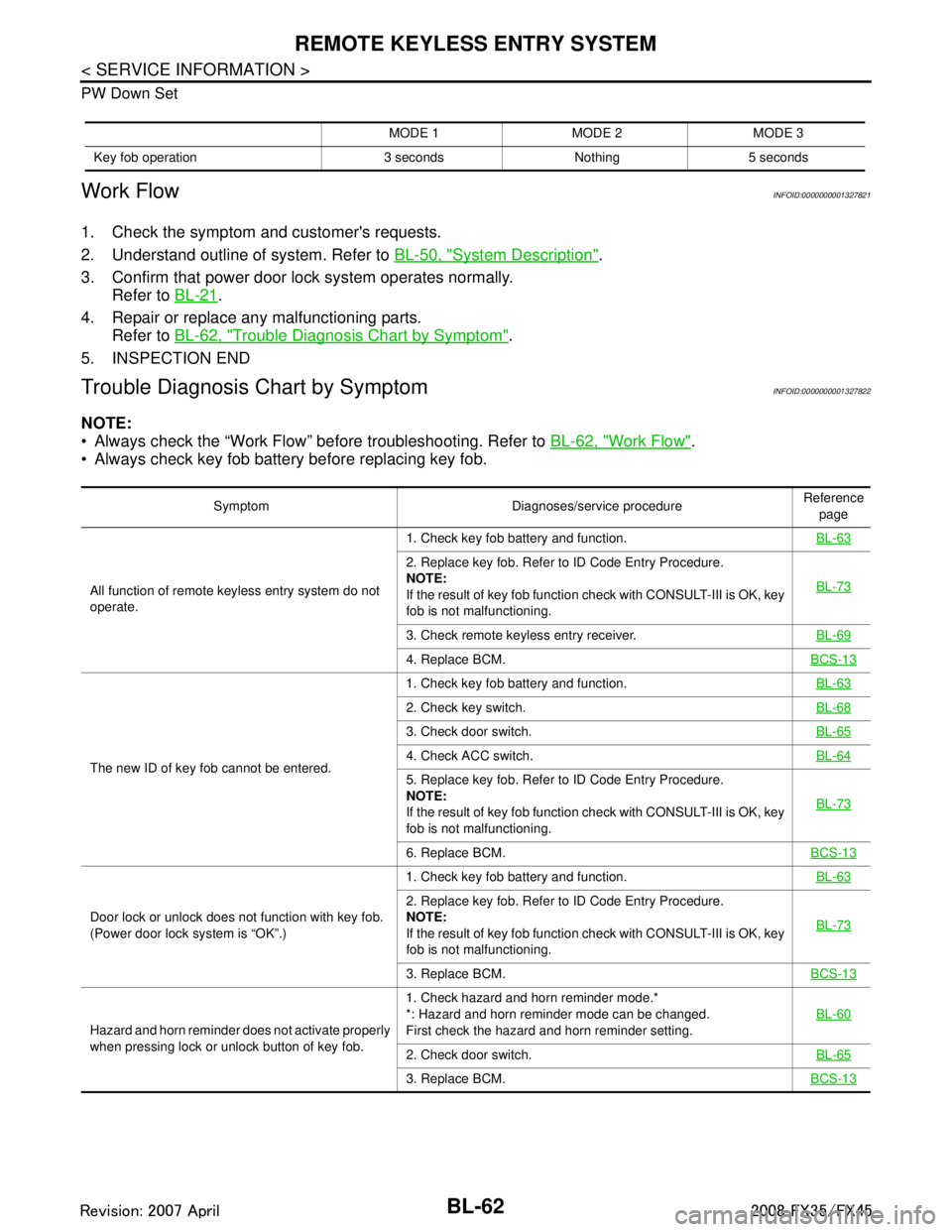
PW Down Set
Work FlowINFOID:0000000001327821
1. Check the symptom and customer's requests.
2. Understand outline of system. Refer to BL-50, "
System Description".
3. Confirm that power door lock system operates normally. Refer to BL-21
.
4. Repair or replace any malfunctioning parts. Refer to BL-62, "
Trouble Diagnosis Chart by Symptom".
5. INSPECTION END
Trouble Diagnosis Chart by SymptomINFOID:0000000001327822
NOTE:
Always check the “Work Flow” before troubleshooting. Refer to BL-62, "
Work Flow".
Always check key fob battery before replacing key fob.
MODE 1 MODE 2 MODE 3
Key fob operation 3 seconds Nothing 5 seconds
Symptom Diagnoses/service procedure Reference
page
All function of remote keyless entry system do not
operate. 1. Check key fob battery and function.
BL-63
2. Replace key fob. Refer to ID Code Entry Procedure.
NOTE:
If the result of key fob function check with CONSULT-III is OK, key
fob is not malfunctioning.BL-73
3. Check remote keyless entry receiver.
BL-69
4. Replace BCM.BCS-13
The new ID of key fob cannot be entered.1. Check key fob battery and function.
BL-63
2. Check key switch.BL-68
3. Check door switch.BL-65
4. Check ACC switch.BL-64
5. Replace key fob. Refer to ID Code Entry Procedure.
NOTE:
If the result of key fob function check with CONSULT-III is OK, key
fob is not malfunctioning.BL-73
6. Replace BCM.
BCS-13
Door lock or unlock does not function with key fob.
(Power door lock system is “OK”.)1. Check key fob battery and function.
BL-63
2. Replace key fob. Refer to ID Code Entry Procedure.
NOTE:
If the result of key fob function check with CONSULT-III is OK, key
fob is not malfunctioning.BL-73
3. Replace BCM.
BCS-13
Hazard and horn reminder does not activate properly
when pressing lock or unlock button of key fob.1. Check hazard and horn reminder mode.*
*: Hazard and horn reminder mode can be changed.
First check the hazard and horn reminder setting.
BL-60
2. Check door switch.
BL-65
3. Replace BCM.BCS-13
3AA93ABC3ACD3AC03ACA3AC03AC63AC53A913A773A893A873A873A8E3A773A983AC73AC93AC03AC3
3A893A873A873A8F3A773A9D3AAF3A8A3A8C3A863A9D3AAF3A8B3A8C
Page 797 of 3924
REMOTE KEYLESS ENTRY SYSTEMBL-63
< SERVICE INFORMATION >
C
DE
F
G H
J
K L
M A
B
BL
N
O P
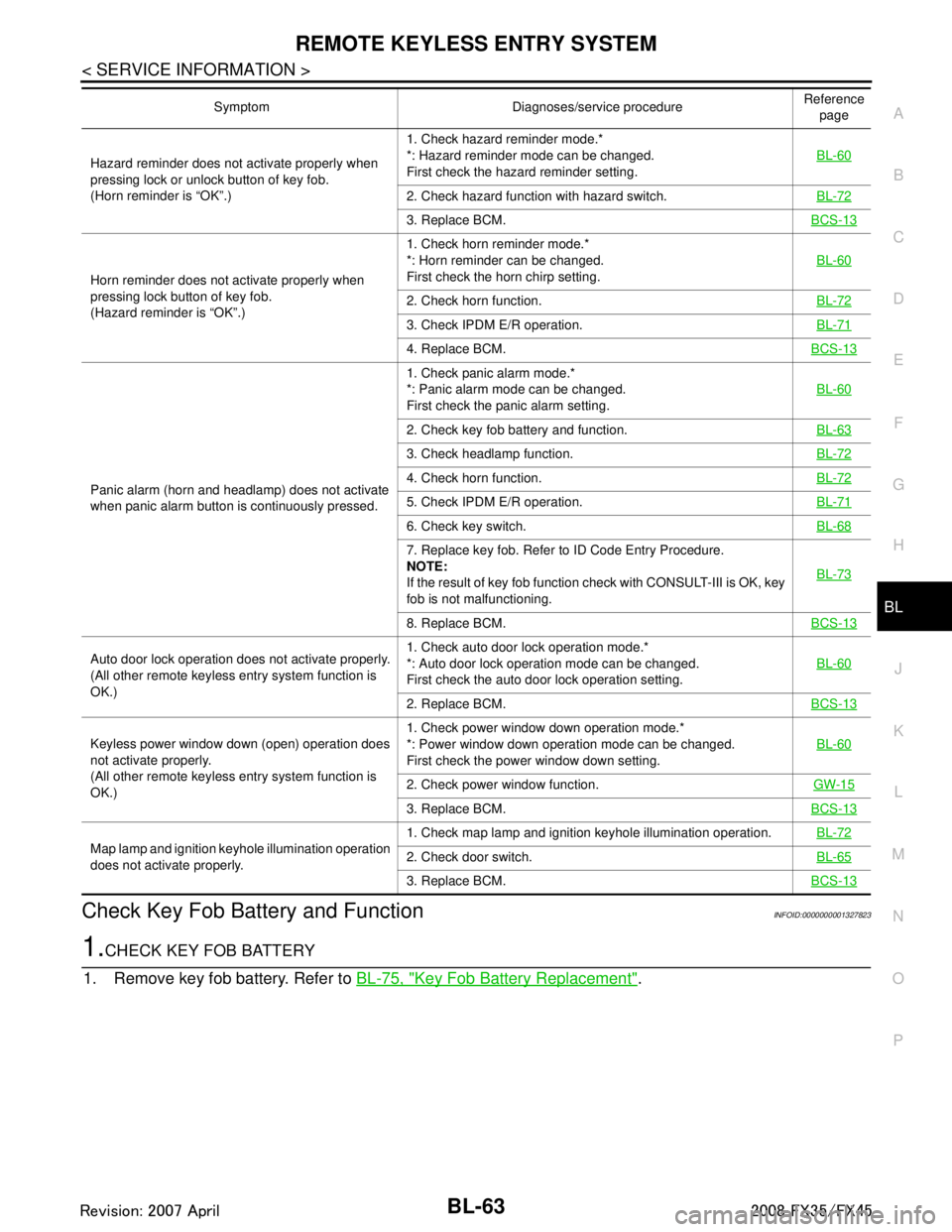
Check Key Fob Battery and FunctionINFOID:0000000001327823
1.CHECK KEY FOB BATTERY
1. Remove key fob battery. Refer to BL-75, "
Key Fob Battery Replacement".
Hazard reminder does not activate properly when
pressing lock or unlock button of key fob.
(Horn reminder is “OK”.) 1. Check hazard reminder mode.*
*: Hazard reminder mode can be changed.
First check the hazard reminder setting.
BL-60
2. Check hazard function with hazard switch.
BL-72
3. Replace BCM.BCS-13
Horn reminder does not activate properly when
pressing lock button of key fob.
(Hazard reminder is “OK”.)1. Check horn reminder mode.*
*: Horn reminder can be changed.
First check the horn chirp setting.
BL-60
2. Check horn function.
BL-72
3. Check IPDM E/R operation.BL-71
4. Replace BCM.BCS-13
Panic alarm (horn and headlamp) does not activate
when panic alarm button is continuously pressed.1. Check panic alarm mode.*
*: Panic alarm mode can be changed.
First check the panic alarm setting.
BL-60
2. Check key fob battery and function.
BL-63
3. Check headlamp function.BL-72
4. Check horn function.BL-72
5. Check IPDM E/R operation.BL-71
6. Check key switch.BL-68
7. Replace key fob. Refer to ID Code Entry Procedure.
NOTE:
If the result of key fob function check with CONSULT-III is OK, key
fob is not malfunctioning.BL-73
8. Replace BCM.
BCS-13
Auto door lock operation does not activate properly.
(All other remote keyless entry system function is
OK.)1. Check auto door lock operation mode.*
*: Auto door lock operation mode can be changed.
First check the auto door lock operation setting.
BL-60
2. Replace BCM.
BCS-13
Keyless power window down (open) operation does
not activate properly.
(All other remote keyless entry system function is
OK.)1. Check power window down operation mode.*
*: Power window down operation mode can be changed.
First check the power window down setting.
BL-60
2. Check power window function.
GW-15
3. Replace BCM.BCS-13
Map lamp and ignition keyhole illumination operation
does not activate properly.1. Check map lamp and ignition keyhole illumination operation.
BL-722. Check door switch.BL-65
3. Replace BCM.BCS-13
Symptom Diagnoses/service procedure Reference
page
3AA93ABC3ACD3AC03ACA3AC03AC63AC53A913A773A893A873A873A8E3A773A983AC73AC93AC03AC3
3A893A873A873A8F3A773A9D3AAF3A8A3A8C3A863A9D3AAF3A8B3A8C
Page 798 of 3924

BL-64
< SERVICE INFORMATION >
REMOTE KEYLESS ENTRY SYSTEM
2. Measure voltage between battery positive and negative termi-nals, (+) and ( −).
NOTE:
Key fob does not function if bat tery is not set correctly.
OK or NG
OK >> GO TO 2.
NG >> Replace battery.
2.CHECK KEY FOB FUNCTION
With CONSULT-III
Check key fob function in “DATA MONITOR” mode with CONSULT-III. When pushing each button of key fob,
the corresponding monitor item should be turned as follows.
OK or NG
OK >> Key fob is OK.
NG >> Replace key fob.
Check ACC SwitchINFOID:0000000001327824
1.CHECK ACC SWITCH
With CONSULT-III
Check ACC switch (“ACC ON SW”) in “DATA MONITOR” mode with CONSULT-III.
Without CONSULT-III Voltage : 2.5 – 3.0V
SEL237W
Condition Monitor item
Pushing LOCK KEYLESS LOCK : ON
Pushing UNLOCK KEYLESS UNLOCK : ON
Keep pushing UNLOCK RKE KEEP UNLK : ON
Pushing PANIC KEYLESS PANIC : ON
Pushing LOCK and UNLOCK at the
same time RKE LCK-UNLOCK : ON
Monitor item Condition
ACC SW Ignition switch position is ACC or ON : ON
Ignition switch position is OFF : OFF
3AA93ABC3ACD3AC03ACA3AC03AC63AC53A913A773A893A873A873A8E3A773A983AC73AC93AC03AC3
3A893A873A873A8F3A773A9D3AAF3A8A3A8C3A863A9D3AAF3A8B3A8C
Page 799 of 3924

REMOTE KEYLESS ENTRY SYSTEMBL-65
< SERVICE INFORMATION >
C
DE
F
G H
J
K L
M A
B
BL
N
O P
Check voltage between BCM connector and ground.
OK or NG
OK >> ACC switch is OK.
NG >> Check the following. 10A fuse [No. 6, located in fuse block (J/B)]
Harness for open or short between BCM and fuse.
Check Door SwitchINFOID:0000000001327825
CHECK DOOR SWITCH (EXCEPT BACK DOOR SWITCH)
1.CHECK DOOR SWITCH INPUT SIGNAL
With CONSULT-III
Check door switches (“DOOR SW-DR”, “DOOR SW-AS”, “DOOR SW-RL” and “DOOR SW-RR”) in “DATA
MONITOR” mode with CONSULT-III.
Without CONSULT-III
Check voltage between BCM connector and ground.
Item (+)
(–) Condition Voltage (V)
Approx.
Con-
nector Te r m i n a l
(Wire color)
BCM M3 11 (LG) Ground ACC or ON Battery voltage
OFF 0
PIIA7002E
Monitor item Condition DATA MONITOR
DOOR SW-DR CLOSE↓
OPEN: OFF
↓
ON
DOOR SW-AS
DOOR SW-RL
DOOR SW-RR
Item Connector Te r m i n a l s
(Wire color) Door
condition Voltage (V)
(Approx.)
(+) (-)
Driver side B1462 (W)
Ground CLOSE
↓
OPEN Battery voltage
↓0
Rear LH 63 (P)
Passenger side M312 (P/B)
Rear RH 13 (P/L)
PIIA7003E
3AA93ABC3ACD3AC03ACA3AC03AC63AC53A913A773A893A873A873A8E3A773A983AC73AC93AC03AC3
3A893A873A873A8F3A773A9D3AAF3A8A3A8C3A863A9D3AAF3A8B3A8C
Page 802 of 3924

BL-68
< SERVICE INFORMATION >
REMOTE KEYLESS ENTRY SYSTEM
Check continuity between back door closure motor D109 terminals 7
and 8.
OK or NG
OK >> GO TO 5.
NG >> Replace back door closure motor.
5.CHECK BCM OUTPUT SIGNAL
1. Connect BCM connector.
2. Check voltage between BCM connector and ground.
OK or NG
OK >> Check condition of harness and connector.
NG >> Replace BCM.
Check Key SwitchINFOID:0000000001327826
1.CHECK KEY SWITCH INPUT SIGNAL
With CONSULT-III
Check ignition key switch “KEY ON SW” in “DATA MONITOR” mode with CONSULT-III.
When key is inserted in ignition key cylinder
When key is removed from ignition key cylinder
Without CONSULT-III
Check voltage between BCM connector M3 terminal 37 (B/W) and
ground.
OK or NG
OK >> Key switch circuit is OK.
NG >> GO TO 2.
2.CHECK KEY SWITCH
Terminals Back door condition Continuity
78 Open Yes
Close No
PIIA9934E
58 (L) – Ground : Approx. 9V
PIIA6229E
KEY ON SW : ON
KEY ON SW : OFF
Condition of ignition key cylinder Voltage (V)
Approx.
Key is inserted Battery voltage
Key is removed 0
PIIA6471E
3AA93ABC3ACD3AC03ACA3AC03AC63AC53A913A773A893A873A873A8E3A773A983AC73AC93AC03AC3
3A893A873A873A8F3A773A9D3AAF3A8A3A8C3A863A9D3AAF3A8B3A8C
Page 805 of 3924

REMOTE KEYLESS ENTRY SYSTEMBL-71
< SERVICE INFORMATION >
C
DE
F
G H
J
K L
M A
B
BL
N
O P
5.CHECK REMOTE KEYLESS ENTR Y RECEIVER GROUND CIRCUIT
1. Check continuity between remote keyless entry receiver con- nector M78 terminal 1 (B) and BCM connector M1 terminal 18
(B)
OK or NG
OK >> Check harness connection. If it is OK, replace BCM.
If it is NG, repair or replace malfunction part.
NG >> Repair or replace the harness.
6.CHECK REMOTE KEYLESS ENTR Y RECEIVER SIGNAL CIRCUIT
1. Check continuity between remote keyless entry receiver connector M78 terminal 2 (Y) and BCM connec-
tor M1 terminal 20 (Y).
2. Check continuity between remote keyless entry receiver connector M78 terminal 2 (Y) and ground.
OK or NG
OK >> Check harness connection. If it is OK, replace remote keyless entry receiver.
If it is NG, repair or replace malfunction part.
NG >> Repair or replace harness.
Check IPDM E/R OperationINFOID:0000000001327828
1.CHECK IPDM E/R INPUT VOLTAGE
Check voltage between IPDM E/R connector E9 terminal 51 and
ground.
OK or NG
OK >> Replace IPDM E/R.
NG >> GO TO 2.
2.CHECK IPDM E/R HARNESS
1. Turn ignition switch OFF.
2. Disconnect IPDM E/R and horn relay connector. 1 (B) – 18 (B) : Continuity should exist.
PIIB3952E
2 (Y) – 20 (Y) : Continuity should exist.
2 (Y) – Ground : Continuity should not exist.
PIIA9633E
51 (SB) – Ground : Battery voltage
PIIA6403E
3AA93ABC3ACD3AC03ACA3AC03AC63AC53A913A773A893A873A873A8E3A773A983AC73AC93AC03AC3
3A893A873A873A8F3A773A9D3AAF3A8A3A8C3A863A9D3AAF3A8B3A8C
Page 809 of 3924

REMOTE KEYLESS ENTRY SYSTEMBL-75
< SERVICE INFORMATION >
C
DE
F
G H
J
K L
M A
B
BL
N
O P
When registering an additional key fob, the existing ID c odes in memory may or may not be erased. If five ID
codes are stored in memory, when an additional code is registered, only the oldest code is erased. If less
than five ID codes are stored in memory, when an additional ID code is registered, the new ID code is added
and no ID codes are erased.
If you need to activate more than two additional new key fobs, repeat the procedure “Additional ID code entry” for each new key fob.
Entry of maximum five ID codes is allowed. When mo re than five ID codes are entered, the oldest ID code
will be erased.
Even if same ID code that is already in the memory is input, the same ID code can be entered. The code is
counted as an additional code.
Removal and Installation of Re mote keyless Entry receiverINFOID:0000000001327834
REMOVAL
1. Remove the instrument passenger lower panel. Refer to IP-16, "Disassembly and Assembly".
2. Disconnect remote keyless entry receiver harness connector, remove screw and remote keyless entry receiver.
INSTALLATION
Install in the reverse order of removal.
Key Fob Battery ReplacementINFOID:0000000001327835
PIIB4073E
PIIA4706E
3AA93ABC3ACD3AC03ACA3AC03AC63AC53A913A773A893A873A873A8E3A773A983AC73AC93AC03AC3
3A893A873A873A8F3A773A9D3AAF3A8A3A8C3A863A9D3AAF3A8B3A8C
Page 812 of 3924

BL-78
< SERVICE INFORMATION >
INTELLIGENT KEY SYSTEM
System Description
INFOID:0000000001327837
The Intelligent Key system is a system which can lock and unlock the doors (door lock function) and start the engine (engine start function) by carrying around the Intelligent Key, which operates based on the results of
electrical key-ID verification using two-way comm unications between the Intelligent Key and the vehicle
Operation of the remote control buttons on the Intelli gent Key also provides the same functions as the
remote control entry system. (Remote control entry functions)
As an ignition key warning function, when a door is lock ed or unlocked with entry switch or remote controller
button operation, the hazard lamps flash and the Intelligent Key warning buzzer sounds.
Even if the vehicle or Intelligent Key battery r uns down, the door can be locked and unlocked and the engine
started with the mechanical key built into the Intelligent Key.
If an Intelligent Key was lost, a new Intelligent Key can be registered. A maximum of 4 Intelligent Keys can be registered.
It has been made possible to diagnose the system, c hange the function setting and register an Intelligent
Key with the CONSULT-III.
DOOR LOCK FUNCTION
Operation Description
When the driver door, passenger door, or back door request switch is pressed, Intelligent Key unit sends a request signal from the transmission antenna corresponding to the pressed door request switch, key-ID ver-
ification is performed using two-way communication with In telligent Key, and if ID is successfully verified, a
door lock/unlock request signal is sent to BCM (Body Control Module) using CAN communication to lock/
unlock the door lock.
When door is locking, door is unlocked, when door is unlocking, door is locked.
When door is locked/unlocked by door request switch operation, hazard lamps flash and Intelligent Key
warning buzzer sounds.
With the locking operation of door request switch , door lock actuators of all door are locked.
Driver side door request switch operation
When door request switch (driver side) is pushed (unlock), driver side door lock actuator is unlocked. (Selec-
tive door unlock function)
When door request switch (driver side) is pushed (unlock) for the second time within 5 seconds after the first
operation, door lock actuators on pass enger's and other's doors are unlocked.
PIIB4645E
3AA93ABC3ACD3AC03ACA3AC03AC63AC53A913A773A893A873A873A8E3A773A983AC73AC93AC03AC3
3A893A873A873A8F3A773A9D3AAF3A8A3A8C3A863A9D3AAF3A8B3A8C