wheel INFINITI FX35 2008 Owner's Manual
[x] Cancel search | Manufacturer: INFINITI, Model Year: 2008, Model line: FX35, Model: INFINITI FX35 2008Pages: 3924, PDF Size: 81.37 MB
Page 625 of 3924

AV-78
< SERVICE INFORMATION >
INTEGRATED DISPLAY SYSTEM
4. The initial trouble diagnosis screen will be shown, and items“Self Diagnosis (DCU)”, “Confirmation/Adjustment” and “CAN
DIAG SUPPORT MONITOR” will become selective.
5. Select “CAN DIAG SUPPORT MONITOR”.
6. The transmitting/receiving of CAN communication can be moni-
tored.
NOTE:
Counter shows the status of CAN communication.
A/C and AV Switch Self-Diagnosis FunctionINFOID:0000000001328726
Performing self-diagnosis makes it possible to check operation of A/C and AV switch indicator (LED) and other
switch.
STARTING THE SELF-DIAGNOSIS MODE
1. Turn ignition switch from OFF to ACC.
2. Within 10 seconds press and hold the switches “1” and “6” simultaneously for 3 seconds.
DIAGNOSIS FUNCTION
The following are checked: All the indicators (LED) in the A/C and AV switch.
Continuity of the switches by sounding the buzze r when the A/C and AV switch and audio steering wheel
switch is pressed.
Continuity of harness between A/C and AV switch and audio steering wheel switch.
NOTE:
SKIB7871E
Item Content Error counter
(Reference value)
CAN_COMM OK/NG 0 - 50
CAN_CIRC_1 OK/UNKWN 0 - 50
CAN_CIRC_2 OK/UNKWN 0 - 50
CAN_CIRC_3 OK/UNKWN 0 - 50
CAN_CIRC_4 OK/UNKWN 0 - 50
CAN_CIRC_5 OK/UNKWN 0 - 50
CAN_CIRC_6 OK/UNKWN 0 - 50
CAN_CIRC_7 OK/UNKWN 0 - 50
CAN_CIRC_8 OK/UNKWN 0 - 50
CAN_CIRC_9 OK/UNKWN 0 - 50
SKIA4288E
SKIB8744E
3AA93ABC3ACD3AC03ACA3AC03AC63AC53A913A773A893A873A873A8E3A773A983AC73AC93AC03AC3
3A893A873A873A8F3A773A9D3AAF3A8A3A8C3A863A9D3AAF3A8B3A8C
Page 636 of 3924

NAVIGATION SYSTEMAV-89
< SERVICE INFORMATION >
C
DE
F
G H
I
J
L
M A
B
AV
N
O P
In map-matching, alternative routes are prepared and prioritized in addition to the road judged currently driven. Due to the distance
and/or direction error, the incorrect road may be prioritized and
current-location mark may be repositioned to the wrong road.
When two roads are running in parallel, they are judged to the
same priority. Therefore, the current-location mark may appear on
either of them alternately, depending on maneuvering of the steer-
ing wheel and configuration of the road.
Map-matching does not function correctly when a road on which the vehicle is driving is new and not recorded in the DVD-ROM, or
when road pattern stored in the map data and the actual road pat-
tern are different due to repair.
When driving on a road not present in the map, the map-matching
function may find another road and position the current-location
mark on it. Then, when the correc t road is detected, the current-
location mark may change to it.
Effective range for comparing the vehicle position and travel direc-
tion calculated by the distance and direction with the road data
read from the DVD-ROM is limited. Therefore, when there is an
excessive gap between current vehicle position and the position on
the map, correction by map-matching is not possible.
GPS (Global Positioning System)
GPS (Global Positioning System) was developed for and is con-
trolled by the US Department of Defense. The system utilizes GPS
satellites (NAVSTAR), sending out radio waves while flying on an
orbit around the earth at an altitude of approximately 21,000 km
(13,100 miles).
The GPS receiver calculates the vehicle's position in three dimen-
sions (latitude/longitude/altitude) ac cording to the time lag of the
radio waves received from four or more GPS satellites (three-dimen-
sional positioning). If radio waves were received only from three
GPS satellites, the GPS receiver ca lculates the vehicle's position in
two dimensions (latitude/longitude) , and utilize the altitude data cal-
culated previously with radio waves from four or more GPS satellites
(two-dimensional positioning).
Position correction by GPS is not available while the vehicle is stopped.
Accuracy of GPS will deteriorate under the following conditions:
In two-dimensional positioning, GPS accuracy will deter iorate when altitude of the vehicle position changes.
The accuracy can be even lower depending on the arrangement of the GPS satellites utilized for the posi-
tioning.
Position detection is not possible when vehicle is in an area where radio waves from the GPS satellite do not
reach, such as in a tunnel, parking lot in a building, and under an elevated highway. Radio waves from the
GPS satellites may not be received when so me object is located over the GPS antenna.
NOTE:
Even a high-precision three dimensional positioning, the detection result has an error about 10 m (30ft).
Because the signals of GPS satellite is controlled by the Tracking and Control Center in the United States,
the accuracy may be degraded lower intentionally or the radio waves may stop.
Component DescriptionINFOID:0000000001328740
NAVI CONTROL UNIT
SEL686V
SKIA0613E
SEL526V
3AA93ABC3ACD3AC03ACA3AC03AC63AC53A913A773A893A873A873A8E3A773A983AC73AC93AC03AC3
3A893A873A873A8F3A773A9D3AAF3A8A3A8C3A863A9D3AAF3A8B3A8C
Page 661 of 3924
AV-114
< SERVICE INFORMATION >
NAVIGATION SYSTEM
Self-Diagnosis Mode (DCU)
INFOID:0000000001328753
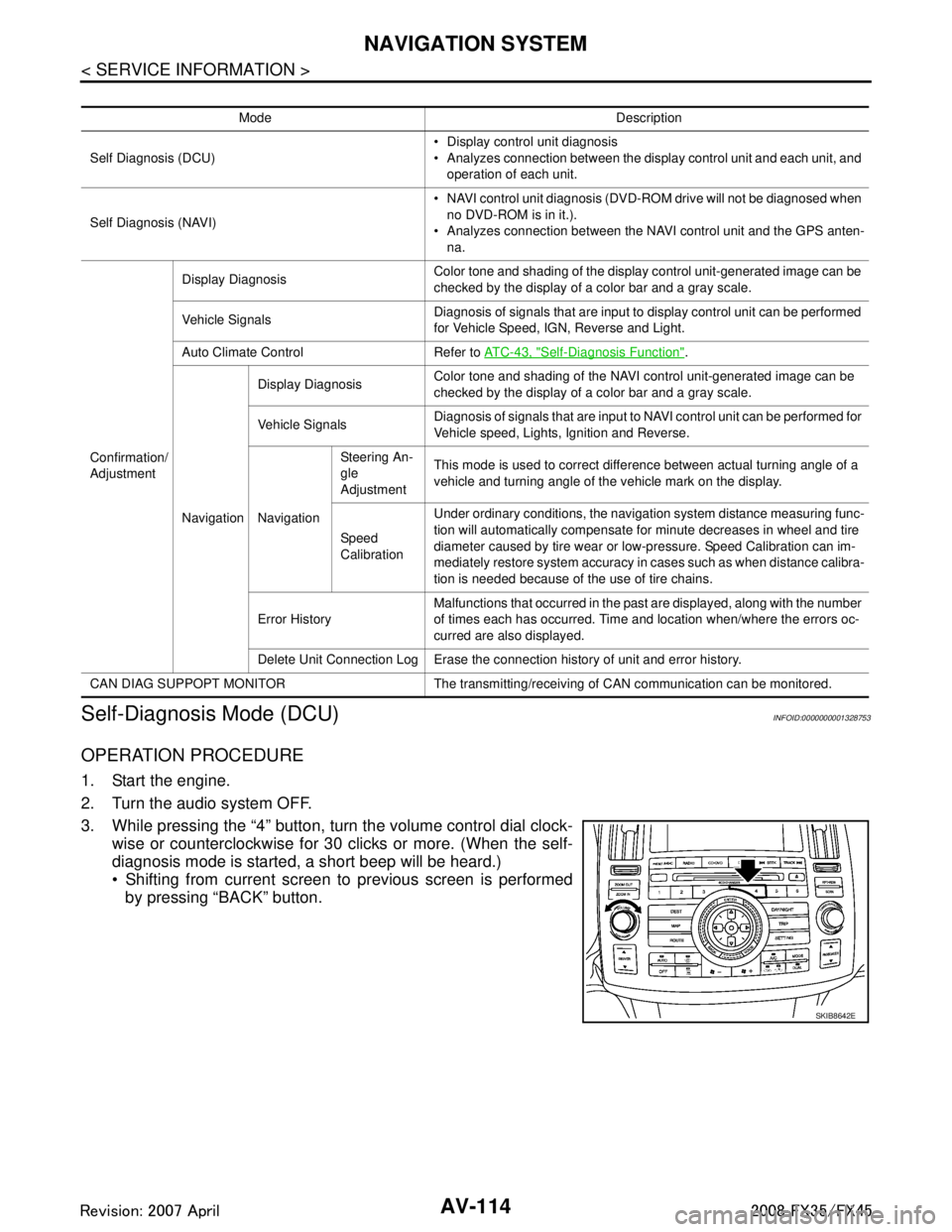
OPERATION PROCEDURE
1. Start the engine.
2. Turn the audio system OFF.
3. While pressing the “4” button, turn the volume control dial clock- wise or counterclockwise for 30 clicks or more. (When the self-
diagnosis mode is started, a short beep will be heard.)
Shifting from current screen to previous screen is performed
by pressing “BACK” button.
Mode Description
Self Diagnosis (DCU) Display control unit diagnosis
Analyzes connection between the display control unit and each unit, and
operation of each unit.
Self Diagnosis (NAVI) NAVI control unit diagnosis (DVD-ROM drive will not be diagnosed when
no DVD-ROM is in it.).
Analyzes connection between the NAVI control unit and the GPS anten-
na.
Confirmation/
Adjustment Display Diagnosis
Color tone and shading of the display control unit-generated image can be
checked by the display of a color bar and a gray scale.
Vehicle Signals Diagnosis of signals that are input to display control unit can be performed
for Vehicle Speed, IGN, Reverse and Light.
Auto Climate Control Refer to AT C - 4 3 , "
Self-Diagnosis Function".
Navigation Display Diagnosis
Color tone and shading of the NAVI control unit-generated image can be
checked by the display of a color bar and a gray scale.
Vehicle Signals Diagnosis of signals that are input to NAVI control unit can be performed for
Vehicle speed, Lights, Ignition and Reverse.
Navigation Steering An-
gle
Adjustment
This mode is used to correct difference between actual turning angle of a
vehicle and turning angle of the vehicle mark on the display.
Speed
Calibration Under ordinary conditions, the navigation system distance measuring func-
tion will automatically compensate for minute decreases in wheel and tire
diameter caused by tire wear or low-pressure. Speed Calibration can im-
mediately restore system accuracy in cases such as when distance calibra-
tion is needed because of the use of tire chains.
Error History Malfunctions that occurred in the past are displayed, along with the number
of times each has occurred. Time and location when/where the errors oc-
curred are also displayed.
Delete Unit Connection Log Erase the connection history of unit and error history.
CAN DIAG SUPPOPT MONITOR The transmitting/recei ving of CAN communication can be monitored.
SKIB8642E
3AA93ABC3ACD3AC03ACA3AC03AC63AC53A913A773A893A873A873A8E3A773A983AC73AC93AC03AC3
3A893A873A873A8F3A773A9D3AAF3A8A3A8C3A863A9D3AAF3A8B3A8C
Page 673 of 3924

AV-126
< SERVICE INFORMATION >
NAVIGATION SYSTEM
NOTE:
Counter shows the status of CAN communication.
A/C and AV Switch Self-Diagnosis FunctionINFOID:0000000001328757
Performing self-diagnosis makes it possible to check operation of A/C and AV switch indicator (LED) and other
switch.
STARTING THE SELF-DIAGNOSIS MODE
1. Turn ignition switch from OFF to ACC.
2. Within 10 seconds press and hold the switches “1” and “6”simultaneously for 3 seconds.
DIAGNOSIS FUNCTION
The following are checked: All the indicators (LED) in the A/C and AV switch.
Continuity of the switches by sounding the buzze r when the A/C and AV switch and audio steering wheel
switch is pressed.
Continuity of harness between A/C and AV switch and audio steering wheel switch.
NOTE:
Rear window defogger switch operation is not checked (No beep sound even under normal status).
EXITING THE SELF-DIAGNOSIS MODE
Turn ignition switch OFF.
CAN Communication CheckINFOID:0000000001328758
1.CHECK MONITOR DESCRIPTION
1. Start self-diagnosis of DCU. Refer to AV-114, "
Self-Diagnosis Mode (DCU)".
2. Select “CAN DIAG SUPPORT MONITOR”. Refer to AV-125,
"CAN Diagnostic Support Monitor".
CAN_CIRC_8 OK/UNKWN 0 - 50
CAN_CIRC_9 OK/UNKWN 0 - 50
SKIB8660E
Item content
Error counter
(Reference value)
Normal conditio n Error (Example)
CAN_COMM OK NG 0 - 50
CAN_CIRC_1 OK UNKWN 0 - 50
CAN_CIRC_2 OK UNKWN 0 - 50
CAN_CIRC_3 OK UNKWN 0 - 50
CAN_CIRC_4 OK UNKWN 0 - 50
CAN_CIRC_5 OK UNKWN 0 - 50
CAN_CIRC_6 OK UNKWN 0 - 50
CAN_CIRC_7 OK UNKWN 0 - 50
CAN_CIRC_8 OK UNKWN 0 - 50
CAN_CIRC_9 UNKWN UNKWN 0 - 50
PKIB6080E
3AA93ABC3ACD3AC03ACA3AC03AC63AC53A913A773A893A873A873A8E3A773A983AC73AC93AC03AC3
3A893A873A873A8F3A773A9D3AAF3A8A3A8C3A863A9D3AAF3A8B3A8C
Page 716 of 3924
TELEPHONEAV-169
< SERVICE INFORMATION >
C
DE
F
G H
I
J
L
M A
B
AV
N
O P
1. Turn ignition switch ACC.
2. Check the indicator is blinking.
OK or NG
OK >> GO TO 2
NG >> Check indicator circuit and MIC. circuit.
2.CHECK AUDIO STEERING WHEEL SWITCH OPERATION
1. Press the switch.
2. Check the indicator is blinking.
OK or NG
OK >> INSPECTION END
NG >> Check audio steering wheel switch circuit.
Audio Steering Wheel S witch Does Not OperateINFOID:0000000001328796
1.CHECK HARNESS
1. Turn ignition switch OFF.
2. Disconnect A/C and AV switch and TEL adapter unit connectors.
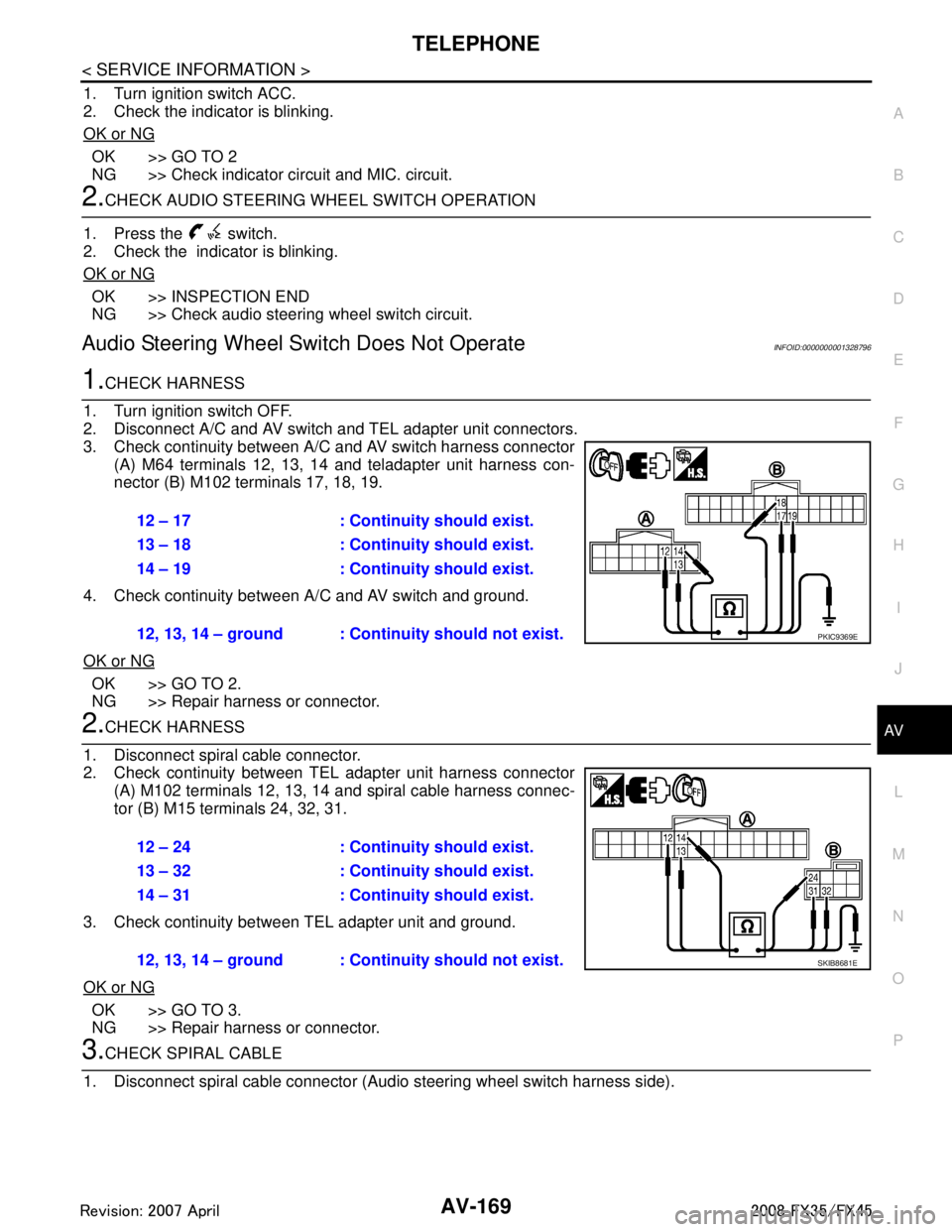
3. Check continuity between A/C and AV switch harness connector (A) M64 terminals 12, 13, 14 and teladapter unit harness con-
nector (B) M102 terminals 17, 18, 19.
4. Check continuity between A/C and AV switch and ground.
OK or NG
OK >> GO TO 2.
NG >> Repair harness or connector.
2.CHECK HARNESS
1. Disconnect spiral cable connector.
2. Check continuity between TEL adapter unit harness connector (A) M102 terminals 12, 13, 14 and spiral cable harness connec-
tor (B) M15 terminals 24, 32, 31.
3. Check continuity between TEL adapter unit and ground.
OK or NG
OK >> GO TO 3.
NG >> Repair harness or connector.
3.CHECK SPIRAL CABLE
1. Disconnect spiral cable connector (Audio steering wheel switch harness side).
12 – 17 : Continuity should exist.
13 – 18 : Continuity should exist.
14 – 19 : Continuity should exist.
12, 13, 14 – ground : Contin uity should not exist.
PKIC9369E
12 – 24 : Continuity should exist.
13 – 32 : Continuity should exist.
14 – 31 : Continuity should exist.
12, 13, 14 – ground : Continuity should not exist.
SKIB8681E
3AA93ABC3ACD3AC03ACA3AC03AC63AC53A913A773A893A873A873A8E3A773A983AC73AC93AC03AC3
3A893A873A873A8F3A773A9D3AAF3A8A3A8C3A863A9D3AAF3A8B3A8C
Page 717 of 3924

AV-170
< SERVICE INFORMATION >
TELEPHONE
2. Check continuity between spiral cable connector M15 terminals24, 31, 32 and spiral cable connector M203 terminals 20, 17, 16.
OK or NG
OK >> GO TO 4.
NG >> Replace spiral cable.
4.CHECK AUDIO STEERING WHEEL SWITCH RESISTANCE
Check resistance audio steering wheel switch terminals.
OK or NG
OK >> INSPECTION END
NG >> Replace audio steering wheel switch.
Voice Activated Control Function Does Not OperateINFOID:0000000001328797
NOTE:
Even under the normal condition, TE L voice guidance may not occur when pressing audio steering wheel
switch.
TEL VOICE GUIDANCE IS HEARD WHEN PR ESSING AUDIO STEERING WHEEL SWITCH
1.CHECK HARNESS BETWEEN TEL ADAPTER UNIT AND MICROPHONE UNIT
1. Turn ignition switch OFF.
2. Disconnect TEL adapter unit and microphone unit connectors.
3. Check continuity between TEL adapter unit harness connector (A) M102 terminals 7, 8, 29 and microphone unit harness con-
nector (B) R59 terminals 5, 6, 4.
4. Check continuity between TEL adapter unit harness connector (A) M102 terminals 7, 8, 29 and ground.
OK or NG
OK >> GO TO 2.
NG >> Repair harness or connector.
2.CHECK MIC. POWER SUPPLY
1. Connect TEL adapter unit and microphone unit connectors.
2. Turn ignition switch ON. 24 – 20 : Continuity should exist.
31 – 17 : Continuity should exist.
32 – 16 : Continuity should exist.
SKIA5874E
Terminal Signal name Condition
Resistance
(Ω )
16 17Mode Depress mode switch. Approx. 0
Seek down Depress (station) down switch. Approx. 165
Volume (down) Depress volume down switch. Approx. 652
20 PTT Depress PTT switch. Approx. 0
Seek up Depress (station) up switch. Approx. 165
Volume (up) Depress volume up switch. Approx. 652
SKIA5010E
7 – 5 : Continuity should exist.
8 – 6 : Continuity should exist.
29 – 4 : Continuity should exist.
7, 8, 29 – Ground : Continuity should not exist.
SKIB7348E
3AA93ABC3ACD3AC03ACA3AC03AC63AC53A913A773A893A873A873A8E3A773A983AC73AC93AC03AC3
3A893A873A873A8F3A773A9D3AAF3A8A3A8C3A863A9D3AAF3A8B3A8C
Page 718 of 3924
TELEPHONEAV-171
< SERVICE INFORMATION >
C
DE
F
G H
I
J
L
M A
B
AV
N
O P
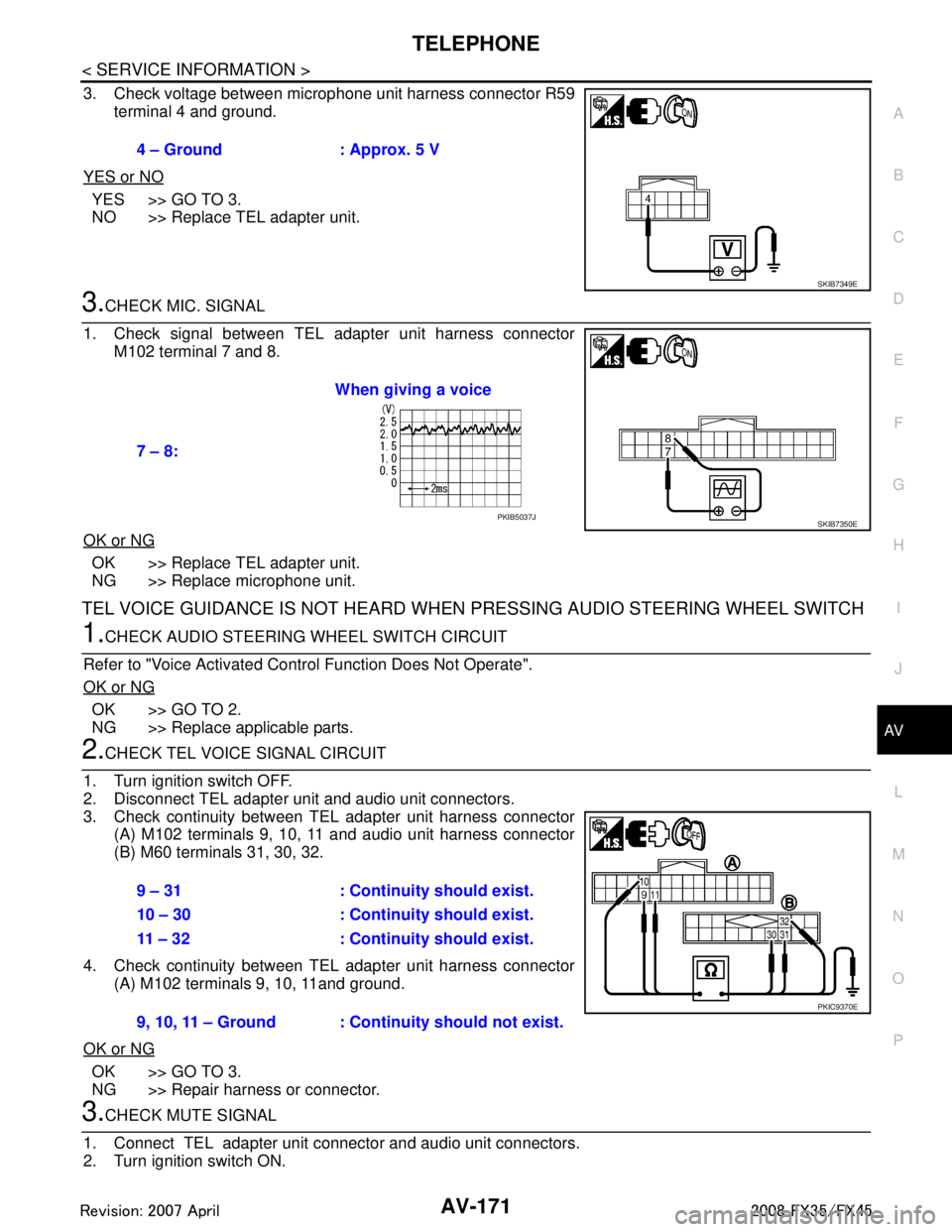
3. Check voltage between microphone unit harness connector R59 terminal 4 and ground.
YES or NO
YES >> GO TO 3.
NO >> Replace TEL adapter unit.
3.CHECK MIC. SIGNAL
1. Check signal between TEL adapter unit harness connector M102 terminal 7 and 8.
OK or NG
OK >> Replace TEL adapter unit.
NG >> Replace microphone unit.
TEL VOICE GUIDANCE IS NOT HEARD WHEN PRESSING AUDIO STEERING WHEEL SWITCH
1.CHECK AUDIO STEERING WHEEL SWITCH CIRCUIT
Refer to "Voice Activated Control Function Does Not Operate".
OK or NG
OK >> GO TO 2.
NG >> Replace applicable parts.
2.CHECK TEL VOICE SIGNAL CIRCUIT
1. Turn ignition switch OFF.
2. Disconnect TEL adapter unit and audio unit connectors.
3. Check continuity between TEL adapter unit harness connector (A) M102 terminals 9, 10, 11 and audio unit harness connector
(B) M60 terminals 31, 30, 32.
4. Check continuity between TEL adapter unit harness connector (A) M102 terminals 9, 10, 11and ground.
OK or NG
OK >> GO TO 3.
NG >> Repair harness or connector.
3.CHECK MUTE SIGNAL
1. Connect TEL adapter unit connector and audio unit connectors.
2. Turn ignition switch ON. 4 – Ground : Approx. 5 V
SKIB7349E
7 – 8:
When giving a voice
SKIB7350EPKIB5037J
9 – 31 : Continuity should exist.
10 – 30 : Continuity should exist.
11 – 32 : Continuity should exist.
9, 10, 11 – Ground : Continuity should not exist.
PKIC9370E
3AA93ABC3ACD3AC03ACA3AC03AC63AC53A913A773A893A873A873A8E3A773A983AC73AC93AC03AC3
3A893A873A873A8F3A773A9D3AAF3A8A3A8C3A863A9D3AAF3A8B3A8C
Page 735 of 3924

BL-1
BODY
C
DE
F
G H
J
K L
M
SECTION BL
A
B
BL
N
O P
CONTENTS
BODY, LOCK & SECURITY SYSTEM
SERVICE INFORMATION .. ..........................4
DTC INDEX ..................................................... .....4
INTELLGENT KEY UNIT U1000 ...............................4
INTELLGENT KEY UNIT B2013-B2014 ............. ......4
ECM P1610-P1615 ...................................................4
PRECAUTIONS ...................................................5
Precaution for Supplemental Restraint System
(SRS) "AIR BAG" and "SEAT BELT PRE-TEN-
SIONER" ............................................................. ......
5
Precaution Necessary for Steering Wheel Rota-
tion After Battery Disconnect .....................................
5
Precaution for Work ..................................................5
PREPARATION ...................................................6
Special Service Tool ........................................... ......6
Commercial Service Tool ..........................................6
SQUEAK AND RATTLE TROUBLE DIAGNO-
SIS .......................................................................
7
Work Flow ........................................................... ......7
Generic Squeak and Rattle Troubleshooting ............9
Diagnostic Worksheet .............................................11
HOOD .................................................................13
Fitting Adjustment ............................................... ....13
Removal and Installation of Hood Assembly ...........14
Removal and Installation of Hood Lock Control ......15
Hood Lock Control Inspection ............................. ....16
RADIATOR CORE SUPPORT ...........................18
Removal and Installation ..................................... ....18
FRONT FENDER ................................................20
Removal and Installation ..................................... ....20
POWER DOOR LOCK SYSTEM ........................21
Component Parts and Harness Connector Loca-
tion ...................................................................... ....
21
System Description .................................................22
CAN Communication System Description ...............23
CAN Communication Unit .................................... ....23
Schematic/With Intelligent Key ................................24
Wiring Diagram - D/LOCK -/With Intelligent Key .....25
Schematic/Without Intellig ent Key ...........................30
Wiring Diagram - D/LOCK -/Without Intelligent
Key ...................................................................... ....
31
Terminal and Reference Value for BCM ..................35
Terminal and Reference Value for Intelligent Key
Unit (With Intelligent Key System) ...........................
35
Work Flow ................................................................36
CONSULT-III Function (BCM) .................................36
Trouble Diagnosis Chart by Symptom .....................37
Check BCM Power Supply and Ground Circuit .......37
Check Door Switch ..................................................38
Check Key Switch ....................................................42
Check Door Lock and Unlock Switch ......................43
Check Door Lock Actuator (Driver Side) .................45
Check Door Lock Actuator (Passenger Side and
Rear LH/RH) ............................................................
45
Check Fuel Lid Lock Actuator ..................................46
Check Front Door Key Cylinder Switch (Lock) ........47
Check Front Door Key Cylinder Switch (Unlock) .....47
Check Select Unlock Relay Circuit ..........................48
REMOTE KEYLESS ENTRY SYSTEM .............50
Component Parts and Harness Connector Loca-
tion ...........................................................................
50
System Description ..................................................50
CAN Communication System Description ...............53
CAN Communication Unit ........................................53
Schematic ................................................................54
Wiring Diagram - KEYLES - ....................................55
Terminal and Reference Value for BCM ..................58
Terminal and Reference Value for IPDM E/R ..........59
CONSULT-III Function (BCM) .................................60
Work Flow ................................................................62
Trouble Diagnosis Chart by Symptom .....................62
Check Key Fob Battery and Function ......................63
Check ACC Switch ..................................................64
Check Door Switch ..................................................65
Check Key Switch ....................................................68
3AA93ABC3ACD3AC03ACA3AC03AC63AC53A913A773A893A873A873A8E3A773A983AC73AC93AC03AC3
3A893A873A873A8F3A773A9D3AAF3A8A3A8C3A863A9D3AAF3A8B3A8C
Page 739 of 3924

PRECAUTIONSBL-5
< SERVICE INFORMATION >
C
DE
F
G H
J
K L
M A
B
BL
N
O P
PRECAUTIONS
Precaution for Supplemental Restraint System (SRS) "AIR BAG" and "SEAT BELT
PRE-TENSIONER"
INFOID:0000000001612892
The Supplemental Restraint System such as “A IR BAG” and “SEAT BELT PRE-TENSIONER”, used along
with a front seat belt, helps to reduce the risk or severi ty of injury to the driver and front passenger for certain
types of collision. This system includes seat belt switch inputs and dual stage front air bag modules. The SRS
system uses the seat belt switches to determine the front air bag deployment, and may only deploy one front
air bag, depending on the severity of a collision and whether the front occupants are belted or unbelted.
Information necessary to service the system safely is included in the “SUPPLEMENTAL RESTRAINT SYS-
TEM” and “SEAT BELTS” of this Service Manual.
WARNING:
• To avoid rendering the SRS inoper ative, which could increase the risk of personal injury or death in
the event of a collision which would result in air bag inflation, all maintenance must be performed by
an authorized NISSAN/INFINITI dealer.
Improper maintenance, including in correct removal and installation of the SRS, can lead to personal
injury caused by unintentional act ivation of the system. For removal of Spiral Cable and Air Bag
Module, see the “SUPPLEMEN TAL RESTRAINT SYSTEM”.
Do not use electrical test equipm ent on any circuit related to the SRS unless instructed to in this
Service Manual. SRS wiring harnesses can be identi fied by yellow and/or orange harnesses or har-
ness connectors.
Precaution Necessary for Steering Wh eel Rotation After Battery Disconnect
INFOID:0000000001612889
NOTE:
This Procedure is applied only to models with Intell igent Key system and NVIS/IVIS (NISSAN/INFINITI
VEHICLE IMMOBILIZER SYSTEM - NATS).
Remove and install all control units after disconnecti ng both battery cables with the ignition knob in the
″ LOCK ″ position.
Always use CONSULT-III to perform self-diagnosis as a part of each function inspection after finishing work.
If DTC is detected, perform trouble diagnosis according to self-diagnostic results.
For models equipped with the Intelligent Key system and NVIS/IVIS, an electrically controlled steering lock
mechanism is adopted on the key cylinder.
For this reason, if the battery is disconnected or if the battery is discharged, the steering wheel will lock and
steering wheel rotation will become impossible.
If steering wheel rotation is required when battery pow er is interrupted, follow the procedure below before
starting the repair operation.
OPERATION PROCEDURE
1. Connect both battery cables. NOTE:
Supply power using jumper cables if battery is discharged.
2. Use the Intelligent Key or mechanical key to turn the ignition switch to the ″ACC ″ position. At this time, the
steering lock will be released.
3. Disconnect both battery cables. The steering lock will remain released and the steering wheel can be
rotated.
4. Perform the necessary repair operation.
5. When the repair work is completed, return the ignition switch to the ″LOCK ″ position before connecting
the battery cables. (At this time, the steering lock mechanism will engage.)
6. Perform a self-diagnosis check of all control units using CONSULT-III.
Precaution for WorkINFOID:0000000001327777
After removing and installing the opening/closing parts, be sure to carry out fitting adjustments to check their
operation.
Check the lubrication level, damage, and wear of each part. If necessary, grease or replace it.
3AA93ABC3ACD3AC03ACA3AC03AC63AC53A913A773A893A873A873A8E3A773A983AC73AC93AC03AC3
3A893A873A873A8F3A773A9D3AAF3A8A3A8C3A863A9D3AAF3A8B3A8C
Page 942 of 3924
BL-208
< SERVICE INFORMATION >
BODY REPAIR
Corrosion Protection
INFOID:0000000001327945
DESCRIPTION
To provide improved corrosion prevention, the foll owing anti-corrosive measures have been implemented in
NISSAN production plants. When repairing or replacing body panels, it is necessary to use the same anti-cor-
rosive measures.
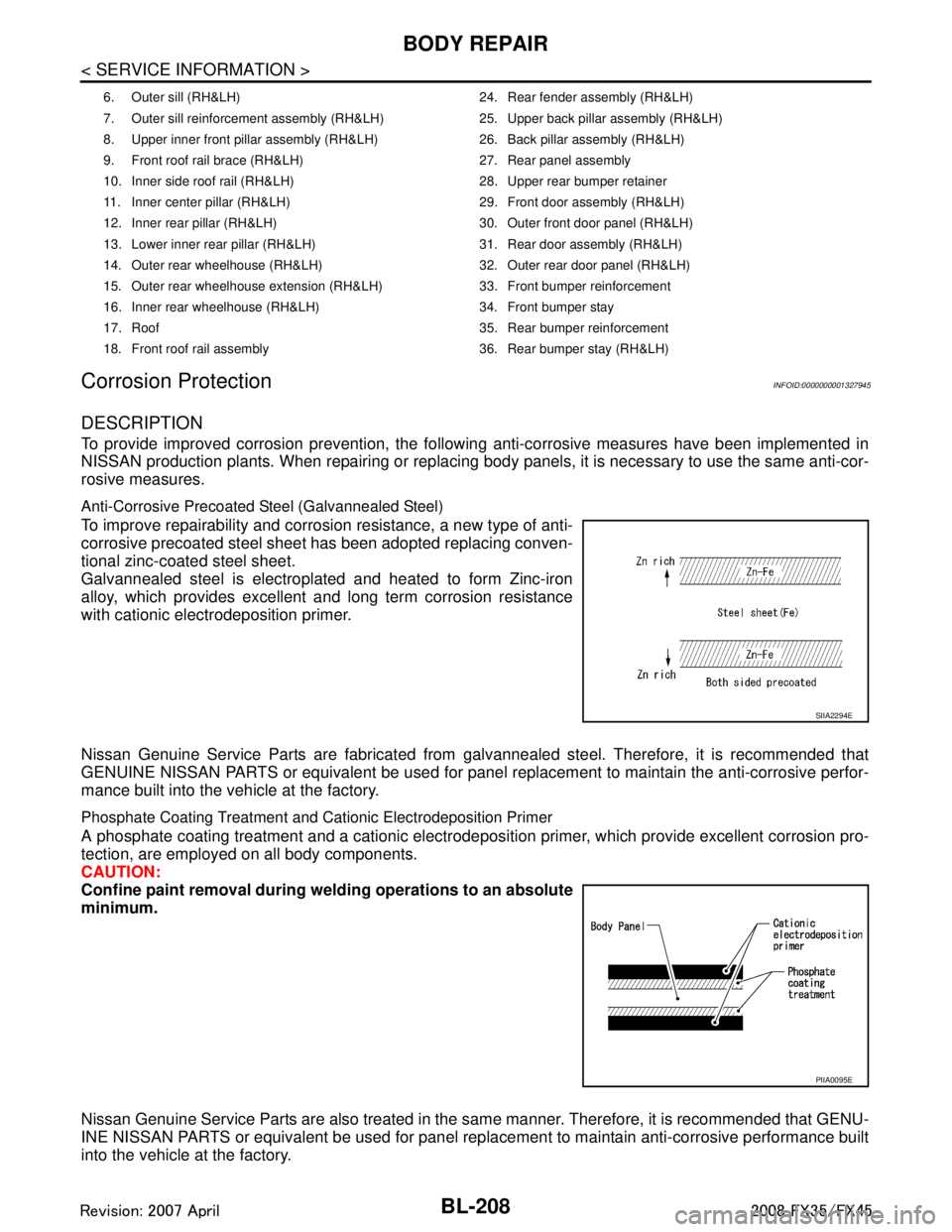
Anti-Corrosive Precoated Steel (Galvannealed Steel)
To improve repairability and corrosion resistance, a new type of anti-
corrosive precoated steel sheet has been adopted replacing conven-
tional zinc-coated steel sheet.
Galvannealed steel is electroplated and heated to form Zinc-iron
alloy, which provides excellent and long term corrosion resistance
with cationic electrodeposition primer.
Nissan Genuine Service Parts are fabricated from galvannealed steel. Therefore, it is recommended that
GENUINE NISSAN PARTS or equivalent be used for panel replacement to maintain the anti-corrosive perfor-
mance built into the vehicle at the factory.
Phosphate Coating Treatment and Cationic Electrodeposition Primer
A phosphate coating treatment and a cationic electrodepositi on primer, which provide excellent corrosion pro-
tection, are employed on all body components.
CAUTION:
Confine paint removal during weld ing operations to an absolute
minimum.
Nissan Genuine Service Parts are also treated in the same manner. Therefore, it is recommended that GENU-
INE NISSAN PARTS or equivalent be used for panel replacement to maintain anti-corrosive performance built
into the vehicle at the factory.
6. Outer sill (RH&LH) 24. Rear fender assembly (RH&LH)
7. Outer sill reinforcement assembly (RH&LH) 25. Upper back pillar assembly (RH&LH)
8. Upper inner front pillar assembly (RH&LH) 26. Back pillar assembly (RH&LH)
9. Front roof rail brace (RH&LH) 27. Rear panel assembly
10. Inner side roof rail (RH&LH) 28. Upper rear bumper retainer
11. Inner center pillar (RH&LH) 29. Front door assembly (RH&LH)
12. Inner rear pillar (RH&LH) 30. Outer front door panel (RH&LH)
13. Lower inner rear pillar (RH&LH) 31. Rear door assembly (RH&LH)
14. Outer rear wheelhouse (RH&LH) 32. Outer rear door panel (RH&LH)
15. Outer rear wheelhouse extension (RH&LH) 33. Front bumper reinforcement
16. Inner rear wheelhouse (RH&LH) 34. Front bumper stay
17. Roof 35. Rear bumper reinforcement
18. Front roof rail assembly 36. Rear bumper stay (RH&LH)
SIIA2294E
PIIA0095E
3AA93ABC3ACD3AC03ACA3AC03AC63AC53A913A773A893A873A873A8E3A773A983AC73AC93AC03AC3
3A893A873A873A8F3A773A9D3AAF3A8A3A8C3A863A9D3AAF3A8B3A8C