installation INFINITI FX35 2008 Service Manual
[x] Cancel search | Manufacturer: INFINITI, Model Year: 2008, Model line: FX35, Model: INFINITI FX35 2008Pages: 3924, PDF Size: 81.37 MB
Page 3197 of 3924
TURN SIGNAL AND HAZARD WARNING LAMPSLT-95
< SERVICE INFORMATION >
C
DE
F
G H
I
J
L
M A
B
LT
N
O P
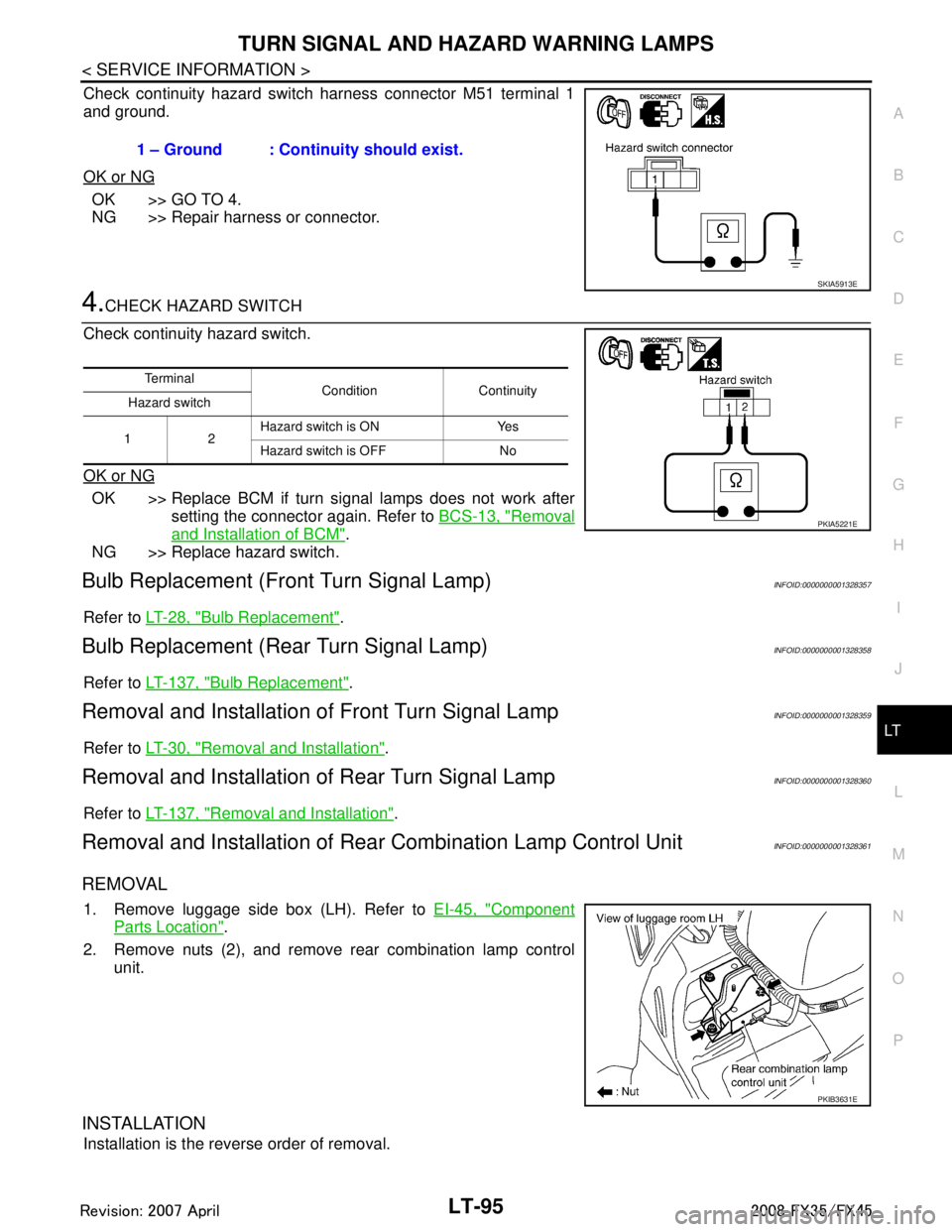
Check continuity hazard switch harness connector M51 terminal 1
and ground.
OK or NG
OK >> GO TO 4.
NG >> Repair harness or connector.
4.CHECK HAZARD SWITCH
Check continuity hazard switch.
OK or NG
OK >> Replace BCM if turn signal lamps does not work after setting the connector again. Refer to BCS-13, "
Removal
and Installation of BCM".
NG >> Replace hazard switch.
Bulb Replacement (Fr ont Turn Signal Lamp)INFOID:0000000001328357
Refer to LT-28, "Bulb Replacement".
Bulb Replacement (Rear Turn Signal Lamp)INFOID:0000000001328358
Refer to LT-137, "Bulb Replacement".
Removal and Installation of Front Turn Signal LampINFOID:0000000001328359
Refer to LT-30, "Removal and Installation".
Removal and Installation of Rear Turn Signal LampINFOID:0000000001328360
Refer to LT-137, "Removal and Installation".
Removal and Installation of Rear Combination Lamp Control UnitINFOID:0000000001328361
REMOVAL
1. Remove luggage side box (LH). Refer to EI-45, "Component
Parts Location".
2. Remove nuts (2), and remove rear combination lamp control unit.
INSTALLATION
Installation is the reverse order of removal. 1 – Ground : Continuity should exist.
SKIA5913E
Te r m i n a l
Condition Continuity
Hazard switch
12 Hazard switch is ON Yes
Hazard switch is OFF No
PKIA5221E
PKIB3631E
3AA93ABC3ACD3AC03ACA3AC03AC63AC53A913A773A893A873A873A8E3A773A983AC73AC93AC03AC3
3A893A873A873A8F3A773A9D3AAF3A8A3A8C3A863A9D3AAF3A8B3A8C
Page 3198 of 3924
LT-96
< SERVICE INFORMATION >
LIGHTING AND TURN SIGNAL SWITCH
LIGHTING AND TURN SIGNAL SWITCH
Removal and InstallationINFOID:0000000001328362
REMOVAL
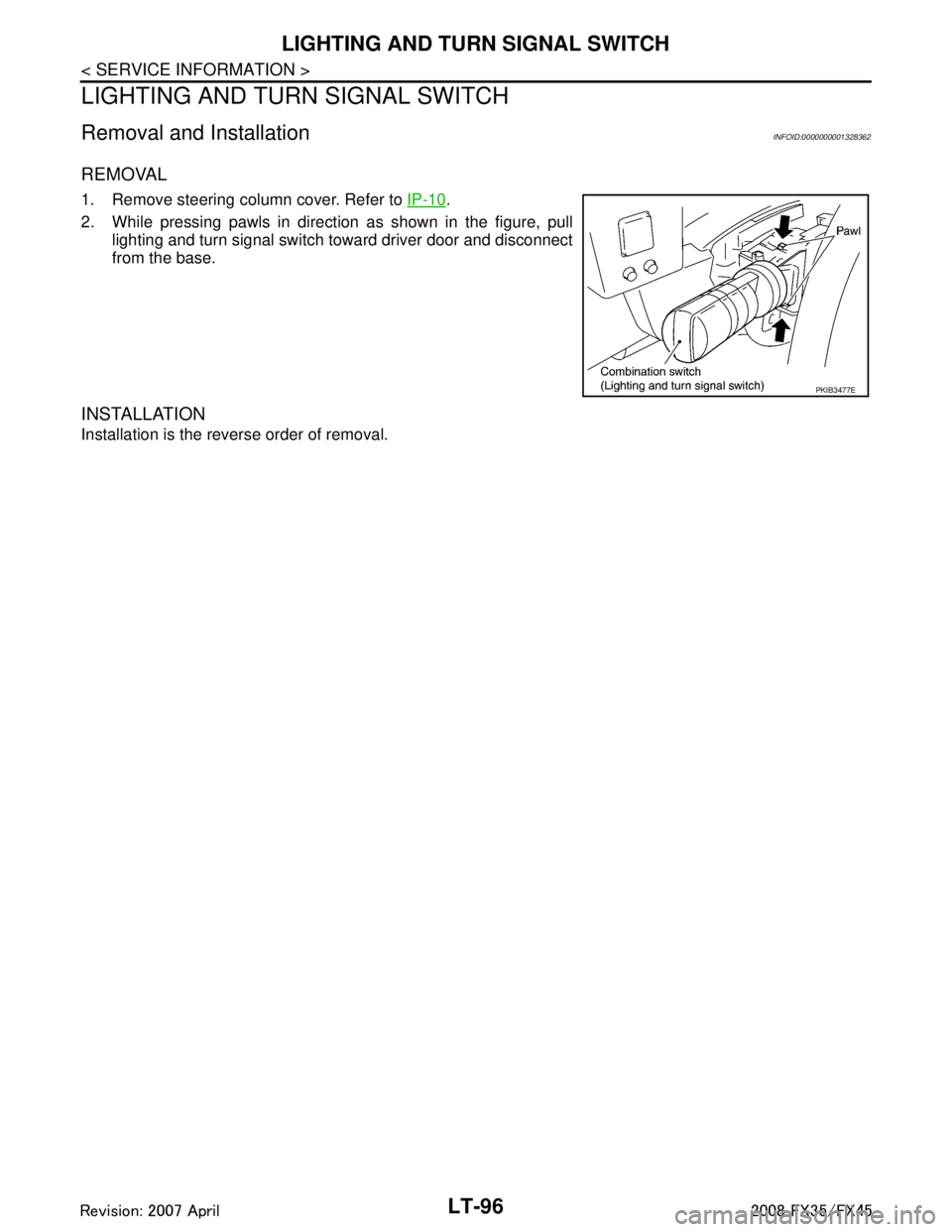
1. Remove steering column cover. Refer to IP-10.
2. While pressing pawls in direction as shown in the figure, pull lighting and turn signal switch toward driver door and disconnect
from the base.
INSTALLATION
Installation is the reverse order of removal.
PKIB3477E
3AA93ABC3ACD3AC03ACA3AC03AC63AC53A913A773A893A873A873A8E3A773A983AC73AC93AC03AC3
3A893A873A873A8F3A773A9D3AAF3A8A3A8C3A863A9D3AAF3A8B3A8C
Page 3199 of 3924
HAZARD SWITCHLT-97
< SERVICE INFORMATION >
C
DE
F
G H
I
J
L
M A
B
LT
N
O P
HAZARD SWITCH
Removal and InstallationINFOID:0000000001328363
REMOVAL
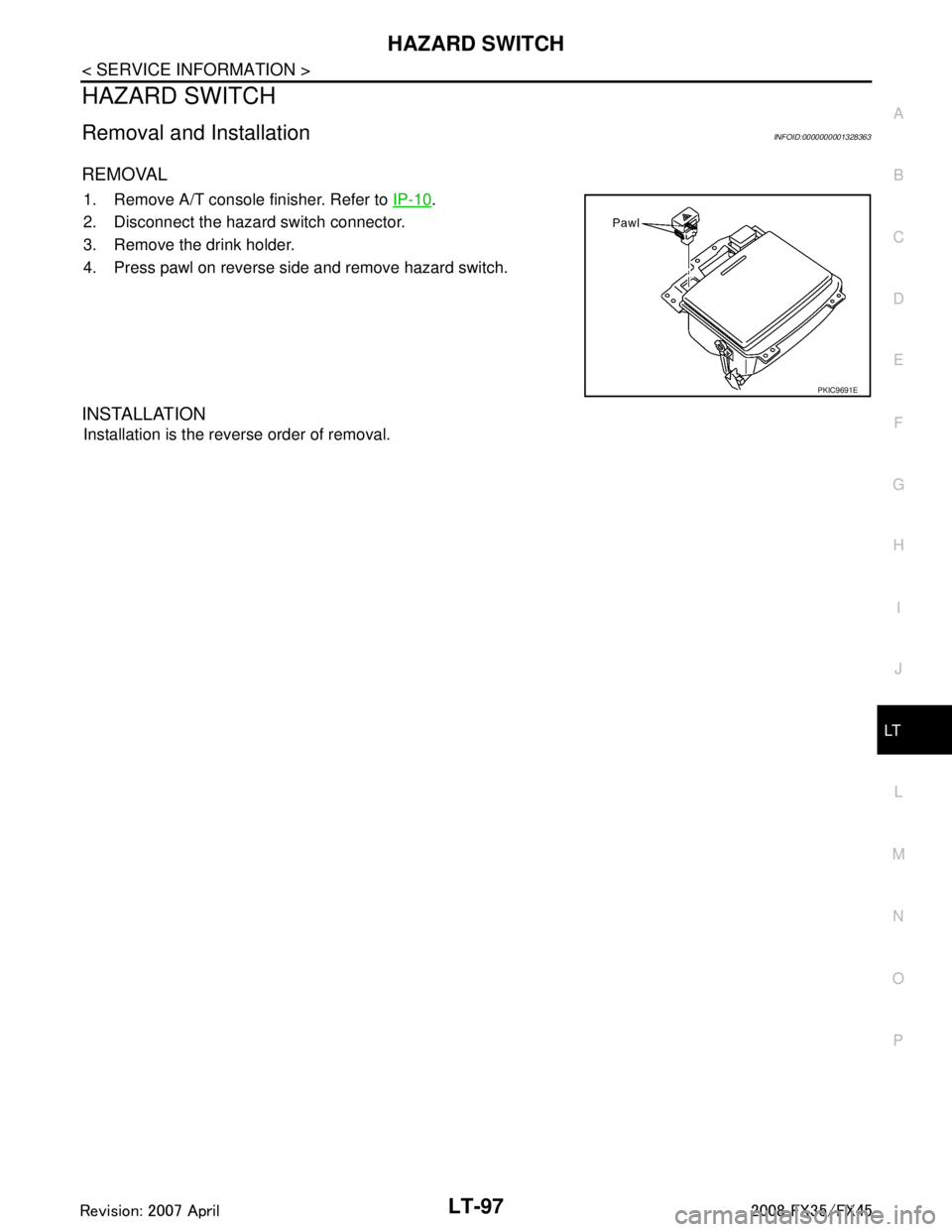
1. Remove A/T console finisher. Refer to IP-10.
2. Disconnect the hazard switch connector.
3. Remove the drink holder.
4. Press pawl on reverse side and remove hazard switch.
INSTALLATION
Installation is the reverse order of removal.
PKIC9691E
3AA93ABC3ACD3AC03ACA3AC03AC63AC53A913A773A893A873A873A8E3A773A983AC73AC93AC03AC3
3A893A873A873A8F3A773A9D3AAF3A8A3A8C3A863A9D3AAF3A8B3A8C
Page 3208 of 3924
LT-106
< SERVICE INFORMATION >
COMBINATION SWITCH
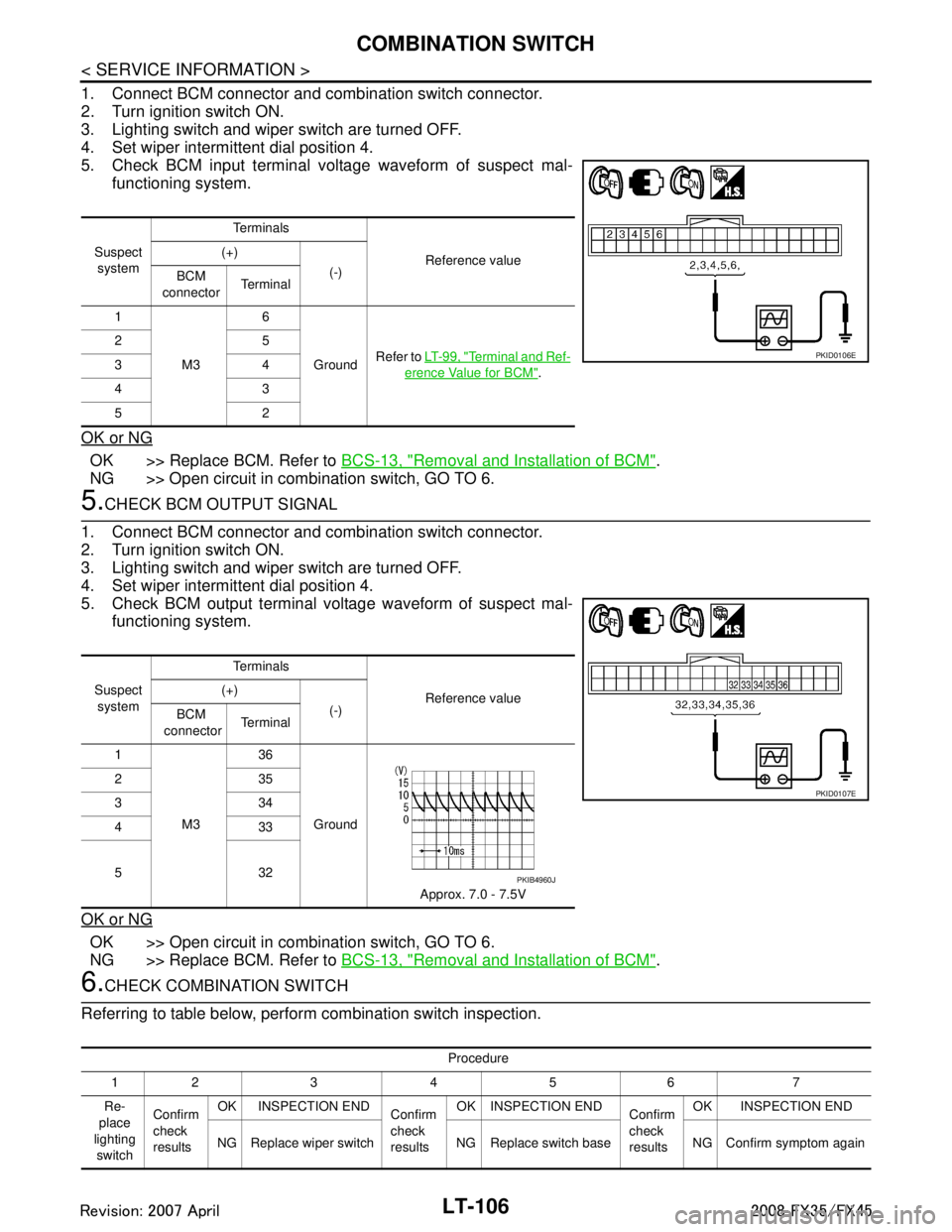
1. Connect BCM connector and combination switch connector.
2. Turn ignition switch ON.
3. Lighting switch and wiper switch are turned OFF.
4. Set wiper intermittent dial position 4.
5. Check BCM input terminal voltage waveform of suspect mal-functioning system.
OK or NG
OK >> Replace BCM. Refer to BCS-13, "Removal and Installation of BCM".
NG >> Open circuit in combination switch, GO TO 6.
5.CHECK BCM OUTPUT SIGNAL
1. Connect BCM connector and combination switch connector.
2. Turn ignition switch ON.
3. Lighting switch and wiper switch are turned OFF.
4. Set wiper intermittent dial position 4.
5. Check BCM output terminal voltage waveform of suspect mal- functioning system.
OK or NG
OK >> Open circuit in combination switch, GO TO 6.
NG >> Replace BCM. Refer to BCS-13, "
Removal and Installation of BCM".
6.CHECK COMBINATION SWITCH
Referring to table below, perform combination switch inspection.
Suspect system Te r m i n a l s
Reference value
(+)
(-)
BCM
connector Te r m i n a l
1
M3 6
Ground Refer to
LT- 9 9 , "
Terminal and Ref-
erence Value for BCM".
25
34
43
52
PKID0106E
Suspect
system Te r m i n a l s
Reference value
(+)
(-)
BCM
connector Te r m i n a l
1
M3 36
Ground Approx. 7.0 - 7.5V
235
334
433
532
PKID0107E
PKIB4960J
Procedure
12 3 4 5 6 7
Re-
place
lighting switch Confirm
check
results
OK INSPECTION END
Confirm
check
resultsOK INSPECTION END
Confirm
check
resultsOK INSPECTION END
NG Replace wiper switch NG Replace switch base NG Confirm symptom again
3AA93ABC3ACD3AC03ACA3AC03AC63AC53A913A773A893A873A873A8E3A773A983AC73AC93AC03AC3
3A893A873A873A8F3A773A9D3AAF3A8A3A8C3A863A9D3AAF3A8B3A8C
Page 3209 of 3924
COMBINATION SWITCHLT-107
< SERVICE INFORMATION >
C
DE
F
G H
I
J
L
M A
B
LT
N
O P
>> INSPECTION END
Removal and InstallationINFOID:0000000001328369
Refer to LT- 9 6 and WW-28, "Removal and Installation of Front Wiper and Washer Switch".
3AA93ABC3ACD3AC03ACA3AC03AC63AC53A913A773A893A873A873A8E3A773A983AC73AC93AC03AC3
3A893A873A873A8F3A773A9D3AAF3A8A3A8C3A863A9D3AAF3A8B3A8C
Page 3216 of 3924
LT-114
< SERVICE INFORMATION >
STOP LAMP
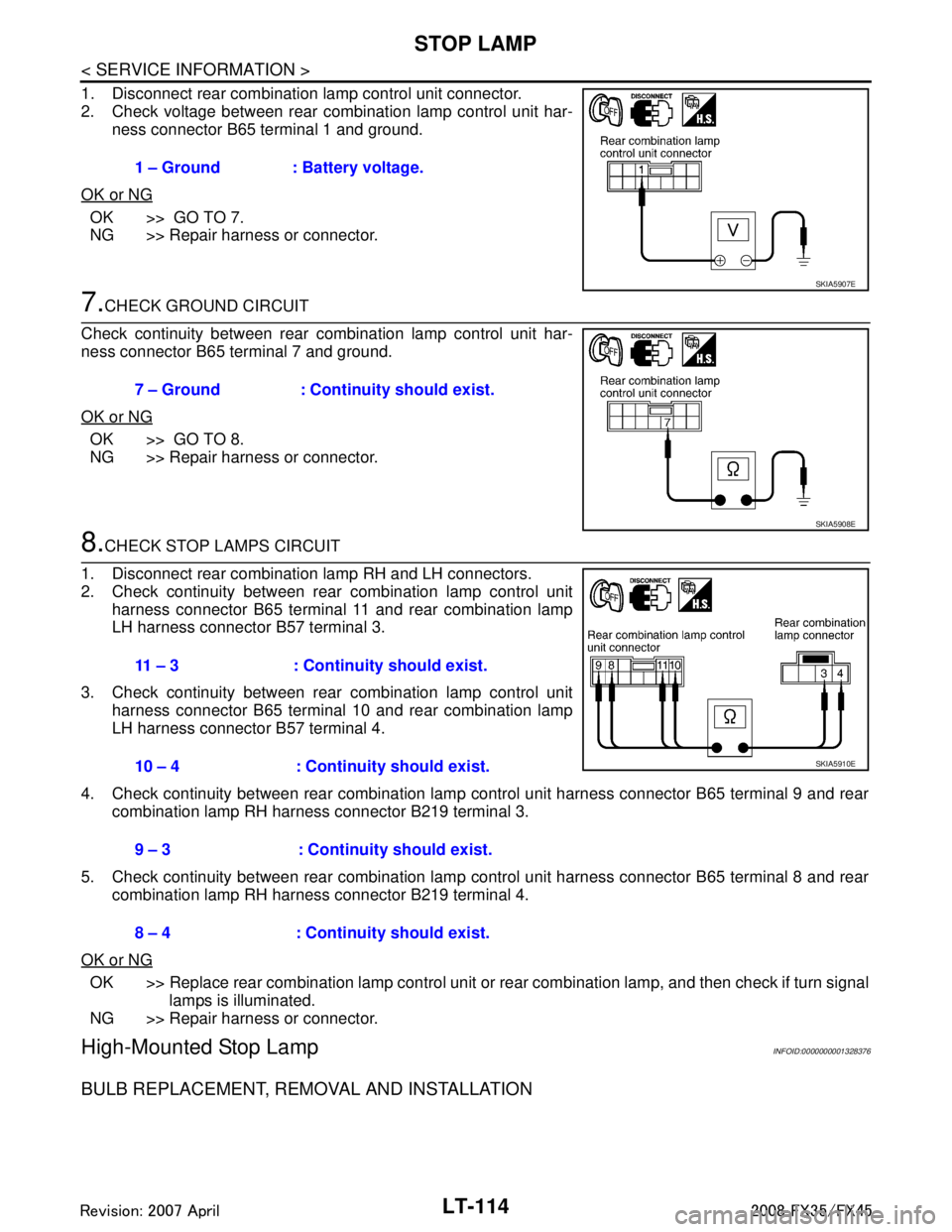
1. Disconnect rear combination lamp control unit connector.
2. Check voltage between rear combination lamp control unit har-ness connector B65 terminal 1 and ground.
OK or NG
OK >> GO TO 7.
NG >> Repair harness or connector.
7.CHECK GROUND CIRCUIT
Check continuity between rear combination lamp control unit har-
ness connector B65 terminal 7 and ground.
OK or NG
OK >> GO TO 8.
NG >> Repair harness or connector.
8.CHECK STOP LAMPS CIRCUIT
1. Disconnect rear combination lamp RH and LH connectors.
2. Check continuity between rear combination lamp control unit harness connector B65 terminal 11 and rear combination lamp
LH harness connector B57 terminal 3.
3. Check continuity between rear combination lamp control unit harness connector B65 terminal 10 and rear combination lamp
LH harness connector B57 terminal 4.
4. Check continuity between rear combination lamp control unit harness connector B65 terminal 9 and rear combination lamp RH harness connector B219 terminal 3.
5. Check continuity between rear combination lamp control unit harness connector B65 terminal 8 and rear combination lamp RH harness connector B219 terminal 4.
OK or NG
OK >> Replace rear combination lamp control unit or rear combination lamp, and then check if turn signal
lamps is illuminated.
NG >> Repair harness or connector.
High-Mounted Stop LampINFOID:0000000001328376
BULB REPLACEMENT, REMOVAL AND INSTALLATION
1 – Ground : Battery voltage.
SKIA5907E
7 – Ground : Continuity should exist.
SKIA5908E
11 – 3 : Continuity should exist.
10 – 4 : Continuity should exist.
9 – 3 : Continuity should exist.
8 – 4 : Continuity should exist.
SKIA5910E
3AA93ABC3ACD3AC03ACA3AC03AC63AC53A913A773A893A873A873A8E3A773A983AC73AC93AC03AC3
3A893A873A873A8F3A773A9D3AAF3A8A3A8C3A863A9D3AAF3A8B3A8C
Page 3217 of 3924
STOP LAMPLT-115
< SERVICE INFORMATION >
C
DE
F
G H
I
J
L
M A
B
LT
N
O P
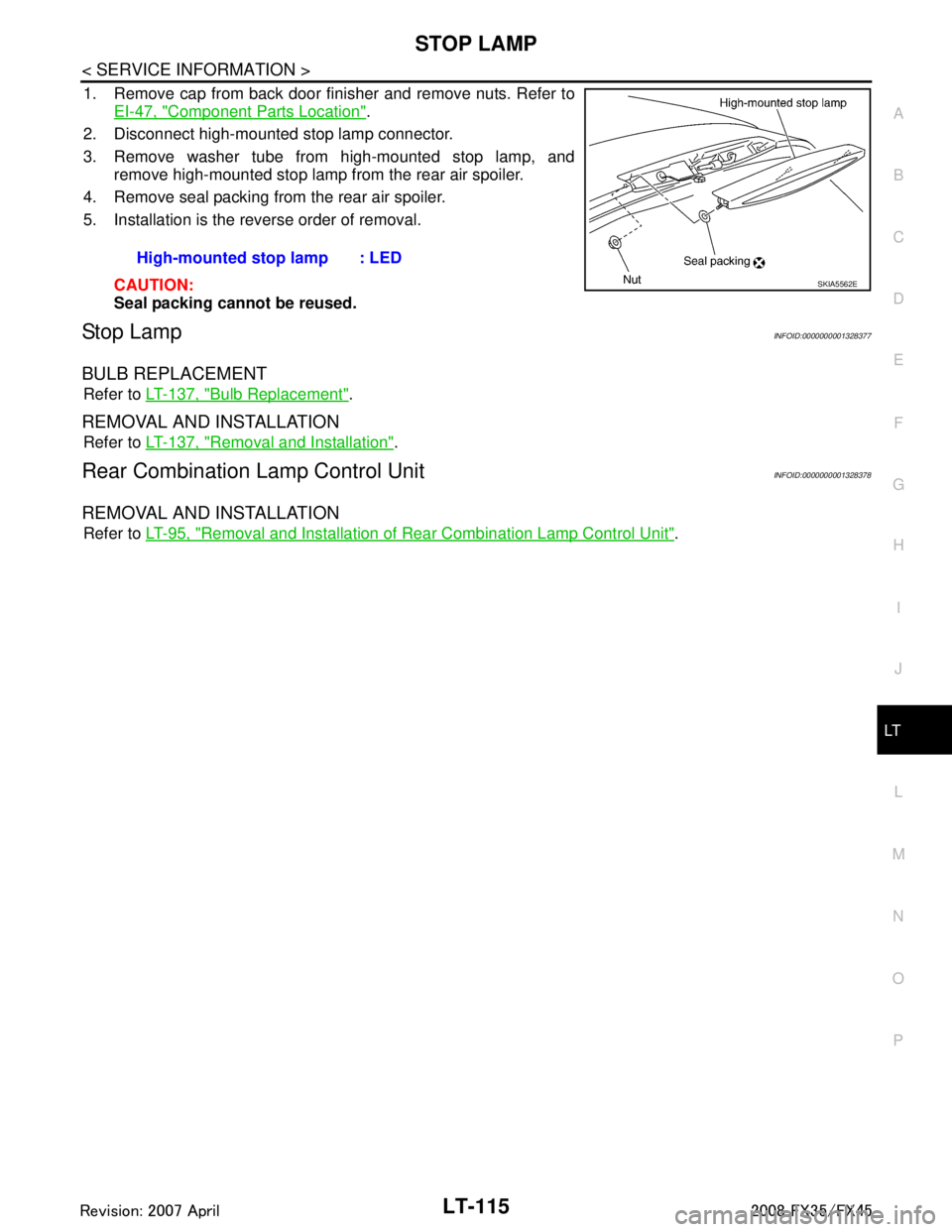
1. Remove cap from back door finisher and remove nuts. Refer to EI-47, "
Component Parts Location".
2. Disconnect high-mounted stop lamp connector.
3. Remove washer tube from high-mounted stop lamp, and remove high-mounted stop lamp from the rear air spoiler.
4. Remove seal packing from the rear air spoiler.
5. Installation is the reverse order of removal.
CAUTION:
Seal packing cannot be reused.
Stop LampINFOID:0000000001328377
BULB REPLACEMENT
Refer to LT-137, "Bulb Replacement".
REMOVAL AND INSTALLATION
Refer to LT-137, "Removal and Installation".
Rear Combination Lamp Control UnitINFOID:0000000001328378
REMOVAL AND INSTALLATION
Refer to LT-95, "Removal and Installation of Rear Combination Lamp Control Unit".
High-mounted stop lamp : LED
SKIA5562E
3AA93ABC3ACD3AC03ACA3AC03AC63AC53A913A773A893A873A873A8E3A773A983AC73AC93AC03AC3
3A893A873A873A8F3A773A9D3AAF3A8A3A8C3A863A9D3AAF3A8B3A8C
Page 3219 of 3924
BACK-UP LAMPLT-117
< SERVICE INFORMATION >
C
DE
F
G H
I
J
L
M A
B
LT
N
O P
Bulb ReplacementINFOID:0000000001328380
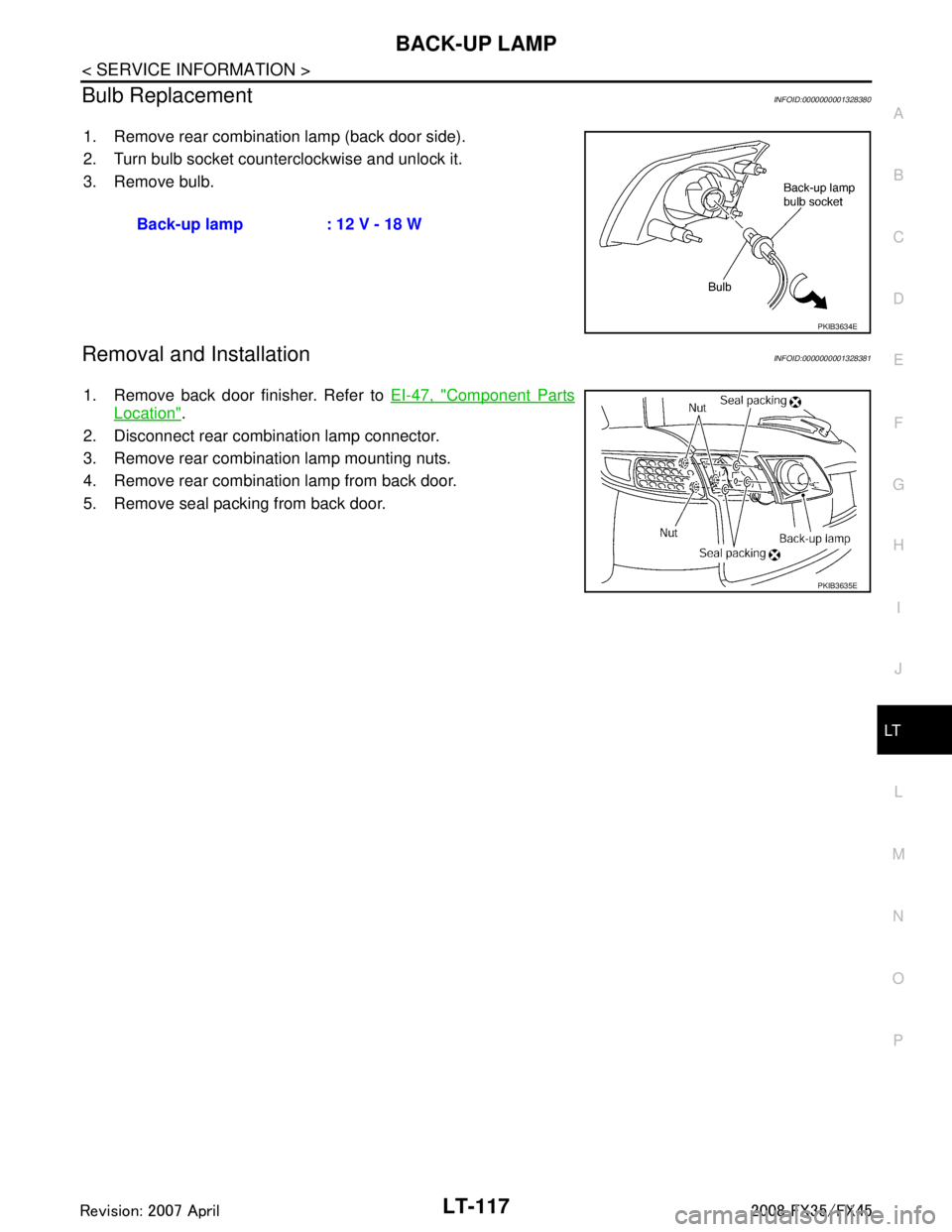
1. Remove rear combination lamp (back door side).
2. Turn bulb socket counterclockwise and unlock it.
3. Remove bulb.
Removal and InstallationINFOID:0000000001328381
1. Remove back door finisher. Refer to EI-47, "Component Parts
Location".
2. Disconnect rear combination lamp connector.
3. Remove rear combination lamp mounting nuts.
4. Remove rear combination lamp from back door.
5. Remove seal packing from back door. Back-up lamp : 12 V - 18 W
PKIB3634E
PKIB3635E
3AA93ABC3ACD3AC03ACA3AC03AC63AC53A913A773A893A873A873A8E3A773A983AC73AC93AC03AC3
3A893A873A873A8F3A773A9D3AAF3A8A3A8C3A863A9D3AAF3A8B3A8C
Page 3232 of 3924
LT-130
< SERVICE INFORMATION >
PARKING, LICENSE PLATE AND TAIL LAMPS
2.ACTIVE TEST
CONSULT-III ACTIVE TEST
1. Select “TAIL LAMP” of IPDM E/R active test item.
2. With operating the test item, check the parking, license plate, side marker and tail lamps operation.
IPDM E/R AUTO ACTIVE TEST
1. Start auto active test. Refer to PG-20, "
Auto Active Test".
2. Check that the parking, license plate, side marker and tail lamps operation.
OK or NG
OK >> GO TO 3.
NG >> GO TO 4.
3.CHECK IPDM E/R
1. Select “TAIL&CLR REQ” of IPDM E/R data monitor item.
2. With operating the lighting switch, check the monitor status.
OK or NG
OK >> Replace IPDM E/R. Refer to PG-24, "Removal and Installation of IPDM E/R".
NG >> Replace BCM. Refer to BCS-13, "
Removal and Installation of BCM".
4.CHECK IPDM E/R
CONSULT-III ACTIVE TEST
1. Turn ignition switch OFF.
2. Disconnect front side marker lamp, parking lamp, license plate lamp and rear combination lamp connec- tors.
3. Select “TAIL LAMP” of IPDM E/R active test item.
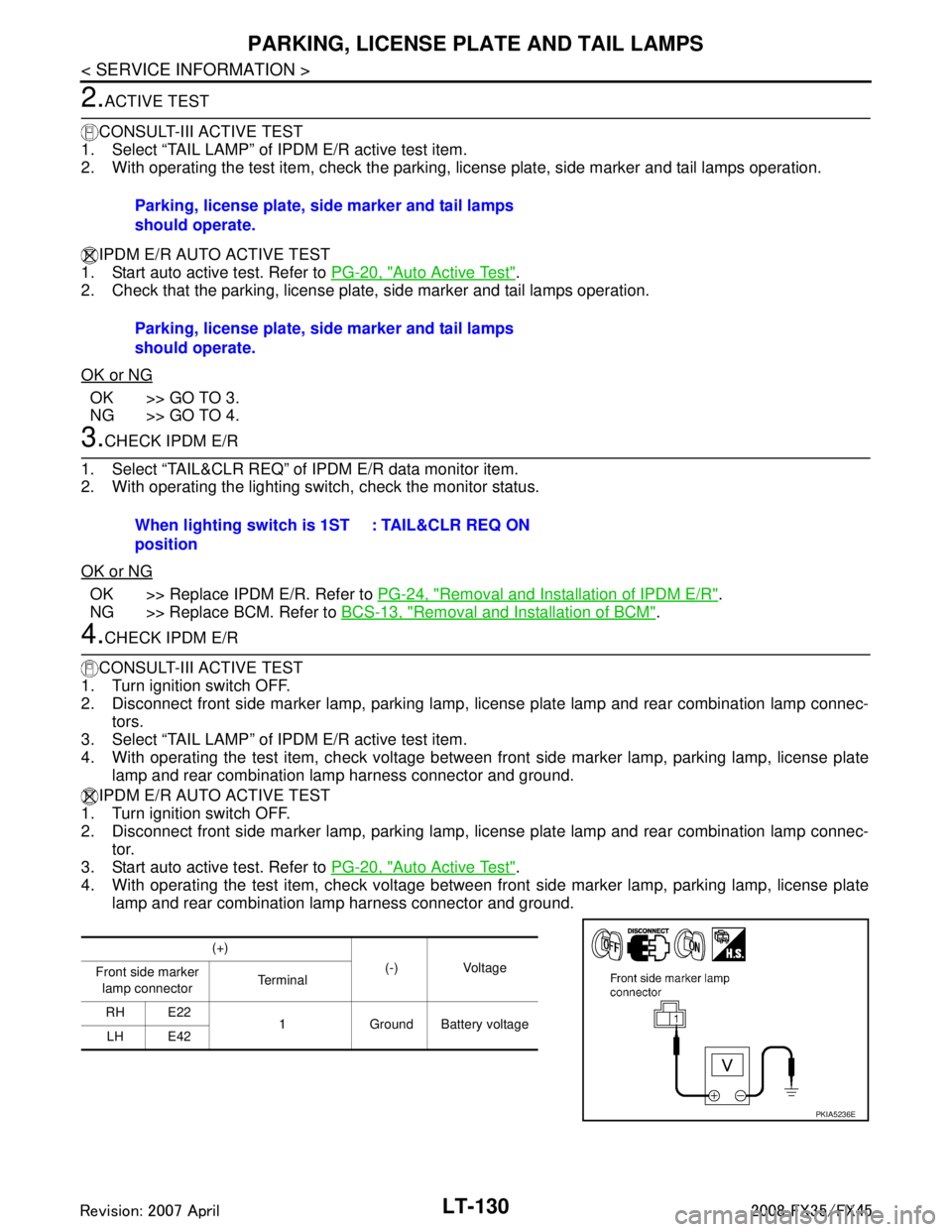
4. With operating the test item, check voltage between fr ont side marker lamp, parking lamp, license plate
lamp and rear combination lamp harness connector and ground.
IPDM E/R AUTO ACTIVE TEST
1. Turn ignition switch OFF.
2. Disconnect front side marker lamp, parking lamp, license plate lamp and rear combination lamp connec-
tor.
3. Start auto active test. Refer to PG-20, "
Auto Active Test".
4. With operating the test item, check voltage between fr ont side marker lamp, parking lamp, license plate
lamp and rear combination lamp harness connector and ground. Parking, license plate, side marker and tail lamps
should operate.
Parking, license plate, side marker and tail lamps
should operate.
When lighting switch is 1ST
position
: TAIL&CLR REQ ON
(+)
(-) Voltage
Front side marker
lamp connector Te r m i n a l
RH E22 1 Ground Battery voltage
LH E42
PKIA5236E
3AA93ABC3ACD3AC03ACA3AC03AC63AC53A913A773A893A873A873A8E3A773A983AC73AC93AC03AC3
3A893A873A873A8F3A773A9D3AAF3A8A3A8C3A863A9D3AAF3A8B3A8C
Page 3234 of 3924
LT-132
< SERVICE INFORMATION >
PARKING, LICENSE PLATE AND TAIL LAMPS
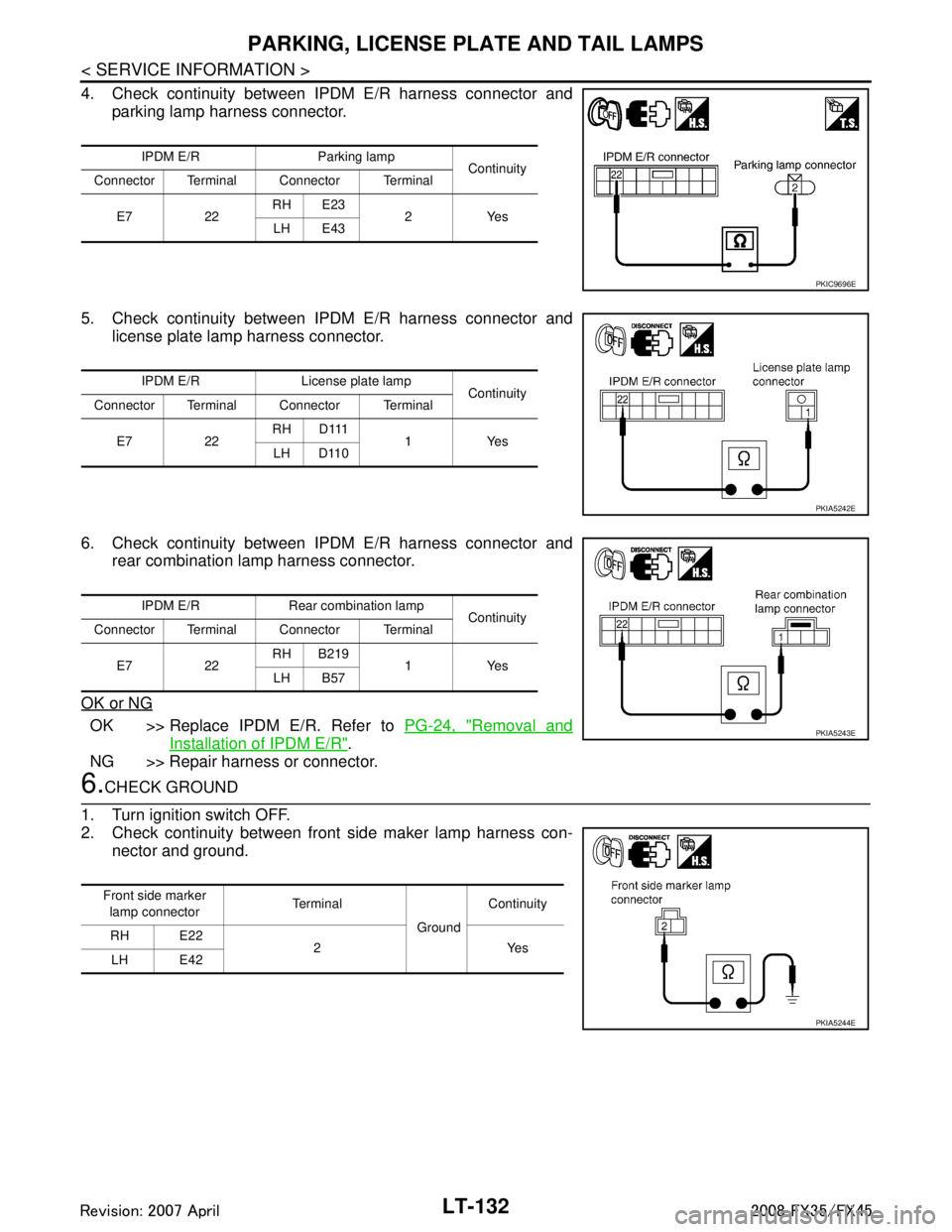
4. Check continuity between IPDM E/R harness connector andparking lamp harness connector.
5. Check continuity between IPDM E/R harness connector and license plate lamp harness connector.
6. Check continuity between IPDM E/R harness connector and rear combination lamp harness connector.
OK or NG
OK >> Replace IPDM E/R. Refer to PG-24, "Removal and
Installation of IPDM E/R".
NG >> Repair harness or connector.
6.CHECK GROUND
1. Turn ignition switch OFF.
2. Check continuity between front side maker lamp harness con- nector and ground.
IPDM E/R Parking lamp Continuity
Connector Terminal Connector Terminal
E7 22 RH E23
2Yes
LH E43
PKIC9696E
IPDM E/R License plate lamp Continuity
Connector Terminal Connector Terminal
E7 22 RH D111
1Yes
LH D110
PKIA5242E
IPDM E/R Rear combination lamp Continuity
Connector Terminal Connector Terminal
E7 22 RH B219
1Yes
LH B57
PKIA5243E
Front side marker
lamp connector Te r m i n a l
GroundContinuity
RH E22 2Yes
LH E42
PKIA5244E
3AA93ABC3ACD3AC03ACA3AC03AC63AC53A913A773A893A873A873A8E3A773A983AC73AC93AC03AC3
3A893A873A873A8F3A773A9D3AAF3A8A3A8C3A863A9D3AAF3A8B3A8C