tire pressure INFINITI FX35 2008 Service Manual
[x] Cancel search | Manufacturer: INFINITI, Model Year: 2008, Model line: FX35, Model: INFINITI FX35 2008Pages: 3924, PDF Size: 81.37 MB
Page 3 of 3924

QUICK REFERENCE CHART FX35/FX45
ENGINE TUNE-UP DATA (VK45DE)
FRONT WHEEL ALIGNMENT (Unladen* )
ELS0003X
* : Fuel, engine coolant and engine oil full. Spare tire, jack, hand tools and mats in designated positions.Engine modelVK45DE
Firing order1-8-7-3-6-5-4-2
Idle speed
A/T (In “P” or “N” position) rpm650 ± 50
Ignition timing (BTDC at idle speed)
A/T (In “P” or “N” position)12° ± 5°
Tensions of drive belts Auto adjustment by auto tensioner
Radiater cap relief pressure
kPa (kg/cm
2 , psi)
78 - 98 (0.8-1.0 , 11-14) Standard
Limit 59 (0.6, 9)
Cooling system leakage testing pressure
157 (1.6, 23)
kPa (kg/cm
2 , psi)
Compression pressure
kPa (kg/cm
2 , psi)/rpm
1,320 (13.5, 191) /300 Standard
Minimum 1,130 (11.5, 164) /300
Spark plug Standard type PLFR5A-11
Hot type PLFR4A-11
Cold type PLFR6A-11
Camber Degree minute (Decimal degree) Minimum –1° 29′ (–1.48°)
Nominal –0° 44′ (–0.73°)
Maximum 0° 01′ (0.02°)
Left and right difference 45′ (0.75°) or less
Caster Degree minute (Decimal degree) Minimum 3° 02′ (3.03°)
Nominal 3° 47′ (3.78°)
Maximum 4° 32′ (4.53°)
Left and right difference 45′ (0.75°) or less
Kingpin inclination Degree minute (Decimal degree) Minimum 12° 20′ (12.33°)
Nominal 13° 05′ (13.08°)
Maximum 13° 50′ (13.83°)
Total toe-in Distance Minimum 0.6 mm (0.024 in)
Nominal 1.6 mm (0.063 in)
Maximum 2.6 mm (0.102 in)
Angle (left wheel or right wheel)
Degree minute (Decimal degree)Minimum 0° 01′ (0.02°)
Nominal 0° 04′ (0.06°)
Maximum 0° 06′ (0.10°)
Wheel turning angle (Full turn) Inside Minimum 32° 00 (32.0°)
Degree minute (Decimal degree) Nominal 35° 00 (35.0°)
Maximum 36° 00 (36.0°)
Outside
Nominal 30° 00 (30.0°)
Degree minute (Decimal degree)
2008
Page 21 of 3924
![INFINITI FX35 2008 Service Manual
ACS-14
< SERVICE INFORMATION >[ICC]
LASER BEAM AIMING ADJUSTMENT
LASER BEAM AIMING ADJUSTMENT
OutlineINFOID:0000000001328812
Adjust the laser beam aiming every time the ICC sensor is removed or insta](/img/42/57017/w960_57017-20.png "INFINITI FX35 2008 Service Manual
ACS-14
< SERVICE INFORMATION >[ICC]
LASER BEAM AIMING ADJUSTMENT
LASER BEAM AIMING ADJUSTMENT
OutlineINFOID:0000000001328812
Adjust the laser beam aiming every time the ICC sensor is removed or insta")
ACS-14
< SERVICE INFORMATION >[ICC]
LASER BEAM AIMING ADJUSTMENT
LASER BEAM AIMING ADJUSTMENT
OutlineINFOID:0000000001328812
Adjust the laser beam aiming every time the ICC sensor is removed or installed.
CAUTION:
Adjust laser beam aiming at a horizontal place as
far as 12 m (39 ft) forward the vehicle can be seen.
Adjust laser beam aiming 5 seconds after starting engine.
Never view ICC sensor integrated un it body window directly during laser beam aiming adjustment.
Follow the CONSULT-III when adju sting the laser beam aiming (laser beam aiming adjustment can-
not be operated without CONSULT-III).
Never ride on vehicle during l aser beam aiming adjustment.
Idle and turn headlamps OFF duri ng laser beam aiming adjustment.
PreparationINFOID:0000000001328813
Adjust the tire pressure to the specified value.
See that there is no load in the vehicle.
Coolant, engine oil filled up to correct level and full fuel tank.
Shift the gear into “P” position and release the parking brake.
Clean the ICC sensor with a soft cloth.
Outline of Adjustment ProcedureINFOID:0000000001328814
1. Set up the ICC target board [KV99110100 (J-45718)].
2. Adjust the sensor following the procedure on CONSUL T-III. (Turn manually the screw for up-down position
adjustment. ICC sensor automatically adjust the right-left position.)
Setting the ICC Target BoardINFOID:0000000001328815
Accurate ICC target board setting is required for the laser beam aiming adjustment.
CAUTION:
ICC system does not function normally if laser beam aiming is not accurate.
ADJUSTING HEIGHT OF THE TARGET
1. Attach a triangle scale at the center.
SKIA6179E
SKIA5974E
3AA93ABC3ACD3AC03ACA3AC03AC63AC53A913A773A893A873A873A8E3A773A983AC73AC93AC03AC3
3A893A873A873A8F3A773A9D3AAF3A8A3A8C3A863A9D3AAF3A8B3A8C
Page 125 of 3924

AT-52
< SERVICE INFORMATION >
TROUBLE DIAGNOSIS
5. Securely engage the parking brake so that the tires do not turn.
6. Start the engine, then measure the line pressure at both idle andthe stall speed.
CAUTION:
Keep the brake pedal pressed all the way down duringmeasurement.
When measuring the line pressure at the stall speed, refer to "STALL TEST".
7. After the measurements are complete, install the oil pressure detection plug and tighten to the specified torque.
CAUTION:
Do not reuse the O-ring.
Apply ATF to the O-ring.
Line Pressure
Judgement of Line Pressure Test
SCIA7463E
:7.3 N·m (0.74 kg-m, 65 in-lb)SAT493G
Engine speed Line pressure kPa (kg/cm
2, psi)
“R” position “D” and “M” positions
At idle speed 425 - 465 (4.3 - 4.7, 62 - 67) 379 - 428 (3.9 - 4.4, 55 - 62)
At stall speed 1,605 - 1,950 (16.4 - 19.9, 233 - 283) 1,310 - 1,500 (13.4 - 15.3, 190 - 218)
Judgement Possible cause
Idle speed Low for all positions
(“P”, “R”, “N”, “D”,
“M”)
Possible causes include malfunctions in the pressure supply system and low oil pump output.
For example
Oil pump wear
Pressure regulator valve or plug sticking or spring fatigue
Oil strainer
⇒ oil pump ⇒ pressure regulator valve passage oil leak
Engine idle speed too low
Only low for a spe-
cific position Possible causes include an oil pressure leak in a passage or device related to the position after
the pressure is distributed by the manual valve.
High Possible causes include a sensor malfunction or malfunction in the line pressure adjustment func-
tion.
For example
Accelerator pedal position signal malfunction
ATF temperature sensor malfunction
Line pressure solenoid malfunction (sticking in OFF state, filter clog, cut line)
Pressure regulator valve or plug sticking
:
Page 533 of 3924
ATC-128
< SERVICE INFORMATION >
REFRIGERANT LINES
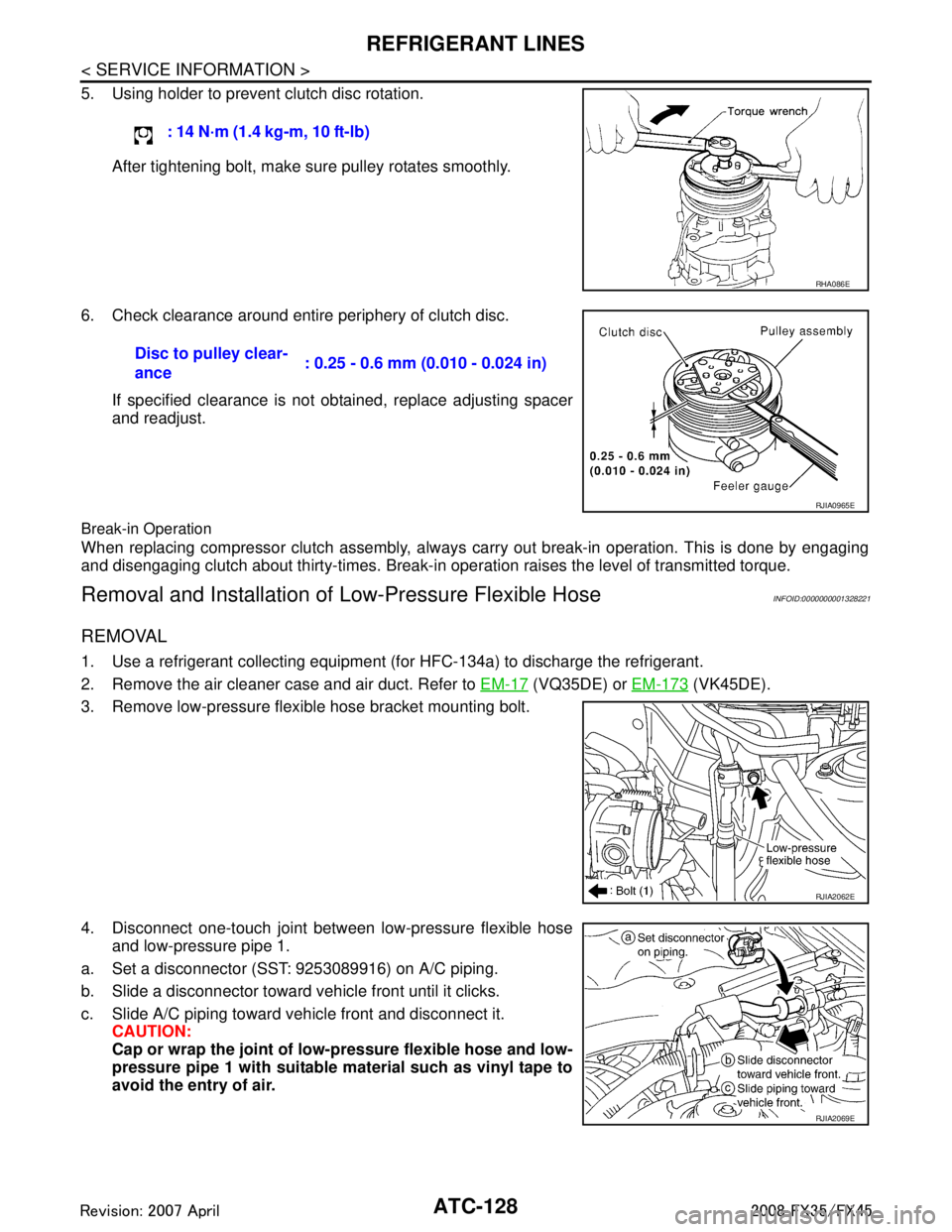
5. Using holder to prevent clutch disc rotation.After tightening bolt, make sure pulley rotates smoothly.
6. Check clearance around entire periphery of clutch disc. If specified clearance is not obtained, replace adjusting spacer
and readjust.
Break-in Operation
When replacing compressor clutch assembly, always carry out break-in operation. This is done by engaging
and disengaging clutch about thirty-times. Break-in oper ation raises the level of transmitted torque.
Removal and Installation of Low-Pressure Flexible HoseINFOID:0000000001328221
REMOVAL
1. Use a refrigerant collecting equipment (for HFC-134a) to discharge the refrigerant.
2. Remove the air cleaner case and air duct. Refer to EM-17
(VQ35DE) or EM-173 (VK45DE).
3. Remove low-pressure flexible hose bracket mounting bolt.
4. Disconnect one-touch joint between low-pressure flexible hose and low-pressure pipe 1.
a. Set a disconnector (SST: 9253089916) on A/C piping.
b. Slide a disconnector toward vehicle front until it clicks.
c. Slide A/C piping toward vehicle front and disconnect it. CAUTION:
Cap or wrap the joint of low- pressure flexible hose and low-
pressure pipe 1 with suitable material such as vinyl tape to
avoid the entry of air. : 14 N·m (1.4 kg-m, 10 ft-lb)
RHA086E
Disc to pulley clear-
ance
: 0.25 - 0.6 mm (0.010 - 0.024 in)
RJIA0965E
RJIA2062E
RJIA2069E
3AA93ABC3ACD3AC03ACA3AC03AC63AC53A913A773A893A873A873A8E3A773A983AC73AC93AC03AC3
3A893A873A873A8F3A773A9D3AAF3A8A3A8C3A863A9D3AAF3A8B3A8C
Page 661 of 3924
AV-114
< SERVICE INFORMATION >
NAVIGATION SYSTEM
Self-Diagnosis Mode (DCU)
INFOID:0000000001328753
OPERATION PROCEDURE
1. Start the engine.
2. Turn the audio system OFF.
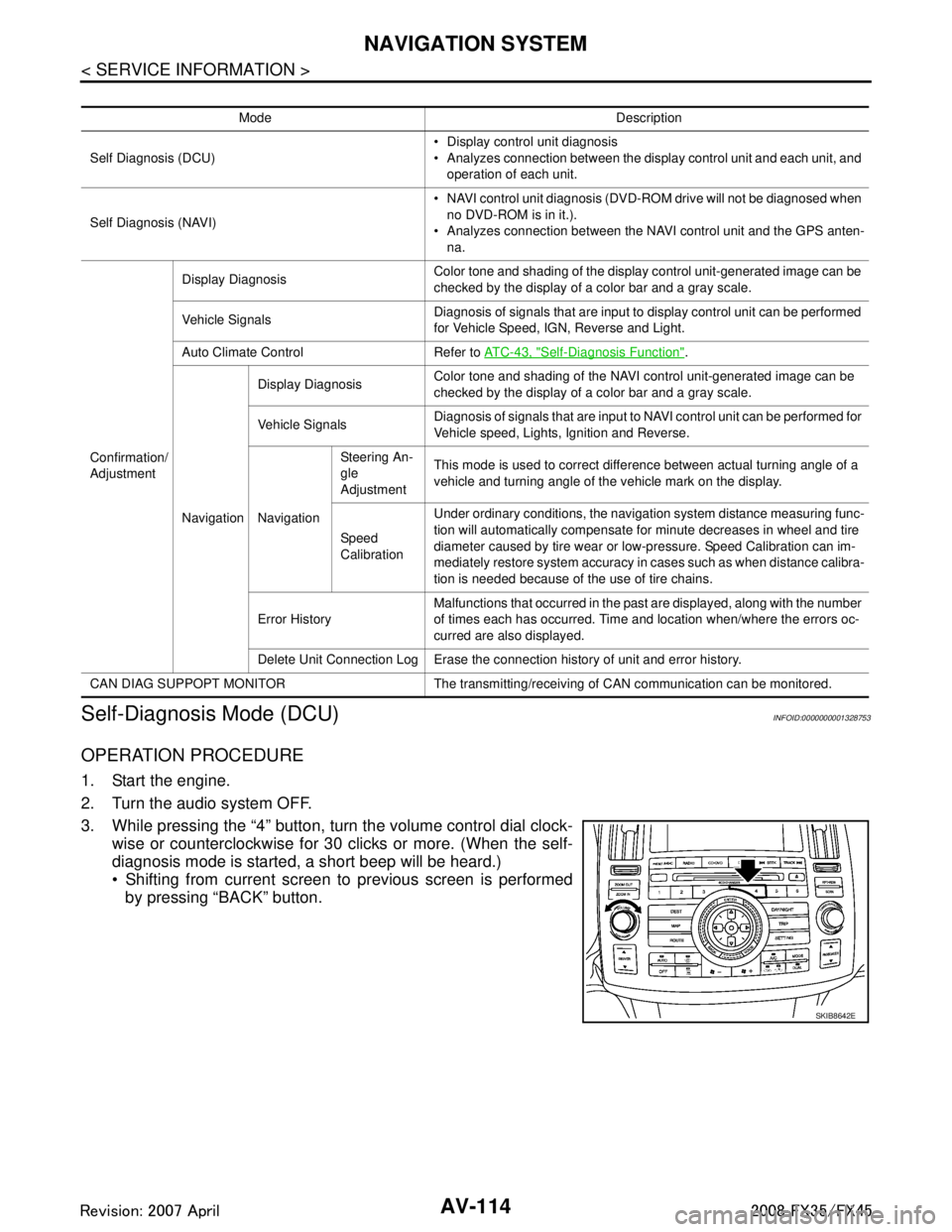
3. While pressing the “4” button, turn the volume control dial clock- wise or counterclockwise for 30 clicks or more. (When the self-
diagnosis mode is started, a short beep will be heard.)
Shifting from current screen to previous screen is performed
by pressing “BACK” button.
Mode Description
Self Diagnosis (DCU) Display control unit diagnosis
Analyzes connection between the display control unit and each unit, and
operation of each unit.
Self Diagnosis (NAVI) NAVI control unit diagnosis (DVD-ROM drive will not be diagnosed when
no DVD-ROM is in it.).
Analyzes connection between the NAVI control unit and the GPS anten-
na.
Confirmation/
Adjustment Display Diagnosis
Color tone and shading of the display control unit-generated image can be
checked by the display of a color bar and a gray scale.
Vehicle Signals Diagnosis of signals that are input to display control unit can be performed
for Vehicle Speed, IGN, Reverse and Light.
Auto Climate Control Refer to AT C - 4 3 , "
Self-Diagnosis Function".
Navigation Display Diagnosis
Color tone and shading of the NAVI control unit-generated image can be
checked by the display of a color bar and a gray scale.
Vehicle Signals Diagnosis of signals that are input to NAVI control unit can be performed for
Vehicle speed, Lights, Ignition and Reverse.
Navigation Steering An-
gle
Adjustment
This mode is used to correct difference between actual turning angle of a
vehicle and turning angle of the vehicle mark on the display.
Speed
Calibration Under ordinary conditions, the navigation system distance measuring func-
tion will automatically compensate for minute decreases in wheel and tire
diameter caused by tire wear or low-pressure. Speed Calibration can im-
mediately restore system accuracy in cases such as when distance calibra-
tion is needed because of the use of tire chains.
Error History Malfunctions that occurred in the past are displayed, along with the number
of times each has occurred. Time and location when/where the errors oc-
curred are also displayed.
Delete Unit Connection Log Erase the connection history of unit and error history.
CAN DIAG SUPPOPT MONITOR The transmitting/recei ving of CAN communication can be monitored.
SKIB8642E
3AA93ABC3ACD3AC03ACA3AC03AC63AC53A913A773A893A873A873A8E3A773A983AC73AC93AC03AC3
3A893A873A873A8F3A773A9D3AAF3A8A3A8C3A863A9D3AAF3A8B3A8C
Page 670 of 3924

NAVIGATION SYSTEMAV-123
< SERVICE INFORMATION >
C
DE
F
G H
I
J
L
M A
B
AV
N
O P
The steering angle output value detected by the gyroscope can be
adjusted.
Speed Calibration
Usually the automatic distance correction function adjusts the mal-
function in distance caused by the tires wearing down or the tire
pressure change. If prompt adjus tment is necessary when the tire
chains are installed, et c., perform this procedure.
Error History
Diagnosis results of self-diagnosis depend on if any error occurred during the time after selecting “Self Diag-
nosis” until self-diagnosis results is displayed.
Meanwhile, when an error occurs before selecting “Sel f Diagnosis”, and if an error does not occur until self-
diagnosis results is displayed, a diagnosis result is judged as normal.
Consequently, a diagnosis needs to be performed with “Error His tory” for the past error that is not available
with self-diagnosis.
“Error History” displays the time and place of the most re cent occurrence of that error. However, take note of
the following points.
Correct time of the error occurrence may not be displayed when the GPS antenna substrate within the NAVI
control unit has malfunctioned.
Place of the error occurrence is represented by the pos ition of the vehicle mark at the time when the error
occurred. If the vehicle mark has deviated from the co rrect position, then the place of the error occurrence
may not be located correctly.
When the ignition switch is turned ON if the error is det ected, the counter increases 1. Even if it is normal
when the ignition switch is turned ON t he next time, the counter does not decrease.
The upper limit of the counter is 50. 51 or more is displayed as 50. It can be reset to 0 by “Delete log” switch.
SKIB3684E
SKIB3685E
SKIB6978E
3AA93ABC3ACD3AC03ACA3AC03AC63AC53A913A773A893A873A873A8E3A773A983AC73AC93AC03AC3
3A893A873A873A8F3A773A9D3AAF3A8A3A8C3A863A9D3AAF3A8B3A8C
Page 727 of 3924
BCM (BODY CONTROL MODULE)BCS-7
< SERVICE INFORMATION >
C
DE
F
G H
I
J
L
M A
B
BCS
N
O P
- Door lock/unlock switch
- Front door switch (driver side, passenger side)
- Rear door switch (LH, RH)
- Back door opener switch
- Combination switch (passing, lighting switch 1ST position, front fog lamp)
- Key fob (lock/unlock signal)
- Key cylinder switch
When control performed only by BCM is required by switch, it shifts to CAN communication inactive mode.
Operation mode of combination switch reading function is changed.
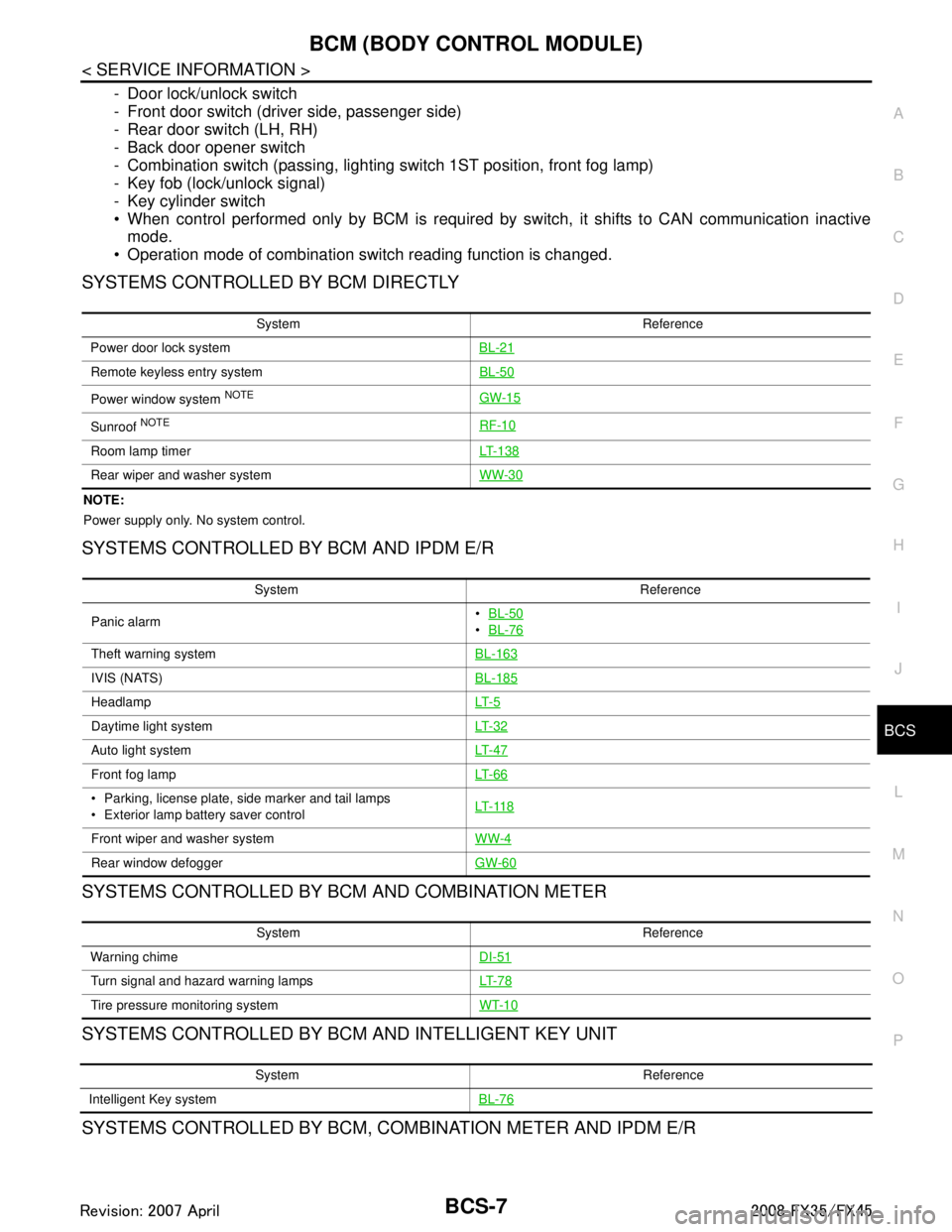
SYSTEMS CONTROLLED BY BCM DIRECTLY
NOTE:
Power supply only. No system control.
SYSTEMS CONTROLLED BY BCM AND IPDM E/R
SYSTEMS CONTROLLED BY BCM AND COMBINATION METER
SYSTEMS CONTROLLED BY BCM AND INTELLIGENT KEY UNIT
SYSTEMS CONTROLLED BY BCM, CO MBINATION METER AND IPDM E/R
System Reference
Power door lock system BL-21
Remote keyless entry systemBL-50
Power window system NOTEGW-15
Sunroof NOTERF-10
Room lamp timerLT- 1 3 8
Rear wiper and washer systemWW-30
System Reference
Panic alarm
BL-50
BL-76
Theft warning system BL-163
IVIS (NATS)BL-185
HeadlampLT- 5
Daytime light systemLT- 3 2
Auto light systemLT- 4 7
Front fog lampLT- 6 6
Parking, license plate, side marker and tail lamps
Exterior lamp battery saver control LT- 11 8
Front wiper and washer system
WW-4
Rear window defoggerGW-60
System Reference
Warning chime DI-51
Turn signal and hazard warning lampsLT- 7 8
Tire pressure monitoring systemWT-10
System Reference
Intelligent Key system BL-76
3AA93ABC3ACD3AC03ACA3AC03AC63AC53A913A773A893A873A873A8E3A773A983AC73AC93AC03AC3
3A893A873A873A8F3A773A9D3AAF3A8A3A8C3A863A9D3AAF3A8B3A8C
Page 729 of 3924

BCM (BODY CONTROL MODULE)BCS-9
< SERVICE INFORMATION >
C
DE
F
G H
I
J
L
M A
B
BCS
N
O P
CAN Communication UnitINFOID:0000000001328609
Refer to LAN-43, "CAN System Specification Chart".
Light warning chime Combination switch
Key switch
Front door switch driver sideCombination meter
(warning buzzer)
Seat belt warning chime Combination meter [Seat belt buckle (driver
side) switch]
Ignition switch Combination meter
(warning buzzer)
Front wiper and washer system Combination switch
Combination meter
Ignition switchIPDM E/R
Rear wiper and washer system Combination switch
Ignition switchRear wiper motor
Rear window defogger Rear window defogger switch
Ignition switch
IPDM E/R
A/C switch signal Unified meter and A/C amp. ECM
Blower fan switch signal Unified meter and A/C amp. ECM
Low tire pressure warning system Remote keyless entry receiver Combination meter System Input Output
3AA93ABC3ACD3AC03ACA3AC03AC63AC53A913A773A893A873A873A8E3A773A983AC73AC93AC03AC3
3A893A873A873A8F3A773A9D3AAF3A8A3A8C3A863A9D3AAF3A8B3A8C
Page 732 of 3924

BCS-12
< SERVICE INFORMATION >
BCM (BODY CONTROL MODULE)
ITEMS OF EACH PART
BCM can perform the following functions for each system.
NOTE:
CONSULT-III displays systems equipped in the vehicle.
×:Applicable
NOTE:
*1: Vehicle with remote keyless entry system display this item.
*2: Vehicle with Intelligent Key system display this item.
*3: This item is displayed, but does not function.
WORK SUPPORT
Display Item List
BCM Diagnostic test item Check item, diagnostic test mode Content
Inspection by part WORK SUPPORT Changes setting of each function.
SELF-DIAG RESULTS BCM performs self-diagnosis of CAN communication.
DATA MONITOR Displays the input data of BCM in real time.
CAN DIAG SUPPORT MNTR
The transmit/receive diagnosis result of CAN communication can be
read.
ACTIVE TEST Gives a drive signal to a load to check the operation.
ECU PART NUMBER ECM part number can be read.
CONFIGURATION (Not be used)
System and item CONSULT-III display Diagnostic test mode (Inspection by part)
WORK SUPPORT DATA MONITOR ACTIVE TEST
BCM BCM ×
Power door lock system DOOR LOCK ×××
Rear window defogger REAR DEFOGGER ××
Warning chime BUZZER ××
Room lamp timer INT LAMP ×××
Remote keyless entry system*
1MULTI REMOTE ENT ×××
Headlamp HEAD LAMP ×××
Wiper WIPER ×××
Turn signal lamp
Hazard lamp FLASHER
××
Blower fan switch signal
A/C switch signal AIR CONDITONER
×
Intelligent Key system*
2INTELLIGENT KEY ×
Combination switch COMB SW ×
NVIS IMMU ××
Room lamp battery saver BATTERY SAVER ×× ×
Trunk lid TRUNK*
3××
Vehicle security system THEFT ALM ×××
Retained power control RETAINED PWR ×××
Oil pressure swit ch SIGNAL BUFFER ××
Low tire pressure warning system AIR PRESSURE MONITOR ×××
Panic system PANIC ALARM ×
3AA93ABC3ACD3AC03ACA3AC03AC63AC53A913A773A893A873A873A8E3A773A983AC73AC93AC03AC3
3A893A873A873A8F3A773A9D3AAF3A8A3A8C3A863A9D3AAF3A8B3A8C
Page 1023 of 3924
![INFINITI FX35 2008 Service Manual
BRC-8
< SERVICE INFORMATION >[VDC/TCS/ABS]
ON-VEHICLE SERVICE
ON-VEHICLE SERVICE
Adjustment of Steering Angl
e Sensor Neutral PositionINFOID:0000000001327658
In case of doing work that applies to the](/img/42/57017/w960_57017-1022.png "INFINITI FX35 2008 Service Manual
BRC-8
< SERVICE INFORMATION >[VDC/TCS/ABS]
ON-VEHICLE SERVICE
ON-VEHICLE SERVICE
Adjustment of Steering Angl
e Sensor Neutral PositionINFOID:0000000001327658
In case of doing work that applies to the")
BRC-8
< SERVICE INFORMATION >[VDC/TCS/ABS]
ON-VEHICLE SERVICE
ON-VEHICLE SERVICE
Adjustment of Steering Angl
e Sensor Neutral PositionINFOID:0000000001327658
In case of doing work that applies to the list below, make sure to adjust neutral position of steering angle sen-
sor before running vehicle.
CAUTION:
To adjust neutral position of steering angl e sensor, make sure to use CONSULT-III.
(Adjustment can not be done without CONSULT-III.)
1. Stop vehicle with front wheels in straight-ahead position.
2. Touch “WORK SUPPORT” and “ST ANGLE SENSOR ADJUSTMENT” on CONSULT-III screen in this order.
3. Touch “START”. CAUTION:
Do not touch steering wheel whil e adjusting steering angle sensor.
4. After approximately 10 seconds, touch “END”. (After approximately 60 seconds, it ends automatically.)
5. Turn ignition switch OFF, then turn it ON again. CAUTION:
Be sure to perform above operation.
6. Run vehicle with front wheels in straight-ahead position, then stop.
7. Select “DATA MONITOR”, “SELECTION FROM ME NU”, and “STR ANGLE SIG” on CONSULT-III screen.
Then make sure “STR ANGLE SIG” is within 0 ± 3.5 deg. If value is more than specification, repeat steps
1 to 6.
8. Erase memory of ABS actuator and electric unit (control unit) and ECM.
9. Turn ignition switch OFF.
Calibration of Decel G Sensor (AWD Models)INFOID:0000000001327659
NOTE:
After removing/installing or replacing yaw rate/side/dec el G sensor, ABS actuator and electric unit (control
unit), suspension components, or after adjusting wheel ali gnment, make sure to calibration of decel G sensor
before running vehicle.
CAUTION:
To calibrate decel G sensor, make sure to use CONS ULT-III. (Adjustment can not be done without CON-
SULT-III.)
1. Stop vehicle with front wheels in straight-ahead position.
CAUTION:
The work should be done at a horizontal place when vehicle is in the unloaded vehicle condition.
Keep all tires inflated to correct pressures. Ad just the tire pressure to the specified pressure
value.
2. Touch “WORK SUPPORT” and “DECEL G-SEN CALI BRATION” on CONSULT-III screen in this order.
3. Touch “START”. CAUTION:
Set vehicle as shown in the display.
4. After approximately 10 seconds, touch “END”. (After approximately 60 seconds, it ends automatically.)
Situation Adjustment of Steering Angle Sensor Neutral Position
Removing/Installing ABS actuator and electric unit (control unit) —
Replacing ABS actuator and electric unit (control unit) ×
Removing/Installing steering angle sensor ×
Removing/Installing steering components ×
Removing/Installing suspension components ×
Change 4 tires to new ones —
Tire rotation —
Adjusting wheel alignment ×
3AA93ABC3ACD3AC03ACA3AC03AC63AC53A913A773A893A873A873A8E3A773A983AC73AC93AC03AC3
3A893A873A873A8F3A773A9D3AAF3A8A3A8C3A863A9D3AAF3A8B3A8C