roof INFINITI FX35 2008 Service Manual
[x] Cancel search | Manufacturer: INFINITI, Model Year: 2008, Model line: FX35, Model: INFINITI FX35 2008Pages: 3924, PDF Size: 81.37 MB
Page 1 of 3924
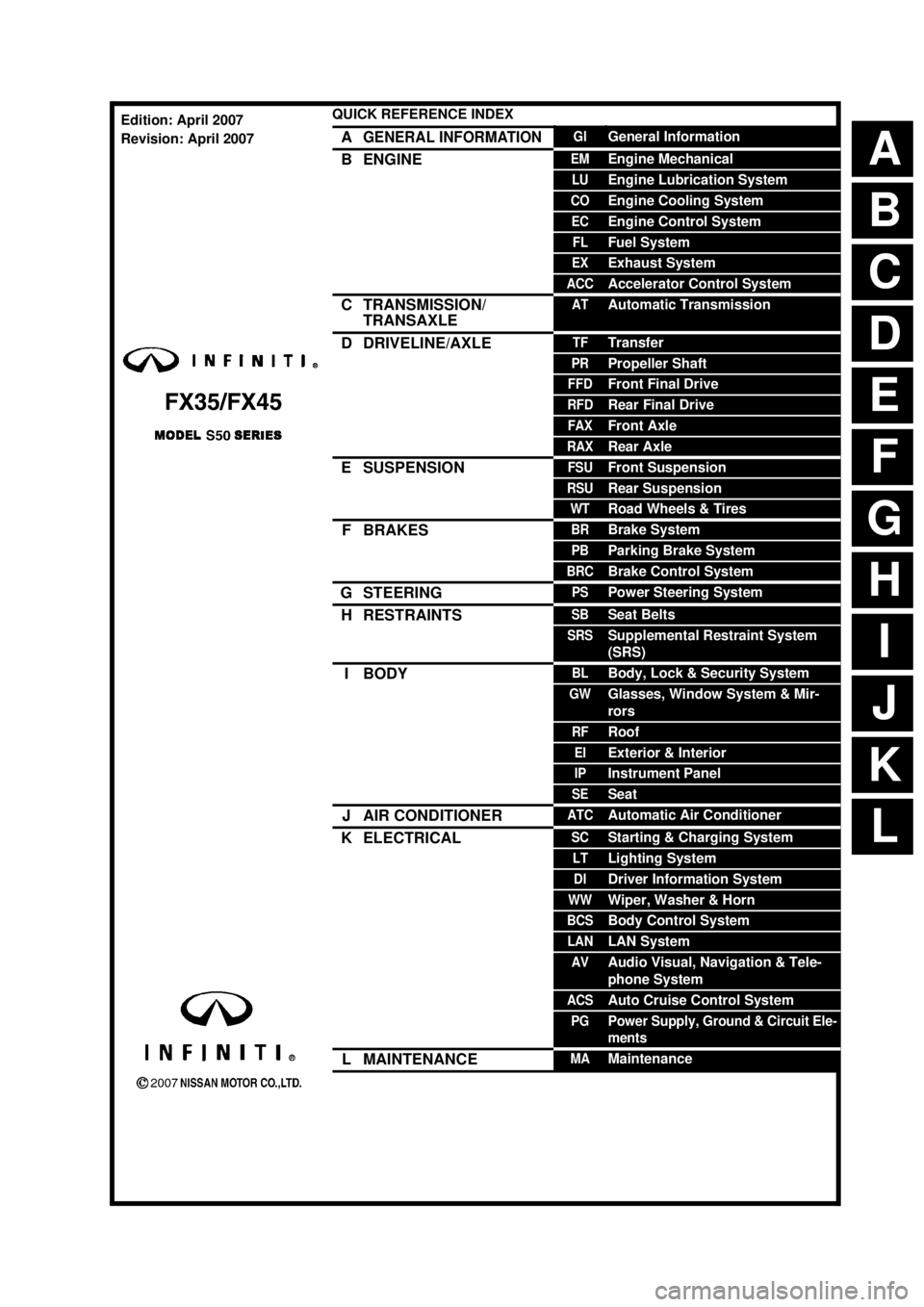
ABCDEFGHIJKLQUICK REFERENCE INDEX AGENERAL INFORMATIONGIGeneral InformationBENGINEEMEngine MechanicalLUEngine Lubrication SystemCOEngine Cooling SystemECEngine Control SystemFLFuel SystemEXExhaust SystemACCAccelerator Control SystemCTRANSMISSION/
TRANSAXLEATAutomatic TransmissionDDRIVELINE/AXLETFTransferPRPropeller ShaftFFDFront Final DriveRFDRear Final DriveFAXFront AxleRAXRear AxleESUSPENSIONFSUFront SuspensionRSURear SuspensionWTRoad Wheels & TiresFBRAKESBRBrake SystemPBParking Brake SystemBRCBrake Control SystemGSTEERINGPSPower Steering SystemHRESTRAINTSSBSeat BeltsSRSSupplemental Restraint System
(SRS)IBODYBLBody, Lock & Security SystemGWGlasses, Window System & Mir-
rorsRFRoofEIExterior & InteriorIPInstrument PanelSESeatJAIR CONDITIONERATCAutomatic Air ConditionerKELECTRICALSCStarting & Charging SystemLTLighting SystemDIDriver Information SystemWWWiper, Washer & HornBCSBody Control SystemLANLAN SystemAVAudio Visual, Navigation & Tele-
phone SystemACSAuto Cruise Control SystemPGPower Supply, Ground & Circuit Ele-
mentsLMAINTENANCEMAMaintenanceEdition: April 2007
Revision: April 2007
Page 548 of 3924

AV-1
ELECTRICAL
C
DE
F
G H
I
J
L
M
SECTION AV
A
B
AV
N
O P
CONTENTS
AUDIO VISUAL, NAVIGATION & TELEPHONE SYS- TEM
SERVICE INFORMATION ............................3
PRECAUTIONS .............................................. .....3
Precaution for Supplemental Restraint System
(SRS) "AIR BAG" and "SEAT BELT PRE-TEN-
SIONER" ............................................................. ......
3
PREPARATION ...................................................4
Commercial Service Tool .................................... ......4
AUDIO .................................................................5
System Description ............................................. ......5
Component Parts Location ........................................6
Schematic - AUDIO - / with Navigation System ........7
Wiring Diagram - AUDIO - / with Navigation Sys-
tem ............................................................................
8
Schematic - AUDIO - without Navigation System ....18
Wiring Diagram - AUDIO - / without Navigation
System ....................................................................
19
Terminal and Reference Value for Audio Unit .........28
Terminal and Reference Value for BOSE Speaker
Amp .........................................................................
30
Terminal and Reference Value for A/C and AV
Switch ......................................................................
32
Terminal and Reference Value for Woofer ..............33
Terminal and Reference Value for Satellite Radio
Tuner ................................................................... ....
34
A/C and AV Switch Self-Diagnosis Function ...........34
Trouble Diagnosis ...................................................35
Power Supply Circuit Inspection .............................36
Audio Steering Wheel Switch Inspection ................37
A/C and AV Switch Inspection ................................39
BOSE Speaker Amp. Inspection .............................39
Vehicle Speed Signal Inspection .............................40
Locking CD Auto-Changer Mechanism ...................41
Removal and Installation of Audio Unit ...................41
Disassembly and Assembly of Audio Unit ...............42
Removal and Installation for A/C and AV Switch ....42
Removal and Installation for Front Door Speaker ....43
Removal and Installation for Rear Door Speaker ....43
Removal and Installation for Instrument Speaker ....43
Removal and Installation for Tweeter .................. ....44
Removal and Installation for Woofer (BOSE Sys-
tem) .........................................................................
44
Removal and Installation for BOSE Speaker Amp ....44
Removal and Installation of Satellite Radio Tuner ....45
Removal and Installation of Satellite Radio Anten-
na ......................................................................... ....
45
ANTENNA .........................................................46
System Description ..................................................46
Wiring Diagram - M/ANT - .......................................47
Terminal and Reference Value for Audio Unit .........48
Antenna Amp. Inspection ........................................48
Location of Antenna .................................................49
Window Antenna Repair ..........................................49
Removal and Installation of Roof Antenna ..............51
Removal and Installation of Satellite Radio Anten-
na ......................................................................... ....
51
INTEGRATED DISPLAY SYSTEM ...................52
System Description ..................................................52
Component Description ...........................................52
CAN Communication Unit ........................................53
Component Parts Location ......................................53
Schematic - INF/D - .................................................54
Wiring Diagram - INF/D - .........................................55
Schematic - COMM - ...............................................61
Wiring Diagram - COMM - .......................................62
Terminal and Reference Value for Display Control
Unit ...................................................................... ....
67
Terminal and Reference Value for Display ..............69
Terminal and Reference Value for A/C and AV
Switch ......................................................................
71
Special Note for Trouble Diagnosis .........................72
On Board Self-Diagnosis Function ..........................72
Self-Diagnosis Mode (DCU) ....................................73
Confirmation/Adjustment Mode ...............................75
CAN Diagnostic Support Monitor .............................77
A/C and AV Switch Self-Diagnosis Function ...........78
CAN Communication Check ....................................79
3AA93ABC3ACD3AC03ACA3AC03AC63AC53A913A773A893A873A873A8E3A773A983AC73AC93AC03AC3
3A893A873A873A8F3A773A9D3AAF3A8A3A8C3A863A9D3AAF3A8B3A8C
Page 583 of 3924

AV-36
< SERVICE INFORMATION >
AUDIO
NOTE:
Noise resulting from variations in field strength, such as fading noise and multi-path noise, or external noise
from trains and other source s. It is not a malfunction.
Fading noise: This noise occurs because of variations in the field strength in a narrow range due to moun- tains or buildings blocking the signal.
Multi-path noise: This noise results from a time di fference between the broadcast waves directly from the
station arriving at the antenna and the waves reflected by mountains or buildings.
Power Supply Circuit InspectionINFOID:0000000001328685
1.CHECK FUSE
Make sure that the following fuses of the BOSE speaker amp., woofer, and audio unit are not blown.
OK or NG
OK >> GO TO 2.
NG >> If fuse is blown, be sure to eliminate caus e of malfunction before installing new fuse. Refer to PG-
3.
2.CHECK POWER SUPPLY CIRCUIT
1. Check voltage between audio unit harness connector terminals and ground.
No sound can be heard from radio or noise is caught. Antenna amp. ON signal circuit
Antenna feeder
Roof antenna
Antenna amp.
Audio unit
Audio steering switch does not operate properly. Remote control signal circuit between audio steering switch and A/C and
AV switch
Audio steering switch
Spiral cable
TEL adapter unit (With telephone system)
A/C and AV switch
Symptom Possible malfunction location
Unit Terminal Signal name Fuse No.
Audio unit 6 Battery power supply 32
10 ACC power supply 6
BOSE speaker amp. 1 Battery power supply 17
Woofer 1 Battery power supply 32
Te r m i n a l s Ignition
switch Vo l ta g e
(+)
(–)
Connector Terminal
M58 6 Ground OFF Battery voltage
10 Ground ACC Battery voltage
PKIA3814E
3AA93ABC3ACD3AC03ACA3AC03AC63AC53A913A773A893A873A873A8E3A773A983AC73AC93AC03AC3
3A893A873A873A8F3A773A9D3AAF3A8A3A8C3A863A9D3AAF3A8B3A8C
Page 592 of 3924
AUDIOAV-45
< SERVICE INFORMATION >
C
DE
F
G H
I
J
L
M A
B
AV
N
O P
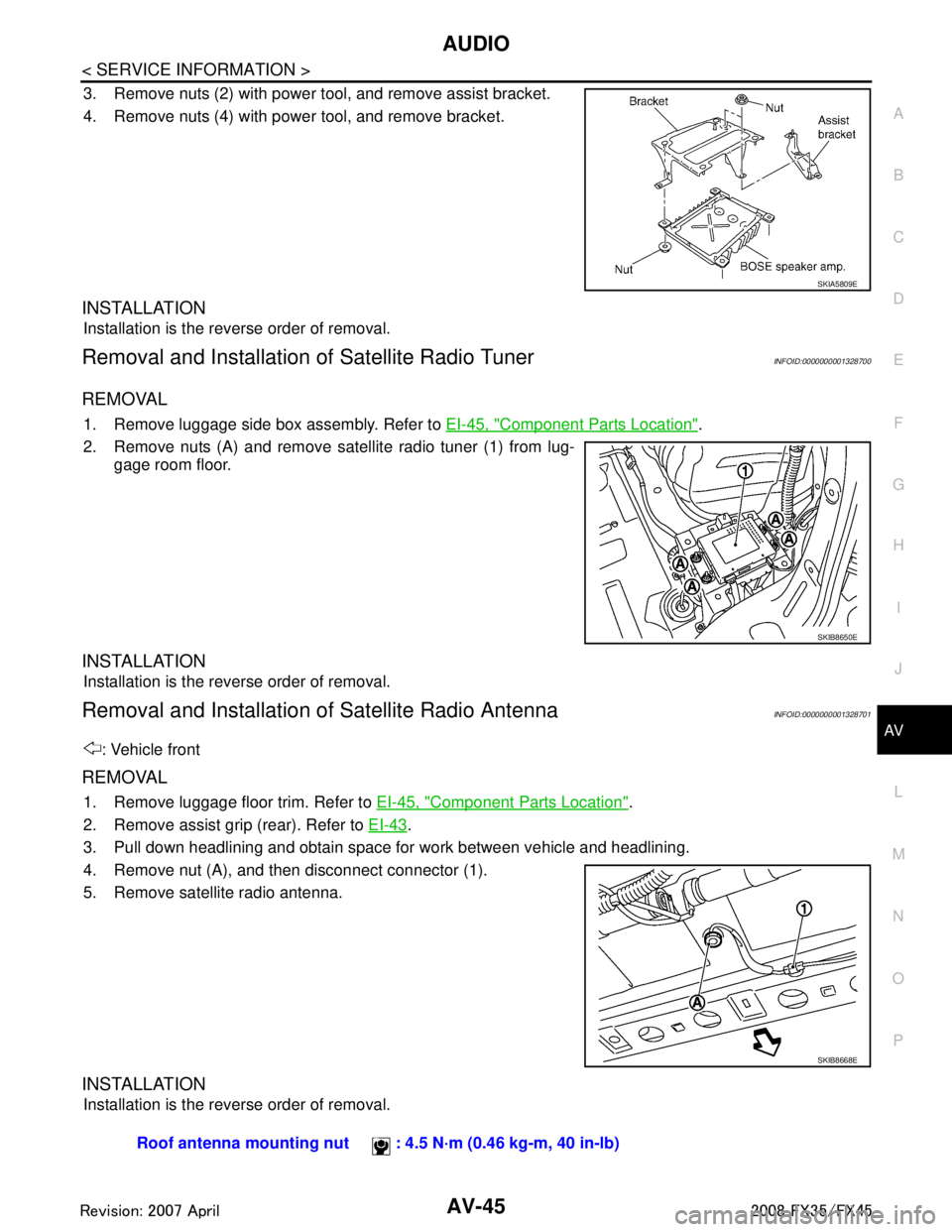
3. Remove nuts (2) with power tool, and remove assist bracket.
4. Remove nuts (4) with power tool, and remove bracket.
INSTALLATION
Installation is the reverse order of removal.
Removal and Installation of Satellite Radio TunerINFOID:0000000001328700
REMOVAL
1. Remove luggage side box assembly. Refer to EI-45, "Component Parts Location".
2. Remove nuts (A) and remove satellite radio tuner (1) from lug- gage room floor.
INSTALLATION
Installation is the reverse order of removal.
Removal and Installation of Satellite Radio AntennaINFOID:0000000001328701
: Vehicle front
REMOVAL
1. Remove luggage floor trim. Refer to EI-45, "Component Parts Location".
2. Remove assist grip (rear). Refer to EI-43
.
3. Pull down headlining and obtain space for work between vehicle and headlining.
4. Remove nut (A), and then disconnect connector (1).
5. Remove satellite radio antenna.
INSTALLATION
Installation is the reverse order of removal.
SKIA5809E
SKIB8650E
SKIB8668E
Roof antenna mounting nut : 4.5 N·m (0.46 kg-m, 40 in-lb)
3AA93ABC3ACD3AC03ACA3AC03AC63AC53A913A773A893A873A873A8E3A773A983AC73AC93AC03AC3
3A893A873A873A8F3A773A9D3AAF3A8A3A8C3A863A9D3AAF3A8B3A8C
Page 598 of 3924
ANTENNAAV-51
< SERVICE INFORMATION >
C
DE
F
G H
I
J
L
M A
B
AV
N
O P
Removal and Installati on of Roof AntennaINFOID:0000000001328708
REMOVAL
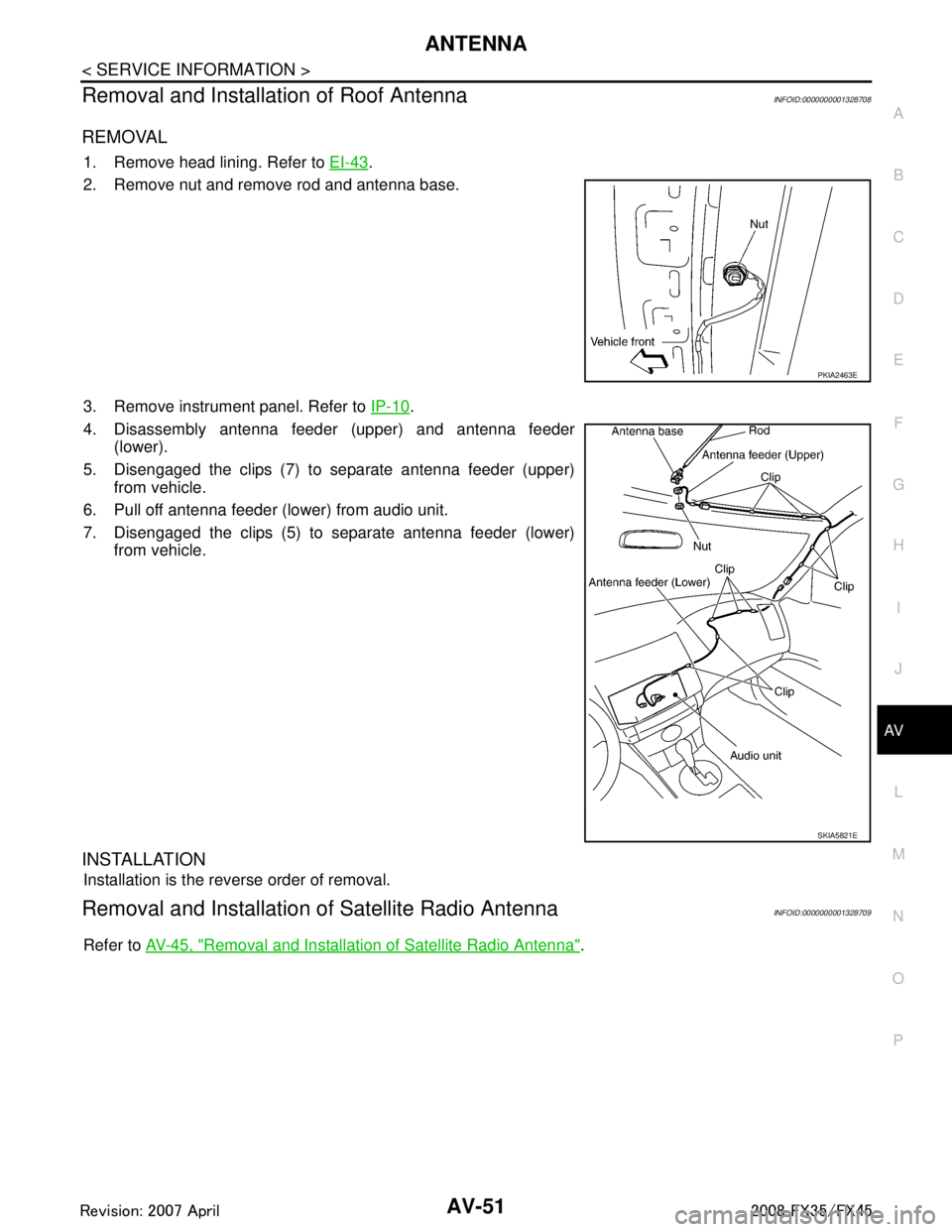
1. Remove head lining. Refer to EI-43.
2. Remove nut and remove rod and antenna base.
3. Remove instrument panel. Refer to IP-10
.
4. Disassembly antenna feeder (upper) and antenna feeder (lower).
5. Disengaged the clips (7) to separate antenna feeder (upper) from vehicle.
6. Pull off antenna feeder (lower) from audio unit.
7. Disengaged the clips (5) to separate antenna feeder (lower) from vehicle.
INSTALLATION
Installation is the reverse order of removal.
Removal and Installation of Satellite Radio AntennaINFOID:0000000001328709
Refer to AV-45, "Removal and Installation of Satellite Radio Antenna".
PKIA2463E
SKIA5821E
3AA93ABC3ACD3AC03ACA3AC03AC63AC53A913A773A893A873A873A8E3A773A983AC73AC93AC03AC3
3A893A873A873A8F3A773A9D3AAF3A8A3A8C3A863A9D3AAF3A8B3A8C
Page 720 of 3924
TELEPHONEAV-173
< SERVICE INFORMATION >
C
DE
F
G H
I
J
L
M A
B
AV
N
O P
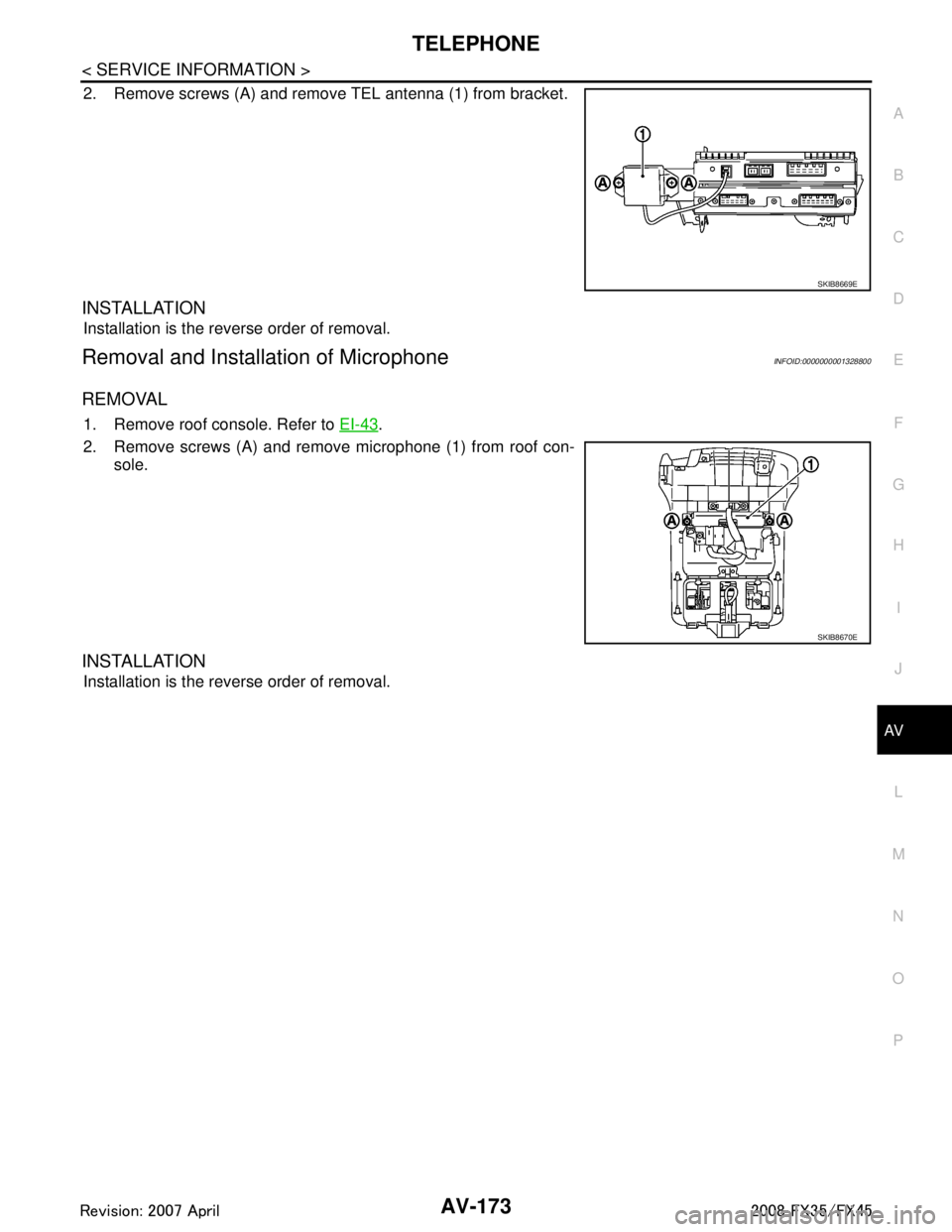
2. Remove screws (A) and remove TEL antenna (1) from bracket.
INSTALLATION
Installation is the reverse order of removal.
Removal and Installation of MicrophoneINFOID:0000000001328800
REMOVAL
1. Remove roof console. Refer to EI-43.
2. Remove screws (A) and remove microphone (1) from roof con- sole.
INSTALLATION
Installation is the reverse order of removal.
SKIB8669E
SKIB8670E
3AA93ABC3ACD3AC03ACA3AC03AC63AC53A913A773A893A873A873A8E3A773A983AC73AC93AC03AC3
3A893A873A873A8F3A773A9D3AAF3A8A3A8C3A863A9D3AAF3A8B3A8C
Page 727 of 3924
BCM (BODY CONTROL MODULE)BCS-7
< SERVICE INFORMATION >
C
DE
F
G H
I
J
L
M A
B
BCS
N
O P
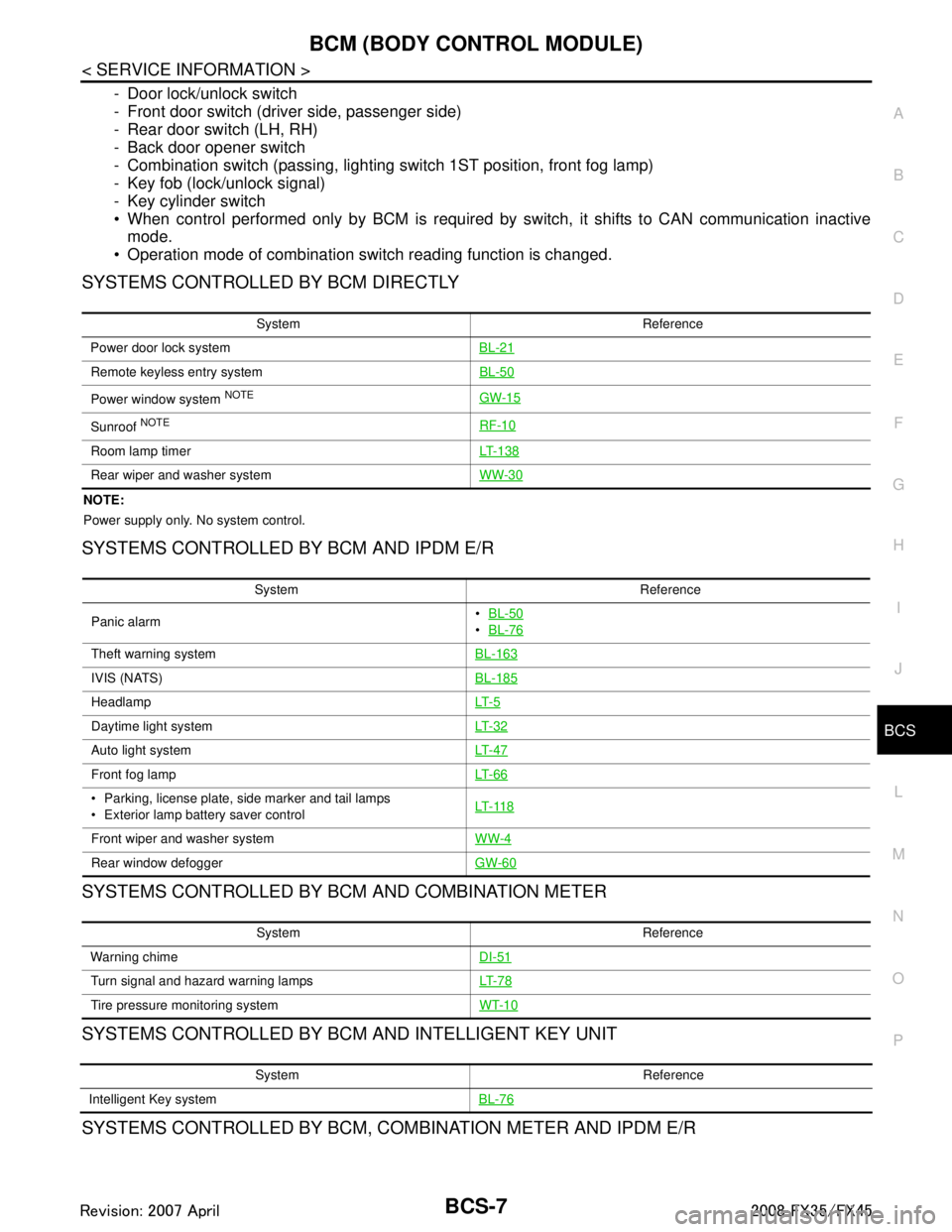
- Door lock/unlock switch
- Front door switch (driver side, passenger side)
- Rear door switch (LH, RH)
- Back door opener switch
- Combination switch (passing, lighting switch 1ST position, front fog lamp)
- Key fob (lock/unlock signal)
- Key cylinder switch
When control performed only by BCM is required by switch, it shifts to CAN communication inactive mode.
Operation mode of combination switch reading function is changed.
SYSTEMS CONTROLLED BY BCM DIRECTLY
NOTE:
Power supply only. No system control.
SYSTEMS CONTROLLED BY BCM AND IPDM E/R
SYSTEMS CONTROLLED BY BCM AND COMBINATION METER
SYSTEMS CONTROLLED BY BCM AND INTELLIGENT KEY UNIT
SYSTEMS CONTROLLED BY BCM, CO MBINATION METER AND IPDM E/R
System Reference
Power door lock system BL-21
Remote keyless entry systemBL-50
Power window system NOTEGW-15
Sunroof NOTERF-10
Room lamp timerLT- 1 3 8
Rear wiper and washer systemWW-30
System Reference
Panic alarm
BL-50
BL-76
Theft warning system BL-163
IVIS (NATS)BL-185
HeadlampLT- 5
Daytime light systemLT- 3 2
Auto light systemLT- 4 7
Front fog lampLT- 6 6
Parking, license plate, side marker and tail lamps
Exterior lamp battery saver control LT- 11 8
Front wiper and washer system
WW-4
Rear window defoggerGW-60
System Reference
Warning chime DI-51
Turn signal and hazard warning lampsLT- 7 8
Tire pressure monitoring systemWT-10
System Reference
Intelligent Key system BL-76
3AA93ABC3ACD3AC03ACA3AC03AC63AC53A913A773A893A873A873A8E3A773A983AC73AC93AC03AC3
3A893A873A873A8F3A773A9D3AAF3A8A3A8C3A863A9D3AAF3A8B3A8C
Page 728 of 3924

BCS-8
< SERVICE INFORMATION >
BCM (BODY CONTROL MODULE)
MAJOR COMPONENTS AND CONTROL SYSTEM
System Reference
Oil pressure warning lamp DI-34
System Input Output
Remote control entry system Key fob All-door locking actuator
Fuel lid Lock actuator
Turn signal lamp (LH, RH)
Combination meter
Intelligent Key system Intelligent Key unit All-door locking actuator
Fuel lid Lock actuator
Turn signal lamp (LH, RH)
Combination meter
Power door lock system Power window main switch
(door lock and unlock switch)
Power window sub switch (passenger side) (door lock and unlock switch) All-door locking actuator
Power supply (IGN) to power window, sunroof Ignition power supply Power window and sunroof system
Power supply (BAT) to power window, sunroof
and power seat Battery power supplyPower window, sunroof system and
power seat
Panic alarm Key switch
Key fobIPDM E/R
Theft warning system All-door switch
Hood switch
Key fob
Power window main switch (door lock and
unlock switch)
Power window sub switch (passenger side) (door lock and unlock switch) IPDM E/R
Security indicator lamp
Auto light system Optical sensor
Combination switch
Ignition switchIPDM E/R
Exterior lamp battery saver control Ignition switch
Combination switchIPDM E/R
Headlamp Combination switch IPDM E/R
Daytime light system Combination meter
ECM
Combination switch
Ignition switchIPDM E/R
Parking, license plate, side marker and tail
lamps Combination switch IPDM E/R
Front fog lamp Combination switch IPDM E/R
Turn signal lamp Combination switch
Ignition switch Turn signal lamp
Combination meter
Hazard lamp Hazard switch Turn signal lamp
Combination meter
Room lamp timer Key switch
Key fob
Power window main switch (door lock and
unlock switch)
Front door switch driver side
All-door switch Interior room lamp
Key warning chime Key switch
Front door switch driver sideCombination meter
(warning buzzer)
3AA93ABC3ACD3AC03ACA3AC03AC63AC53A913A773A893A873A873A8E3A773A983AC73AC93AC03AC3
3A893A873A873A8F3A773A9D3AAF3A8A3A8C3A863A9D3AAF3A8B3A8C
Page 744 of 3924

BL-10
< SERVICE INFORMATION >
SQUEAK AND RATTLE TROUBLE DIAGNOSIS
Most of these incidents can be repaired by adjusting, securing or insulating the item(s) or component(s) caus-
ing the noise.
SUNROOF/HEADLINING
Noises in the sunroof/headlining area c an often be traced to one of the following:
1. Sunroof lid, rail, linkage or seals making a rattle or light knocking noise
2. Sunvisor shaft shaking in the holder
3. Front or rear windshield touching headlining and squeaking
Again, pressing on the components to stop the noise while duplicating the conditions can isolate most of these
incidents. Repairs usually consist of insulating with felt cloth tape.
SEATS
When isolating seat noise it's important to note the pos ition the seat is in and the load placed on the seat when
the noise is present. These conditions should be dupl icated when verifying and isolating the cause of the
noise.
Cause of seat noise include:
1. Headrest rods and holder
2. A squeak between the seat pad cushion and frame
3. The rear seatback lock and bracket
These noises can be isolated by moving or pressing on the suspected components while duplicating the con-
ditions under which the noise occurs. Most of thes e incidents can be repaired by repositioning the component
or applying urethane tape to the contact area.
UNDERHOOD
Some interior noise may be caused by components under the hood or on the engine wall. The noise is then
transmitted into the passenger room.
Causes of transmitted underhood noise include:
1. Any component mounted to the engine wall
2. Components that pass through the engine wall
3. Engine wall mounts and connectors
4. Loose radiator mounting pins
5. Hood bumpers out of adjustment
6. Hood striker out of adjustment
These noises can be difficult to isolate since they cannot be reached from the interior of the vehicle. The best
method is to secure, move or insulate one component at a time and test drive the \
vehicle. Also, engine RPM
or load can be changed to isolate the noise. Repairs can usually be made by moving, adjusting, securing, or
insulating the component causing the noise.
3AA93ABC3ACD3AC03ACA3AC03AC63AC53A913A773A893A873A873A8E3A773A983AC73AC93AC03AC3
3A893A873A873A8F3A773A9D3AAF3A8A3A8C3A863A9D3AAF3A8B3A8C
Page 875 of 3924
BACK DOORBL-141
< SERVICE INFORMATION >
C
DE
F
G H
J
K L
M A
B
BL
N
O P
BACK DOOR
Fitting AdjustmentINFOID:0000000001327879
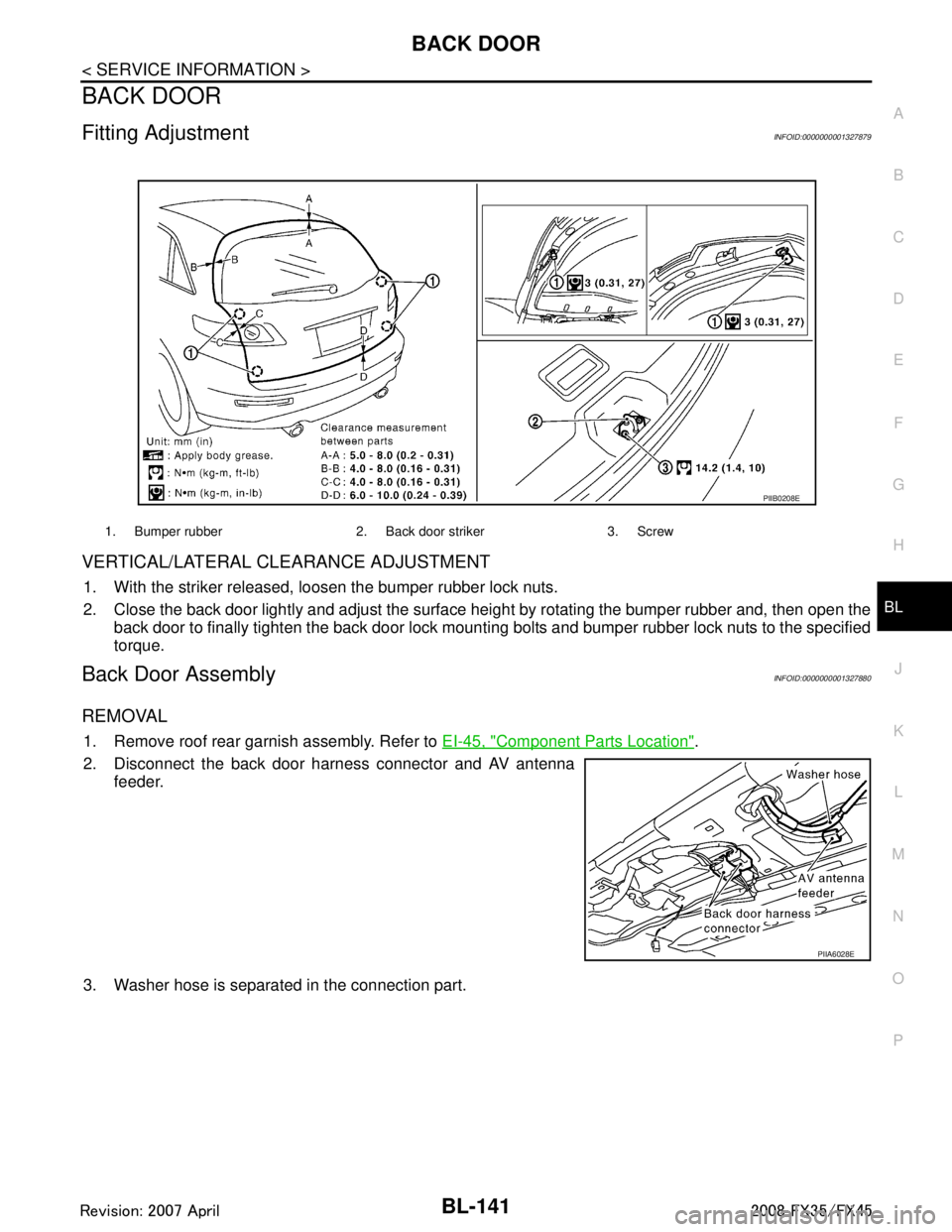
VERTICAL/LATERAL CLEARANCE ADJUSTMENT
1. With the striker released, loosen the bumper rubber lock nuts.
2. Close the back door lightly and adjust the surface height by rotating the bumper rubber and, then open the
back door to finally tighten the back door lock mounti ng bolts and bumper rubber lock nuts to the specified
torque.
Back Door AssemblyINFOID:0000000001327880
REMOVAL
1. Remove roof rear garnish assembly. Refer to EI-45, "Component Parts Location".
2. Disconnect the back door harness connector and AV antenna feeder.
3. Washer hose is separated in the connection part.
1. Bumper rubber 2. Back door striker 3. Screw
PIIB0208E
PIIA6028E
3AA93ABC3ACD3AC03ACA3AC03AC63AC53A913A773A893A873A873A8E3A773A983AC73AC93AC03AC3
3A893A873A873A8F3A773A9D3AAF3A8A3A8C3A863A9D3AAF3A8B3A8C