ignition INFINITI G CONVERTIBLE 2013 Manual Online
[x] Cancel search | Manufacturer: INFINITI, Model Year: 2013, Model line: G CONVERTIBLE, Model: INFINITI G CONVERTIBLE 2013Pages: 466
Page 315 of 466

5-14Starting and driving
The selector lever cannot be moved out of
the P (Park) position and into any of the
other gear positions if the ignition switch
is pushed to the LOCK, OFF or ACC
position.
1. Keep the foot brake pedal depressedand push the selector lever button to
shift into a driving gear.
2. Release the parking brake and foot brake, then gradually start the vehicle
in motion.
WARNING
. Do not depress the accelerator pedal
while shifting from P (Park) or N
(Neutral) to R (Reverse), D (Drive), DS
(Drive Sport) or manual shift mode.
Always depress the brake pedal until
shifting is completed. Failure to do so
could cause you to lose control and have
an accident.
. Cold engine idle speed is high, so use
caution when shifting into a forward or
reverse gear before the engine has
warmed up.
. Never shift to P (Park) or R (Reverse)
while vehicle is moving forward. Never shift to P (Park), D (Drive) or DS (Drive
Sport) while vehicle is moving rearward.
Failure to do so could cause you to lose
control and have an accident.
CAUTION
.
When stopping the vehicle on an uphill
grade, do not hold the vehicle by
depressing the accelerator pedal. The
foot brake should be used for this
purpose.
. Do not downshift abruptly on slippery
roads. This may cause a loss of control.
SSD0596
Selector lever
To move the selector lever,
: Push the button while depressing the brake pedal,
: Push the button,
: Just move the selector lever.
ShiftingGUID-D7BE0023-45FB-4407-8021-50172CE62578After starting the engine, fully depress the
brake pedal and shift the selector lever
from P (Park) to R (Reverse), N (Neutral), D
(Drive), DS (Drive Sport) or Manual shift
mode position.
Push the button to shift into P (Park) or R
(Reverse). All other positions can be
selected without pushing the button.
Page 318 of 466
.In the manual shift mode, the transmis-
sion automatically shifts down to 1st
gear before the vehicle comes to a
stop. When accelerating again, it is
necessary to shift up to the desired
range.
Accelerator downshift —In D (Drive)
position —
GUID-06BB20B5-DB70-4A4E-BFAD-8895E4D6A7ADFor passing or hill climbing, fully depress
the accelerator pedal to the floor. This
shifts the transmission down into the lower
gear, depending on the vehicle speed.
Fail-safeGUID-95D61986-6CBA-49FB-BC3E-01783BEA6F87When the fail-safe operation occurs, note
that the transmission will be locked in any
of the forward gears according to the
condition.
If the vehicle is driven under extreme
conditions, such as excessive wheel spin-
ning and subsequent hard braking, the
fail-safe system may be activated. This will
occur even if all electrical circuits are
functioning properly. In this case, push
the ignition switch to the OFF position and
wait for 3 seconds. Then push the ignition
switch back to the ON position. The vehicle
should return to its normal operating
condition. If it does not return to its normal operating condition, have an
INFINITI retailer check the transmission
and repair if necessary.
SSD0598
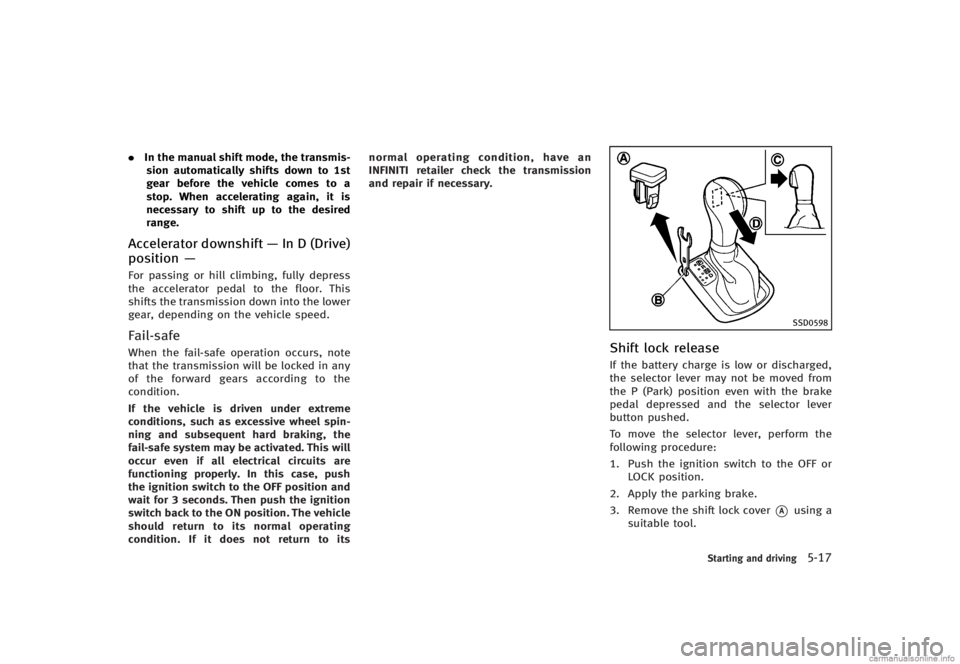
Shift lock releaseGUID-274AEC6C-BC56-4620-B517-6BF60F025945If the battery charge is low or discharged,
the selector lever may not be moved from
the P (Park) position even with the brake
pedal depressed and the selector lever
button pushed.
To move the selector lever, perform the
following procedure:
1. Push the ignition switch to the OFF or
LOCK position.
2. Apply the parking brake.
3. Remove the shift lock cover
*Ausing a
suitable tool.
Starting and driving5-17
Page 319 of 466

5-18Starting and driving
4.Push down the shift lock*Bas
illustrated.
5. Push the selector lever button
*Cand
move the selector lever to N (Neutral)
position
*Dwhile holding down the
shift lock.
Push the ignition switch to the ON posi-
tion. Now the vehicle may be moved to the
desired location.
If the lever cannot be moved out of P
(Park), have an INFINITI retailer check the
automatic transmission system as soon as
possible.
Adaptive shift control (ASC)GUID-AEB4A362-DBFB-4302-BBDA-E06349BDD353The adaptive shift control system automa-
tically operates when the transmission is
in the "D" (drive) and "DS" (Drive Sport)
position and selects an appropriate gear
depending on the road conditions such as
uphill, downhill or curving roads.
Control on uphill and curving roads:
GUID-D73A39BF-43C8-459F-9C24-47B7F579C407A low gear is maintained that suits the
degree of the slope or curve to allow
smooth driving with a small number of
shifts. Control on downhill roads:
GUID-D73A39BF-43C8-459F-9C24-47B7F579C407The adaptive shift control system shifts to
a low gear that suits the degree of the
slope, and uses the engine braking to
reduce the number of times that the brake
must be used.
Control on winding roads:
GUID-D73A39BF-43C8-459F-9C24-47B7F579C407A low gear is maintained on continuous
curves that involve repeated acceleration
and deceleration, so that smooth accelera-
tion is available instantly when the accel-
erator pedal is depressed.
NOTE:
.
Adaptive shift control may not operate
when the transmission oil temperature
is low immediately after the start of
driving or when it is very hot.
. During some driving situations, hard
braking for example, the adaptive shift
control may automatically operate. The
transmission may automatically shift
to a lower gear for engine braking. This
increases engine speed but not vehicle
speed. Vehicle speed is controlled by
the accelerator pedal when the vehicle
is in the Adaptive shift control mode.
. When the adaptive shift control oper-
ates, the transmission sometimes maintains a lower gear for a longer
period of time than when adaptive shift
control is not operating. Engine speed
will be higher for a specific vehicle
speed while ASC system is operating
than when ASC is not operating.
MANUAL TRANSMISSIONGUID-85E7D443-32BF-4842-9843-AD19102125BE
WARNING
.
Do not downshift abruptly on slippery
roads. This may cause a loss of vehicle
control.
. Do not over-rev the engine when shifting
to a lower gear. This may cause a loss of
vehicle control or engine damage.
CAUTION
.Do not rest your foot on the clutch pedal
while driving. This may damage the
clutch.
. Fully depress the clutch pedal before
shifting to help prevent transmission
damage.
Page 333 of 466

5-32Starting and driving
4. Indicates your vehicle
5. Set vehicle speed indicator:Indicates the set vehicle speed.
For Canadian models, the speed is
displayed in km/h.
6. Intelligent Cruise Control system warn- ing light (orange):
The light comes on if there is a
malfunction in the ICC system.
SSD0607
When the ignition switch is pushed to the
ON position, the indicators come on as
illustrated to check for a burned-out bulb,
and it turns off when the engine is started.
SSD0608
Operating vehicle-to-vehicle dis-
tance control mode
GUID-190B2DBA-F8C6-47E6-9BC8-3DAA7C99D6F9To turn on the cruise control, quickly push
and release the MAIN switch
*Aon. The
cruise indicator light, set distance indicator
and set vehicle speed indicator come on
and in a standby state for setting.
Page 345 of 466

5-44Starting and driving
set your desired cruising speed. Pushing
the MAIN switch again will turn the system
completely off.
When the ignition switch is pushed to the
OFF position, the system is also automati-
cally turned off. To use the Intelligent
Cruise Control again, quickly push and
release the MAIN switch (vehicle-to-vehicle
distance control mode) or push and hold it
(conventional cruise control mode) again to
turn it on.
CAUTION
To avoid accidentally engaging cruise con-
trol, make sure to turn the MAIN switch off
when not using the Intelligent Cruise Con-
trol system.
SSD0620
To set cruising speed,accelerate your
vehicle to the desired speed, push the
COAST/SET switch and release it. (The SET
indicator will come on in the display.) Take
your foot off the accelerator pedal. Your
vehicle will maintain the set speed.
. To pass another vehicle, depress the
accelerator pedal. When you release
the pedal, the vehicle will return to the
previously set speed.
. The vehicle may not maintain the set
speed when going up or down steep
hills. If this happens, manually main-
tain vehicle speed.
To cancel the preset speed, use any of thefollowing methods:
1.
Push the CANCEL button. The SET
indicator will go out.
2. Tap the brake pedal. The SET indicator will go out.
3. Turn the MAIN switch off. Both the CRUISE indicator and SET indicator will
go out.
To reset at a faster cruising speed, use one
of the following three methods:
1. Depress the accelerator pedal. When the vehicle attains the desired speed,
push and release the COAST/SET
switch.
2. Push and hold the ACCELERATE/RE-
SUME set switch. When the vehicle
attains the speed you desire, release
the switch.
3. Push, then quickly release the ACCEL- ERATE/RESUME switch. Each time you
do this, the set speed will increase by
about 1 MPH (1.6 km/h).
To reset at a slower cruising speed, use
one of the following three methods:
1. Lightly tap the brake pedal. When the vehicle attains the desired speed, push
the COAST/SET switch and release it.
Page 349 of 466

5-48Starting and driving
away from the center of the road if it
moves.
4. Push the ignition switch to the OFF position.GUID-614685FF-EB67-49C3-BFAE-697175427816
SSD0927
WARNING
. The sonar system is a convenience but it
is not a substitute for proper parking.
Always look around and check that it is
safe to do so before parking. Always
move slowly.
. Read and understand the limitations of
the sonar system as contained in this
section. Inclement weather may affect
the function of the sonar system; this
may include reduced performance or a
false activation. .
This system is not designed to prevent
contact with small or moving objects.
. The system is designed as an aid to the
driver in detecting large stationary
objects to help avoid damaging the
vehicle. The system will not detect small
objects below the bumper, and may not
detect objects close to the bumper or on
the ground.
. If your vehicle sustains damage to the
bumper fascia, leaving it misaligned or
bent, the sensing zone may be altered
causing inaccurate measurement of ob-
SONAR SYSTEM (if so equipped)
Page 351 of 466

5-50Starting and driving
to the object with its color and rate of
blinking.
When an object is detected, the indicator
(green) appears and blinks (the tone
sounds intermittently). When the vehicle
moves closer to the object, the color of the
indicator turns yellow and the rate of
blinking increases (the rate of the tone
increases). When the corner of the vehicle
is very close to the object, less than 11.8 in
(30 cm) away, the indicator stops blinking
and turns red (the tone sounds continu-
ously).
When the rear view monitor is displayed,
the colors of the sonar indicator and the
distance guide lines in the rear view
indicate different distances to the object.
The sonar indicator can be turned off in the
SONAR setting display. (See“How to use
SETTING button” (P.4-13) for the“Sonar”
settings.) When the sonar indicator is off,
only a tone sounds when the sonar detects
obstacles.
SSD0929
SONAR SYSTEM OFF SWITCHGUID-ADA1633F-60D3-48D0-86BC-06AD618A342FThe sonar system OFF switch on the
instrument panel allows the driver to turn
the sonar system on and off. To turn the
sonar system on and off, the ignition
switch must be in the “ON”position. The
indicator light
*1on the switch will
illuminate when the system is turned off.
If the indicator light flashes when the
sonar system is not turned off, it may
indicate a malfunction in the sonar system.
GUID-C1AF3658-F1E8-4E95-98FD-FC0151B448EA
WARNING
If the engine is not running or is turned off
while driving, the power assist for the
steering will not work. Steering will be
harder to operate.
The power assisted steering uses a hy-
draulic pump, driven by the engine, to
assist steering.
If the engine stops or the drive belt breaks,
you will still have control of the vehicle.
However, much greater steering effort is
needed, especially in sharp turns and at
low speeds.
POWER STEERING
Page 357 of 466

5-56Starting and driving
flashes so note the following:
.The road may be slippery or the system
may determine some action is required
to help keep the vehicle on the steered
path.
. You may feel a pulsation in the brake
pedal and hear a noise or vibration
from under the hood. This is normal
and indicates that the VDC system is
working properly.
. Adjust your speed and driving to the
road conditions.
See “Vehicle Dynamic Control (VDC) warn-
ing light” (P.2-14).
If a malfunction occurs in the system, the
VDC warning light
illuminates in the
instrument panel. The VDC system auto-
matically turns off.
The VDC OFF switch is used to turn off the
VDC system. The VDC off indicator
illuminates to indicate the VDC system is
off. When the VDC switch is used to turn off
the system, the VDC system still operates
to prevent one drive wheel from slipping by
transferring power to a non slipping drive
wheel. The VDC warning light
flashes if
this occurs. All other VDC functions are off,
and the VDC warning light
will not
flash. The VDC system is automatically reset to on when the ignition switch is
placed in the off position then back to the
on position.
See
“Vehicle Dynamic Control (VDC) warn-
ing light” (P.2-14) and “Vehicle Dynamic
Control (VDC) off indicator light” (P.2-16).
The computer has a built-in diagnostic
feature that tests the system each time you
start the engine and move the vehicle
forward or in reverse at a slow speed.
When the self-test occurs, you may hear a
“clunk” noise and/or feel a pulsation in the
brake pedal. This is normal and is not an
indication of a malfunction.
WARNING
. The VDC system is designed to help the
driver maintain stability but does not
prevent accidents due to abrupt steering
operation at high speeds or by careless
or dangerous driving techniques. Reduce
vehicle speed and be especially careful
when driving and cornering on slippery
surfaces and always drive carefully.
. Do not modify the vehicle’s suspension.
If suspension parts such as shock
absorbers, struts, springs, stabilizer bars, bushings and wheels are not
INFINITI recommended for your vehicle
or are extremely deteriorated, the VDC
system may not operate properly. This
could adversely affect vehicle handling
performance, and the VDC warning light
may illuminate.
. If brake related parts such as brake
pads, rotors and calipers are not INFINITI
recommended or are extremely deterio-
rated, the VDC system may not operate
properly and the VDC warning light
may illuminate.
. If engine control related parts are not
INFINITI recommended or are extremely
deteriorated, the VDC warning light
may illuminate.
. When driving on extremely inclined
surfaces such as higher banked corners,
the VDC system may not operate prop-
erly and the VDC warning light
may
illuminate. Do not drive on these types
of roads.
. When driving on an unstable surface
such as a turntable, ferry, elevator or
ramp, the VDC warning light
may
illuminate. This is not a malfunction.
Restart the engine after driving onto a
Page 363 of 466

6-2In case of emergency
GUID-F6D33B3B-089A-4D1D-9FE1-0840E20C9E24In the event of a roadside emergency,
Roadside Assistance Service is available to
you. Please refer to your Warranty Informa-
tion Booklet (U.S.) or Warranty & Roadside
Assistance Information Booklet (Canada)
for details.
GUID-5CB01D30-F3C9-424F-BADF-06867B0B06CDTo shut off the engine in an emergency
situation while driving, perform the follow-
ing procedure:
.Rapidly push the push-button ignition
switch 3 consecutive times in less than
1.5 seconds, or
. Push and hold the push-button ignition
switch for more than 2 seconds.GUID-77B6068C-531C-4817-874F-A81F63FC9DFE
TIRE PRESSURE MONITORING SYS-
TEM (TPMS)
GUID-F2A30E25-6F86-4A74-8B34-2A1D7AE536C6This vehicle is equipped with the Tire
Pressure Monitoring System (TPMS). It
monitors tire pressure of all tires except
the spare. When the low tire pressure
warning light is lit and the CHECK TIRE
PRESSURE warning appears on the dot
matrix crystal display, one or more of your
tires is significantly under-inflated. If the
vehicle is being driven with low tire
pressure, the TPMS will activate and warn
you of it by the low tire pressure warning
light. This system will activate only when
the vehicle is driven at speeds above 16
MPH (25 km/h). For more details, see
“Warning/indicator lights and audible re-
minders” (P.2-10) and “Tire Pressure Mon-
itoring System (TPMS)” (P.5-4).
WARNING
.If the low tire pressure warning light
illuminates while driving, avoid sudden
steering maneuvers or abrupt braking,
reduce vehicle speed, pull off the road to
a safe location and stop the vehicle as
soon as possible. Driving with under-
inflated tires may permanently damage
ROADSIDE ASSISTANCE PROGRAM EMERGENCY ENGINE SHUT OFF FLAT TIRE
Page 373 of 466

6-12In case of emergency
SCE0871
6. Push the ignition switch to the“ACC”
position. Then turn the compressor
switch to the ON (−) position and inflate
the tire up to the pressure that is
specified on the tire and loading
information label affixed to the driver’s
side center pillar if possible, or to the
minimum of 26 psi (180 kPa). Turn the
air compressor off briefly in order to
check the tire pressure with the pres-
sure gauge.
If the tire is inflated to higher than the
specified pressure, lower the tire pres-
sure by releasing air with the pressure
release valve. NOTE:
The compressor tire pressure gauge
may show a pressure reading of 87 psi
(600 kPa) for about 30 seconds while
inflating the tire. The pressure gauge is
indicating the pressure inside the
sealant can. When the sealant has
been injected into the tire the pressure
gauge will drop and indicate actual tire
pressure.
WARNING
.
To avoid serious personal injury while
using the emergency tire puncture repair
kit:
—Securely tighten the compressor
hose to the tire valve. Failure to do
so can cause the sealant to spray
into the air and get into your eyes or
on the skin.
. Do not stand directly beside the da-
maged tire while it is being inflated
because of the risk of the rupture. If
there are any cracks or bumps, turn the
compressor off immediately.
If the tire pressure does not increase to 26 psi (180 kPa) within 10 minutes, the
tire may be seriously damaged and
the
tire cannot be repaired with this tire
repair kit. Contact an INFINITI retailer.
7. When the tire pressure is at the
specified amount, turn the air compres-
sor off. If the pressure cannot be
inflated to the specified amount, the
air compressor can be turned off at the
minimum of 26 psi (180 kPa). Remove
the power plug from the power outlet
and quickly remove the hose from the
tire valve. Attach the protective cap and
valve cap. Properly stow the emergency
tire puncture repair kit in the trunk.
CAUTION
To avoid serious personal injury when
stowing the emergency tire puncture repair
kit:
. Keep the sealant bottle screwed into the
compressor. Failure to do so can cause
the sealant to spray into the air and get
into your eyes or on the skin.
8. Immediately drive the vehicle for 10
minutes or 2 miles (3 km) at a speed of