traction control INFINITI G CONVERTIBLE 2013 Owner's Manual
[x] Cancel search | Manufacturer: INFINITI, Model Year: 2013, Model line: G CONVERTIBLE, Model: INFINITI G CONVERTIBLE 2013Pages: 466
Page 83 of 466
2-14Instruments and controls
.Parking brake release warning
. Door/trunk open warning
. Loose fuel cap warning
. Check tire pressure warning
See “Dot matrix liquid crystal display” (P.2-
17).
Preview Function warning light
(orange; if so equipped)
GUID-82B96A00-53B7-4A66-B4A8-0DC25F7726B2The light comes on if there is a malfunction
in the Brake Assist (with Preview Function)
system.
If the warning light comes on, park the
vehicle in a safe place. Turn the engine off,
restart the engine, resume driving and set
the ICC system again.
If it is not possible to set the system or the
indicator stays on, it may indicate that the
system is malfunctioning. Although the
vehicle is still driveable under normal
conditions, have the vehicle checked at
an INFINITI retailer.
Seat belt warning lightGUID-97087213-3971-4726-A0FE-1FFDDC320E7EThe light and chime remind you to fasten
seat belts. The light illuminates whenever
the ignition switch is pushed to the ON
position, and will remain illuminated until
the driver’s seat belt is fastened. At the same time, the chime will sound for about
6 seconds unless the driver’s seat belt is
securely fastened.
The seat belt warning light for the front
passenger will illuminate if the seat belt is
not fastened when the front passenger’s
seat is occupied. For approximately 5
seconds after the ignition switch is in the
ON position, the system does not activate
the warning light for the front passenger.
See
“Seat belts” (P.1-11) for precautions
on seat belt usage.
Supplemental air bag warning
light
GUID-C450F6BC-AD31-42E7-A143-D8289371BB6EAfter pushing the ignition switch to the ON
position, the supplemental air bag warning
light will illuminate. The supplemental air
bag warning light will turn off after about 7
seconds if the supplemental front air bag
and supplemental side air bag, curtain
side-impact air bag systems and/or pre-
tensioner seat belt are operational.
If any of the following conditions occur, the
front air bag, side air bag, curtain air bag
and pretensioner systems needs servicing
and your vehicle must be taken to your
nearest INFINITI retailer. .
The supplemental air bag warning light
remains on after approximately 7 sec-
onds.
. The supplemental air bag warning light
flashes intermittently.
. The supplemental air bag warning light
does not come on at all.
Unless checked and repaired, the supple-
mental restraint systems and/or the pre-
tensioners may not function properly.
For additional information, see “Supple-
mental restraint system” (P.1-35).
WARNING
If the supplemental air bag warning light is
on, it could mean that the front air bag, side
air bag, curtain air bag systems and/or
pretensioner systems will not operate in an
accident. To help avoid injury to yourself or
others, have your vehicle checked by a
retailer as soon as possible.
Vehicle Dynamic Control (VDC)
warning light
GUID-B300F4AE-A31B-490C-8B0C-44DBA460C228The light will blink when the VDC system or
the traction control system is operating,
Page 84 of 466

thus alerting the driver that the vehicle is
nearing its traction limits. The road surface
may be slippery.
When the vehicle dynamic control warning
light illuminates when the vehicle dynamic
control system is turned on, this light
alerts the driver to the fact that the vehicle
dynamic control system’s fail-safe mode is
operating, for example the vehicle dynamic
control system may not be functioning
properly. Have the system checked by an
INFINITI retailer. If a malfunction occurs in
the system, the vehicle dynamic control
system function will be canceled but the
vehicle is still driveable. For additional
information, see“Vehicle Dynamic Control
(VDC) system” (P.5-55) of this manual.
INDICATOR LIGHTSGUID-64224243-3D85-45E9-840F-E29B74A1855A
Automatic transmission posi-
tion indicator light (if so equipped)
GUID-F12DE2FF-4D6B-4F62-8F44-84CE06C5841EWhen the ignition switch is pushed to the
ON position, the indicator shows the
automatic selector shift position.
In the manual shift mode, when the
transmission does not shift to the selected
gear due to the transmission protection
mode, the AT position indicator light will
blink and a chime will sound. (See
“Automatic transmission” (P.5-13).)
Exterior light indicatorGUID-74BD5266-0D40-44BC-B993-5808317E4C38This indicator illuminates when the head-
light switch is turned to the AUTO,orposition and the front side marker
lights, the front parking lights, instrument
panel lights, rear combination lights,
license plate lights or headlights are on.
The indicator turns off when these lights
are turned off.
Front fog light indicator lightGUID-89DB9C0E-A5A2-42CB-8F4C-563F783E6EF9The front fog light indicator light illumi-
nates when the front fog lights are on. (See
“Fog light switch” (P.2-38).)
Front passenger air bag status
light
GUID-56567F38-A7E9-4445-882A-4C4EC06CF83FThe front passenger air bag status light
() located under the climate controls
will be lit and the passenger front air bag
will be OFF depending on how the front
passenger seat is being used.
For front passenger air bag status light
operation, see “INFINITI Advanced Air Bag
System (front seats)” (P.1-40) of this
manual.
High beam indicator lightGUID-9E559E28-47EC-4A74-B9B9-B97EFBAD0089This light comes on when the headlight
high beam is on and goes out when the low
beam is selected.
Malfunction Indicator Light
(MIL)
GUID-CCF62CD3-CAC8-43D4-8902-CA55F37F5E80If the malfunction indicator light comes on
steady or blinks while the engine is
running, it may indicate a potential emis-
sion control malfunction.
The malfunction indicator light may also
come on steady if the fuel-filler cap is loose
or missing, or if the vehicle runs out of fuel.
Check to make sure the fuel-filler cap is
installed and closed tightly, and that the
vehicle has at least 3 US gallons (14 liters)
of fuel in the fuel tank.
After a few driving trips, the
light
should turn off if no other potential
emission control system malfunction ex-
ists.
If this indicator light remains on for 20
seconds and then blinks for 10 seconds
when the engine is not running, it indicates
that the vehicle is not ready for an
emission control system inspection/main-
tenance test. (See “Readiness for Inspec-
tion/Maintenance (I/M) test” (P.9-23).)
Instruments and controls2-15
Page 85 of 466

2-16Instruments and controls
Operation:GUID-D73A39BF-43C8-459F-9C24-47B7F579C407The malfunction indicator light will come
on in one of two ways:
.Malfunction indicator light on steady —
An emission control system malfunc-
tion has been detected. Check the fuel-
filler cap if the LOOSE FUEL CAP
warning appears in the dot matrix
liquid crystal display. If the fuel-filler
cap is loose or missing, tighten or
install the cap and continue to drive the
vehicle. The
light should turn off
after a few driving trips. If thelight
does not turn off after a few driving
trips, have the vehicle inspected by an
INFINITI retailer. You do not need to
have your vehicle towed to the retailer.
. Malfunction indicator light blinking —
An engine misfire has been detected
which may damage the emission con-
trol system.
To reduce or avoid emission control
system damage:
a) Do not drive at speeds above 45 MPH (72 km/h).
b) Avoid hard acceleration or decelera- tion.
c) Avoid steep uphill grades. d)
If possible, reduce the amount of
cargo being hauled or towed.
The malfunction indicator light may
stop blinking and remain on.
Have the vehicle inspected by an
INFINITI retailer. You do not need to
have your vehicle towed to the retailer.
CAUTION
Continued vehicle operation without having
the emission control system checked and
repaired as necessary could lead to poor
driveability, reduced fuel economy, and
possible damage to the emission control
system.
Security indicator lightGUID-5C1A30CC-C304-47F2-9017-21DB6C86EF88The light blinks when the ignition switch is
in the ACC, OFF or LOCK position. This
function indicates the security system
equipped on the vehicle is operational.
If the security system is malfunctioning,
this light will remain on while the ignition
switch is in the ON position. For additional
information, see “Security systems” (P.2-
27).
Turn signal/hazard indicator
lights
GUID-00B1B086-3725-450B-94DE-085F076508AEThe light flashes when the turn signal
switch lever or hazard switch is turned on.
Vehicle Dynamic Control (VDC)
off indicator light
GUID-5CBCDD2A-ACCA-4B6D-8B1E-B27C7F5AB078The light comes on when the vehicle
dynamic control off switch is pushed to
OFF. This indicates that the vehicle dynamic
control system and traction control system
are not operating.
AUDIBLE REMINDERSGUID-E1144D4E-396B-40A8-884E-447992E83ED5
Key reminder chimeGUID-E43BBD4C-3A1F-483C-9D44-524733918052A chime will sound if the driver side door is
opened while the ignition switch is pushed
to the ACC position or pushed to the OFF or
LOCK position with the Intelligent Key left
in the Intelligent Key port. Make sure the
ignition switch is pushed to the OFF
position, and take the Intelligent Key with
you when leaving the vehicle.
Light reminder chimeGUID-8624C04E-DC02-4067-8A90-B91AF097C12CA chime will sound when the driver side
door is opened with the light switch in the
orposition and the ignition switch
in the ACC, OFF or LOCK position.
Page 190 of 466
SONAR settings (if so equipped)GUID-6C6605B9-9B7E-4709-AEB4-341DEC2AEC71The“Sonar” screen will appear when
selecting the “Sonar”key with the INFINITI
controller and pushing the ENTERbutton.
For models with the navigation system,
select the “Others”key to show the
“Sonar” key.
For the details about the sonar system
operation, see “Sonar system” (P.5-48).
Sonar Display:
GUID-D73A39BF-43C8-459F-9C24-47B7F579C407When this item is turned ON, the corner/
center sonar indicator will appear when the
sonar detects rear obstacles near the
bumper.
Corner Sonar Sensitivity:
GUID-D73A39BF-43C8-459F-9C24-47B7F579C407Adjust the sensitivity level of the corner
sonar higher (right) or lower (left).
Center Sonar Sensitivity:
GUID-D73A39BF-43C8-459F-9C24-47B7F579C407Adjust the sensitivity level of the center
sonar higher (right) or lower (left).
SAA2491
Image Viewer (models with naviga-
tion system)
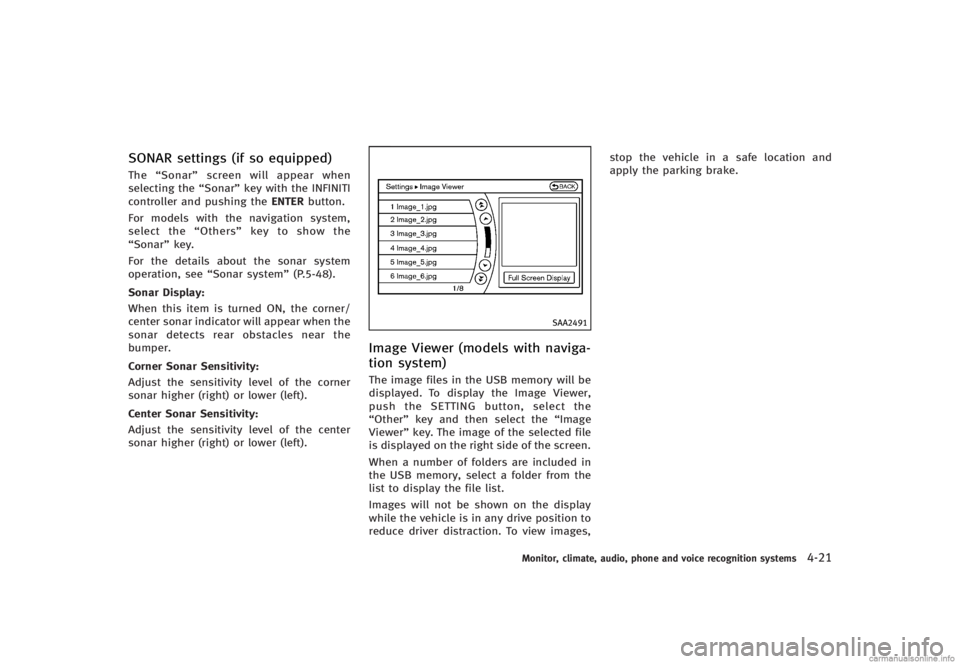
GUID-EFE3D40C-6D2C-4150-A2A4-47FD1A4C9E2FThe image files in the USB memory will be
displayed. To display the Image Viewer,
push the SETTING button, select the
“Other” key and then select the “Image
Viewer” key. The image of the selected file
is displayed on the right side of the screen.
When a number of folders are included in
the USB memory, select a folder from the
list to display the file list.
Images will not be shown on the display
while the vehicle is in any drive position to
reduce driver distraction. To view images, stop the vehicle in a safe location and
apply the parking brake.
Monitor, climate, audio, phone and voice recognition systems4-21
Page 214 of 466
USB (Universal Serial Bus)GUID-FD5C9B59-3FBD-4041-BB0D-1A12CAFB978D
WARNING
Do not connect or disconnect the USB device
while driving. Doing so can be a distraction.
If distracted you could lose control of your
vehicle and cause an accident or serious
injury.
NOTE:
.Do not force the USB device into the
USB port. Inserting the USB device
tilted or up-side-down into the port
may damage the USB device and the
port. Make sure that the USB device is
connected correctly into the USB port.
. Do not grab the USB port cover (if so
equipped) when pulling the USB device
out of the port. This could damage the
port and the cover.
. Do not leave the USB cable in a place
where it can be pulled unintentionally.
Pulling the cable may break the wire,
USB device or the port.
The vehicle is not equipped with a USB
memory (flash drive). Customers should
prepare USB devices as necessary. This system cannot be used to format USB
devices. To format a USB device, use a
personal computer.
In some countries, the USB device for the
front seats plays only sound without
images for regulatory reasons, even when
the vehicle is parked.
This system supports various USB memory
devices, USB hard drives and iPod
®
players. Some USB devices may not be
supported by this system.
.
Partitioned USB devices may not be
played correctly.
. Some characters used in other lan-
guages (Chinese, Japanese, etc.) are
not displayed properly on the vehicle
center screen. Using English language
characters with a USB device is recom-
mended.
General notes for USB use:
. The USB device may not function when
the passenger compartment tempera-
ture is extremely high. Lower the
temperature before use.
. During cold weather or rainy days, the
player may malfunction due to humid-
ity. If this occurs, remove the USB
device and dehumidify or ventilate the USB player completely.
. Do not connect a USB device if a
connector, cable or USB port is wet.
Allow the connector, cable, and USB
port to dry completely before connect-
ing the USB device. (Wait for 24 hours
or more until it is dry.) If the connector
and USB port are exposed to fluids
other than water, evaporative residue
may cause a short circuit between the
connector pins and USB port. In this
case, replace the cable and USB port.
Otherwise damage to the USB device
and a loss of function may occur.
. If the cable is damaged (insulation cut,
connectors cracked, contamination
such as liquids, dust, dirt, etc. in the
connectors), do not use the cable.
Replace the cable with a new one.
. Do not put a USB device in a location
where static electricity occurs, electrical
noise is generated or hot air from the
air conditioner blows directly on it.
Doing so may cause the data stored on
the USB device to be corrupted.
. Be careful not to do the following or the
cable could be damaged and a loss of
function may occur.
Monitor, climate, audio, phone and voice recognition systems4-45
Page 228 of 466
Text (models without navigation system):GUID-D73A39BF-43C8-459F-9C24-47B7F579C407When the“Text”key is selected in the
screen using the INFINITI controller and
then the ENTER button is pushed while the
CD is being played, the music information
below will be displayed on the screen.
CD:
. Disc title
. Track title
CD with compressed audio files:
. Folder title
. File title
. Song title
. Album title
. Artist
Next/Previous Track and Fast
Forward/Rewind:
GUID-D73A39BF-43C8-459F-9C24-47B7F579C407Push the Forward or Rewind button for
more than 1.5 seconds while a CD is being
played to fast forward or rewind through
the track. When the button is released, the
CD will return to normal play speed.
When the Forward button is pushed for
less than 1.5 seconds while a CD is being
played, the next track on the CD will be
played. When the Rewind button is pushed for less
than 1.5 seconds within 3 seconds after
the current track started playing, the
previous track will be played.
When the Rewind button is pushed for less
than 1.5 seconds after 3 seconds from
when the current track started playing, the
beginning of the current track will be
played.
REPEAT (RPT), RANDOM (RDM):GUID-D73A39BF-43C8-459F-9C24-47B7F579C407When the RPT button is pushed while the
CD is played, the play pattern can be
changed as follows:
(CD)
NOS2606
(CD with compressed audio files)
NOS2607
CD EJECT:GUID-D73A39BF-43C8-459F-9C24-47B7F579C407When the CD EJECT button is pushed with
the CD loaded, the CD will be ejected.
When this button is pushed while the CD is
being played, the CD will be ejected.
If the CD comes out and is not removed, it
will be pulled back into the slot to protect
it.
DVD (Digital Versatile Disc) PLAYER
OPERATION (models with naviga-
tion system)
GUID-13D2FB6F-D8B1-4FE3-BF8B-5BB5975ED39E
PrecautionsGUID-8D9A86E8-A04C-4710-9AA1-C5DB0B92CD3EStart the engine when using the DVD
entertainment system.
Movies will not be shown on the front
display while the vehicle is in any drive
position to reduce driver distraction. Audio
is available when a movie is played. To
view movies in the front display, stop the
vehicle in a safe location, move the
selector/shift lever to the P (Park) position
(Automatic Transmission models) or in an
appropriate gear (Manual Transmission
models) and apply the parking brake.
WARNING
.
The driver must not attempt to operate
the DVD system or wear the headphones
while the vehicle is in motion so that full
attention may be given to vehicle opera-
Monitor, climate, audio, phone and voice recognition systems4-59
Page 340 of 466

SSD0284A
NOTE:
The approach warning chime may sound
and the system display may blink when
the ICC sensor detects some reflectors
*Awhich are fitted on vehicles in other lanes
or on the side of the road. This may cause
the ICC system to decelerate or accelerate
the vehicle. The ICC sensor may detect
these reflectors when the vehicle is driven
on winding roads, hilly roads or when
entering or exiting a curve. The ICC sensor
may also detect reflectors on narrow roads
or in road construction zones. In these
cases you will have to manually control
the proper distance ahead of your vehicle.Also, the sensor sensitivity can be affected
by vehicle operation (steering maneuver or
driving position in the lane) or traffic or
vehicle condition (for example, if a vehicle
is being driven with some damage).
Automatic cancellationGUID-95DA4169-5423-4330-A023-6CCFCB5E6FA1A chime sounds under the following con-
ditions and the control is automatically
canceled.
.
When the vehicle speed falls below
approximately 20 MPH (32 km/h)
. When the selector lever is not in the D
(Drive), DS (Drive Sport) or manual shift
mode
. When the windshield wipers are oper-
ated at low speed (LO) or high speed
(HI)
. When the rain sensing auto wiper
system is operated and the wiper
speed is at least the same as the LO
(low ) position speed
. When the VDC is turned off
. When the VDC operates
SSD0614
Warning light and displayGUID-E3CCA0EC-C4EA-45EA-9440-CFA23124D811Condition A:GUID-D73A39BF-43C8-459F-9C24-47B7F579C407The chime sounds and the Intelligent
Cruise Control system is canceled auto-
matically in the conditions described be-
low. Part of the system display will come
on or blink, making it impossible to set.
.When the VDC is turned off
. When the ABS or VDC (including the
traction control system) operates
. When a tire slips
. When strong light (sunlight, etc.) is
directly shining on the front of the
vehicle
Starting and driving5-39
Page 346 of 466

2. Push and hold the COAST/SET switch.Release the switch when the vehicle
slows down to the desired speed.
3. Push, then quickly release the COAST/ SET switch. Each time you do this, the
set speed will decrease by about 1 MPH
(1.6 km/h).
To resume the preset speed, push and
release the ACCELERATE/RESUME switch.
The vehicle will resume the last set
cruising speed when the vehicle speed is
over 25 MPH (40 km/h).
Automatic cancellationGUID-2BC704F8-C6DC-4DDB-8923-1C1D5B472968A chime sounds under the following con-
ditions and the control is automatically
canceled.
. When the vehicle slows down more
than 8 MPH (13 km/h) below the set
speed
. When the vehicle speed falls below
approximately 20 MPH (32 km/h)
. When the selector lever is not in the D
(Drive), DS (Drive Sport) or manual shift
mode
. When the VDC operates (including the
traction control system)
. When a tire slips
SSD0621
Warning lightGUID-510CCF75-4D98-4C9C-8CC0-60138320EE78When the system is not operating properly,
the chime sounds and the system warning
light (orange) will come on.
Action to take:
GUID-D73A39BF-43C8-459F-9C24-47B7F579C407If the warning light comes on, park the
vehicle in a safe place. Turn the engine off,
restart the engine, resume driving and then
perform the setting again.
If it is not possible to set or the indicator
stays on, it may indicate that the system is
malfunctioning. Although the vehicle is
still driveable under normal conditions,
have the vehicle checked at an INFINITI retailer.
PREVIEW FUNCTION (for Intelligent
Cruise Control system equipped
models)
GUID-32536B6C-4378-49EB-9FE2-8A7EE457E3F0The ICC system with the preview function
identifies the need to apply emergency
braking by sensing the vehicle ahead in
the same lane and the distance to the
vehicle ahead and relative speed from it, it
applies the brake pre-pressure before the
driver depresses the brake pedal and helps
improve brake response by reducing pedal
free play.
For more details, see
“Brake assist”(P.5-
52).
Starting and driving5-45
Page 356 of 466

WARNING
Do not pump the brake pedal. Doing so may
result in increased stopping distances.
Self-test featureGUID-4FC5730B-9006-485D-8F47-48423827A0FDThe ABS includes electronic sensors, elec-
tric pumps, hydraulic solenoids and a
computer. The computer has a built-in
diagnostic feature that tests the system
each time you start the engine and move
the vehicle at a low speed in forward or
reverse. When the self-test occurs, you may
hear a“clunk” noise and/or feel a pulsa-
tion in the brake pedal. This is normal and
does not indicate a malfunction. If the
computer senses a malfunction, it switches
the ABS off and illuminates the ABS
warning light on the instrument panel.
The brake system then operates normally,
but without anti-lock assistance.
If the ABS warning light illuminates during
the self-test or while driving, have the
vehicle checked by an INFINITI retailer.
Normal operationGUID-4A24737D-9B87-4CFC-A807-4E8F57A64E71The ABS operates at speeds above 3 to 6
MPH (5 to 10 km/h).
When the ABS senses that one or more
wheels are close to locking up, the actuator
rapidly applies and releases hydraulic
pressure. This action is similar to pumping
the brakes very quickly. You may feel a
pulsation in the brake pedal and hear a
noise from under the hood or feel a
vibration from the actuator when it is
operating. This is normal and indicates
that the ABS is operating properly. How-
ever, the pulsation may indicate that road
conditions are hazardous and extra care is
required while driving.
GUID-9B2B3B86-188B-477E-85AC-1E8002A9BE3EThe Vehicle Dynamic Control (VDC) system
uses various sensors to monitor driver
inputs and vehicle motion. Under certain
driving conditions, the VDC system helps
to perform the following functions.
. Controls brake pressure to reduce
wheel slip on one slipping drive wheel
so power is transferred to a non
slipping drive wheel on the same axle.
. Controls brake pressure and engine
output to reduce drive wheel slip based
on vehicle speed (traction control func-
tion).
. Controls brake pressure at individual
wheels and engine output to help the
driver maintain control of the vehicle in
the following conditions:
— understeer (vehicle tends to not
follow the steered path despite
increased steering input)
— oversteer (vehicle tends to spin due
to certain road or driving condi-
tions).
The VDC system can help the driver to
maintain control of the vehicle, but it
cannot prevent loss of vehicle control in
all driving situations.
When the VDC system operates, the VDC
warning light
in the instrument panel
Starting and driving5-55
VEHICLE DYNAMIC CONTROL (VDC) SYSTEM
Page 359 of 466

5-58Starting and driving
SPECIAL WINTER EQUIPMENTGUID-9E63915B-AEEB-4DF7-AE59-93BA4A80CE83It is recommended that the following items
be carried in the vehicle during winter:
.A scraper and stiff-bristled brush to
remove ice and snow from the windows
and wiper blades.
. A sturdy, flat board to be placed under
the jack to give it firm support.
. A shovel to dig the vehicle out of
snowdrifts.
. Extra window washer fluid to refill the
reservoir tank.
DRIVING ON SNOW OR ICEGUID-B958E8BB-93DC-4740-87FE-FFE84942F1FF
WARNING
. Wet ice (328F, 08C and freezing rain),
very cold snow or ice can be slick and
very hard to drive on. The vehicle will
have much less traction or “grip”under
these conditions. Try to avoid driving on
wet ice until the road is salted or
sanded.
. Whatever the condition, drive with cau-
tion. Accelerate and slow down with
care. If accelerating or downshifting too
fast, the drive wheels will lose even more traction.
. Allow more stopping distance under
these conditions. Braking should be
started sooner than on dry pavement.
. Allow greater following distances on
slippery roads.
. Watch for slippery spots (glare ice).
These may appear on an otherwise clear
road in shaded areas. If a patch of ice is
seen ahead, brake before reaching it. Try
not to brake while on the ice, and avoid
any sudden steering maneuvers.
. Do not use the cruise control on slippery
roads.
. Snow can trap dangerous exhaust gases
under your vehicle. Keep snow clear of
the exhaust pipe and from around your
vehicle.
ENGINE BLOCK HEATER (if so
equipped)
GUID-225659C5-E0EC-4FA3-AF40-10B3DE04F272Engine block heaters are used to assist in
cold temperature starting.
The engine block heater should be used
when the outside temperature is 208F
(−78C) or lower.
To use the engine block heaterGUID-403EC22E-E30C-4DE3-AC84-7E1C9EDC9E2B1. Turn the engine off.
2. Open the hood and unwrap the engine
block heater cord.
3. Plug the engine block heater cord into a grounded 3-wire, 3-pronged extension
cord.
4. Plug the extension cord into a Ground Fault Interrupt (GFI) protected,
grounded 110-volt AC (VAC) outlet.
5. The engine block heater must be
plugged in for at least 2 - 4 hours,
depending on outside temperatures, to
properly warm the engine coolant. Use
an appropriate timer to turn the engine
block heater on.
6. Before starting the engine, unplug and properly store the cord to keep it away
from moving parts.