lights INFINITI G COUPE 2013 User Guide
[x] Cancel search | Manufacturer: INFINITI, Model Year: 2013, Model line: G COUPE, Model: INFINITI G COUPE 2013Pages: 490, PDF Size: 7.25 MB
Page 118 of 490
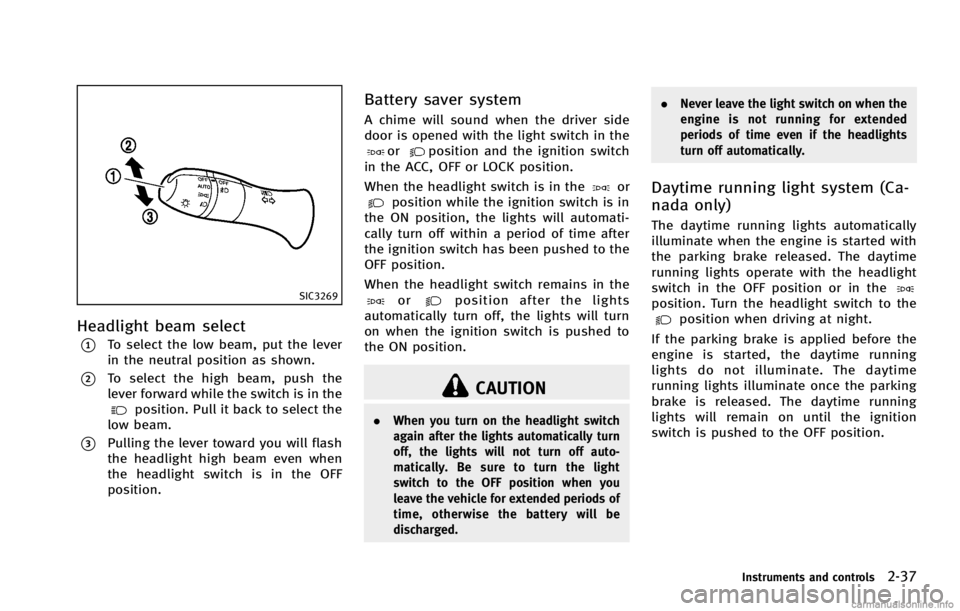
SIC3269
Headlight beam selectGUID-1105ED2E-9741-4EAA-A5D8-36C19A0F048D
position. Pull it back to select the
low beam.
*3Pulling the lever toward you will flash
the headlight high beam even when
the headlight switch is in the OFF
position.
Battery saver systemGUID-015F3DAF-8A59-4727-BB76-C11FB41B2B60
orposition and the ignition switch
in the ACC, OFF or LOCK position.
When the headlight switch is in the
orposition while the ignition switch is in
the ON position, the lights will automati-
cally turn off within a period of time after
the ignition switch has been pushed to the
OFF position.
When the headlight switch remains in the
orposition after the lights
automatically turn off, the lights will turn
on when the ignition switch is pushed to
the ON position.
CAUTION
. When you turn on the headlight switch
again after the lights automatically turn
off, the lights will not turn off auto-
matically. Be sure to turn the light
switch to the OFF position when you
leave the vehicle for extended periods of
time, otherwise the battery will be
discharged. .
Never leave the light switch on when the
engine is not running for extended
periods of time even if the headlights
turn off automatically.
Daytime running light system (Ca-
nada only)
GUID-84A2F990-744E-4ADE-B431-E99613FFC97F
position. Turn the headlight switch to theposition when driving at night.
If the parking brake is applied before the
engine is started, the daytime running
lights do not illuminate. The daytime
running lights illuminate once the parking
brake is released. The daytime running
lights will remain on until the ignition
switch is pushed to the OFF position.
Instruments and controls2-37
Page 120 of 490

SIC3271
TURN SIGNAL SWITCHGUID-8B2C7C5B-C4F7-454D-AF37-BDA58A9D5766
SIC3272
FOG LIGHT SWITCHGUID-782C350F-DF92-4D39-BD90-4155E2E5F990
position, then turn the
switch to theposition. To turn them
off, turn the switch to the OFF position.
The headlights must be on for the fog
lights to operate.
GUID-6A8C64A7-6F2F-477B-8944-B7474460FBD5
SIC2574
Push the switch on to warn other drivers
when you must stop or park under
emergency conditions. All turn signal lights
will flash.
WARNING
. If stopping for an emergency, be sure to
move the vehicle well off the road.
. Do not use the hazard warning flashers
while moving on the highway unless
unusual circumstances force you to drive
so slowly that your vehicle might be-
come a hazard to other traffic.
Instruments and controls2-39
HAZARD WARNING FLASHER SWITCH
Page 138 of 490

GUID-086B1CC9-F92B-4357-8461-A4FAC03B72E8
SIC3249
MAP LIGHTSGUID-1AFD655C-C54F-4694-ACBA-625EF6501A09
SIC3250
PERSONAL LIGHTS (Sedan)GUID-8A80AFCB-87B7-47AE-B03E-E39C7E1A6A4A
SIC3251
INTERIOR LIGHT CONTROL SWITCHGUID-C2DB58AC-6BD5-4108-8834-2A62D1E0B377
Page 139 of 490

2-58Instruments and controls
CAUTION
Do not use for extended periods of time with
the engine stopped. This could result in a
discharged battery.
GUID-4767303A-3063-498C-B5AA-4C1CC218222A
SIC2064
Type A
SIC3869
Type B
VANITY MIRROR LIGHTS
Page 160 of 490

Locking doors and fuel-filler doorGUID-A1ED2141-D2A2-4C18-9403-59DB4C719650
button*1on the
Intelligent Key.
4. All the doors and fuel-filler door will lock.
5. The hazard indicator flashes twice and the horn chirps once.
*: Doors will lock with the Intelligent Key
while the ignition switch is in the ACC or
ON position.
Operate the door handles to confirm that
the doors have been securely locked.
Unlocking doors and fuel-filler doorGUID-337B912E-F7DF-44D8-9546-848D7FB4BC8Dbutton*2on the
Intelligent Key once.
2. The hazard indicator flashes once. The driver’s door and fuel-filler door will
unlock.
3. Push the UNLOCK
button on the
Intelligent Key again within 1 minute.
4. The hazard indicator flashes once
again. All the doors will unlock. All doors will be locked automatically
unless one of the following operations is
performed within 1 minute after pushing
the UNLOCK
button on the Intelligent
Key while the doors are locked. If during
this 1-minute time period, the UNLOCK
button on the Intelligent Key is pushed, all
doors will be locked automatically after
another 1 minute.
. Opening any door
. Pushing the ignition switch
. Inserting the Intelligent Key into the
Intelligent Key port.
During this 1-minute time period, if the
UNLOCK
button on the Intelligent Key
is pushed, all doors will be locked auto-
matically after another 1 minute.
Opening windowsGUID-DFAF51D2-F77E-429A-B2B3-4704C432A052*2button operation also
allows you to open the window that is
equipped with the automatic open/close
function. (See “Power windows” (P.2-52)).
To open the window, push the door
UNLOCK
button on the Intelligent Key
for about 3 seconds after the door is
unlocked.
To stop opening, release the UNLOCK
button. If the window open operation is stopped in
mid-operation while pushing the UNLOCK
button, release and push the UNLOCKbutton again until the window opens
completely.
Window cannot be closed using the In-
telligent Key.
The door window can also be operated by
turning the mechanical key in a door lock.
(See “Doors” (P.3-4).)
Opening trunk lidGUID-6B0C7E6B-21C5-491B-9405-C60A2288D5EDbutton*3on the
Intelligent Key for more than 1 second.
2. The trunk will unlatch.
3. Raise the trunk lid to open the trunk.
Using panic alarmGUID-DFDC4598-37EC-49D5-968F-B7FA5F92DB59
button*4on the
key for more than 1 second.
2. The theft warning alarm and headlights will stay on for 25 seconds.
3. The panic alarm stops when:
.It has run for 25 seconds, or
Pre-driving checks and adjustments3-15
Page 213 of 490

4-34Monitor, climate, audio, phone and voice recognition systems
seconds. The indicator lights (both air
recirculation and outside air circulation
sides) will flash twice, and then the intake
air will be controlled automatically.
Air flow control:
GUID-D73A39BF-43C8-459F-9C24-47B7F579C407
: Air flows from center and side ventilators.
: Air flows from center and side ventilators andfoot outlets.
: Air flows mainly from foot outlets.
: Air flows from defroster and foot outlets.
To turn the system offGUID-AD1354E7-58D5-4D12-9984-BCCF1701C8CE
SAA1526
Type B
1. “AUTO” automatic climate control ON
button/Temperature control dial
2. Air flow control button
3. “
”Fan speed control dial
4. “OFF” button
5. “
”front defroster button
6. “
”rear window defroster button
(See “Rear window and outside mirror
defroster switch” (P.2-34).)
7. “
”intake air control button
AUTOMATIC CLIMATE CONTROL
(Type B)
GUID-A975719E-9D57-4522-8059-48964137AD90
Page 215 of 490

4-36Monitor, climate, audio, phone and voice recognition systems
Outside air circulation:GUID-D73A39BF-43C8-459F-9C24-47B7F579C407
”to draw outside air into the passen-
ger compartment. The indicator light on the
“
” side will come on.
Automatic intake air control:
GUID-D73A39BF-43C8-459F-9C24-47B7F579C407
”. To return to the
automatic control mode, push the intake
air control button “
”for about 2
seconds. The indicator lights (both air
recirculation and outside air circulation
sides) will flash twice, and then the intake
air will be controlled automatically.
Air flow control:
GUID-D73A39BF-43C8-459F-9C24-47B7F579C407
: Air flows from center and side ventilators.
: Air flows from center and side ventilators and foot outlets.
: Air flows mainly from foot outlets.
: Air flows from defroster and foot outlets.
To turn the system offGUID-72F0A526-1E4F-46F2-803C-E31F9547AE00
Page 222 of 490

cles exist.
Static: Caused by thunderstorms, electrical
power lines, electric signs and even traffic
lights.
Satellite radio reception:
GUID-D73A39BF-43C8-459F-9C24-47B7F579C407
SAA0480
Compact Disc (CD) playerGUID-38E485E9-34E1-441A-B0B9-6E52D87C42FA
Page 410 of 490

Accelerator pedal:Check the pedal for
smooth operation and make sure the pedal
does not catch or require uneven effort.
Keep the floor mat away from the pedal.
Automatic transmission P (Park) mechan-
ism: On a fairly steep hill, check that your
vehicle is held securely with the selector
lever in the P (Park) position without
applying any brakes.
Brake pedal: Check the pedal for smooth
operation. If the brake pedal suddenly
goes down further than normal, the pedal
feels spongy or the vehicle seems to take
longer to stop, see an INFINITI retailer
immediately. Keep the floor mat away from
the pedal.
Brakes: Check that the brakes do not pull
the vehicle to one side when applied.
Parking brake: Check the parking brake
operation regularly. The vehicle should be
securely held on a fairly steep hill with only
the parking brake applied. If the parking
brake needs adjusted, see an INFINITI
retailer.
Seat belts: Check that all parts of the seat
belt system (for example, buckles, an-
chors, adjuster and retractors) operate
properly and smoothly, and are installed securely. Check the belt webbing for cuts,
fraying, wear or damage.
Seats:
Check seat position controls such as
seat adjusters, seatback recliner, etc. to
ensure they operate smoothly and that all
latches lock securely in every position.
Check that the head restraints move up
and down smoothly and that the locks (if
so equipped) hold securely in all latched
positions.
Steering wheel: Check for changes in the
steering conditions, such as excessive free
play, hard steering or strange noises.
Warning lights and chimes: Make sure that
all warning lights and chimes are operating
properly.
Windshield defroster: Check that the air
comes out of the defroster outlets properly
and in sufficient quantity when operating
the heater or air conditioner.
Windshield wiper and washer*: Check that
the wipers and washer operate properly
and that the wipers do not streak.
Under the hood and vehicleGUID-29B64B94-E77F-40DC-A4B2-6B5D542860ED
Page 436 of 490

WARNING
HIGH VOLTAGE
When xenon headlights are on, they pro-
duce a high voltage. To prevent an electric
shock, never attempt to modify or disas-
semble. Always have your xenon headlights
replaced at an INFINITI retailer. For addi-
tional information, see “Headlight and turn
signal switch” (P.2-34).
Use the same number and wattage shown
in the following chart as originally in-
stalled.
If replacement is required, see an INFINITI
retailer.
Fog may temporarily form inside the lens of
the exterior lights in the rain or in a car
wash. A temperature difference between
the inside and the outside of the lens
causes the fog. This is not a malfunction. If
large drops of water collect inside the lens,
contact an INFINITI retailer.
EXTERIOR AND INTERIOR LIGHTSGUID-BDE3C310-75C1-4F4D-9E48-5E09104465DA