battery INFINITI G35 2003 User Guide
[x] Cancel search | Manufacturer: INFINITI, Model Year: 2003, Model line: G35, Model: INFINITI G35 2003Pages: 256, PDF Size: 3.37 MB
Page 103 of 256
Recommended battery: CR2025 or equiva-
lent
Make sure that the ! side faces the
bottom case.
3. Close the lid securely.
4. Push the keyfob button two or three times
to check its operation.
See your INFINITI retailer if you need any
assistance for replacement.
If the battery is removed for any reason
other than replacement, perform step 4
above.
O Be careful not to touch the circuit board
and the battery terminal.
O An improperly disposed battery can
harm the environment. Always confirm
local regulations for battery disposal.
O The keyfob is water-resistant; however,
if it gets wet, immediately wipe it com-
pletely dry.
O When changing batteries, do not let dust
or oil get on the keyfob.
FCC Notice:
Changes or modifications not expressly
approved by the manufacturer compliance could void the user's authority to operate
the equipment. This device complies with
Part 15 of the FCC Rules and RSS-210 of
Industry Canada. Operation is subject to
the following two conditions: (1) This de-
vice may not cause harmful interference,
and (2) this device must accept any inter-
ference received, including interference
that may cause undesired operation of the
device.
Pre-driving checks and adjustments
3-9
Z 02.7.29/V35-D/V5.0
X
Page 107 of 256

SECONDARY TRUNK LID
RELEASE
Sedan The secondary trunk lid release mechanism
allows opening of the trunk lid in the event of a
discharged battery, etc.
The handle is located on the back side of the
trunk lid inside the trunk compartment.
Approach the handle through the interior trunk
access hole (rear seat armrest).
To open the trunk lid from the rear seat,
pull the release handle towards you until the lock releases and push up on the trunk
lid.
Return the handle to the back side of the lid.
Otherwise, it may cause water leaks in the
trunk.
Coupe To open the trunk lid in the event of a dis-
charged battery, operate the interior trunk lid
release mechanism from the rear seat.
Fold down the rear seatback by pulling the
strap under the seatback sideways
j 1
. If nec-
essary, pull the front of the rear seat cushion
up and forward to remove the cushion
j 2
. To open the trunk lid from the rear seat,
pull the release handle towards you until
the lock releases and push up on the trunk
lid.
SPA1590 SSS0237
Pre-driving checks and adjustments
3-13
Z 02.7.29/V35-D/V5.0
X
Page 114 of 256
any positions other than ON.
4. Push the SET switch and, within 5 seconds,
push the memory switch 1 or 2 fully for at
least 1 second.
The indicator light for the pushed memory
switch will come on and stay on for approxi-
mately 5 seconds after pushing the switch.
After the indicator light goes off, the se-
lected positions are stored in the selected
memory (1 or 2).
If memory is stored in the same memory
switch, the previous memory will be de-
leted.
Confirming memory storage O Turn the ignition ON and push the SET
switch. If the main memory has not been
stored, the indicator light will come on for
approximately 0.5 seconds. When the
memory has stored the position, the indica-
tor light will stay on for approximately 5
seconds.
O If the battery cable is disconnected, or if the
fuse blows, the memory will be canceled. In
such a case, reset the desired positions
using the following procedures.
1. Open and close the driver's door more than two times with the ignition key in the LOCK
position.
2. Reset the desired position using the previ-
ous procedure.
Selecting the memorized position 1. A/T models:
Set the automatic transmission selector le-
ver to the P (Park) position.
M/T models:
Apply the parking brake securely when the
vehicle is stopped.
2. Turn the ignition ON.
3. Push the memory switch 1 or 2 fully for at
least 1 second.
The driver's seat will move to the memo-
rized position with the indicator light flash-
ing. Then the light will stay on for approxi-
mately 5 seconds.
When memory switch 1 or 2 is pushed with the
driver's door open and then the key inserted
into the ignition switch within approximately 1
minute, the driver's seat will move to the
memorized position. (AT models only) System operation The automatic drive positioner system will not
work or will stop operating under the following
conditions:
O when the vehicle speed is above 4 MPH (7
km/h).
O when any two or more of the memory
switches are simultaneously pressed while
the automatic drive positioner is operating.
O when the adjusting switch for the driver's
seat is turned on while the automatic drive
positioner is operating.
O when the cancel switch is pushed to cancel.
O when the memory switch 1 or 2 is not
pushed for at least 1 second.
O when the seat has already been moved to
the memorized position.
O when no seat position is stored in the
memory switch.
O when the parking brake is not applied. Ð
M/T models
O when the vehicle speed is above 4 MPH (7
km/h) while the parking brake is applied. Ð
M/T models
To restart the drive positioner system,
move the parking brake to off and on.
3-20 Pre-driving checks and adjustments
Z 02.7.29/V35-D/V5.0
X
Page 124 of 256

power lines, electric signs and even traffic
lights.
SATELLITE RADIO RECEPTION When the satellite radio is first installed or the
battery has been replaced, the satellite radio
may not work properly. This is not a malfunc-
tion. Wait more than 10 minutes with satellite
radio ON for satellite radio to receive all of the
necessary data.
AUDIO OPERATION
PRECAUTIONS
Cassette player O To maintain good quality sound,
INFINITI recommends using cassette
tapes of 60 minutes or shorter in length.
O Cassette tapes should be removed from
the player when not in use. Store cas-
settes in their protective cases and away
from direct sunlight, heat, dust, mois-
ture and magnetic sources.
O Direct sunlight can cause the cassette to
become deformed. The use of deformed
cassettes may cause the cassette to jam
in the player.
O Do not use cassettes with labels which
are peeling and loose. If used, the label could jam in the player.
O If a cassette has loose tape, insert a
pencil through one of the cassette hubs
and rewind the tape firmly around the
hubs. Loose tape may cause tape jam-
ming and wavering sound quality.
O Over a period of time, the playback
head, capstan and pinch roller may col-
lect a tape coating residue as the tape is
played. This residue accumulation can
cause weak or wavering sound, and
should be removed periodically with a
head cleaning tape. If the residue is not
removed periodically, the player may
need to be disassembled for cleaning.
Compact Disc (CD) player O During cold weather or rainy days, the
player may malfunction due to the hu-
midity. If this occurs, remove the CD and
dehumidify or ventilate the player com-
pletely.
O The player may skip while driving on
rough roads.
O The CD player sometimes cannot func-
tion when the compartment temperature
is extremely high. Decrease the tem-
perature before use. O Only use high quality 4.7 inches (12 cm)
round discs that have the ªCOMPACT
disc DIGITAL AUDIOº logo on the disc
or packaging.
O Do not expose the CD to direct sunlight. SAA0480
4-8 Heater, air conditioner and audio systems
Z 02.7.29/V35-D/V5.0
X
Page 129 of 256
1. Tune to the desired station using the SEEK,
SCAN or TUNE button.
2. Select the desired station/channel and
keep pushing any of the desired
station/channel memory buttons (1 to 6)
until a beep sound is heard. (The radio
mutes when the select button is pushed.)
3. The channel indicator will then come on
and the sound will resume. Memorizing is
now complete.
4. Other buttons can be set in the same
manner.
If the battery cable is disconnected, or if the
fuse blows, the radio memory will be can-
celled. In that case, reset the desired stations.
Automatic preset:
To select the preset FM, AM, SAT or PTY
station/channel, push the AUTO.P button for
less than 1.5 seconds.
To preset the FM, AM, SAT or PTY
station/channel, push the AUTO.P button for
more than 1.5 seconds.
(CAT) Program type/category:
When the PTY button is pressed during FM
mode, the PTY name of the current tuned
station is displayed. When the PTY (CAT) button is pressed during
the satellite radio mode, the category name of
the current channel is displayed. During this
time if the PTY data code is zero, or the data is
unreadable; the display will show NONE.
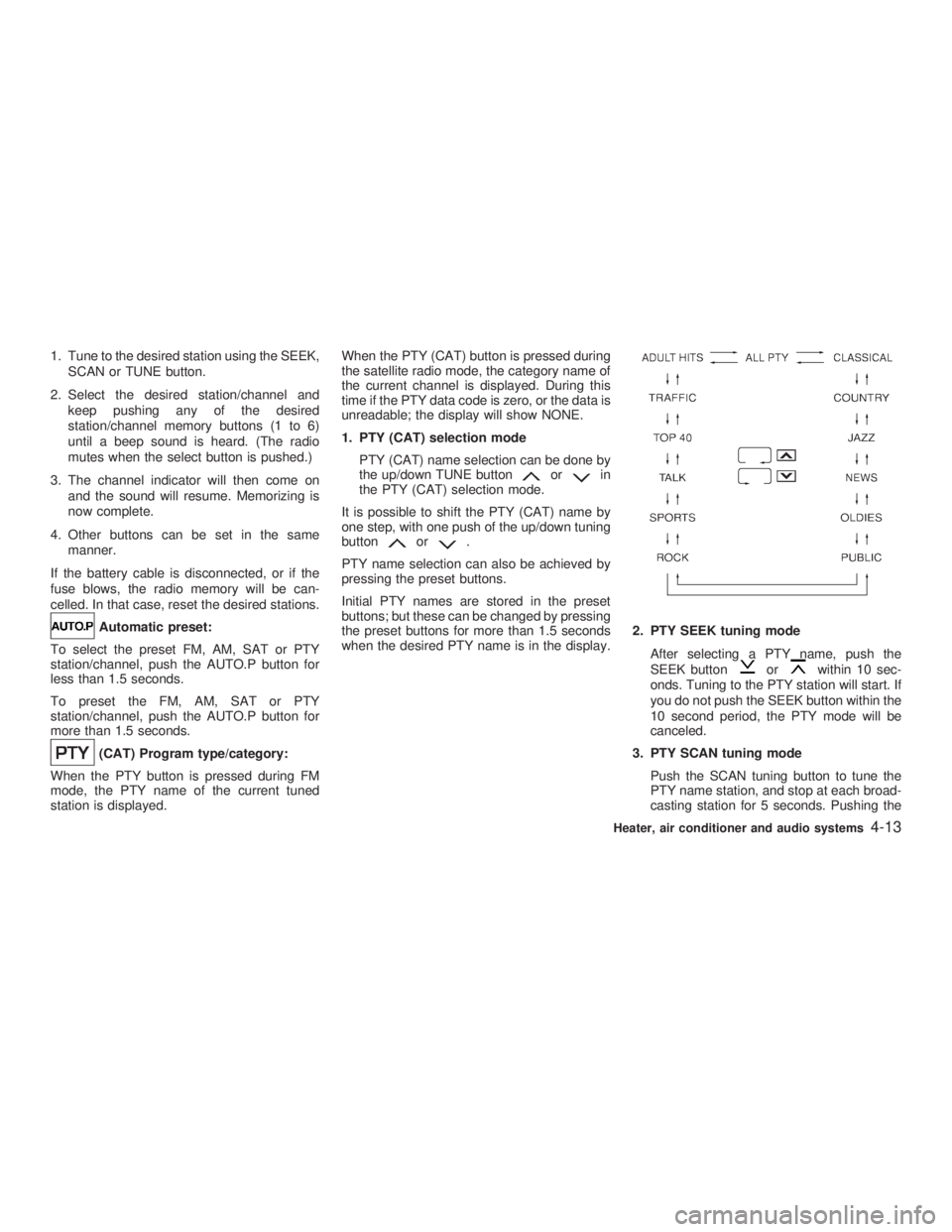
1. PTY (CAT) selection mode
PTY (CAT) name selection can be done by
the up/down TUNE button or in
the PTY (CAT) selection mode.
It is possible to shift the PTY (CAT) name by
one step, with one push of the up/down tuning
button or .
PTY name selection can also be achieved by
pressing the preset buttons.
Initial PTY names are stored in the preset
buttons; but these can be changed by pressing
the preset buttons for more than 1.5 seconds
when the desired PTY name is in the display. 2. PTY SEEK tuning mode
After selecting a PTY name, push the
SEEK button or within 10 sec-
onds. Tuning to the PTY station will start. If
you do not push the SEEK button within the
10 second period, the PTY mode will be
canceled.
3. PTY SCAN tuning mode
Push the SCAN tuning button to tune the
PTY name station, and stop at each broad-
casting station for 5 seconds. Pushing the Heater, air conditioner and audio systems
4-13
Z 02.7.29/V35-D/V5.0
X
Page 135 of 256
5 Starting and driving Precautions when starting and driving ...................... 5-2
Exhaust gas (Carbon monoxide).......................... 5-2
Three way catalyst ............................................... 5-3
Avoiding collision and rollover .............................. 5-3
Drinking alcohol/drugs and driving ....................... 5-4
Ignition switch............................................................ 5-4
Automatic transmission ........................................ 5-4
Manual transmission ............................................ 5-5
Key positions ........................................................ 5-6
Infiniti vehicle immobilizer system ....................... 5-6
Before starting the engine ......................................... 5-7
Starting the engine .................................................... 5-7
Driving the vehicle ..................................................... 5-8
Automatic transmission ........................................ 5-8
Manual transmission .......................................... 5-12
Parking brake .......................................................... 5-14
Cruise control .......................................................... 5-15
Precautions on cruise control ............................. 5-15
Cruise control operations ................................... 5-15
Break-in schedule ................................................... 5-17
Increasing fuel economy ......................................... 5-17
Parking/parking on hills ........................................... 5-18
Power steering ........................................................ 5-19
Brake system .......................................................... 5-19 Braking precautions............................................ 5-19
Anti-lock brake system (ABS) ........................... 5-20
Vehicle dynamics control (VDC) system................. 5-21
Cold weather driving ............................................... 5-23
Freeing a frozen door lock ................................. 5-23
Anti-freeze .......................................................... 5-23
Battery ................................................................ 5-23
Draining of coolant water ................................... 5-23
Tire equipment ................................................... 5-23
Special winter equipment ................................... 5-23
Driving on snow or ice ....................................... 5-24
Engine block heater (if so equipped) ................. 5-24
Z 02.7.29/V35-D/V5.0
X
Page 146 of 256

Shift lock release If the battery charge is low or discharged, the
selector lever may not be moved from the P
(Park) position even with the brake pedal
depressed.
To move the selector lever, apply the parking
brake, depress the brake pedal, and push the
shift lock release button. The selector lever
can be moved to N (Neutral). This allows the
vehicle to be moved if the battery is dis-
charged.
If the lever cannot be moved out of P (Park),
have your INFINITI retailer check the auto- matic transmission system as soon as pos-
sible.
MANUAL TRANSMISSION
Shifting To change gears, or when up shifting or down
shifting fully depress the clutch pedal, shift into
the appropriate gear then slowly and smoothly
release the clutch.
Start the vehicle in 1st gear and shift to 2nd,
3rd, 4th, 5th and 6th gear in sequence accord-
ing to the vehicle speed.
To back up, depress the shift lever and then
move it to the R (Reverse) position after stop-
ping the vehicle completely.SSD0298 SSD0287
5-12 Starting and driving
Z 02.7.29/V35-D/V5.0
X
Page 157 of 256
FREEING A FROZEN DOOR LOCK To prevent a door lock from freezing, apply
de-icer or glycerin to it through the key hole. If
the lock becomes frozen, heat the key before
inserting it into the key hole.
ANTI-FREEZE In the winter when it is anticipated that the
temperature will drop below 32ÉF (0ÉC), check
anti-freeze to assure proper winter protection.
For additional information, see ªEngine Cool-
ing Systemº in the ª8. Do-it-yourselfº section.
BATTERY If the battery is not fully charged during ex-
tremely cold weather conditions, the battery
fluid may freeze and damage the battery. To
maintain maximum efficiency, the battery
should be checked regularly. For additional
information, see ªBatteryº in the ª8. Do-it-
yourselfº section.
DRAINING OF COOLANT WATER If the vehicle is to be left outside without
anti-freeze, drain the cooling system by open-
ing the drain plug located under the radiator.
Refill before operating the vehicle. See ªEn-
gine cooling systemº in the ª8. Do-it-yourselfº
section for changing engine coolant. TIRE EQUIPMENT 1. SUMMER tires are of a tread design to
provide superior performance on dry pave-
ment. However, the performance of these
tires will be substantially reduced in snowy
and icy conditions. If you operate your
vehicle on snowy or icy roads, INFINITI
recommends the use of MUD & SNOW or
ALL SEASON tires on all four wheels.
Please consult your INFINITI retailer for the
tire type, size, speed rating and availability
information.
2. For additional traction on icy roads, studded
tires may be used. However, some prov-
inces and states prohibit their use. Check
local, state and provincial laws before in-
stalling studded tires.
Skid and traction capabilities of studded
snow tires, on wet or dry surfaces, may be
poorer than that of non-studded snow tires.
3. Tire chains may be used if desired. Make
sure they are of proper size for the tires on
your vehicle and are installed according to
the chain manufacturer's suggestions. Use
of tire chains may be prohibited according
to location. Check the local laws before
installing tire chains. When installing tire
chains, make sure they are of proper size
for the tires on your vehicle and are in- stalled according to the chain manufactur-
er's suggestions. Use only SAE Class S
chains. Class ªSº chains are used on ve-
hicles with restricted tire to vehicle clear-
ance. Vehicles that can use Class ªSº
chains are designed to meet the SAE stan-
dard minimum clearances between the tire
and the closest vehicle suspension or body
component required to accommodate the
use of a winter traction device (tire chains
or cables). The minimum clearances are
determined using the factory equipped tire
size. Other types may damage your ve-
hicle. Use chain tensioners when recom-
mended by the tire chain manufacturer to
ensure a tight fit. Loose end links of the tire
chain must be secured or removed to pre-
vent the possibility of whipping action dam-
age to the fenders or underbody. If pos-
sible, avoid fully loading your vehicle when
using tire chains. In addition, drive at a
reduced speed. Otherwise, your vehicle
may be damaged and/or vehicle handling
and performance may be adversely af-
fected.
Never install tire chains on a T-type spare
tire. Do not use tire chains on dry roads.
SPECIAL WINTER EQUIPMENT It is recommended that the following items beCOLD WEATHER DRIVING
Starting and driving
5-23
Z 02.7.29/V35-D/V5.0
X
Page 160 of 256
Every new INFINITI comes with a 4 year,
unlimited mileage Roadside Assistance plan.
In the event of a roadside emergency,
Roadside Assistance Service is available to
you. Please refer to your Warranty Booklet
(U.S.) or Warranty & Roadside assistance
information booklet (Canada) for details. Both
the Warranty Booklet and Roadside
Assistance Calling Card in your Owner's
Literature Portfolio provide the Toll-Free
Number to call for assistance. Roadside
Assistance is provided 24 hours a day, 365
days a year, for 4 years from the date sold to
give emergency roadside help, in the event of
mechanical or nonmechanical trouble(s) such
as flat tires, out-of-gas, dead battery, lost
keys, mechanical breakdown, accident, etc. CHANGING A FLAT TIRE If you have a flat tire, follow the instructions
below.
Stopping the vehicle 1. Safely move the vehicle off the road away
from traffic.
2. Turn on the hazard warning flashers.
3. Park on a level surface and apply the
parking brake. Shift the manual transmis-
sion into R (Reverse) position (automatic
transmission in P (Park) position).
4. Turn off the engine.
5. Raise the hood to warn other traffic, and to
signal professional road assistance person-
nel that you need assistance.
6. Have all passengers get out of the vehicle
and stand in a safe place, away from traffic
and clear of the vehicle.
WARNING O Make sure that the parking brake is
securely applied and the manual
transmission is shifted into R (Re- verse), or the automatic transmission
into P (Park).
O Never change tires when the vehicle
is on a slope, ice or slippery areas.
This is hazardous.
O Never change tires if oncoming traffic
is close to your vehicle. Wait for pro-
fessional road assistance.ROADSIDE ASSISTANCE
PROGRAM FLAT TIRE
6-2 In case of emergency
Z 02.7.29/V35-D/V5.0
X
Page 165 of 256
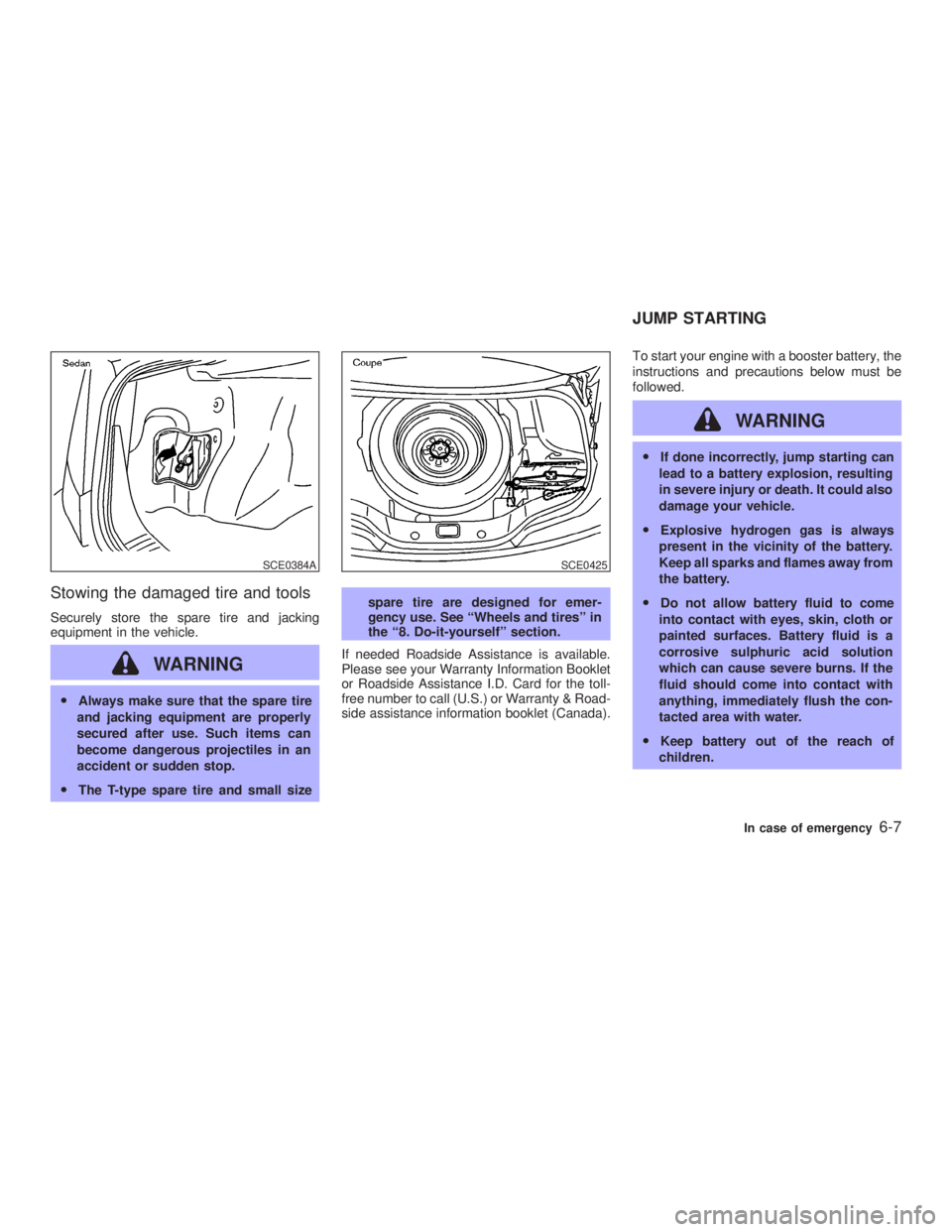
Stowing the damaged tire and tools Securely store the spare tire and jacking
equipment in the vehicle.
WARNINGO Always make sure that the spare tire
and jacking equipment are properly
secured after use. Such items can
become dangerous projectiles in an
accident or sudden stop.
O The T-type spare tire and small size spare tire are designed for emer-
gency use. See ªWheels and tiresº in
the ª8. Do-it-yourselfº section.
If needed Roadside Assistance is available.
Please see your Warranty Information Booklet
or Roadside Assistance I.D. Card for the toll-
free number to call (U.S.) or Warranty & Road-
side assistance information booklet (Canada). To start your engine with a booster battery, the
instructions and precautions below must be
followed.
WARNING O If done incorrectly, jump starting can
lead to a battery explosion, resulting
in severe injury or death. It could also
damage your vehicle.
O Explosive hydrogen gas is always
present in the vicinity of the battery.
Keep all sparks and flames away from
the battery.
O Do not allow battery fluid to come
into contact with eyes, skin, cloth or
painted surfaces. Battery fluid is a
corrosive sulphuric acid solution
which can cause severe burns. If the
fluid should come into contact with
anything, immediately flush the con-
tacted area with water.
O Keep battery out of the reach of
children.SCE0384A SCE0425
JUMP STARTING
In case of emergency
6-7
Z 02.7.29/V35-D/V5.0
X