lights INFINITI G35 2003 User Guide
[x] Cancel search | Manufacturer: INFINITI, Model Year: 2003, Model line: G35, Model: INFINITI G35 2003Pages: 256, PDF Size: 3.37 MB
Page 74 of 256

To turn the fog lights on, turn the headlight
switch to the position, then turn the
switch to the position. To turn them off,
turn the switch to the OFF position.
The headlights must be on for the fog lights to
operate. Push the switch on to warn other drivers when
you must stop or park under emergency con-
ditions. All turn signal lights will flash.
Some state or provincial laws may prohibit
the use of the hazard warning flasher
switch while driving.
WARNING O If stopping for an emergency, be sure
to move the vehicle well off the road. O Do not use the hazard warning flash-
ers while moving on the highway un-
less unusual circumstances force
you to drive so slowly that your ve-
hicle might become a hazard to other
traffic.
O Turn signals do not work when the
hazard warning flasher lights are on.
The flasher can be actuated with the ignition
switch either off or on.SIC1836 SIC1447
FOG LIGHT SWITCH
HAZARD WARNING FLASHER
SWITCH
2-20 Instruments and controls
Z 02.7.29/V35-D/V5.0
X
Page 77 of 256

If the power supply is disconnected, the
clock will not indicate the correct time.
Readjust the time.
ADJUSTING THE TIME To adjust the time, turn the adjusting knob. The power outlet is for powering electrical
accessories such as cellular telephones.
CAUTION O Use caution as the socket and plug
may be hot during or immediately
after use.
O This power outlet is not designed for
use with a cigarette lighter unit.
O Do not use with accessories that ex-
ceed a 12 volt, 120W (10A) power draw. Do not use double adapters or
more than one electrical accessory.
O Use this power outlet with the engine
running. (If the engine is stopped,
this could result in a discharged bat-
tery.)
O Avoid using when the air conditioner,
headlights or rear window defogger
is on.
O Before inserting or disconnecting a
plug, be sure to turn off the powerSIC1855 SIC1840A SIC1803
CLOCK POWER OUTLET
Instruments and controls
2-23
Z 02.7.29/V35-D/V5.0
X
Page 89 of 256

1. Press the switch to the CLOSE/UP side to
tilt up the sunroof.
2. Press and hold the switch to the
CLOSE/UP side for approximately 3 sec-
onds while the sunroof is tilted up.
3. Release the switch once, then press and
hold the switch to the CLOSE/UP side
again for approximately 10 seconds until
the sunroof moves automatically.
4. The sunroof will automatically open and
then close all the way.
If you failed at procedure 3. repeat all the
procedures from No. 1.
Have your INFINITI retailer check and repair
the sunroof.
INTERIOR LIGHT The interior light has a two-position switch.
When the switch is in the door position, the
light will illuminate when a door is opened.
The light will stay on for about 30 seconds
when:
O The doors are unlocked by the keyfob, a
key or the power door lock switch while all
doors are closed.
O The driver's door is opened and then closed
while the key is removed from the ignition
switch. O The key is removed from the ignition switch
while all doors are closed.
The light will turn off while the 30 second timer
is activated, when:
O The driver's door is locked either with the
keyfob, a key or the power door lock switch.
O The ignition switch is turned ON.
MAP LIGHT When the switch is pushed in, the light will turn
on. When the switch is pushed again, the light
will turn off.
When the map light switch is in the ON
position, it will automatically turn off 30
minutes after the ignition switch has been
turned to the OFF position. To turn on the
light again, turn the ignition switch to the
ON position.
The map, personal, and vanity mirror lights will
automatically turn off 30 minutes after the
latest operation of the following with the igni-
tion switch in the ACC or OFF position:
O Opening or closing any door
O Locking or unlocking with the keyfob, a key
or the power door lock switch.
O Inserting or removing a key from the ignition
switch SIC1857
INTERIOR LIGHT
Instruments and controls
2-35
Z 02.7.29/V35-D/V5.0
X
Page 90 of 256

These lights will turn on again when any of the
above operations is performed after the lights
have turned off automatically. (The lights will
turn off 30 minutes after the latest operation of
the above as well.)
CAUTIONO Turn off the map, personal and vanity
mirror lights when you leave the ve-
hicle.
O Do not use for extended periods of
time with the engine stopped. This
could result in a discharged battery.
REAR PERSONAL LIGHT The rear personal light has a three-position
switch.
When the switch is in the door position, the
light will illuminate when the door is opened.
When the personal light switch is in the ON
position, it will automatically turn off 30
minutes after the ignition switch has been
turned to the OFF position. To turn on the
light again, turn the ignition switch to the
ON position. The light on the vanity mirror will turn on when
the cover on the vanity mirror is opened.
When the vanity mirror light stays on, it will
automatically turn off 30 minutes after the
ignition switch has been turned to the OFF
position. To turn on the light again, turn the
ignition switch to the ON position. SIC1858 SIC1859
VANITY MIRROR LIGHT (if so
equipped)
2-36 Instruments and controls
Z 02.7.29/V35-D/V5.0
X
Page 102 of 256
Continue to press the UNLOCK button for 3
seconds. All the door windows will be lowered.
Continue to press the UNLOCK button until
windows are fully open.
To stop lowering the windows, release the
UNLOCK button.
To start lowering the windows, press the UN-
LOCK button again for more than 3 seconds.
The rear door windows will operate 0.5 sec-
onds after the front windows' operation (if so
equipped).
Releasing the trunk lid 1. Push the TRUNK button on the keyfob for
longer than 0.5 seconds with the key re-
moved from the ignition key cylinder.
2. The trunk lid opens.
Using the panic alarm If you are near your vehicle and feel threat-
ened, you may activate the alarm to call atten-
tion as follows:
1. Push the PANIC button on the keyfob for
longer than 0.5 seconds with the key
removed from the ignition key cylinder.
2. The theft warning alarm and headlights will
stay on for 30 seconds. 3. The panic alarm stops when:
O It has run for 30 seconds, or
O The LOCK or the UNLOCK button is
pressed, or
O The PANIC or the TRUNK button is pushed
on the keyfob for longer than 0.5 seconds.
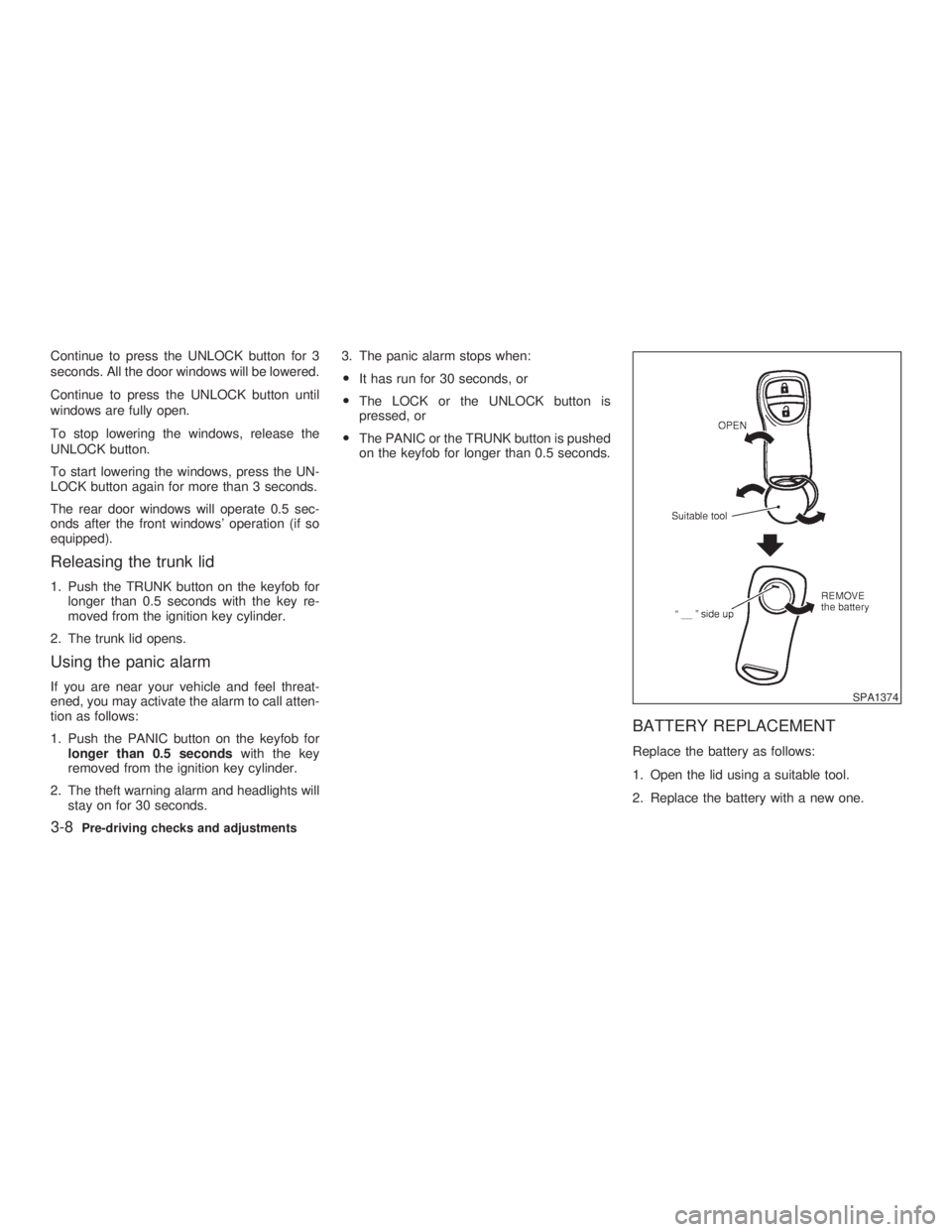
BATTERY REPLACEMENT Replace the battery as follows:
1. Open the lid using a suitable tool.
2. Replace the battery with a new one. SPA1374
3-8 Pre-driving checks and adjustments
Z 02.11.1/V35-D/V5.0
X
Page 111 of 256
CAUTIONStore the main sun visor after storing
the extension sun visor.
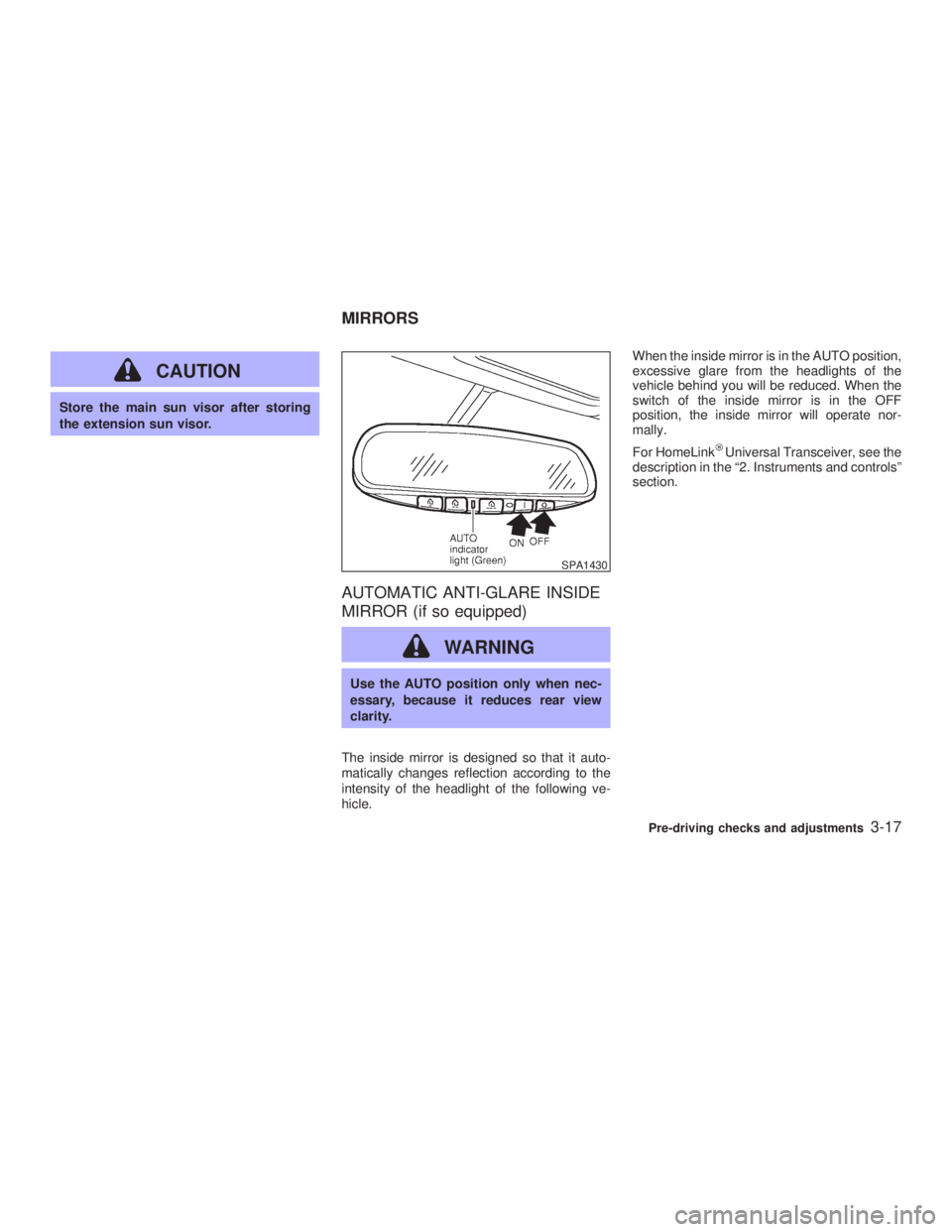
AUTOMATIC ANTI-GLARE INSIDE
MIRROR (if so equipped)
WARNING Use the AUTO position only when nec-
essary, because it reduces rear view
clarity.
The inside mirror is designed so that it auto-
matically changes reflection according to the
intensity of the headlight of the following ve-
hicle. When the inside mirror is in the AUTO position,
excessive glare from the headlights of the
vehicle behind you will be reduced. When the
switch of the inside mirror is in the OFF
position, the inside mirror will operate nor-
mally.
For HomeLink Universal Transceiver, see the
description in the ª2. Instruments and controlsº
section. SPA1430
MIRRORS
Pre-driving checks and adjustments
3-17
Z 02.7.29/V35-D/V5.0
X
Page 124 of 256

power lines, electric signs and even traffic
lights.
SATELLITE RADIO RECEPTION When the satellite radio is first installed or the
battery has been replaced, the satellite radio
may not work properly. This is not a malfunc-
tion. Wait more than 10 minutes with satellite
radio ON for satellite radio to receive all of the
necessary data.
AUDIO OPERATION
PRECAUTIONS
Cassette player O To maintain good quality sound,
INFINITI recommends using cassette
tapes of 60 minutes or shorter in length.
O Cassette tapes should be removed from
the player when not in use. Store cas-
settes in their protective cases and away
from direct sunlight, heat, dust, mois-
ture and magnetic sources.
O Direct sunlight can cause the cassette to
become deformed. The use of deformed
cassettes may cause the cassette to jam
in the player.
O Do not use cassettes with labels which
are peeling and loose. If used, the label could jam in the player.
O If a cassette has loose tape, insert a
pencil through one of the cassette hubs
and rewind the tape firmly around the
hubs. Loose tape may cause tape jam-
ming and wavering sound quality.
O Over a period of time, the playback
head, capstan and pinch roller may col-
lect a tape coating residue as the tape is
played. This residue accumulation can
cause weak or wavering sound, and
should be removed periodically with a
head cleaning tape. If the residue is not
removed periodically, the player may
need to be disassembled for cleaning.
Compact Disc (CD) player O During cold weather or rainy days, the
player may malfunction due to the hu-
midity. If this occurs, remove the CD and
dehumidify or ventilate the player com-
pletely.
O The player may skip while driving on
rough roads.
O The CD player sometimes cannot func-
tion when the compartment temperature
is extremely high. Decrease the tem-
perature before use. O Only use high quality 4.7 inches (12 cm)
round discs that have the ªCOMPACT
disc DIGITAL AUDIOº logo on the disc
or packaging.
O Do not expose the CD to direct sunlight. SAA0480
4-8 Heater, air conditioner and audio systems
Z 02.7.29/V35-D/V5.0
X
Page 141 of 256
O Make sure the area around the vehicle is
clear.
O Maintenance items should be checked pe-
riodically, e.g., each time you check engine
oil.
O Check that all windows and lights are clean.
O Visually inspect tires for their appearance
and condition. Also, check tires for proper
inflation.
O Lock all doors.
O Position seat and adjust head restraints.
O Adjust inside and outside mirrors.
O Fasten seat belts and ask all passengers to
do likewise.
O Check the operation of warning lights when
key is turned to the ON (3) position. 1. Apply the parking brake.
2. Automatic transmission:
Move the selector lever to P (Park) or N
(Neutral). (P preferred.)
The starter is designed not to operate if the
selector lever is in one of the driving posi-
tions.
Manual transmission:
Move the shift lever to N (Neutral) position,
and depress the clutch pedal to the floor
while cranking the engine.
The starter is designed not to operate un-
less the clutch pedal is fully depressed.
3. Crank the engine with your foot off the
accelerator pedal by turning the ignition
key to START. Release the key when the
engine starts. If the engine starts, but fails
to run, repeat the above procedure.
O If the engine is very hard to start in ex-
tremely cold weather or when restarting,
depress the accelerator pedal a little (ap-
proximately 1/5 to the floor) and hold it then
crank the engine. Release the key and the
accelerator pedal when the engine starts.
O If the engine is very hard to start because it
is flooded, depress the accelerator pedal all the way to the floor and hold it. Crank the
engine for 5 to 6 seconds. After cranking
the engine, release the accelerator pedal.
Crank the engine with your foot off the
accelerator pedal by turning the ignition
key to START. Release the key when the
engine starts. If the engine starts, but fails
to run, repeat the above procedure.
CAUTION Do not operate the starter for more than
15 seconds at a time. If the engine does
not start, turn the key off and wait 10
seconds before cranking again, other-
wise the starter could be damaged.
4. Warm-up
Allow the engine to idle for at least 30
seconds after starting. Drive at moderate
speed for a short distance first, especially in
cold weather.BEFORE STARTING THE ENGINE STARTING THE ENGINE
Starting and driving
5-7
Z 02.7.29/V35-D/V5.0
X
Page 150 of 256

To set at cruising speed, accelerate your
vehicle to the desired speed, push the
COAST/SET switch and release it. (The SET
indicator light will come on.) Take your foot off
the accelerator pedal. Your vehicle will main-
tain the set speed.
O To pass another vehicle, depress the
accelerator pedal. When you release the
pedal, the vehicle will return to the previ-
ously set speed.
O The vehicle may not maintain the set speed
when going up or down steep hills. If this
happens, drive without the cruise control.
To cancel the preset speed, follow either of
these three methods:
a) Push the cancel switch; The SET indicator
light will go out.
b) Tap the brake pedal; The SET indicator
light will go out.
c) Turn the main switch off. Both the CRUISE
indicator and SET indicator lights will go
out.
O If you depress the brake pedal while push-
ing the RES/ACCEL set switch and reset at
the cruising speed, turn the main switch off
once and then turn it on again.
O The cruise control will automatically be can- celled if the vehicle slows down below
approximately 8 MPH (13 km/h).
O Depress the clutch pedal (manual transmis-
sion), or move the selector lever to N (Neu-
tral) position (automatic transmission). The
SET indicator light will go out.
To reset at a faster cruising speed, use one
of the following three methods:
a) Depress the accelerator pedal. When the
vehicle attains the desired speed, push and
release the COAST/SET switch.
b) Push and hold the RES/ACCEL set switch.
When the vehicle attains the speed you
desire, release the switch.
c) Push, then quickly release the RES/ACCEL
set switch. Each time you do this, the set
speed will increase by about 1 MPH (1.6
km/h).
To reset at a slower cruising speed, use one
of the following three methods:
a) Lightly tap the brake pedal. When the ve-
hicle attains the desired speed, push the
COAST/SET switch and release it.
b) Push and hold the COAST/SET switch.
Release the switch when the vehicle slows
down to the desired speed. c) Push, then quickly release the COAST/
SET switch. Each time you do this, the set
speed will decrease by about 1 MPH (1.6
km/h).
To resume the preset speed, push and re-
lease the RES/ACCEL set switch. The vehicle
will resume the last set cruising speed when
the vehicle speed is over 25 MPH (40 km/h).
5-16 Starting and driving
Z 02.7.29/V35-D/V5.0
X
Page 155 of 256
cidents resulting from careless or dan-
gerous driving techniques. It can help
maintain vehicle control during braking
on slippery surfaces, but remember that
the stopping distance on slippery sur-
faces will be longer than on normal
surfaces, even with the anti-lock sys-
tem. Stopping distances may also be
longer on rough, gravel or snow covered
roads, or if you are using tire chains.
Always maintain a safe distance from
the vehicle in front of you. Ultimately,
the responsibility for safety of yourself
and others rests in the hands of the
driver.
Tire type and condition of tires may also
affect braking effectiveness.
O When replacing tires, install the
specified size of tires on all four
wheels.
O When installing a spare tire, make
sure it is the proper size and type as
specified on the tire placard. See ªVe-
hicle identificationº in the ª10. Tech-
nical and consumer informationº sec- tion for tire placard location. When driving on slippery surfaces or suddenly
avoiding obstacles on roads, the vehicle might
swerve or slip. With the vehicle dynamics
control (VDC) system, sensors detect these
movements and control the braking and en-
gine output to help improve vehicle stability
while driving.
O When the vehicle dynamics control system
is operating, the slip indicator in the instru-
ment panel blinks.
O When only the traction control system por-
tion of the vehicle dynamics control system
is operating, the slip indicator will also blink.
O If the slip indicator blinks, the vehicle is
under slippery conditions. Be sure to drive
carefully. See ªSlip indicator lightº, and ªVe-
hicle dynamics control off indicator lightº in
the ª2. Instruments and controlsº section.
O Indicator light
If a malfunction occurs in the system, the
SLIP and indicator lights come on in
the meter panel.
As long as these warning lights are on, the
traction control function is canceled.
The VDC system uses a Brake Limited Slip
Differential (LSD) system to improve vehicle
traction. The brake LSD system works when
one of the driving wheels is spinning on aVEHICLE DYNAMICS CONTROL
(VDC) SYSTEM
Starting and driving
5-21
Z 02.7.29/V35-D/V5.0
X