driver seat adjustment INFINITI G35 2003 Owners Manual
[x] Cancel search | Manufacturer: INFINITI, Model Year: 2003, Model line: G35, Model: INFINITI G35 2003Pages: 256, PDF Size: 3.37 MB
Page 8 of 256
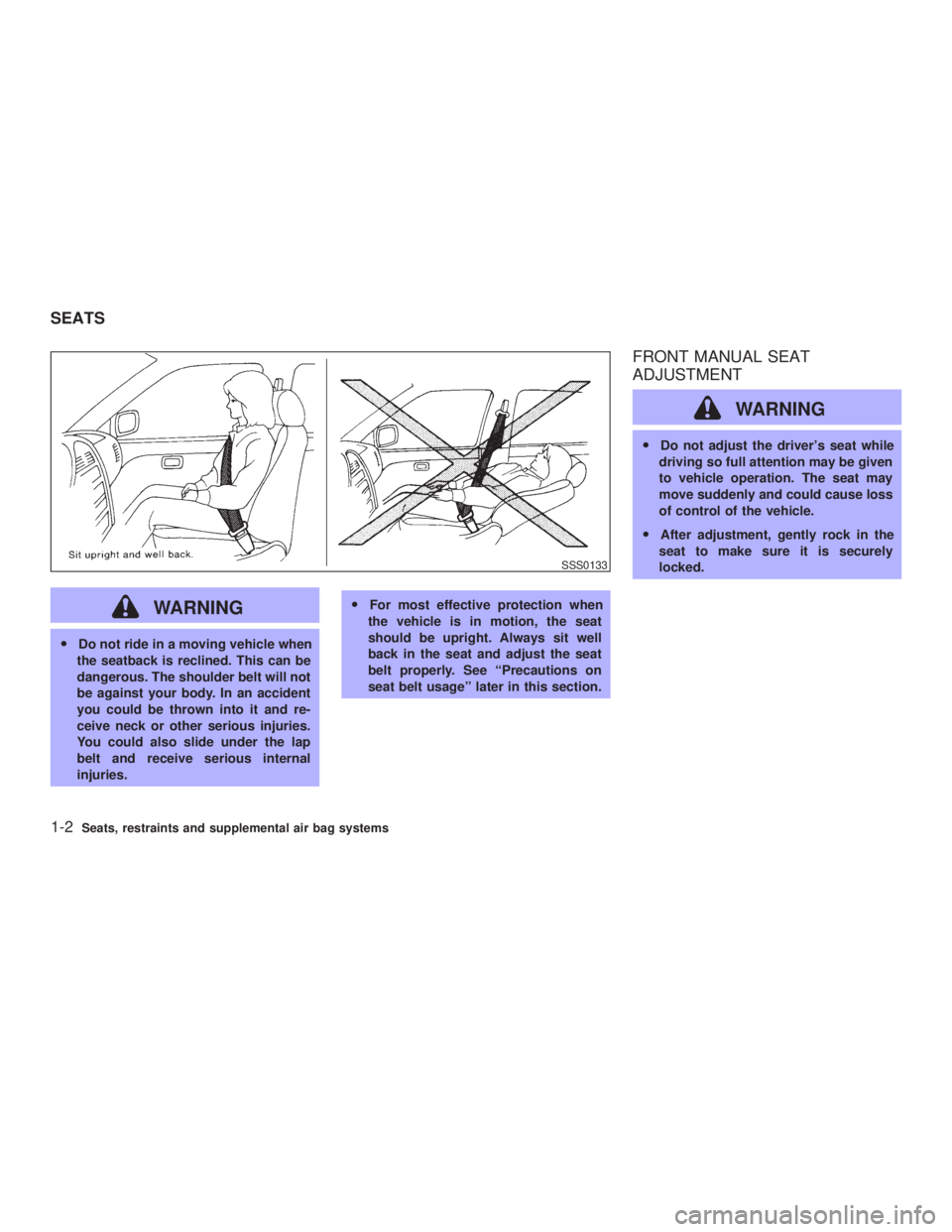
WARNINGO Do not ride in a moving vehicle when
the seatback is reclined. This can be
dangerous. The shoulder belt will not
be against your body. In an accident
you could be thrown into it and re-
ceive neck or other serious injuries.
You could also slide under the lap
belt and receive serious internal
injuries. O For most effective protection when
the vehicle is in motion, the seat
should be upright. Always sit well
back in the seat and adjust the seat
belt properly. See ªPrecautions on
seat belt usageº later in this section. FRONT MANUAL SEAT
ADJUSTMENT
WARNING O Do not adjust the driver's seat while
driving so full attention may be given
to vehicle operation. The seat may
move suddenly and could cause loss
of control of the vehicle.
O After adjustment, gently rock in the
seat to make sure it is securely
locked. SSS0133
SEATS
1-2 Seats, restraints and supplemental air bag systems
Z 02.7.29/V35-D/V5.0
X
Page 10 of 256
FRONT POWER SEAT
ADJUSTMENT (if so equipped)
WARNINGO Do not adjust the driver's seat while
driving so full attention may be given
to vehicle operation.
O Do not leave children unattended in-
side the vehicle. They could unknow-
ingly activate switches or controls.
Unattended children could become
involved in serious accidents.
Operating tips O The seat motor has an auto-reset overload
protection circuit. If the motor stops during
operation, wait 30 seconds, then reactivate
the switch.
O Do not operate the power seat for a long
period of time when the engine is off. This
will discharge the battery.
See ªAutomatic seat positionerº in the ª3.
Pre-driving checks and adjustmentsº for auto-
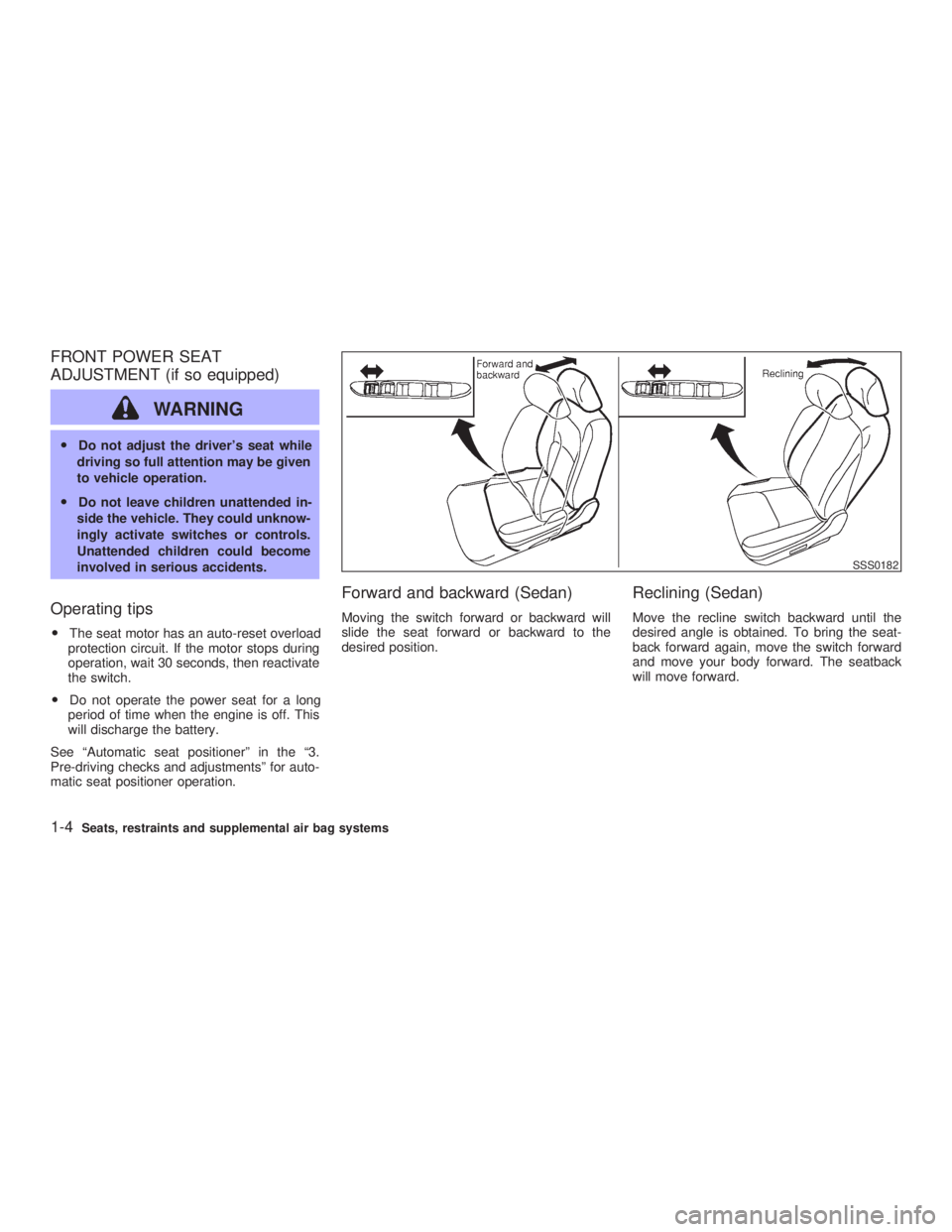
matic seat positioner operation. Forward and backward (Sedan) Moving the switch forward or backward will
slide the seat forward or backward to the
desired position.
Reclining (Sedan) Move the recline switch backward until the
desired angle is obtained. To bring the seat-
back forward again, move the switch forward
and move your body forward. The seatback
will move forward. SSS0182
1-4 Seats, restraints and supplemental air bag systems
Z 02.7.29/V35-D/V5.0
X
Page 13 of 256

Lumbar support (Driver's seat) The lumbar support feature provides lower
back support to the driver. Move the lever up
or down to adjust the seat lumbar area.
REAR SEAT ADJUSTMENT
Reclining (if so equipped) Pull the reclining lever and position the seat
back at the desired angle. Release the reclin-
ing lever after positioning the seat at the
desired angle.
WARNING O Do not ride in a moving vehicle when
the seatback is reclined. This can be
dangerous. The shoulder belt will not be against your body. In an accident
you could be thrown into it and re-
ceive neck or other serious injuries.
You could also slide under the lap
belt and receive serious internal inju-
ries.
O For the most effective protection
when the vehicle is in motion, the
seat should be upright. Always sit
well back in the seat and adjust the
seat belt properly. See ªSeat beltsº
later in this section for precautions
on seat belt usage.
O After adjustment, check to be sure
the seat is securely locked.SSS0184 SSS0185
Seats, restraints and supplemental air bag systems
1-7
Z 02.7.29/V35-D/V5.0
X
Page 38 of 256

WARNINGO After adjustment, release the adjust-
ment button and try to move the
shoulder belt down to make sure it is
securely fixed in position.
O The shoulder belt anchor height
should be adjusted to the position
best for you. Failure to do so may
reduce the effectiveness of the entire
restraint system and increase the
chance or severity of injury in an
accident.
Shoulder belt guide (Coupe) The shoulder arm can be adjusted to allow
easier access to the shoulder belt. The arm
can also be folded down to allow rear seat
passengers easier access.
SEAT BELT EXTENDERS If, because of body size or driving position, it is
not possible to properly fit the lap-shoulder belt
and fasten it, an extender is available which is
compatible with the installed seat belts. The
extender adds approximately 8 inches (200
mm) of length and may be used for either the
driver or front passenger seating position. See your INFINITI retailer for assistance if the
extender is required.
WARNING O Only INFINITI belt extenders, made by
the same company which made the
original equipment belts, should be
used with INFINITI belts.
O Adults and children who can use the
standard seat belt should not use an
extender. Such unnecessary use
could result in serious personal in-
jury in the event of an accident.
O Never use seat belt extenders to in-
stall child restraints. If the child re-
straint is not secured properly, the
child could be seriously injured in a
collision or a sudden stop.
SEAT BELT MAINTENANCE O To clean the seat belt webbings, apply a
mild soap solution or any solution recom-
mended for cleaning upholstery or carpets.
Then brush the webbing, wipe it with a cloth
and allow it to dry in the shade. Do not allow SSS0222
1-32 Seats, restraints and supplemental air bag systems
Z 02.7.29/V35-D/V5.0
X
Page 95 of 256
3 Pre-driving checks and adjustments Keys .......................................................................... 3-2
Doors ......................................................................... 3-3
Locking with key (Driver's side) ........................... 3-3
Windows open/close with key .............................. 3-3
Locking with inside lock knob............................... 3-4
Locking with power door lock switch.................... 3-4
Child safety rear door lock ................................... 3-5
Remote keyless entry system ................................... 3-5
How to use remote keyless entry system ............ 3-5
Battery replacement ............................................. 3-8
Hood ........................................................................ 3-10
Trunk lid .................................................................. 3-10
Opener operation ............................................... 3-11
Interior trunk lid release ..................................... 3-12
Secondary trunk lid release ............................... 3-13 Fuel filler lid ............................................................. 3-14
Opening the filler lid ........................................... 3-14
Fuel filler cap ...................................................... 3-14
Steering wheel ........................................................ 3-16
Tilt operation....................................................... 3-16
Sun visors ............................................................... 3-16
Mirrors ..................................................................... 3-17
Automatic anti-glare inside mirror (if so
equipped)............................................................ 3-17
Outside mirrors ................................................... 3-18
Automatic seat positioner (if so equipped) ............. 3-19
Automatic seat positioner operation ................... 3-19
Procedure for storing memory............................ 3-19
Cancel switch ..................................................... 3-21
Z 02.7.29/V35-D/V5.0
X
Page 97 of 256

WARNINGO Always have the doors locked while
driving. Along with the use of seat
belts, this provides greater safety in
the event of an accident by helping to
prevent persons from being thrown
from the vehicle. This also helps keep
children and others from unintention-
ally opening the doors, and will help
keep out intruders.
O Before opening any door, always look
for and avoid oncoming traffic.
O Do not leave children unattended in-
side the vehicle. They could unknow-
ingly activate switches or controls.
Unattended children could become
involved in serious accidents.
LOCKING WITH KEY (Driver's side)
Power The power door lock system allows you to lock
or unlock all doors, trunk lid and fuel filler lid
simultaneously.
O Turning the driver's door key to the front of
the vehicle will lock all doors, trunk lid and
fuel filler lid.
O Turning the driver's door key one time to
the rear of the vehicle will unlock the driv-
er's door. From that position, returning the
key to neutral (where the key can only be
removed and inserted) and turning it to the rear again within 5 seconds will unlock all
doors, fuel filler lid and trunk lid.
WINDOWS OPEN/CLOSE WITH
KEY Turn the driver's door key to the unlock posi-
tion and hold for about 1 second, all door
windows will begin to lower.
To stop opening, turn the key to the neutral
position.
To close all door windows, turn the key to the
lock position and hold for about 1 second.
To stop closing, turn the key to the neutral
position.
The rear door windows will operate 0.5 sec-
onds after the front windows' operation (if so
equipped).
In the event of a hand in the way, or other
obstruction, the auto reverse function will acti-
vate. SPA1421
DOORS
Pre-driving checks and adjustments
3-3
Z 02.11.1/V35-D/V5.0
X
Page 113 of 256
AUTOMATIC SEAT POSITIONER
OPERATION This system is designed so that the driver's
seat will automatically move when the auto-
matic transmission selector lever is in the P
(Park) position or when the parking brake is
applied (manual transmission model). This al-
lows the driver to get in and out of the driver's
seat more easily.
When one of the following conditions is met,
the driver's seat will slide backward. (AT mod-
els only)
O When the key is removed from the ignition
switch.
O When the driver's door is opened with the
key turned to ACC or LOCK.
O When the key is turned from ON to ACC
with the driver's door open.
When one of the following conditions is met,
the driver's seat will return to the positions
before being set. (AT models only)
O When the key is inserted into the ignition
switch.
O When the driver's door is closed with the
key turned to LOCK.
O When the key is turned from ACC to ON with the driver's door open.
PROCEDURE FOR STORING
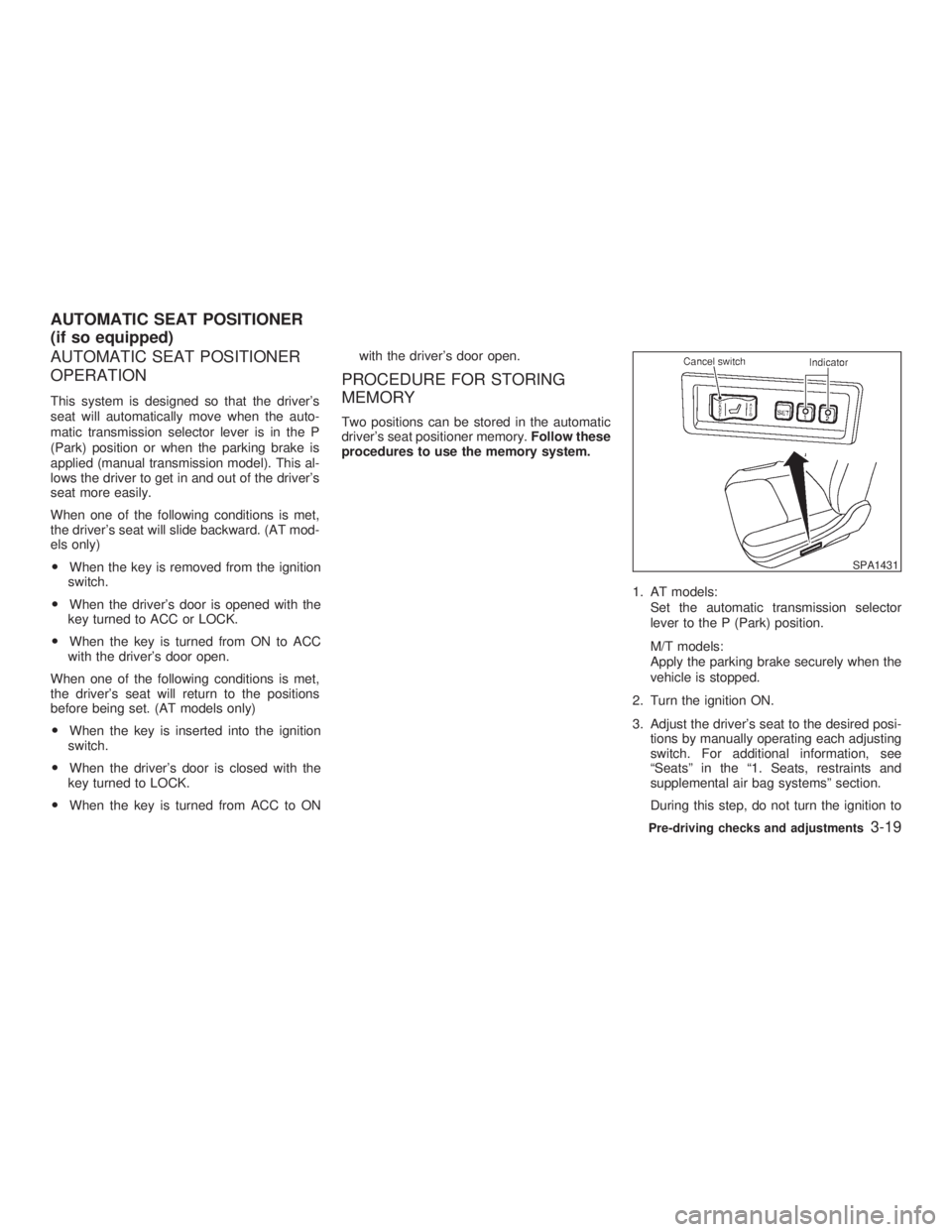
MEMORY Two positions can be stored in the automatic
driver's seat positioner memory. Follow these
procedures to use the memory system.
1. AT models:
Set the automatic transmission selector
lever to the P (Park) position.
M/T models:
Apply the parking brake securely when the
vehicle is stopped.
2. Turn the ignition ON.
3. Adjust the driver's seat to the desired posi-
tions by manually operating each adjusting
switch. For additional information, see
ªSeatsº in the ª1. Seats, restraints and
supplemental air bag systemsº section.
During this step, do not turn the ignition to SPA1431
AUTOMATIC SEAT POSITIONER
(if so equipped)
Pre-driving checks and adjustments
3-19
Z 02.7.29/V35-D/V5.0
X
Page 114 of 256
any positions other than ON.
4. Push the SET switch and, within 5 seconds,
push the memory switch 1 or 2 fully for at
least 1 second.
The indicator light for the pushed memory
switch will come on and stay on for approxi-
mately 5 seconds after pushing the switch.
After the indicator light goes off, the se-
lected positions are stored in the selected
memory (1 or 2).
If memory is stored in the same memory
switch, the previous memory will be de-
leted.
Confirming memory storage O Turn the ignition ON and push the SET
switch. If the main memory has not been
stored, the indicator light will come on for
approximately 0.5 seconds. When the
memory has stored the position, the indica-
tor light will stay on for approximately 5
seconds.
O If the battery cable is disconnected, or if the
fuse blows, the memory will be canceled. In
such a case, reset the desired positions
using the following procedures.
1. Open and close the driver's door more than two times with the ignition key in the LOCK
position.
2. Reset the desired position using the previ-
ous procedure.
Selecting the memorized position 1. A/T models:
Set the automatic transmission selector le-
ver to the P (Park) position.
M/T models:
Apply the parking brake securely when the
vehicle is stopped.
2. Turn the ignition ON.
3. Push the memory switch 1 or 2 fully for at
least 1 second.
The driver's seat will move to the memo-
rized position with the indicator light flash-
ing. Then the light will stay on for approxi-
mately 5 seconds.
When memory switch 1 or 2 is pushed with the
driver's door open and then the key inserted
into the ignition switch within approximately 1
minute, the driver's seat will move to the
memorized position. (AT models only) System operation The automatic drive positioner system will not
work or will stop operating under the following
conditions:
O when the vehicle speed is above 4 MPH (7
km/h).
O when any two or more of the memory
switches are simultaneously pressed while
the automatic drive positioner is operating.
O when the adjusting switch for the driver's
seat is turned on while the automatic drive
positioner is operating.
O when the cancel switch is pushed to cancel.
O when the memory switch 1 or 2 is not
pushed for at least 1 second.
O when the seat has already been moved to
the memorized position.
O when no seat position is stored in the
memory switch.
O when the parking brake is not applied. Ð
M/T models
O when the vehicle speed is above 4 MPH (7
km/h) while the parking brake is applied. Ð
M/T models
To restart the drive positioner system,
move the parking brake to off and on.
3-20 Pre-driving checks and adjustments
Z 02.7.29/V35-D/V5.0
X