automatic transmission INFINITI G35 2006 User Guide
[x] Cancel search | Manufacturer: INFINITI, Model Year: 2006, Model line: G35, Model: INFINITI G35 2006Pages: 344, PDF Size: 6.81 MB
Page 108 of 344
WARNINGKeep upper glove box lid closed while
driving to help prevent injury in an accident
or a sudden stop.
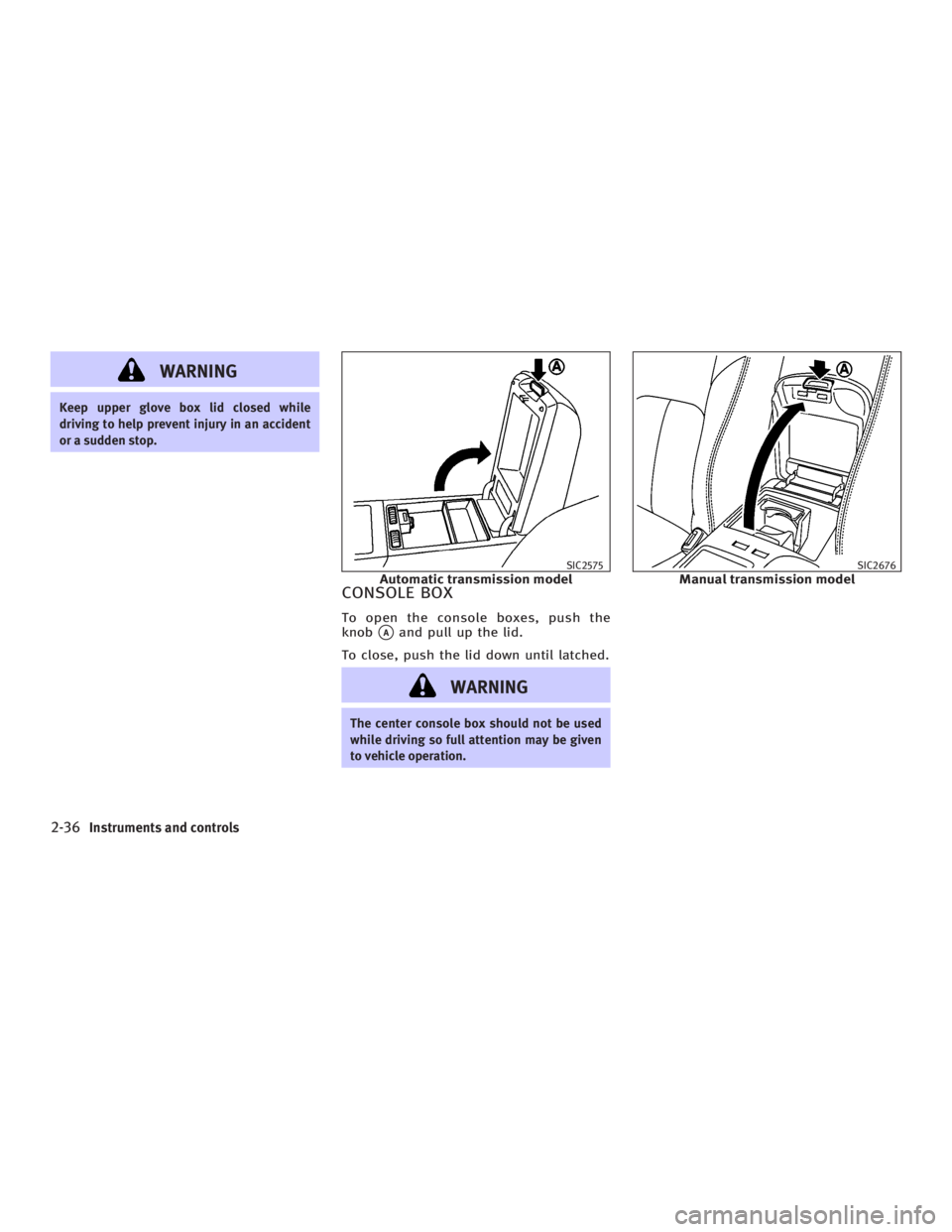
CONSOLE BOX To open the console boxes, push the
knob
q A
and pull up the lid.
To close, push the lid down until latched.
WARNING The center console box should not be used
while driving so full attention may be given
to vehicle operation. SIC2575
Automatic transmission model SIC2676
Manual transmission model
2-36 Instruments and controls
w 06.1.4/V35-D/V5.0
X
Page 156 of 344
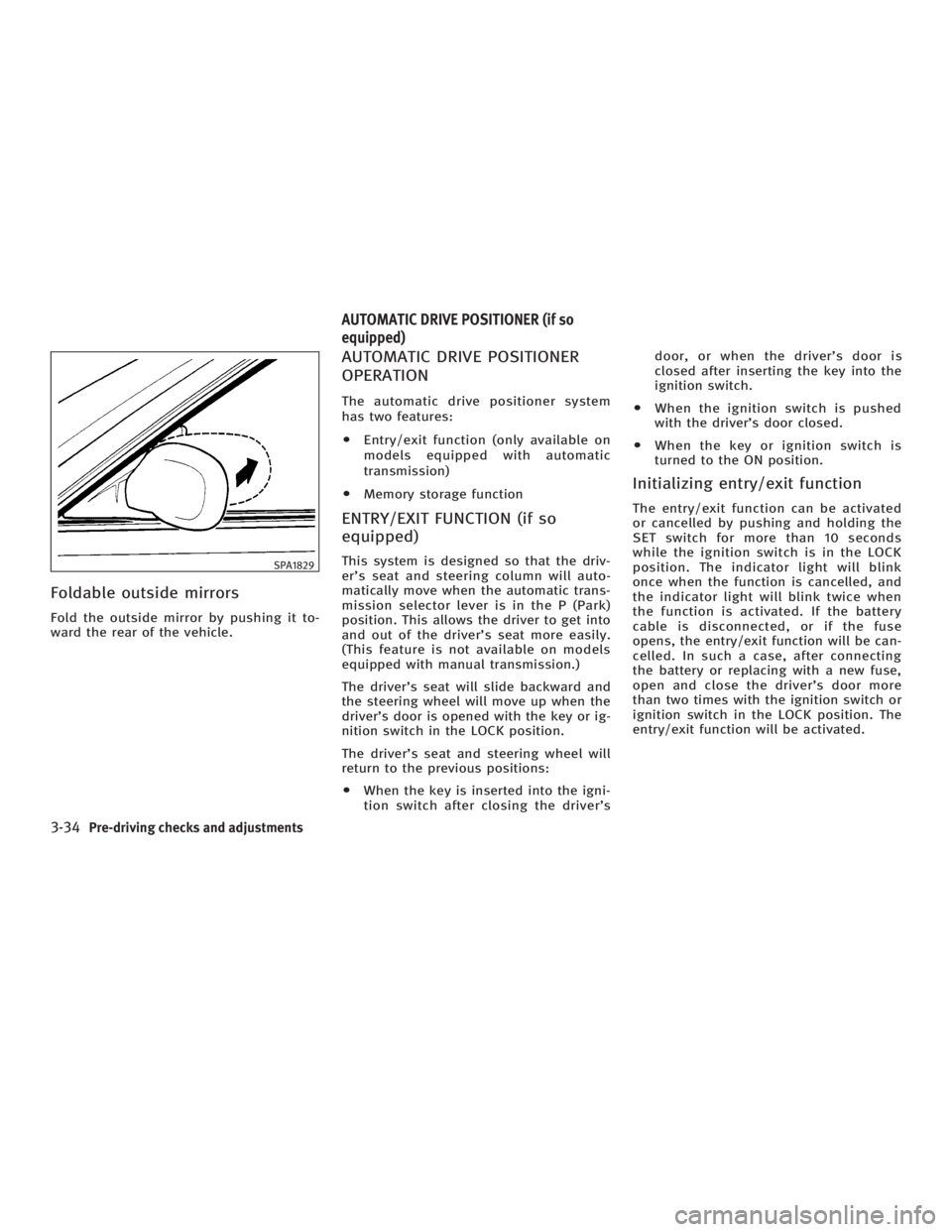
Foldable outside mirrors Fold the outside mirror by pushing it to-
ward the rear of the vehicle. AUTOMATIC DRIVE POSITIONER
OPERATION The automatic drive positioner system
has two features:
O Entry/exit function (only available on
models equipped with automatic
transmission)
O Memory storage function
ENTRY/EXIT FUNCTION (if so
equipped) This system is designed so that the driv-
er's seat and steering column will auto-
matically move when the automatic trans-
mission selector lever is in the P (Park)
position. This allows the driver to get into
and out of the driver's seat more easily.
(This feature is not available on models
equipped with manual transmission.)
The driver's seat will slide backward and
the steering wheel will move up when the
driver's door is opened with the key or ig-
nition switch in the LOCK position.
The driver's seat and steering wheel will
return to the previous positions:
O When the key is inserted into the igni-
tion switch after closing the driver's door, or when the driver's door is
closed after inserting the key into the
ignition switch.
O When the ignition switch is pushed
with the driver's door closed.
O When the key or ignition switch is
turned to the ON position.
Initializing entry/exit function The entry/exit function can be activated
or cancelled by pushing and holding the
SET switch for more than 10 seconds
while the ignition switch is in the LOCK
position. The indicator light will blink
once when the function is cancelled, and
the indicator light will blink twice when
the function is activated. If the battery
cable is disconnected, or if the fuse
opens, the entry/exit function will be can-
celled. In such a case, after connecting
the battery or replacing with a new fuse,
open and close the driver's door more
than two times with the ignition switch or
ignition switch in the LOCK position. The
entry/exit function will be activated.SPA1829
AUTOMATIC DRIVE POSITIONER (if so
equipped)
3-34 Pre-driving checks and adjustments
w 06.1.4/V35-D/V5.0
X
Page 157 of 344
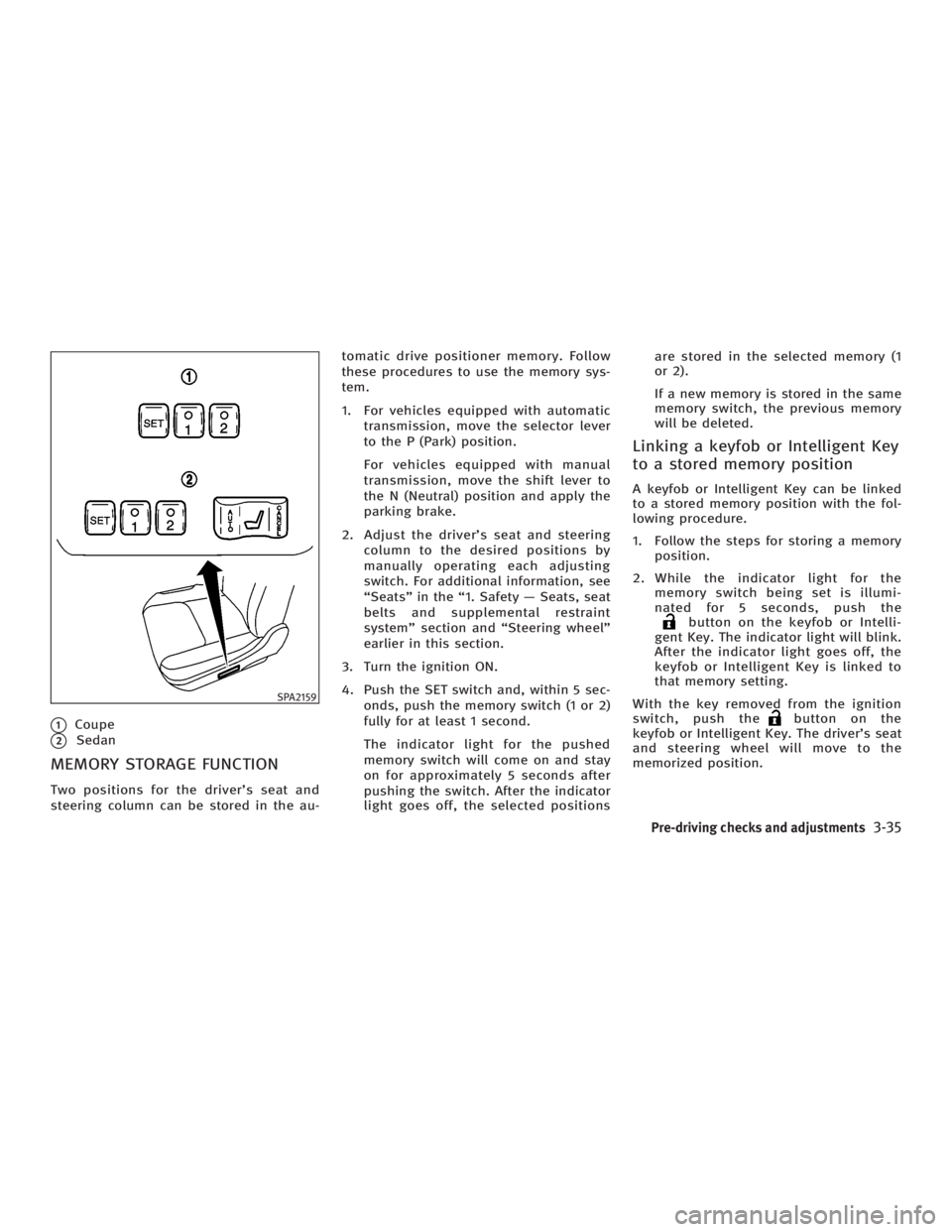
q 1
Coupe
q 2
Sedan
MEMORY STORAGE FUNCTION Two positions for the driver's seat and
steering column can be stored in the au- tomatic drive positioner memory. Follow
these procedures to use the memory sys-
tem.
1. For vehicles equipped with automatic
transmission, move the selector lever
to the P (Park) position.
For vehicles equipped with manual
transmission, move the shift lever to
the N (Neutral) position and apply the
parking brake.
2. Adjust the driver's seat and steering
column to the desired positions by
manually operating each adjusting
switch. For additional information, see
ªSeatsº in the ª1. Safety Ð Seats, seat
belts and supplemental restraint
systemº section and ªSteering wheelº
earlier in this section.
3. Turn the ignition ON.
4. Push the SET switch and, within 5 sec-
onds, push the memory switch (1 or 2)
fully for at least 1 second.
The indicator light for the pushed
memory switch will come on and stay
on for approximately 5 seconds after
pushing the switch. After the indicator
light goes off, the selected positions are stored in the selected memory (1
or 2).
If a new memory is stored in the same
memory switch, the previous memory
will be deleted.
Linking a keyfob or Intelligent Key
to a stored memory position A keyfob or Intelligent Key can be linked
to a stored memory position with the fol-
lowing procedure.
1. Follow the steps for storing a memory
position.
2. While the indicator light for the
memory switch being set is illumi-
nated for 5 seconds, push the
button on the keyfob or Intelli-
gent Key. The indicator light will blink.
After the indicator light goes off, the
keyfob or Intelligent Key is linked to
that memory setting.
With the key removed from the ignition
switch, push the button on the
keyfob or Intelligent Key. The driver's seat
and steering wheel will move to the
memorized position.SPA2159
Pre-driving checks and adjustments
3-35
w 06.1.4/V35-D/V5.0
X
Page 158 of 344
Confirming memory storage O Turn the ignition ON and push the SET
switch. If the main memory has not
been stored, the indicator light will
come on for approximately 0.5 sec-
onds. When the memory has stored in
position, the indicator light will stay
on for approximately 5 seconds.
O If the battery cable is disconnected, or
if the fuse opens, the memory will be
canceled.
Reset the desired position using the
previous procedure.
Selecting the memorized position 1. For vehicles equipped with automatic
transmission, move the selector lever
to the P (Park) position.
For vehicles equipped with manual
transmission, move the shift lever in
the N (Neutral) position and apply the
parking brake.
2. Use one of the following methods to
move the driver's seat and the
steering wheel.
O Turn the ignition switch to the ªONº
position and push the memory switch (1 or 2) fully for at least 1
second.
O Within 45 seconds of opening the
driver's door, push the memory
switch (1 or 2) fully for at least 1
second.
The driver's seat and steering column
will move to the memorized position
with the indicator light flashing, and
then the light will stay on for approxi-
mately 5 seconds.
SYSTEM OPERATION The automatic drive positioner system will
not work or will stop operating under the
following conditions:
O when the vehicle speed is above 4
MPH (7 km/h).
O when the adjusting switch for the driv-
er's seat and steering column is
turned on while the automatic drive
positioner is operating.
O when the cancel switch (if so
equipped) is pushed to the CANCEL
side. (However, it will not be cancelled
if the switch is pushed while the seat
and steering column are returning to the previous positions (entry/exit
function).)
O when the memory switch 1 or 2 is not
pushed and held for at least 1 second.
O when the seat has already been
moved to the memorized position.
O when no seat position is stored in the
memory switch.
O when the parking brake is not applied.
Ð MT models
O when the speed is above 4 MPH (7
km/h) while the parking brake is ap-
plied. Ð MT models
To restart the drive positioner system,
move the parking brake to off and on.
O when the front seat is folded for oper-
ating the walk-in mechanism (if so
equipped).
O when the engine is started while the
automatic drive positioner is operating.
O when the AT selector lever is moved
from the P position to any other posi-
tion. (However, it will not be cancelled
if the switch is pushed while the seat
and steering column are returning to
the previous positions (entry/exit
function).)
3-36 Pre-driving checks and adjustments
w 06.1.4/V35-D/V5.0
X
Page 202 of 344
You can still use the Memo Pad and ac-
cess Setup.
To turn on the system again, choose the
Bluetooth On command from the Setup
command.
SPEAKER ADAPTATION (SA) MODE Speaker Adaptation allows up to two out-of
dialect users to train the system to improve
recognition accuracy. By repeating a
number of commands, the users can create
a voice model of their own voice that is
stored in the system. The system is ca-
pable of storing a different speaker adapta-
tion model for memory A and memory B.
If memory A is available, the system will
use memory A to store the model. If
memory A is in use and memory B is
available, the system will use memory B
to store the model. If both of the memory
locations are in use, the system will ask
the user to select which memory location
should be overwritten.
Training procedure The procedure for training a voice is as
follows.
1. Position the vehicle in a reasonably
quiet outdoor location. 2. Sit in the driver's seat with the engine
running, the parking brake on, and the
transmission in Park.
3. Press and hold the button for
more than 5 seconds.
4. The system announces: ªPress the
PHONE/SEND ( ) button for the
hands-free phone system to enter the
speaker adaptation mode or press the
PHONE/END ( ) button to select a
different language.º
5. Press the button.
For information on selecting a dif-
ferent language, see ªChoosing a lan-
guageº earlier in this section.
6. Voice memory A or memory B is se-
lected automatically. If both memory
locations are already in use, the
system will prompt you to overwrite
one. Follow the instructions provided
by the system.
7. When preparation is complete and you
are ready to begin, the press the
button.
8. The SA mode will be explained. Follow
the instructions provided by the
system. 9. When training is finished, the system
will tell you an adequate number of
phrases have been recorded.
10. The system will ask you to say your
name. Follow the instructions to regis-
ter your name.
11. The system will announce that
speaker adaptation has been com-
pleted and the system is ready.
The SA mode will stop if:
O The button is pressed for more
than 5 seconds in SA mode.
O The vehicle is driven during SA mode.
O The ignition switch is turned to the
OFF or LOCK position.
Training phrases During the SA mode, the system instructs
you to say the following phrases.
(The system will prompt you for each
phrase.)
O phone book new entry
O dial three oh four two nine
O delete call back number
O setup pair phone
4-42 Display screen, heater, air conditioner and audio systems
w 06.1.13/V35-D/V5.0
X
Page 205 of 344
5 Starting and driving Precautions when starting and driving .............. 5-2
Exhaust gas (Carbon monoxide) .................. 5-2
Three way catalyst....................................... 5-3
Tire pressure monitoring system (TPMS) ..... 5-3
Avoiding collision and rollover..................... 5-5
Drinking alcohol/drugs and driving ............. 5-5
All-wheel drive (AWD) driving safety
precautions (for AWD models) .................... 5-6
Ignition switch (except Intelligent Key
system)............................................................. 5-6
Automatic transmission ............................... 5-6
Manual transmission .................................. 5-7
Key positions .............................................. 5-8
INFINITI Vehicle Immobilizer System ............ 5-8
Ignition switch (models with the Intelligent
Key system) ...................................................... 5-9
Ignition switch positions ............................. 5-9
INFINITI Vehicle Immobilizer System .......... 5-10
Before starting the engine............................... 5-10
Starting the engine .......................................... 5-11
Driving the vehicle .......................................... 5-12
Automatic transmission.............................. 5-12
Manual transmission ................................ 5-16
Parking brake .................................................. 5-19 Cruise control ................................................. 5-20
Precautions on cruise control .................... 5-20
Cruise control operations .......................... 5-20
Break-in schedule ........................................... 5-22
Increasing fuel economy ................................. 5-22
All-wheel drive (AWD) (if so equipped) ............ 5-23
All-wheel drive (AWD) warning light ........... 5-23
Parking/parking on hills ................................. 5-24
Power steering ................................................ 5-25
Brake system .................................................. 5-26
Braking precautions .................................. 5-26
Anti-lock brake system (ABS)..................... 5-26
Vehicle Dynamic Control (VDC) system .......... 5-28
Rear active steer (RAS) system (if so
equipped) ....................................................... 5-29
Cold weather driving....................................... 5-30
Freeing a frozen door lock ......................... 5-30
Anti-freeze ................................................. 5-30
Battery ...................................................... 5-30
Draining of coolant water .......................... 5-30
Tire equipment .......................................... 5-30
Special winter equipment........................... 5-31
Driving on snow or ice ............................... 5-31
Engine block heater (if so equipped) ......... 5-32
w 06.1.13/V35-D/V5.0
X
Page 210 of 344
Remember, drinking and driving don't
mix!
And that's true for drugs too (over the
counter, prescription, and illegal drugs).
Don't drive if your ability to operate your
vehicle is impaired by alcohol, drugs, or
some other physical condition.
ALL-WHEEL DRIVE (AWD) DRIVING
SAFETY PRECAUTIONS (for AWD
models)
WARNINGO Do not drive beyond the performance ca-
pability of the tires, even with AWD en-
gaged. Accelerating quickly, sharp
steering maneuvers or sudden braking
may cause loss of control.
O Always use tires of the same type, size,
brand, construction (bias, bias-belted or
radial), and tread pattern on all four
wheels. Install tire chains on the rear
wheels when driving on slippery roads
and drive carefully. O This vehicle is not designed for off-road
(rough road) use. Do not drive on sandy
or muddy roads that tires may get stuck
in.
O Do not place an AWD equipped vehicle
on a two wheel dynamometer or raise
two wheels off the ground and shift the
transmission to any D (drive) or R (re-
verse) position. Doing so may result in
transmission damage or unexpected ve-
hicle movement which could result in se-
rious vehicle damage or personal injury.
O Never operate the accelerator pedal with
any wheels raised and the other wheels
on the ground while jacking up or with
any wheels on a roller and the other
wheels on the ground. Otherwise, the
vehicle could lurch forward or backward.
O When a wheel is off the ground due to an
unlevel surface, do not spin the wheel
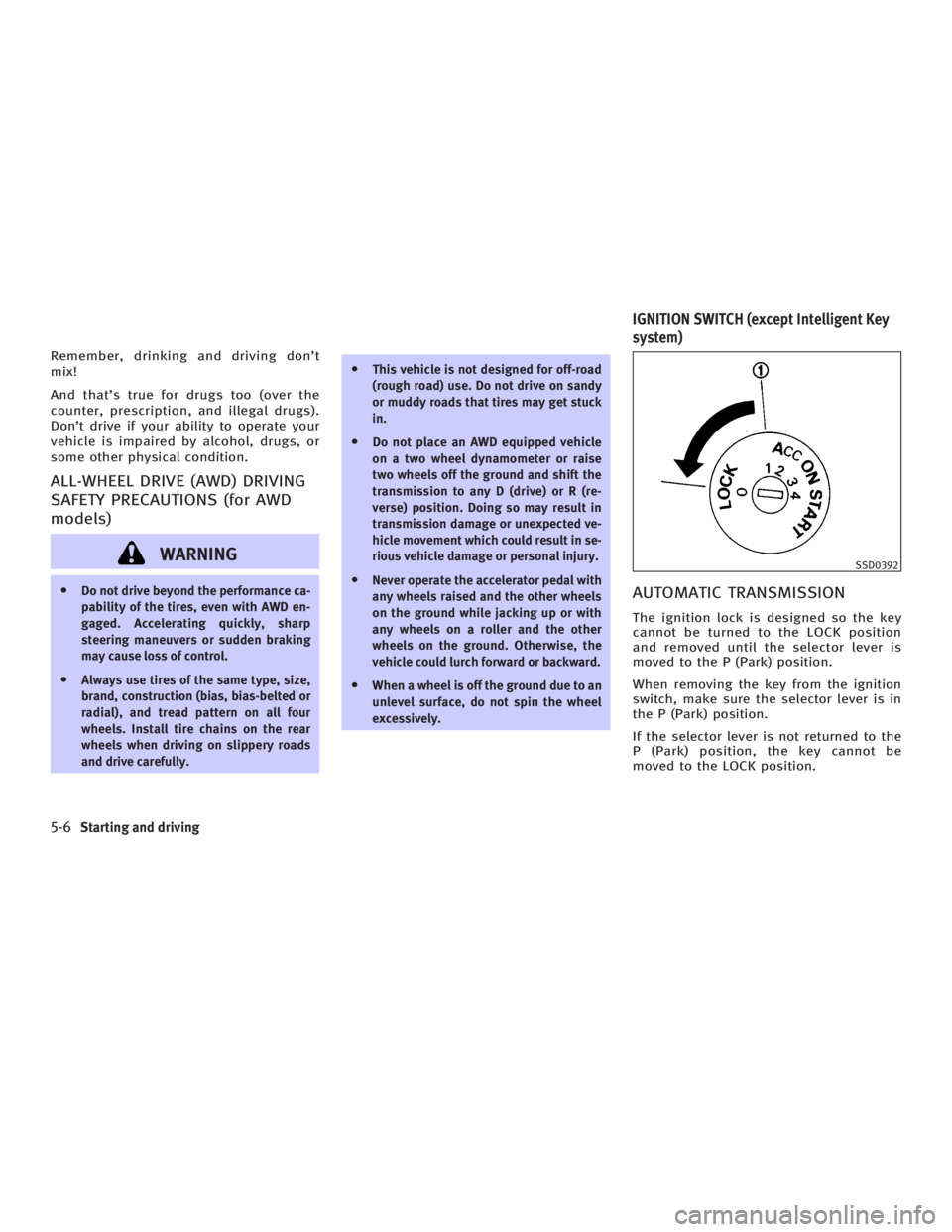
excessively. AUTOMATIC TRANSMISSION The ignition lock is designed so the key
cannot be turned to the LOCK position
and removed until the selector lever is
moved to the P (Park) position.
When removing the key from the ignition
switch, make sure the selector lever is in
the P (Park) position.
If the selector lever is not returned to the
P (Park) position, the key cannot be
moved to the LOCK position. SSD0392
IGNITION SWITCH (except Intelligent Key
system)
5-6 Starting and driving
w 06.1.4/V35-D/V5.0
X
Page 212 of 344
In order for the steering wheel to be
locked, it must be turned about 1/6 of a
turn clockwise from the straight up posi-
tion.
To lock the steering wheel, turn the key to
the LOCK position. Remove the key.
To unlock the steering wheel, insert the
key and turn it gently while rotating the
steering wheel slightly right and left.
WARNINGNever remove or turn the key to the LOCK po-
sition while driving. The steering wheel will
lock. This may cause the driver to lose con-
trol of the vehicle and could result in serious
vehicle damage and/or personal injury.
KEY POSITIONS The ignition switch includes an anti-theft
steering lock device.
LOCK (Normal parking position) (0)
The ignition key can only be removed
when the ignition switch is in this posi-
tion. OFF (1)
The engine can be turned off without
locking the steering wheel.
The ignition lock is designed so that the
key cannot be turned to the LOCK position
and removed until the selector lever is
moved to the P position (for automatic
transmission) or the key is pushed in
while turning the key between the ACC
and LOCK positions.
ACC (Accessories) (2)
This position activates electrical accesso-
ries when the engine is not running.
ON (Normal operating position) (3)
This position activates ignition system in
addition to electrical accessories.
START (4)
This position activates the starter motor,
starting the engine.
INFINITI VEHICLE IMMOBILIZER
SYSTEM The INFINITI Vehicle Immobilizer System
will not allow the engine to start without
the use of the registered key. If the engine fails to start using a regis-
tered key (for example, when interference
is caused by another registered key, an
automated toll road device or automated
payment device on the key ring), restart
the engine using the following proce-
dures:
1. Leave the ignition switch in the ON po-
sition for approximately 5 seconds.
2. Turn the ignition switch to the OFF or
LOCK position and wait approximately
10 seconds.
3. Repeat steps 1 and 2.
4. Restart the engine while holding the
device (which may have caused the in-
terference) away from the registered
key.
If this procedure allows the engine to
start, INFINITI recommends placing the
registered key on a separate key ring to
avoid interference from other devices.
5-8 Starting and driving
w 06.1.4/V35-D/V5.0
X
Page 215 of 344
1. Apply the parking brake.
2. Automatic transmission:
Move the selector lever to the P or N
position. (P preferred.)
The starter is designed so that the
starter does not operate unless the se-
lector lever is in either one of the
above positions.
Manual transmission:
Move the shift lever to the N position.
Depress the clutch pedal fully to the
floor.
The starter is designed so that it does
not operate unless the clutch pedal is
fully depressed.
3. Turn the ignition switch to START (4)
to crank the engine with your foot off
the accelerator pedal. Release the key
when the engine starts.
If the engine starts, but fails to run, re-
peat the above procedure.
O If the engine is very hard to start in
extremely cold weather or when re-
starting, depress the accelerator pedal
a little (approximately 1/3 to the floor)
and while holding, crank the engine. Release the key and the accelerator
pedal when the engine starts.
O If the engine is very hard to start be-
cause it is flooded, depress the accel-
erator pedal all the way to the floor
and hold it. Crank the engine for 5 to
6 seconds. After cranking the engine,
release the accelerator pedal. Crank
the engine with your foot off the accel-
erator pedal by turning the ignition key
to the START position. Release the key
when the engine starts. If the engine
starts, but fails to run, repeat the
above procedure.
CAUTION Do not operate the starter for more than 15
seconds at a time. If the engine does not
start, turn the key off and wait 10 seconds
before cranking again, otherwise the starter
could be damaged.
4. Warm-up
Allow the engine to idle for at least 30
seconds after starting. Do not race the
engine while warming it up. Drive at
moderate speed for a short distance
first, especially in cold weather. In cold weather, keep the engine running
for a minimum o f2-3 minutes before
shutting it off. Starting and stopping
the engine over a short period of time
may make the vehicle more difficult to
start.
STARTING THE ENGINE
Starting and driving
5-11
w 06.1.4/V35-D/V5.0
X
Page 216 of 344

AUTOMATIC TRANSMISSION
5-speed automatic transmission The automatic transmission in your ve-
hicle is electronically controlled by a
transmission control module to produce
maximum efficiency and smooth opera-
tion.
Shown on the following pages are the rec-
ommended operating procedures for this
transmission. Follow these procedures for
maximum vehicle performance and
driving enjoyment.
Starting the vehicle After starting the engine, fully depress the
foot brake pedal and push the selector le-
ver button before shifting the selector
lever to the R (Reverse), N (Neutral), D
(Drive) or Manual shift mode position. Be
sure the vehicle is fully stopped before at-
tempting to shift the selector lever.
This automatic transmission model is de-
signed so that the foot brake pedal must
be depressed before shifting from P (Park)
to any drive position while the ignition
switch is the ON position.
The selector lever cannot be moved out of
the P (Park) position and into any of the other gear positions if the ignition switch
is turned to the LOCK, OFF or ACC position
or if the key is removed from the switch.
1. Keep the foot brake pedal depressed
and push the selector lever button to
shift into a driving gear.
2. Release the parking brake and foot
brake, then gradually start the vehicle
in motion.
WARNING O Do not depress the accelerator pedal
while shifting from P (Park) or N (Neutral)
to R (Reverse), D (Drive) or manual shift
mode. Always depress the brake pedal
until shifting is completed. Failure to do
so could cause you to lose control and
have an accident.
O Cold engine idle speed is high, so use
caution when shifting into a forward or
reverse gear before the engine has
warmed up.
O On slippery roads, do not downshift.
This may cause a loss of control. O Never shift to P (Park) or R (Reverse)
while vehicle is moving forward. Never
shift to P (Park) or D (Drive) while vehicle
is moving rearward. Failure to do so
could cause you to lose control and have
an accident.
CAUTION When stopping the vehicle on an uphill
grade, do not hold the vehicle by depressing
the accelerator pedal. The foot brake should
be used for this purpose.DRIVING THE VEHICLE
5-12 Starting and driving
w 06.1.4/V35-D/V5.0
X