key INFINITI G35 2006 User Guide
[x] Cancel search | Manufacturer: INFINITI, Model Year: 2006, Model line: G35, Model: INFINITI G35 2006Pages: 344, PDF Size: 6.81 MB
Page 90 of 344

3. Close and lock all doors, hood and
trunk lid.
Lock all doors by pushing the LOCK
button on the keyfob, the Intelli-
gent Key or by pushing any front door
handle request switch or turning the
door key. When using the remote key-
less entry, the hazard indicators will
operate as shown in ªRemote keyless
entry systemº or ªIntelligent Key
systemº in the ª3. Pre-driving checks
and adjustmentsº section.
4. Confirm that the security indicator
light
q A
comes on. The security indica-
tor light glows for about 30 seconds
and then blinks. The system is now
armed. If, during this 30-second time
period, the door is unlocked by the
key, the remote keyless entry or the
front door request switch, or the igni-
tion switch is turned to the ACC or ON
position, the system will not be
armed.
Even when the driver and/or passengers
are in the vehicle, the system will be
armed with all doors, hood and trunk lid
locked and ignition switch off. Turn the ig-
nition switch to the ACC position to turn off
the system. Vehicle security system activation The security system will give the following
alarm:
O The headlights blink and the horn
sounds intermittently.
O The alarm automatically turns off after
approximately 50 seconds. However,
the alarm reactivates if the vehicle is
tampered with again. The alarm can
be shut off by unlocking a door with
the key, by pushing any front door
handle request switch or by pushing
the UNLOCK button on the keyfob
or Intelligent Key.
The alarm is activated by:
O Opening the door without using the
key or keyfob or Intelligent Key.
O Opening the trunk lid without using
the keyfob or Intelligent Key.
O Opening the hood.
How to stop an activated alarm The alarm will stop only by unlocking a
door with the key, by pushing any door
handle request switch or by pushing the
UNLOCK button on keyfob or Intelli-
gent Key. The alarm will not stop if the ig- nition switch is turned to the ACC or ON
position.
If the system does not operate as de-
scribed above, have it checked by an
INFINITI dealer.
INFINITI VEHICLE IMMOBILIZER
SYSTEM The INFINITI Vehicle Immobilizer System
will not allow the engine to start without
the use of the registered key.
If the engine fails to start using the regis-
tered key (for example, when interference
is caused by another registered key, an
automated toll road device or automated
payment device on the key ring), restart
the engine using the following proce-
dures:
1. Leave the ignition switch in the ON po-
sition for approximately 5 seconds.
2. Turn the ignition switch to the OFF or
LOCK position and wait approximately
10 seconds.
3. Repeat steps 1 and 2.
4. Restart the engine while holding the
device (which may have caused the in-
2-18 Instruments and controls
w 06.1.4/V35-D/V5.0
X
Page 91 of 344
terference) separate from the regis-
tered key.
If this procedure allows the engine to
start, INFINITI recommends placing the
registered key on a separate key ring
to avoid interference from other de-
vices.
Statement related to section 15 of FCC
rules for INFINITI Vehicle Immobilizer
System (CONT ASSY-BCM, ANT ASSY-
IMMOBILIZER)
This device complies with part 15 of the
FCC Rules and RSS-210 of Industry Canada.
Operation is subject to the following two
conditions;
(1) This device may not cause harmful in-
terference, and (2) this device must accept
any interference received, including inter-
ference that may cause undesired opera-
tion of the device.
CHANGES OR MODIFICATIONS NOT EX-
PRESSLY APPROVED BY THE PARTY RE-
SPONSIBLE FOR COMPLIANCE COULD VOID
THE USER'S AUTHORITY TO OPERATE THE
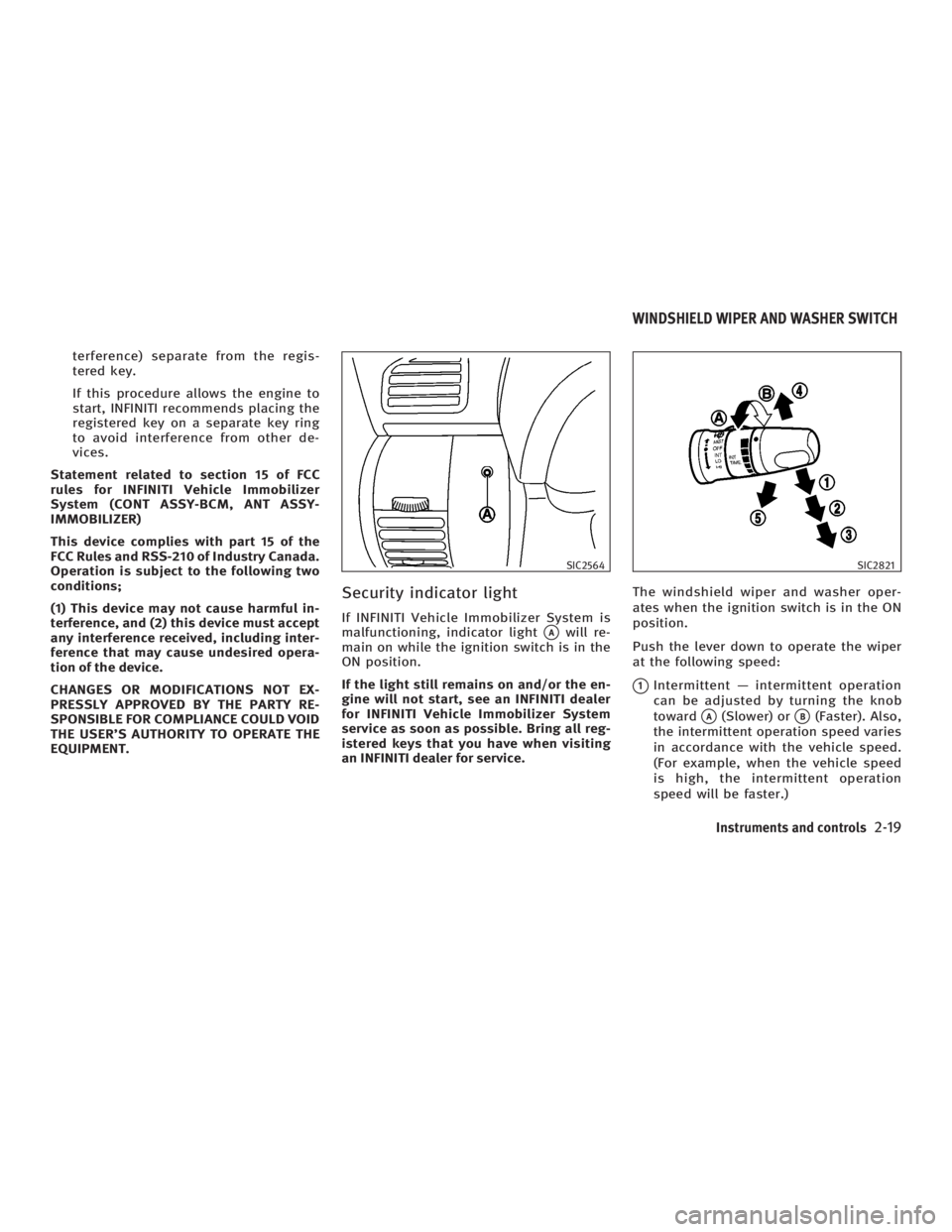
EQUIPMENT. Security indicator light If INFINITI Vehicle Immobilizer System is
malfunctioning, indicator light
q A
will re-
main on while the ignition switch is in the
ON position.
If the light still remains on and/or the en-
gine will not start, see an INFINITI dealer
for INFINITI Vehicle Immobilizer System
service as soon as possible. Bring all reg-
istered keys that you have when visiting
an INFINITI dealer for service. The windshield wiper and washer oper-
ates when the ignition switch is in the ON
position.
Push the lever down to operate the wiper
at the following speed:
q 1
Intermittent Ð intermittent operation
can be adjusted by turning the knob
toward
q A
(Slower) or
q B
(Faster). Also,
the intermittent operation speed varies
in accordance with the vehicle speed.
(For example, when the vehicle speed
is high, the intermittent operation
speed will be faster.) SIC2564 SIC2821
WINDSHIELD WIPER AND WASHER SWITCH
Instruments and controls
2-19
w 06.1.4/V35-D/V5.0
X
Page 107 of 344
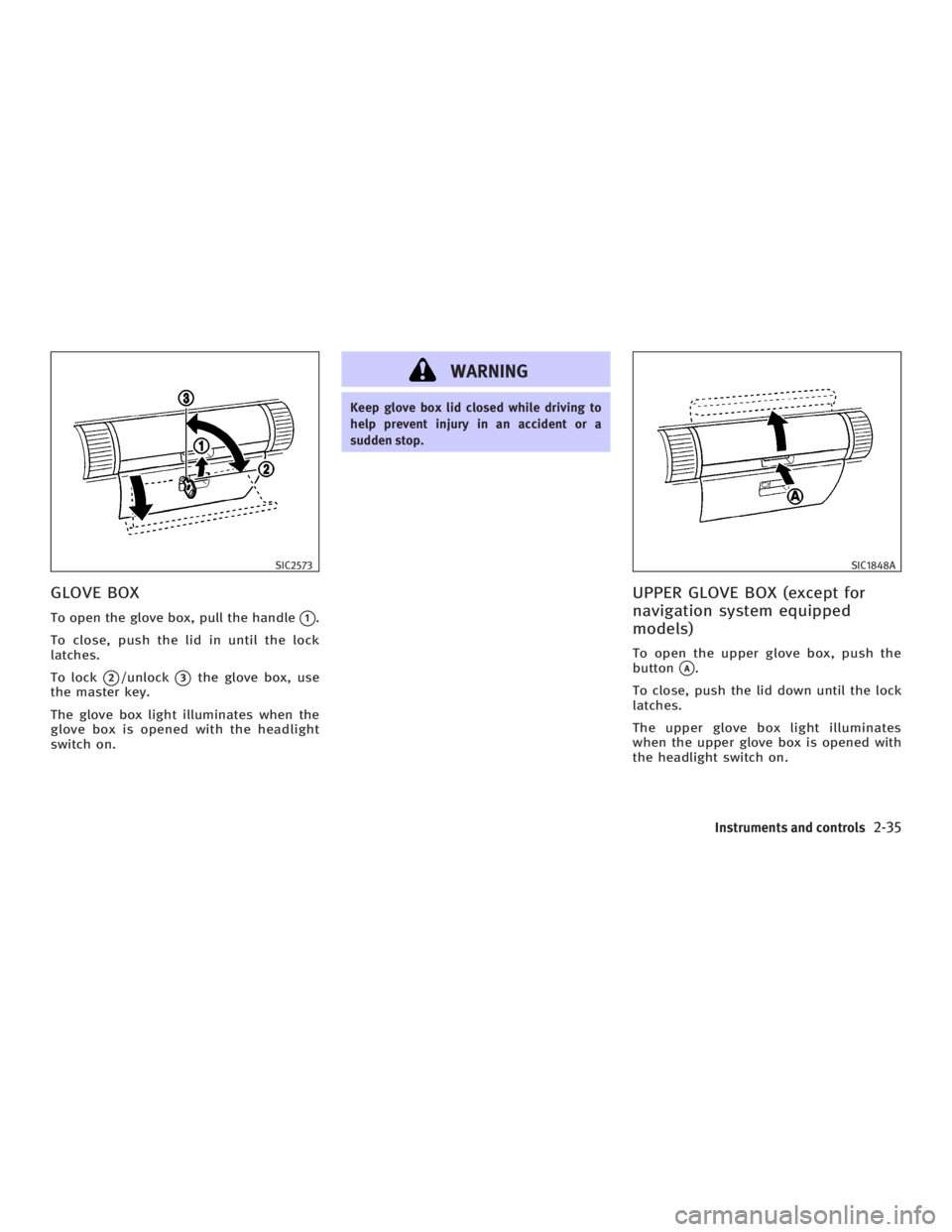
GLOVE BOX To open the glove box, pull the handle
q 1
.
To close, push the lid in until the lock
latches.
To lock
q 2
/unlock
q 3
the glove box, use
the master key.
The glove box light illuminates when the
glove box is opened with the headlight
switch on. WARNING Keep glove box lid closed while driving to
help prevent injury in an accident or a
sudden stop.
UPPER GLOVE BOX (except for
navigation system equipped
models) To open the upper glove box, push the
button
q A
.
To close, push the lid down until the lock
latches.
The upper glove box light illuminates
when the upper glove box is opened with
the headlight switch on.SIC2573 SIC1848A
Instruments and controls
2-35
w 06.1.4/V35-D/V5.0
X
Page 111 of 344
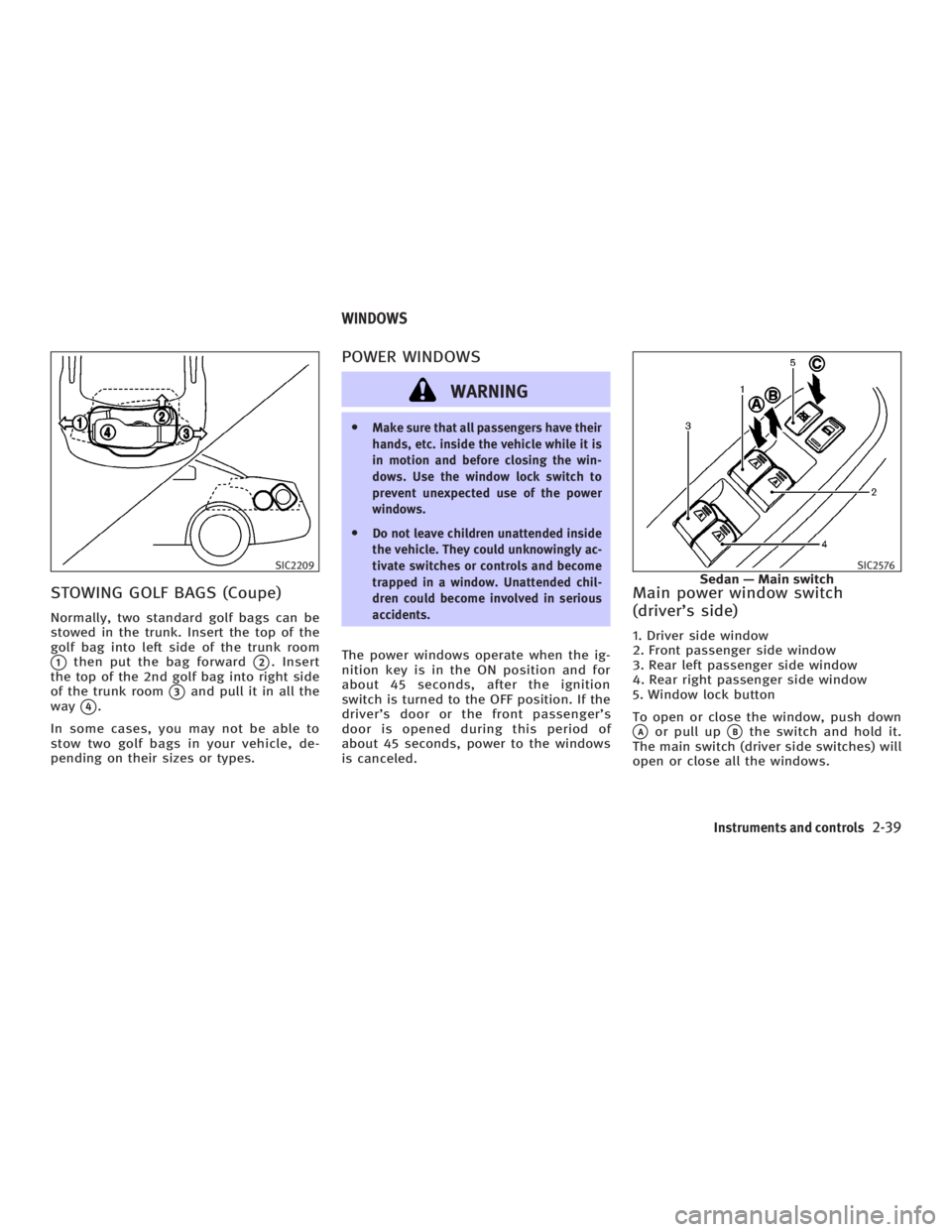
STOWING GOLF BAGS (Coupe) Normally, two standard golf bags can be
stowed in the trunk. Insert the top of the
golf bag into left side of the trunk room
q 1
then put the bag forward
q 2
. Insert
the top of the 2nd golf bag into right side
of the trunk room
q 3
and pull it in all the
way
q 4
.
In some cases, you may not be able to
stow two golf bags in your vehicle, de-
pending on their sizes or types. POWER WINDOWS
WARNING O Make sure that all passengers have their
hands, etc. inside the vehicle while it is
in motion and before closing the win-
dows. Use the window lock switch to
prevent unexpected use of the power
windows.
O Do not leave children unattended inside
the vehicle. They could unknowingly ac-
tivate switches or controls and become
trapped in a window. Unattended chil-
dren could become involved in serious
accidents.
The power windows operate when the ig-
nition key is in the ON position and for
about 45 seconds, after the ignition
switch is turned to the OFF position. If the
driver's door or the front passenger's
door is opened during this period of
about 45 seconds, power to the windows
is canceled. Main power window switch
(driver's side) 1. Driver side window
2. Front passenger side window
3. Rear left passenger side window
4. Rear right passenger side window
5. Window lock button
To open or close the window, push down
q A
or pull up
q B
the switch and hold it.
The main switch (driver side switches) will
open or close all the windows.SIC2209 SIC2576
Sedan Ð Main switchWINDOWS
Instruments and controls
2-39
w 06.1.4/V35-D/V5.0
X
Page 116 of 344
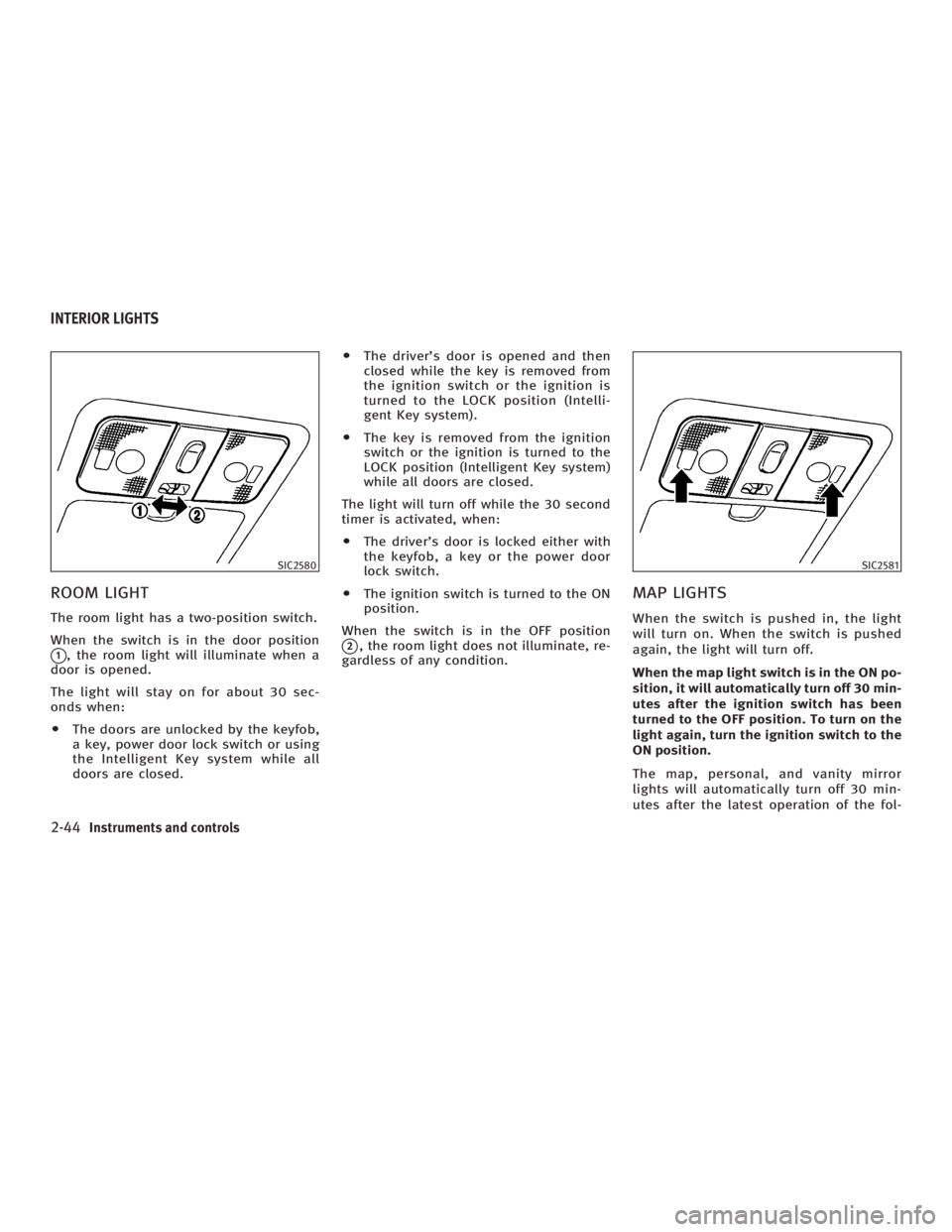
ROOM LIGHT The room light has a two-position switch.
When the switch is in the door position
q 1
, the room light will illuminate when a
door is opened.
The light will stay on for about 30 sec-
onds when:
O The doors are unlocked by the keyfob,
a key, power door lock switch or using
the Intelligent Key system while all
doors are closed. O The driver's door is opened and then
closed while the key is removed from
the ignition switch or the ignition is
turned to the LOCK position (Intelli-
gent Key system).
O The key is removed from the ignition
switch or the ignition is turned to the
LOCK position (Intelligent Key system)
while all doors are closed.
The light will turn off while the 30 second
timer is activated, when:
O The driver's door is locked either with
the keyfob, a key or the power door
lock switch.
O The ignition switch is turned to the ON
position.
When the switch is in the OFF position
q 2
, the room light does not illuminate, re-
gardless of any condition.
MAP LIGHTS When the switch is pushed in, the light
will turn on. When the switch is pushed
again, the light will turn off.
When the map light switch is in the ON po-
sition, it will automatically turn off 30 min-
utes after the ignition switch has been
turned to the OFF position. To turn on the
light again, turn the ignition switch to the
ON position.
The map, personal, and vanity mirror
lights will automatically turn off 30 min-
utes after the latest operation of the fol-SIC2580 SIC2581
INTERIOR LIGHTS
2-44 Instruments and controls
w 06.1.4/V35-D/V5.0
X
Page 117 of 344

lowing with the ignition switch in the ACC
or OFF position:
O Opening or closing any door
O Locking or unlocking with the keyfob,
a key, the power door lock switch or
the ignition is turned to the LOCK po-
sition (Intelligent Key system)
O Inserting or removing a key from the
ignition switch
These lights will turn on again when any
of the above operations is performed after
the lights have turned off automatically.
(The lights will turn off 30 minutes after
the latest operation of the above as well.)
CAUTIONO Turn off the map, personal and vanity
mirror lights when you leave the vehicle.
O Do not use for extended periods of time
with the engine stopped. This could re-
sult in a discharged battery. PERSONAL LIGHTS
Rear (Sedan)
q A
: Left-hand side
q B
: Right-hand side
The rear personal light has a three-
position switch.
When the switch is in the door position
q 2
, the light will illuminate when the rear
door is opened. When the rear personal light switch is in
the ON position
q 1
, the rear personal
lights illuminate, regardless of any condi-
tion.
When the switch is in the OFF
q 3
position,
the rear personal lights do not illuminate,
regardless of any condition.
When the personal light switch is in the
ON position, it will automatically turn off
30 minutes after the ignition switch has
been turned to the OFF position. To turn on
the light again, turn the ignition switch to
the ON position. SIC2582
Instruments and controls
2-45
w 06.1.4/V35-D/V5.0
X
Page 123 of 344
3 Pre-driving checks and adjustments Keys ................................................................. 3-2
Infiniti vehicle immobilizer system keys ...... 3-2
Doors ............................................................... 3-3
Locking with key ......................................... 3-3
Locking with inside lock knob ..................... 3-4
Locking with power door lock switch........... 3-4
Child safety rear door lock (Sedan) ............. 3-5
Remote keyless entry system (models without
Intelligent Key system) ..................................... 3-5
How to use remote keyless entry system .... 3-6
Intelligent Key system (if so equipped) ............. 3-9
Door locks/unlocks precaution .................. 3-11
Intelligent Key operation ............................ 3-11
Opening and closing windows ................... 3-14
Operating the engine ................................. 3-14
Intelligent Key operating range ................. 3-16
Warning signals ......................................... 3-17
Trouble-shooting guide .............................. 3-19
Operation with intelligent remote keyless
entry system ............................................. 3-20
Operation with the mechanical key and
valet key ................................................... 3-23 Hood .............................................................. 3-24
Trunk lid ......................................................... 3-25
Opener operation ...................................... 3-25
Interior trunk lid release ............................ 3-27
Secondary trunk lid release ....................... 3-27
Fuel-filler door ................................................ 3-28
Opening the fuel-filler door ....................... 3-28
Fuel-filler cap ............................................ 3-29
Steering wheel ............................................... 3-30
Manual operation ...................................... 3-30
Electric operation (if so equipped) ............. 3-31
Sun visors ...................................................... 3-32
Mirrors............................................................ 3-32
Automatic anti-glare inside mirror (if so
equipped) .................................................. 3-32
Outside mirrors ......................................... 3-33
Automatic drive positioner (if so equipped) .... 3-34
Automatic drive positioner operation ......... 3-34
Entry/exit function (if so equipped) ........... 3-34
Memory storage function ........................... 3-35
System operation ...................................... 3-36
Cancel switch (if so equipped)................... 3-37
w 06.1.4/V35-D/V5.0
X
Page 124 of 344
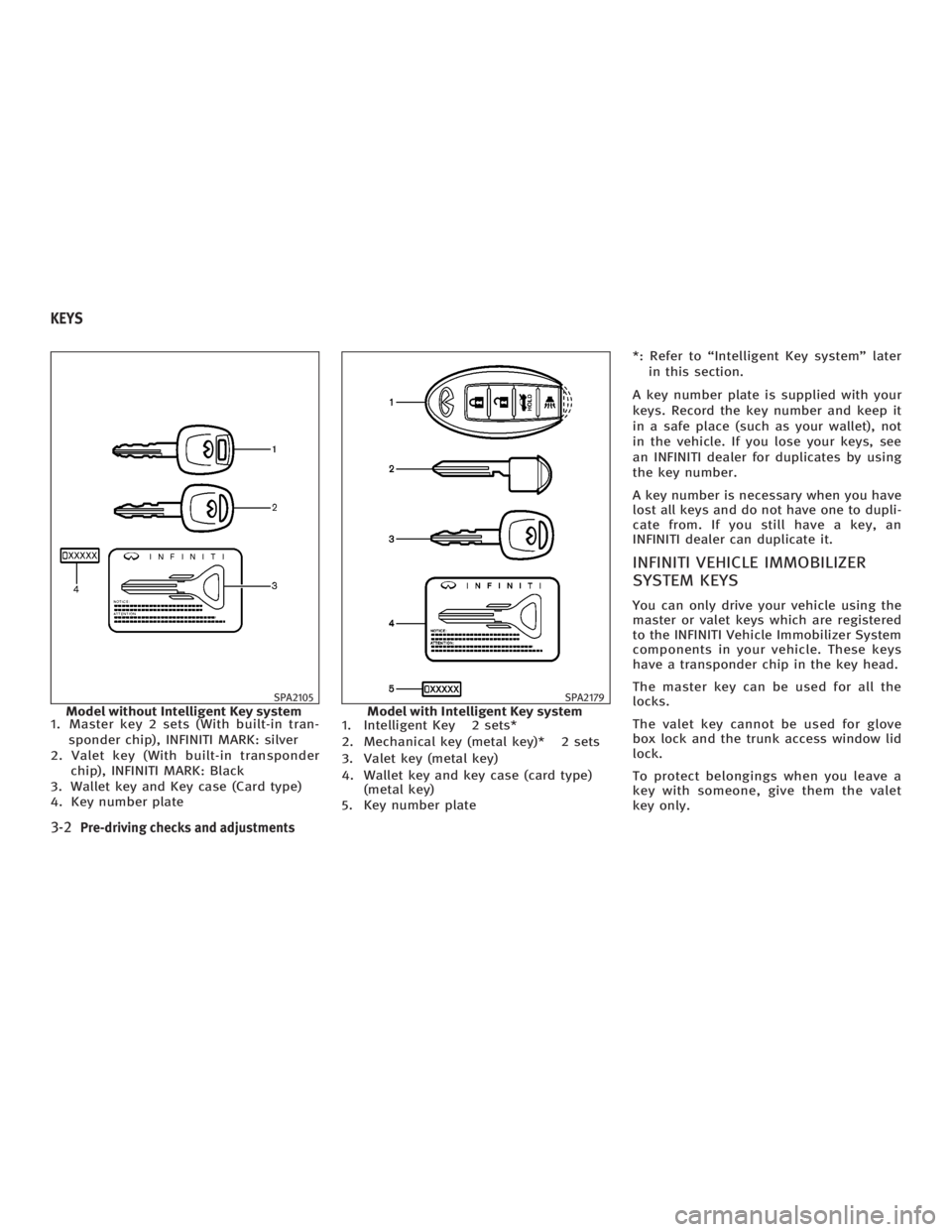
1. Master key 2 sets (With built-in tran-
sponder chip), INFINITI MARK: silver
2. Valet key (With built-in transponder
chip), INFINITI MARK: Black
3. Wallet key and Key case (Card type)
4. Key number plate 1. Intelligent Key 2 sets*
2. Mechanical key (metal key)* 2 sets
3. Valet key (metal key)
4. Wallet key and key case (card type)
(metal key)
5. Key number plate *: Refer to ªIntelligent Key systemº later
in this section.
A key number plate is supplied with your
keys. Record the key number and keep it
in a safe place (such as your wallet), not
in the vehicle. If you lose your keys, see
an INFINITI dealer for duplicates by using
the key number.
A key number is necessary when you have
lost all keys and do not have one to dupli-
cate from. If you still have a key, an
INFINITI dealer can duplicate it.
INFINITI VEHICLE IMMOBILIZER
SYSTEM KEYS You can only drive your vehicle using the
master or valet keys which are registered
to the INFINITI Vehicle Immobilizer System
components in your vehicle. These keys
have a transponder chip in the key head.
The master key can be used for all the
locks.
The valet key cannot be used for glove
box lock and the trunk access window lid
lock.
To protect belongings when you leave a
key with someone, give them the valet
key only.SPA2105
Model without Intelligent Key system SPA2179
Model with Intelligent Key systemKEYS
3-2 Pre-driving checks and adjustments
w 06.1.4/V35-D/V5.0
X
Page 125 of 344
Never leave these keys in the vehicle.
Additional or replacement keys:
If you still have a key, the key number is
not necessary when you need extra
INFINITI Vehicle Immobilizer System keys.
An INFINITI dealer can duplicate it. As
many as 5 INFINITI Vehicle Immobilizer
System keys can be used with one ve-
hicle. You should bring all registered keys
that you have to an INFINITI dealer for reg-
istration. This is because the registration
process will erase the memory of all key
codes previously registered into the
INFINITI Vehicle Immobilizer System. After
the registration process, these compo-
nents will only recognize keys coded into
the INFINITI Vehicle Immobilizer System
during registration. Any key that is not
given to your dealer at the time of regis-
tration will no longer be able to start your
vehicle.
Do not allow the immobilizer system key,
which contains an electrical transponder,
to come into contact with salt water. This
could affect system function. WARNING O Always have the doors locked while driv-
ing. Along with the use of seat belts, this
provides greater safety in the event of an
accident by helping to prevent persons
from being thrown from the vehicle. This
also helps keep children and others from
unintentionally opening the doors, and
will help keep out intruders.
O Before opening any door, always look for
and avoid oncoming traffic.
O Do not leave children unattended inside
the vehicle. They could unknowingly ac-
tivate switches or controls. Unattended
children could become involved in se-
rious accidents.
LOCKING WITH KEY
Power The power door lock system allows you to
lock or unlock all doors, trunk lid and the
fuel-filler door.
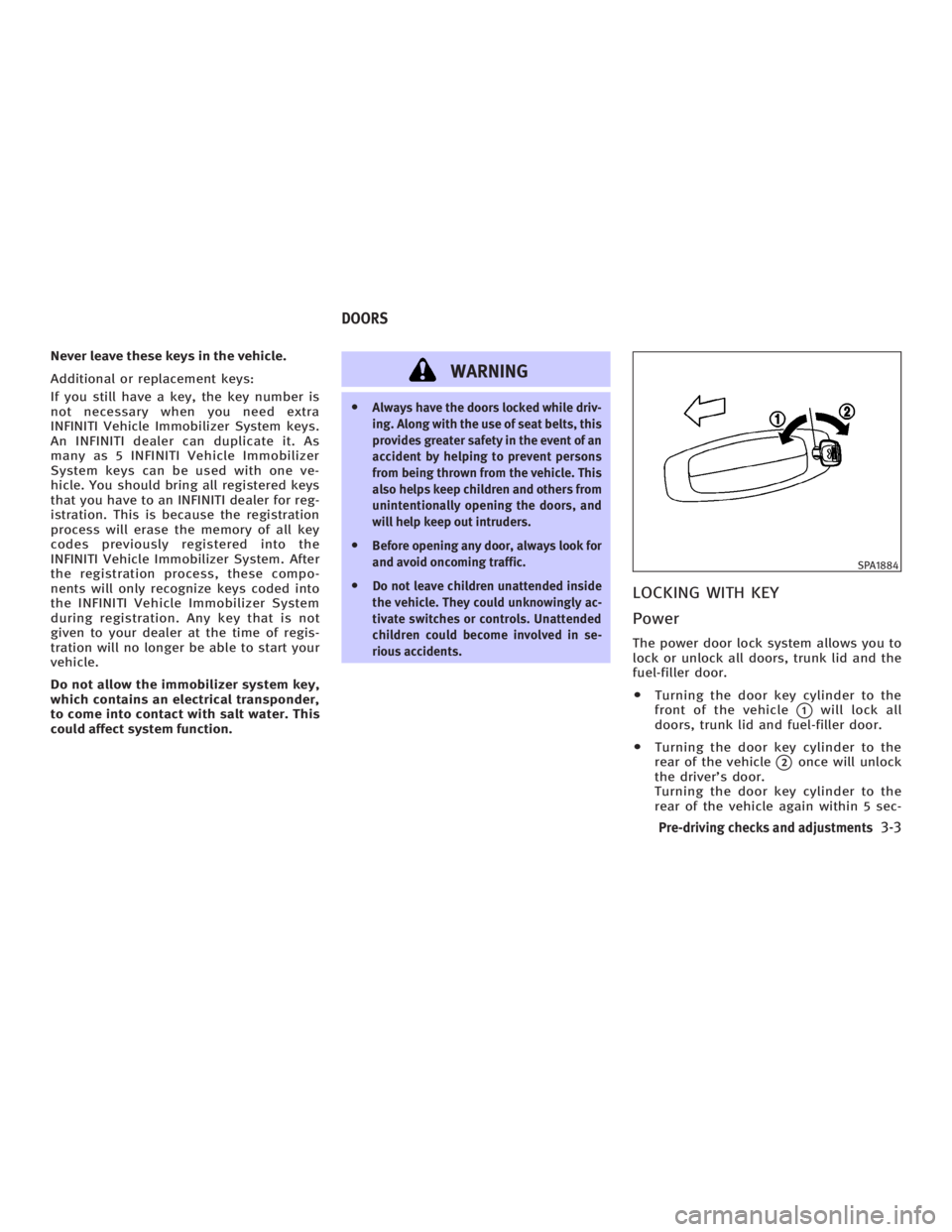
O Turning the door key cylinder to the
front of the vehicle
q 1
will lock all
doors, trunk lid and fuel-filler door.
O Turning the door key cylinder to the
rear of the vehicle
q 2
once will unlock
the driver's door.
Turning the door key cylinder to the
rear of the vehicle again within 5 sec- SPA1884
DOORS
Pre-driving checks and adjustments
3-3
w 06.1.4/V35-D/V5.0
X
Page 126 of 344
onds will unlock all doors, the trunk
lid and the fuel-filler door.
Opening and closing windows To open the door windows, turn the door
key cylinder to the rear of the vehicle and
hold the key for about 1 second.
To stop opening, return the door key cyl-
inder to the neutral position by turning
the key.
To close the door windows, turn the door
key cylinder to the front of the vehicle
and hold the key for about 1 second.
To stop closing, return the door key cylin-
der to the neutral position by turning the
key.
In the event of an obstruction, such as a
hand, in the way of door windows, the
auto reverse function will activate.
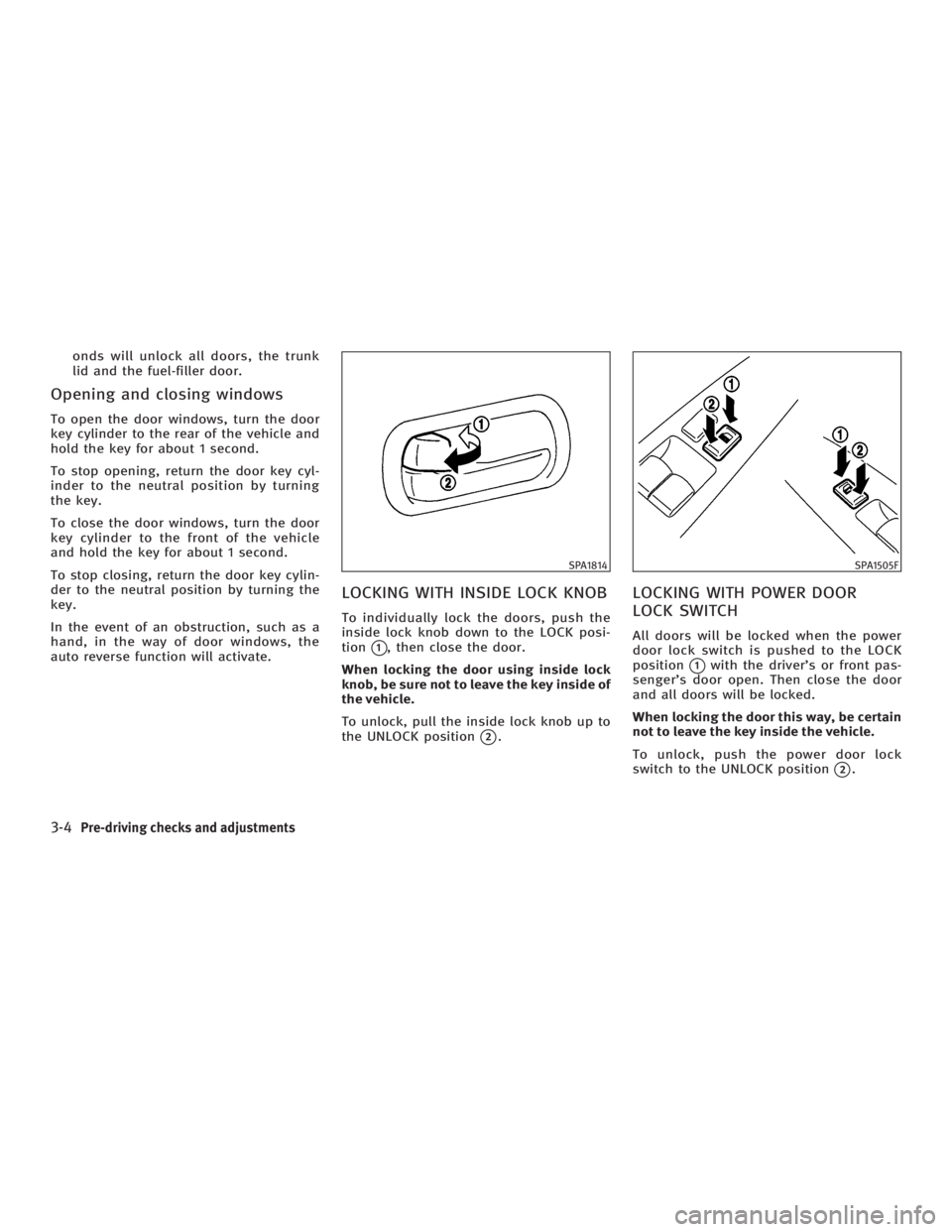
LOCKING WITH INSIDE LOCK KNOB To individually lock the doors, push the
inside lock knob down to the LOCK posi-
tion
q 1
, then close the door.
When locking the door using inside lock
knob, be sure not to leave the key inside of
the vehicle.
To unlock, pull the inside lock knob up to
the UNLOCK position
q 2
. LOCKING WITH POWER DOOR
LOCK SWITCH All doors will be locked when the power
door lock switch is pushed to the LOCK
position
q 1
with the driver's or front pas-
senger's door open. Then close the door
and all doors will be locked.
When locking the door this way, be certain
not to leave the key inside the vehicle.
To unlock, push the power door lock
switch to the UNLOCK position
q 2
.SPA1814 SPA1505F
3-4 Pre-driving checks and adjustments
w 06.1.4/V35-D/V5.0
X